LangChain: Things I Wish I Knew Before Getting Started (Part I)
When you start learning a new framework, it’s easy to feel overwhelmed by the sheer number of concepts, components, and possibilities it offers. LangChain is no exception; it’s a broad and deep ecosystem that goes far beyond simply “writing prompts”.
That’s why, when I explore libraries like LangChain, it helps me a lot to build a mental model to understand what its key pieces are, how they fit together, and what real problems they solve inside a system. Without that conceptual map, it’s easy to get lost among classes and isolated examples.
In this post I want to share the mental model I’ve been building, with the goal of helping you understand what LangChain really is, how to use it with good judgement, and what kinds of architectures it adds value to. I’ll try to support each concept with small self-contained code snippets, although some points (due to their complexity) will require a more conceptual approach than a purely practical one.
Before we start: Is LangChain a library?
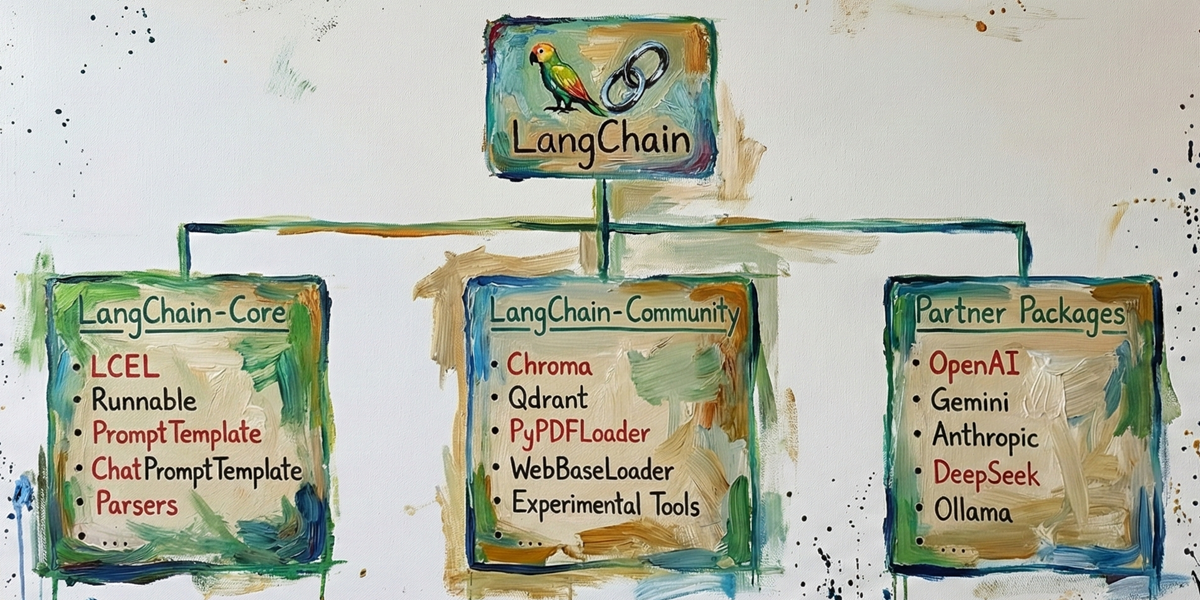
No — LangChain is not “a library”. And this distinction matters more than it seems. LangChain is a modular framework for orchestrating LLMs. It is composed of several packages with clearly separated responsibilities. Understanding this structure avoids confusion when you start installing dependencies or designing an architecture.
We can split the ecosystem into “3+1” main blocks:
- LangChain Core: This is the stable core of the framework. It contains the fundamental abstractions such as:
Runnable,PromptTemplate,ChatPromptTemplate,Parsers,Composition with LCEL, etc. Install it with:pip install langchain - LangChain Community: This contains community-maintained integrations with external services that are not part of the core, such as:
Chroma,Qdrant,PyPDFLoader,WebBaseLoader, experimental integrations, etc. Install it with:pip install langchain-community - Partner Packages: These are official connectors maintained in collaboration with LLM providers. They implement direct integration with commercial APIs such as
OpenAI,Gemini,Claude,DeepSeek, etc. Each provider is installed separately:pip install langchain-openai pip install langchain-google-genai pip install langchain-anthropic pip install langchain-deepseek - (+1) Complementary libraries: LangChain doesn’t live alone. In real systems, it’s often combined with libraries for building RAG pipelines, indexing systems, structured validation, or interactive deployments, etc. Some of these libraries include:
chromadb,faiss-cpu,pypdf,beautifulsoup4,pydantic,streamlit,fastapi,langchain-huggingface,sentence-transformers,tiktoken, etc., and each one has its own independent installation.
Understanding this modularity from day one changes how you work with the framework: you don’t “install LangChain”, you design a system made of interoperable pieces. Schematically, we can represent it like this:
Concept index
In this series of posts I’m going to cover the following key concepts to understand and use LangChain effectively:
- What is an LLM?
- LLM APIs and providers
- Runnables
- LCEL
- PromptTemplate, ChatPromptTemplate & Placeholder
- MessagesPlaceholder
- Document Loaders
- Text Splitters
- Embeddings
- Vector databases
- Retrievers
- RAG
Bonus track:
- Pydantic
- Streamlit
1. What is an LLM?
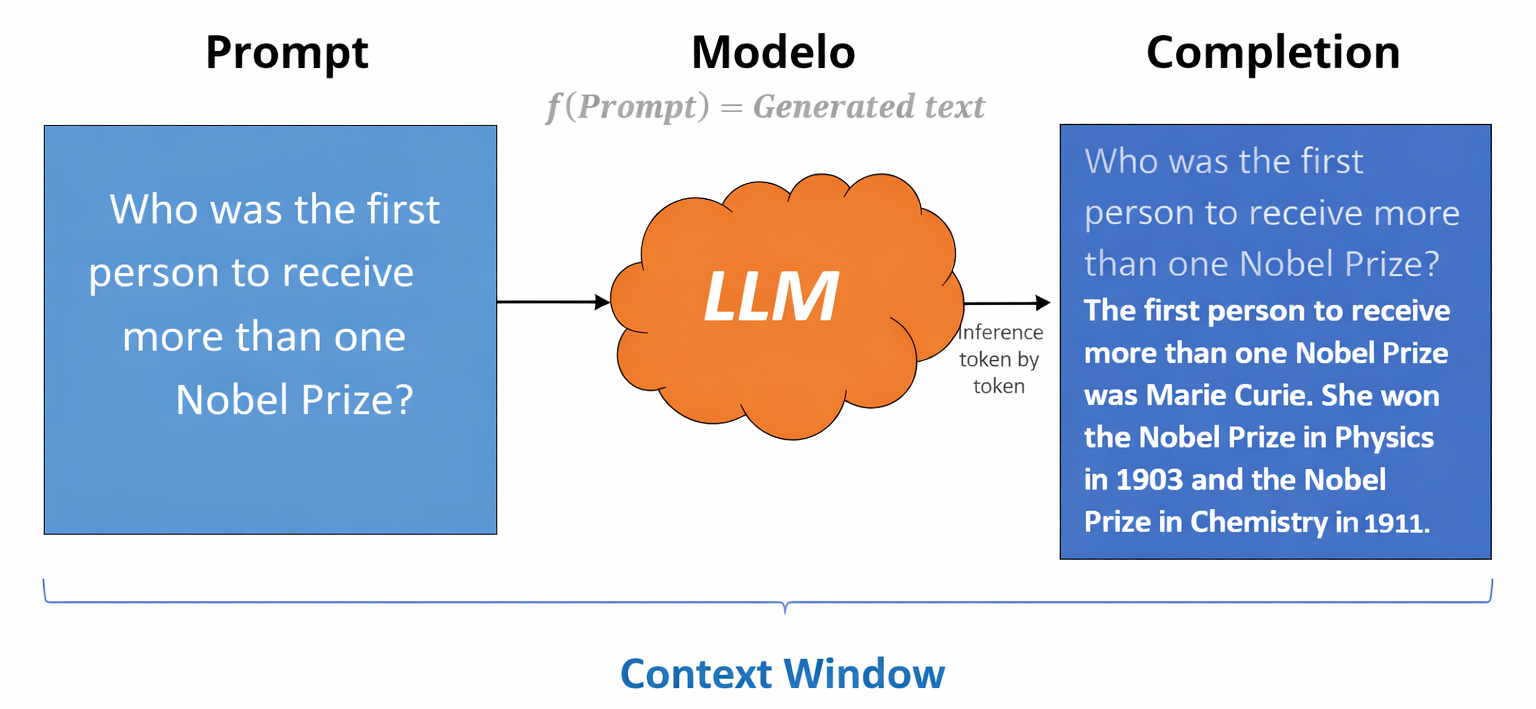
An LLM (Large Language Model) is a model that takes a text input called a Prompt and generates a natural-language answer. In order for the model to process the prompt, the text is converted into tokens, which are the smallest units of text an LLM understands and generates. A Token can be a whole word, a fragment, a space, or a symbol. As a rough reference, 1,000 tokens correspond to about 750 words (1 token ≈ 0.75 words). LLM providers measure and bill model usage based on the total number of tokens processed.
LLMs operate within a Context Window, which is the total amount of information the model can handle in a single interaction. This window includes the current prompt, the previous conversation history, and the tokens the model is generating as output; the sum of all of them cannot exceed the model’s maximum limit.
After receiving the prompt, Inference begins: the model generates output sequentially (token by token), progressively building coherent text until it completes the answer or reaches the set limit. The generated text is called the Completion (Prompt + Generated text).
As a comparative reference, the following table shows some representative models on the market, along with their context window and approximate costs per million tokens.
| Model | Context Window | Input cost (≈ $ / 1M tokens) | Output cost (≈ $ / 1M tokens) |
|---|---|---|---|
| GPT-5.X | ~400K tokens | ~$10–15 | ~$30–40 |
| GPT-4o-mini | ~128K tokens | ~$5 | ~$15 |
| Gemini 3 | ~1M tokens | ~$7–12 | ~$20–30 |
| Gemini 2.5 Flash | ~1M tokens | ~$1–3 | ~$3–8 |
| Claude Opus 4.5 | ~200K tokens | ~$15–20 | ~$60–75 |
| Claude 4.5 Sonnet | ~1M tokens | ~$3–6 | ~$15–20 |
| Claude 3 Haiku | ~200K tokens | ~$0.25–1 | ~$1–4 |
| DeepSeek V3.2 | ~128K tokens | ~$0.5–2 | ~$2–5 |
| DeepSeek Chat (Lite) | ~128K tokens | ~$0.2–0.8 | ~$1–3 |
Summary of the key concepts related to LLMs:
| Concept | Definition |
|---|---|
| LLM | A model that takes a Prompt as input and generates a natural-language answer. |
| Prompt | The input text the user sends to the model. |
| Token | The smallest unit of text an LLM understands and generates; it can be a word, fragment, space, or symbol. |
| Context Window | Total number of tokens the model can handle in a single interaction (prompt + history + output). |
| Inference | The process by which the model generates output tokens sequentially. |
| Completion | The final text generated by the model in response to the prompt. |
2. LLM APIs and providers — OpenAI, Gemini, Anthropic, DeepSeek, …
The first step to building any system with LLMs is being able to invoke them correctly.
LangChain provides official API integrations with the main providers. Each offers different models, limits, usage policies, costs, etc. From an architectural point of view, they are all consumed as remote services exposing an HTTP endpoint and billing by the volume of processed tokens (input + output). Provider list: https://docs.langchain.com/oss/python/integrations/chat
To use them you typically need to:
- Create an account on the provider’s platform.
- Generate an API key.
- Configure that key in your environment (usually as an environment variable).
- Have enough credit, since billing is done per consumed token.
In practice, all providers follow the same economic model: the more tokens you send and generate, the higher the cost. That’s why it’s important to design for efficiency from the start.
If you’re just getting started, Google Gemini can be a good option because it typically offers a limited free quota that lets you experiment without an upfront cost. However, this post won’t cover signup steps or API key generation; for that, check each provider’s official documentation.
Here are the signup links for the main platforms:
- OpenAI: https://openai.com/es-ES/api/
- Google Gemini: https://aistudio.google.com/app/api-keys
- Anthropic: https://platform.claude.com/
- DeepSeek: https://platform.deepseek.com/
To use a chat model in LangChain, you first choose the provider and then install the corresponding package:
pip install langchain-openai
pip install langchain-google-genai
pip install langchain-anthropic
pip install langchain-deepseekEach of these packages implements its own ChatModel class, but they all share a common interface and a very similar set of parameters.
| Parameter | Purpose | What is it? | What is it for? |
|---|---|---|---|
| model | Model name | Identifier of the model to use | Select capabilities, context, cost, and performance |
| temperature | Randomness control | Sampling parameter that adjusts entropy | Make output more deterministic (0) or more creative (>0.7) |
| max_tokens | Max output tokens | Upper limit of tokens the model can generate | Control answer length and cost |
| timeout | Max waiting time | Time limit for the API response | Avoid indefinite blocking if the provider is slow or fails |
| max_retries | Automatic retries | Number of automatic retry attempts on error | Increase robustness against rate limits or transient errors |
| api_key | API key | Private authentication credential | Authorise and bill service usage |
api_key as a parameter in code. Set it as an environment variable (OPENAI_API_KEY, GOOGLE_API_KEY, etc.).Below is the code to instantiate LLMs from different providers:
OpenAI
from langchain_openai import ChatOpenAI

llm = ChatOpenAI(model="gpt-4o-mini", temperature=0.2, timeout=30, max_retries=2)
Google (Gemini)
from langchain_google_genai import ChatGoogleGenerativeAI

llm = ChatGoogleGenerativeAI(model="gemini-2.5-flash", temperature=0.2)
Anthropic (Claude)
from langchain_anthropic import ChatAnthropic

llm = ChatAnthropic(model="claude-3-5-sonnet-latest", temperature=0.2, timeout=30)
DeepSeek
from langchain_deepseek import ChatDeepSeek

llm = ChatDeepSeek(model="deepseek-chat", temperature=0.2, timeout=30, max_retries=2)
Notice that in all cases we assign the instance to the variable llm. This makes it possible to switch providers without changing the rest of the system. A clean way to do that is to centralise model construction:
from langchain_openai import ChatOpenAI
from langchain_google_genai import ChatGoogleGenerativeAI
from langchain_anthropic import ChatAnthropic
from langchain_deepseek import ChatDeepSeek


def build_llm(provider: str, temperature: float = 0.2, timeout: int = 30, max_retries: int = 2):
    provider = provider.lower()
    if provider == "openai":
        return ChatOpenAI(model="gpt-4o-mini", temperature=temperature, timeout=timeout, max_retries=max_retries)
    elif provider == "google":
        return ChatGoogleGenerativeAI(model="gemini-2.5-flash", temperature=temperature, timeout=timeout, max_retries=max_retries)
    elif provider == "anthropic":
        return ChatAnthropic(model="claude-3-5-sonnet-latest", temperature=temperature, timeout=timeout, max_retries=max_retries)
    elif provider == "deepseek":
        return ChatDeepSeek(model="deepseek-chat", temperature=temperature, timeout=timeout, max_retries=max_retries)
    else:
        raise ValueError("Unsupported provider. Use: openai | google | anthropic | deepseek")
This way, your architecture is decoupled from the provider and you can switch models without rewriting your pipeline.
3. Runnables — LangChain’s base interface
In LangChain, almost everything is a Runnable: models, prompts, retrievers, parsers, or even custom functions.
A Runnable is the framework’s base execution interface. It defines how any component runs: it takes an input, performs an operation, and returns an output. The standard way to execute it is via the invoke() method.
All Runnables implement the same execution interface:
| Method | What does it do? |
|---|---|
invoke(input) |
Runs the Runnable synchronously and returns the full result. |
stream(input) |
Runs the Runnable and returns output incrementally (in chunks). |
batch(inputs) |
Runs the Runnable over multiple inputs and returns a list of results. |
ainvoke() |
Async version of invoke(), allowing await in concurrent environments. |
astream() |
Async version of stream(), producing incremental output without blocking the main thread. |
abatch() |
Async version of batch(), allowing multiple inputs to be processed in parallel. |
This implies something fundamental: an LLM, a Retriever, or a custom function are executed in exactly the same way. The architecture becomes homogeneous.
Let’s look at a simple example invoking a model with invoke(), the most common way to execute a Runnable:
from langchain_google_genai import ChatGoogleGenerativeAI

llm = ChatGoogleGenerativeAI(model="gemini-2.5-flash", temperature=0.2)
out = llm.invoke("Who was the first person to receive more than one Nobel Prize?")
print(out.content)
# The first person to receive more than one Nobel Prize was Marie Curie ...
In this case, llm is simply a Runnable. It takes a string as input, calls the model, and returns an AIMessage object whose text we access via .content.
Understanding that everything in LangChain is a Runnable is key: it means any system component can be executed, combined, and replaced following the exact same pattern.
4. LCEL — building the execution pipeline
If Runnables are LangChain’s basic building blocks, LCEL (LangChain Expression Language) is the mechanism that lets you connect them to build an execution pipeline.
LCEL is a declarative syntax that mainly uses the | operator to chain Runnables. Conceptually, each | means the output of one component becomes the input of the next. In other words:
input -> Runnable1 -> Runnable2 -> ... -> outputWe’re not writing step-by-step procedural code. We’re declaring a data transformation flow.
Below is a practical example where we chain an LLM with a custom function (Runnable) that turns the output into uppercase:
from langchain_google_genai import ChatGoogleGenerativeAI
from langchain_core.runnables import RunnableLambda

# 1.- Instantiate the LLM
llm = ChatGoogleGenerativeAI(model="gemini-2.5-flash", temperature=0.2)

# 2.- Create a Runnable that transforms the output to uppercase
to_upper = RunnableLambda(lambda msg: msg.content.upper())

# 3.- Chain both Runnables (input -> llm -> to_upper -> output)
chain = llm | to_upper

# 4.- Run it
out = chain.invoke("Who was the first person to receive more than one Nobel Prize?")
print(out)
# THE FIRST PERSON TO RECEIVE MORE THAN ONE NOBEL PRIZE WAS MARIE CURIE ...
What’s really happening in chain = llm | to_upper?
- The input (a string) goes into the LLM.
- The LLM returns an AIMessage.
- That AIMessage automatically flows to the next Runnable (to_upper).
- to_upper transforms the content to uppercase.
- The final result is the pipeline output.
In short, LCEL turns a set of isolated components into a declarative, composable pipeline, allowing you to build more complex systems without leaving the same execution pattern.
5. PromptTemplates, ChatPromptTemplates & Placeholders
PromptTemplates let you define dynamic prompts as reusable artefacts, instead of scattering static text throughout the code. In practice they act as an input contract: they make explicit what variables the model needs and under what rules it should respond. This improves maintainability and makes behaviour more consistent.
Here we’ll see what a PromptTemplate and a ChatPromptTemplate are, introducing the idea of a Root Prompt and the use of placeholders.
To understand the Root Prompt, think about how you start a conversation in ChatGPT, Claude, Gemini, etc. You often begin with a first message that specifies:
- Role or personality
- Rules and constraints
- Answering style
- Persistent context
For example, we could write something like:
You are an assistant specialised in football (soccer).

Rules:
- Respond in English, as spoken in Texas.
- Explain concepts in a simple way.
- Use analogies when possible.
- Don’t give generic answers; be concrete and direct.
- Answers must be brief, no more than 100 words.

Question:
What is offside?
That first message is the Root Prompt: it defines identity, tone, and boundaries, and it influences the entire interaction that follows.
The key idea is that this Root Prompt can be made reusable and dynamic with a template. The rules could stay the same, but the topic and the question could change. That’s where placeholders come in: variables inside the prompt that get replaced with concrete values at runtime.
A PromptTemplate is exactly that: a text template with placeholders that lets you keep the base structure (identity and rules) and change only what’s variable (topic, question) without rewriting the prompt.
In LangChain you do it with PromptTemplate like this:
from langchain_core.prompts import PromptTemplate
from langchain_google_genai import ChatGoogleGenerativeAI

# LLM
llm = ChatGoogleGenerativeAI(model="gemini-2.5-flash", temperature=0.2)

# Prompt as a contract
prompt = PromptTemplate(
    template="""
You are an assistant specialised in {topic}.
Rules:
- Respond in English, as spoken in Texas.
- Explain concepts in a simple way.
- Use analogies when possible.
- Don’t give generic answers; be concrete and direct.
- Answers must be brief, no more than 100 words.

Question: {question}
""",
    input_variables=["topic", "question"]
)

# LCEL (input -> prompt -> llm -> output)
chain = prompt | llm

# Run the pipeline with different questions while keeping the same input contract
response = chain.invoke({
    "topic": "Machine Learning",
    "question": "Overfitting"
})

print(response.content)
# Overfitting is when your Machine Learning model fits the training data too well...
# It’s like a student memorising answers from an old exam instead of understanding the subject...
This way, the template defines the contract (required variables) and you can reuse the same “mould” with different inputs. The limitation is that PromptTemplate fits single-message scenarios well, but it’s less suitable when you need multi-turn conversations, history, examples, and explicit roles — that’s where ChatPromptTemplate comes in.
ChatPromptTemplate builds the prompt as a sequence of messages, where each one has a role (system, human, ai, etc.). This matters because the model interprets a system instruction, a user question, and a previous answer differently, and that structure improves coherence in conversational systems.
The most common predefined roles are:
| Role | Short explanation |
|---|---|
| system | Defines the model’s identity, rules, tone, and global constraints. It’s the Root Prompt that shapes the overall behaviour. |
| human | Represents the user’s input. It contains the dynamic question or instruction to solve. |
| ai | Represents the model’s previous responses. Used in conversation history or few-shot examples to guide style and output format. |
| tool | Contains the result of an external tool invoked by the model. Used in tool-calling or agent architectures. |
An example with ChatPromptTemplate would be:
from langchain_core.prompts import ChatPromptTemplate
from langchain_google_genai import ChatGoogleGenerativeAI

# LLM
llm = ChatGoogleGenerativeAI(model="gemini-2.5-flash", temperature=0.2)

# ChatPromptTemplate as a structured contract
chat_prompt = ChatPromptTemplate.from_messages([

    # SYSTEM role → Root Prompt (identity + global rules)
    ("system", """
            You are an assistant specialised in {topic}.

            Rules:
            - Respond in English, as spoken in Texas.
            - Explain concepts in a simple way.
            - Use analogies when possible.
            - Don’t give generic answers; be concrete and direct.
            - Answers must be brief, no more than 100 words.
    """),

    #### Conversation history: persistent context ####
    ("human", "What is a supervised model?"),
    ("ai", "It’s like learning with a coach who checks your work. You get examples with the right answer, and the model adjusts until it can get it right on its own."),
    #### End of persistent context ####

    # Dynamic input
    ("human", "{question}")
])

# LCEL (input -> chat_prompt -> llm -> output)
chain = chat_prompt | llm

response = chain.invoke({
    "topic": "Machine Learning",
    "question": "What is overfitting?"
})

print(response.content)
# Overfitting is when the model learns the training data way too well...
# Then you change the inputs a little, and it struggles because it memorised instead of generalising...
The practical difference is that the contract is expressed as a conversation: the Root Prompt lives in system, the persistent context is represented with human/ai messages, and the current input enters as human with a placeholder.
In short, PromptTemplate and ChatPromptTemplate turn prompts into maintainable artefacts: they declare input contracts, separate rules from business logic, and let you reuse system behaviour consistently — from simple cases to complex conversations.
6. MessagesPlaceholder and few-shot
An LLM has no built-in memory. It does not remember previous interactions and it does not learn from each conversation, because it is not retrained in real time. However, in apps like ChatGPT, Gemini, or Claude it can feel like it “remembers” what you said before. This happens because each request includes the new question plus the conversation history (context).
Remember: an LLM is just a model that generates text from an input text (a prompt). Nothing more. The responsibility for how that prompt is built and managed lies in the system you develop. Designing context correctly is what lets you build applications that appear to have memory, coherence, and continuity over time.
For this task, LangChain offers MessagesPlaceholder, a special type of placeholder used to represent message history inside a ChatPromptTemplate. Instead of inserting raw text, MessagesPlaceholder formats and structures the conversation history appropriately so the model can interpret it correctly.
Below is a practical example using MessagesPlaceholder to include multi-turn history and then ask a new question that depends on that context:
from langchain_google_genai import ChatGoogleGenerativeAI
from langchain_core.prompts import ChatPromptTemplate, MessagesPlaceholder
from langchain_core.messages import HumanMessage, AIMessage

# LLM
llm = ChatGoogleGenerativeAI(model="gemini-2.5-flash", temperature=0.2)

# Conversational prompt with history
prompt = ChatPromptTemplate.from_messages([
    ("system", """
            You are an assistant specialised in {topic}.

            Rules:
            - Respond in Texan English, as spoken in Texas.
            - Explain concepts in a simple way.
            - Use analogies when possible.
            - Don’t give generic answers; be concrete and direct.
            - Answers must be brief, no more than 100 words.
    """),
    MessagesPlaceholder(variable_name="history"),
    ("human", "{question}")
])

# Conversation history (4 full iterations)
history = [
    HumanMessage(content="Hey, what is supervised learning?"),
    AIMessage(content="It’s like learning with a coach who gives you exercises with the right answers and corrects you until you can do it yourself."),

    HumanMessage(content="And what is a model?"),
    AIMessage(content="It’s like a mathematical rule that tries to capture a pattern: it takes inputs and transforms them into an output."),

    HumanMessage(content="And what does training the model mean?"),
    AIMessage(content="It means adjusting its internal parameters using examples, like practising a lot until it becomes second nature."),

    HumanMessage(content="And what happens if it practises too much on the same examples?"),
    AIMessage(content="It might start memorising them instead of learning the general idea.")
]

# LCEL
chain = prompt | llm

# New question that depends on context
resp = chain.invoke({
    "topic": "Machine Learning",
    "history": history,
    "question": "So, what is overfitting in this context?"
})

print(resp.content)
# Overfitting is when the model becomes great at the data it already saw and basically memorises it...
# But when you give it new data, it gets confused because it didn’t learn the general pattern.
With this approach we can control context programmatically however we want: limiting the number of messages, summarising history, removing irrelevant or sensitive content, or applying any strategy that optimises quality and token cost.
Another key technique to improve model behaviour is few-shot prompting (few-shot learning). Instead of adding more instructions, we show concrete input/output examples.
For instance, we might ask the model to generate meeting minutes from a transcript and include examples of transcripts with their corresponding minutes. This guides the model towards a specific format, style, or pattern. With ChatPromptTemplate and MessagesPlaceholder, adding examples is as simple as adding human/ai pairs to the history.
Here’s a typical few-shot example where the model classifies texts by sentiment (positive, negative, or neutral) based on examples included in the history:
from langchain_google_genai import ChatGoogleGenerativeAI
from langchain_core.prompts import ChatPromptTemplate, MessagesPlaceholder
from langchain_core.messages import HumanMessage, AIMessage

llm = ChatGoogleGenerativeAI(model="gemini-2.5-flash", temperature=0.2)

prompt = ChatPromptTemplate.from_messages([
    ("system", "Classify the sentiment as: POSITIVE, NEGATIVE, or NEUTRAL. Reply with the label only."),
    MessagesPlaceholder(variable_name="examples"),
    ("human", "Text: {text}")
])

examples = [
    HumanMessage(content="I love this product"),
    AIMessage(content="POSITIVE"),
    HumanMessage(content="The service was terrible"),
    AIMessage(content="NEGATIVE"),
    HumanMessage(content="It’s what I expected, nothing more, nothing less"),
    AIMessage(content="NEUTRAL"),
]

chain = prompt | llm

resp = chain.invoke({
    "examples": examples,
    "text": "This works pretty well, but it could be better."
})

print(resp.content)
# NEUTRAL
In conclusion, MessagesPlaceholder and few-shot are not about “adding more text”. They’re about controlling the context you pass to the LLM. History adds continuity and coherence, while examples shape behaviour and format.
Designing which messages go into the prompt, in what order, and for what purpose is what turns a simple text generator into a system that feels intelligent, consistent, and aligned with your expectations.
Conclusion
In this first part we’ve covered the fundamental concepts to understand what LangChain is, how it’s organised, and what problems it actually solves. We’ve seen it isn’t a monolithic library, but a modular ecosystem made up of distinct pieces with clear responsibilities.
We’ve learned how to invoke an LLM and why everything in LangChain revolves around the Runnable interface, which standardises execution. From there, we saw how LCEL lets you build declarative and composable pipelines, and how PromptTemplate and ChatPromptTemplate turn prompts into explicit, maintainable contracts inside your architecture.
Finally, we learned that conversational coherence isn’t real memory. It’s context management, supported by MessagesPlaceholder. We also saw how model behaviour can be guided effectively with few-shot examples. With these six pillars clear, you now have the minimum mental map to start designing LLM systems with architectural judgement.
Appendix: Build a chat model with LangChain using the concepts covered
With everything we’ve covered, let’s implement a console chat using Gemini + LangChain.
Once you run the code below, you’ll choose a conversation topic (for example, “Machine Learning”) and then you’ll be able to ask questions about that topic like a ChatGPT-style chat.
To help you see what is actually being sent to the model, on each turn we’ll print the system message (Root Prompt), the conversation history (context), and the current question. That way you can understand how the prompt is built on every interaction and how the model uses context to generate coherent answers.
# Console chat with Gemini + LangChain.
# On each turn it prints what is sent to the LLM: system + history + question.

from langchain_google_genai import ChatGoogleGenerativeAI
from langchain_core.prompts import ChatPromptTemplate, MessagesPlaceholder
from langchain_core.messages import HumanMessage, AIMessage

topic = input("Conversation topic: ").strip() or "Machine Learning"

llm = ChatGoogleGenerativeAI(model="gemini-2.5-flash", temperature=0.2)

prompt = ChatPromptTemplate.from_messages([
    ("system", f"You are an expert assistant in {topic}. Reply in British English, brief and clear, with answers under 30 words."),
    MessagesPlaceholder("history"),
    ("human", "{question}")
])

history = []

print("\nType 'exit' to quit.")

while True:
    question = input("You: ").strip()
    if question.lower() == "exit":
        break

    # Exact messages sent to the LLM (system + history + question)
    messages = prompt.format_messages(history=history, question=question)

    print("\n--- SENT TO THE LLM ---")
    for m in messages:
        role = m.__class__.__name__.replace("Message", "").lower()
        print(f"[{role}] {m.content}")

    # Call the LLM
    resp = llm.invoke(messages)

    print("--- RESPONSE ---")
    print(resp.content)

    # Update history (this is the “context”)
    history += [HumanMessage(content=question), AIMessage(content=resp.content)]
Below is an example of how the console interaction would look:
Conversation topic:  Machine Learning
Type 'exit' to quit.
You: What is supervised learning?
--- SENT TO THE LLM ---
[system] You are an expert assistant in Machine Learning. Reply in British English, brief and clear, with answers under 30 words.
[human] What is supervised learning?
--- RESPONSE ---
It learns from labelled data (input-output pairs) to predict or classify new data, aiming to map inputs to the correct outputs.


You: What is a model?
--- SENT TO THE LLM ---
[system] You are an expert assistant in Machine Learning. Reply in British English, brief and clear, with answers under 30 words.
[human] What is supervised learning?
[ai] It learns from labelled data (input-output pairs) to predict or classify new data, aiming to map inputs to the correct outputs.
[human] What is a model?
--- RESPONSE ---
A trained function or algorithm that predicts or classifies. It represents the knowledge extracted during learning.


You: And what does training the model mean?
--- SENT TO THE LLM ---
[system] You are an expert assistant in Machine Learning. Reply in British English, brief and clear, with answers under 30 words.
[human] What is supervised learning?
[ai] It learns from labelled data (input-output pairs) to predict or classify new data, aiming to map inputs to the correct outputs.
[human] What is a model?
[ai] A trained function or algorithm that predicts or classifies. It represents the knowledge extracted during learning.
[human] And what does training the model mean?
--- RESPONSE ---
It means adjusting internal parameters using data so the model learns patterns and makes accurate predictions or classifications.


You: What is overfitting?
--- SENT TO THE LLM ---
[system] You are an expert assistant in Machine Learning. Reply in British English, brief and clear, with answers under 30 words.
[human] What is supervised learning?
[ai] It learns from labelled data (input-output pairs) to predict or classify new data, aiming to map inputs to the correct outputs.
[human] What is a model?
[ai] A trained function or algorithm that predicts or classifies. It represents the knowledge extracted during learning.
[human] And what does training the model mean?
[ai] It means adjusting internal parameters using data so the model learns patterns and makes accurate predictions or classifications.
[human] What is overfitting?
--- RESPONSE ---
The model fits the training data too closely, losing its ability to generalise to unseen data and producing poor predictions.
