
Building Your Own Collection in Python
Learn how to build your own Collection in Python step by step: Container, Sized and Iterable explained, plus the difference between an Iterator and an Iterable.
It’s great to know and use Python’s built-in collection objects (in the documentation you’ll read it as “Built-in”), like Lists (“List”), Dictionaries (“Dict”; also known as Hash Maps or “HashMap”), Sets (“Set”) or Tuples (“Tuple”) in Python (or almost any other programming language), since they are highly optimized because they are written at a low level inside the interpreter.
In short, a “Collection”, as its name says, collects “things”: it stores data and organizes it for use with some data structure (data structures such as data in insertion order, by keys, in the form of a tree, etc.).
But many times it’s better to create our own Collection, whether for cleanliness, code reuse, convenience, because what we need doesn’t exist, or even because it will be more efficient than using other data structures.
Is there really anything we need beyond the “built-in” Python structures? For example, a dictionary never keeps the insertion order of its elements; we might need a dictionary that also remembers the order in which elements were inserted. Wouldn’t a List that keeps the keys in order on one side and a Dictionary that keeps the keys and values on the other be enough? We would have to use two data structures and keep them in sync (when you insert into one, insert into the other; when you delete from one, delete from the other). If we need this behavior several times, creating a Collection that does things by itself and reusing it would save us a lot of code. By the way, this data structure exists in Python’s “Collections” package; it’s called “OrderedDict” and you can find it at collections — Container datatypes (Python docs). There are also many other data structures in the same “Collections” library that I recommend you take a look at, because they will surely be useful for different purposes.
And what could we create that doesn’t exist in Python’s “Collections” package? It’s a matter of imagination or necessity. For example, I can think of a List that stores its elements in a file and not in RAM (a List that takes up hundreds of Gibibytes may not fit in your computer’s RAM, but it does fit if it’s saved to a file, that is, on the hard drive); or simply a dictionary that only allows keys with “cake names”.
Note about the Python version used: Here I’ll write code for Python version 3, which differs in a few details from version 2. But I’ll explain how to change the code so it also works in version 2.
Code on GitHub (I recommend reading the article first and downloading/cloning the code at the end): View on GitHubInvarato/JarrobaPython / nuestra_propia_coleccion
If you understand what a Python List is, you already understand a lot
To be able to design our own Collection, we first need to understand how any Collection works.
For example, a List in Python (Reminder: in Python it makes no difference whether you delimit Strings with double quotes “” or single quotes ‘’; here I generally use single quotes so as not to clutter the code and make it easier to read).
mi_listado = ['PRIMERO', 'SEGUNDO', 'TERCERO']
What advantage does it have over other things? You can ask it how many elements it has inside, so it is Sized.
cantidad_elementos = len(mi_listado)
print('Cantidad de elementos en mi listado: {}'.format(cantidad_elementos))
It prints to the screen (Note about string concatenation: I use the “format()” function, to which you simply pass values and which replaces, in order, the curly braces “{}” it finds in the String that comes before this function):
Cantidad de elementos en mi_listado: 3
You can ask it whether it has a certain value in its contents, so it is a Container.
if 'SEGUNDO' in mi_listado:
    print('Existe en mi_listado')
else:
    print('NO existe en mi_listado')
It shows us:
Existe en mi_listado
And since you can iterate (loop) over it element by element, it is Iterable.
for valor in mi_listado:
    print('Elemento del listado: {}'.format(valor))
Which prints:
Elemento del listado: PRIMERO
Elemento del listado: SEGUNDO
Elemento del listado: TERCERO
Try it
It’s important that you experiment yourself, so here is the previous Python code, ready to copy, paste and run:
#!/usr/bin/env python
# -*- coding: utf-8 -*-


if __name__ == "__main__":
    mi_listado = ['PRIMERO', 'SEGUNDO', 'TERCERO']

    # Is Sized
    cantidad_elementos = len(mi_listado)
    print('Cantidad de elementos en mi_listado: {}'.format(cantidad_elementos))

    # Is a Container
    if "SEGUNDO" in mi_listado:
        print('Existe en mi_listado')
    else:
        print('NO existe en mi_listado')

    # Is Iterable
    for valor in mi_listado:
        print('Elemento del listado: {}'.format(valor))
So in Python (and in other programming languages), each of these things is split into classes that we can inherit from to extend their behavior (as we’ll see later). The documentation is at collections — Container datatypes (Python docs) and collections.abc — Abstract Base Classes for Containers (Python docs).

In the image above, what is the gray part in the middle with stripes on both sides?
The methods of the __XXX__ type (the method name with two underscores on each side) are the so-called “magic methods” in Python. They are really methods that come with Python and perform some “special” (magic) function that we can override to use all “the power of their magic”. For example, __len__ will let us easily make it so that when we pass an object (the instance of a class that could well be designed by us) to Python’s “len()” function, it returns the number of elements the object has (for example, we could do something like this: len(mi_objeto_de_mi_propia_clase) ). In other words, we’ll be able to use anything (the “len()” function, the “for” loop, the “if … in” conditional, etc.) just as native Python code does. Magic! (I expand on “magic methods” below).
Let’s create our first object that uses this “magic”. To do it properly in Python, we are going to import the “collections” library, which provides the different interfaces we’ll need to design our own Collection (You could do it without importing this interface, but we’d lose several development aids and wouldn’t be programming properly; for example, no IDE would help us create the class correctly; it also wouldn’t work if somewhere else in our code we wanted to ask whether the object is an instance of some class, for example: isinstance(objeto_que_podria_ser_iterable, abc.Iterable) ).
Container
Let’s start by programming a Container. To do so, our class, which we’ll call “Contenedor”, has to inherit from “abc.Container”:
from collections import abc


class Contenedor(abc.Container):
What to import in Python 2 (and before Python 3.3, since the change was made from version 3.3 onward): you should NOT import “from collections import abc” but “import collections“. So you should NOT inherit from “abc” but from “collections“; that is, instead of writing “class Contenedor(abc.Container)” you must write “class Contenedor(collections.Container)“
If we’re using an IDE, it will detect that we’re using the Interface for our class but that we’re missing the implementation of the abstract methods (The following image is from the PyCharm IDE, but any other will tell us something similar).
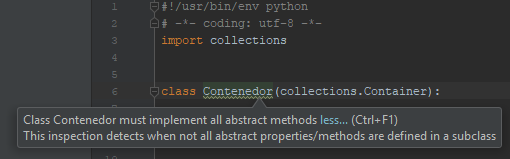
If we don’t use an IDE, we can run our Python program and it will show us the following error:
TypeError: Can't instantiate abstract class Contenedor with abstract methods __contains__
One way or another, it helps us not forget to implement the methods needed for it to be a “Container” class. In this case, the abstract method we have to override is: __contains__
from collections import abc


class Contenedor(abc.Container):

    def __contains__(self, x):
        pass
If we let the IDE generate it automatically, it will create something more like the following code:
from collections import abc


class Contenedor(abc.Container):

    def __contains__(self, x: object) -> bool:
        pass
If we’re working with Python 3, the IDE will create the method including parameter and return type hints (Type hints in Python are optional. In Python 2, you can’t define types this way. Either way, whether or not you define the types, in both Python 2 and Python 3, the __contains__ method will accept a parameter of any type as input, that is “object”, and must always return a value of type “bool”). In the following examples I’ll remove the types to make them simpler to understand.
The __contains__ method will let us ask directly with an “if <something> in <Container>” (using Python’s simple syntax) whether our object has something or not. For example:
mi_contenedor = Contenedor()

if "algo" in mi_contenedor:
    print('Existe en mi_contenedor')
else:
    print('NO existe en mi_contenedor')
In this example we ask whether the text “algo” is contained in our object “mi_contenedor”, which is of the “Contenedor” class. This “if <something> in <Container>” asks the __contains__ method directly and passes it the text “algo” (that is, “if <something> in <Container>” passes the value “algo” as parameter “x” to the “magic method” __contains__ of the “Contenedor” object) so that the “Contenedor” class does something with it and returns a “bool” value (“True” or “False”), which is what the “if” expects.
For example, if it is passed the text “algo”, have it return that “yes, it contains it”.
from collections import abc


class Contenedor(abc.Container):

    def __contains__(self, x):
        if x == 'algo':
            return True
        else:
            return False
This way, if we run the above, it will print:
Existe en mi_contenedor
Try it
Here is the whole code so you can run it:
#!/usr/bin/env python
# -*- coding: utf-8 -*-
from collections import abc


class Contenedor(abc.Container):

    def __contains__(self, x):
        if x == 'algo':
            return True
        else:
            return False


if __name__ == "__main__":
    mi_contenedor = Contenedor()

    if "algo" in mi_contenedor:
        print('Existe en mi_contenedor')
    else:
        print('NO existe en mi_contenedor')
Sized
Another “magic thing in Python”: being able to ask an object and have it tell us how many “things” (usually the amount of data) our object has inside.
mi_medible = Medible()

cantidad = len(mi_medible)

print('Cantidad de elementos en mi_medible: {}'.format(cantidad))
You pass an object to Python’s len() function and len() will look for the __len__ method implemented in the “Sized” interface. The __len__ method returns a non-negative integer.
from collections import abc


class Medible(abc.Sized):

    def __len__(self):
        return 100
It will print:
Cantidad de elementos en mi_medible: 100
Try it
This __len__ method is very simple; if you’ve done any Python programming you’re already sick of using len() to get the size of whatever (lists, dictionaries, sets, etc.). So I’m going to give you a slightly more realistic piece of code, to try it out and see its usefulness.
Our next Medible class will store a text and keep the number of letters in another variable. If a letter is added (with the “add_letra()” method we’ll create) it has to update both the stored text and the variable holding the number of letters. When len() is called, which will call the __len__ method of our class, it will simply return the variable that holds the object’s number of letters (as you can see, there’s no need to calculate it; it’s already calculated as letters are added with “add_letra()”). I’ve added an extra method “get_texto()” to get the String stored in our object.
#!/usr/bin/env python
# -*- coding: utf-8 -*-
from collections import abc


class Medible(abc.Sized):

    def __init__(self):
        self.cantidad_de_letras = 3
        self.texto_con_letras = "ABC"

    def add_letra(self, letra):
        self.texto_con_letras += letra
        self.cantidad_de_letras += 1

    def __len__(self):
        return self.cantidad_de_letras

    def get_texto(self):
        return self.texto_con_letras


if __name__ == "__main__":
    mi_medible = Medible()

    texto = mi_medible.get_texto()
    cantidad_letras_del_texto = len(mi_medible)

    print('mi_medible tiene {} letras en el texto: "{}"'.format(cantidad_letras_del_texto, texto))

    mi_medible.add_letra("D")

    texto = mi_medible.get_texto()
    cantidad_letras_del_texto = len(mi_medible)

    print('mi_medible tiene {} letras en el texto: "{}"'.format(cantidad_letras_del_texto, texto))
It prints to the screen:
mi_medible tiene 3 letras en el texto: "ABC"
mi_medible tiene 4 letras en el texto: "ABCD"
Iterable
And the last class we want to implement is the __iter__ method of “Iterable”. I wanted to leave this one for last because it’s a bit special, though easy to understand in the couple of minutes it’ll take you to read this part 😉
Look at how a “for” loop iterates (above I gave you an example with the list). Well, we want the same thing: pass my class’s object to the “for” loop and have it iterate over every element that exists inside my object.
mi_iterable = Iterable()

for valor in mi_iterable:
    print('Elemento de mi_iterable: {}'.format(valor))
We want it to return, one by one, all the values inside our object. For this example we’ll return the same as the list example we saw earlier (it will have three values: “PRIMERO”, “SEGUNDO” and “TERCERO”), and we also want it to print to the console:
Elemento de mi_iterable: PRIMERO
Elemento de mi_iterable: SEGUNDO
Elemento de mi_iterable: TERCERO
How do we tell the Iterable object to do that? The “for <iterated value> in <Iterable>” loop will always look for the __iter__ method of the “Iterable”, and the “for” loop expects the __iter__ method to return an object of type “Iterator”.
“Iterator” vs “Iterable”
“Iterator” and “Iterable”: two very different things that get mistaken for the same one. The quick difference is that an “Iterator” creates each element as it is asked for, so you can only iterate over it once (that is, if you iterate an “Iterator” the first time with a FOR loop you’ll get the elements, but if you try to iterate over the “Iterator” in later FOR loops you won’t get its elements, because they have already been created and returned the first time); whereas an “Iterable” can be iterated over more than once, since it has the elements stored, or the “iterable” iterates the “Iterator” the first time to store the elements it creates and, if it’s iterated again, the stored elements are used (that’s why a list, which is an “iterable”, can be iterated as many times as we want in as many FOR loops as we need).
Either way, the full explanation of “Iterator” and “Iterable” is a bit cyclical. Cyclical because the __iter__ method of an “Iterable” class returns an “Iterator”, but the “Iterator” class inherits from “Iterable”.
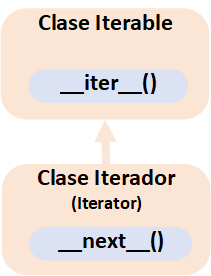
That is, the parent class returns an object of the child class, but the child implements the parent class’s __iter__ method, so it returns itself.
What? Let’s take a moment to look at the structure we’d have to implement for both “Iterable” and “Iterator”.
from collections import abc


class Iterable(abc.Iterable):

    # Method of the parent class (Iterable) that returns an object of the child class (Iterator)
    def __iter__(self):
        return un_iterador


class Iterador(abc.Iterator):

    # Method of the child class (Iterador), needed to create an Iterator
    def __next__(self):
        pass  # We'll see how it works later

    # Method of the parent class (Iterable) that returns an object of the child class (Iterator)
    def __iter__(self):
        return un_iterador
But why? What kind of madness is this? It isn’t madness; it has its logic, and it’s quite simple. Let’s see it with a working example.
Let’s start with the child class, the “Iterator”, so we have to implement at least the “magic method” __next__, which returns a value from our data structure, and every time __next__ is called we have to make sure it returns the next value (In the simple list [“PRIMERO”, “SEGUNDO”, “TERCERO”], we want it to return:
- When __next__ is called the first time, it has to return the value “PRIMERO”
- When __next__ is called a second time, the value “SEGUNDO”
- And a third time, the value “TERCERO”
- If __next__ is called more times than there are values in our object, we have to give a “Stop the iteration signal”, since there are no values left to return.
Our ingredients are a method called __next__ inside a class. The best approach is to keep a class variable that counts where we left off (in the following example it’s called “siguiente_valor_a_devolver”), so every time someone calls __next__ it will return each of the values in the order we wanted. When there are no values left we’ll raise the special “StopIteration” exception to tell whoever is iterating our Iterator that there are no more values to return.
from collections import abc


class Iterador(abc.Iterator):

    def __init__(self):
        self.siguiente_valor_a_devolver = 0

    def __next__(self):
        self.siguiente_valor_a_devolver += 1

        if self.siguiente_valor_a_devolver == 1:
            return "PRIMERO"
        elif self.siguiente_valor_a_devolver == 2:
            return "SEGUNDO"
        elif self.siguiente_valor_a_devolver == 3:
            return "TERCERO"
        else:
            raise StopIteration
And we can try it out by successively calling the __next__ method of the “Iterador” object (notice that I’ve wrapped the __next__ calls in a “try/except”, because we know that at some point it will raise the “StopIteration” exception):
mi_iterador = Iterador()

try:

    # PRIMERO
    str_val_conv = mi_iterador.__next__()
    print('__next__ devuelve: "{}"'.format(str_val_conv))

    # SEGUNDO
    str_val_conv = mi_iterador.__next__()
    print('__next__ devuelve: "{}"'.format(str_val_conv))

    # TERCERO
    str_val_conv = mi_iterador.__next__()
    print('__next__ devuelve: "{}"'.format(str_val_conv))

    # StopIteration
    str_val_conv = mi_iterador.__next__()
    print('No llega a este print por la excepcion StopIteration: "{}"'.format(str_val_conv))

except StopIteration:
    print('La ultima llamada a __next__ ha lanzado la excepcion StopIteration')
When run, it shows:
__next__ devuelve: "PRIMERO"
__next__ devuelve: "SEGUNDO"
__next__ devuelve: "TERCERO"
La ultima llamada a __next__ ha lanzado la excepcion StopIteration
Okay, we have the “Iterator”; now the “Iterable”.
The “Iterable” needs to implement the __iter__ method that returns an “Iterator”. Since we have the “Iterador” class from before, it’s very easy: we can simply instantiate it and return it.
from collections import abc


class Iterable(abc.Iterable):

    def __iter__(self):
        mi_iterador = Iterador()
        return mi_iterador
This way, the “for <iterated value> in <Iterable>” loop can get from an “Iterable” an object of type “Iterator” from which to obtain, step by step (__next__ after __next__), the contained values (which in the “for <iterated value> in <Iterable>” syntax are passed in “<iterated value>”). The loop stops iterating when it catches the “StopIteration” exception from the “Iterator” (that is, the “for <iterated value> in <Iterable>” loop has summed up all the previous code of going from mi_iterador.__next__() to mi_iterador.__next__() until the “StopIteration” exception).
mi_iterable = Iterable()

for valor in mi_iterable:
    print('Elemento de mi_iterable: {}'.format(valor))
It prints:
Elemento de mi_iterable: PRIMERO
Elemento de mi_iterable: SEGUNDO
Elemento de mi_iterable: TERCERO
Once you understand the above, doesn’t it seem like a lot of classes just for the “for” loop to iterate over our “Iterable”? Yes, and that’s the reason the “Iterator” itself can return itself, which saves us the “Iterable” class (that’s why it inherits it in this strange “Iterator” cycle). The two classes “Iterator” and “Iterable” in a single one:
from collections import abc


class IteradorIterable(abc.Iterator):

    def __init__(self):
        self.siguiente_valor_a_devolver = 0

    def __next__(self):
        self.siguiente_valor_a_devolver += 1

        if self.siguiente_valor_a_devolver == 1:
            return "PRIMERO"
        elif self.siguiente_valor_a_devolver == 2:
            return "SEGUNDO"
        elif self.siguiente_valor_a_devolver == 3:
            return "TERCERO"
        else:
            raise StopIteration

    def __iter__(self):
        return self
We pass the object to the “for” loop.
mi_iterador_iterable = IteradorIterable()

for valor in mi_iterador_iterable:
    print('Elemento de mi_iterador_iterable: {}'.format(valor))
And it turns out it gives us the same result with less code:
Elemento de mi_iterador_iterable: PRIMERO
Elemento de mi_iterador_iterable: SEGUNDO
Elemento de mi_iterador_iterable: TERCERO
In short, we’ve had to understand three things:
- Iterator: returns each value one at a time (__next__ after __next__) as we ask for it. An “Iterator” creates each element as it is asked for, so you can only iterate over it once (that is, if you try to iterate several times with a FOR loop, the second time it will already have been iterated and it can’t be iterated again).
- Iterable: returns an Iterator object (with __iter__). An “Iterable” can be iterated over more than once (that’s why a list can be iterated several times when used in several FOR loops).
- Iterator that is Iterable: combines both previous classes to simplify the code, that is, it has both __next__ and __iter__.
Inside a “For” loop in Python
The “for <iterated value> in <Iterable>” loop works its magic when we ask it to iterate over an “Iterable object” that we pass it (it could well be the typical list, a dictionary, a set, or any other Iterable), but inside it follows some steps we’ve already seen and that I expand on here. For example:
mi_lista = [1, 2, 3, 4, 5]

for valor in mi_lista:
    print('Elemento de mi_ lista: {}'.format(valor))

# Continua el código después del bucle for ...
What the “for” loop does internally is call the __iter__() method of the Iterable object we’ve passed it (in the previous example “mi_lista”) to get the “Iterator object”. Then it repeatedly calls the __next__() method of the “Iterator object”, returning the value into the body of the “for” loop (in the previous example, “valor”, and it prints it with “print”), until a call to __next__() of the “Iterator object” raises the “StopIteration” exception and the “for” loop ends (in the previous example it would reach the comment “# Continua el código después del bucle for”).
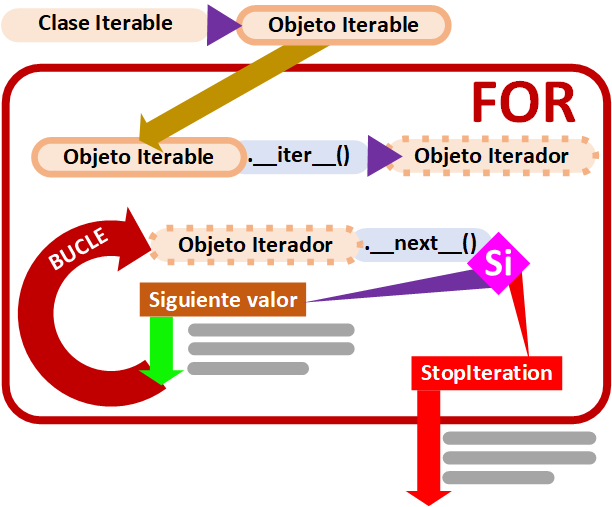
As developers we’ve seen that using the “for” loop is very easy, and building the “for” loop isn’t very hard either; for example, we could simulate all the previous steps with “while”.
With a “while” loop we’d have to do by hand everything the “for” loop saves us from. I think it helps to understand the abstraction of “for”, and for complex processes you need to loop with a “while” loop.
To get the “iterator”, we can call the __iter__ method of the “iterable” object directly. Then use __next__ to get all the values until the “StopIteration” exception is raised:
mi_iterable = Iterable()
mi_iterador = mi_iterable.__iter__()

continuar = True
while continuar:
    try:
        valor = mi_iterador.__next__()
        print('__next__ devuelve: "{}"'.format(valor))
    except StopIteration:
        print('La ultima llamada a __next__ ha lanzado la excepcion StopIteration, que sirve para salir del bucle WHILE')
        continuar = False
It prints to the screen:
__next__ devuelve: "PRIMERO"
__next__ devuelve: "SEGUNDO"
__next__ devuelve: "TERCERO"
La ultima llamada a __next__ ha lanzado la excepcion StopIteration, que sirve para salir del bucle WHILE
We’ve built the “for” loop with our own hands 😀
Collection
Let’s go back to the simplest example of a “Collection”, the “Python List”.
Let’s quickly review what you can do with a “Python List” object
- It contains elements (“Container”)
my_listado = [“valor 1”, “valor 2”, “valor 3”]
- It can be iterated (“Iterable”)
for valor in mi_listado:
    # Iterate over the values of mi_listado
- It can be measured
cantidad_elementos = len(mi_listado)
That is, the “Python List” inherits to implement the three previous classes “Iterable”, “Container” and “Sized”.
We could apply Python’s multiple inheritance, but it isn’t the most effective approach.
Since several things inherit from “Iterable”, “Container” and “Sized” at the same time, they are grouped in the “Collection” class.
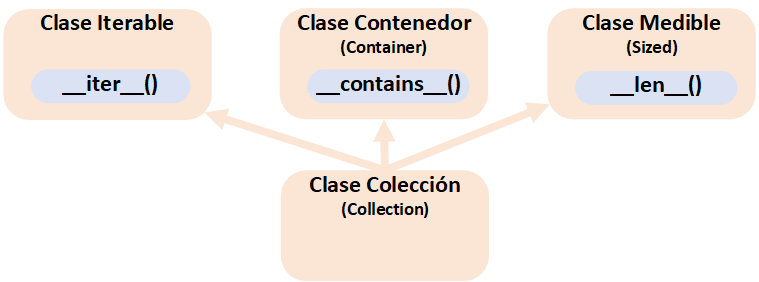
So inheriting from “Collection” is enough to correctly implement a Collection.
from collections import abc


class Coleccion(abc.Collection):

    # Implemented from the Sized class
    def __len__(self):
        pass

    # Implemented from the Container class
    def __contains__(self, x):
        pass

    # Implemented from the Iterable class
    def __iter__(self):
        pass
As it should be, the __iter__ method has been added, which returns an object of type “Iterator”. As we saw a moment ago, we’ll most likely want to do everything in the same class to save code, so we can inherit from “Iterator” and implement the __next__ method.
from collections import abc


class MiColeccionIterador(abc.Collection, abc.Iterator):

    def __len__(self):
        pass

    def __iter__(self):
        pass

    def __contains__(self, x):
        pass

    # Method from abc.Iterator
    def __next__(self):
        pass
Try it
A quick example extending one of the previous ones. We’ll create our own “Immutable List”, that is, it will have data inside that we can’t change.
#!/usr/bin/env python
# -*- coding: utf-8 -*-
from collections import abc


class MiColeccionIterador(abc.Collection, abc.Iterator):

    def __init__(self):
        self.siguiente_valor_a_devolver = 0

    def __len__(self):
        return 3

    def __contains__(self, x):
        return x is "PRIMERO" or x is "SEGUNDO" or x is "TERCERO"

    def __next__(self):
        self.siguiente_valor_a_devolver += 1

        if self.siguiente_valor_a_devolver == 1:
            return "PRIMERO"
        elif self.siguiente_valor_a_devolver == 2:
            return "SEGUNDO"
        elif self.siguiente_valor_a_devolver == 3:
            return "TERCERO"
        else:
            raise StopIteration

    def __iter__(self):
        self.siguiente_valor_a_devolver = 0
        return self


if __name__ == "__main__":

    mi_coleccion_iterador = MiColeccionIterador()

    print('mi_coleccion_iterador tiene {} elementos'.format(len(mi_coleccion_iterador)))

    if "ALGO" in mi_coleccion_iterador:
        print('"ALGO" Existe en mi_coleccion_iterador')
    else:
        print('"ALGO" NO existe en mi_coleccion_iterador')

    if "SEGUNDO" in mi_coleccion_iterador:
        print('"SEGUNDO" Existe en mi_coleccion_iterador')
    else:
        print('"SEGUNDO" NO existe en mi_coleccion_iterador')

    for valor in mi_coleccion_iterador:
        print('Elemento de mi_coleccion_iterador: {}'.format(valor))
It prints:
mi_coleccion_iterador tiene 3 elementos

"ALGO" NO existe en mi_coleccion_iterador
"SEGUNDO" NO existe en mi_coleccion_iterador

Elemento de mi_coleccion_iterador: PRIMERO
Elemento de mi_coleccion_iterador: SEGUNDO
Elemento de mi_coleccion_iterador: TERCERO
Note about initializing the Iterator: Every time __iter__ is called, we may want the “Iterator” object to start over from the beginning returning things through the __next__ method (that’s why in __iter__ we’ve put “self.siguiente_valor_a_devolver = 0” in this example). If we don’t reset the variable “self.siguiente_valor_a_devolver” to “0”, the first time we use the “Iterator” object in a “for” loop it will work, but the variable that keeps track of the next __next__ step will already have reached the end. If we later want to use our “Iterator” in other “for” loops, __next__ will always raise StopIteration and the bodies of the “for” loops will never be entered; they will be entered if the variable “self.siguiente_valor_a_devolver” is reset to “0”, since it will iterate from the beginning again.
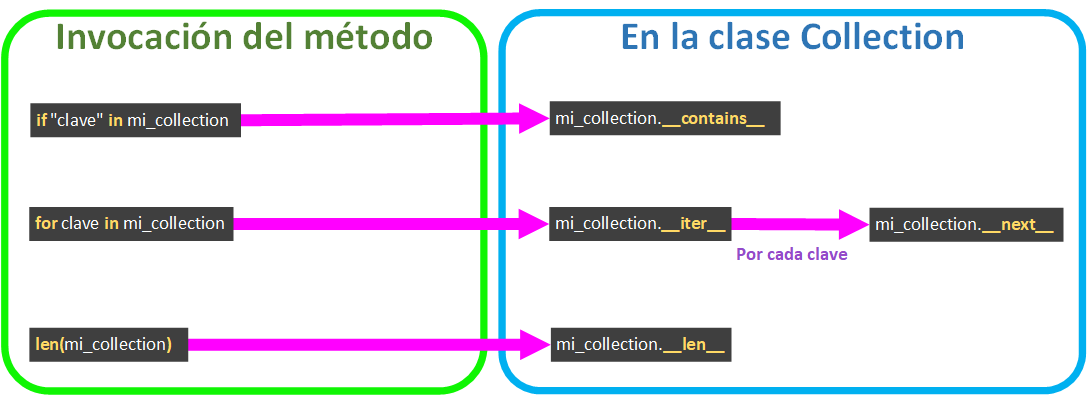
Life cycle of a Collection’s methods
As important as knowing the above is knowing the life cycle followed each time we call a method of our Collection class, since it will give us the clues to implement our code correctly. The ones we’ve seen are:
- Getting a value given a key ( valor = collection[“clave”] ) calls __getitem__.
- if “clave” in collection: calls the magic method __contains__ to ask whether it has the key.
- for clave in collection: calls __iter__, and __iter__ calls __next__ to get each key.
- len(collection) calls __len__.
In perspective
I’ll finish by leaving you all the relationships of what we’ve seen in this article together:
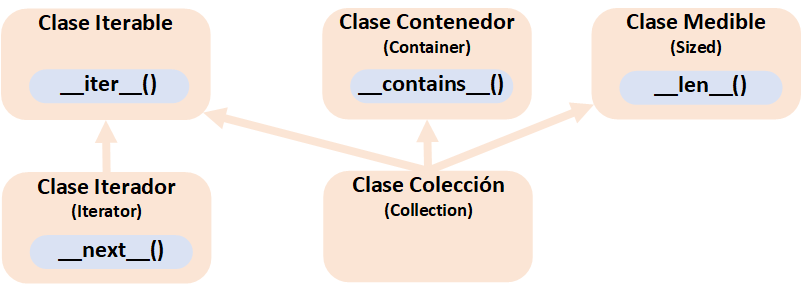
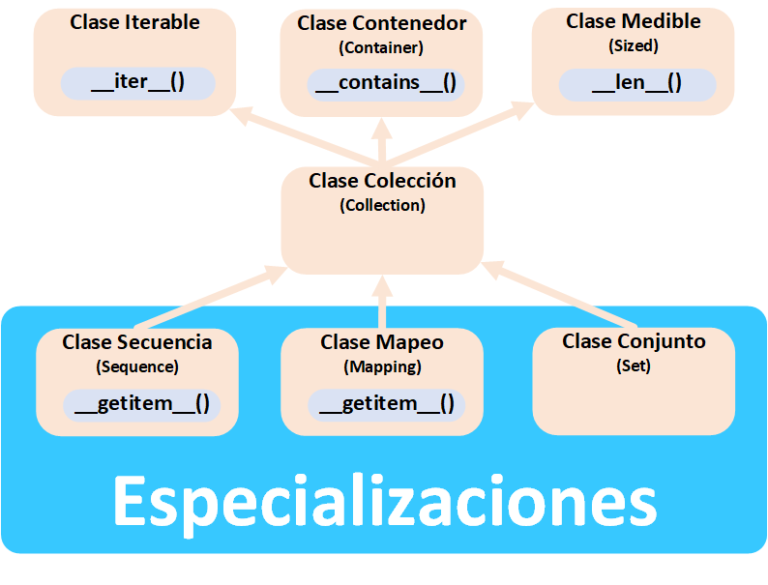
We’ve learned a lot about “Collections”; what’s still left is specializing our “Collections”, plus incredible capabilities such as mutability (the ability to change, with the typical “add item” or “remove item” on our “Collection”) among others that we’ll see in a future article.
References
“Building Your Own Collection in Python” by Ramón Invarato at jarroba.com, licensed under Creative Commons Attribution-NonCommercial-ShareAlike 3.0. Registered at Safe Creative.

You may also like
Specialize Your Own Collection in Python
Mapping, Sequence or Collection in Python: you choose the best one for the data structure you want to build. A simple explanation of everything you need.


Python Course – 3. Collections
Learn Python collections: lists, sequences, tuples and dictionaries, with videos, theory slides and hands-on exercises from the jarroba Python course.
Leave a comment