
Exceptions in Java, with Examples
Learn what exceptions are in Java, how the Throwable hierarchy works, and how to handle errors with try - catch - finally, with simple, practical examples.
In Java, runtime errors (errors that happen while the program is running) are called exceptions. They occur when one of the instructions in our program fails, for example when you divide by zero, when an object is 'null' and can't be, when a file doesn't open correctly, and so on. When an exception occurs, an error message is shown on the screen and the program stops running.
In Java (as in other programming languages) there are many types of exceptions, and listing every one of them would be an almost endless task. When it comes to exceptions, you learn them through experience, by running into them and figuring out how to fix them.
When an exception occurs in Java, an object of a certain class is created (depending on the type of error that happened). This object holds the information about the error and gives us the methods we need to get that information. These classes all have the Throwable class as their parent class, so the exceptions follow a hierarchy. Below we show some of the classes to give you an idea of the hierarchy exceptions follow, but there are many, many more exceptions than the ones we show:

Next we are going to show an example of how dividing by zero produces an exception. Take a look at the following image, where you can see a piece of code and the result of running it:
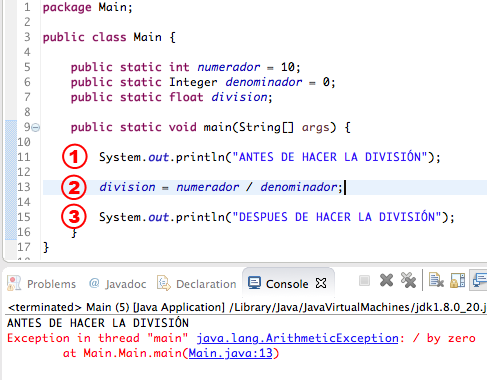
As you can see, our program has 3 instructions. The first one should print the message "ANTES DE HACER LA DIVISIÓN" (before the division) to the screen, the second one should do the division, and the last one should print the message "DESPUES DE HACER LA DIVISIÓN" (after the division) to the screen. The first instruction runs perfectly, but when it reaches the second one an "ArithmeticException" (an exception of the ArithmeticException class) is thrown and the program stops, because we are dividing a number by '0'.
Luckily, Java lets us handle exceptions so that our program doesn't stop unexpectedly and keeps running even when an exception occurs. To do that we have the "try – catch – finally" structure, shown below:
try {

	// Instructions when there is no exception

} catch (TypeException ex) {

	// Instructions when an exception occurs

} finally {

	// Instructions that run whether or not there are exceptions

}
Regarding the "try – catch – finally" structure, first the "try" block runs; if an exception occurs, the "catch" block runs, and finally the "finally" block runs. In this structure you can leave out the "catch" block or the "finally" block, but not both.
Now that we know this structure, we can rewrite our program so that all three instructions run even if an exception occurs. First we need to know which exception class may show up, which would be "ArithmeticException", so we can define it in the "catch" part. Our program would look like this and would run without problems, and we would also get the information about the exception:
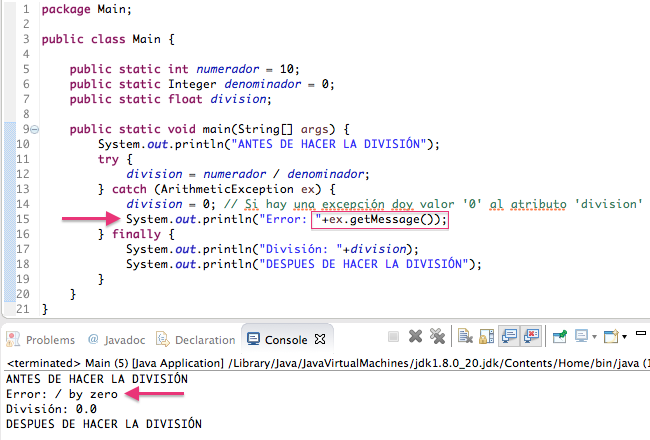
As you can see, we catch the exception in an object "ex" of the "ArithmeticException" class, and we can get the error message that the exception gives us. You can also see that the program finishes running even though an exception occurred.
Within the same structure we can define as many exceptions as we want. In the previous case we only defined the "ArithmeticException" exception, but we could also define, for example, the "NullPointerException" exception, in case a 'null' value comes in when doing the division:
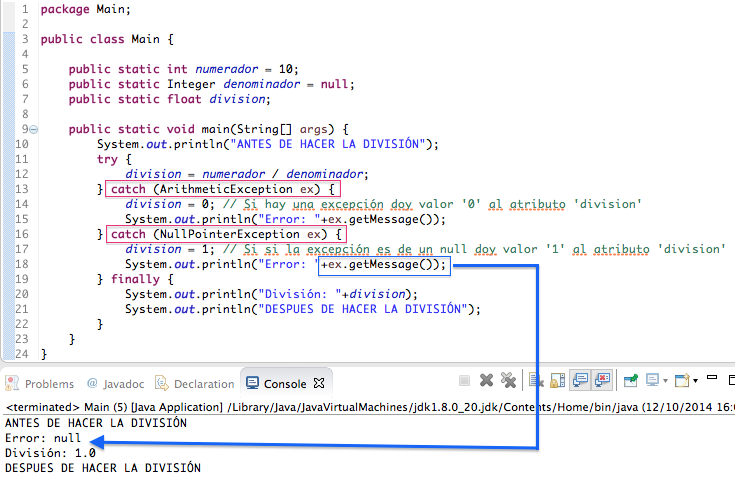
To sum up, in this post we have given a very simple example of how to handle a couple of fairly obvious exceptions, such as division by '0' and a 'null'. We could easily have handled them with an "if" control statement checking the contents of the attributes, but the goal of this post was to see how to handle exceptions with the "try – catch – finally" structure; if you know how to use it, your program should keep working even when exceptions occur. It's also worth saying that it's almost impossible to memorize every exception in Java (so don't go cramming them one by one, because you probably won't use even 10% of them), since you will learn them as you run into them in your own projects. The ones we have shown you are quite common, just like the ones you may run into when working with files, arrays, and so on.
“Exceptions in Java, with Examples” by Ricardo Moya at jarroba.com, licensed under Creative Commons Attribution-NonCommercial-ShareAlike 3.0. Registered at Safe Creative.

You may also like


Inheritance in Java, with Examples
Learn what inheritance is in object-oriented programming and how it works in Java, using extends, protected and super with a clear, practical example.
ArrayList in Java, with Examples
Learn how to use ArrayList in Java: add, remove and iterate elements, store objects, and work with nested ArrayLists, with practical examples.
Leave a comment