
Inheritance in Java, with Examples
Learn what inheritance is in object-oriented programming and how it works in Java, using extends, protected and super with a clear, practical example.
You can download the project for this post by clicking HERE.
Inheritance is one of the 4 pillars of object-oriented programming (OOP), along with Abstraction, Encapsulation and Polymorphism. At first these concepts, which are typical of the OOP paradigm, are a bit hard to grasp because we usually come from another programming paradigm, such as structured programming (see the post "Programming Paradigms), but it has to be said that the difficulty lies in understanding this new paradigm and nothing else. In this post we are going to explain what inheritance is as clearly as we can, using an example.
Many definitions of inheritance have been given, for example this one: "Inheritance is a mechanism that allows a class to be defined from the definition of another existing class. Inheritance allows methods and data to be shared automatically among classes, subclasses and objects.". At first sight this definition is a bit hard to digest for those of you who are just starting with OOP, so we are going to digest it with an example in which we will see that inheritance is nothing more than a "Dynamic Copy-Paste" or a way of "factoring out" the code we write.
The example we propose simulates the behavior of the different members of the Spanish national football team: both the players and the coaching staff (coaches, masseurs, etc.). To simulate this behavior we are going to define three classes that will represent Futbolista (player), Entrenador (coach) and Masajista (masseur) objects. For each of them we will need some data, which we will reflect in attributes, and a series of actions, which we will reflect in their methods. We show these attributes and methods in the following class diagram:
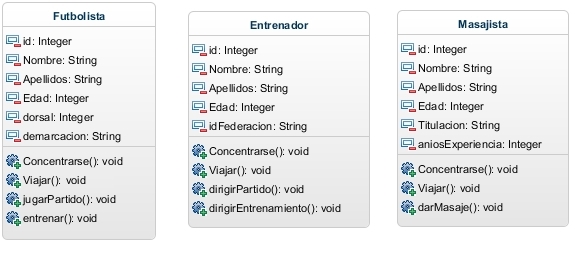
As you can see, the three classes have attributes and methods that are the same: all three have the attributes id, Nombre, Apellidos and Edad (id, first name, last name and age); and all three have the methods Viajar and Concentrarse (travel and go to a training camp):
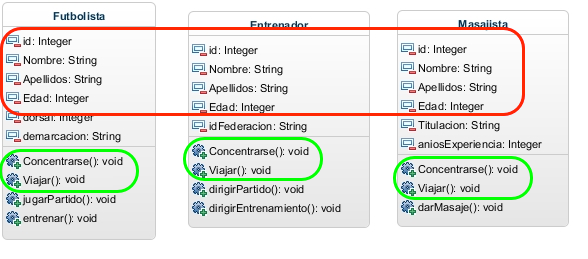
At the code level, after looking at the class diagram, we have the following:
|
|
|
What we can see at this point is that we are writing a lot of repeated code, since the three classes have common methods and attributes. That’s why, as we’ll see in a moment, we say that inheritance consists of "factoring out" code so we don’t write more than we need. So what we’ll do is create a class with the "code that is common to the three classes" (in inheritance this class is called the "Parent Class or Superclass") and the code that is specific to each class we’ll leave in it, with these classes being called "Child Classes", which inherit all the public or protected attributes and methods from the parent class. It is very important to say that child classes never inherit the private attributes and methods of the parent class, so be very careful with this. To sum up, so you can see the advantage of inheritance: we now have a parent class with ‘n’ lines of code and three child classes with ‘a’, ‘b’ and ‘c’ lines of code respectively, so if you do the math, we have reduced our code by ‘2n’ lines, since before we had ‘(n+a)+(n+b)+(n+c)’ lines of code and now, after applying inheritance, we have ‘n+a+b+c’ lines, although it’s also true that we have one more class, but we’ll see a little later the advantage of having that parent class. In short, after "factoring out" and applying inheritance, we have the following classes:
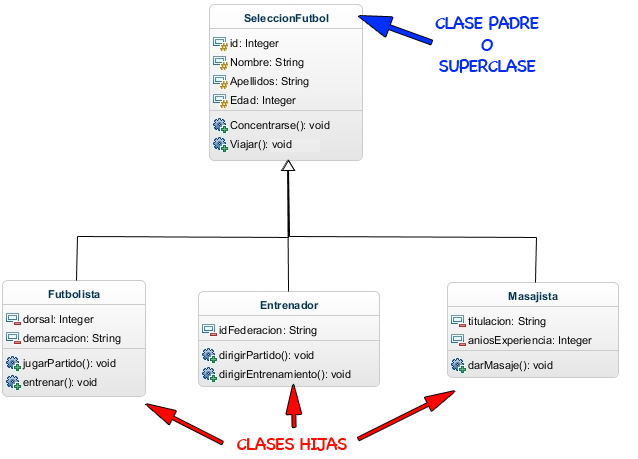
At the code level, the classes would be implemented as follows:
|
||
|
|
|
As you can see, the code is now much cleaner, better structured and has fewer lines, which makes it more readable, which is very important, and what makes it even more important is that the code is reusable. This means that if we now want to add more classes to our application, such as a Doctor, an equipment manager, a press officer, etc., who also belong to the Spanish team’s coaching staff, we can do it very easily, since the parent class (SeleccionFutbol) already implements part of their data and behavior, and we only have to implement the attributes and methods specific to that class. Are you starting to see how useful inheritance is?
Now, if you looked closely at the code we wrote, and if you haven’t had any experience with inheritance in Java, you will have noticed three "new" reserved words: "extends", "protected" and "super". Let’s explain what they mean:
- extends: This reserved word tells the child class which one is its parent class. For example, in the Futbolista class, by writing "public class Futbolista extends SeleccionFutbol" we are telling the ‘Futbolista’ class that its parent class is ‘SeleccionFutbol’. Or, to put it another way so it’s easier to understand, by writing this we are doing a "dynamic copy-paste", telling the ‘Futbolista’ class to ‘copy’ all the public or protected attributes and methods of the ‘SeleccionFutbol’ class. That’s where the ‘definition’ we gave comes from, that inheritance is a ‘dynamic copy-paste’.
- protected: it indicates a type of visibility for the attributes and methods of the parent class, and it means that when an attribute is ‘protected’, that attribute or method is only visible from the child classes and not from any other class.
- super: it is used to call the constructor of the parent class. Maybe it wasn’t very clear in the code we showed, so below we show it more clearly, looking at the constructors of the objects when we pass them the attributes:
public class SeleccionFutbol {

	......

	public SeleccionFutbol() {
	}

	public SeleccionFutbol(int id, String nombre, String apellidos, int edad) {
		this.id = id;
		this.Nombre = nombre;
		this.Apellidos = apellidos;
		this.Edad = edad;
	}
	......
public class Futbolista extends SeleccionFutbol {
	......
	public Futbolista() {
		super();
	}

	public Futbolista(int id, String nombre, String apellidos, int edad, int dorsal, String demarcacion) {
		super(id, nombre, apellidos, edad);
		this.dorsal = dorsal;
		this.demarcacion = demarcacion;
	}
	......
So far so good, but now let’s see how we work with these classes. To see how it works in a clear and simple way, we are going to work with one object of each class and see how they are created and how they run their methods. Let’s start by showing the following code snippet:
public class Main {

	// ArrayList of SeleccionFutbol objects. Regardless of the child class the object belongs to
	public static ArrayList<SeleccionFutbol> integrantes = new ArrayList<SeleccionFutbol>();

	public static void main(String[] args) {

		Entrenador delBosque = new Entrenador(1, "Vicente", "Del Bosque", 60, "284EZ89");
		Futbolista iniesta = new Futbolista(2, "Andres", "Iniesta", 29, 6, "Interior Derecho");
		Masajista raulMartinez = new Masajista(3, "Raúl", "Martinez", 41, "Licenciado en Fisioterapia", 18);

		integrantes.add(delBosque);
		integrantes.add(iniesta);
		integrantes.add(raulMartinez);

		// CONCENTRACION
		System.out.println("Todos los integrantes comienzan una concentracion. (Todos ejecutan el mismo método)");
		for (SeleccionFutbol integrante : integrantes) {
			System.out.print(integrante.getNombre()+" "+integrante.getApellidos()+" -> ");
			integrante.Concentrarse();
		}

		// VIAJE
		System.out.println("nTodos los integrantes viajan para jugar un partido. (Todos ejecutan el mismo método)");
		for (SeleccionFutbol integrante : integrantes) {
			System.out.print(integrante.getNombre()+" "+integrante.getApellidos()+" -> ");
			integrante.Viajar();
		}
	......
The first thing we see is that we create one object of each class, passing the attributes to the constructor as parameters, and then, "surprisingly," we put them in an "ArrayList" of objects of the "SeleccionFutbol" class, which is the parent class. Of course Java lets you do this, since all the objects are children of the same parent class. Then, as you can see, we loop through the ArrayList and run their "common" methods, ‘Concentrarse’ and ‘Viajar’. This code produces the following output:
Todos los integrantes comienzan una concentracion. (Todos ejecutan el mismo método)
Vicente Del Bosque -> Concentrarse
Andres Iniesta -> Concentrarse
Raúl Martinez -> Concentrarse

Todos los integrantes viajan para jugar un partido. (Todos ejecutan el mismo método)
Vicente Del Bosque -> Viajar
Andres Iniesta -> Viajar
Raúl Martinez -> Viajar
As you can see, since they all run the same method from the parent class, the code works correctly.
Next we are going to run code specific to the child classes, which is why we can no longer loop through the ArrayList and run the same method for all the objects: now those methods are unique to the child classes. The code is the following:
// ENTRENAMIENTO
System.out.println("nEntrenamiento: Solamente el entrenador y el futbolista tiene metodos para entrenar:");
System.out.print(delBosque.getNombre()+" "+delBosque.getApellidos()+" -> ");
delBosque.dirigirEntrenamiento();
System.out.print(iniesta.getNombre()+" "+iniesta.getApellidos()+" -> ");
iniesta.entrenar();

// MASAJE
System.out.println("nMasaje: Solo el masajista tiene el método para dar un masaje:");
System.out.print(raulMartinez.getNombre()+" "+raulMartinez.getApellidos()+" -> ");
raulMartinez.darMasaje();

// PARTIDO DE FUTBOL
System.out.println("nPartido de Fútbol: Solamente el entrenador y el futbolista tiene metodos para el partido de fútbol:");
System.out.print(delBosque.getNombre()+" "+delBosque.getApellidos()+" -> ");
delBosque.dirigirPartido();
System.out.print(iniesta.getNombre()+" "+iniesta.getApellidos()+" -> ");
iniesta.jugarPartido();
As we can see, even though the coach and the players attend a training session, each of them does a different job in it, so we have to write different methods for each of the classes. We’ll see when we talk about polymorphism that we can run the same method on different classes and have those methods do different things. The result of the code above is the following:
Entrenamiento: Solamente el entrenador y el futbolista tiene metodos para entrenar:
Vicente Del Bosque -> Dirige un entrenamiento
Andres Iniesta -> Entrena

Masaje: Solo el masajista tiene el método para dar un masaje:
Raúl Martinez -> Da un masaje

Partido de Fútbol: Solamente el entrenador y el futbolista tiene metodos para el partido de fútbol:
Vicente Del Bosque -> Dirige un partido
Andres Iniesta -> Juega un partido
CONCLUSIONS AND CLARIFICATIONS:
That’s everything we wanted to tell you about inheritance in this post. Inheritance can be a bit more complex than what we’ve covered here, since we’ve only covered single inheritance (which, for the moment, is the only type of inheritance Java supports) and not multiple inheritance, a type of inheritance in which a child class can have several parents. Still, if you’re just starting to learn the concept of inheritance, single inheritance is more than enough for now. For those of you just getting started in the world of computer science, you will have noticed that we included some examples with a few "weird" diagrams; these diagrams are called class diagrams (we made them with the web tool Online modeling — Collaborative UML tool (GenMyModel)) and they are used to graphically represent the attributes and methods of classes and the relationships between them, using the UML language, which we’ll try to talk about later in other tutorials. Finally, I’d like to say and make clear that in this post we may not have used the correct terminology to explain inheritance, but we’ve explained it a bit differently from how it’s explained elsewhere so that those of you who are starting out can understand inheritance from another point of view.
“Inheritance in Java, with Examples” by Ricardo Moya at jarroba.com, licensed under Creative Commons Attribution-NonCommercial-ShareAlike 3.0. Registered at Safe Creative.

You may also like


Polymorphism in Java (Part I), with Examples
Learn what polymorphism is in Java and how it works in object-oriented programming, with abstract classes, method overriding and a football team example.
Polymorphism in Java -Interface- (Part II), with Examples
Learn how interfaces work in Java and how they take polymorphism a step further than abstract classes, with a practical example of a football team.
Exceptions in Java, with Examples
Learn what exceptions are in Java, how the Throwable hierarchy works, and how to handle errors with try - catch - finally, with simple, practical examples.
Interfaces in Java 8: The Default Method, with Examples
Learn how the default method in Java 8 interfaces works, how it lets you add behavior without touching your classes, and how it simulates multiple inheritance.
Leave a comment