
Map in Java, with Examples
Learn how to use the Java Map interface with examples: HashMap, TreeMap and LinkedHashMap, their key methods, iterators and working with your own objects.
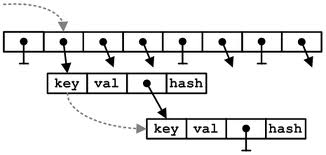 The Map interface (java.io.Map) in Java lets us represent a data structure for storing "key/value" pairs, so that each key has only one value. This data structure is also known in other programming languages as "Dictionaries", although in each language it has its own nuances. Just as we said in the post "ArrayList in Java, with examples" Maps in Java have all the data structure theory of Trees (AVL, B, B+, B*) implemented under the hood, so they let you add, remove and modify elements transparently for the developer. Before explaining how to use Maps, here is a link to the JavaDoc: click HERE.
First of all, you can download the code of all the examples below by clicking HERE.
The main methods for working with a Map are the following:
// Declaration of a Map (a HashMap) with "Integer" key and "String" value. Keys can be any type of object, although the most commonly used are predefined Java objects like String, Integer, Double ... !!!!CAREFUL: Maps do not allow primitive data types
Map<Integer, String> nombreMap = new HashMap<Integer, String>();
nombreMap.size(); // Returns the number of elements in the Map
nombreMap.isEmpty(); // Returns true if there are no elements in the Map and false if there are
nombreMap.put(K clave, V valor); // Adds an element to the Map
nombreMap.get(K clave); // Returns the value of the key passed as a parameter, or 'null' if the key does not exist
nombreMap.clear(); // Removes all the elements of the Map
nombreMap.remove(K clave); // Removes the key/value pair of the key passed as a parameter
nombreMap.containsKey(K clave); // Returns true if the map has a key that matches K
nombreMap.containsValue(V valor); // Returns true if the map has a value that matches V
nombreMap.values(); // Returns a "Collection" with the values of the Map
Another important element when working with Maps (although not as much as when working with ArrayList) is "Iterators" (Iterator). Iterators are used to traverse Maps and work with them. Iterators have only three methods: “hasNext()” to check whether there are still elements left in the iterator, “next()” to give us the next element of the iterator; and “remove()” to remove the element from the Iterator. You can actually do without iterators when working with Maps, since the big advantage of Maps over ArrayList is that each object has an associated key and you can look it up by that key, although it never hurts to know how to use iterators to handle Maps.
Before moving on to examples, you may have noticed that we started this post by saying that Map is an interface, so the interface’s methods must be implemented. Java already has several "Map classes" implemented. We won’t explain all of them, only the three we consider the most important and useful so you can see the difference: "HashMap", "TreeMap" and "LinkedHashMap". The main difference between these 3 classes is the way or the order in which they store the values in the Map. If you took the Computer Engineering degree (or similar) and went through all that tree theory (which we won’t go over here), you’d know that the big difference between AVL, B, B+ and B* trees is the way they store the data in order to later optimize the insertions, deletions, modifications and lookups of the "values". Well, in this post all that theory is transparent to us, but it’s good to look at these three classes so that, depending on your problem, you can choose the best one:
- HashMap: The elements inserted into the map will not have any specific order. It does not accept duplicate keys or null values.
- TreeMap: The Map is sorted in a "natural" way. For example, if the keys are integers (as we’ll see later), it sorts them from lowest to highest.
- LinkedHashMap: It stores the elements in the Map in the order in which they are inserted; that is, it has no real sorting of the elements, so this class performs lookups more slowly than the other classes.
With that in mind, let’s look at an example of these 3 classes and how they order the elements. For this example we’ll have a Map in which the key is the shirt number of the Spanish national team players who started the 2010 World Cup final, and the value is their name.
With a HashMap
Map<Integer, String> map = new HashMap<Integer, String>();
map.put(1, "Casillas");		map.put(15, "Ramos");
map.put(3, "Pique");		map.put(5, "Puyol");
map.put(11, "Capdevila");	map.put(14, "Xabi Alonso");
map.put(16, "Busquets");	map.put(8, "Xavi Hernandez");
map.put(18, "Pedrito");		map.put(6, "Iniesta");
map.put(7, "Villa");

// Imprimimos el Map con un Iterador
Iterator it = map.keySet().iterator();
while(it.hasNext()){
  Integer key = it.next();
  System.out.println("Clave: " + key + " -> Valor: " + map.get(key));
}
The result is the following, where we can see that it gives us the objects in no "logical order":
Clave: 16 -> Valor: Busquets
Clave: 1  -> Valor: Casillas
Clave: 18 -> Valor: Pedrito
Clave: 3  -> Valor: Pique
Clave: 5  -> Valor: Puyol
Clave: 6  -> Valor: Iniesta
Clave: 7  -> Valor: Villa
Clave: 8  -> Valor: Xavi Hernandez
Clave: 11 -> Valor: Capdevila
Clave: 14 -> Valor: Xabi Alonso
Clave: 15 -> Valor: Ramos
With a TreeMap
Map<Integer, String> treeMap = new TreeMap<Integer, String>();
treeMap.put(1, "Casillas");	treeMap.put(15, "Ramos");
treeMap.put(3, "Pique");	treeMap.put(5, "Puyol");
treeMap.put(11, "Capdevila");	treeMap.put(14, "Xabi Alonso");
treeMap.put(16, "Busquets");	treeMap.put(8, "Xavi Hernandez");
treeMap.put(18, "Pedrito");	treeMap.put(6, "Iniesta");
treeMap.put(7, "Villa");

// Imprimimos el Map con un Iterador que ya hemos instanciado anteriormente
it = treeMap.keySet().iterator();
while(it.hasNext()){
  Integer key = it.next();
  System.out.println("Clave: " + key + " -> Valor: " + treeMap.get(key));
}
The result is the following, where we can see that it sorts the objects by key in "natural order":
Clave: 1  -> Valor: Casillas
Clave: 3  -> Valor: Pique
Clave: 5  -> Valor: Puyol
Clave: 6  -> Valor: Iniesta
Clave: 7  -> Valor: Villa
Clave: 8  -> Valor: Xavi Hernandez
Clave: 11 -> Valor: Capdevila
Clave: 14 -> Valor: Xabi Alonso
Clave: 15 -> Valor: Ramos
Clave: 16 -> Valor: Busquets
Clave: 18 -> Valor: Pedrito
With a LinkedHashMap
Map<Integer, String> linkedHashMap = new LinkedHashMap<Integer, String>();
linkedHashMap.put(1, "Casillas");	linkedHashMap.put(15, "Ramos");
linkedHashMap.put(3, "Pique");		linkedHashMap.put(5, "Puyol");
linkedHashMap.put(11, "Capdevila");	linkedHashMap.put(14, "Xabi Alonso");
linkedHashMap.put(16, "Busquets");	linkedHashMap.put(8, "Xavi Hernandez");
linkedHashMap.put(18, "Pedrito");	linkedHashMap.put(6, "Iniesta");
linkedHashMap.put(7, "Villa");

// Imprimimos el Map con un Iterador que ya hemos instanciado anteriormente
it = linkedHashMap.keySet().iterator();
while(it.hasNext()){
  Integer key = it.next();
  System.out.println("Clave: " + key + " -> Valor: " + linkedHashMap.get(key));
}
The result is the following, where we can see that it keeps the objects in the same order in which we inserted them:
Clave: 1  -> Valor: Casillas
Clave: 15 -> Valor: Ramos
Clave: 3  -> Valor: Pique
Clave: 5  -> Valor: Puyol
Clave: 11 -> Valor: Capdevila
Clave: 14 -> Valor: Xabi Alonso
Clave: 16 -> Valor: Busquets
Clave: 8  -> Valor: Xavi Hernandez
Clave: 18 -> Valor: Pedrito
Clave: 6  -> Valor: Iniesta
Clave: 7  -> Valor: Villa
Now that we’ve seen the differences between the Map classes, let’s see how the methods we mentioned at the beginning work:
System.out.println("********* Trabajando con los métodos de Map *********");
System.out.println("Mostramos el numero de elementos que tiene el TreeMap: treeMap.size() = "+treeMap.size());
System.out.println("Vemos si el TreeMap esta vacio : treeMap.isEmpty() = "+treeMap.isEmpty());
System.out.println("Obtenemos un elemento del Map pasandole la clave 6: treeMap.get(6) = "+treeMap.get(6));
System.out.println("Borramos un elemento del Map el 18 (porque fue sustituido): treeMap.remove(18)"+treeMap.remove(18));
System.out.println("Vemos que pasa si queremos obtener la clave 18 que ya no existe: treeMap.get(18) = "+treeMap.get(18));
System.out.println("Vemos si existe un elemento con la clave 18: treeMap.containsKey(18) = "+treeMap.containsKey(18));
System.out.println("Vemos si existe un elemento con la clave 1: treeMap.containsKey(1) = "+treeMap.containsKey(1));
System.out.println("Vemos si existe el valo 'Villa' en el Map: treeMap.containsValue("Villa") = "+treeMap.containsValue("Villa"));
System.out.println("Vemos si existe el valo 'Ricardo' en el Map: treeMap.containsValue("Ricardo") = "+treeMap.containsValue("Ricardo"));
System.out.println("Borramos todos los elementos del Map: treeMap.clear()");treeMap.clear();
System.out.println("Comprobamos si lo hemos eliminado viendo su tamaño: treeMap.size() = "+treeMap.size());
System.out.println("Lo comprobamos tambien viendo si esta vacio treeMap.isEmpty() = "+treeMap.isEmpty());
The output for all the methods executed is the following:
********* Trabajando con los métodos de Map *********
Mostramos el numero de elementos que tiene el TreeMap: treeMap.size() = 11
Vemos si el TreeMap esta vacio : treeMap.isEmpty() = false
Obtenemos un elemento del Map pasandole la clave 6: treeMap.get(6) = Iniesta
Borramos un elemento del Map el 18 (porque fue sustituido): treeMap.remove(18)Pedrito
Vemos que pasa si queremos obtener la clave 18 que ya no existe: treeMap.get(18) = null
Vemos si existe un elemento con la clave 18: treeMap.containsKey(18) = false
Vemos si existe un elemento con la clave 1: treeMap.containsKey(1) = true
Vemos si existe el valo 'Villa' en el Map: treeMap.containsValue("Villa") = true
Vemos si existe el valo 'Ricardo' en el Map: treeMap.containsValue("Ricardo") = false
Borramos todos los elementos del Map: treeMap.clear()
Comprobamos si lo hemos eliminado viendo su tamaño: treeMap.size() = 0
Lo comprobamos tambien viendo si esta vacio treeMap.isEmpty() = true
Another of the most useful things when working with Maps is traversing them as if they were an ArrayList, and we do that as follows. If we want to get the key/value pairs, or only the keys or the values separately (careful, now we’re working with the LinkedHashMap from the example):
System.out.println("Foreach: Forma alternativa para recorrer los Map mostrando la Clave y el valor:");
for (Entry<Integer, String> jugador : linkedHashMap.entrySet()){
	Integer clave = jugador.getKey();
	String valor = jugador.getValue();
	System.out.println(clave+"  ->  "+valor);
}
The output of this code snippet is the following (the players in the order they were inserted into the Map):
Foreach: Forma alternativa para recorrer los Map mostrando la Clave y el valor:
1  ->  Casillas
15 ->  Ramos
3  ->  Pique
5  ->  Puyol
11 ->  Capdevila
14 ->  Xabi Alonso
16 ->  Busquets
8  ->  Xavi Hernandez
18 ->  Pedrito
6  ->  Iniesta
7  ->  Villa
As we can see, what this "foreach" does is give us each key/value pair one by one. So, if we got only the value, we’d have the same effect as if we were working with an ArrayList or Collections.
Now that we’ve seen the 3 most used Map classes and the most important methods, let’s look at one more example of how to work with Maps. But this time the value won’t be a predefined Java object, but an object of the "JugadorSeleccion" class, shown below:
class JugadorSeleccion {

	private int dorsal;
	private String nombre;
	private String demarcacion;

	public JugadorSeleccion() {
	}

	public JugadorSeleccion(int dorsal, String nombre, String demarcación) {
		this.dorsal = dorsal;
		this.nombre = nombre;
		this.demarcacion = demarcación;
	}

	public int getDorsal() {
		return dorsal;
	}

	public void setDorsal(int dorsal) {
		this.dorsal = dorsal;
	}

	public String getNombre() {
		return nombre;
	}

	public void setNombre(String nombre) {
		this.nombre = nombre;
	}

	public String getDemarcación() {
		return demarcacion;
	}

	public void setDemarcación(String demarcación) {
		this.demarcacion = demarcación;
	}

	@Override
	public String toString() {
		return this.dorsal+"  --  "+this.nombre+"  --  "+this.demarcacion;
	}

}
In this example we’re going to create a TreeMap in which the key will be the player’s name and the value will be an object of the "JugadorSeleccion" class. We declare the TreeMap as follows and put the following objects in it:
System.out.println("********* TreeMap con Objetos y como Clave un String *********");
Map <String, JugadorSeleccion> jugadores = new TreeMap<String, JugadorSeleccion>();
jugadores.put("Casillas", new JugadorSeleccion(1, "Casillas", "Portero"));
jugadores.put("Ramos", new JugadorSeleccion(15, "Ramos", "Lateral Derecho"));
jugadores.put("Pique", new JugadorSeleccion(13, "Pique", "Central"));
jugadores.put("Puyol", new JugadorSeleccion(5, "Puyol", "Central"));
jugadores.put("Capdevila", new JugadorSeleccion(11, "Capdevila", "Lateral Izquierdo"));
jugadores.put("Xabi", new JugadorSeleccion(14, "Xabi Alonso", "Medio Centro"));
jugadores.put("Busquets", new JugadorSeleccion(16, "Busquets", "Medio Centro"));
jugadores.put("Xavi", new JugadorSeleccion(8, "Xavi Hernandez", "Centro Campista"));
jugadores.put("Pedrito", new JugadorSeleccion(18, "Pedrito", "Interior Izquierdo"));
jugadores.put("Iniesta", new JugadorSeleccion(6, "Iniesta", "Interior Derecho"));
jugadores.put("Villa", new JugadorSeleccion(7, "Villa", "Delantero"));
If we do a "foreach" over this TreeMap, we’ll see that the Map is sorted alphabetically by key. That is, by the players’ names:
for (Entry<String, JugadorSeleccion> jugador : jugadores.entrySet()){
	String clave = jugador.getKey();
	JugadorSeleccion valor = jugador.getValue();
	System.out.println(clave+"  ->  "+valor.toString());
}
The result of running this code is the following:
Busquets   ->  16  --  Busquets        --  Medio Centro
Capdevila  ->  11  --  Capdevila       --  Lateral Izquierdo
Casillas   ->  1   --  Casillas        --  Portero
Iniesta    ->  6   --  Iniesta         --  Interior Derecho
Pedrito    ->  18  --  Pedrito         --  Interior Izquierdo
Pique      ->  13  --  Pique           --  Central
Puyol      ->  5   --  Puyol           --  Central
Ramos      ->  15  --  Ramos           --  Lateral Derecho
Villa      ->  7   --  Villa           --  Delantero
Xabi       ->  14  --  Xabi Alonso     --  Medio Centro
Xavi       ->  8   --  Xavi Hernandez  --  Centro Campista
If we define our own classes and work with them in Maps, we need to be very clear about an important premise in programming: "'Equal' is not the same as 'the same' ". This means that if we create a new object of the "JugadorSeleccion" class whose attributes are equal to those of an object in the Map and we run the "containsValue" method, it will return a flat-out "false". Because even though the objects are equal, they are not the same object, and therefore the Map does not contain it. That is, if we do the following it will return false, because our ‘villa’ object is not the same one that is in the Map:
// Cuidado con comparar objetos que son iguales pero no son lo mismo
JugadorSeleccion villa = new JugadorSeleccion(7, "Villa", "Delantero");
System.out.println("Esta este objeto 'villa' en el Map: jugadores.containsValue(villa) = "+jugadores.containsValue(villa));
The output will be the following:
Esta este objeto 'villa' en el Map: jugadores.containsValue(villa) = falseOn the other hand, if we run what comes next, we’ll be asking for an object that is indeed inside the Map:
// En este caso si que estamos preguntando por el mismo objeto
JugadorSeleccion navas = new JugadorSeleccion(22, "Navas", "Extremo Derecho");
jugadores.put("Navas", navas);
System.out.println("Esta este objeto 'navas' en el Map: jugadores.containsValue(navas) = "+jugadores.containsValue(navas));
And the output will be as follows:
Esta este objeto 'navas' en el Map: jugadores.containsValue(navas) = trueWhen it comes to working with your "own" objects, this is the only thing you need to be careful about. And those of you used to programming in languages like C or C++, where you have to be extremely careful with pointers, will have this more than covered. As for the rest of the methods, there’s not much more to say when working with "own" objects.
If you have any questions about Maps, don’t hesitate to ask by leaving a comment on the post or in the Forum.
“Map in Java, with Examples” by Ricardo Moya at jarroba.com, licensed under Creative Commons Attribution-NonCommercial-ShareAlike 3.0. Registered at Safe Creative.

You may also like


ArrayList in Java, with Examples
Learn how to use ArrayList in Java: add, remove and iterate elements, store objects, and work with nested ArrayLists, with practical examples.

Hash Tables (or Hash Maps): How They Work
Hash Table explained simply. What is a Hash Table and how does it work without writing code? A key type of "data structure" every developer should know.
Leave a comment