
Reading and Writing Files in Python, with Examples
In this tutorial you'll learn how to read and write files in Python, one of the most useful and commonly used tasks when programming. Examples included.
You can download the project for this post by clicking HERE.
In this tutorial we are going to see how to read and write files in Python, since it is one of the most useful and commonly used things when programming. Although reading and writing files can be done in several ways, in this tutorial we will give you the code you need to perform these actions.
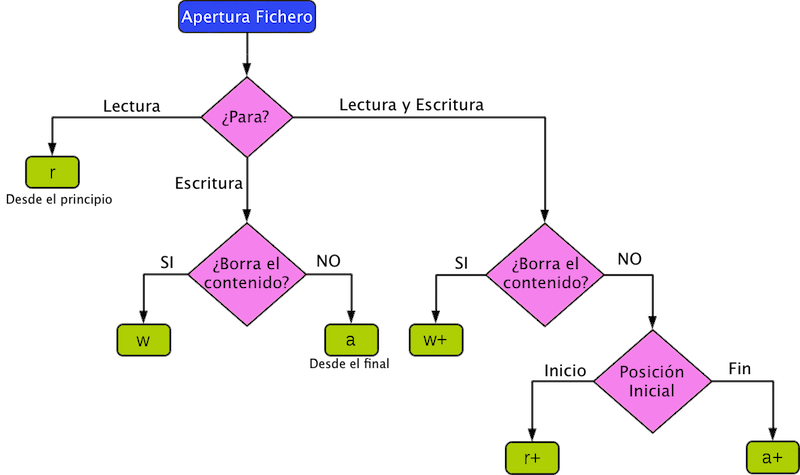
Before explaining and showing examples of reading and writing, the following image shows a diagram of the read and write modes in Python:
Reading Files:
First, let’s read the contents of the following file (called 'fichero_leer.txt') and print what we read to the screen:
Linea 1
Linea 2
Linea 3
Linea 4
Linea 5
Linea 6
Linea 7
Linea 8
Linea 9
Linea 10
First we need to specify the path or directory where the file we want to read is located, (e.g. -> Windows: c:\\carpeta\……\fichero.txt, Linux or Unix: \var\www\……\fichero.txt).
dirFichero = './fichero_leer.txt'
Note
Since we are running this code on a Unix operating system, the '.' symbol indicates that the file is in the same folder as the Python file we are running, but we could perfectly well use the absolute path to reference this file.
Once we have the file we want to read, we open it in read mode ('r') and with a 'for' loop we read the file line by line and print it to the screen:
dirFichero = './fichero_leer.txt'
with open(dirFichero, 'r') as reader:
    for line in reader:
        print line
Following the diagram in the first image, we wanted to read the file from the beginning, so we chose the 'r' option, but we could also have chosen the 'r+' option to read the file from the beginning without deleting its contents.
On the other hand, we can also start reading the file from a specific position (or from a specific byte). We do this with the 'seek(byte)' method, indicating the byte we want to start reading from. Let’s look at an example, reading the file starting from byte 32, which would correspond to starting at line 5:
with open(dirFichero, 'r') as reader:
    reader.seek(32)
    for line in reader:
        print line
The following would be printed to the screen as a result:
Linea 5
Linea 6
Linea 7
Linea 8
Linea 9
Linea 10
Finally, let’s show the 'w+' option, which deletes the file’s contents after reading it. This would be done as follows, passing 'w+' as the option:
with open(dirFichero, 'w+') as reader:
    for line in reader:
        print line
Writing Files:
To write a file, let’s look at an example where we write each element of a list on its own line. To do this we open a file with the 'w' option (if the file exists it deletes its contents, and if it doesn’t exist it creates it) and with the 'write()' method we write the content we pass it as a parameter. We do it like this:
# Lista con las lineas a escribir en el fichero
lineas = ['Uno', 'Dos', 'Tres', 'Cuatro', 'Cinco', 'Seis', '...']

dirFichero = './fichero_escribir.txt'
fichero = open(dirFichero, 'w')
for l in lineas:
    fichero.write(l + '\n')
fichero.close()
As a result we will have a file with the following content:
Uno
Dos
Tres
Cuatro
Cinco
Seis
...
On the other hand, if we want to keep writing to the file without deleting its contents, we must use the 'a+' option, which positions itself at the end of the file without deleting its contents and starts writing from that position:
# Lista con las lineas a escribir en el fichero
lineas = ['Uno', 'Dos', 'Tres', 'Cuatro', 'Cinco', 'Seis', '...']

dirFichero = './fichero_escribir.txt'
# Escribo en el fichero el contenido de la lista, sin borrar el contenido del fichero
fichero = open(dirFichero, 'a+')
for l in lineas:
    fichero.write(l + '\n')
fichero.close()
As a result, we have a file whose content is what was there before (the contents of the list) plus the new content we have written, which is the same list:
Uno
Dos
Tres
Cuatro
Cinco
Seis
...
Uno
Dos
Tres
Cuatro
Cinco
Seis
...
“Reading and Writing Files in Python, with Examples” by Ricardo Moya at jarroba.com, licensed under Creative Commons Attribution-NonCommercial-ShareAlike 3.0. Registered at Safe Creative.

You may also like


Reading and Writing Files in Java, with Examples
In this tutorial we'll see how to read and write files in Java, one of the most useful and commonly used tasks when programming. Learn it with examples.
Python Course – 8. Files
Learn how to work with files and directories in Python: paths, reading and writing files, plus practical exercises with video lessons and downloadable theory.
Leave a comment