
Python Course – 8. Files
Learn how to work with files and directories in Python: paths, reading and writing files, plus practical exercises with video lessons and downloadable theory.
We program so that a machine manages data for us, and the way we want it to. Files let us store as much data as we want: some files with information before it is processed and others with the information after it has been processed; that is why they will be one of the main inputs and outputs of our programs.
Theory
Skip to PDF content8.1- Files and Directories
An operating system (Windows, Linux, Mac, Android, etc.) manages data with files, and these are organized in directory structures. Knowing how to manage files and directories is a crucial point when working with them.
8.2- Paths
A path is the route to follow through the directories to reach one or more files. With the Path method, it will be very easy and practical to work with as many files as we want.
Exercises
Exercise 8.1-crear_fichero_y_leer_fichero.py
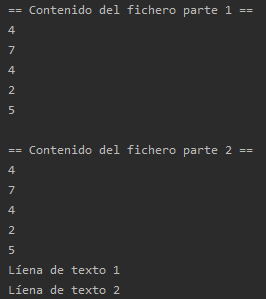
Using Python code, create a directory in a location on your computer and a file inside it.
Inside the file, write five lines of random numbers from 1 to 10 (Part 1).
Then read that file and print each line to the screen.
Next, add a couple of lines of text at the end of the file (Part 2).
And read the file again.
Exercise 8.2-futbolistas.py
Given the file “futbolistas.txt”, in which each line contains the data of a soccer player, you are asked to:
- Implement a function called “file_to_list(file_dir)” that, given the path of the file futbolista.txt, returns a
list in which each element corresponds to a line of the file; that is, each element represents the data of one player. - Implement a function called “get_top_goals_players(list_players, top_n)” that, given the list of players,
returns in another list the “top_n” top-scoring players. - Implement a function called “get_players_by_team(list_players, team)” that, given the list of players, returns
in another list all the players who have played for the team passed as a parameter (team), sorted in descending order by the number of minutes they have played. - Implement a function called “write_list_to_file(list_to_write, file_dir)” that, given the list passed as a
parameter (list_to_write), writes each element of the list on its own line in the file passed as the parameter “file_dir”. - Write the lists created in points b and c to a file, using the function implemented in point d.
In the futbolistas.txt file, each line contains the data of a soccer player, and the data are separated by the separator “::”. The data at each position are the following:
| 1 | id | 14 | PartidosCompletos | 27 | Numligas |
| 2 | Apodo | 15 | PartidosSuplente | 28 | NumCopasDelRey |
| 3 | Nombre | 16 | PartidosSustituidos | 29 | NumSuperCopas |
| 4 | FechaNacimiento | 17 | partidosPorTemporadas | 30 | NumChampions |
| 5 | LugarNacimiento | 18 | PorcentajePartidos | 31 | NumUEFAs |
| 6 | Pais | 19 | MinutosJugados | 32 | NumEuropaLeagues |
| 7 | Altura | 20 | MinutoPorPartido | 33 | NumSuperCopasEuropa |
| 8 | Peso | 21 | Goles | 34 | NumMundialesClubes |
| 9 | Demarcacion | 22 | TarjetasAmarillas | 35 | NumIntercontinentales |
| 10 | NumTemporadas | 23 | TarjetasRojas | 36 | NumMundiales |
| 11 | NumEquipos | 24 | PartidosSeleccionEspaniola | 37 | Numeurocopas |
| 12 | PartidosJugados | 25 | GolesSeleccionEspaniola | 38 | ValorMercado |
| 13 | PartidosTitular | 26 | Equipos |
“Python Course – 8. Files” by Ramón Invarato at jarroba.com, licensed under Creative Commons Attribution-NonCommercial-ShareAlike 3.0. Registered at Safe Creative.

You may also like
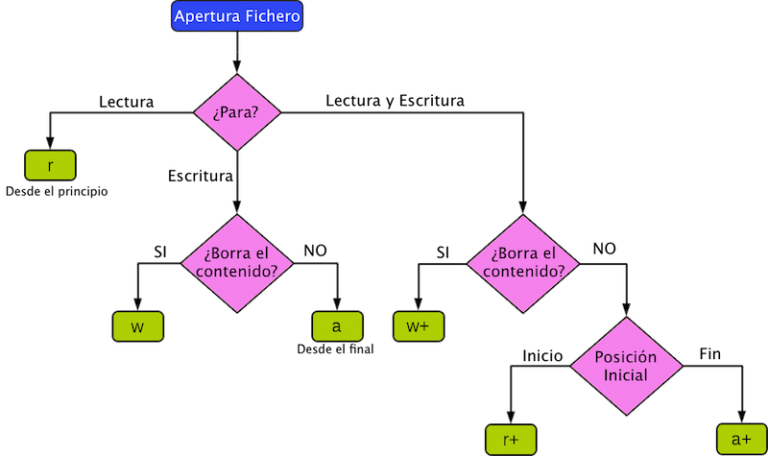
Reading and Writing Files in Python, with Examples
In this tutorial you'll learn how to read and write files in Python, one of the most useful and commonly used tasks when programming. Examples included.

Advanced Dockerfile: Multi-Stage Builds, Registries, and Tricks
Free Docker course. Expert Docker tricks: multi-stage builds, optimizing images, faster build times, and distributing images through Docker registries.
Leave a comment