
Switching Automatically from One ViewController to Another (iPhone)
Learn how to switch from one ViewController to another automatically on iPhone, with no user interaction, using an NSTimer and a Storyboard ID.
This tutorial shows how to switch from one ViewController to another without any user intervention, that is, without the user having to tap any element of the graphical interface.
This is very useful for apps that need to download data from the server before starting up, or to perform any other action.
The first thing to do is create a new project. When you create the project, you will get a ViewController with its associated “.h” and “.m” files. We gave this ViewController a label saying “1º Pantalla”.
Next, add a new ViewController to the StoryBoard. To this new ViewController, which has a label with the text “2º Pantalla”, you need to give a “Storyboard ID”. In this case we named the ID “Menu”. Everything described so far is shown in the following screenshot.
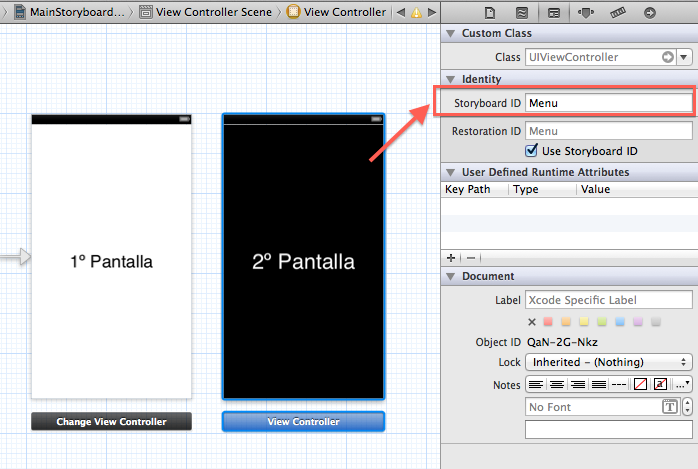
Next, you need to create a timer so that the ViewController changes after some time. In our example, the View changes after two seconds. We do this by defining a timer in the ".h" file and writing a method in the ".m" file that uses that timer and runs another method once the defined time has passed. We do it like this:
".h" file
#import <UIKit/UIKit.h>

@interface changeViewController : UIViewController{
    NSTimer *timer;
}

@end
".m" file
- (void) empezar{

    timer = [NSTimer scheduledTimerWithTimeInterval:2.0         // The timer fires every second
                                             target:self        // This timer runs in this view
                                           selector:@selector(pasarPantalla)      // The pasarPantalla method is run
                                           userInfo:nil
                                            repeats:NO];
}
As you can see in this "empezar" method, after 2 seconds the "pasarPantalla" method is run. This "pasarPantalla" method is in charge of switching from one ViewController to another, telling it which ViewController to go to by its “Storyboard ID”, which, as we said earlier, we identified with the word "Menu". Here is the "pasarPantalla" method:
-(void) pasarPantalla{
    UIStoryboard *storyboard = [UIApplication sharedApplication].delegate.window.rootViewController.storyboard;
    UIViewController *cambiarViewController = [storyboard instantiateViewControllerWithIdentifier:@"Menu"];
    [self presentModalViewController:cambiarViewController animated:YES];

}
Once this method is created, call the "empezar" method from the "viewDidLoad" method; after two seconds it runs the "pasarPantalla" method and switches to the second ViewController.
You can download the project for this example from the following link. CLICK HERE.
“Switching Automatically from One ViewController to Another (iPhone)” by Ricardo Moya at jarroba.com, licensed under Creative Commons Attribution-NonCommercial-ShareAlike 3.0. Registered at Safe Creative.

You may also like


Passing Data Between ViewControllers Using Storyboards and Segues (Video)
Learn how to pass data between ViewControllers in iOS using Storyboards and Segues, with a video tutorial and the prepareForSegue method explained.
NSTimer in Objective-C: Example (Video)
Learn how NSTimer works in Objective-C with a simple video tutorial: an app that increments an integer variable every second. Project download included.
Leave a comment