
Passing Data Between ViewControllers Using Storyboards and Segues (Video)
Learn how to pass data between ViewControllers in iOS using Storyboards and Segues, with a video tutorial and the prepareForSegue method explained.
Although this may not be the proper way to exchange data between ViewControllers using Storyboards, this video tutorial offers a solution to the problem. It may seem easy at first, but it isn’t very intuitive for those of us who are just starting out with iPhone and iPad app development.
The problem to solve is this: passing 2 variables of type NSString from one ViewController to another using Storyboards. The solution is to add a "segue" (loosely speaking, a segue is a "pipe" between ViewControllers), and set the attributes of the second ViewController from the first ViewController (in this case, two attributes of type NSString).
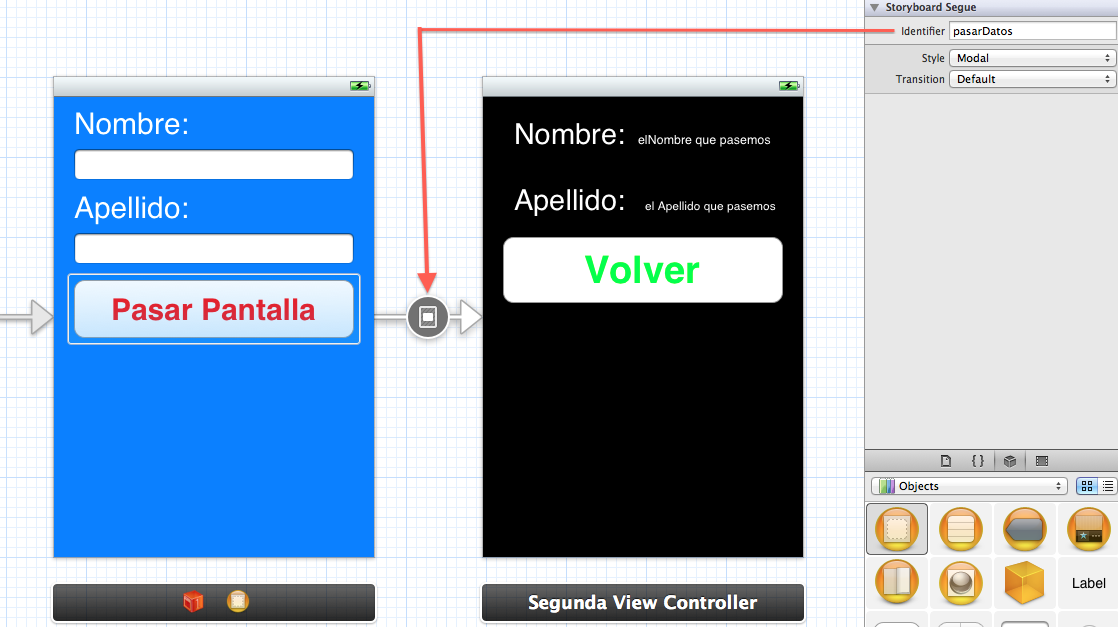
This data will be passed through a specific "segue" that has an identifier, and it is done through the following "prepareForSegue" method:
-(void) prepareForSegue:(UIStoryboardSegue *)segue sender:(id)sender{
    if ([[segue identifier] isEqualToString:@"NOMBRE_DEL_SEGUE"]) {
        NOMBRE_VIEWCONTROLLER_DESTINO *segundoView = [segue destinationViewController];
        segundoView.NOMBRE_ATRIBUTO = VALOR_A_PASAR;

    }
}
Below is a video showing how this simple app for passing data between Views using Storyboards and Segues was built:
You can download the project for this app HERE.
“Passing Data Between ViewControllers Using Storyboards and Segues (Video)” by Ricardo Moya at jarroba.com, licensed under Creative Commons Attribution-NonCommercial-ShareAlike 3.0. Registered at Safe Creative.

You may also like


Intent – Passing Data Between Activities – Android App (Video)
Learn how to pass data from one Activity to another in an Android app using an Intent after a button click, with a step-by-step video tutorial in Eclipse.

Switching Automatically from One ViewController to Another (iPhone)
Learn how to switch from one ViewController to another automatically on iPhone, with no user interaction, using an NSTimer and a Storyboard ID.
Leave a comment