
Android Architecture – ART vs Dalvik
Android architecture explained in a technical yet easy way. ART vs Dalvik compared, APK contents, AOT and JIT compilation, and the Odex vs Deodex difference.
To talk about ART vs DALVIK, we first need to go a bit deeper down into the Android architecture.
The Android architecture is really no different from that of any other operating system running on a computer (like Windows, Mac or Linux). A user who isn’t very familiar with the depths of Android would see the architecture as the following stack:

The average user holds a rectangle in their hand -which they know very well as a smartphone- and understands that it runs Apps; the rest is “Magic” (it’s a developer joke 😛 ). The user ignores the rest of the architecture, and that’s normal since they are abstracted from the internals: they just want it to work, period. This is a user who doesn’t want to know more about how it works; they bought it for that, and they use it the way it’s meant to be used.
For someone who wants to understand the ins and outs of Android, the architecture stack above falls very short, and everything that falls under “Magic” expands; it’s where millions of people have worked for decades -we could almost talk about a century- to bring this magic rectangle -the smartphone- to the user.
Android is a peculiar operating system, since it runs on a Linux kernel and all its applications are compiled from Java (but with Android’s own compilation). Even so, its architecture follows that of any other computer in the world:
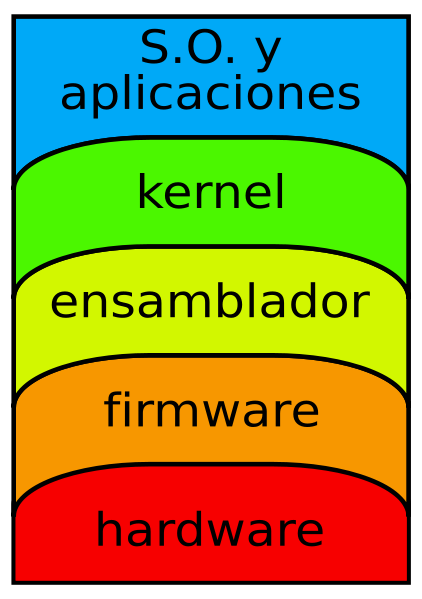
Image of a typical computer architecture taken from Wikipedia, from the article Computer architecture
So that you understand the magnitude of what lies underneath when working with any programming language (and when using applications), an Android device follows the same pattern. From the physical side, the hardware, which is the device itself, to the smartphone or tablet you usually hold in your hand. Far from the hardware, as users and Android application developers we will only work with the most superficial layer of the computer architecture, the “OS and applications” one.
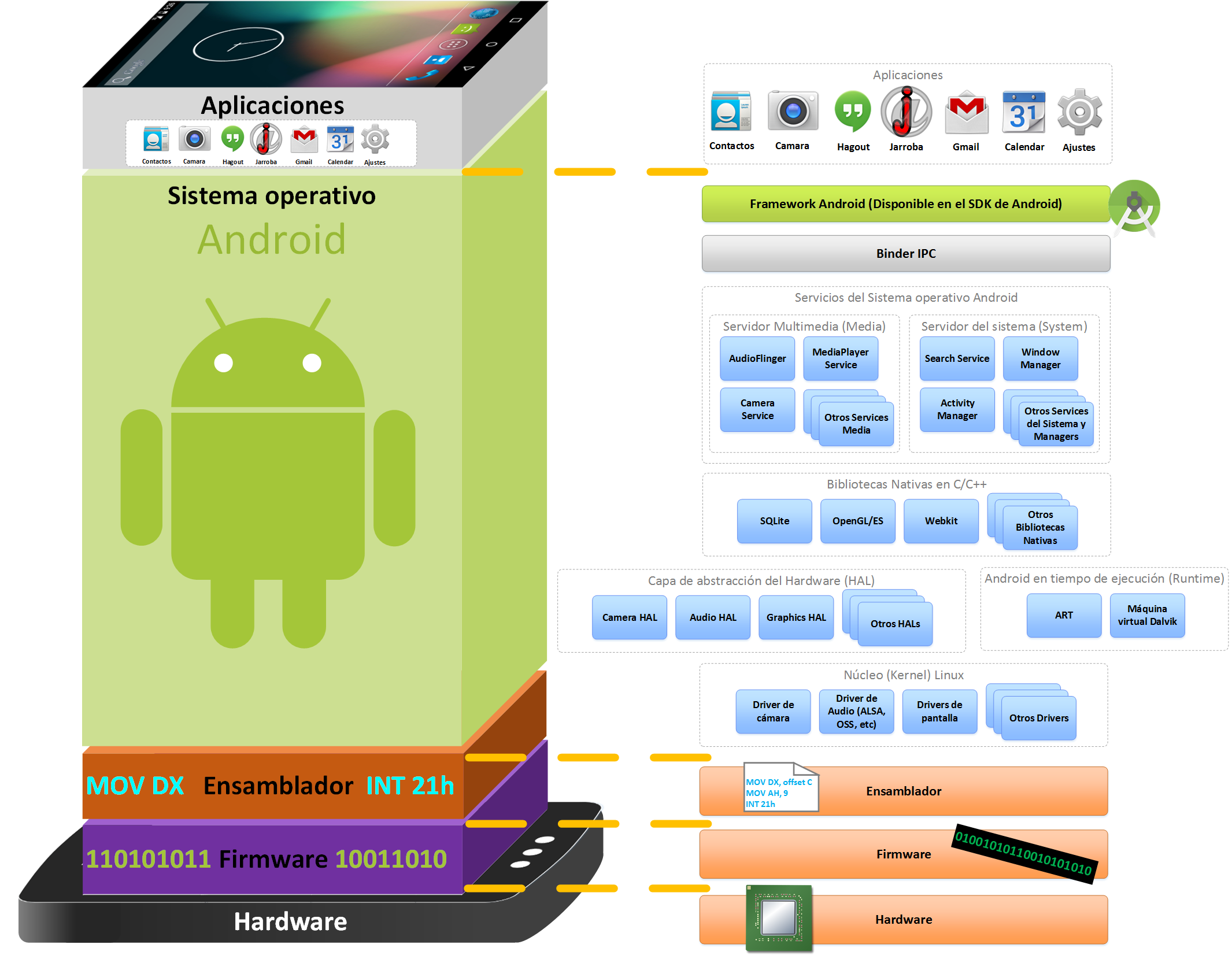
I’m going to explain the Android architecture and each of its parts in detail (the following image represents the Android architecture stack from the top, which is the application level, down to the base, the hardware):
- Applications: any kind of Android application. This is the layer the user interacts with.
- Android Framework: Access to the Android API to reuse components or modify them. This is the layer we will work in as Android developers (we will work with the SDK; we’ll see how it’s used). Everything in this layer will be an exact representation of the HAL layer.
- Native C/C++ libraries: the developer can use them through the Framework. This is the layer where we can work at a low level as Android developers (you work with the NDK and program in C/C++).
- Android Runtime: Java language libraries that run on:
-A single instance in the Dalvik virtual machine (the old one)
-The Android Runtime execution environment (known by its acronym ART)
- Binder IPC (Inter-Process Communication): A mechanism that lets the Framework go beyond a single process and call the Android operating system services. This lets the APIs interact with the Android operating system services. These communications are hidden from the developer in the Framework layer (we’ll talk more about this in the chapter on Services).
- Android System Services: Almost all the functionality in the Framework API will communicate with some system service (Service) to access the hardware involved. Each service is split into components focused on specific functionality. Services are grouped into:
-System: Includes window managers, notification managers, etc.
-Media: Includes those involved in multimedia playback and recording (images, audio, video, etc.)
- Hardware Abstraction Layer (HAL): Interface that allows the Android operating system to call the device’s driver layer.
- Linux Kernel: Hardware abstraction layer and security services, memory management, process management, network stack, driver model, etc.
- Assembly: low-level language for programmable integrated circuits. It is a mnemonic representation of binary machine code plus several constants, making programming easier than using binary directly (more information at http://es.wikipedia.org/wiki/Lenguaje_ensamblador).
- Firmware: Machine instructions burned into a chip for specific purposes (more information at http://es.wikipedia.org/wiki/Firmware)
- Hardware: The physical parts and components (more information at http://es.wikipedia.org/wiki/Hardware)
Difference between Dalvik and ART. ART vs DALVIK
It doesn’t matter when developing Android applications, since we will work with the Framework layer (and, at most, with the C/C++ libraries layer if we use the NDK). The rest is automatic and transparent for Android application developers.
That is, when we run an application developed for ART, it will also work on Dalvik, thanks to backward compatibility.
Dalvik was in use from the birth of Android and was replaced by ART starting with version 5.0 (in version 4.4 using it was optional).
Dalvik or ART is found on every device or emulator that runs Android (depending on the Android version, it’s Dalvik or ART).
Bytecode
In programming in general, bytecode is the result of doing the heavy work of processing the source code (the code you’ve written) and optimizing it. The result is a file called bytecode. This file is portable across architectures. The virtual machine will be in charge of compiling (translating) it at runtime into machine code for the system where it is deployed. This is much faster than doing all the work from the source code, since the work has been done beforehand.
In Android programs are usually written in Java and compiled to bytecode by the Java virtual machine. Then it is translated into bytecode files for Dalvik or for ART:
- DEX (Dalvik Executable Format): Bytecode file that will always be called “classes.dex”, compressed inside the APK file. This file is generic and not prepared for specific hardware, so it has to be translated into machine code on each device (so that it doesn’t have to be translated every time the application runs, either an ODEX file or an ELF file will be created). It is required by both the Dalvik virtual machine and ART.
- ODEX (Optimized DEX): This file contains the instruction set used by the Dalvik virtual machine. Every time the application runs on the device, the Dalvik virtual machine dynamically translates the parts of the DEX file that are used and saves them in the ODEX file; as more gets translated, more is saved in the ODEX file. It is generated from a DEX file with the “dexopt” tool. It is required by the Dalvik virtual machine.
- ELF (Executable and Linkable Format): The ELF file is an executable for Linux; it is a file format for executables, object code, shared libraries and core dumps. That is, the DEX bytecode file is translated into the ELF file, which is the translation to machine code of the hardware where it will run; that’s why it is compiled on the device itself at installation time (unlike ODEX, ELF is the complete translation of the whole DEX file in one go during installation; ODEX is the sum of the parts the Dalvik virtual machine has translated each time the application ran). It is generated from a DEX file with the “dex2oat” tool. It is required by ART (it replaces the ODEX file of the old Dalvik virtual machine).
Packaging an Android program into an APK
The Build System combines the Java JDK and the Android SDK tools. Testing tasks are carried out as a final check, making sure the application works as expected under real conditions. With Gradle in Android Studio, the application is compiled, signed and optimized all at once. When it’s ready, you get a signed APK application that can be distributed to users directly or through the “Google Play” app store. The resulting APK file will contain: compiled code, resources, the manifest file (AndroidManifest.xml), among others.
Below I describe the steps followed to create an APK package (see the next image). It goes from the top of the image, where we have the code we’re writing in Android Studio and all the resources we add to our application, down to the bottom, where we get the signed APK file.
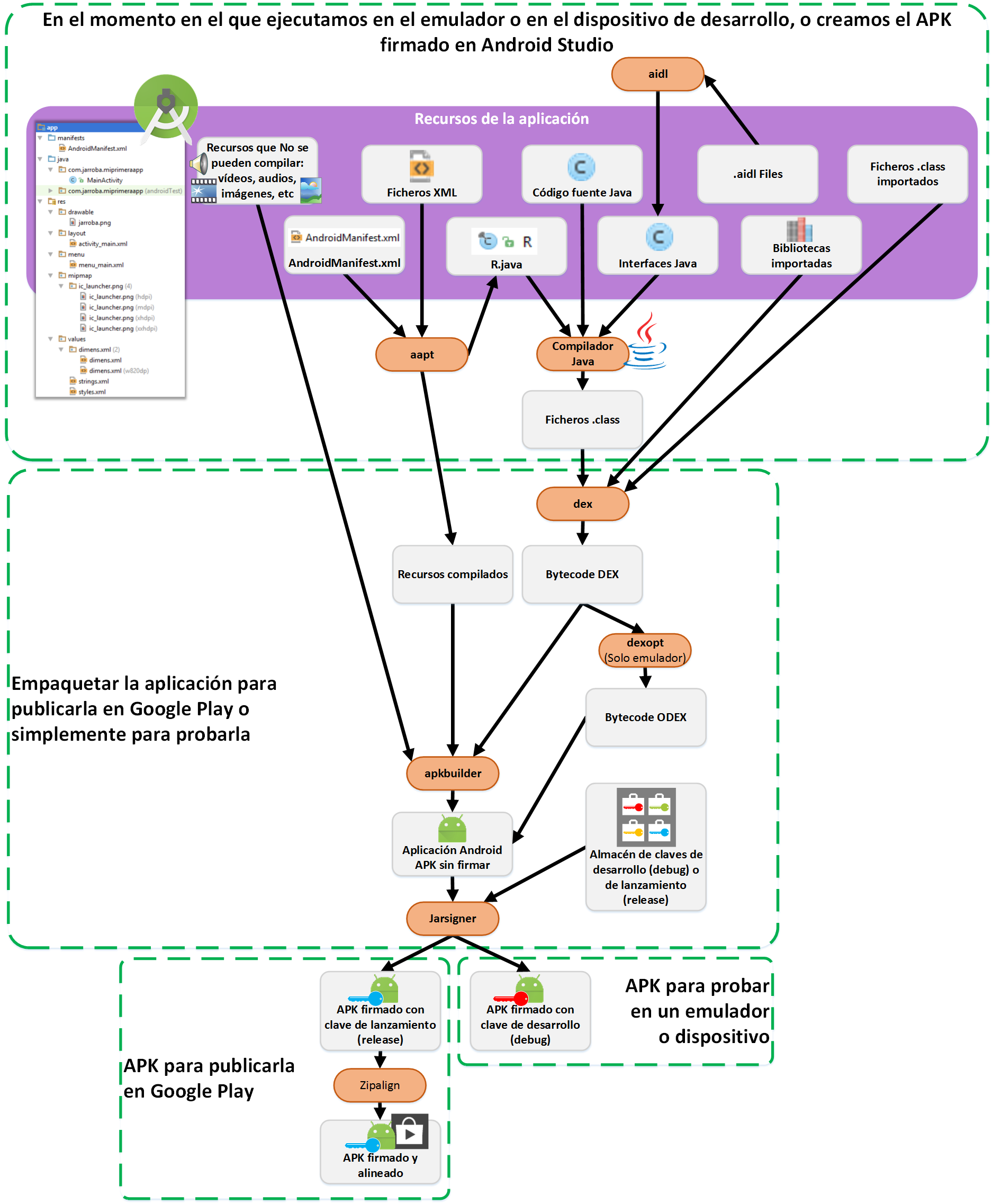
I’ll explain the steps seen in the previous image, tool by tool (most of these tools can be found as executables inside the Android SDK folder, while for the Java compiler we use Java’s own. Keep in mind that this whole process is automatic and we don’t need to worry about it):
- aapt (The Android Asset Packaging Tool): Compiles the “AndroidManiest.xml” file and the Activities’ XML files. It also generates the “R.java” file to reference resources from Java code (more information in later chapters).
- aidl (Android Interface Definition Language): Converts the “.aidl” interfaces (interfaces to communicate services through inter-process communication, IPC; we’ll go into detail in future chapters) into Java interfaces.
- Java compiler: takes all the Java code, including the “R.java” files and the “.aidl” interfaces, and compiles it into “.class” files.
- dex: Converts the “.class” files into DEX bytecode files. In addition, any imported library, as well as other “.class” files you’ve included, will be converted to DEX files, putting all the classes of our code into a single DEX file. To optimize space, duplicate Strings and other repeated constants are included only once in the DEX file.
- dexopt: Only applied when running on the emulator from Android Studio. Converts the DEX file into the compiled ODEX file through AOT (Ahead Of Time) compilation so that it works solely and exclusively on the emulator (more information in later questions). In this case the ODEX is not packaged inside the APK, but placed next to the APK.
- apkbuilder: images, videos and other things that can’t be compiled, together with the DEX files, are packaged into the APK file.
- Jarsigner: We sign the APK file with a development (debug) or release key. The resulting APK file can now be installed on any Android device.
- Zipalign: If the APK file has been signed with the release key, the file must be aligned (data structure alignment consists of shifting the bits to a multiple of the word size the processor can handle, and padding whatever is missing; in Android it’s normally 4 bytes). The resulting aligned APK file improves memory system performance because of the way the processor manages memory on a device.
The APK file
You can deduce what the APK file resulting from the previous process will contain. The files are:
- DEX: contains all the Java files, such as our Java files or R.java
- Compiled resources: XML files, such as AndroidManifest.xml, or the Layouts
- Uncompiled resources: videos, images, audio, etc.
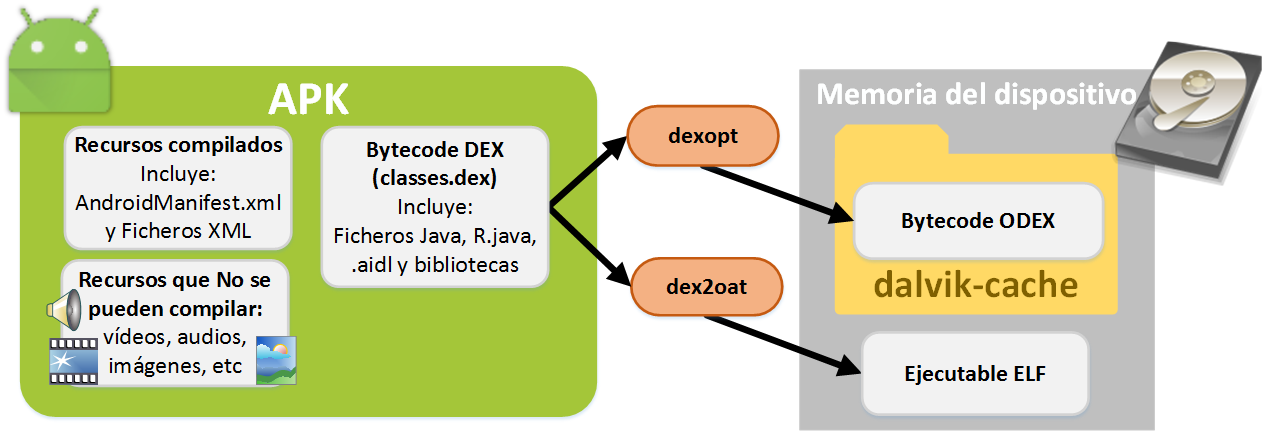
Also remember that the APK is signed and aligned.
The ELF file for ART is missing; it wasn’t obtained in the previous process. Converting a DEX file to an ELF file is done with the “dex2oat” tool. This tool lives inside the Android operating system. As soon as we install the APK file on the Android operating system, the “dex2oat” tool takes the DEX file and creates the ELF file.
In Dalvik, the “dexopt” tool is applied to the parts of the DEX file that are in use, to generate the ODEX file at the time of execution by the Dalvik virtual machine.
Installing the APK on the device
The DEX file in its original state is said to be in the Pre-dexopt state.
At the moment the application is installed on the device, the DEX file is modified:
- It is optimized
- The byte order is swapped according to the Endianness format, which describes how data is stored and the architecture the processor works with (that is, how data is stored in big-endian, which is the natural order, little-endian, which goes from least significant to most significant, and middle-endian, which supports both of the previous formats)
- Simple data structures are created
- Library functions are linked inline (a copy of the function’s source code is inserted into the section of code where it is called)
- Objects of empty classes will be short-circuited (referring in programming to not being evaluated unless necessary).
If we work with ART, when the application is installed the ELF file will be generated from the DEX.
If we work with Dalvik, the ODEX file may be created at installation, although it won’t be complete.
Here’s a curiosity you’ve surely noticed when your Android device gets updated: when the update finishes, all the installed applications have to be updated. This update of all installed applications is the compilation of the DEX bytecodes inside your device.
Dalvik virtual machine
It is a virtual machine developed by Google for Android.
Although it’s very similar to the Java virtual machine, the Dalvik virtual machine differs in that:
- It takes up less space
- It is able to run 16-bit instruction sets, instead of the 8 bits of the Java virtual machine
- The constant pool has been modified to use only 32-bit indexes, for simplicity.
The Dalvik virtual machine is characterized by performing “just-in-time” (JIT) compilation. In short, every time an application runs, the Dalvik virtual machine’s compiler translates that application’s bytecode with the “dexopt” tool at runtime into machine code, and runs it (JIT, Just-In-Time. More information in the following questions).
It’s worth mentioning that each application runs on its own instance of the virtual machine (there will be as many virtual machines instantiated as applications running). This way, if any problem occurs with an application, it won’t affect the rest of the running applications.
The Dalvik virtual machine opens the APK file and decompresses the DEX file inside. Then it will create in cache or update the ODEX file if permissions allow it, and then it will run it.
JIT compilation (Just-In-Time)
JIT compilation is compiling the program’s bytecode at runtime.
To make it clear, let’s take an example for the case at hand. Suppose you have a phone with an application. Of this application, only the DEX bytecode is inside the APK file. When you tap the icon to run the application for the first time, at that moment the application is compiled on your device by the Dalvik virtual machine, which converts the bytecode into machine code, which is the ODEX file. This code is now understood by the hardware. This is the moment when we can say the application really works.
Obviously, this JIT compilation process takes time, and it would be a bit silly to repeat it several times for the same code of the same application; so it isn’t compiled every time the same program runs. Instead, the DEX bytecode is compiled and the resulting machine code is cached in the ODEX file. On later runs of the same application, the code already cached in the ODEX file is reused.
The reasons for doing JIT compilation are:
- Compiling the bytecode into machine code optimized for the CPU and operating system where it will run.
- The system can collect statistics about the application’s execution on a machine. This way, it can decide to recompile it differently to optimize performance.
- The system can perform global optimizations without losing the advantages of dynamic linking (the operating system loads shared libraries into RAM and links the ones the application needs; for example, if we develop an application that uses the camera, Android will load the Camera library into RAM and link it to our application so it can use it).
The “dexopt” tool
All the classes in the DEX file will be verified and optimized by loading all the classes into the virtual machine and running them. If something fails, it won’t be verified or optimized.
The “dexopt” tool performs an abbreviated initialization of the virtual machine, loading zero or more DEX files from the bootstrap class path, and then verifies and optimizes as much as possible of the target DEX file. When it finishes, the process exits, freeing all resources.
The “dexopt” tool can generate ODEX files from DEX files in one of the following cases (the letter before each description matches the letter of each application in the image):
A) Production application (for Google Play): The system’s application installer generates it when the application is installed for the first time. This application has privileges to write to the “dalvik-cache” directory. If not all of the DEX code has been converted to ODEX, it will be generated when the application runs.
B) Development application for the emulator: The Build System performs an AOT compilation (Ahead Of Time) at the moment the Android SDK packages the APK. The DEX file is extracted and removed (the resulting APK will have no DEX file). The ODEX is stored next to the original compressed file (not in the “dalvik-cache” directory), becoming part of the system image. This case requires using the emulator, forcing a JIT compilation of the DEX file, to extract the resulting ODEX file to the “dalvik-cache” directory.
C) Development application for a physical device: The Dalvik virtual machine performs a JIT compilation. The output goes to a special directory called “dalvik-cache”. This method is only allowed for development, where the permissions of the “dalvik-cache” directory are not restricted. It is not allowed in production.
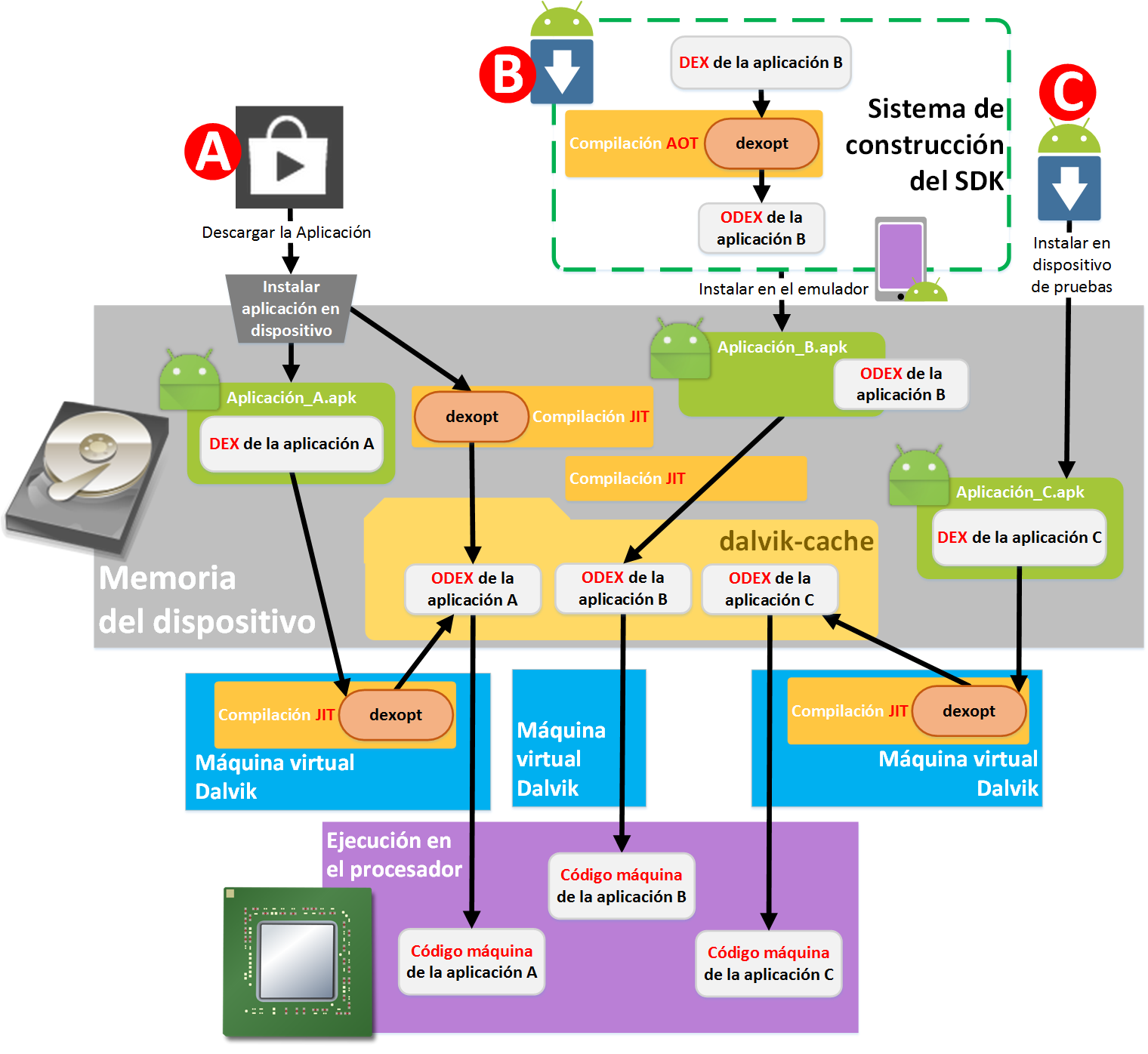 The “dalvik-cache” directory is located exactly at the path “$ANDROID_DATA/data/dalvik-cache”.
ODEX files will have a name derived from the path where the DEX file is located. You only have permission to read –but not modify or delete– the DEX files of both our application and others. Applications only have permission to access their own ODEX file.
Creating the ODEX from the DEX, in the cases where “Dalvik compiles the ODEX file with JIT” and “the application installer generates the ODEX file”, follows these steps:
1st If it doesn’t exist, the “dalvik-cache” directory is created.
2nd The DEX file is extracted from the APK file. And a small amount of space is reserved at the start of the DEX file for the ODEX file header.
3rd The file is mapped into memory so it can be accessed easily, and it is adjusted for the system it’s on. This includes byte swapping, byte reordering and basic structural checks (such as making sure the offsets and indexes in the files are within valid ranges), without changing anything significant in the DEX file.
The bytecode verification process involves scanning all the instructions of every method in every class of a DEX file. The goal is to identify illegal instruction sequences (an example of something illegal is: making a call from one package to a method of a class in a different package) so that the checks don’t have to be done at runtime. Many of the calculations are needed for exact garbage collection.
For performance reasons, the optimization will assume that verification has run successfully. By default, Dalvik verifies all classes, and only optimizes the classes that have been verified.
Once verification has passed successfully, a flag will be set in the ODEX. This way it won’t be verified again when it’s reloaded.
Dalvik’s optimization consists of the following:
- For virtual method calls, it replaces the method index with a vtable index.
- For instance field get/put, it replaces the field index with a byte offset. It also merges the boolean / byte / char / short variants into a single 32-bit form.
- It replaces high-volume calls, such as String.length(), with inline replacements. It skips the usual call to overloaded methods, switching directly from the interpreter to the native implementation.
- It prunes empty methods.
- It adds precomputed data.
With regard to optimization, the following problems can arise:
- The vtable indexes and byte offsets are subject to change if the virtual machine is updated.
- If the superclass (in inheritance, the parent class, the one that is inherited from) belongs to a different DEX file, and that other DEX with the parent class is updated, we’ll have to make sure our indexes and offsets are updated as well.
ART runtime
ART (Android Runtime) performs an AOT compilation at installation time to obtain the ELF executable (it replaces Dalvik’s ODEX file).
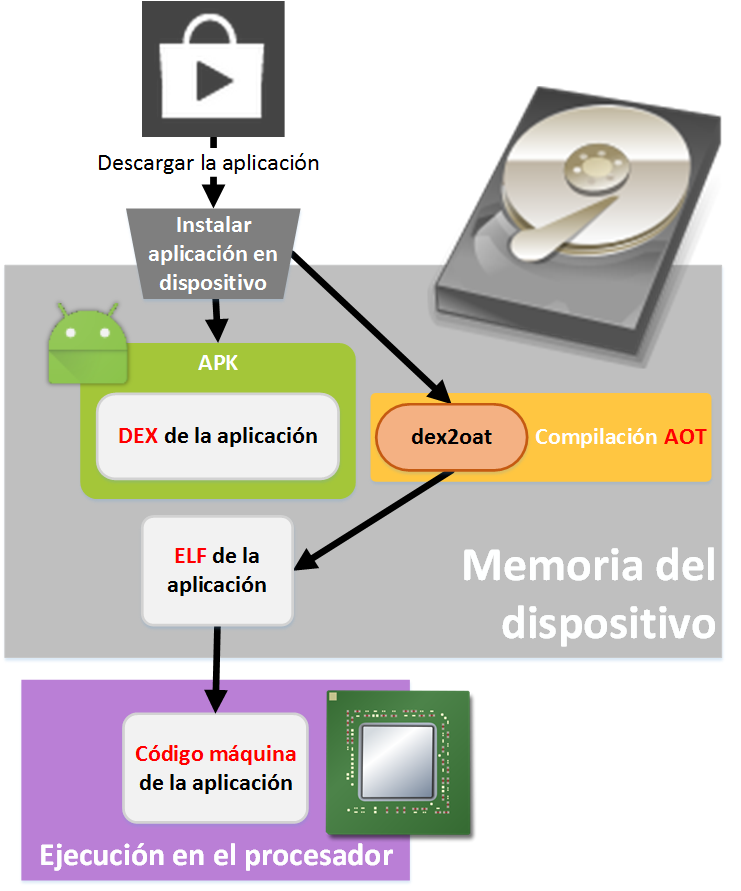 ART improves on the Dalvik virtual machine in the following ways:
- Improves garbage collector performance
- Improves application debugging
- Improves development profiling tools
- Consumes less energy
- Improves overall system performance
- There is no runtime code cache
- Since it only uses RAM, it can be paged (Dalvik used cache memory that couldn’t be paged)
- It pre-initializes the set of classes at compile time, which improves RAM performance
- Compiling with the “dex2oat” tool from a DEX file to an ELF takes almost three times longer than compiling with the “dexopt” tool from DEX to ODEX. Despite this, the result is a full compilation in the ELF files, unlike ODEX, where only part of it was compiled
As an added bonus, ART maintains backward compatibility with Dalvik by using the same “.dex” bytecode. But ART doesn’t use “.odex”; it replaces it with “ELF” executables.
AOT compilation (Ahead-Of-Time)
AOT compilation is compiling the bytecode into machine code before the program runs.
In Android, the DEX bytecode is compiled at the moment the application is installed on the device, becoming the ELF executable file.
The reasons for doing AOT compilation are:
- Execution is very fast since programs and libraries are already compiled. It saves hard drive space and RAM, and reduces startup time. With AOT, the number of compilations is reduced and the processor is used less, which saves more battery; that’s why it’s very useful on mobile devices.
- By contrast, compiling “just in time” (JIT) is too slow –because it compiles while running– when the code is complex, and it causes latency, which doesn’t happen when compiling with AOT. Although AOT doesn’t allow certain optimizations that can be done with JIT.
Odex and Deodex (or Odexing and Deodexing)
You’ve possibly heard these words if you’ve used or seen anything about ROMs (ROM comes from “Read Only Memory”, a read-only memory that stores the operating system; if you remember the CD-ROM era, an Android ROM is like the CD-ROM that the operating system comes on to install it on a device). What’s more, you’ve surely heard these words if the terms cooked or modified ROM ring a bell (A “cooked ROM” means the operating system has been modified with applications, animations, themes, internal processes, settings, etc. chosen by its creator; and when we install it on our device, it will look the way they modified it from the start).
You’ve surely noticed that the words “Odex” and “Deodex” look like the ODEX file. As we saw earlier, ODEX is the bytecode that optimizes application startup for each device (it’s the DEX optimized for the Dalvik virtual machine).
The problem for ROM cooks is that if they modify an APK file already installed on the device and don’t refresh the ODEX file, it causes errors. So they have to “deodex” the APK file before working with it, to make their job easier.
I’ve used “Deodex” as a verb, since it’s the action. We have types of actions with the bytecode conversion:
- Odex (Odexing): This is what we already saw (the “normal” one), what’s done when creating the ODEX file from the DEX file using the “dexopt” tool.
- Deodex (Deodexing): It involves choosing an APK file we want and looking for its ODEX file in the cache memory, to put it inside that APK. This speeds up development, since you can modify APK files without worrying that the ODEX is out of date because it’s in the cache memory; it ensures the integrity of the application. A whole ROM can be “deodexed”, which implies the “deodexing” of all its installed APK files.
Therefore, to work with cooked ROMs it’s better that they have been “Deodexed”.
Other difficulties are:
- The ODEX file has dependencies on each BOOTCLASSPATH file that is loaded when it’s generated. The ODEX file is only valid when exactly that BOOTCLASSPATH file is used. Dalvik enforces this by storing a checksum of each file in the ODEX file. This makes it dependent on its checksum, ensuring that each file’s checksum matches the ODEX file being loaded. The BOOTCLASSPATH file is a list of APKs or JARs (which are “core.jar”, “ext.jar”, “framework.jar”, “android.policy.jar” and “services.jar”, and can be found in the “/system/framework” directory) from which classes can be loaded. However, some APKs have extra dependencies on other APKs or JARs (in addition to the 5 above). The ODEX file dependencies complicate modifying already installed applications. This is because you can’t take an APK with its ODEX file from one system image and try to run it on another system image (unless they use exactly the same Framework files, which is almost impossible).
- If any change is made to the BOOTCLASSPATH file, it will invalidate all the ODEX file dependencies (which implies the invalidation of all the APKs and JARs on the device).
- ODEX files are difficult to convert back to DEX files.
- The first time a “deodexed” application is run by the Dalvik virtual machine, it will take longer to start. On the rest of the runs the application won’t take longer, since it will have already moved the ODEX file to the cache folder.
Author’s note
This article -both text and graphics- has been a work of gathering information from different sources over several months, and my own adaptation of it. Although I’ve tried to be as faithful and precise as possible on the theoretical level, being documented by the different sources that provide the most direct (reliable) information, and drawing on the knowledge I have, it is my duty to point out that, due to inconsistencies and contradictions in the official documentation, and also due to the evolution of the architecture itself, it may not match reality.
With my best wishes, I hope to clear up a lot of doubts, to make this a good article, and to make the information as complete as possible; so that you don’t have to spend as much time as I did gathering it, breaking it down and understanding it.
If you have any suggestions, feel free to leave them in the comments.
And if you’ve never programmed in Android and you’re curious to try it, you can learn to program in Android in a very simple way with our free book at the following address: https://jarroba.com/libro-android-100-gratis/
Bibliography
- Android (operating system) (Wikipedia)
- Android runtime and Dalvik (Android Open Source Project)
- http://source.android.com/devices/index.html
- Get Started (Android Open Source Project)
- Dalvik (software) (Wikipedia)
- Android Runtime (Wikipedia)
- Configure your build (Android Developers)
- Prepare your app for release (Android Developers)
- http://tools.android.com/tech-docs/new-build-system/build-workflow
- Ahead-of-time compilation (Wikipedia)
- Just-in-time compilation (Wikipedia)
- https://code.google.com/p/smali/wiki/DeodexInstructions
- docs/dexopt.html (platform/dalvik, Git at Google)
- https://software.intel.com/es-es/blogs/2014/06/18/art-vs-dalvik-introducing-the-new-android-x86-runtime
- Will my Android App still run with ART instead of Dalvik? (Intel)
“Android Architecture – ART vs Dalvik” by Ramón Invarato at jarroba.com, licensed under Creative Commons Attribution-NonCommercial-ShareAlike 3.0. Registered at Safe Creative.

You may also like
How to Use Multiple GitHub Accounts over HTTPS
Learn how to use several GitHub accounts over HTTPS: configure git so each repository gets its own credentials in your keychain and avoid 403 errors.


100% Free Android Book
100% free Android book that teaches everything you need to know about Android. Explained in a fun, easy way with hundreds of images.
Leave a comment