
Android Error – Application Does Not Specify an API Level
Fix the Android warning "Application does not specify an API level requirement" by adding minSdkVersion to your Manifest.xml, so you can publish to the Market.
This appears in the Log when the application starts:

With the following telltale line in the Log:
WARNING: Application does not specify an API level requirement!
Although it lets you run the application in the emulator, it’s important to fix it so you can upload the application to the Market.
Solution
You fix it in the “Manifest.xml” file, right after the opening <manifest> declaration line, by adding this line:
<uses-sdk android:minSdkVersion=“n” />
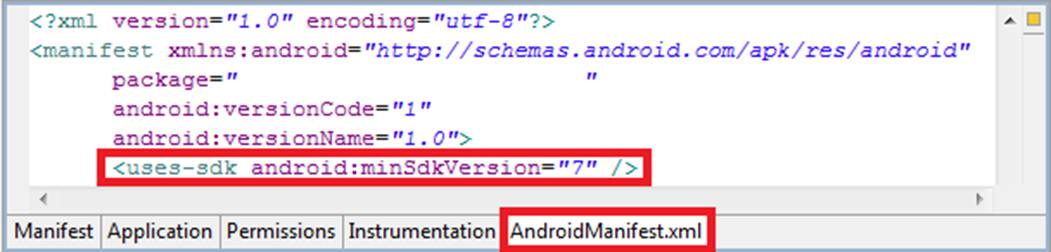
Where n is the API version, which corresponds to the platform version used. You can find the correspondences here: page with the Android API levels
In the example in the images, 7 was added, which corresponds to the version used to create that application, which is Android 2.1.
“Android Error – Application Does Not Specify an API Level” by Ramón Invarato at jarroba.com, licensed under Creative Commons Attribution-NonCommercial-ShareAlike 3.0. Registered at Safe Creative.

You may also like


Android Error – Higher Compiler Compliance Level Required
Getting the Android error "requires compiler compliance level" in Eclipse? Here are three simple solutions to fix it step by step.
Android Error – A Newer ADT Version Is Required
Getting the Android error "This Android SDK requires Android Developer Toolkit version X or above"? Learn how to install or update the ADT plugin in Eclipse.
Leave a comment