
Android Error – Higher Compiler Compliance Level Required
Getting the Android error "requires compiler compliance level" in Eclipse? Here are three simple solutions to fix it step by step.
You will see the following error:
Android requires compiler compliance level X or Y. Found 'Z' instead. Please use Android Tools > Fix Project Properties.

There are several ways to fix this problem. We try the first one, and if it doesn’t work, we try the next one.
Solution 1
Right-click the file that shows the error and select “Android Tools / Fix Project Properties”.

Check whether the problem has been fixed. If not, move on to the next step.
Solution 2
Go to the project, then choose a class that has the problem. Go to a line with the error and hover the pointer over it; the possible fixes you can try will appear.
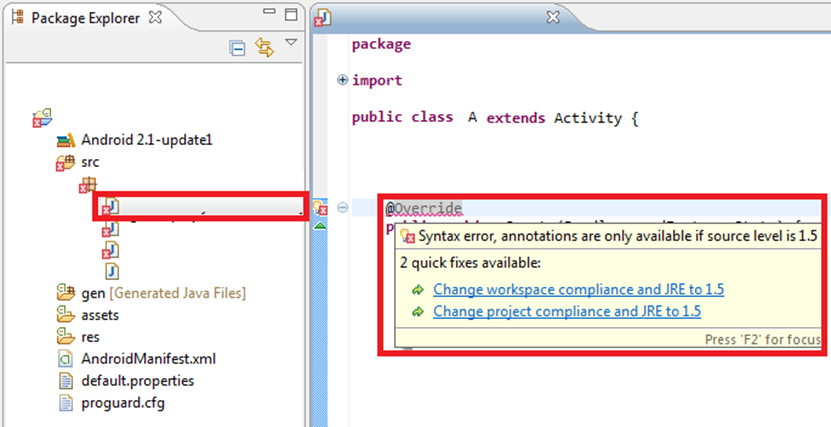
Try the different auto-fix options that Eclipse offers. Check whether the problem has been fixed. If not, move on to the next step.
Solution 3
If, for example, you get errors on @Overrides and other annotations from other compliance levels, try changing the compiler version. To do this, right-click the project that gives you trouble and select “Properties”.
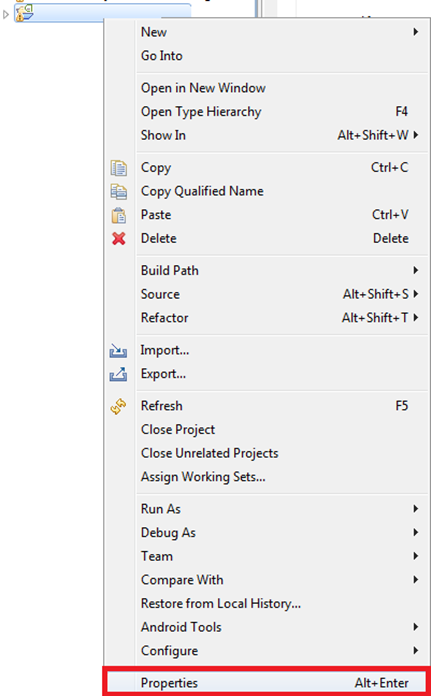
Then, in the “Java Compiler” tab, select “Enable Project specific settings” and change the version under “Compiler compliance level:” (the highest number, which will be the newest, is recommended). Apply the changes and click yes on the message that appears.

The problem should now be fixed.
“Android Error – Higher Compiler Compliance Level Required” by Ramón Invarato at jarroba.com, licensed under Creative Commons Attribution-NonCommercial-ShareAlike 3.0. Registered at Safe Creative.

You may also like


Android Error – A Newer ADT Version Is Required
Getting the Android error "This Android SDK requires Android Developer Toolkit version X or above"? Learn how to install or update the ADT plugin in Eclipse.
Android Error – Eclipse Throws an Error That Doesn’t Exist Anywhere
Eclipse shows a red X on your Android project but no error anywhere? Follow these step-by-step solutions to fix the phantom error and the R.java problem.
Android Error – Errors on Methods with @Override Annotations, Listener Types or Overridden Methods
Getting errors on every @Override annotation after importing or copying code into your workspace? Find out why it happens and how to fix it.
Android Error – Application Does Not Specify an API Level
Fix the Android warning "Application does not specify an API level requirement" by adding minSdkVersion to your Manifest.xml, so you can publish to the Market.
Leave a comment