
Android ListView in Just a Few Lines
Learn how to build an Android ListView with the least code possible, using ListActivity, SimpleCursorAdapter and a MatrixCursor. Clean, short and easy.
In this article I’m not going to go into as much detail as in the full article about lists, which I recommend you read, if you haven’t already, before or after this one; that one will help you understand all the ins and outs of how to design a list from top to bottom, how to build your own adapter, a list in an XML Layout, and how to tell each row apart so you can do different tasks on each one of those mounted in the list. No, not here. Here we’ll do the opposite. We’re going to build a list a different way: I’ll show you how to make a list with as little code as possible and in the simplest way. We’ll take advantage of a lot of Android API classes, so we’ll write very little code. We’ll build the same list example as in the link above, but abstracting away many aspects so the code ends up very clean and clear. We’ll have the same list of birds:
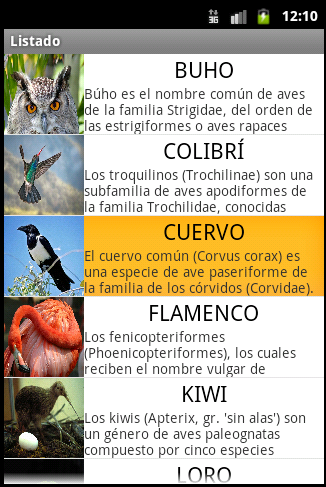
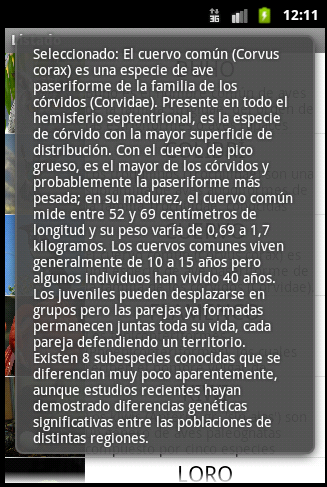
When you tap an item, it shows the content of the selected element.
The only Layout we’re going to have is the “entrada.xml” element:
<?xml version="1.0" encoding="utf-8"?>
<LinearLayout xmlns:android="http://schemas.android.com/apk/res/android"
android:layout_width="fill_parent"
android:layout_height="wrap_content"
android:orientation="horizontal" >

	<ImageView
	android:id="@+id/imageView_imagen"
	android:layout_width="80dp"
	android:layout_height="80dp"
	android:adjustViewBounds="true"
	android:scaleType="fitXY"
	android:contentDescription="Descripción del contenido de la imagen"
	android:src="@android:drawable/ic_menu_gallery" />

	<LinearLayout
	android:layout_width="fill_parent"
	android:layout_height="match_parent"
	android:gravity="center"
	android:orientation="vertical" >

		<TextView
		android:id="@+id/textView_superior"
		android:layout_width="wrap_content"
		android:layout_height="wrap_content"
		android:text="Large Text"
		android:textAppearance="?android:attr/textAppearanceLarge" />

		<TextView
		android:id="@+id/textView_inferior"
		android:layout_width="wrap_content"
		android:layout_height="wrap_content"
		android:text="Small Text"
		android:textAppearance="?android:attr/textAppearanceSmall" />

	</LinearLayout>

</LinearLayout>
I’ll explain the Java code step by step. Unlike other Jarroba tutorials where I first explain and then show the full code, here I’ll do it the other way around, because the title of the article, "in a few lines", takes priority; so you can marvel at how little code there is (leaving out the example Strings, which take up the most space 🙂 ), how nice it looks, and how easy it is to program a list. Here is the full code of “MainActivity.java”:
import android.app.ListActivity;
import android.database.MatrixCursor;
import android.os.Bundle;
import android.support.v4.widget.SimpleCursorAdapter;
import android.view.View;
import android.widget.ListView;
import android.widget.TextView;
import android.widget.Toast;
public class MainActivity extends ListActivity{

	@Override
	protected void onCreate(Bundle savedInstanceState) {
		super.onCreate(savedInstanceState);

		//We simulate pulling the data from the database into a cursor
		String[] columnasBD = new String[] {"_id", "imagen", "textoSuperior", "textoInferior"};
		MatrixCursor cursor = new MatrixCursor(columnasBD);
		cursor.addRow(new Object[] {"0", R.drawable.im_buho, "BUHO", "Búho es el nombre común de aves de la familia Strigidae, del orden de las estrigiformes o aves rapaces nocturnas. Habitualmente designa especies que, a diferencia de las lechuzas, tienen plumas alzadas que parecen orejas."});
		cursor.addRow(new Object[] {"1", R.drawable.im_colibri, "COLIBRÍ", "Los troquilinos (Trochilinae) son una subfamilia de aves apodiformes de la familia Trochilidae, conocidas vulgarmente como colibríes, quindes, tucusitos, picaflores, chupamirtos, chuparrosas, huichichiquis (idioma nahuatl), mainumby (idioma guaraní) o guanumby. Conjuntamente con las ermitas, que pertenecen a la subfamilia Phaethornithinae, conforman la familia Trochilidae que, en la sistemática de Charles Sibley, se clasifica en un orden propio: Trochiliformes, independiente de los vencejos del orden Apodiformes. La subfamilia Trochilinae incluye más de 100 géneros que comprenden un total de 330 a 340 especies."});
		cursor.addRow(new Object[] {"2", R.drawable.im_cuervo, "CUERVO", "El cuervo común (Corvus corax) es una especie de ave paseriforme de la familia de los córvidos (Corvidae). Presente en todo el hemisferio septentrional, es la especie de córvido con la mayor superficie de distribución. Con el cuervo de pico grueso, es el mayor de los córvidos y probablemente la paseriforme más pesada; en su madurez, el cuervo común mide entre 52 y 69 centímetros de longitud y su peso varía de 0,69 a 1,7 kilogramos. Los cuervos comunes viven generalmente de 10 a 15 años pero algunos individuos han vivido 40 años. Los juveniles pueden desplazarse en grupos pero las parejas ya formadas permanecen juntas toda su vida, cada pareja defendiendo un territorio. Existen 8 subespecies conocidas que se diferencian muy poco aparentemente, aunque estudios recientes hayan demostrado diferencias genéticas significativas entre las poblaciones de distintas regiones."});
		cursor.addRow(new Object[] {"3", R.drawable.im_flamenco, "FLAMENCO", "Los fenicopteriformes (Phoenicopteriformes), los cuales reciben el nombre vulgar de flamencos, son un orden de aves neognatas, con un único género viviente: Phoenicopterus. Son aves que se distribuyen tanto por el hemisferio occidental como por el hemisferio oriental: existen cuatro especies en América y dos en el Viejo Mundo. Tienen cráneo desmognato holorrino, con 16 a 20 vértebras cervicales y pies anisodáctilos."});
		cursor.addRow(new Object[] {"4", R.drawable.im_kiwi, "KIWI", "Los kiwis (Apterix, gr. 'sin alas') son un género de aves paleognatas compuesto por cinco especies endémicas de Nueva Zelanda.1 2 Son aves no voladoras pequeñas, aproximadamente del tamaño de una gallina. Antes de la llegada de los humanos alrededor del año 1300, en Nueva Zelanda los únicos mamíferos que había eran murciélagos, y los nichos ecológicos que en otras partes del mundo eran ocupados por animales tan diversos como caballos, lobos y ratones fueron utilizados en Nueva Zelanda por pájaros (y en menor proporción por ciertas especies de reptiles). La denominación kiwi es maorí, idioma del pueblo homónimo de linaje malayopolinesio que colonizó Nueva Zelanda antes de la llegada de los europeos."});
		cursor.addRow(new Object[] {"5", R.drawable.im_loro, "LORO", "Las Psitácidas (Psittacidae) son una familia de aves psitaciformes llamadas comúnmente loros o papagayos, e incluye a los guacamayos, las cotorras, los periquitos, los agapornis y formas afines."});
		cursor.addRow(new Object[] {"6", R.drawable.im_pavo, "PAVO", "Pavo es un género de aves galliformes de la familia Phasianidae, que incluye dos especies, el pavo real común (Pavo cristatus) y el pavo real cuelliverde (Pavo muticus).1"});
		cursor.addRow(new Object[] {"7", R.drawable.im_pinguino, "PINGÜINO", "Los pingüinos (familia Spheniscidae, orden Sphenisciformes) son un grupo de aves marinas, no voladoras, que se distribuyen únicamente en el Hemisferio Sur, sobre todo en sus altas latitudes."});

		//We add the data to the Adapter and tell it where to draw each piece of data in the Layout row
		String[] desdeEstasColumnas = {"imagen", "textoSuperior", "textoInferior"};
		int[] aEstasViews = {R.id.imageView_imagen, R.id.textView_superior, R.id.textView_inferior};
		SimpleCursorAdapter adapter = new SimpleCursorAdapter(this, R.layout.entrada, cursor, desdeEstasColumnas, aEstasViews, 0);

		ListView listado = getListView();
		listado.setAdapter(adapter);
	}

	@Override
	public void onListItemClick(ListView lista, View view, int posicion, long id) {
		// Do something when a list item is selected
		TextView textoTitulo = (TextView) view.findViewById(R.id.textView_superior);

		CharSequence texto = "Seleccionado: " + textoTitulo.getText();
		Toast.makeText(getApplicationContext(), texto, Toast.LENGTH_LONG).show();
	}

}
That’s it. There is no more code. All the code above is what you need for a list to work in the most optimal way in terms of code, using as much of the Android API as possible. The rest of the article is the explanation of each part of the code, which I’ll get to without further ado. We boil this Java code down to a single class that doesn’t extend Activity, but ListActivity, so that it manages the list Layout for us.
public class MainActivity extends ListActivityTo begin with, we need to get the data from somewhere. Normally it comes from a database that returns a Cursor (here we’ll use MatrixCursor so we can insert data by hand into the cursor; usually you’d use the Cursor class). To avoid getting tangled up in the complexity of a database, we’ll simulate retrieving it into a Cursor by inserting data directly, but we have to simulate it properly, with the database columns we would retrieve, the unique identifier called “_id” being mandatory. This is how we’ll simulate getting them:
String[] columnasBD = new String[] {"_id", "imagen", "textoSuperior", "textoInferior"};

MatrixCursor cursor = new MatrixCursor(columnasBD);

cursor.addRow(new Object[] {"0", R.drawable.im_buho, "BUHO", "Búho es el nombre común de aves de la familia Strigidae, del orden de las estrigiformes o aves rapaces nocturnas. Habitualmente designa especies que, a diferencia de las lechuzas, tienen plumas alzadas que parecen orejas."});
cursor.addRow(new Object[] {"1", R.drawable.im_colibri, "COLIBRÍ", "Los troquilinos (Trochilinae) son una subfamilia de aves apodiformes de la familia Trochilidae, conocidas vulgarmente como colibríes, quindes, tucusitos, picaflores, chupamirtos, chuparrosas, huichichiquis (idioma nahuatl), mainumby (idioma guaraní) o guanumby. Conjuntamente con las ermitas, que pertenecen a la subfamilia Phaethornithinae, conforman la familia Trochilidae que, en la sistemática de Charles Sibley, se clasifica en un orden propio: Trochiliformes, independiente de los vencejos del orden Apodiformes. La subfamilia Trochilinae incluye más de 100 géneros que comprenden un total de 330 a 340 especies."});
cursor.addRow(new Object[] {"2", R.drawable.im_cuervo, "CUERVO", "El cuervo común (Corvus corax) es una especie de ave paseriforme de la familia de los córvidos (Corvidae). Presente en todo el hemisferio septentrional, es la especie de córvido con la mayor superficie de distribución. Con el cuervo de pico grueso, es el mayor de los córvidos y probablemente la paseriforme más pesada; en su madurez, el cuervo común mide entre 52 y 69 centímetros de longitud y su peso varía de 0,69 a 1,7 kilogramos. Los cuervos comunes viven generalmente de 10 a 15 años pero algunos individuos han vivido 40 años. Los juveniles pueden desplazarse en grupos pero las parejas ya formadas permanecen juntas toda su vida, cada pareja defendiendo un territorio. Existen 8 subespecies conocidas que se diferencian muy poco aparentemente, aunque estudios recientes hayan demostrado diferencias genéticas significativas entre las poblaciones de distintas regiones."});
cursor.addRow(new Object[] {"3", R.drawable.im_flamenco, "FLAMENCO", "Los fenicopteriformes (Phoenicopteriformes), los cuales reciben el nombre vulgar de flamencos, son un orden de aves neognatas, con un único género viviente: Phoenicopterus. Son aves que se distribuyen tanto por el hemisferio occidental como por el hemisferio oriental: existen cuatro especies en América y dos en el Viejo Mundo. Tienen cráneo desmognato holorrino, con 16 a 20 vértebras cervicales y pies anisodáctilos."});
cursor.addRow(new Object[] {"4", R.drawable.im_kiwi, "KIWI", "Los kiwis (Apterix, gr. 'sin alas') son un género de aves paleognatas compuesto por cinco especies endémicas de Nueva Zelanda.1 2 Son aves no voladoras pequeñas, aproximadamente del tamaño de una gallina. Antes de la llegada de los humanos alrededor del año 1300, en Nueva Zelanda los únicos mamíferos que había eran murciélagos, y los nichos ecológicos que en otras partes del mundo eran ocupados por animales tan diversos como caballos, lobos y ratones fueron utilizados en Nueva Zelanda por pájaros (y en menor proporción por ciertas especies de reptiles). La denominación kiwi es maorí, idioma del pueblo homónimo de linaje malayopolinesio que colonizó Nueva Zelanda antes de la llegada de los europeos."});
cursor.addRow(new Object[] {"5", R.drawable.im_loro, "LORO", "Las Psitácidas (Psittacidae) son una familia de aves psitaciformes llamadas comúnmente loros o papagayos, e incluye a los guacamayos, las cotorras, los periquitos, los agapornis y formas afines."});
cursor.addRow(new Object[] {"6", R.drawable.im_pavo, "PAVO", "Pavo es un género de aves galliformes de la familia Phasianidae, que incluye dos especies, el pavo real común (Pavo cristatus) y el pavo real cuelliverde (Pavo muticus).1"});
cursor.addRow(new Object[] {"7", R.drawable.im_pinguino, "PINGÜINO", "Los pingüinos (familia Spheniscidae, orden Sphenisciformes) son un grupo de aves marinas, no voladoras, que se distribuyen únicamente en el Hemisferio Sur, sobre todo en sus altas latitudes."});
We’ll create the adapter. For that we’ll use the Android one called SimpleCursorAdapter, to which we have to pass the “entrada.xml” so it puts there the data we’ll give it in the Cursor. And in which View will the adapter place each piece of data? For that, two String arrays are used: one with the names of the columns above, without the identifier; and another with the Views where that data has to be drawn. These two String arrays are paired up; for example, position 2 of the columns array (or attributes, depending on how you like to name them in the database) will place that data in the View at position 2 of the other array.
String[] desdeEstasColumnas = {"imagen", "textoSuperior", "textoInferior"};
int[] aEstasViews = {R.id.imageView_imagen, R.id.textView_superior, R.id.textView_inferior};
SimpleCursorAdapter adapter = new SimpleCursorAdapter(this, R.layout.entrada, cursor, desdeEstasColumnas, aEstasViews, 0);
In a very simple way we add the Adapter to the list, getting the list with getListView(). Remember that the class acts as a list and as an Activity at the same time, because it doesn’t extend Activity, but ListActivity.
ListView listado = getListView();
listado.setAdapter(adapter);
And all that’s left is to detect the click event on a list item. With a very simple event we get the row that was tapped along with its whole hierarchy of Views, so we can navigate the hierarchy with findViewById(), get the View we want, and with it the content we previously assigned in the Adapter.
@Override
public void onListItemClick(ListView lista, View view, int posicion, long id) {
	// Do something when a list item is selected
	TextView textoTitulo = (TextView) view.findViewById(R.id.textView_superior);

	CharSequence texto = "Seleccionado: " + textoTitulo.getText();
	Toast.makeText(getApplicationContext(), texto, Toast.LENGTH_LONG).show();
}
As you can see, the most complicated thing is often the simplest 😀
“Android ListView in Just a Few Lines” by Ramón Invarato at jarroba.com, licensed under Creative Commons Attribution-NonCommercial-ShareAlike 3.0. Registered at Safe Creative.

You may also like


ListView in Android: Building a Custom List
Learn how to create an Android ListView quickly and effectively. Everything you need to know about ListView and Adapter in Android, with full example code.
ListView Expansion: Custom GridView and Spinner in Android
Answers to the most common ListView questions in Android: custom GridView, custom Spinner, clickable Views inside rows and simulating a RadioGroup.
Leave a comment