
ListView in Android: Building a Custom List
Learn how to create an Android ListView quickly and effectively. Everything you need to know about ListView and Adapter in Android, with full example code.
This tutorial is for everyone who has already dipped a toe into Android, especially to dive into ListViews, or lists, in Android. It assumes some very basic knowledge, which you can pick up from earlier tutorials such as the one on what an Activity is. If you don’t have much time or you just want a code snippet to build a list quickly, then I recommend you go straight to the article on building a list in just a few lines; if instead you want to learn everything about Android lists, then reading on is the right choice.
“Even though everything in the universe tends toward chaos, it’s always good to put some order in it so we can make sense of it”. It’s not the best definition of a list, but it is a nice allegory for one. A list is just that: a set of ordered data, so that it’s easy to dig around in it.
This tutorial will describe how to build a list in Android: one where we have an arbitrary amount of data -we don’t know the exact number of items because, say, we get the data from the Internet, or it lives in a database that keeps growing, etc- about birds that we want to arrange in a list. We want to design its items however we like, with the bird’s name as the headline, a short description and an image associated with each one (See the following image to understand at a glance what we want to achieve).
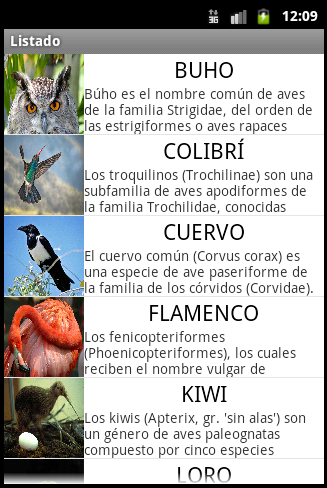
And not content with that, we also want each item in the list to be selectable.
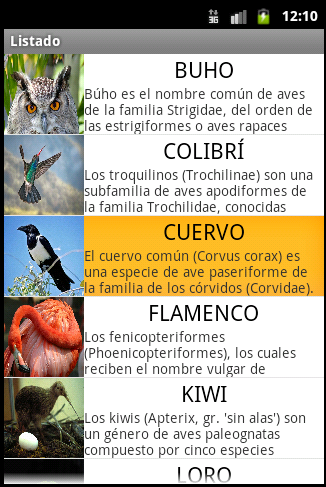
To show more information about the selected item in a Toast (we could also open another Activity with extra information, or whatever we want).
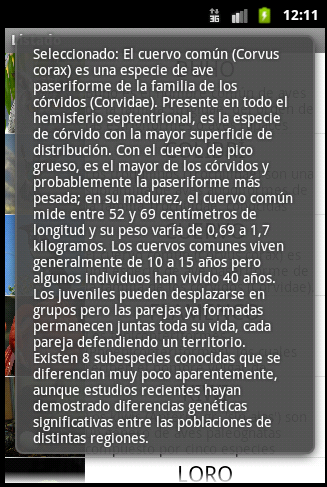
In short, we’ll build a ListView with dynamically generated content (you can find a static example on the official Android developers page), which is what an Android developer needs 90% of the time. And yes, the images and texts in the example come from Wikipedia.
We’ll do this in a simple and optimal way. First we’ll understand it, then we’ll build it.
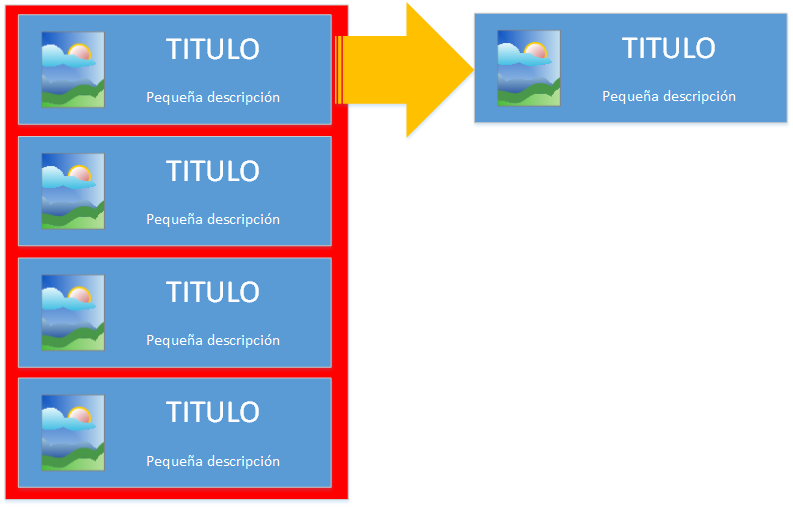
What do we want to do? We want a list of as many individual items/entries as we please (anywhere from zero to infinity 😉 ). Going from the real thing to the mental concept would look like the following image.
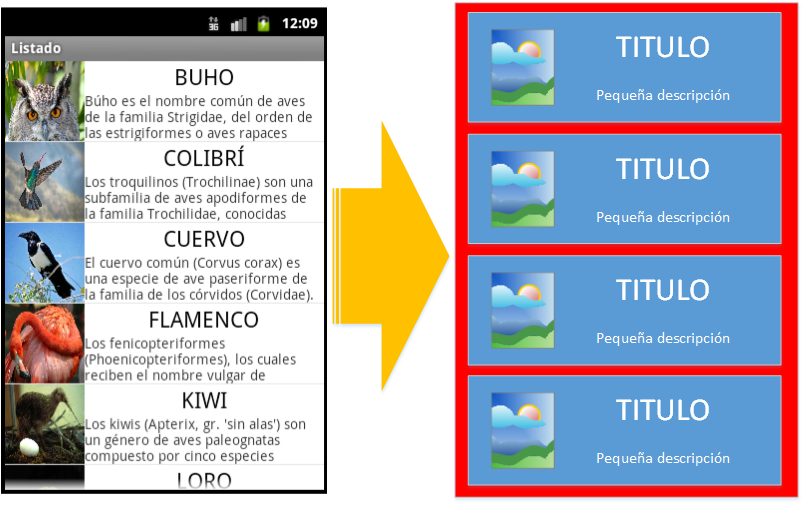
All the entries are the same. Wouldn’t it be wonderful if we could design a single entry and then the rest were just "copy and paste"? Even if it’s out of sheer laziness, the answer is: as good developers, we must.
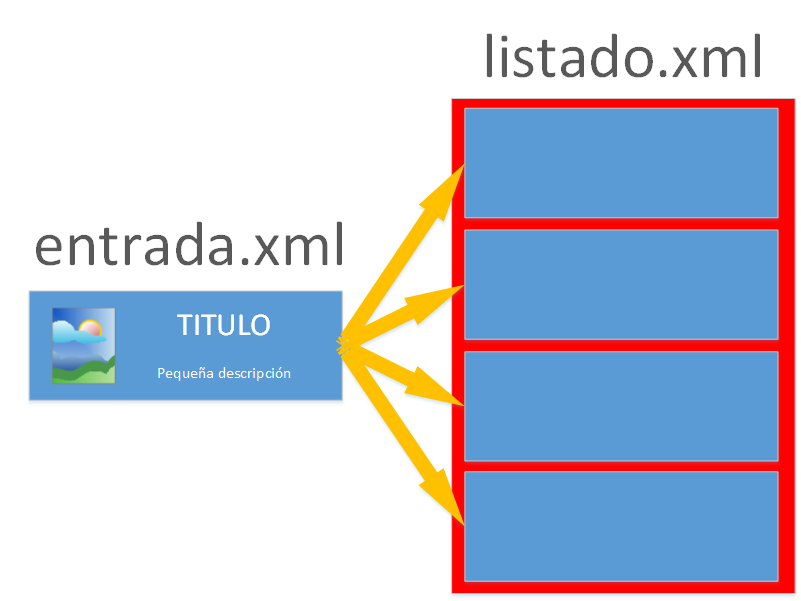
Now we have split up what we want to do. From here on, logic tells us that in the design we’ll have two Layouts, a main one that will contain several copies of the second:
- One with a single entry, with whatever design we like. It will be the unit that gets copied inside the list. In this example we’ll call it “entrada.xml”.
- Another one with the list, which will contain only that. With the “slots” waiting to hold a copy of the entry design, each entry with different data. We’ll call this container of entries “listado.xml”.
We’ll design “entrada.xml”. For the example we’ll build the following Layout, which of course you can make however you like, with whatever fields, images, buttons, checkboxes, spinners, etc. you want. When designing it, think not about the content of each entry, but about how to make all the entries come out the same. This one will be replicated for all the entries.
For the example, the idea of an entry is the following:
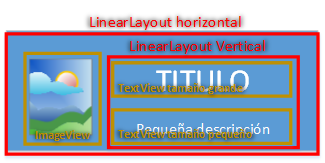
And the code to generate the view of an entry would be this (Note: to cut down on code and make it easier to follow, we’ve put the Strings in directly; this is bad practice and they should go in the “strings.xml” file). Of course we add the “id” attributes so we can reference them later and fill each entry with its corresponding data.
<?xml version="1.0" encoding="utf-8"?>
<LinearLayout xmlns:android="http://schemas.android.com/apk/res/android"
    android:layout_width="fill_parent"
    android:layout_height="wrap_content"
    android:orientation="horizontal" >

    <ImageView
        android:id="@+id/imageView_imagen"
        android:layout_width="80dp"
        android:layout_height="80dp"
        android:adjustViewBounds="true"
        android:scaleType="fitXY"
        android:contentDescription="Descripción del contenido de la imagen"
        android:src="@android:drawable/ic_menu_gallery" />

    <LinearLayout
        android:layout_width="fill_parent"
        android:layout_height="match_parent"
        android:gravity="center"
        android:orientation="vertical" >

        <TextView
            android:id="@+id/textView_superior"
            android:layout_width="wrap_content"
            android:layout_height="wrap_content"
            android:text="Large Text"
            android:textAppearance="?android:attr/textAppearanceLarge" />

        <TextView
            android:id="@+id/textView_inferior"
            android:layout_width="wrap_content"
            android:layout_height="wrap_content"
            android:text="Small Text"
            android:textAppearance="?android:attr/textAppearanceSmall" />

    </LinearLayout>

</LinearLayout>
Easy? No. “listado.xml” is easier. In this example it’s enough to use a ListView, which will be the container of the entries.
<?xml version="1.0" encoding="utf-8"?>
<ListView xmlns:android="http://schemas.android.com/apk/res/android"
    android:id="@+id/ListView_listado"
    android:layout_width="match_parent"
    android:layout_height="match_parent" >
</ListView>
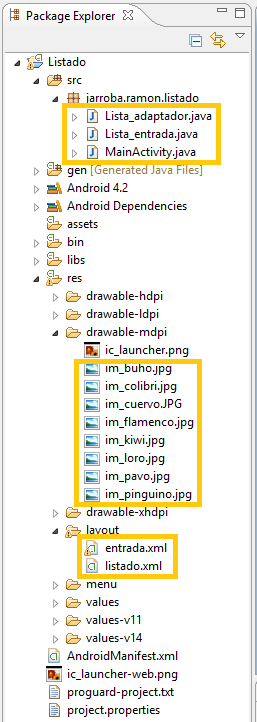
We still need the program logic: the logic that will load the data and build the list for us. For this we’ll have an Activity that displays the list. To keep things simple, in the example we’ll put it in the class “MainActivity.java”. It will use two other classes. One that encapsulates the data of an entry, which we’ll name “Lista_entrada.java”. And another that adapts the entries to the list, which we’ll name “Lista_adaptador.java”.
We’ll end up with the following files in the package explorer. The highlighted ones are the ones we’ll use in this example. Note that we’re inserting the images directly so as not to complicate the example further, but this way of building the list dynamically would also work if the images were downloaded from the internet, read from the phone’s storage, etc.
Let’s start by defining “Lista_entrada.java”. What is it for? We know some data will arrive, and that for each entry we care about the following: image, title and description. So we’ll make data packages for each of the entry’s sets of data. These packages will be objects of the class “Lista_entrada.java”.
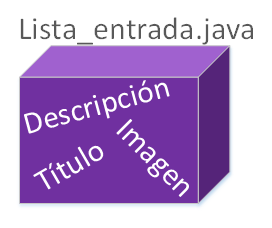
To get an idea, imagine we have three birds. Each one with a title, a description and an image. We’ll have three objects of the class “Lista_entrada.java”, each storing its own data. But don’t get confused: this isn’t assigned to the entry of the view -the interface- yet; these are just groups to keep the information separate. These groups are usually called handlers.
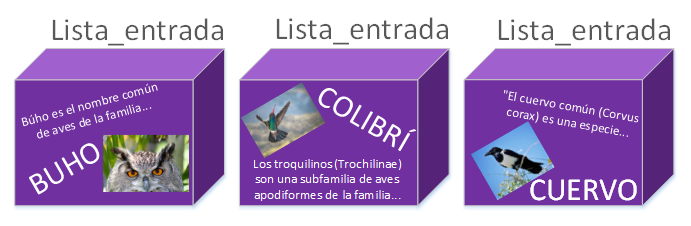
The following code contains the encapsulation of the data, which matches what we just explained:
- Title, with the variable name “textoEncima” to specify which of the view’s two TextViews it will have to be placed in.
- Description, which we’ll call the variable “textoDebajo”.
- Image, where we’ll store the variable “idImagen” to reference the image. We only store the id, since we’re only saving the image’s identifier and not the image itself (to keep this example simple we store the identifier, but if we want we can store a Drawable, a Bitmap, etc).
This handler will hold the variables of the Views we declared in the “entrada.xml” Layout. I repeat, we won’t reference them here; it’s just a container that keeps one set of data apart from another.
If you look at its code, it’s just variables, with their getters and the constructor acting as the setter. That’s all there is to the class; it’s that simple (here, to make it easier to understand, we include getters and setters; Android recommends, for optimization, making public fields and forgetting about getters and setters, which would make this code even simpler).
package jarroba.ramon.listado;

public class Lista_entrada {
	private int idImagen;
	private String textoEncima;
	private String textoDebajo;

	public Lista_entrada (int idImagen, String textoEncima, String textoDebajo) {
	    this.idImagen = idImagen;
	    this.textoEncima = textoEncima;
	    this.textoDebajo = textoDebajo;
	}

	public String get_textoEncima() {
	    return textoEncima;
	}

	public String get_textoDebajo() {
	    return textoDebajo;
	}

	public int get_idImagen() {
	    return idImagen;
	}
}
How do we encapsulate the data we want in this Handler? Very easily, you’ll see.
If we create the “Lista_entrada” object as is, we’d do it like this:
new Lista_entrada(R.drawable. imagen, "TÍTULO", "Descripción");Where do we put the object? How many of these objects are we going to have? The answer is in a Java list, more specifically in an ArrayList.
In this example we’ll do it directly in the “MainActivity.java” class, as in the following (Note: what’s shown below is a piece of the “MainActivity.java” class; the full class is shown at the end of the article). Here’s an example of how to add the information for the three birds to the ArrayList:
package jarroba.ramon.listado;

import java.util.ArrayList;

import android.app.Activity;
import android.os.Bundle;
import android.widget.ListView;

public class MainActivity extends Activity {
    @Override
    protected void onCreate(Bundle savedInstanceState) {
        super.onCreate(savedInstanceState);
        setContentView(R.layout.listado);

        ArrayList<Lista_entrada> datos = new ArrayList<Lista_entrada>();

        datos.add(new Lista_entrada(R.drawable.im_buho, "BUHO", "Búho es el nombre común de aves de la familia Strigidae, del orden de las estrigiformes o aves rapaces nocturnas. Habitualmente designa especies que, a diferencia de las lechuzas, tienen plumas alzadas que parecen orejas."));
        datos.add(new Lista_entrada(R.drawable.im_colibri, "COLIBRÍ", "Los troquilinos (Trochilinae) son una subfamilia de aves apodiformes de la familia Trochilidae, conocidas vulgarmente como colibríes, quindes, tucusitos, picaflores, chupamirtos, chuparrosas, huichichiquis (idioma nahuatl), mainumby (idioma guaraní) o guanumby. Conjuntamente con las ermitas, que pertenecen a la subfamilia Phaethornithinae, conforman la familia Trochilidae que, en la sistemática de Charles Sibley, se clasifica en un orden propio: Trochiliformes, independiente de los vencejos del orden Apodiformes. La subfamilia Trochilinae incluye más de 100 géneros que comprenden un total de 330 a 340 especies."));
        datos.add(new Lista_entrada(R.drawable.im_cuervo, "CUERVO", "El cuervo común (Corvus corax) es una especie de ave paseriforme de la familia de los córvidos (Corvidae). Presente en todo el hemisferio septentrional, es la especie de córvido con la mayor superficie de distribución. Con el cuervo de pico grueso, es el mayor de los córvidos y probablemente la paseriforme más pesada; en su madurez, el cuervo común mide entre 52 y 69 centímetros de longitud y su peso varía de 0,69 a 1,7 kilogramos. Los cuervos comunes viven generalmente de 10 a 15 años pero algunos individuos han vivido 40 años. Los juveniles pueden desplazarse en grupos pero las parejas ya formadas permanecen juntas toda su vida, cada pareja defendiendo un territorio. Existen 8 subespecies conocidas que se diferencian muy poco aparentemente, aunque estudios recientes hayan demostrado diferencias genéticas significativas entre las poblaciones de distintas regiones."));
    }

}
We’re not done with the “MainActivity.java” class yet. We still need to tell it what we want to do with the ArrayList, which is to send it to the list so that it rebuilds and shapes it.
Every ListView needs to be given an adapter with the data, and it has to extend “BaseAdapter” (that’s just how Android is…).
A quick aside. We’ve worked on this and we know what a pain it is to build the adapter for a dynamic list. That’s why www.jarroba.com wants to give you a gift, to save you time and headaches. In all the examples I’ve seen out there, they build a separate adapter for each handler for this kind of simple list. And I said: no, never again, it’s not necessary; a single adapter works for all the lists with custom entries that we want (or at least all the ones I’ve worked with). Below I’m giving you the code, which looks simple; what is truly easy is using it. It’s the result of a lot of time, mistakes and experience. It may be improvable, so if you discover something and want to tell us, or I find a better way, I’ll update this tutorial. But for now I haven’t seen anything more comfortable for working with lists. Of course, you’re free to modify it, suggest improvements and use it. Note: this "universal" adapter is only for simple lists with complex views, meaning the list items are loaded once and won’t be modified any more while the user interacts with the list; if we want to add or remove items while the user is touching the list, we need a different kind of adapter (You can learn how the Adapter’s getView() method uses inflate() in this other tutorial).
Code of the “Lista_adaptador.java” class:
package jarroba.ramon.listado;

import java.util.ArrayList;

import android.content.Context;
import android.view.LayoutInflater;
import android.view.View;
import android.view.ViewGroup;
import android.widget.BaseAdapter;

/** Universal ListView adapter, for www.jarroba.com
 * @author Ramon Invarato Menéndez
 */
public abstract class Lista_adaptador extends BaseAdapter {

    private ArrayList<?> entradas;
    private int R_layout_IdView;
    private Context contexto;

    public Lista_adaptador(Context contexto, int R_layout_IdView, ArrayList<?> entradas) {
        super();
        this.contexto = contexto;
        this.entradas = entradas;
        this.R_layout_IdView = R_layout_IdView;
    }

    @Override
    public View getView(int posicion, View view, ViewGroup pariente) {
        if (view == null) {
	    LayoutInflater vi = (LayoutInflater) contexto.getSystemService(Context.LAYOUT_INFLATER_SERVICE);
            view = vi.inflate(R_layout_IdView, null);
        }
        onEntrada (entradas.get(posicion), view);
        return view;
    }

    @Override
    public int getCount() {
        return entradas.size();
    }

    @Override
    public Object getItem(int posicion) {
        return entradas.get(posicion);
    }

    @Override
    public long getItemId(int posicion) {
        return posicion;
    }

    /** Returns each of the entries along with the view it must be associated with
     * @param entrada The entry that will be associated with the view. The entry is of the package/handler type
     * @param view The particular View that will hold the package/handler data
     */
    public abstract void onEntrada (Object entrada, View view);

}
What this code does is create an adapter for a ListView. In the constructor you have to pass the application context, the id of the entry’s layout (in this example “R.layout.entrada”), and the ArrayList of handlers with the data that we built earlier. Obviously, since it asks for the ArrayList’s data, this code will go right after the creation of the ArrayList. When creating the object, we’ll be asked to override the “onEntrada” method, which is where we’ll assign each part of the “Lista_entrada.java” handler to each of the copies of the “entrada.xml” views. “onEntrada” gives you two pieces of information: the object with only the data of the entry it’s about to build, and the view it’s going to put it in. You’ll be surprised at how little code is needed and how simple it is to use, as we’ll see next.
A quick look at where this adapter is used.
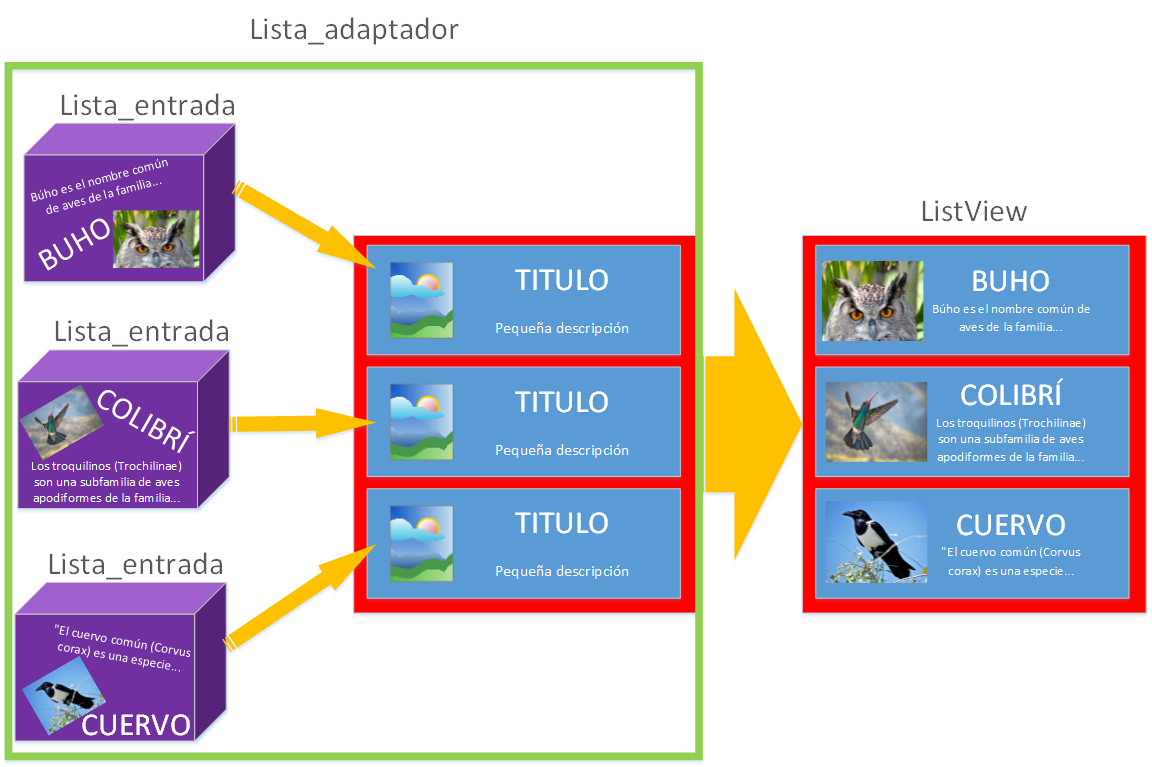
In the example we’ll place it inside “MainActivity.java” in “onCreate”, after the code that was already there (Note: as we said before, we’ll publish the full code at the end). Code to use the adapter:
ListView lista = (ListView) findViewById(R.id.ListView_listado);
        lista.setAdapter(new Lista_adaptador(this, R.layout.entrada, datos){
			@Override
			public void onEntrada(Object entrada, View view) {
		            TextView texto_superior_entrada = (TextView) view.findViewById(R.id.textView_superior);
		            texto_superior_entrada.setText(((Lista_entrada) entrada).get_textoEncima());

		            TextView texto_inferior_entrada = (TextView) view.findViewById(R.id.textView_inferior);
		            texto_inferior_entrada.setText(((Lista_entrada) entrada).get_textoDebajo());

		            ImageView imagen_entrada = (ImageView) view.findViewById(R.id.imageView_imagen);
		            imagen_entrada.setImageResource(((Lista_entrada) entrada).get_idImagen());
			}
		});
This little bit of code uses the adapter. Each View is assigned its data at the exact moment each entry is built. Didn’t I say it was easy?
All that’s left is to capture the Click event for each of the entries and do whatever we want with it. In this example we take the description and show it in a Toast. We do this when the adapter hands back the entry: knowing the position, it will have returned the clicked entry. After the previous code we write the click event listener as usual:
lista.setOnItemClickListener(new OnItemClickListener() {
    @Override
    public void onItemClick(AdapterView<?> pariente, View view, int posicion, long id) {
        Lista_entrada elegido = (Lista_entrada) pariente.getItemAtPosition(posicion);

        CharSequence texto = "Seleccionado: " + elegido.get_textoDebajo();
        Toast toast = Toast.makeText(MainActivity.this, texto, Toast.LENGTH_LONG);
        toast.show();
    }
 });
And at last, the complete code of “MainActivity.java” is the following:
package jarroba.ramon.listado;

import java.util.ArrayList;

import android.app.Activity;
import android.os.Bundle;
import android.view.View;
import android.widget.AdapterView;
import android.widget.AdapterView.OnItemClickListener;
import android.widget.ImageView;
import android.widget.ListView;
import android.widget.TextView;
import android.widget.Toast;

public class MainActivity extends Activity {

	private ListView lista;

    @Override
    protected void onCreate(Bundle savedInstanceState) {
        super.onCreate(savedInstanceState);
        setContentView(R.layout.listado);

        ArrayList<Lista_entrada> datos = new ArrayList<Lista_entrada>();

        datos.add(new Lista_entrada(R.drawable.im_buho, "BUHO", "Búho es el nombre común de aves de la familia Strigidae, del orden de las estrigiformes o aves rapaces nocturnas. Habitualmente designa especies que, a diferencia de las lechuzas, tienen plumas alzadas que parecen orejas."));
        datos.add(new Lista_entrada(R.drawable.im_colibri, "COLIBRÍ", "Los troquilinos (Trochilinae) son una subfamilia de aves apodiformes de la familia Trochilidae, conocidas vulgarmente como colibríes, quindes, tucusitos, picaflores, chupamirtos, chuparrosas, huichichiquis (idioma nahuatl), mainumby (idioma guaraní) o guanumby. Conjuntamente con las ermitas, que pertenecen a la subfamilia Phaethornithinae, conforman la familia Trochilidae que, en la sistemática de Charles Sibley, se clasifica en un orden propio: Trochiliformes, independiente de los vencejos del orden Apodiformes. La subfamilia Trochilinae incluye más de 100 géneros que comprenden un total de 330 a 340 especies."));
        datos.add(new Lista_entrada(R.drawable.im_cuervo, "CUERVO", "El cuervo común (Corvus corax) es una especie de ave paseriforme de la familia de los córvidos (Corvidae). Presente en todo el hemisferio septentrional, es la especie de córvido con la mayor superficie de distribución. Con el cuervo de pico grueso, es el mayor de los córvidos y probablemente la paseriforme más pesada; en su madurez, el cuervo común mide entre 52 y 69 centímetros de longitud y su peso varía de 0,69 a 1,7 kilogramos. Los cuervos comunes viven generalmente de 10 a 15 años pero algunos individuos han vivido 40 años. Los juveniles pueden desplazarse en grupos pero las parejas ya formadas permanecen juntas toda su vida, cada pareja defendiendo un territorio. Existen 8 subespecies conocidas que se diferencian muy poco aparentemente, aunque estudios recientes hayan demostrado diferencias genéticas significativas entre las poblaciones de distintas regiones."));
        datos.add(new Lista_entrada(R.drawable.im_flamenco, "FLAMENCO", "Los fenicopteriformes (Phoenicopteriformes), los cuales reciben el nombre vulgar de flamencos, son un orden de aves neognatas, con un único género viviente: Phoenicopterus. Son aves que se distribuyen tanto por el hemisferio occidental como por el hemisferio oriental: existen cuatro especies en América y dos en el Viejo Mundo. Tienen cráneo desmognato holorrino, con 16 a 20 vértebras cervicales y pies anisodáctilos."));
        datos.add(new Lista_entrada(R.drawable.im_kiwi, "KIWI", "Los kiwis (Apterix, gr. 'sin alas') son un género de aves paleognatas compuesto por cinco especies endémicas de Nueva Zelanda.1 2 Son aves no voladoras pequeñas, aproximadamente del tamaño de una gallina. Antes de la llegada de los humanos alrededor del año 1300, en Nueva Zelanda los únicos mamíferos que había eran murciélagos, y los nichos ecológicos que en otras partes del mundo eran ocupados por animales tan diversos como caballos, lobos y ratones fueron utilizados en Nueva Zelanda por pájaros (y en menor proporción por ciertas especies de reptiles). La denominación kiwi es maorí, idioma del pueblo homónimo de linaje malayopolinesio que colonizó Nueva Zelanda antes de la llegada de los europeos."));
        datos.add(new Lista_entrada(R.drawable.im_loro, "LORO", "Las Psitácidas (Psittacidae) son una familia de aves psitaciformes llamadas comúnmente loros o papagayos, e incluye a los guacamayos, las cotorras, los periquitos, los agapornis y formas afines."));
        datos.add(new Lista_entrada(R.drawable.im_pavo, "PAVO", "Pavo es un género de aves galliformes de la familia Phasianidae, que incluye dos especies, el pavo real común (Pavo cristatus) y el pavo real cuelliverde (Pavo muticus).1"));
        datos.add(new Lista_entrada(R.drawable.im_pinguino, "PINGÜINO", "Los pingüinos (familia Spheniscidae, orden Sphenisciformes) son un grupo de aves marinas, no voladoras, que se distribuyen únicamente en el Hemisferio Sur, sobre todo en sus altas latitudes."));

        lista = (ListView) findViewById(R.id.ListView_listado);
        lista.setAdapter(new Lista_adaptador(this, R.layout.entrada, datos){
			@Override
			public void onEntrada(Object entrada, View view) {
		        if (entrada != null) {
		            TextView texto_superior_entrada = (TextView) view.findViewById(R.id.textView_superior);
		            if (texto_superior_entrada != null)
		            	texto_superior_entrada.setText(((Lista_entrada) entrada).get_textoEncima());

		            TextView texto_inferior_entrada = (TextView) view.findViewById(R.id.textView_inferior);
		            if (texto_inferior_entrada != null)
		            	texto_inferior_entrada.setText(((Lista_entrada) entrada).get_textoDebajo());

		            ImageView imagen_entrada = (ImageView) view.findViewById(R.id.imageView_imagen);
		            if (imagen_entrada != null)
		            	imagen_entrada.setImageResource(((Lista_entrada) entrada).get_idImagen());
		        }
			}
		});

        lista.setOnItemClickListener(new OnItemClickListener() {
			@Override
			public void onItemClick(AdapterView<?> pariente, View view, int posicion, long id) {
				Lista_entrada elegido = (Lista_entrada) pariente.getItemAtPosition(posicion);

                CharSequence texto = "Seleccionado: " + elegido.get_textoDebajo();
                Toast toast = Toast.makeText(MainActivity.this, texto, Toast.LENGTH_LONG);
                toast.show();
			}
        });

    }

}
We hope this has been clear and helps you understand a lot about how a list is built.
Here you can download the entire project: Listado
In response to our readers’ most common questions. If you want to do something else with lists, or you’ve run into things you didn’t know how to solve; and even, with what you’ve learned here, how to build a fully customized GridView or Spinner, I recommend you take a look at the article that expands your ListView knowledge; it clears up many doubts and teaches a lot more, at: https://jarroba.com/expansion-listview/
The article on developing for different Android devices with the Fragments architecture may also be very interesting; in it I extend the list example a bit further and add advanced concepts.
“ListView in Android: Building a Custom List” by Ramón Invarato at jarroba.com, licensed under Creative Commons Attribution-NonCommercial-ShareAlike 3.0. Registered at Safe Creative.

You may also like


Android ListView in Just a Few Lines
Learn how to build an Android ListView with the least code possible, using ListActivity, SimpleCursorAdapter and a MatrixCursor. Clean, short and easy.
ListView Expansion: Custom GridView and Spinner in Android
Answers to the most common ListView questions in Android: custom GridView, custom Spinner, clickable Views inside rows and simulating a RadioGroup.
Leave a comment