
Binary: Combinations and Conversion
Learn how numeral system combination tables work and convert between binary, decimal, hexadecimal and octal with simple mental math.
Understanding how the “combination tables” of “numeral systems” work gives you a big advantage. You need them to learn to write any number anywhere, at the right moment, and to convert any value you want with a few simple calculations (for example, to or from binary).
It may not be the proudest achievement in the world, but I promise that after reading this article you will be able to understand programmer jokes like this one:

I’d bet you’ve seen this joke in one of its hundreds of variants all over the Internet. You’ve probably heard it in class, at work, or from a tech-loving friend. You may even have missed it because you didn’t get it, but from now on you have to get it 😉
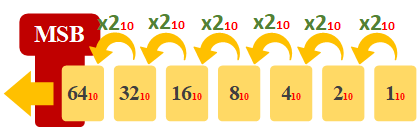
I’m going to reveal the trick behind the joke, and show you that converting from binary to decimal in your head is very simple and very fast. Mentally, start at 1 and keep doubling the amount toward the left as many times as the number you want to convert from binary to decimal has bits. For the hand example above, doubling once is enough (we only have two bits, representing the two raised fingers: “11”).
Tool
Free online calculator
Click this link to open a free base calculator courtesy of Jarroba.com so your learning is hands-on.

For the example I’m going to overdo it (two steps for the two bits would be enough, the rest are extra), doubling the previous number (x2) several times from right to left. You could also do it the other way around (left to right), but it’s usual to calculate binary from right to left (One thing: ignore the “MSB” acronym for now, I’ll explain it in a few lines; and you can skip the little red numbers for now, I’ll explain those in the note below):
Note
Note about the bases in the images of this article
A quick reminder of what a “base” is: the base of a numeral system (for example, “the decimal numeral system” or “the binary numeral system”) is the number of symbols that numeral system has (for example, decimal has the symbols 0, 1, 2, 3, 4, 5, 6, 7, 8, 9; and binary has only the symbols 0 and 1).
As we explained in the article about the binary numeral system, the base is written as a subscript after the number in parentheses, for example “(1250)10”. For design reasons (to save space and avoid overloading the images with symbols), in the images I’ll write it without parentheses and in red, for example “125010”.
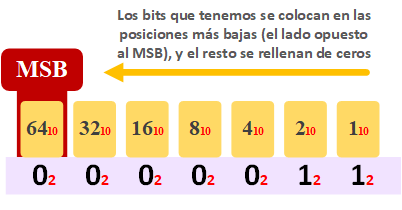
Below the numbers we just calculated (…, 64, 32, 16, 8, 4, 2, 1), we write the bits of the binary number starting from the smallest number toward the biggest (for the binary number “11” from the fingers before, we write the first 1 under the 1, and the next 1 under the 2). We fill in the rest with zeros. Like in the following image:
And now we just have to calculate the decimal value. We cross out all the powers of 2 that have a “0” under them and add up the ones that have a “1”:
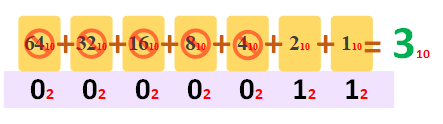
I overdid it here; “2+1” would have been enough. But I wanted to give you a complete example with “zeros” and “zero padding”.
As you can see, getting the programmer joke is an instant calculation (it took me longer to explain it than to do the math in my head).
And you can believe me when I say that all of binary calculation is this simple; we’re not going to do anything “special” or “extra”. But we will learn to deal with very large binary numbers, above all to know what they mean and why things work the way they do.
Let’s start with the easiest one: combination tables in decimal (the rest of the tables are just as simple; you only have to understand the logic and, as we said, everything works the same way).
Decimal (base 10)
As we know, the decimal numeral system has only 10 symbols (base 10, made up of combinations of the ten symbols we are more than used to: 0, 1, 2, 3, 4, 5, 6, 7, 8, 9). If we put all the existing decimal symbols in a table, we get the following:
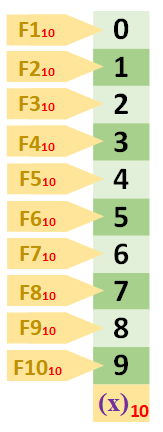
Table legend
This table is a bit special (my own design, to see some properties quickly in a convenient and complete way). We have painted all the symbols of the numeral system for the digits we are looking at vertically (with a different background for each numeral system; for example, I chose green for decimal). At the very bottom is the base the numbers are in. On the left is the row with the number (to simplify, I omitted some parentheses around the bases), which I mainly put there to count the numbers in the table (you can’t rely on the number itself to tell you directly which row it is, since in the table above the first number starts at “zero”; I explain this in more detail after the image).
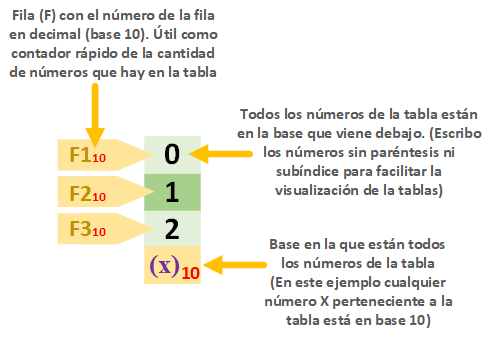
As you can see in this example, you have to keep in mind that the last number in the table will be one less than the amount of numbers. That is, the last number in the image above is “2”, which is the third (R3) number in the table. This is because we start counting from zero (0). So be careful: if we start counting at zero, the final number will always be one less than the total amount of numbers in the table.
If we want to represent larger numbers we have to add more digits (a digit, also called a “figure”, is each symbol in a number). For example:
- The number 7 has 1 digit
- The number 45 has 2 digits
- The number 897 has 3 digits
- The number 1,589 has 4 digits
- The number 18,897 has 5 digits
By convention, any number (regardless of base) that has “zeros” on the left doesn’t get them written, that is, the number “000000097” is the same as “97”. And if the number has a fractional part, the zeros on the right are not written; for example, “000000097,150000” is the same as “97,15”.
Note
Note about the fractional part
The “fractional part” is also called the “decimal part”, but I don’t use the term “decimal part” in the article to avoid confusion with the “decimal number”.
To avoid confusion, I want to point out that I write the fractional part with “commas”, for example “3,141592”.
I use the period to separate the “thousands”, for example “2.000.000,78”.
Depending on your country you may use them the other way around; just swap one for the other 🙂
Remember that the “fractional part” is whatever isn’t the “integer part” (also, the fractional part is the number minus its “integer part”). That is, the number “9.000,25” is split into:
- Integer part: 9.000
- Fractional part (9.000,25 – 9.000): 0,25
It may not seem so, but leading zeros are written in many places you’ve surely seen, especially where there are fixed slots for the numbers. For example: a digital clock (you’ll see the time as “07:09”), or the dates in an operating system (we can see them as “03/07/2017”), even lottery tickets (which we can see as “0 0 5 7 6”), also flight tickets (for example “IBE 0467”), among hundreds of other examples. Since in the tables we will always say how many digits the numbers have, the slots are always fixed, so we will always fill all the positions of the number with zeros on the left. Besides, when working in binary there will always be fixed-size memory positions (that is, any file on your computer will always take up a multiple of some number of bits depending on where the bits are, whether in the processor, the hard drive, RAM, etc. For example, if the hard drive stores in groups of 8 bits, then a file will always take up a multiple of 8 bits, which is 1 Byte as we saw in the article about units of information; so it makes no difference whether a file takes up 75 bits, since memory will always reserve a multiple of 8 and it will always say 80 bits are used. And if the file grows to 81 bits? Then it will take up 88 bits), and that is another reason to put zeros in the part that doesn’t change the value, to fill it in.
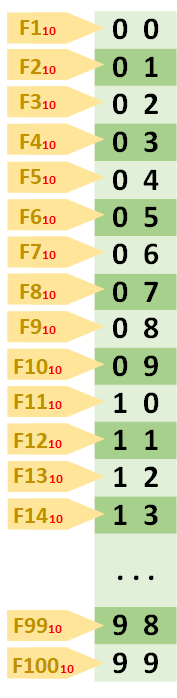
That’s all well and good, but if we want to write the table with all the combinations of all the decimal numbers that have two digits, it’s not enough to draw from “ten” (10) to “ninety-nine” (99); we also need “zero” (0) to “nine” (9), since their first digit is a “zero” that isn’t normally written (for example, the symbol “5” represented with two decimal digits is written “05”). The table would be the following:
Another important thing -for any number in any numeral system we want- is to know the order in which to read the symbols of numbers with several digits. If I write “12” and ask you what decimal number it is, you’ll surely say “twelve”, but if I ask someone who reads them backwards they’ll say “twenty-one”. So it’s important to know which digit is the:
- Most significant digit: the digit with the highest value.
- Least significant digit: the digit with the lowest value.
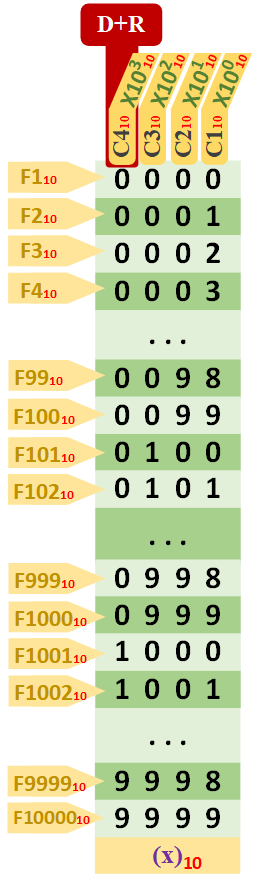
For example, if we want to read the number “2.017” we know that the “Most significant digit” (in the image I’ve represented it as “D+R”) is at the far left, where the “thousands” are, and the “Least significant digit” (represented in the next image as “D-R”) is on the opposite side, at the far right, which will be the units. This way we can read “2.017” as “Two thousand seventeen” (and not the other way around as “Seven thousand one hundred two”).
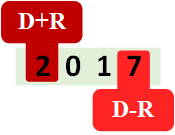
It’s enough to know where the “Most significant digit” is located to deduce where the “Least significant digit” is (if one is at the start of the number, the other will be at the end; and vice versa). So usually only the “most significant” one is mentioned, and the “least significant” is deduced.
Luckily, and by convention, for decimal numbers the “Most significant digit” is always the leftmost digit. Understanding this is important for any numeral system (especially for binary, where it can vary whether you read from left to right or from right to left).
Taking the previous four-digit example “2.017”, knowing that the “Most significant digit” is the leftmost digit, if I ask you:
- Which digit is the thousands? You can already tell me it’s where the “Most significant digit” is, the far-left digit, the first digit starting from the left
- Which digit is the hundreds? The second digit starting from the left
- Which digit is the tens? The third digit starting from the left
- Which digit is the units? The fourth digit starting from the left
Units, hundreds, tens, thousands, etc. This means I can multiply each digit of the number “2.017” by the power of the base, in this case a power of 10 (a power of “ten” because decimal is base “ten”), with the “Most significant digit” located at the highest power of 10 (and the “Least significant digit” at the lowest power of 10, “raised to zero”):
- Thousands: 2 x 103 = 2 x 1.000 = 2.000
- Hundreds: 0 x 102 = 0 x 100 = 0
- Tens: 1 x 101 = 1 x 10 = 10
- Units: 7 x 100 = 7 x 1 = 7
Funny enough, if I add up all the results I get the number “2.017”:
2.000 + 0 + 10 + 7 = 2.017
Knowing which is the “most significant digit” comes in handy for establishing the multiples that will later help us with conversion between numeral systems (especially from any numeral system to decimal).
Table legend (Extended)
Before, we saw the rows (R) of the table; now it’s the columns’ (C) turn.
We’ll mark the “Most significant digit” column with “D+R”.
With that in hand, we’ll start at the column opposite the “Most significant digit” (in the following example, the far-right one) and number from 1 -as “C1”- up to the total number of columns in the table (in this example there are only 2 columns -the last one will be “C2”). Numbering the columns will help us count the digits and refer to a specific number (similar to the grid game “Battleship”, we can say that at “C1” and “R3” there is a “2”).
Also, the columns will help us place the multiples of the base.
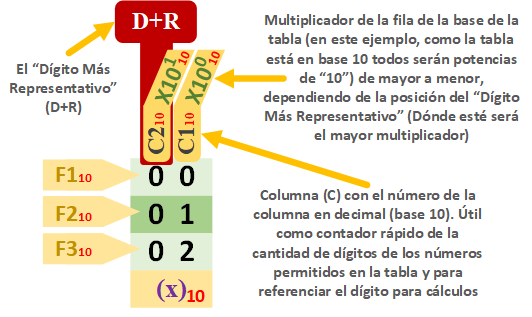
It’s important to clearly tell apart the numbers that appear in the tables (to avoid confusion, I call “value” the number inside the table; that is, the ones on the green background in the images of these tables):
- Number of digits a value in the table has at most (The columns of the table).
- Total number of values in a table (The rows of the table). This is the same as the number of possible combinations we can make with the chosen number of digits.
- Values the table starts and ends with (as well as the ones that make up the rest of the table, which are easy to deduce). These values are the numbers in whatever base we want. Note: As we said, if the first value starts at zero, each value will always be one less than the corresponding row of the table (one less than the amount of numbers we’ve counted up to that value)
- Base the values of the table are in
- Decimal multiplier in powers to help with conversions (we’ll see them in detail later)
The complete table of the decimal numeral system for four digits would be (it’s simple, it has three things that repeat in all the tables; take a look and we’ll continue):
Comparative conversion example
And we finish with a complete example to “convert” the decimal number “3908” to the same decimal system (nothing is really converted here, but when we move on to the next base you’ll understand why we do this “conversion to itself”):
- The decimal number to convert to decimal: 3908
- For each column, its decimal multiplier: (3 x 10³) + (9 x 10²) + (0 x 101) + (8 x 100)
- Each power is: (3 x 1.000) + (9 x 100) + (0 x 10) + (8 x 1)
- We calculate the parentheses: 3.000 + 900 + 0 + 8
- We add up: 3908
- Conversion: (3908)10 = (3908)10
Binary (base 2)
At last we get to the good stuff, the “binary tables”, now that we understand the previous “decimal tables”.
As we said, the numbers in a binary system have only two symbols (since it’s base 2): one (1) and zero (0).
Since in computing we don’t work with “numbers” but with bits, each symbol of a binary number is not called a “digit” (nor a “figure”) but a “bit”, so in binary we say (it’s the same thing with a different name):
- Most significant bit (MSB): the bit with the highest value (equivalent to the “Most significant digit”, the “D+R”).
- Least significant bit (LSB): the bit with the lowest value (equivalent to the “Least significant digit”, the “D-R”).
Drawing the table with a single bit would be very simple:
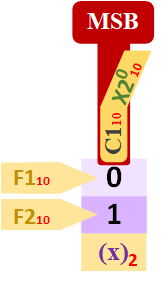
Since it only has “0” and “1”, it only has two rows. We said it’s a single-bit table, so it only has one column. And remember that the decimal multiplier is the power (it’s the base of the numeral system we’re dealing with). In this case binary is base 2, so the power is 2.
The simplest table with two bits would be:
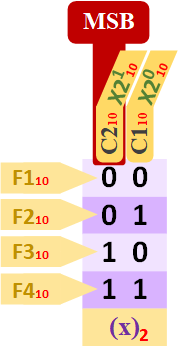
How do you place the “0s” and “1s” in any table to cover all possible combinations?
As we saw, numeral systems have a finite number of symbols, so every time we run out of symbols for a digit (for example, in decimal the symbols end at 9, and then they’re grouped to start over with 10, 11, 12, etc.), we increment the next one to the left by one (more precisely, the one closest to the “Most significant digit”), and start over with the first symbol. And so on until all the digits of the table are covered.
A quick trick for drawing the binary table for any number of bits.
First, calculate the number of different combinations of numbers (Rows) the table will have. It’s easy knowing the number of digits (bits, Columns) the table will have; you calculate it with the base raised to that number (this way of calculating the “amount of numbers in a table” also works for any other numeral system).
For example, if we want to build the 3-bit binary table for the binary numeral system (which is base 2):
23 = 8
That is, the binary table for 3 bits will contain exactly 8 different numbers (8 Rows).
Second, we choose a column to start with, the leftmost or the rightmost (normally you pick the “most significant bit” one, though it doesn’t matter). And we begin (I recommend following the table below the column from left to right):
- We fill the first column with half “zeros” and half “ones”. For example, for the 3-bit binary table the first four would be “zeros” and the remaining four “ones”, so the column (vertically) would be: 00001111
- We fill the second column with half of the previous, alternating. Continuing with the example, before we filled “four by four” (four “zeros” and then four “ones”); now half of that is “two by two” (two “zeros” and then two “ones”, repeating until the table is filled), so this column would be: 00110011
- The rest of the columns work the same way; they always alternate in groups half the size of the previous one, and the last column will always end up being the two symbols alternating: 0, 1, 0, 1, 0, 1, etc. For the third column, half of the second (which was “two by two”) is now “one by one”, giving the column: 01010101
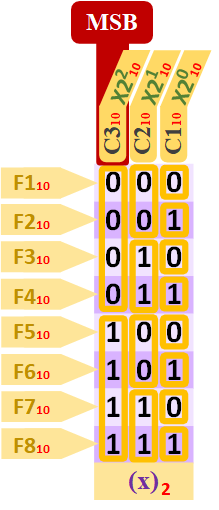
Now we know how to draw absolutely all the combinations (notice that this way every row has a unique number, with no repeats in other rows; also, they’re sorted from smallest to largest) of any binary table (with any number of columns) in a matter of seconds.
So the table for four bits would be:

Now we have the tables, so let’s see how to convert a binary number to decimal.
It’s important to understand well the relationship between the columns of the binary tables and their decimal multipliers (understand the logic so you can use it at any time), since with them we’ll be able to quickly convert any binary number to decimal in our heads. We’ll review the powers of two in a second:
- 20 = 1
- 21 = 2
- 22 = 4
- 24 = 8
- …
- 2n
So, for any number of columns we can know its value both as a power and directly as a decimal number in our heads, in a matter of seconds:
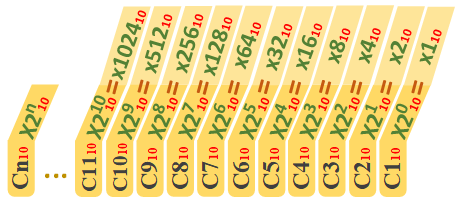
If you look at the first example, the programmer joke at the beginning of the article, this is how we calculate the decimal multipliers of the columns.
By the way, I’m calling them “decimal multipliers” because they let us convert any number of the table (of the base) we’re using to decimal, just by adding.
Converting binary to decimal
Now, if I ask you how much the binary number “1011” is in decimal? Easy, similar to how we did the previous “decimal to decimal” conversion (it’s above, in the section called “Comparative conversion example”). “1011” has four bits (four digits), and since we want to write it in decimal, the “ones” and “zeros” will be decimal, so we can calculate it step by step:
- The binary number to convert to decimal: 1011
- For each column, its decimal multiplier: (1 x 23) + (0 x 22) + (1 x 21) + (1 x 20)
- Each power is: (1 x 8) + (0 x 4) + (1 x 2) + (1 x 1)
- We calculate the parentheses: 8 + 2 + 1
- We add up: 11
- Conversion: (1101)2 = (11)10
Very easy and extremely simple. The binary “1011” is 11 in decimal. Now you know how to calculate from binary to decimal.
Warning
Extra clarification
I’m drawing the rows (Rx) here to know the count. As already pointed out, you have to be careful not to confuse the number of values with the last value of the table. In binary, tables are filled from the first combination of all zeros (“000…000”), going through all the combinations, and ending with all ones (“111…111”).
For example, earlier we did the example of building the 3-bit table, and we saw that the number of values in the table was 8 (23 = 8). The first binary value is “000” (which represents decimal “0”), and the last is “111” (which represents decimal “7”). You might be confused into thinking the last value represents decimal “8” because it’s the last one in the table and the number of values in the table is “8”, but that’s not true because the first value starts at zero (remember that, if the first value in the table starts at zero, each value will always be one less than its row; and the last value will be the number of values in the table minus one).
You have to distinguish the decimal multiplier of each column from the calculation that counts the amount of numbers in a table, which is the base raised to the number of digits (columns) a number has. For example, for the four-digit table (which starts at “0000” and ends at “1111”), it will be 24 = 16 numbers in the table (the first value in the table in decimal represents “0” and the last “15”). It’s a MISTAKE to think the last decimal multiplier is the number of values in the table; it’s the same problem as before, caused by the first value starting at zero. For the 4-digit binary table, the largest multiplier is 23, which is 8 and not 16, which would be the number of values; this is so that the conversion of the last value of the table “1111” works:
- The binary number to convert to decimal: 1111
- For each column, its multiplier: (1 x 23) + (1 x 22) + (1 x 21) + (1 x 20)
- Each power is: (1 x 8) + (1 x 4) + (1 x 2) + (1 x 1)
- We calculate the parentheses: 8 + 4 + 2 + 1
- We add up: 15
- Conversion: (1111)2 = (15)10
Converting decimal to binary
And to convert a decimal number to binary, for example the decimal number “53”? You could say it’s the same as before, but in reverse: we need to find the largest column multiplier that, when subtracted from the decimal number, gives a positive result or zero (if it’s zero, we’re done), and then it will be a binary “1”; however, if it gives a negative result, it will be a binary “0”. Let’s see the steps of the example (I’m going to elaborate a bit in the following explanation, but it’s quite simple: you just keep subtracting the column multiplier from the positive result):
- The decimal number to convert to binary: 53
- We look for the first largest multiplier that, when subtracted from 53, stays positive. For example, 128 (= 27) will be a binary “0” since subtracting it gives a negative number (53 – 128 = -75); the same happens with 64 (= 26), which gives a negative (53 – 64 = -11) and will also be a binary “0”.
- The first column, the largest one that gives a binary “1”, is 32 (= 25), which corresponds to the sixth column (C6): 53 – 32 = 21, the positive result, so it’s a 1 Since we used 32 = 25 (see the previous image of the columns) we know it belongs to the sixth column (C6), and from here we continue with the rest of the columns downward.
- 16 (= 24) from C5: 21 – 16 = 5, positive result so it’s a binary 1, for the sixth column (C6)
- 8 (= 23) from C4: 5 – 8 = -3, negative result so it’s a binary 0 (the negative result isn’t carried over to the next lower multiplier; the previous positive result is reused)
- 4 (= 22) from C3: 5 – 4 = 1, positive result so it’s a binary 1
- 2 (= 21) from C2: 1 – 2 = -1, negative result so it’s a binary 0
- 1 (= 20) from C1: 1 – 1 = 0, zero result so it’s a binary 1 and we’re done
- We collect the binary 1s and 0s in column order (starting from the MSB): 110101
- So: (110101)2 = (53)10
Comparative example
We can compare this way of calculating to when a machine (an ATM or a change machine) has to give you money. The machine will try to give you the coin with the highest value that fits in the total it has to give you; if it can’t, it’ll try the next one; it will always keep trying the next smaller one to give you the fewest coins, and so give you all the money.
Suppose you want a machine to give you €6; that machine has €10 bills, €5 bills, €2 coins and €1 coins inside. It will first try to give you a €10 bill but that’s too much (6 – 10 = -4, a negative result), then it will try the €5 bill, which it can give you since it fits in €6 (6 – 5 = 1, so it still owes you €1), then a €2 coin but it won’t work (1 – 2 = -1, which is negative), and since only the €1 coin is left, it will give you that (1 – 1 = 0). This way it will have given you back one €5 bill and one €1 coin, which is the same as:
0x10 + 1×5 + 0x2 + 1×1 = 6
If you look closely, it’s exactly what we did to calculate the decimal number from binary.
By the way, this clever way of getting the desired result is called a “greedy algorithm” (more information at Algoritmo voraz (Wikipedia) ) 😉
There are other ways to convert binary to decimal. I think this one is the simplest and the fastest to do in your head.
Note
Fun fact: How many binary numbers can we represent with the fingers of our hands?
It’s possible to count in binary with the fingers of your hands. For example, if a finger is up it would be a binary 1, and if it’s folded it would be a binary 0.
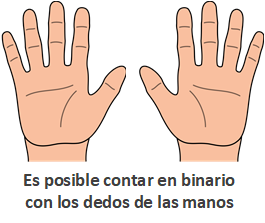
Based on what we saw before, I recommend you do the calculation as practice (you can do the logic in your head).
Since we have ten fingers (five on each hand), we’d have 10 digits (which is the same as 10 columns, the columns of the earlier tables), which is equivalent to 10-bit numbers. Therefore, the number of numbers in the table is (review: the base of the numeral system raised to the number of digits the number has; in this case in binary the base is 2, and 10 bits are the 10 digits):
210 = 1.024
That is, with the fingers of our hands we can count up to 1,024 possible numbers! Amazing that we can count to over a thousand with so few fingers! 😀
While we’re at it, in the previous article about numeral systems I mentioned the curiosity of how ancient Mesopotamia counted in base 60 using the finger segments. If we modify the way we count a little and…
What if we used all the finger segments to count in binary?
If you look at the palms of your hands and count the segments in all your fingers (remember, segments are the parts of the finger separated by where the finger bends). We could mark the used segments with a pen to represent a binary 1, and the unused ones would be a binary 0.
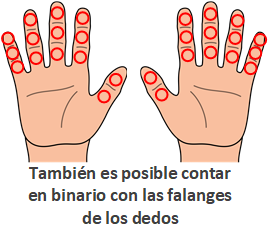
We have fourteen segments per hand, which times two is 28 segments in total (that would be 28 digits). As before, calculating the number of possible combinations (the amount of numbers we can count with the digits we have), it turns out to be:
228 = 268.435.456
With our hands we can count almost two hundred seventy million numbers! Even more amazing that we can count such a crazy number of millions with just the fingers of our hands!
About the possible uses of the same binary number
Do you remember at the beginning of the previous article about numeral systems when I told you a binary number can mean anything?
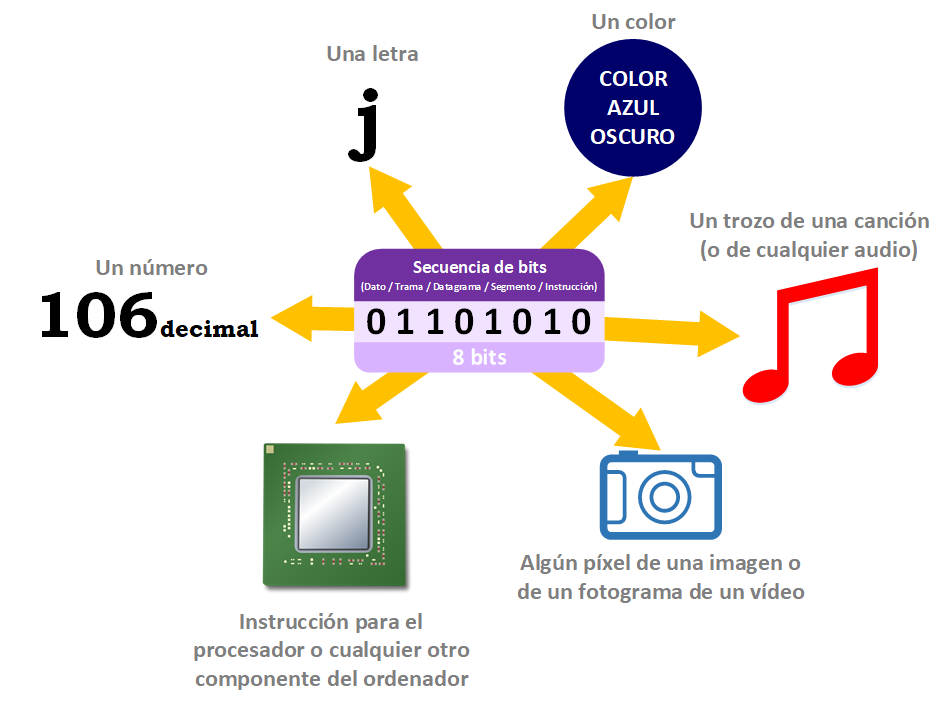
I gave the binary number “01101010” as an example, which was “106” in decimal. With what we’ve explained, you’ve already solved the first riddle. You can calculate from decimal to binary and vice versa: (01101010)2 = (106)10
Hexadecimal (base 16)
Hexadecimal is base 16, and therefore this numeral system has sixteen symbols: 0, 1, 2, 3, 4, 5, 6, 7, 8, 9, A, B, C, D, E, F.
Working with binary is great, but it’s not convenient to “carry around”. It’s an ugly number with so many “ones” and “zeros”, and very long too. Remember when I told you in the previous article about numeral systems that the binary number “01101010” could represent other things, like the color “Dark Blue” (see the previous note: “Note about the possible representations of a binary number”)? And it’s dark blue in the RGB color model.
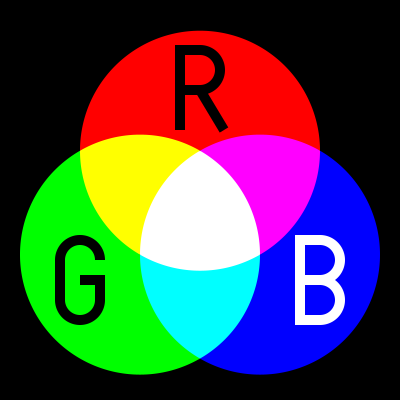
RGB color model
Although there are several color models, the most widely used is RGB (“Red Green Blue”. Full information at RGB (Wikipedia)).
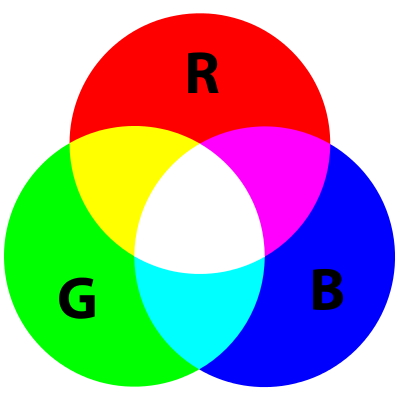
It’s based on what we learned in school about the primary colors of light (“a primary color of light” is a color that isn’t a mix of any others) and it’s the model our eyes use to report colors to the brain. And practically every screen you can imagine uses it (televisions, PC monitors, tablets, smartphones, etc.). As you can imagine, each pixel of an image contains this color information (besides its position, among other information). In other words, an image is a whole bunch of bits (and let’s not even talk about a video, which is not only many images, but also has audio 😉 )
The RGB model uses 24 bits (8 bits for Red + 8 bits for Green + 8 bits for Blue) to represent a color.
For example, the bit sequence we’ve seen in other examples “01101010” would look like this with 24 bits (we pad with zeros on the left up to 24 bits):

As we saw earlier, 8 bits can hold up to 256 combinations of binary numbers (starting at binary “00000000”, which is decimal “0”, and ending at “11111111”, which is decimal “255”). That is, we’ll have 256 combinations of Red, 256 of Green and 256 of Blue. The smallest value (“00000000”) is pure black and the largest is the most vivid color (“11111111”).
For simplicity (and practicality), colors are expressed in other bases, such as decimal, like this:
rgb(“amount of RED”, “amount of GREEN”, “amount of BLUE”)
For example, for the dark blue we’ve seen, binary “01101010”, which is “106” in decimal, it would be:
rgb(0, 0, 106)
With this we can play with mixtures, which give us the rest of the colors. For example, vivid “red and green” make vivid “yellow” (you can see how the mixture looks in the previous image with the three colored circles):
rgb(255, 255, 000)
On the other hand, you’ll see hexadecimal a lot too, since it’s very easy to group because it’s a power of 2. This is how you’ll see colors in all color calculators (online ones or in image editing programs themselves), as well as when programming with colors. To express a color in hexadecimal (and as we saw in the previous article about numeral systems) the hash symbol “#” is put before the number. So we have, for example (A bit later we’ll see how to use hexadecimal; here I’m only showing it as a preview):
- binary “00000000 00000000 00000000” = decimal “rgb(0, 0, 0)” = hexadecimal “#00 00 00”
- binary “11111111 11111111 11111111” = decimal “rgb(255, 255, 255)” = hexadecimal “#FF FF FF”
Look at the image below and answer this question: which number is easier and faster to memorize/carry around/write, the binary or the hexadecimal?

And likewise, if we remove the “useless” zeros on the left we’d have: “(1101010)2 = (6A)16”. Using hexadecimal is much shorter than binary. This trick to shorten the binary number (really, the trick is converting the number to a higher base to compress very large numbers of lower bases) is used a lot with bases that are powers of 2. It’s not unusual to find bit sequences written in bases like quaternary (base 4), octal (base 8), hexadecimal (base 16), base 32, base 64, etc. in all sorts of places (Internet, books, etc.). In any base except binary (base 2).
The hexadecimal number (base 16) has 16 symbols. 0 to 9 were chosen, and for the rest, the letters “A” to “F”. The table of all the existing hexadecimal symbols:
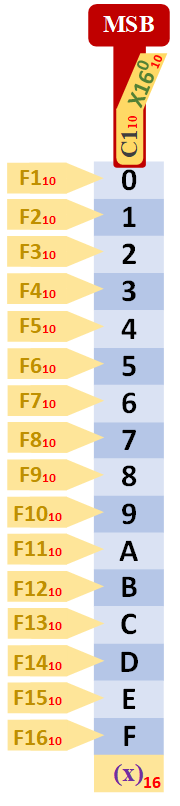
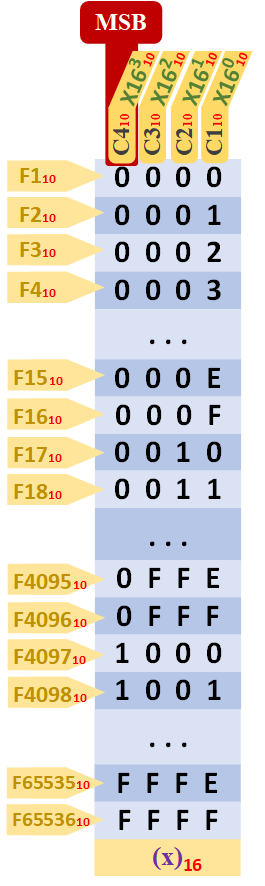
This table is quite a bit bigger; if you look closely, it follows the same principles as the previous bases: it’s easy to create.
Here’s the four-digit table for hexadecimal, quickly:
Converting hexadecimal to decimal
The conversion from hexadecimal to decimal is the same as from binary. For example, to convert the hexadecimal number “7C0A” to decimal:
- The hexadecimal number to convert to decimal: 7C0A
- For each column, its decimal multiplier: (7 x 163) + (C x 162) + (0 x 161) + (A x 160)
- We replace each hexadecimal symbol (the letters) with decimals: (7 x 163) + (12 x 162) + (0 x 161) + (10 x 160)
- Each power is: (7 x 4.096) + (12 x 256) + (0 x 16) + (10 x 1)
- We calculate the parentheses: 28.672 + 3.072 + 0 + 10
- We add up: 31.754
- Conversion: (7C0A)16 = (31.754)10
Converting hexadecimal to binary
We can see the comparison of hexadecimal with decimal and binary in the following table:
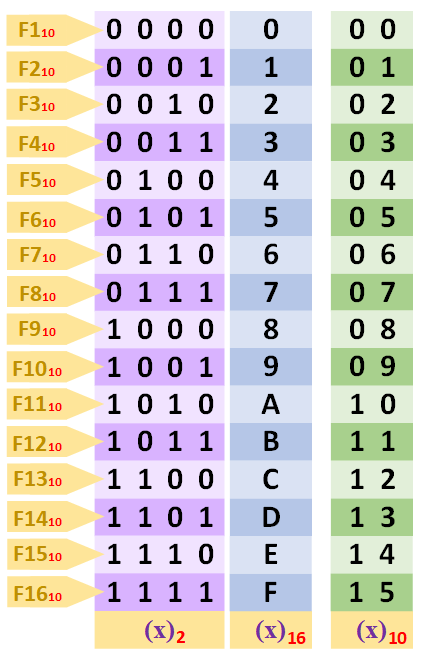
What matters most is that the hexadecimal table repeats exactly when the 4-bit binary one ends (because 16 is a power of 2, specifically 24 = 16; any base that’s a power of 2 will repeat and will be very good for instantly converting each symbol to its binary). With it, it’s easy to convert each hexadecimal symbol to a group of 4 bits directly from the table (I remove the decimal so as not to confuse things, since decimal doesn’t coincide with the end of the hexadecimal table and can’t be used to convert the hexadecimal symbol to decimal):
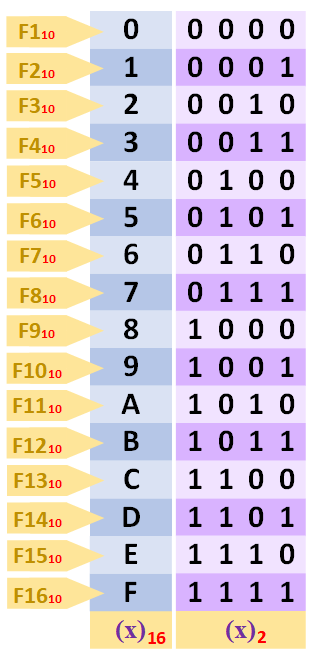
Converting from hexadecimal to binary is very simple. It’s enough to convert each hexadecimal letter to binary separately. For example, to convert the hexadecimal number “7C0A” to binary:
- The hexadecimal number to convert to binary: 7C0A
- Replace each hexadecimal symbol with its binary: 0111 1100 0000 1010
- Conversion: (7C0A)16 = (0111110000001010)2
Converting binary to hexadecimal
And the other way around, converting from binary to hexadecimal is the same as before. Each group of four bits is a hexadecimal symbol. For example, to convert the binary number “0111110000001010” to hexadecimal:
- The binary number to convert to hexadecimal: 0111110000001010
- Split into groups of four bits: 0111 1100 0000 1010
- Replace each group with its hexadecimal symbol: 7C0A
- Conversion: (0111110000001010)2 = (7C0A)16
Converting hexadecimal to any numeral system
Once we have the value in binary, we can convert the value to decimal (as we saw before) or to any base we want.
Text encoding
We also said that a group of bits could be a letter (as has been recalled in this article, and the mystery was left open in the previous one about numeral systems). We gave as an example that the binary number “01101010” (or the hexadecimal “6A”) is the letter “j” (lowercase j).
As with colors, there are several standards. A very famous one is ASCII (“American Standard Code for Information Interchange”. Full information on ASCII at ASCII (Wikipedia) ). It uses 8 bits to store each symbol (symbols such as the letters of the alphabet, the ten symbols of decimal numbers, @, +, -, /, etc.).
It’s simply based on replacing a binary code with a symbol from the following “1968 ASCII Code Chart”:
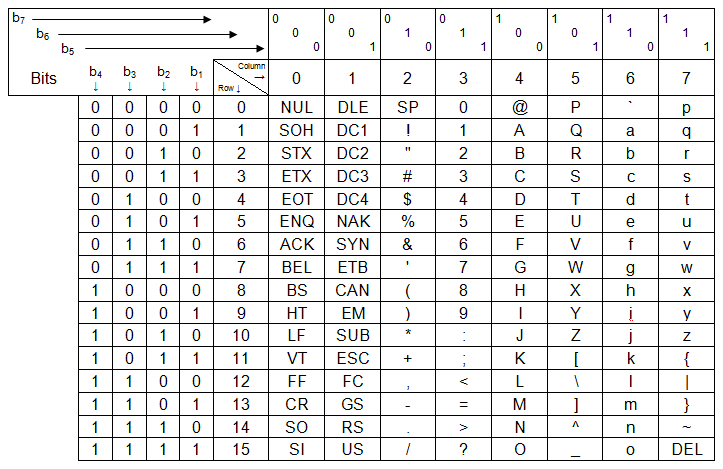
It looks complicated, but it’s very simple. The chart offers both the binary conversion (in the box at the top left where it says “b7”, “b6”, “b5”, “b4”, “b3”, “b2”, “b1”) and the hexadecimal conversion (at the top left, in a box inside the previous one, where it says “Row” and “Column”).
To find out which letter the binary “01101010” is, simply:
- The binary number to convert to an ASCII symbol: 01101010
- We drop the first bit (since it isn’t used, we keep the last seven): 1101010
- We split by positions (taking into account the most significant bit “MSB”, which is the leftmost one and will be “b7”):
- b7 = 1
- b6 = 1
- b5 = 0
- b4 = 1
- b3 = 0
- b2 = 1
- b1 = 0
- We look for the symbol in the table matching the row and column: j
With hexadecimal it’s simpler:
- The hexadecimal number to convert to an ASCII symbol: 6A
- We replace the hexadecimal symbols with decimals: 6 10
- The first symbol is “Column” and the second is “Row”:
- Column = 6
- Row = 10
- We look for the symbol in the table matching the row and column: j
To finish, I’ll mention that hexadecimal is used for a ton of things (besides colors and letters, as we said), always for the purpose of shortening the representation of lower bases. For:
- IP addresses (the ones you use to connect a computer to the Internet), especially for the new IPv6 protocol, which supports 2128 different addresses. For example, an IPv6 address could be (it’s already long in hexadecimal, imagine in binary): “2001:0DB8:AC10:FE01:2541:FE18:12AE:F81B”
- MAC addresses (the physical address of the network card of any of your devices; the “network card” is what unequivocally identifies your computer so it can be connected, for example, to a router, so it has Internet). For example: “48:6D:43:C2:3C:FE”
- In product serial numbers. It depends on the manufacturer, but sometimes you can see hexadecimal on product boxes instead of decimal (like on the boxes of televisions, microwaves, or smartphones). Also when buying software (the number it normally asks for during installation, to make sure it’s genuine).
- Programming with assembly code (“assembly code” is used to program the processor of your computer or smartphone; for example, telling the processor to add two numbers that are in two separate memory positions and place the result in another memory position). For example, an assembly instruction could be: “C010 B6 80 04”
Octal (base 8)
Although all the tables are the same by now, I didn’t want to finish without showing you the octal ones (base 8, which has 8 symbols: 0, 1, 2, 3, 4, 5, 6, 7), since grouping binary into octal is also very common (8 is a power of 2, specifically: 23=8). It’s not as widely used as hexadecimal, but it’s also important. And it’s calculated exactly the same way as the other tables (learn one and you know them all).
Here’s the basic one-digit table, quickly:
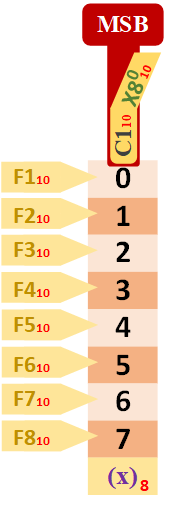
And any other one, for example the four-digit one:
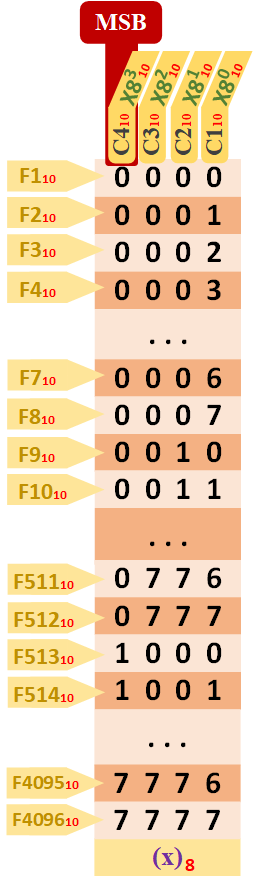
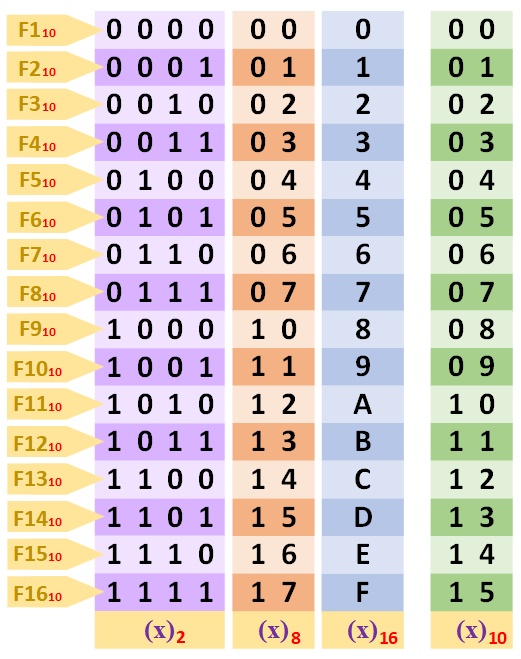
I’m also giving you, for free, the comparison of the four numeral systems we’ve seen (binary, octal, hexadecimal and decimal). So you can see that octal also coincides before moving on to the next round number (by “round number” I mean the one after the last one that ends the count with the symbols of a numeral system; that is, the one that ends in “zero”. For decimal the round numbers would be 10, 20, 30,… , 80, 90, 100, etc. For binary: 10, 100, 110, 1000, 1100, 1110, etc. For hexadecimal: 10, 20, 30,… , D0, F0, 100, etc. And for octal: 10, 20, 30,… , 60, 70, 100, etc.), exactly where the tables for binary and hexadecimal also end (as we said, the coincidence isn’t by chance; they coincide because they’re powers of 2; decimal isn’t a power of 2, it’s a power of 10, and it would coincide with other numeral systems that are powers of 10).
Converting octal to decimal
The conversion from octal to decimal is the same as the previous ones. For example, to convert the octal number “6017” to decimal:
- The octal number to convert to decimal: 6017
- For each column, its decimal multiplier: (6 x 83) + (0 x 82) + (1 x 81) + (7 x 80)
- Each power is: (6 x 512) + (0 x 64) + (1 x 8) + (7 x 1)
- We calculate the parentheses: 3.072 + 0 + 8 + 7
- We add up: 3.087
- Conversion: (6017)8 = (3.087)10
Converting octal to binary
Just as simple as hexadecimal, to convert from octal to binary and vice versa:
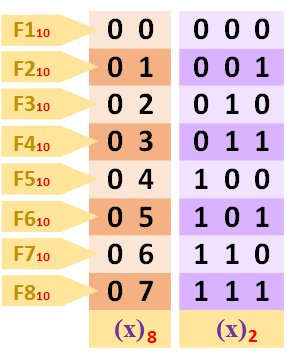
Converting from octal to binary. Convert each octal letter to binary separately. For example, convert the octal number “6701” to binary:
- The octal number to convert to binary: 6701
- Replace each hexadecimal symbol with its binary: 110 111 000 001
- Conversion: (6701)8 = (110111000001)2
Converting binary to octal
And the other way around, converting from binary to octal. Each group of three bits is an octal symbol. For example, to convert the binary number “110111000001” to hexadecimal:
- The binary number to convert to octal: 110111000001
- Split into groups of three bits: 110 111 000 001
- Replace each group with its hexadecimal symbol: 6701
- Conversion: (110111000001)2 = (6701)8
Converting octal to any numeral system
And just like hexadecimal, from the value in binary we can convert the value to decimal (as we saw before) or to any base we want.
Note
Different meanings for the same binary number
It depends on the program that opens each file (which has bits inside). For one program the bits will mean one thing and for another, something else.
For example, for an image editing program (like Photoshop or Gimp) they will be bit positions and each position will have a color (to know which pixel to paint and in what color).
For a music player the bits will represent metadata (metadata is information about the audio, such as the song’s author, its duration, etc.) and the signal itself that it will play as audio (the position of each point of the audio signal curve).
Or for a calculator, it will mean an actual number or a symbol to operate on several numbers with.
Attributions
- RGB color model image by Ninja404 obtained from Wikipedia: https://upload.wikimedia.org/wikipedia/commons/c/c2/AdditiveColor.svg
- 1968 ASCII code chart image by LWChris obtained from Wikipedia: https://upload.wikimedia.org/wikipedia/commons/archive/8/82/20140820143049%21US-ASCII_code_chart.png
References
- Sistema binario (Wikipedia)
- Binary prefix (Wikipedia)
- Base (aritmética) (Wikipedia)
- Sistema de numeración (Wikipedia)
- Base64 (Wikipedia)
- Unary coding (Wikipedia)
- Índice (matemática) (Wikipedia)
- Most significant bit (Wikipedia)
- Least significant bit (Wikipedia)
- Instruction set architecture (Wikipedia)
- Besides personal experience
“Binary: Combinations and Conversion” by Ramón Invarato at jarroba.com, licensed under Creative Commons Attribution-NonCommercial-ShareAlike 3.0. Registered at Safe Creative.

You may also like
Binary Number System
Learn what the binary number system is, how it relates to decimal, octal, hexadecimal and base 64, and how to read bases and number notations.

Units of Measurement for Information
Learn the units of information: bit, byte, kilo vs kibi, GB vs GiB. Understand the old and new systems so nobody fools you about storage or speed.
Leave a comment