
Bit
The bit, the basic unit of digital information. It represents two states: the binary system. Something so simple, yet important and full of potential.
The bit, the basic unit of digital information. Something so simple, and at the same time so important and necessary to understand because of all its potential. Everybody should understand the foundation of today’s technology, because we live in a digital world and not understanding it properly is like not knowing how to add.
We might want to translate “bit” from English into Spanish as “little piece”, but that would be our first mistake, because the letters of “bit” are short for “Binary Digit”, which we can indeed translate as “Binary Digit” (when you talk about it out there, it’s better to use “bit”, which is how you’ll be understood both by Spanish speakers -since the word “bit” itself is already accepted in Spanish by the RAE– and by people who speak other languages).
The bit is usually represented as a “1” or a “0”. I could tell you that 1 means the typical things: “Yes”, “True”, “On”, etc.; and that 0 means the opposite: “No”, “False”, “Off”, among others. That’s only partly true, because it doesn’t really mean that; it’s whatever meaning we want to give to each state of something (for example, 1 could mean “love” and 0 “hate”; or not even opposites like colors, 1 could mean “blue” and 0 could mean “red”, or even 1 “apple” and 0 “building”).
Although the bit is usually represented as 1 or 0, it is not a number. It really represents two states of something, such as a bottle “with liquid” or “without liquid” (or, if you like quantum physics, it would be like Schrödinger’s cat, which can be “alive” or “dead” at the moment it is observed). Everything has states, even you; for example, your complete current state could be: “happy, not hungry at all, but a bit thirsty, cool in the shade of a tree and relaxed”, or any other you can imagine.
The fact that 1 bit can only represent two states is called a “binary system”, and each state excludes the other (if one exists, the other doesn’t; for example, a light bulb being on or off is mutually exclusive: if it’s on it can’t be off; an example of a system with two non-exclusive states could be a faucet where you can mix hot and cold water; however, when the water is at 100 degrees it excludes being at 30 degrees, because both states can’t exist at the same time). So we can only write either a “binary 1” or a “binary 0” (don’t confuse them with a decimal 1 or a decimal 0; you’ll understand why as you read on). On the other hand, in a “binary system” a “binary 2” can never exist; that would already be a “ternary system” and not a “binary system” (it allows 3 numbers: 0, 1 and 2); and by extension no other number either (if, for example, it went from 0 to 9, it would be the “decimal system” we are used to using in our day to day).
When the computer was invented, we wanted to represent states -since absolutely everything in the universe has states- and to know not only how to represent them, but how to control them at will; that’s what lets us move faster with almost everything that can be posed in the world, and all thanks to digital states.
To understand this idea (that something doesn’t have to be “on” or “off”), I’m going to show you how a 0 or a 1 in binary was stored in a computer some years ago (until 1970, and I can tell you it was so common that people thought it would stay that way forever, but in the end it evolved into something more complex; that’s why I’m going to start by explaining the simple before the complex):

A ring, a hoop or a washer? Well yes, more precisely it’s a toroid (the “toroid” shape is the ring shape you’ve seen in the image), which could measure less than a millimeter (there were several sizes and thicknesses), and was made of ferrite. It was what was commonly known as a “Ferrite core”, and it had the ability to store either a “0” or a “1” just as you see in the previous image.
And how did this “Ferrite core” store a “0” or a “1”? Through magnetism, because it was a magnet.
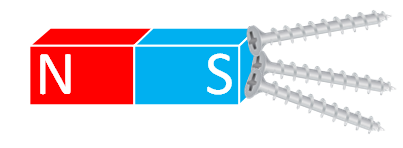
Can a magnet store something? Yes, and it’s quite simple (as simple as the inanimate object a magnet is; inanimate, but with particular physical properties). Picture the typical magnet that attracts other metals (other “ferromagnetic metals” specifically, not all metals are attracted or pushed by a magnet) or repels them with the opposite side.
Note
Note about the letters “N” and “S”:
“N” and “S” could mean North and South respectively, but they really don’t mean anything more than that one is the opposite of the other (one attracts the other, while it repels its own kind). We could have represented one pole with “+” and the other with “-”; or simply written on one pole “I’m Paco, I want to get together with Alicia, but I reject other Pacos” and on the opposite one “I’m Alicia, I want to get together with Paco, but I reject other Alicias”.
OK, all of this is great, but how do we store something in a magnet? If a magnet attracts on one side and repels on the other, and the magnetism of the magnet is changed (the polarity is changed: the side that used to repel now attracts and vice versa), we can represent either a “0” or a “1”, and therefore store it. Let’s see how.
Note
Note about magnetism
Here we don’t intend to give an advanced course on magnetism, just to understand the basics needed to grasp how the most basic hardware works. We simplify with “attracts” or “repels” using an example object that we assume is a magnetic monopole (a single pole), made up to keep things simple. All ferromagnetic materials have two poles; each pole attracts the opposite pole (the “N” attracts the “S”), and repels the same pole (the “N” repels the “N”).
If we have to draw the magnetic lines, we can say that they come out of one pole and go into the other (that is, something that is repelled by one pole is pushed toward the one that attracts it and pulled by it).
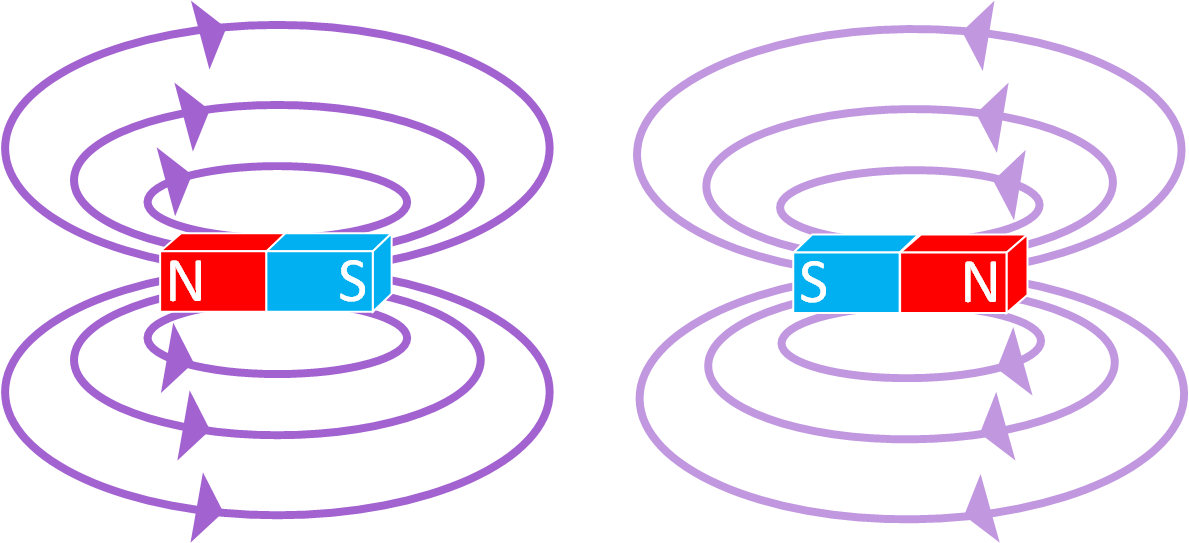
In the following images I’ll represent magnetism with purple lines, and when the magnetism changes I’ll draw them a bit lighter so you can see the difference.
By the way, although here we’ve described magnetism in a friendly way and without formulas, it’s based on proven facts; know that you don’t need to memorize it to understand how a computer works logically, just have a general knowledge to give you a broader view, which I’ll explain with dozens of images, in simple but complete terms. That way, if there’s something you already know, you can skim through it until you read something you don’t know; and if you didn’t know it, you’ll understand it right away.
Suppose we paint a mark (in the image below the mark is a golden star) on one of a magnet’s poles without knowing the polarity of each pole.

Now we discover the polarity of each pole and label it with a sign (“N” and “S”).

Let’s agree, for example, that it means “1” (the whole magnet means “1” in its current state, which is with the “N” on the left and the “S” on the right). If we change its polarity -so the mark is now on the opposite pole- it will mean “0” (it means “1” or “0” just because we want it to; if we say one is a number, the other will be the opposite).
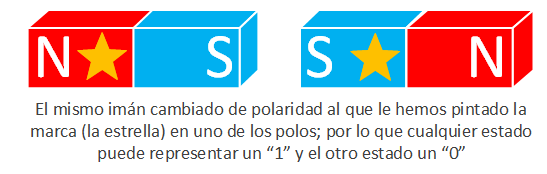
I’m going to dedicate this paragraph to an aside so you can reflect for a moment. If we build this magnet at home to store states by changing polarity, it can mean whatever we really want, like “marked and attracts” means “apples”, or “marked and repels” means “bananas”. In computing we want them to represent “0s” and “1s”, mostly so we can write them on a sheet of paper quickly and easily; and also so it’s independent of whether we store the state with magnets, or with colored balls (for example, we could place a “green” ball on a box meaning “1”, and if we swap it for a “brown” one it could mean “0”; it all depends on our imagination, although for a computer we want something electrical, automatic, with no moving parts, very fast, and the smaller the better).
Magnetic cores
With magnetic toroids (the “Magnetic cores”) the operation is similar. Except that the magnetic poles (“N” and “S”) are distributed along the whole ring (imagine we bend the previous rectangular magnets until the “N” meets the “S”; from that moment there’s no “N” or “S” as such because it’s all of it; it’s as if there were infinite “N”s and “S”s one after another).
The magnetism of a toroid runs through the whole area of the ring in one direction or the opposite, depending on whether -as we saw earlier- we’ve flipped its magnetism or not.

That’s why the most common name for these toroids was “Magnetic core of ferrite” (made mostly of ferrite, although also of other materials; so they’re usually just called “Magnetic core”). They are “magnetic” because they’re made of “ferrite” (as already said, a ferromagnetic material), and “core” because the material the toroid is made of is very good at forming magnetic fields (what in physics is called “Magnetic permeability”).
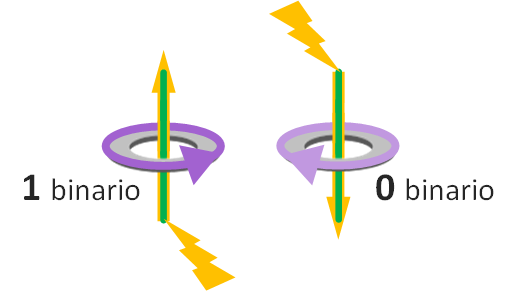
To flip the polarity we have to pass an electric current through the middle of the toroid (through the hole of the ring). In the following image we pass a green wire through the middle.

There’s a physical fact we know that scientists discovered some years ago (specifically we owe it to Hans Christian, who discovered it in 1820; if you’re interested there’s more history about magnetism at Magnetismo (Wikipedia)). And it is that, if we place the toroid horizontally, if the electric current comes from below, passes through the middle of the ring and continues upward, the magnetic field will rotate in one direction; and if it goes from top to bottom, it will rotate in the opposite direction. After running a few experiments and discovering this, we can use this property of nature to store information. This way, if the magnetism rotates one way we want it to represent the binary “1”, and if it rotates the opposite way the binary “0” (in the following image I placed the 1 and the 0 randomly wherever I wanted; in all the following examples I keep the same representation; this is how the manufacturers of magnetic core devices would do it, and it probably wouldn’t match between two different companies).
Note
Curiosity about the direction of the magnetic field caused by an electric current
The rotation direction of the magnetic field is always the same depending on which way the electricity flows (up or down, if the magnetic field is horizontal). We can get the rotation direction of the magnetic field with the “right-hand” rule trick. The thumb of your right hand points in the direction of the electric current, and the rest of your fingers, slightly curled, point in the direction the magnetic field always rotates.

Writing values in magnetic cores
Knowing how to store 1 bit is nice, but with a single bit we can’t do much; we want to store as many bits as possible (and read them). So if, for example, we put 2 magnetic cores we can store more information (2 bits, which is one bit per “magnetic core”).

But there’s a problem: how do we store a different value in each magnetic core if the wire that passes through both “magnetic cores” is the same (it would change both at once)? With another property of physics.
Human knowledge is broad, and we know that magnets have a special characteristic when it comes to electricity: if we connect a wire to a magnet and gradually increase the electric current, at first nothing will happen; but at a certain point, above a certain amount of current, the magnet flips its polarity (what used to attract now repels and vice versa) and even if we stop shocking the magnet, it keeps the new polarity (this physical effect is called “Magnetic hysteresis”, more information at Histéresis (Wikipedia)).
This physical property is perfect for storing information in a magnetic core, since we can choose which toroid we want to flip. Let’s imagine we start with the “magnetic core” in the following state:
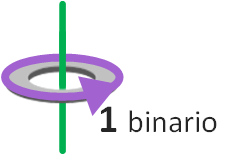
And we want to change its state. If we apply little electricity to the wire that passes through the middle, its state doesn’t change (if you look at the earlier note box called “Curiosity about the direction of the magnetic field caused by an electric current”, the following drawing doesn’t follow the “right-hand” rule, because the magnetic field running through the toroid hasn’t changed).
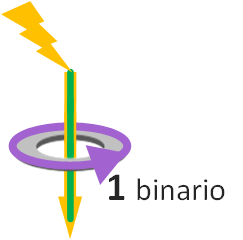
But if we pass enough electricity, its state changes (the electricity needed depends on some factors, such as the size of the “magnetic core” or the material it’s made of), which is what we wanted (the following image does follow the “right-hand” rule). So we’ve gone from a “1” to a “0”. And to return to the previous state, it would be enough to do the reverse (pass enough electricity through the ring from bottom to top).
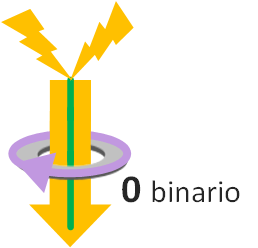
This is the same as having two wires with electricity running through each in the same direction (whose sum causes the magnetic change). In the following image we’ve passed a new brown wire through the inside of the magnetic core (although I’ve drawn the wire apparently crossed to represent it; if you look closely, it really passes through the hole of the ring just like the green wire; so it’s not that the green wire is on top of the brown one; in reality we’d see both as parallel wires passing through the inside of the toroid).
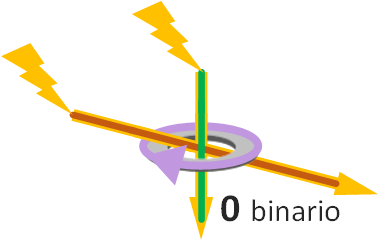
If we connect a single wire to the electric current, it won’t flip the polarity of the magnetic core; but two energized wires will. Let’s see how this is useful (although you may already see where this is going; if not, keep reading and I’ll give you more hints).
Knowing how the magnetism of a toroid with an electric current running through it works, we can create a matrix of toroids to store many bits. Remember, 1 toroid stores 1 bit, so N toroids will store N bits. How many bits do you want to store? Then you’ll need as many magnetic cores as bits we want to store.
Let’s look at a more complex example (which doesn’t mean “difficult”, since it’s quite easy; it’s the same as before, but with more magnetic cores). We want to create a “hard drive” with a capacity to store 4 bits (does a high-definition movie fit in 4 bits? Not even close; we’d need millions more magnetic cores; let’s say not even a small low-quality image fits, hardly even a letter, although that’s relative).
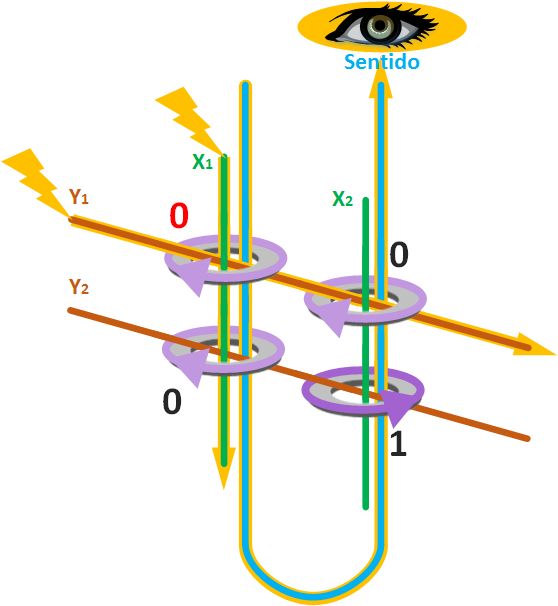
Look at the image below. We’ve arranged the magnetic cores as a 2×2 matrix (it looks complex because there’s a lot going on at first glance, but you’ll soon find out it’s really just a few things and then it’s all the same thing multiplied by however many toroids we want). Through the hole of each magnetic core we’ve passed two wires (in the image you can see that each toroid has an X wire and a Y wire), and we’ve initialized all the toroids with the same magnetic field direction, which we said will be the representation of the “binary 0”.
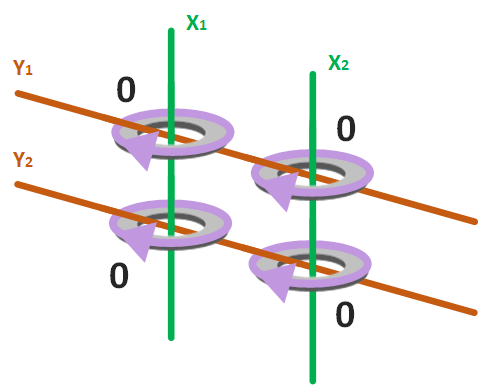
So, if we want to set a “binary 1” (flip the magnetism) in the top-left toroid, without modifying any other, it’s as simple as passing electricity through the two wires threaded through its hole (in the image X1 and Y1), in the direction of the electric current that flips the magnetic field (following the “right-hand” rule). This way, not enough electric current passes through the inside of the other magnetic cores (so their magnetic field direction doesn’t change and they keep representing the “binary 0”), but it does through the one we wanted to change (whose magnetic field will change to “binary 1”). So, we have the value we wanted (in this case the “binary 1”) in the toroid where the wires energized in the same direction intersect.
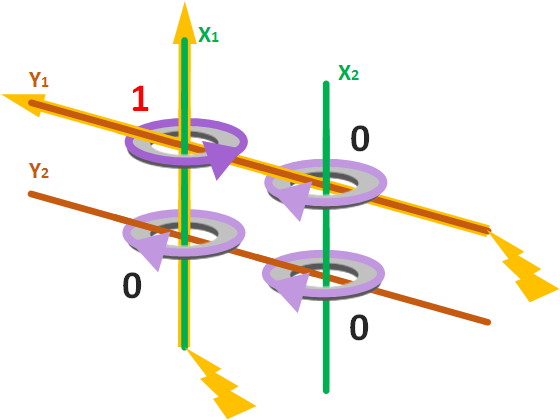
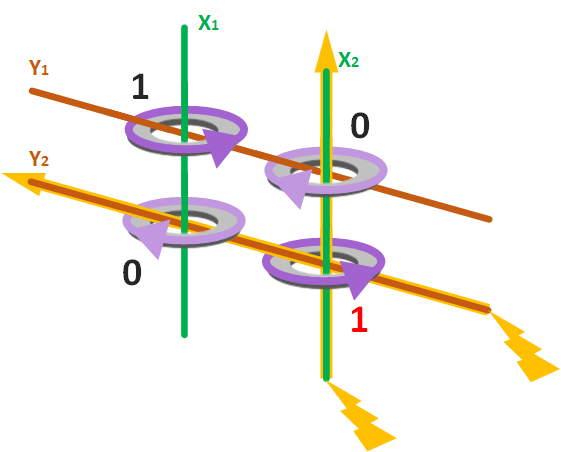
If we want to change the value of any other magnetic core we’d do the same, but with the wires that pass through its hole. The following image is the continuation of the example, but changing the value of the bottom-right magnetic core (by passing electricity in the desired direction through wires X2 and Y2).
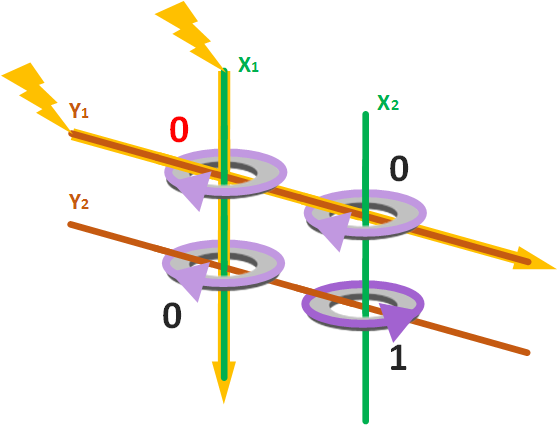
And the same thing, but in reverse. For example, if we want to write a “binary 0” again in the top-left magnetic core, without affecting other magnetic cores, we simply apply electric current in the opposite direction on the wires that pass through its hole (in the image X1 and Y1).
Reading values from magnetic cores
So far we’ve written information to our hard drive. But how do we read it?
To read the data stored in a magnetic core, the idea is to select it from among all the others and then have something that “sees” whether a “binary 1” or a “binary 0” is stored. What “sees” the bit is yet another wire through the hole of the toroid called the “Sense wire”, and the name comes from the fact that it’s the wire in charge of sensing (“seeing”) whether there’s a “binary 1” or a “binary 0” in the magnetic core we select.
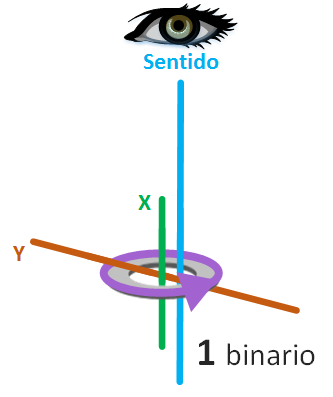
But how does this work? How do we select one magnetic core from all the rest? For the second question, here’s a hint: the same way we write to the desired magnetic core (with the X and Y wires). And let me explain the first question.
The idea is to try to change the magnetic field and detect that change. So with the X and Y wires we’ll try to change the magnetic field to the one corresponding to the “binary 0”, and if the magnetic field changes, it means there was a “binary 1”, and if it doesn’t change there was a “binary 0”. Doesn’t this turn the “1s” into “0s”? Yes, so once we’ve detected it was a “1”, the thing to do is change the magnetic field back to “1” (if there was a “0” it isn’t needed since nothing will have changed) so the magnetic core stores the correct value again.
To detect the change in the magnetic field we use another property of physics, which simply says that a changing magnetic field generates an electric field (in physics this property is called “induced voltage”; for the explanation you don’t need to understand more than what I’ve told you; if you’re curious there’s more information at Fuerza electromotriz (Wikipedia)).
And this is where the new “Sense wire” comes in: if in a magnetic core we try to set a “binary 0” (with the “X wire” and the “Y wire” corresponding to that magnetic core) and the magnetic field changes, an electric field will be generated in the “Sense wire”. So we’ll detect that there was a “binary 1” in that magnetic core (in this case we’d then have to write the “binary 1” back into the magnetic core, since by reading it we’ve changed it to “binary 0”).
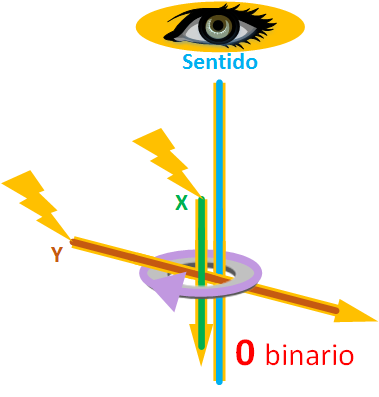
However, if we try to write a “binary 0” in the magnetic core and the magnetic field does NOT change, then no electricity will run through the “Sense wire” (actually some electricity does run, very little, not enough to be interpreted as a real magnetic change; here, to simplify the states, I’ll say that either electricity runs or nothing runs through the “sense wire”) and we’ll deduce that there was a “binary 0”.
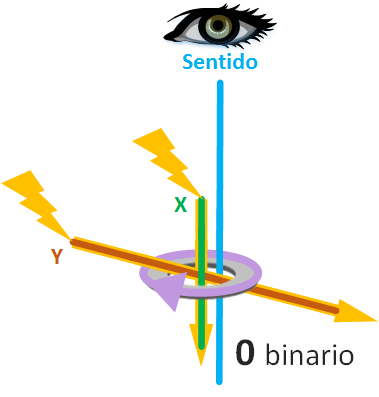
As part of a group of magnetic cores, a single “sense wire” is enough to interpret the value of any magnetic core.
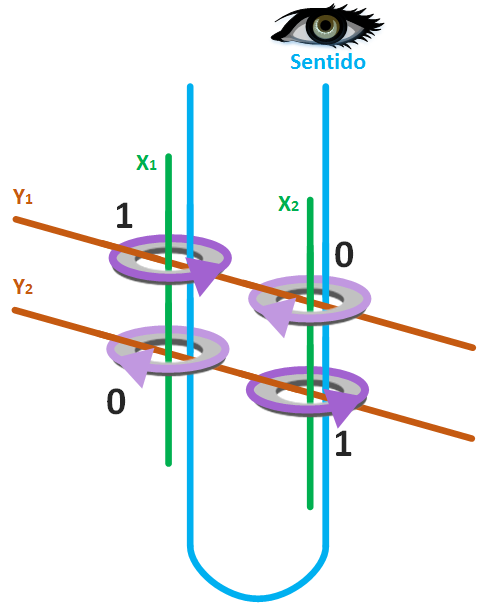
And to wrap up this part, a quick example if we want to know the value of any magnetic core, such as the magnetic core where wires X1 and Y1 meet (take a second to look at the previous image). We force a “binary 0” to be stored, whatever value the “magnetic core” previously had (it doesn’t matter whether it was a “binary 0” or a “binary 1”), where wires X1 and Y1 meet. If there was a “binary 1” we’ll detect an electric charge on the “sense wire”; if there was a “binary 0” no electric charge will be detected.
As you can see in the following image there is a “binary 1”. So, through the “sense wire” we’ll receive an electric current, and we’ll know that the magnetic core where wires X1 and Y1 meet had a “binary 1”. In this case, there really was a “binary 1” and we’ve replaced it with a “binary 0”; since we know there was a “binary 1” we’d write it back for when we need to read this value again in the future.
Note
Note about the fourth wire not explained in the examples
Here I’ve simplified things to the two wires, “X Wire” and “Y Wire”, to write the values in the magnetic cores, and the “Sense wire” to read the bits stored in the magnetic cores.
I don’t want to hide information from you, so I have to tell you that, to make the most of space and manufacturing materials, the wiring was a bit more complex (and the direction of the magnetic fields alternated from one core to the next). It was a tangle of wires (logical, though at first sight it was a mess of wires), and since the same current passed in the same direction through several magnetic cores (which meant the magnetic direction of several fields could change at once, when what we wanted was to change that of one specific magnetic core to store the bit’s state), a fourth wire called the “Inhibit Wire” was used, which also passed through the inside of the magnetic cores. It served to keep other magnetic cores from changing the direction of their magnetic field (it inhibited the magnetic change, hence the name “Inhibit Wire”). What this “Inhibit Wire” did was run the same amount of electric current as the two wires, “X Wire” and “Y Wire”, in the opposite direction, so that it would cancel out and not cause the magnetic change in the magnetic cores whose value we didn’t want to change.
In many designs the “Inhibit Wire” was merged with the “Sense wire”, since the “Inhibit Wire” was used when writing and the “Sense wire” when reading.
To keep the article easy to understand, and since the “Inhibit Wire” has no deeper explanatory value for what the “bit” is, I didn’t add it to the images (so as not to tangle things up, pun intended 😉 ); so I’m dedicating this note to it.
The following image from Wikipedia shows the tangle of wires well, though with logic to it (you don’t need to memorize it, I’m just including it as a curiosity):
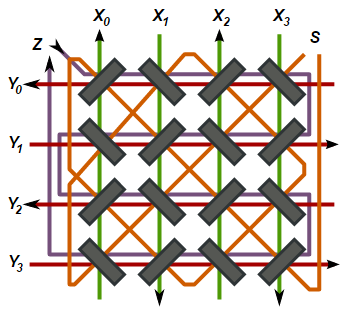
We’ve learned a lot in a short time; if you notice, they’re not such complicated physical concepts to understand at first (the article may need a couple of reads, and if we got into formulas it would be a different story; here, what’s been explained is enough to understand the idea of the “bit” at the hardware level). You’ve discovered how data is stored in hardware (even if it’s the old way, which is very similar to the new one). I wanted to explain the obsolete way because it expresses very well what a “binary 0” and a “binary 1” are, as opposed to the most common and direct perception of “on” and “off” (here they’re magnetic fields rotating in one direction or the opposite. Bet you hadn’t imagined that! 😛 ). It clears up many ideas and gives a much broader, and also more realistic, view.
On the other hand, in other more modern storage systems the ideas are similar: we need something that writes at a position we choose, and then reads what’s at the position we want.
Below I give a quick summary of what exists and how it’s built. We’ll expand on how it works in future articles.
Other bit storage systems
There are (or were) other things where we can store bits, different and more modern than “magnetic core” technology (I’m sure a few come to mind).
Note: Here I give a quick summary of what exists and how it’s built. We’ll expand on how it works in future articles.
We could store bits on paper, such as in:
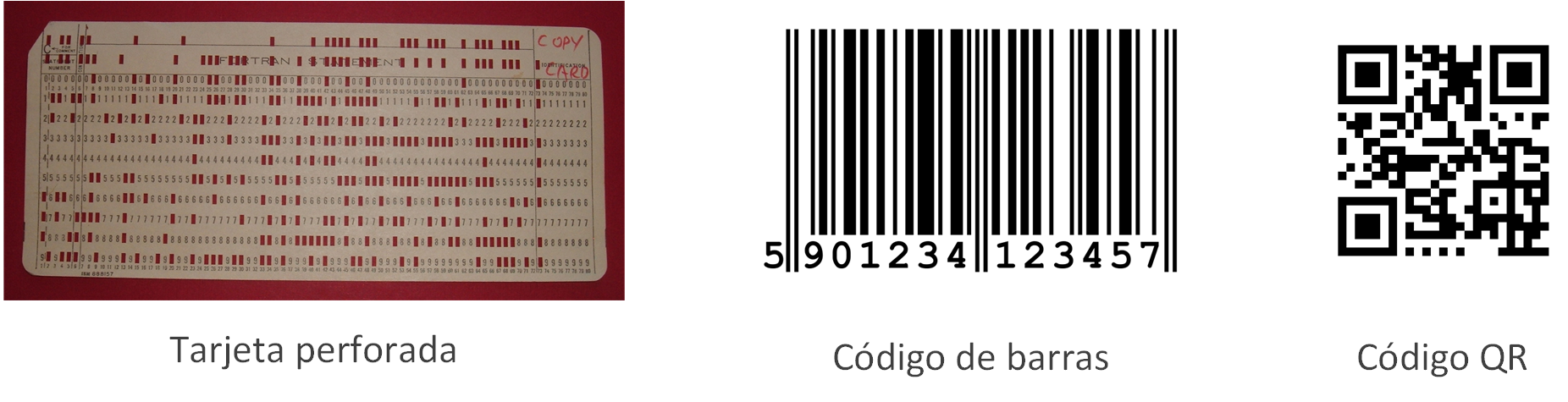
- Punched cards: As you’ll understand, they’re already obsolete (they stored little for their size, trees had to be used to make the paper, and today we have better technologies for storing information). Positions on the paper of the card were punched, so that unpunched would represent, for example, a “binary 0” and punched a “binary 1”, or the other way around. What mattered was whether it was punched or not, which is what stored the information. Each hole was then read mechanically (similar to the notches of a lock that read a key), by passing electricity through (electricity could only pass where there were holes), or with optical sensors.
- Barcodes: We usually see them on products in any store, and they’re read at the cash registers when you go to pay. The idea is that a bar represents, for example, a “binary 1” and no bar a “binary 0” (or the opposite; remember it doesn’t matter whether it’s “binary 0” or “binary 1”, but that it stores information the way we want to represent it and then read it back; in fact, in the barcode in the following image the longer bars of the barcode don’t represent “binary 0” or “binary 1”, but we could say they represent “start”, “middle” and “end”, and they let the machine that reads barcodes know where to start and finish reading)
- QR codes: More modern, we usually see them mostly in public transport advertising or in magazines, so we can read them with the cameras of our phones or tablets. As you can see in the following image, in the QR code a dot can represent a “binary 1” and no dot could be a “binary 0” (the big squares in the corners, like in the barcode, let whoever reads them position it correctly, to know where to start and finish).
Or, in non-volatile digital technologies (“Non-volatile” meaning they store information permanently, at least until told otherwise; except for some that could only be written once) such as:
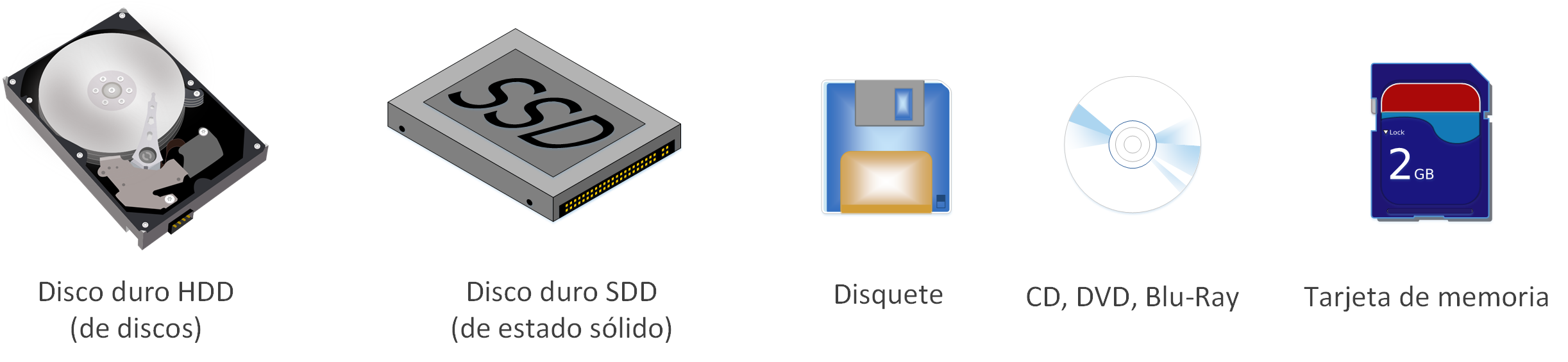
- Hard disk drive (HDD): Stores bits magnetically (similar to magnetic cores) on several stacked platters
- Solid-state drive (SSD): Stores in flash memory (in memory cells, each cell holds 1 bit)
- Memory cards (like the popular SD cards): Store in flash memory
- Floppy disks: Stored bits magnetically (Obsolete, no longer manufactured)
- CDs, DVDs, Blu-Ray: Store optically (a laser burns to form grooves in the disc and those grooves are read; whether there is a groove or not corresponded to a binary 1 or a binary 0). The difference between CD, DVD or Blu-Ray was the size of the grooves; the smaller the grooves we can create and read, the more storage capacity fits. They can only be written once (There was a variety of rewritable discs, for example the so-called CD-RW, which used a type of polycrystal on their surface; this polycrystal had the peculiarity that, if we wanted to burn a "0" onto the CD at a point with the laser, that point was heated to about 700º so it would lose reflectivity, and if we wanted to write a "1" the point was heated to about 200º so it would regain reflectivity; to read, it was enough to use a laser temperature lower than 200º so the stored value wasn’t modified).
Also digitally, in volatile memories (volatile because it stores information as long as it has electric power; if it’s unplugged from electricity, whatever it had stored is lost) such as (depending on the technology they’re quite similar):
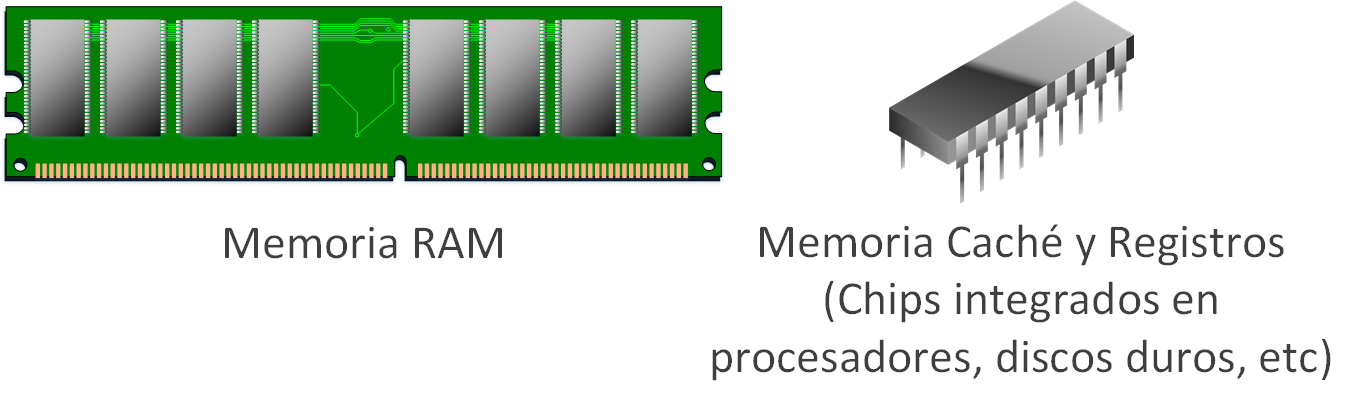
- RAM memory (Random-access memory): Stores in memory cells (each cell holds 1 bit)
- Cache memory: Stores in flip-flops (a circuit that generates periodic waves and can stay in two states, to store a “binary 1” or a “binary 0”), known as SRAM (Static RAM).
- Processor registers memory: Stores each bit in a capacitor complemented with integrated circuits, better known as DRAM (Dynamic RAM)
If you want more, I recommend you continue with the "Units of Measurement of Information" article by clicking here.
Note
A curiosity about my university
As a curiosity, my university (the Escuela Universitaria de Informática of the Universidad Politécnica de Madrid), both the old logo (the one on the left) and the modern one (the one on the right) use the magnetic core as the logo, with the four wires (X, Y, sense and inhibit).

I imagine whoever designed the logo (a careful and very respectable design) thinking of “something” about computing that would last forever, “something” that wouldn’t evolve, “something” that wouldn’t be lost over time, “something” eternal. “Something” like a “plane” for the aeronautics university, an “anchor” for the naval ones, or some “plant” for the agriculture ones; things we could say are eternal or are expected to last quite a few years. But that “something” doesn’t exist, at least not yet, in computing; because computing is very new and changes too much. So much so that, as we said, magnetic cores were already abandoned by 1970.
Acknowledgments
- To Guillermo Invarato for the corrections regarding physics (electricity and magnetism)
Attributions
- Unmodified 4×4 magnetic core diagram from: https://en.wikipedia.org/wiki/File:Coincident-current_magnetic_core.svg
- Unmodified punched card (only placed next to other images of the same group to save space) from: https://commons.wikimedia.org/wiki/File:IBM1130CopyCard.agr.jpg
- Unmodified barcode (only placed next to other images of the same group to save space) from: https://commons.wikimedia.org/wiki/File:EAN13.svg
- The logos of the Escuela Universitaria de Informática (EUI) of the Universidad Politécnica de Madrid (UPM) -now renamed Escuela Técnica Superior de Ingeniería de Sistemas Informáticos (ETSISI)- belong to that same school: Here we show the logos as a curiosity and unmodified (one has only been placed next to the other to save space).
References
- Magnetic-core memory (Wikipedia)
- Electric current (Wikipedia)
- Fuerza electromotriz (Wikipedia)
- Magnetismo (Wikipedia)
- Magnetic core (Wikipedia)
- Permeabilidad magnética (Wikipedia)
- Histéresis (Wikipedia)
- Random-access memory (Wikipedia)
- Static random-access memory (Wikipedia)
- Cache (computing) (Wikipedia)
- Hard disk drive (Wikipedia)
- CPU cache (Wikipedia)
- Processor register (Wikipedia)
- How does my computer store things in memory? (Unix and Internet Fundamentals HOWTO)
“Bit” by Ramón Invarato at jarroba.com, licensed under Creative Commons Attribution-NonCommercial-ShareAlike 3.0. Registered at Safe Creative.

You may also like
Units of Measurement for Information
Learn the units of information: bit, byte, kilo vs kibi, GB vs GiB. Understand the old and new systems so nobody fools you about storage or speed.


Binary: Combinations and Conversion
Learn how numeral system combination tables work and convert between binary, decimal, hexadecimal and octal with simple mental math.
Leave a comment