
Check Digit – Error Detection
The check digit covers several hash codes, such as the parity bit, the digit generated by the Luhn algorithm, the verification letter of national ID numbers, and more.
The “Check digit” or “Verification digit” is a very simple type of hash code (you can find more information about hash codes here) used to detect errors (there are others that correct them, like the Hamming code). This way, if for example we send any file (such as an image) over the Internet from our computer/smartphone/tablet to a friend, our friend’s device will be able to work out whether the bits that make up the file arrived correctly or not (for example, an electromagnetic storm might have changed some bits along the way, so it wouldn’t arrive correctly).
The check digit is used in many places, many more than you probably imagine. Where you have most likely seen it is in credit card numbers and in the DNI number (National Identity Document); it also appears in others, such as barcodes, invoice numbers, identification numbers like license plates, ISBNs, etc. In short, the check digit appears in almost all the official papers or cards issued by the government, banks, or stores; in the number that appears as an identifier.
Generally this check digit is calculated with a chosen modulo (chosen by the manufacturer of the machine that reads the barcodes, the government that issues the DNI, the bank that issues the card, etc). Note that depending on the manufacturer there may be other variants that don’t use the modulo.
Above all, it’s very interesting to understand how to calculate the modulo (it’s useful for many things and it’s very simple. If you have never seen or fully understood the modulo, you might think it’s complicated, but quite the opposite, the following question will settle how hard it is: do you know how to divide? If the answer is yes, getting comfortable with the modulo won’t take you any more effort than dividing), so I’ll make a short detour to explain it (note about the examples: the examples are basic so that everyone can follow the article easily; if you already know something, you can simply skip it or review it; that doesn’t stop me from explaining complex things starting from the basics).
Note
What is the modulo (mod)?
It is simply the remainder of integer division (“integer division” means there won’t be decimals like “7.5”). For example:
- No remainder (the same as saying the remainder is zero “0”): 8 divided by 2 is 4, and the remainder is 0 (as a simple example, if I have 8 candies and share them between 2 kids, each kid gets 4 candies, and 0 candies are left over). In this case the modulo (the remainder) is 0. Put another way, “8 / 2 = 4” and “8 mod 2 = 0”
- With remainder: 11 divided by 4 is 2 (if it weren’t “integer division” the result would be “2.75”, and with decimals there is never a remainder; that’s why we use “integer division”, so there is a remainder), and the remainder is 3 (that is, multiply the result 2 by 4, and see how much is missing to reach 11, so 11 – 8 = 3; or in the simple example, 11 candies shared among 4 kids, each kid gets 2 candies, and 3 are left over). In this case the modulo (the remainder) is 3. Put another way, “11 / 4 = 2” and “11 mod 4 = 3”
It is usually written in two ways (read as “The modulo Y of X is Z”; for example “The modulo 4 of 11 is 3”):
- “X mod Y = Z” (example, “11 mod 4 = 3”)
- “X % Y = Z” (example, “11 % 4 = 3”)
The beauty of the modulo is that calculating “11 mod 4 = X” is easy: “X” is “3”. But from the result (the remainder) “3”, finding for example “Y mod 4” and getting “Y” is hard (if not impossible, since “Y mod 4 = 3” is also satisfied by “3 mod 4 = 3” or “7 mod 4 = 3” among infinitely many possible results, and the one we wanted was “11”; so we can say the calculation can’t be undone). That’s why the modulo is used so often in security algorithms, since even a computer takes a while to reverse it, because it isn’t a direct calculation 🙂
You can easily calculate the modulo with any scientific calculator.
For example, in the Windows calculator, if you switch to scientific mode the “Mod” key will appear; to use it, just enter the first number, press “Mod”, enter the second number, and press “=”.
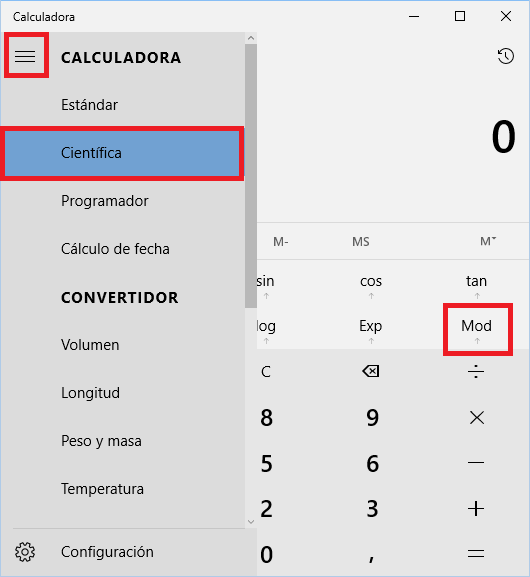
In programming, the modulo is very useful for calculating “repetitions”, using minimal resources and writing the fewest lines of code. Whatever we do, the modulo will be the last number and it will repeat.
An example: imagine you have a list with numbered rows (like 1, 2, 3, 4, 5, 6, 7, …) and you want each row to be colored first red, then green and finally blue, repeating like that infinitely. Since we have three colors we can use “R mod 3” where “R” is the row number, and the result of this operation will correspond to “1” for red, “2” for green and “0” for blue (“1 mod 3 = 1”, “2 mod 3 = 2”, “3 mod 3 = 0”, “4 mod 3 = 1”, “5 mod 3 = 2”, “6 mod 3 = 0”, “7 mod 3 = 1”, …). We’d have a lovely colored list with the same colors repeated in the order we want 🙂
Another example would be figuring out whether a number is even or odd (for example, the row number from the previous list), with “R mod 2”, where the result is “1” for odd numbers and “0” for even numbers (“1 mod 2 = 1”, “2 mod 2 = 0”, “3 mod 2 = 1”, “4 mod 2 = 0”, “5 mod 2 = 1”, “6 mod 2 = 0”, “7 mod 2 = 1”, …).
Parity Bit
It is used a great deal for groups of bits.
I’ll explain it quickly in a visual way, then go into detail (it’s the same thing, just a bit more technical).
Suppose you want to send a binary message to your friend (binary that, converted to human language, could mean something, but for this example I don’t care what it means, only whether what was sent is the same as what is received). The message for the example (as you can see in the following image) will be “110110”
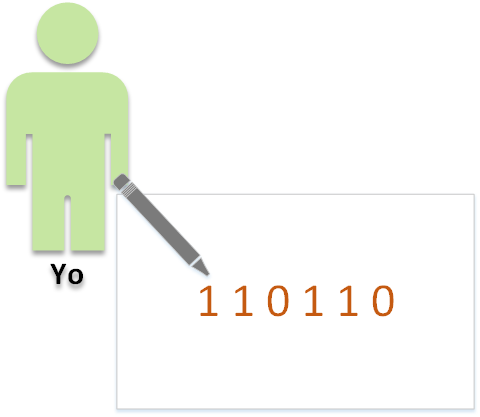 You know it might arrive corrupted along the way, so you decide to add a “parity bit”. A “parity bit” is nothing more than counting the “ones” (“1s”) in the message, and if the result is:
- If Even we represent it as 0
- If Odd we represent it as 1
And why not the other way around, 1 as even and 0 as odd? Be patient, we’ll see it a few lines further on.
So in the previous example we had the message “110110”, and counting the number of “1s” we see there are “4”. We know “4” is an even number, so we write one more bit (the parity bit) which will be “0”. So what we are going to send is “110110 0” (I separate the parity bit so it’s easy to read; with electrical bits there is no separation at all, they are sent one after another, and the destination will know that the last bit is the parity bit and the rest is the message).
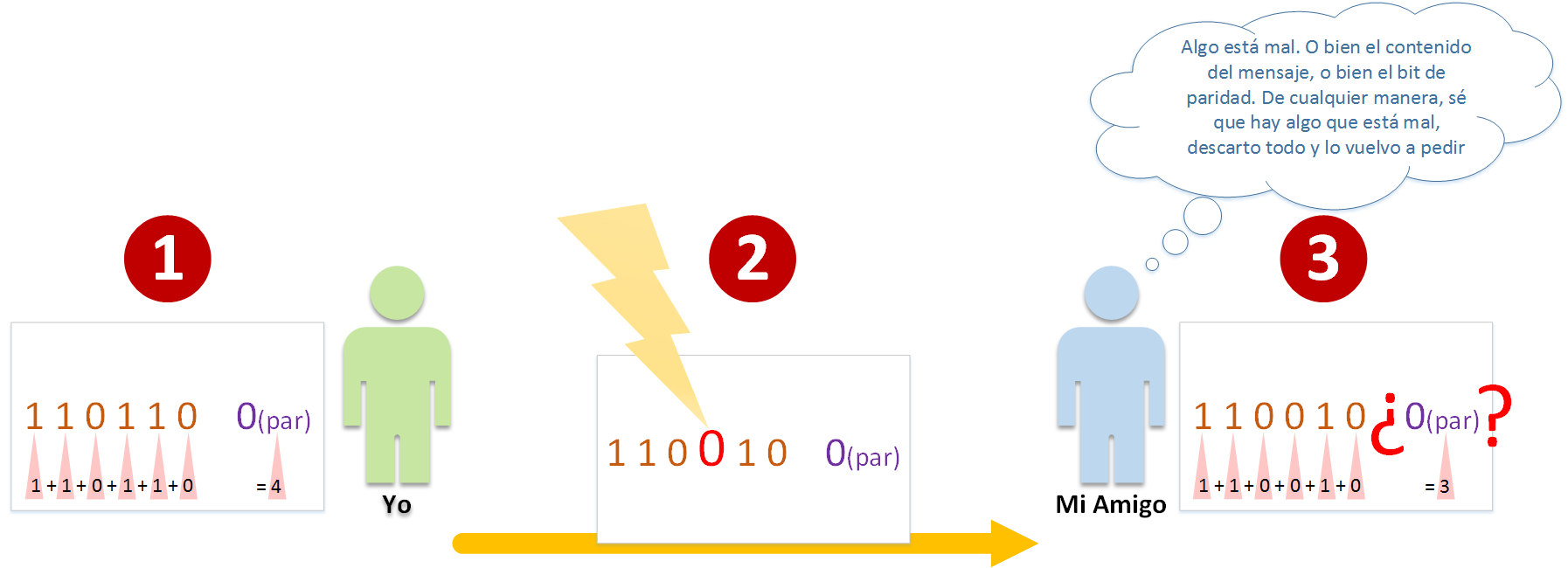
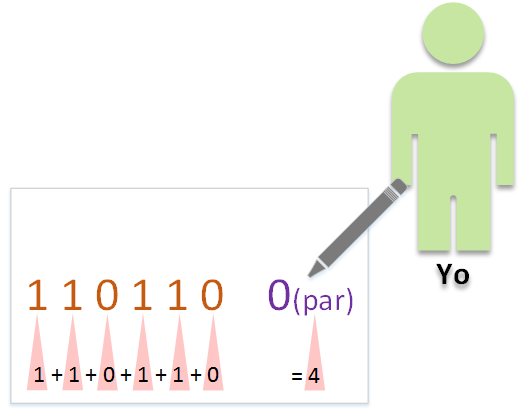 We’re ready to send the message to our friend. Step by step (follow the next image at each step):
- I write the message (message content plus the parity bit) to send to my friend (as we just did), and send it.
- Along the way something might change the content of the transmission (if we assume it’s sent over a cable, a magnetic storm could change some data, for example; if you were picturing it as a letter, suppose a rainstorm smudges a digit of the message so much that it changes it 😉 ). Nothing might happen and it might arrive correctly, but in this example we’ll make something unexpected happen, so a 1 will be changed to a 0, leaving the example message as: “110010 0”
- Now our friend receives the message. He does the same thing: he adds up the “1s” in the message (without counting the parity bit); and sees that the result is “3”, an odd number, so converted to a parity bit it should be “1”. The parity bit received was 0 (meaning “even”), and the computed one is “1” (meaning “odd”), so something is wrong. At this point we won’t know what is wrong (the message or the parity bit), nor which digit is the wrong one (or whether several are wrong). What we do know is that something is wrong, so our friend will discard the message and ask for it again
Note
What if several digits change in transmission in such a way that our friend’s sum of “1s” also comes out “even”?
Then he wouldn’t be able to detect that there was an error and would take the message as valid. Note that this method avoids many errors (if you think about the infinite possibilities that exist, it detects many error cases; I can’t say exactly half, since it depends on chance, but it comes close.
And in the remaining cases the message will arrive fine, so we have more success cases than error cases, counting the times the message is requested again after detecting the error). The “parity bit” is one of the simplest ways, it consumes the fewest resources (it doesn’t matter how powerful the processor is, it’s calculated in no time) and takes the least memory (1 bit).
There are methods that detect many more error cases, but they aren’t as efficient as the “parity bit” (even so, all error detection algorithms have a maximum number of erroneous bits they can detect; the only way to be absolutely certain the message arrives correctly is to send the same message infinitely many times to the receiver so it can compare them infinitely and be 100% sure there was no error, which is not efficient at all).
The beauty of the “parity bit” is that it’s usually used as a first check for groups of bits; then the groups of bits (either grouped into larger groups, or together to form the file) are checked again with other algorithms (like the Hamming code, MD5 or SHA1, more complete information in the article on hash codes); so it’s very hard for our friend not to receive his data correctly; it may take requesting several groups of bits (or the whole file, which groups many groups of bits, if necessary), but he will get his data correctly with high probability.
Calculating the parity bit with the modulo
Once you understand how the modulo works, it’s very easy to calculate it in a slightly more technical way.
You simply take the modulo of 2 (“X mod 2”), and depending on the result it will be (here I answer the earlier question “And why not the other way around, 1 as even and 0 as odd?”, because of the result the modulo of 2 gives):
- If 0 it’s an Even number
- If 1 it’s an Odd number
Let’s see how it works with an example (I use the following example because something very similar is commonly used in networks).
Remember the example at the beginning of the article, sending a file to a friend? Well, that file we want to send is made up of bits, and those bits can be split into groups. Suppose our file is:
- Complete file in bits (bits on a computer have no spaces, I add spaces to make it easier to read): 1011 1010 1111
We can split it into several groups:
- Group A: 1011
- Group B: 1010
- Group C: 1111
The count of 1s will be our parity bit:
- Group A: 1011 has 3 1s, since 3 mod 2 = 1, the “Parity bit” is 1
- Group B: 1010 has 2 1s, since 2 mod 2 = 0, the “Parity bit” is 0
- Group C: 1111 has 4 1s, since 4 mod 2 = 0, the “Parity bit” is 0
This way we can add it to the end of each group of bits:
- Group A: 10111
- Group B: 10100
- Group C: 11110
And we send each group of bits to our friend one by one. If he receives any of them wrong, he’ll ask us for it again. He calculates it without counting the “Parity bit”, and finally compares the received “Parity bit” with the calculated one to see if it’s correct. Suppose that in Group A a bit of the file arrives wrong, in Group B just the “parity bit” arrives wrong, and Group C arrives correctly:
- Group A: 00111. 0011 has 2 1s, since 2 mod 2 = 0, the “Parity bit” should be 0
- Group B: 10101. 1010 has 2 1s, since 2 mod 2 = 0, the “Parity bit” should be 0
- Group C: 11110. 1111 has 4 1s, since 2 mod 4 = 0, the “Parity bit” should be 0
It doesn’t matter which bit of the group was wrong (whether it was the “Parity bit” or the bits that make up the file). As soon as something doesn’t add up, it’s detected as erroneous (and those groups of bits would have to be requested again). From the above we can deduce that:
- Group A: 00111. The received “Parity bit” is 1, different from the calculated one, which is 0. Group with Error
- Group B: 10101. The received “Parity bit” is 1, different from the calculated one, which is 0. Group with Error
- Group C: 11110. The received “Parity bit” is 0, equal to the calculated one, which is 0. Correct group
If all the groups were fine, the file will be rebuilt from all the groups of bits and our friend will be able to use the file (which would probably be an image or video of kittens, so all this mathematical work just so our friend can watch kittens 😀 ).
Calculating the parity bit with XOR
This is how the “parity bit” is usually used as a “Checksum”, since calculating with the XOR operator at a low level takes very little processor time.
Another reason for choosing that the sum of the 1s in the message be “1” if odd and “0” if even is precisely that when using the “XOR” operator to obtain the parity, these are the only possible outputs:
- 1 XOR 1 = 0
- 1 XOR 0 = 1
- 0 XOR 1 = 1
- 0 XOR 0 = 0
So, for example, for the previous groups of bits:
- Group A: 1011
- Group B: 1010
- Group C: 1111
The computer’s processor would calculate the parity bit as:
- Group A: 1011 -> (1 XOR 0) XOR (1 XOR 1) = 1 XOR 0 = 1.
- Group B: 1010 -> (1 XOR 0) XOR (1 XOR 0) = 1 XOR 1 = 0.
- Group C: 1111 -> (1 XOR 1) XOR (1 XOR 1) = 0 XOR 0 = 0.
And just like with modulo 2, we get the same result. We can add the calculated parity bit to the end of each group:
- Group A: 10111
- Group B: 10100
- Group C: 11110
The rest is done the same way, except that now instead of using the modulo as we did before, we use the XOR operator (which is much more efficient in memory and processing).
Credit or debit cards
On bank cards (it doesn’t matter which, whether credit, debit, bank account, etc.) the “check digit” is the last digit of the numbers that make up the “Card number” (the long number on the front of the card; it usually has between 12 and 19 digits, and how many depends on who creates the card).
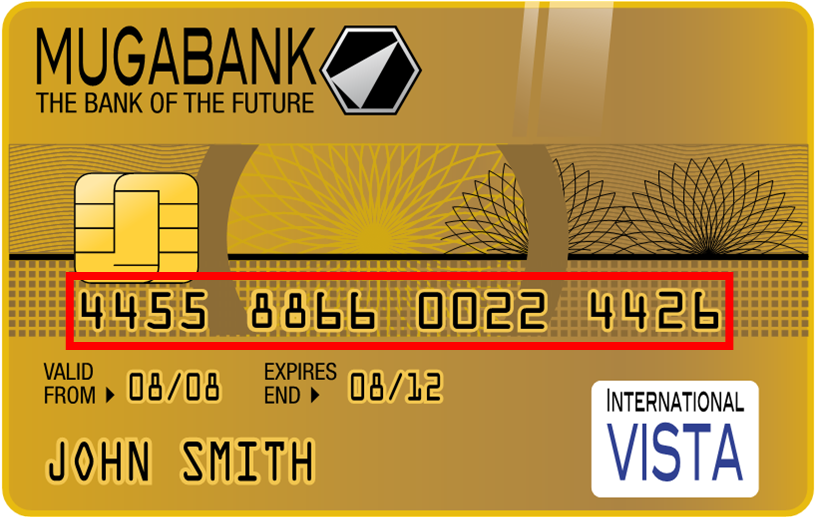
In this case, those who choose the check digit and the modulo are the issuers, which are usually, for example, MasterCard, Visa, American Express, Discover, JCB, Maestro, etc (note about the brands mentioned: they appear here only as examples for learning and to apply the example in a real-world context).
As a standard they all usually apply the “Luhn algorithm”, which uses modulo 10 (a fun fact about modulo 10: it is always the last digit of the number, for example, for “576 mod 10” the last digit of “576” is “6”).
Danger
And what about the number on the back of the bank card (next to the magnetic stripe)?
That number is known as the “Security Code” (“Card Security Code” or “CSC”) or “CVV” or “CVC” code. It is a security number to make sure that whoever uses the card (especially online; if you’ve made any purchase, payment gateways ask for this number) physically has it. Don’t confuse the “Security Code” with the “Check digit”. For security reasons, the “Security Code” must not be stored anywhere.
To comply with security rules, whether you have a website or you are a developer, never, I repeat never, store anyone’s “Security Codes” anywhere (such as in a database). “Security Codes” may only be stored on the physical card, and the user has to enter it whenever they enter the “Card number” (unless the payment gateway of the bank that issued the card does otherwise, since they already know the “Security Code”, they created it).
Let’s review the card numbers to make them clear:
- On the front: The “Card number”, which includes the “Check digit”
- On the back: The “Security Code”
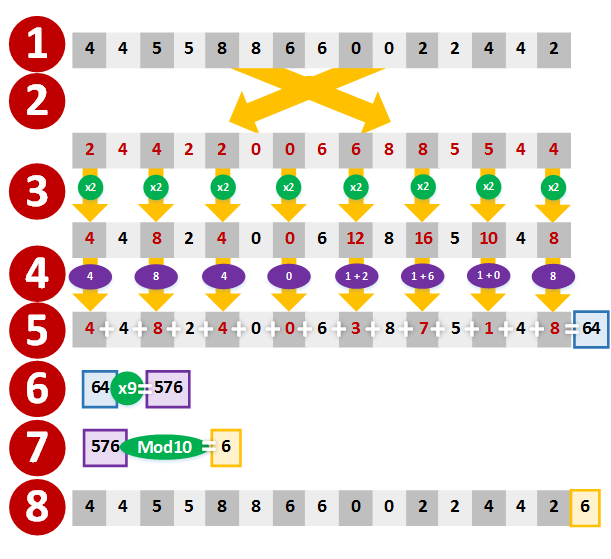
Let’s play the bank (or company) that issues a card to a customer who needs one with 16 digits (we’ll create the card from the previous image). We know the last number is the “Check digit”, so we can randomly create (without repeating other customers’) the remaining 15 digits, and for this example they will be: “4455 8866 0022 445X” (“X” is the “Check digit” that we have to calculate with the “Luhn algorithm”)
The “Luhn algorithm” is a very simple algorithm that you can calculate by hand in less than a minute (honest, I calculated it by hand several times to make this example 😉 ). The steps are as follows (follow the image with each point):
- Having the “Card number” minus the last digit, which will be the “Check digit”, and which we said would be “4455 8866 0022 445”; we start calculating.
- We reverse the digits (this may seem unimportant, but it depends on the number of digits in the “Card number”, which as we said usually varies between 12 and 19; this way it always works).
- We multiply by 2 (“x2”) the digits in the odd positions
- We add the digit representing the tens to the one representing the units of the previous results. That is, if in step 3 we multiplied “8 x 2”, whose result is “16”; as you can see this result has several digits (obviously any number greater than “9” has several digits), so we add them “1 + 6” giving “7”. However, if it has only one digit, such as “4”, there’s nothing to add.
- We add up everything from the previous results.
- We multiply the previous result by “9” (“x9”)
- We take the modulo 10 of the previous step’s result. That result is finally the “Check digit”
- We now have the complete “Card number”, by putting the calculated “Check digit” at the end of the chosen digits (remember they were “4455 8866 0022 445X”; not reversed) (we have “X” which is “6”, so we end up with “4455 8866 0022 4456”). The credit card can now be sent to print with a valid “Card number” 😉
If, for example, we want to pay with this card on a website, we would enter the 16 digits of the “Card number” by hand, and we might make a mistake entering some of them, or not. The website’s payment gateway will calculate, in the user’s own browser, using the “Luhn algorithm”, whether it was entered correctly or not, to tell the user immediately whether it’s correct. So it runs the same “Luhn algorithm” as before, but this time with the number the user typed by hand in the website’s payment gateway. As was done in the steps of the algorithm, we don’t use the “Check digit” the user entered, but calculate it again (as if we were issuing the card again). If the newly calculated “Check digit” matches the one the user entered, then the “Card number” is valid (so the user entered the “Card number” correctly); if it doesn’t match the “Check digit” entered by the user, the user made a mistake in some digit, so the “Card number” is invalid.
National Identity Document (DNI)
Although I’m going to use the Spanish identity document as an example, other countries’ documents are similar (Tip: the official website of each government or issuer should have information about the calculations).
To calculate the check digit of the Spanish DNIe (the image shows the old DNI, but that doesn’t change the calculation for the example) we can see at the bottom left the number next to “DNI NÚM.”, being the number “99999999” (normally the DNI number is a random number; this one is an example and doesn’t belong to any citizen) and the check digit is a letter associated with a number, in this case “R”.
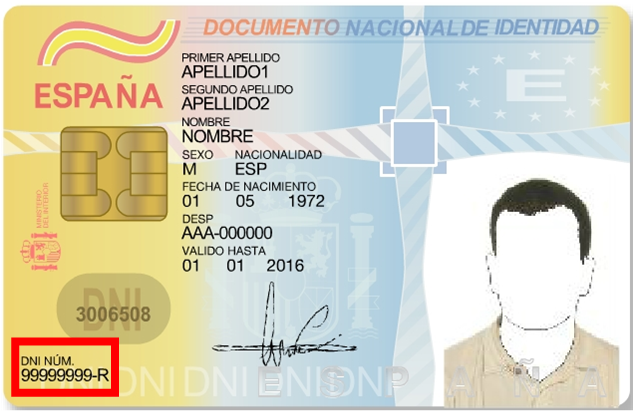
Suppose we are the manufacturers of the DNI card (in Spain the factory is called “Casa de la moneda y timbre”), and we want to issue/manufacture the DNI whose number is “99999999”. For the Spanish DNI the modulo is 23 (because the government decided so). Then to calculate the check digit:
99999999 mod 23 = 1
So the check digit is “1”. Now we look at the mapping table between numbers and letters (obtained from http://www.interior.gob.es/web/servicios-al-ciudadano/dni/calculo-del-digito-de-control-del-nif-nie).

And we see that “1” does correspond to the letter “R”.
To detect an error we can change one or several digits, for example “91995949-R”. Barring collisions (see the hash code article for more information about hash code collisions), when we do the calculation above the letter will change:
91995949 mod 23 = 20
The letter corresponding to 20 is “C”, which is different from the “R” given as the check digit, so that DNI number is wrong.
Bibliography
- Personal experience
- Error detection and correction (Wikipedia)
- Código de control (Wikipedia)
- http://www.interior.gob.es/web/servicios-al-ciudadano/dni/calculo-del-digito-de-control-del-nif-nie
- Luhn algorithm (Wikipedia)
- https://es.wikipedia.org/wiki/DNI_electr%C3%B3nico_en_Espa%C3%B1a
- Parity bit (Wikipedia)
- Credit Card Number Generator – Validator (FreeFormatter)
“Check Digit – Error Detection” by Ramón Invarato at jarroba.com, licensed under Creative Commons Attribution-NonCommercial-ShareAlike 3.0. Registered at Safe Creative.

You may also like
Hash Code
How does a hash code work? Hash tables and uses like digest, fingerprint, checksum, redundancy, parity bits, CRC and md5sum, with practical examples.
Fault-Tolerant, Highly Available Apache Kafka Cluster
Learn how to set up a Kafka cluster with multiple brokers, distributed across several real cloud servers, step by step.
Leave a comment