
Hash Code
How does a hash code work? Hash tables and uses like digest, fingerprint, checksum, redundancy, parity bits, CRC and md5sum, with practical examples.
You’ve landed on an article about the hidden world of technical computing. Hash codes are very often overlooked, and yet they are extremely important, because almost everything you do on your computer -especially over the Internet- will use several hash codes of different types without you even noticing. Hash codes can come from the simplest calculations all the way up to advanced mathematical algorithms.
I consider understanding how a hash code works, and what it is used for, a basic principle of computing (even more so for programming), so I recommend that you understand and absorb it properly. This article is designed incrementally: what you need for later, you’ll learn first. And if you feel that what you’ve read so far is enough, you can stop reading; it depends on whether you need a general idea, basic knowledge, intermediate knowledge, or even very advanced knowledge (if you read from the start of the article I promise you’ll understand the most technical parts, everything is explained in detail).
At the end I’ve explained some tools to calculate the hash of files step by step, which I recommend you try. I’ve also left some programming examples at the end of the article, for those who like to code.
If you’ve never seen a hash code or you only have a vague idea about them, they probably seem insignificant to you, or maybe you’ve never even heard of them. I’ll answer that with some rhetorical questions (with a humorous tone 😉 ):
- Is it really unimportant that a file traveling over the Internet reaches its destination without errors, or, if it arrives with errors, that we can even fix them?
- Is it of little importance that when you type a password on any website to log in, what travels over the Internet is not the password but something else that is of little use if it gets stolen?
- Or digitally signing documents and thus ensuring with legal certainty who sent that document; or making bank transfers with the certainty that the person making it really wants to make it over the Internet?
- Is it perhaps of little interest that a card containing inside only meaningless numbers and letters can identify a person (electronic IDs for doors in many companies, or electronic national identity documents, such as the DNI-e in Spain) so that no personal data has to be provided?
I think the questions above make it clear, besides showing a bunch of uses, that hash codes are not important, they are VERY important in computing and above all in communications.
They are so important that hash codes are also known by an endless list of names, such as (you don’t need to memorize them, although from now on every time you see them they’ll ring a bell 😀 ): Hash, Summary, Mince, Digest (or “Message Digest”), Fingerprint (the direct translation is “fingerprint”, but in computing it’s closer to “digital fingerprint” or “digital signature”), Checksum (or “Check sum”), Redundancy, Parity (or “Parity bits”), CRC (Cyclic Redundancy Check), among others.
Note
What’s the difference between each name for the hash code?
Not much (Note: if this is the first time you read anything about hash codes and hash functions, I recommend skipping this box and continuing; then come back at the end and everything will be clearly revealed 😉 ). The most characteristic differences are that the names “Checksum”, “Redundancy”, “Parity bits” or “CRC” are mostly used to verify files that have been sent, and therefore they are shorter hash codes (less secure for some uses, but very useful for checking files); that the name “Fingerprint” is usually used for signatures; or that “Hash” is seen a lot in programming as an identifier (like HashMap, or functions such as “getHash()” or “hashCode()” to get the hash of an object). Which one is used depends on the context, but you could say they are almost the same thing; the idea is very similar, although their direct use, how they are obtained, their security, their size and their calculation speed change (in this article I’ll refer to them most of the time as “Hash”, since in computing this word has a more widespread use).
Tool
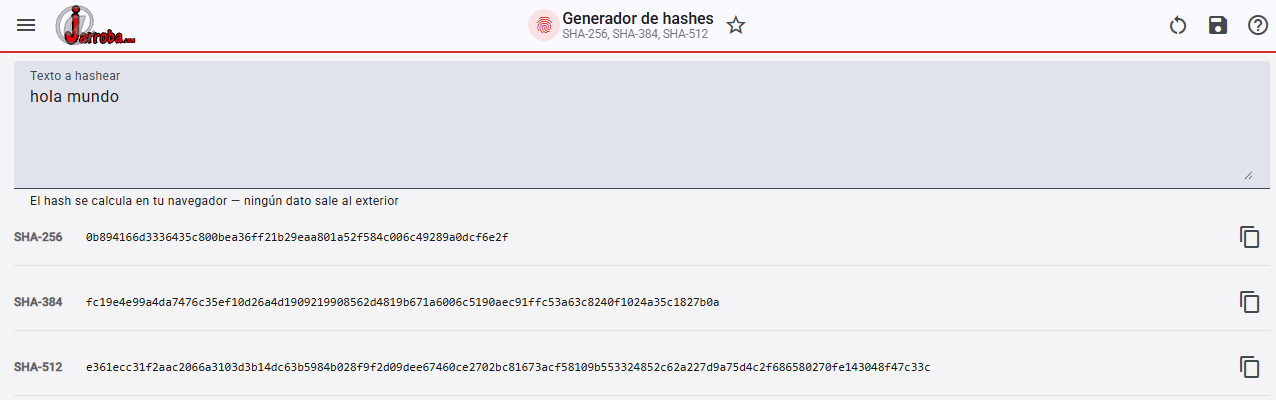
Free hash generator
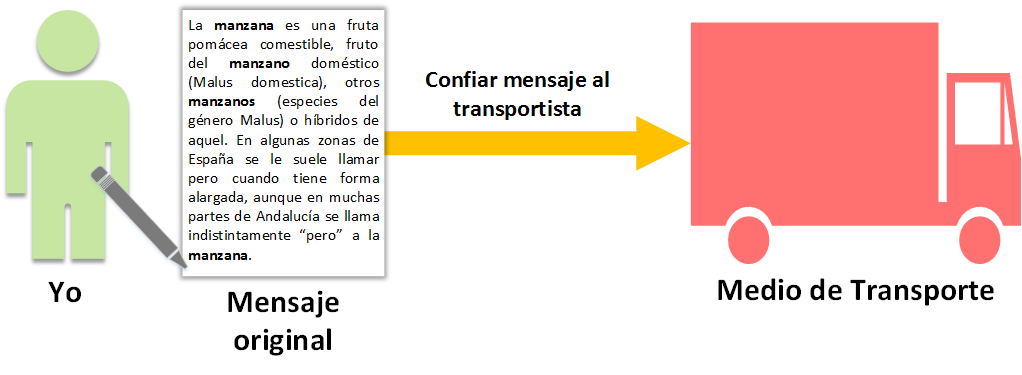
To explain how a hash works, let’s start with a fable with an almost happy ending.
Suppose “I” (that is, “you”) want to write a message and send it to a friend, hiring a delivery van to take care of delivering the message to our friend. Suppose I want to send a text about the “Apple” (the text about the Apple in the image is copied from Manzana (Wikipedia)), which I take great care to write in full detail, taking up hundreds and hundreds of lines. When I finish it, I hand it over to the driver who is going to carry the message to our friend.
The van is on its way and the driver is a prankster. Being a good prankster, he modifies our message while driving and replaces every mention of “Apple” with “Pear”. The original message has been modified. This altered message is the one the funny driver hands over to our friend.
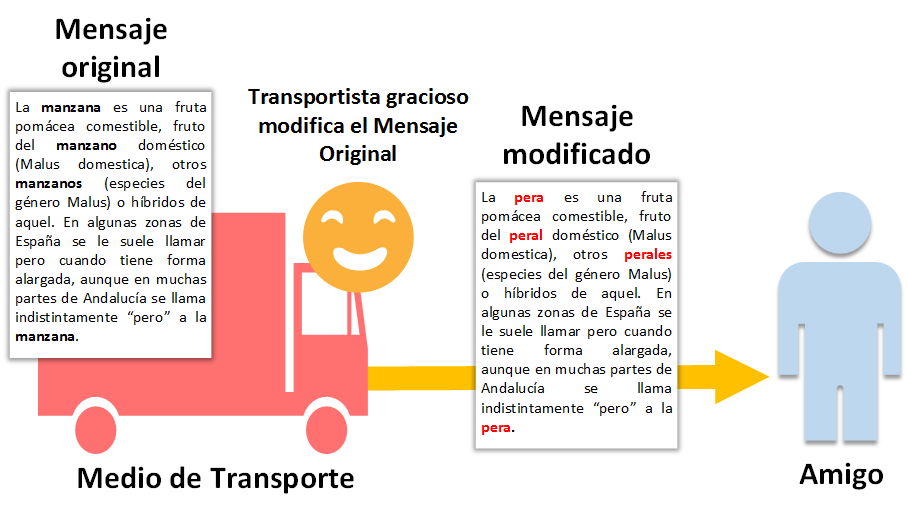
By the way, this is known as a “Man in the middle” attack; it’s a third party (who is neither the sender nor the receiver) somewhere along the way who modifies/reads the message.
So we need to do something to check whether the received message is the same as the one that was sent.
To do that, our friend calls us on the phone. Out of sheer curiosity, he only wants to know the “Summary” of the message. Obviously, we’ll tell our friend that it’s “about apples”; that is, given the original message, I’ve calculated the Summary [1] thanks to the way my brain is wired (that is, the “hash function”; which we can also call by any of the other synonyms, like “digest function”, “summary function”, etc.) which lets me think up/calculate the Summary just by looking at what the text is about, and I tell the Summary to my friend [2]. Our friend, being human, has the same brain wiring, so it’s also easy for him to calculate the Summary [3].
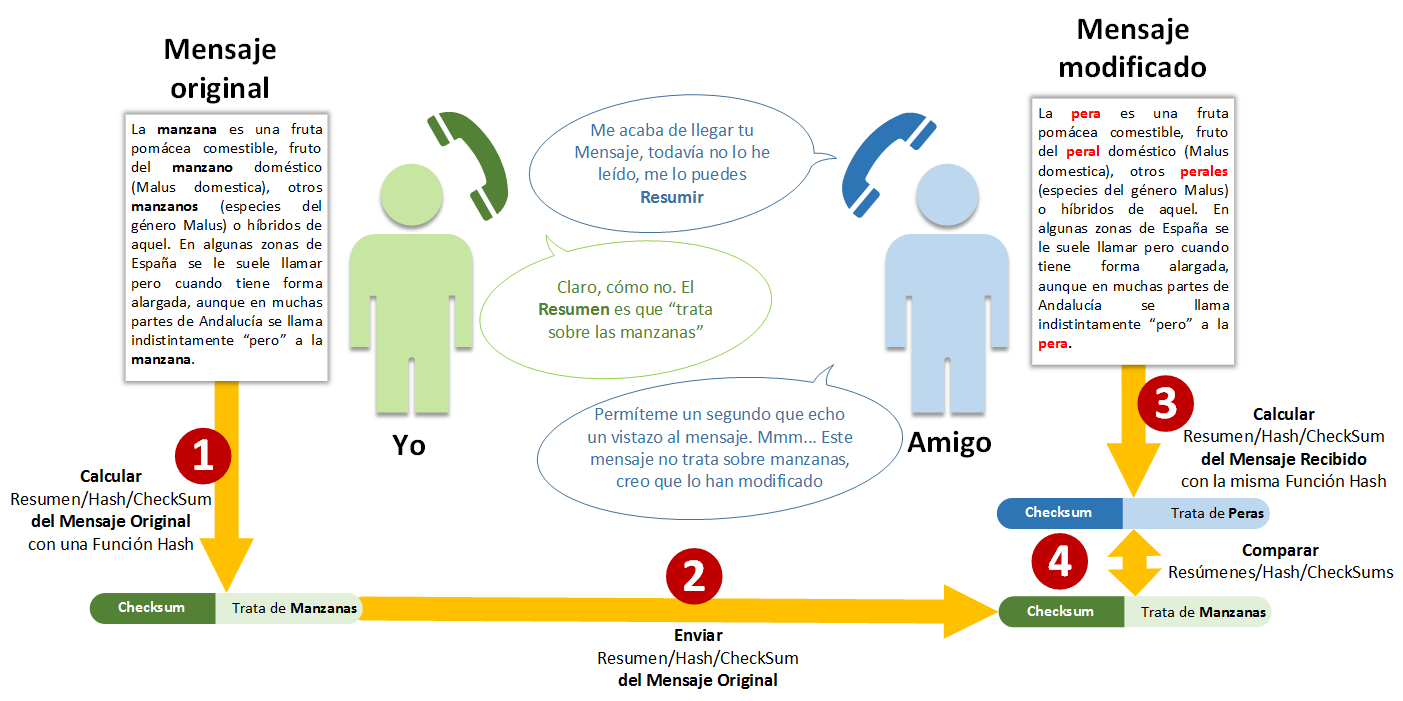
Since my friend has both summaries at hand (his and mine), it’s very easy for him to compare them [4] and see whether they match or not. Two things can happen:
- If the Summaries are the same, the received message is the same as the original message, so the received message is considered correct
- If the Summaries are different, the received message has been modified. And our friend will most likely ask us for the same message again, hoping that a different driver doesn’t feel like modifying it again
In the example above you could see how simple the hash code is (which, as we said, we can find under the names: Hash, Mince, Summary, Digest, Fingerprint, Checksum) and how powerful it is for detecting modified messages. That’s exactly what your computer does when it downloads a file from the Internet (like an image, an audio file, etc.): it checks its hash code, not only for the whole file but for little pieces of it as the file is sent from a server to your computer; that is, any of the images you’ve seen above were chopped into pieces on the Jarroba server, sent over the Internet in chunks, and each chunk was checked on your computer with hash codes to see whether it was correct or not.
Note
Could a hash code validate a modified message?
It could. Imagine that in the example above, the Summary I send to my friend is “it’s about a fruit”; that’s a valid Summary of the original message, and if my friend gets the same Summary, he would take the modified message as correct. This is called a collision, that is, when different messages are processed by a given “hash function” and give the same hash code as a result for those different messages.
Note
Will there always be collisions for any “hash function”?
Of course. In logical terms, if we go to a library and write the Summary of every book, one by one, with each Summary taking up a single line, we can say with total certainty that some Summary will also work for another book that is very similar.
Collisions are one of the problems of hash codes, although we always try to make “hash functions” create hash codes with the lowest possible probability of collision. In other words, the messages that a “hash function” can process could be infinite (since they aren’t limited in size); while the Summaries it returns (being limited in size) are finite.
Note
Why are collisions so important? Why so much insistence on “Man in the Middle” attacks?
Imagine you’re making a money transfer to a friend over the Internet: you enter your friend’s account and click send money. A third party’s “Man in the Middle” attack could intercept and modify the order to send money to the bank along the way, changing the destination account number (to the attacker’s account, obviously). The order reaches the bank, and the bank sees that the destination number doesn’t match the hash generated by the sender, so the bank would effectively protect the transfer by rejecting the sending of money to someone who wasn’t requested.
Now the same thing, but the person carrying out the “Man in the Middle” attack puts in a different account number, which this time matches the hash generated from the original account number; the order reaches the bank, and since the hash codes match, the bank thinks it’s a legitimate transfer, so it gives the order and the money goes to the modified account. This is very serious, and it can be achieved very quickly by having translation tables (a hash code along with the messages that validate it); that way, in a matter of seconds, a communication can be tampered with.
For your peace of mind, it’s quite hard to pull off this kind of attack against a bank (or other properly protected websites); there are other security systems that have to be overcome first before you can get to fool the hash codes, such as the connection encryption, timeouts, the secrecy of the functions used, etc.
Note
Are hash codes only used to send files between computers?
They also work locally, without leaving your own computer. As you’ve had the chance to understand, hash codes are used to check that files haven’t been modified (this is how antivirus programs work: they check with hash codes that nobody modifies the files, and the “signature database” they contain holds the hash codes of viruses).
They’re also used in programming, to speed up searches as in “hash tables” (there’s an example later on); as well as in functions that generate random numbers (or rather pseudorandom numbers: a computer doesn’t generate random numbers in the way we truly understand them, it generates hashes of, for example, the current time, and that’s what it returns as a random number; so every time you roll dice in any computer game, you now know that the result actually came from a hash code.
Note that in cryptography being pseudorandom is a big advantage, since it lets two different computers produce the same result, and so they can communicate without anyone along the way knowing the secret number hidden inside each computer).
Note: If you skipped the question I recommended skipping, “What’s the difference between each name for the hash code?”, you can read it now.
The math of hash functions
Note: if you only want to know how it works and not the mathematical terms, skip this box. I wrote this box to make advanced cryptography easier to understand. With math 😀 !
These are mathematical terms we’ll come across very often if we dig deeper into the world of cryptography. In the previous example, the library (this is the Domain) contains infinitely many books (each book is a preimage in mathematics, or a message in computing). Each book can be processed by a “Summary function” (“h”), which will return a Summary code (“h(x)”, where “h” is the name of the function and “x” is the message whose Summary we want to get; each Summary code is an image of some preimage). The set of all possible Summary codes is called, in mathematics, the Codomain. Every book maps to a hash code (which in mathematics means that the Domain has an image in the Codomain); but a single hash code can correspond to more than one book.
Shouldn’t the function be “h(x)” and not just “h”? No. “h(x)” is the Summary, because “h(x)” represents a bunch of things together (in this case “h” and “x”) giving a final state in itself; you could just as well write “h(x) = Summary” but since it’s a direct equality it says the same thing, and in mathematical notation it gets abbreviated. If you’re a developer it may sound a bit strange that what looks like “the function” is the result and not the function itself; and yet, when we program, what we consider “the function” is always the result. Don’t we write code like “var result = function(x)”? What really “works” inside the “function” is the content that does the processing (what we wrongly call “function(x)”), and in mathematics, to represent the content we simply drop the input variables and write “function” (people usually map this wrongly in their heads to what a function really is). So from now on you know the difference between “f(x)” and “f”: if it has variables it’s the result, if it doesn’t it’s the logic that performs the calculation.
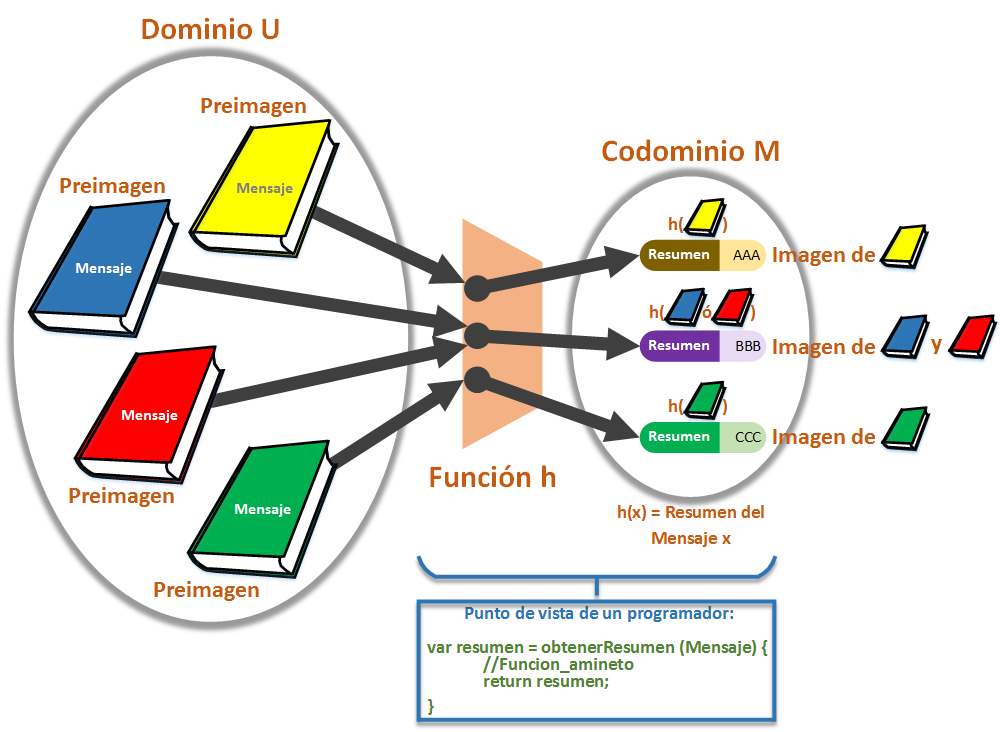
The mathematical function (it sounds a bit odd to say “mathematical function”, I’m using it to tell it apart from the “programming function”) in the image above is:

Where “h: U -> M” means that the Summary function “h” converts the books/messages of the group “U” into some Summary of the group “M” (in mathematics the “group of things” is called a “set”; here I’m swapping the name for a softer synonym with the sole goal of making it easier to understand). For example, the green book is converted by the function “h” into the Summary “CCC”; and the same goes for all the books/messages.
And where “x -> h(x)” says that when we put any book/message “x” into the function “h”, it becomes the Summary “h(x)”.
In the image above you can see a “collision”, since the hash function gives the same Summary code for both the red book and the blue one.
Note
And after all this, how is the function “h” defined in mathematics?
Well, just what we’ve already said: what’s inside that “works”, that does things. I think that with what you’ve learned, the eleventh definition of the word function in the RAE (the Royal Spanish Academy dictionary) explains it very well: “A relation between two sets that assigns to each element of the first one an element of the second, or none.”. As I said, for each book/message in group U, the function creates a Summary that corresponds to it from among those in group M (in our case with hash codes, each Message corresponds to a single, certain Summary; although it may share the Summary with another Message in the case of collisions). Here I’ve explained the basics in a different way from the one you usually find, so that you absorb them in a very simple way in the shortest time possible, and can make the jump to much more advanced terms. If you’re interested, you can find the rest of the mathematical formulas in hundreds of places on the Internet such as Wikipedia: Función hash (Wikipedia)
Now I’m going to give you exactly the same example as before, but in code a computer can understand, that is, in binary.
In binary (similar to the Checksum of TCP/IP Segments)
Now let’s take one more step. We’ll turn the same previous example with my friend and me into two computers sending data to each other; one is my computer and the other is my friend’s computer. Suppose we want to send it this binary data (it could be the text of an email, a photo, a video, or whatever, converted to binary), for example the data “10110000”.
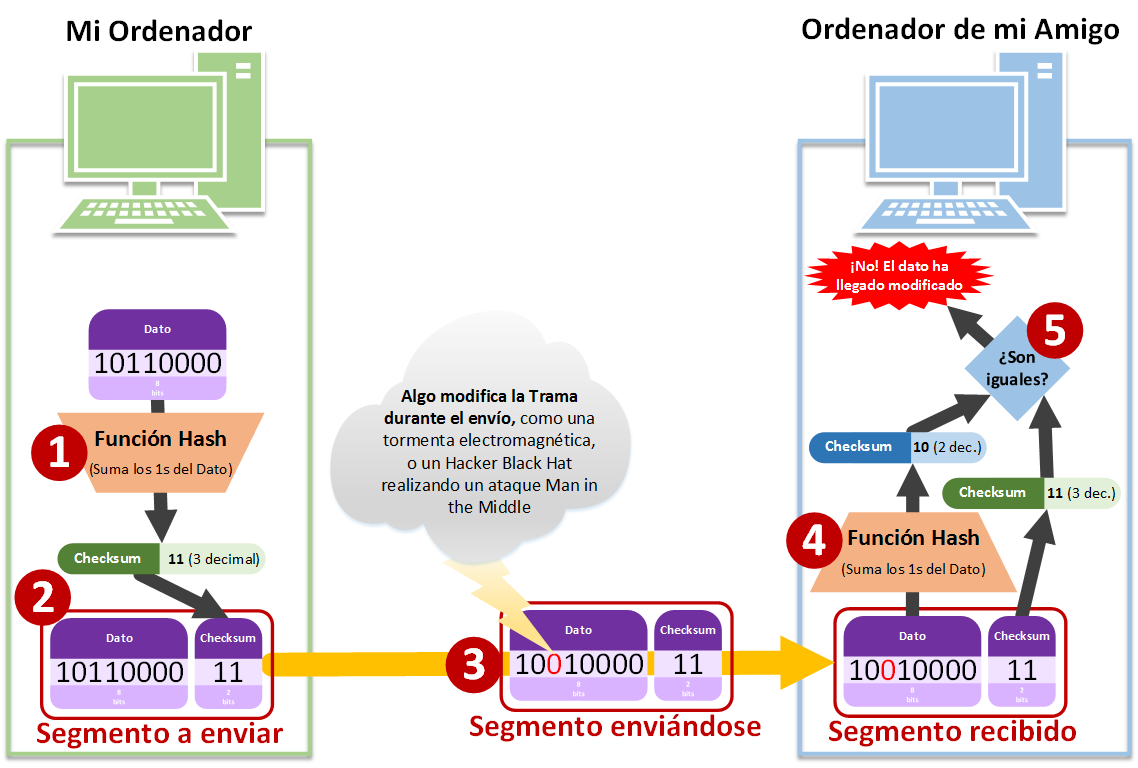
The steps the data will follow are:
- Getting the hash code through a hash function. The hash function can be anything we make up that summarizes the binary data above (although I strongly recommend using the standardized and most advanced “hash functions” to date, like MD6 or SHA3). For this example we’ve made up the “hash function”, which consists of adding up the “1”s in the binary data “10110000”; as we can count, there are 3 ones, and 3 in binary is “11” (a reminder of the decimal-to-binary conversion using two digits: 0 = 00, 1 = 01, 2 = 10, 3 = 11)
- Fill in the Segment of information to send, which will contain the data and the hash code (Checksum)
- The Segment is sent (contained in a Frame) to my friend’s computer by some means, such as the Internet. On the way the Segment could get modified, for example by an electromagnetic storm or a Man in the Middle attack (some third party interested in tricking our friend’s computer). In the example we’ve gone from having the Segment (Data + Checksum) “1011000011” to “1001000011”
- Our friend’s computer receives the Segment of information with the modified data and the hash code. Since both computers calculate with the same hash function, it calculates the hash code of the received data with that hash function. In the example we split the received Segment “1001000011” into the data “10010000” and the hash code received with the Segment “11”; when calculating the hash code of “10010000”, whose count of ones is 2 in decimal, we get the binary hash code “10”
- It compares both hash codes, the received one and the calculated one. If they are the same, the data was received correctly; if they are different, it wasn’t and we’ll have to request it again. In this example we received “11” with the Segment and the calculated hash code was “10”, which as we can see don’t match; we’ll never know whether it was the Data or the received hash code that was modified, what we do know is that something is wrong, so everything is discarded and requested again.
Could the electromagnetic storm also change a “1” into a “0” so that the Segment ends up as “1101100011”? Yes, and there would be 3 ones. Then would the “hash code” validate the erroneous frame as correct? Yes, it’s a problem of hash codes, although much bigger “hash codes” and much more complex “hash functions” are normally used, like MD5 or SHA-1 (or more modern ones like the ones mentioned earlier, MD6 or SHA3), so statistically it’s very unlikely that we’d overlook the error. Okay, but could we still fail to detect the error? Yes, and that’s one of the reasons why we still download corrupted files today 😉
By the way, when we call the hash code a “parity bit” it’s very similar to the method I made up above, so similar that it’s actually used as a “Checksum”. We’ve prepared a complete article to understand the “parity bit” in detail and in a very simple way; click here; although I recommend you finish reading this article first, since that way you’ll understand it much better.
Ideal properties a hash code should meet
“Should meet” because in some cases it may not matter, or we simply haven’t yet found a way to get closer to the ideal. I’ll describe the cases that matter from a cryptographic point of view, and to continue the previous examples.
The beauty of a hash code is that it has to be creatable (calculable) by any hash function using minimal resources (that is, low cost, immediate; if the computer spends an hour calculating it, it isn’t much use). And for the same unmodified file (or text, message, data, etc.) it must always give the same hash code, that is, it must be deterministic in its results (sometimes it may be useful for it to be non-deterministic, but those are particular cases that I won’t get into one by one). If, for example, we want to download a file whose hash code was previously calculated by the file’s creator, at the moment we download the file it will let us check whether the file was indeed downloaded correctly (we’ll see practical examples later).
In addition, it must reduce the number of collisions for each hash code. If we calculate the hash code of every file (or text, or whatever) that exists on Earth and count how many times each hash code shows up repeated, the hash function must ensure that all collision counts are the same or very similar, that is, uniform; in other words, it must ensure that the number of collisions for one hash code is as likely as for any other (precisely to avoid collisions as much as possible, since we can’t reduce them to zero, but we can reduce them to the minimum for each hash code).
Another very important thing, especially in cryptography, is that if a single bit is changed (as in the previous example, a “1” for a “0”) the result of the hash function should be as different as possible from what it would have been if nothing had changed; that is, there must be no direct correlation between what goes into the hash function and what comes out (in the example of the hash function that adds up the ones, there is a very strong correlation between what goes into the function and what comes out, since modifying one bit changes very little and, in addition, the resulting hash is very easy to deduce; which makes it uninteresting for actual use, although fine for learning 😉 ). Having the modification of a single bit make the entire hash change completely at random is what’s called the avalanche effect.
A very interesting property, and although I put it last it is no less important, is that from a hash code we shouldn’t be able to obtain any information about the original message (the previous example wouldn’t qualify, since the hash function simply adds up the ones to generate the hash code, so we know how many ones there are in the message; it gives information, even if little, and it shouldn’t give any).
The existence of collisions is important. Imagine the following: the login of a website asks for the username and password, we enter our data and click send; the password isn’t sent to the server, the hash code is, and someone along the way intercepts the hash code; this someone has previously worked out the hash code of the most common passwords (so they know which password each hash corresponds to for a bunch of possible passwords like “12345” or “admin”), the hash code that they’ve stolen along the way matches one of the ones this third party calculated earlier, so the thief already knows our password. For security it’s useful for collisions to exist, because if we had no collisions we could easily map (say that hash X belongs to message Y) all the cases and know their meaning; with collisions, someone knowing the hash code won’t know which of all the messages that could form it is the one that created the hash. In the password example, if we know that the password “12345” corresponds to the hash “a48de4a9”, and we capture the hash from someone’s login to their email, for example, and it turns out to be “a48de4a9”, even if collisions exist we could check whether we really get into the session with “12345”, and if so we’ve obtained the other user’s password; if not, then it will be some other one that we won’t know. What I mean by this last part is that, although we have collisions, it doesn’t prevent mapping; it makes it harder, since you have to do some extra check or have several possible passwords mapped for the same hash and try them one by one.
In general the hash code will need to be private when some information about the message can be extracted from it (as in the password example above); if, for example, it’s going to be sent over the Internet, the solution is to encrypt the hash code before sending it. The hash code is usually public when it’s used to check for errors and doesn’t expose the information from which the hash code was obtained, like the Checksum of TCP/IP Segments (TCP/IP Segments are, for example, an image converted into bits, cutting those bits into little pieces and adding the Checksum to each little piece; then each little piece is sent with its Checksum over the Internet, and if a little piece arrives with errors at its destination, only that little piece is requested again; then at the destination the little pieces are put back in order with the help of other bits that indicate the order, which, like the Checksum, also accompany each little piece, and thus the image is obtained at the destination). What will almost always be public is the hash function (for the stolen-passwords example, the thief could go to a website and look at that site’s JavaScript code to check whether the hash function is MD5, or SHA1, or SHA512, etc.).
Special note for front-end developers (a front-end developer is someone who writes the code that is going to run in the user’s browser, code like HTML, JavaScript and CSS; although it also includes desktop applications or mobile apps, with code like Java, C#, VB, C++, etc.): be very careful about assuming that what we do on the client/browser side is secure. Security must always be focused on the server. The code the user receives on their computer/phone is public. Think of it as the server giving the front-end code away to the user, who can do whatever they want with it: look at it, study it, modify it, fill it with insults, make it possible to type into disabled fields, etc.; it’s theirs and wherever they’re running it (a browser, a phone, etc.). Compiled code (like that of desktop applications or mobile apps) may be harder to get than that of a web page; but reverse engineering exists (getting the source code from the compiled code) and programs do it in a matter of seconds.
I’ve described the properties I consider most important for a proper understanding. There are many more, and some of them are well explained at Función hash (Wikipedia)
Uses of hash codes in context
Digitally signing
I’m going to quickly summarize what matters to us here. There’s a lot more behind it, and certificates also use hashes. Here I’ll only cover how to digitally sign a file.
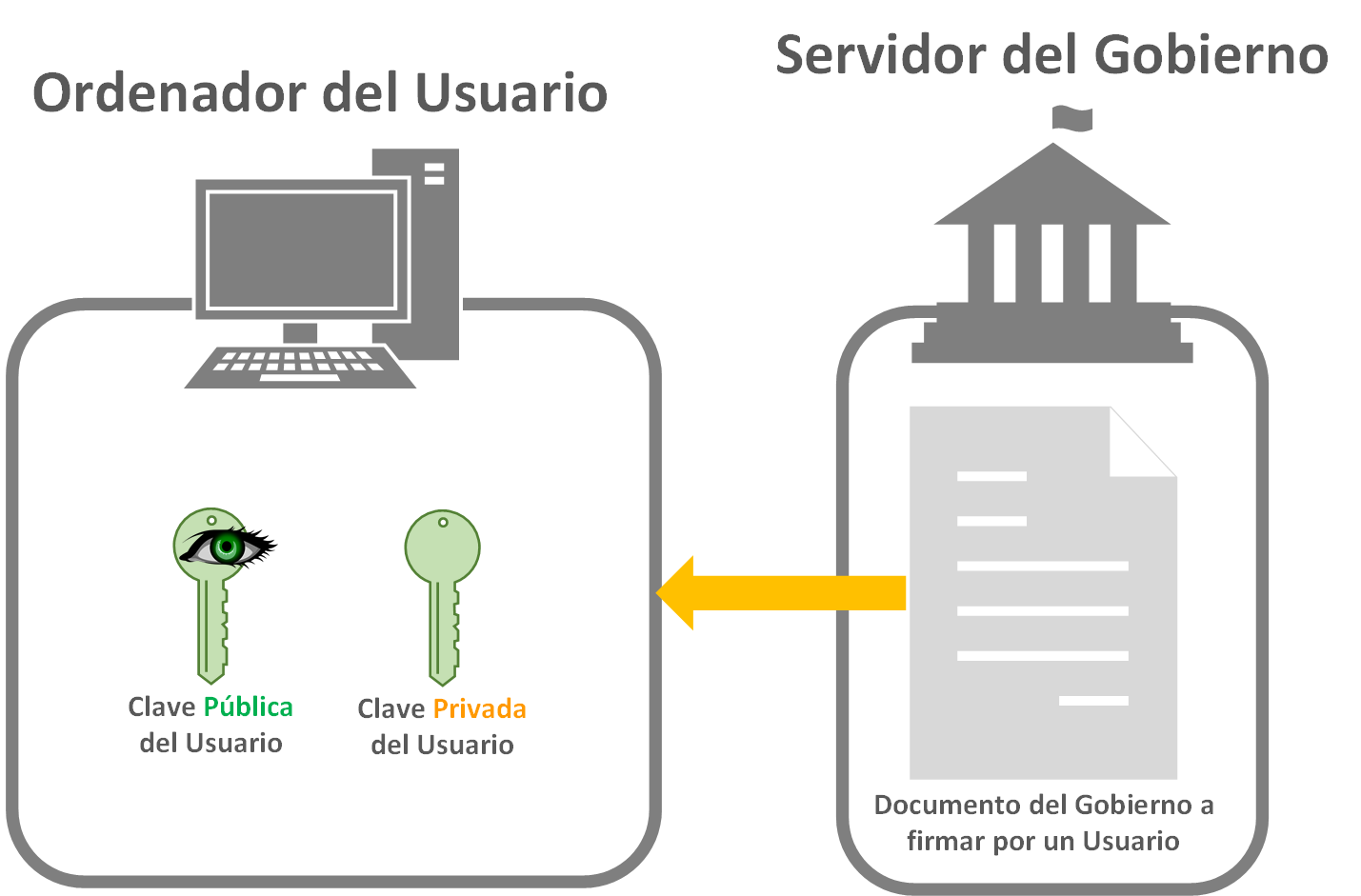
In this example let’s suppose we want to download a form to fill out from our government; we go to the website and download it (or it’s sent to us somehow). This document could perfectly well be a PDF file, for example (or any other type of file). The catch is that the user/citizen has a pair of public and private keys (through some key exchange method like RSA, Diffie Hellman, etc.; we’ll talk more about these in a future article, for this example it’s enough to have two keys, public and private, the method doesn’t matter), which will normally be in the chip of their national identity document; the DNI-e in Spain.
Note
How do the “Private Key” and the “Public Key” work?
In case you don’t know how the Public and Private keys work, I’ll explain it quickly without going into mathematical details. The “Private Key” is the one that encrypts and the “Public Key” is the one that decrypts what was encrypted with the “Private Key” paired with it (if you look at the examples, I represent the “Public Key” with an eye on top, to represent two things: that everyone can see it, and that it’s the one that reveals what’s hidden, the key that opens the encryption, the one that decrypts). Just any Public key does NOT decrypt what a Private key has encrypted, it only decrypts what its partner has encrypted (a “Public Key” is the partner of a “Private Key” thanks to certain math; and as I said, we’ll go into more detail in future articles).
The user fills out the document. They may or may not modify it, the point is that the document they’re going to hand over to the government is the one whose hash code will be obtained. Then, with some encryption function (like RC4, AES, etc.; we’ll also talk about these in future articles, in the example image we’ll call it generically the “Encryption Function”), we’ll encrypt the hash code with the user’s Private key. The result is what’s called a “Digital signature”. The “Digital signature” is our signature on the document, since it’s the same as signing a paper document with a pen (this way we can think of the “Private Key” as the pen held in our hand, and the hash code as the blank space to sign on the paper document); except that the signature goes separately from the document, but associated with it.
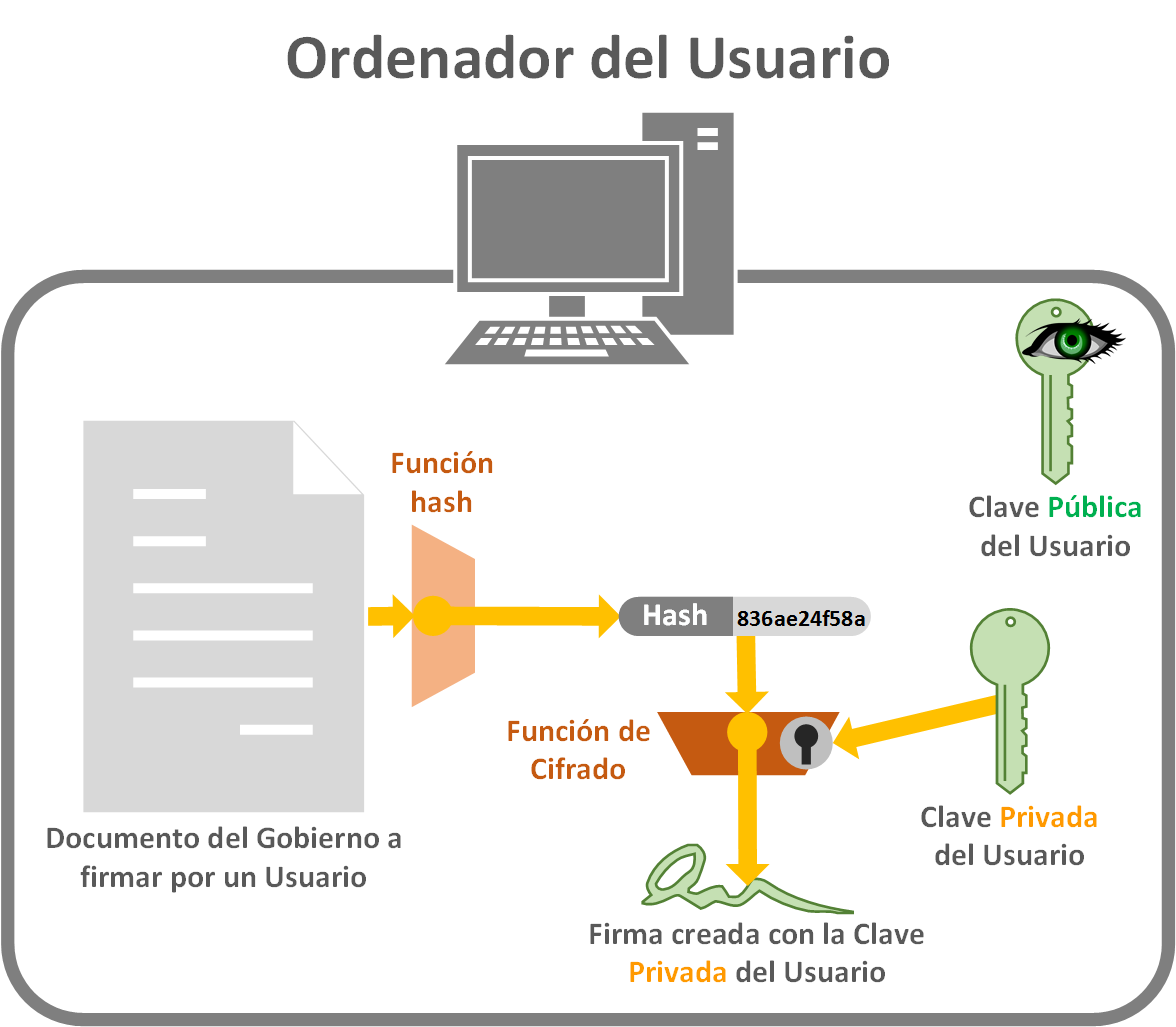
Now we have to send everything needed to our government so that it can be sure that we signed it. To do so, we send our government the Document from which we obtained the hash code, the “Digital signature” of that document, and the “Public Key” (remember that we sign with the “Private Key”, which, as its name says, is private to us and must never leave our possession; the “Public Key”, however, is public, you could even post it on social media, and it’s there for everyone to see).
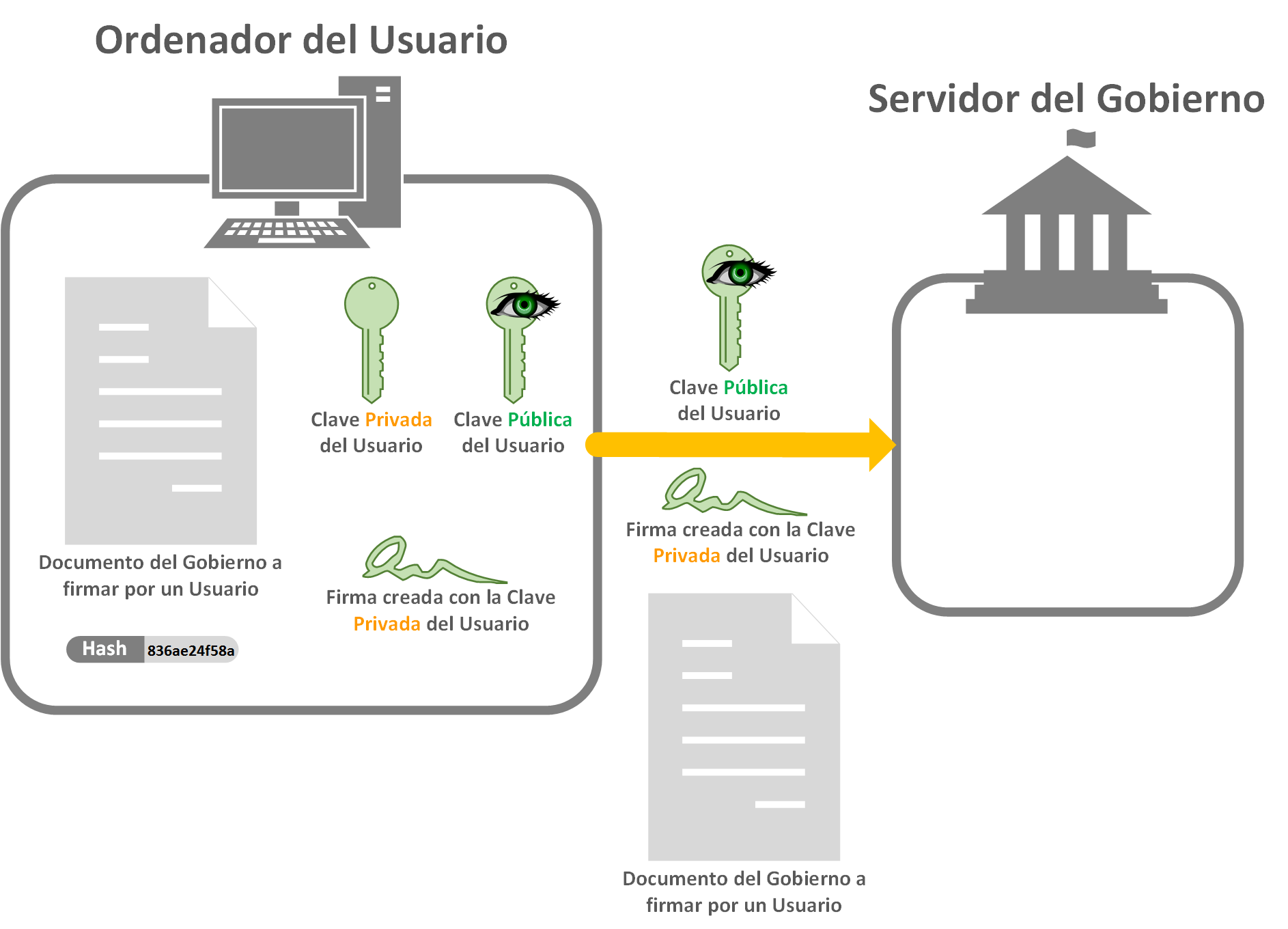
Security note: Ideally we would send it over a secure channel like “HTTPS” so that nobody can intercept this data. In practice, when digitally signing anything like this, it’s always done over secure channels.
With all the data in its hands, the government can do the same thing, but in reverse (and what we’ve already seen). That is, get the hash code of the document we sent. Use the Public key to decrypt the “Digital signature”, and by decrypting it we obtain the hash code that the user encrypted with their Private key. Now we compare the hash codes and, if they match, the user really did sign the document.
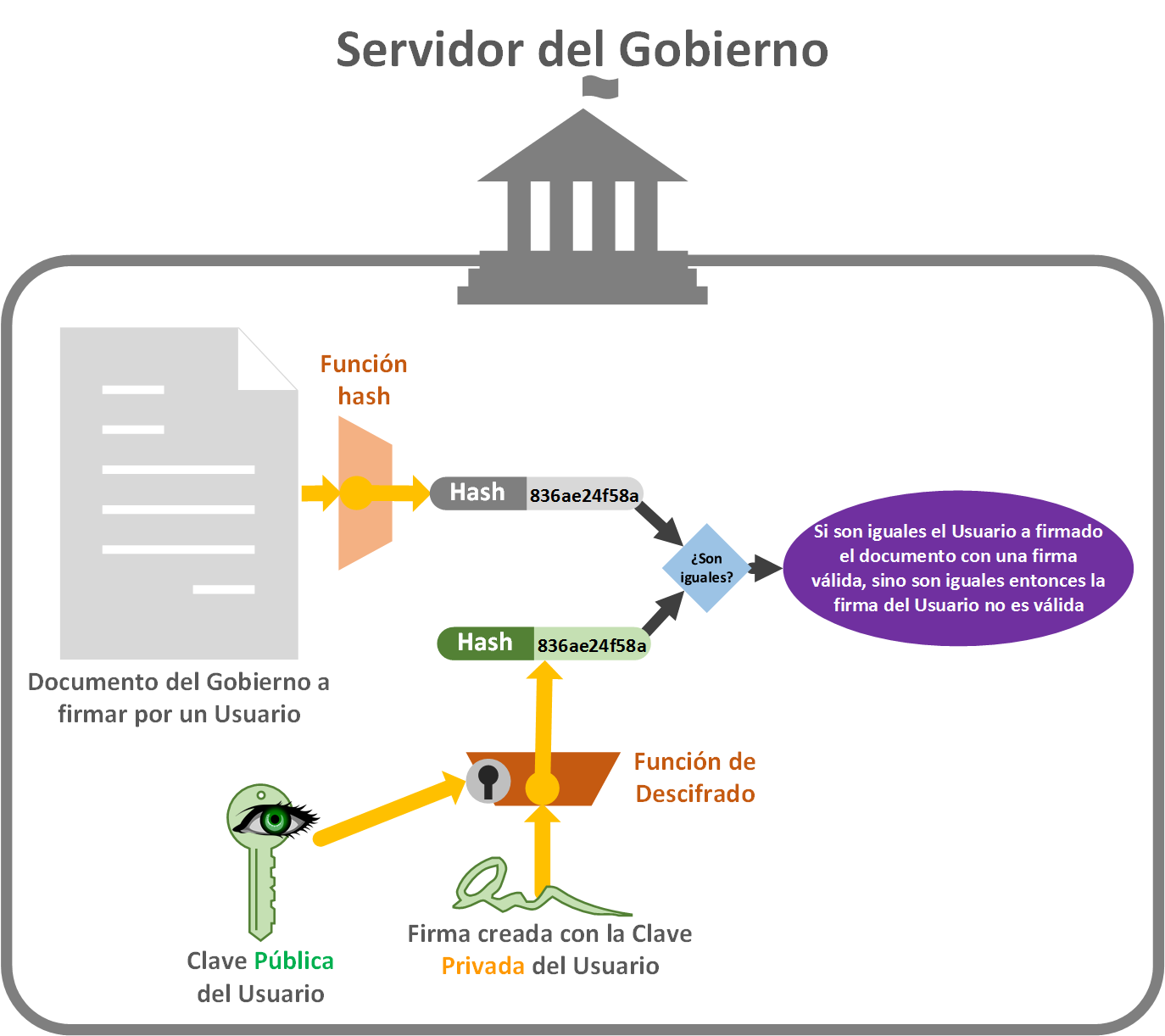
Note that the government needs some way of making sure that the user’s Public key belongs to that user. It knows this because the government will have in its database the Public key associated with each user, so it really knows which user it belongs to (it knows because it’s the one who previously created the “Public Key” and “Private Key” for the user). An HTTPS connection also helps make sure it’s a specific user.
Note
What would happen if a Blackhat hacker, carrying out a “man in the middle” attack, got the data the user sends to the government, forged the document and sent it to the government as if they were the user?
The Blackhat hacker can’t sign anything with the user’s Private key, because to do that they would have had to steal it (and if it’s a card like the DNI-e or a bank card, that’s hard unless they physically steal it); so they have no choice but to sign with a different Private key. This way, when they send the government the forged document, a different signature, and a different Public key, the government will know right away that the signature isn’t the user’s (and if the Blackhat hacker sent their own Public key to the government, the government will even know who the forger is).
Password security on websites
For developers who have built the typical “Username” and “Password” form: what risks can there be if the password isn’t encrypted in some way? Many, and big ones; with a user’s username and password, you can find out the credentials for other services if they use the same or a similar one (it can be obtained in a matter of seconds if it’s similar, since you start from one the user uses and try the same or similar ones on other “Username” and “Password” forms to see if you get lucky; which is textbook pruning). So it makes no difference whether the password is stored locally or on a server. If it’s in plain text (if it isn’t encrypted in any way; that is, if the user enters a password like “12345a” and “12345a” is stored, instead of something like “736f6e245d2a36f53”), if it’s stored locally an intruder could access it in plain text (either because they stole the device, or through some virus); and if the password is stored on a server, besides the local problem above, it could also be compromised by “man in the middle” attacks (a third party along the way steals it). More than enough reasons to put security measures in place, and to never send or store passwords in plain text.
The following image explains a bad way (and I stress very bad; and I’ve seen it far too often to be true) of sending access credentials (usually username and password) to the server and granting access to the user. In a first step the user enters their “username” and “password” on the login page of any website [1] (in the image, for the demonstration, I’ve used typical passwords considered insecure like “12345a”; as a user, never use easily guessable passwords, and don’t reuse them on other sites). The user has no idea that underneath, the password and username are being sent insecurely and in plain text in the URL itself [2]. On the server, the user will be looked up in the database and the password will be obtained [3]; unfortunately for the user, who doesn’t know that all the passwords are stored in plain text too. Knowing the received password and the one we have stored, they’re compared and, if it’s correct, access to the user’s session is granted [4] (in the image we haven’t sent the response to the user, it doesn’t matter for this case; but the next step would be to tell the user whether their session couldn’t be started for whatever reason, or to start their session and give them access to what they have permissions for).
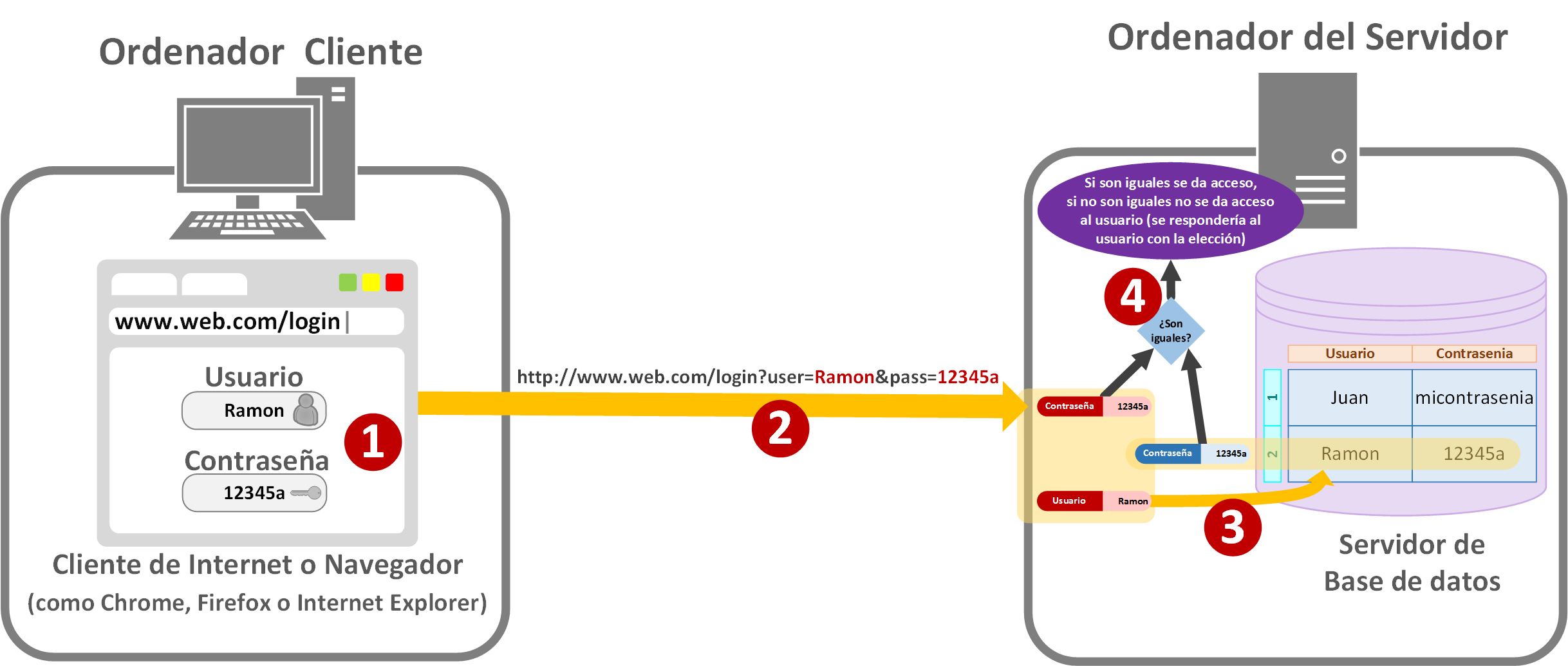
Things that are done wrong in the logic above (in the image above):
- Sending the information in a “GET” (sending the information in the URL itself); information should always be sent in a “POST” (more information on “GET” and “POST” at https://jarroba.com/cliente-servidor-peticion-del-cliente/); this is more about security in how the server receives the data than about the security of the information itself.
- The password is being sent to the server in plain text.
- It’s being sent over “HTTP”, unencrypted (“HTTPS” with an “S” at the end is encrypted).
- The password in the server’s database is also in plain text.
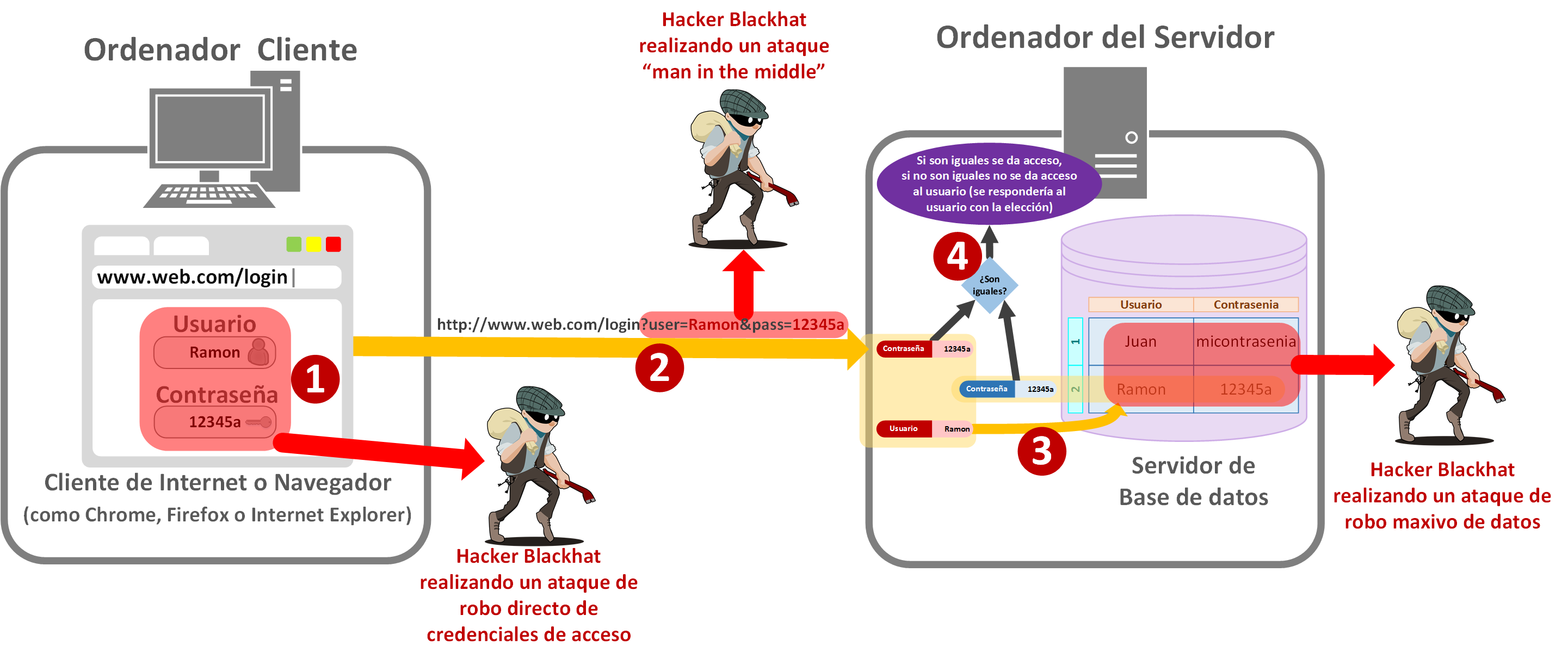
To give you an idea of where information theft could come from in the process above:
- On the client’s computer: there’s little that can be done if a virus has gotten in. The responsibility here lies with the user, who must always keep the operating system and browser up to date, and have an antivirus; or if they’ve landed on a fake website (phishing to steal users’ data). On the part of the website’s developers, having used HTTPS could make stealing credentials harder, since the browser itself notifies the user that the visited site is the right one and is secure; in addition, with “HTTPS” the browser has additional protection policies (it depends on the browser, and with “HTTP” it often applies them too), such as preventing JavaScript from automatically copying the clipboard.
- During transmission: a “man in the middle” attack can easily steal the credentials, and later access the website as if it were the original user. This part is entirely the responsibility of whoever designed the website (the user can do nothing). This is where the hash code comes into play for developers, and above all “HTTPS”.
On the server: I don’t think I need to spell out the problem that large companies have when their entire database is stolen and the passwords are in plain text or with poor security applied; and then the user receives an email that says something like: “Our company didn’t take minimum security measures and all our data has been stolen. There’s nothing we can do, so you, the user, have to change your password”. It’s a really big problem. First, because passwords must never be in plain text on the server, there is no reason that justifies storing passwords in plain text (the only “excuse” I’ve heard is that they want to know the users’ passwords to do some study, but the results of those studies can only be malicious, to try to deduce other passwords or something like that, so this excuse doesn’t hold either); in other words, it isn’t illegal, for now, to store the password in plain text, but you should treat it as if it were.
To solve this, what’s done is that, in the same “Username” and “Password” form, the hash code of the password is obtained (we can use any function we like among the recommended secure ones such as “SHA1” or “MD5”). The password is never stored or sent to external servers, only its hash. That way we make sure that if they steal the password, they won’t get the original password.
For the user it’s the same: they enter the username and password in the form [1]. But before sending the credentials over the Internet (or over any kind of network), the hash code of the password is obtained [2] (as I recommended before, some version of the “SHA” or “MD” functions; if you’re programming in any language, it surely has these functions to convert text or bits into one of these hash codes). What gets sent is the hash code [3] (we’ve protected the sending of the password; to protect the rest of the data other measures will need to be implemented, here I’m only talking about the password). Since the server receives the hash code, what it will have in the database are the users’ hashes [4] (the passwords are irreversibly encrypted; in theory, in the following paragraphs I explain why). All that’s left is the comparison [5].
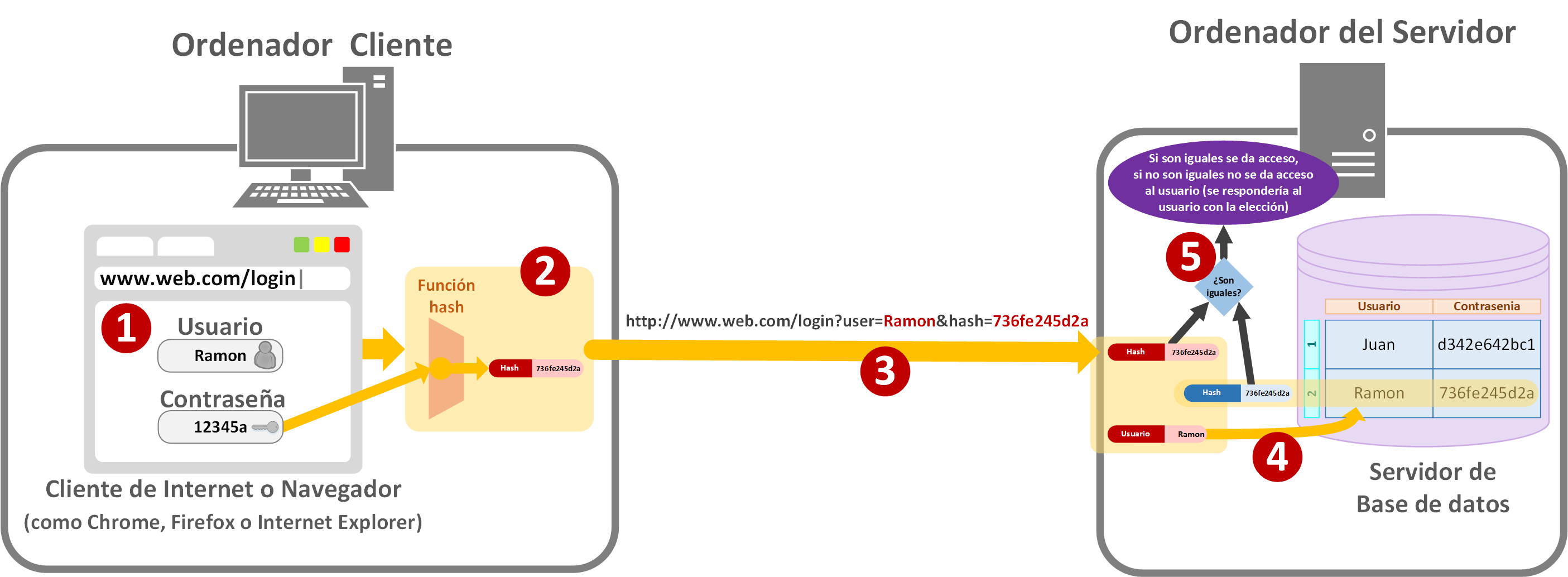
If you look closely, as developers we’ve covered all of our responsibilities regarding the password. Don’t forget that there’s other data besides the password too.
Of course this is a basic layer of security. There are tricks. As we saw earlier, we know that one thing corresponds to one hash, but several things can correspond to the same hash (collisions). The thief could have a hash mapper with many passwords (known as a “Rainbow table”, more information at https://es.wikipedia.org/wiki/Tabla_arco%C3%ADris) and greatly narrow down the possibilities. So it will also be worth encrypting the database or the data sent to the server, as well as having security through certificates.
To prevent the hash of a password from always being the same, a Salt is added to the password before it’s processed by the hash function (more information at https://es.wikipedia.org/wiki/Sal_(criptograf%C3%ADa)). The Salt is usually a random value generated on the server, .
It could also be worthwhile to cover some of the problems mentioned above (there are many ways to approach security; this basic example is by no means the most secure, but it does make attacks harder), such as first creating a hash of the password (which will be the same one stored on the server), and then, together with the current hour and minute, creating a new hash (first hash + hour and minute), sending it to the server and having the server compare it with the same thing (the hash it has stored + hour and minute); this way the hashes are invalidated every minute in case of capture by a “man in the middle”, and it’s harder to deduce the password since it isn’t the direct hash.
If we can’t use “HTTPS” (mainly because certificates are usually paid), it’s highly recommended to use an OAuth system (we can use the most famous ones, like Google’s, Facebook’s, Twitter’s, LinkedIn’s, GitHub’s, etc.) to avoid having to send user credentials. In short, a hash code (which they call a “Token”) is sent to the servers of the aforementioned brands so that they validate the user.
In any case, a good security policy will minimize all of these cases. The first and most recommended thing is to use “HTTPS”, for example (this is beyond this article, we’ll explain it in a future article).
Hash tables (or dispersion tables)
Information about hash tables can be found in the dedicated article on hash tables; click here. There we explain how they work, what they are for, and give code examples.
Famous and recommended hash functions
We’ve now reached the famous hash functions. It’s highly recommended to use any of these hash functions, especially the most widely used or the newest ones (the more modern, the better they meet the properties, and the more secure they are). The ones I’m about to present are mostly used in programming or at the user level (below you have usage examples); however, in networking other hash functions pay off more, like the “parity bit” explained earlier, the “minimum Hamming distance”, or the “Modular sum”, or “Cyclic Redundancy Checks, CRC”, among others (we’ll go into more detail in a future article, here I’ll only focus on their use at a high level).
Below are the hash functions that are recommended for security:
Message-Digest algorithm (MD):
- MD5: 128 bits. Very widely used. Not recommended for security reasons. Still used for checking files.
- MD6: 256 bits, processed through multithreading. New algorithm, recommended for security.
Secure Hash Algorithm (SHA). Complete tables at Secure Hash Algorithms (Wikipedia):
- SHA-1: 160 bits. Not recommended for security reasons. Still used for checking files.
- SHA-2: 256 bits (SHA-256) and 512 bits (SHA-512), there are others. Very widely used, although not recommended for security reasons.
- SHA-3: 256 bits (SHA3-256) and 512 bits (SHA3-512), there are others. New algorithm, recommended for security.
The software that performs the calculations and checks for these is named after the “algorithm name” with the suffix “sum”; for example for “MD5” it would be “md5sum” or for “SHA-1” it would be “sha1sum” (for “SHA” the size can also be mentioned, as in “sha256sum” or “sha512sum“). If you’re a developer, you’ll find it in practically any programming language, ready to use (and if not, you’ll surely find an external library); if you’re not a developer, there are many applications that can be used at the user level, like the ones shown in this article.
Checking downloaded files with a hash code
Now it’s time to see some practical examples of its use at the user level. As you read, at the “user level” we can check any file that we download from any site on the Internet as long as it comes with its hash code.
You may have noticed that when you download a file, one of the names we’ve already seen appears next to the download button, such as Hash, Summary, Mince, Digest, Fingerprint, Checksum.
For popular programs such as browsers, games and other programs designed for users without technical knowledge, the hash codes are usually a bit more hidden (since a normal user doesn’t know what that number is for and won’t use it). There is always some place with the hash code; usually a very ugly, plain white page with just text (let’s call it the “page for advanced users”), where only the files appear with their corresponding hash codes.
Seeing the hash code directly as a user
For example, when downloading the famous video player VideoLAN (at VLC: Sitio oficial – ¡Soluciones multimedia libres para todos los sistemas operativos! (VideoLAN) we click on “Download VLC”):
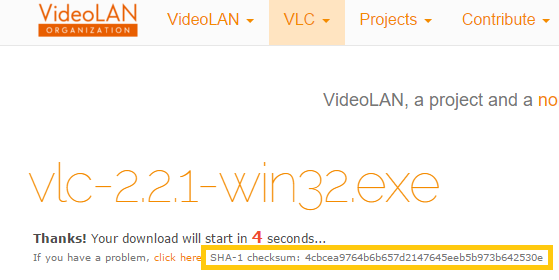
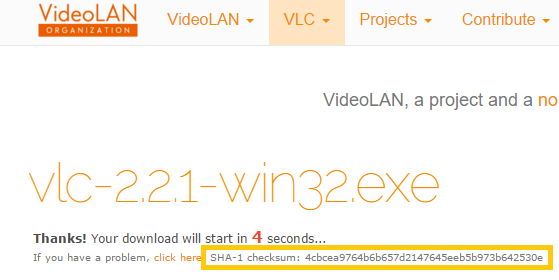
We can see that, right next to the download, the name “SHA-1 checksum” appears with the hash code.
Another example, when downloading the Eclipse IDE (at Eclipse Downloads (Eclipse Foundation), we click on the version we want to download, such as the “64 bit” one of “Eclipse IDE for Java EE Developers”), we’ll be able to see, next to the “Download” button, the MD5, SHA1 and SHA-512 hash codes:
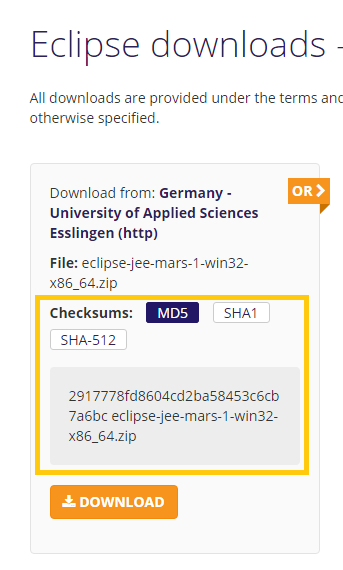
Download hashes hidden from users
For example, to download the Firefox browser, normal users download the application from https://www.mozilla.org/es-ES/firefox/new/, where we will NOT see the hash code anywhere. Why don’t they put the hash code on the website itself? Well, I suppose it’s by design, or because users without technical computer knowledge don’t even know what that long stream of letters and numbers is for. However, advanced users can find the hash codes on the ugly page we mentioned before, the “history of released versions (releases)” page (or repository) at https://ftp.mozilla.org/pub/firefox/releases/, which acts like a file system (yes, it really is a folder with files or more folders, like the ones in any operating system); so we select a version we want to download (it’s always advisable to download the latest version for security and performance reasons of the program we’ll download; for example I picked version “43.0.4”, whose contents are in the following image). Inside we’ll look for the hash code file, which in this case is called “SHA512SUMS”.
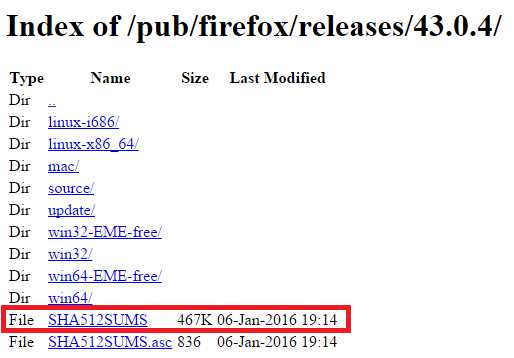
And we’ll see that it shows us a bunch of hash codes. Panic! 🙁 I mean… DON’T panic, it’s the same as before 🙂 !
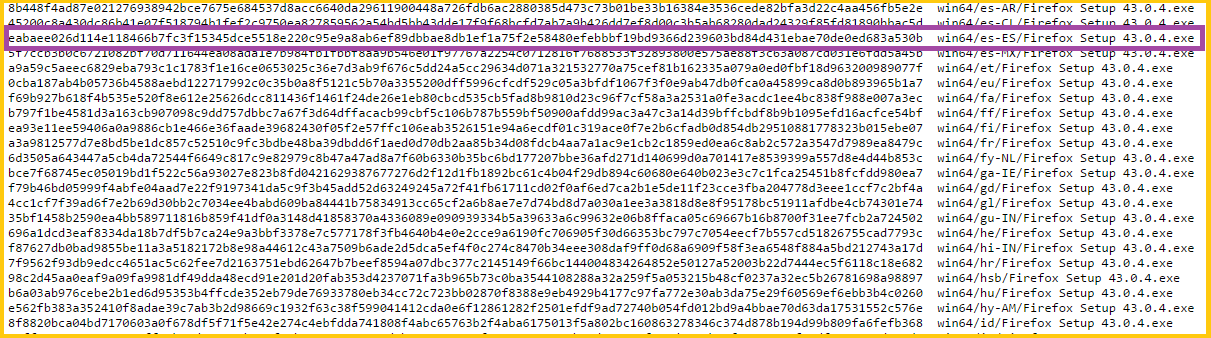
It’s as simple as seeing that each row, from left to right, corresponds to a file we can download. For example, if we want to download Firefox for “Windows” “64-bit” in “Spanish (Spain)”, we’d navigate through the file system to “win64” and then to “es-ES”, whose final path would be https://ftp.mozilla.org/pub/firefox/releases/43.0.4/win32/es-ES/, and there we’d select the executable to download.
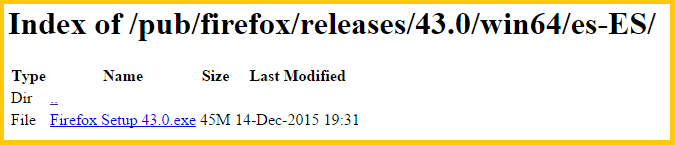
In these “released files histories” we’ll see files for all operating systems and, in turn, for all languages. For the example above it will correspond to the row “win64/es-ES/Firefox Setup 43.0.4.exe”; which in turn is the same path to the file we can download (as you can see highlighted in purple in the image above of the hash codes).
Checking the hash code by hand
In most cases the hash code is checked automatically without us noticing, and quite a few times per second for different things. For example, when a program’s installer (when installing or updating) says something like “verifying installation”, it means that the files are being checked, and among these checks, hash codes are used to verify the integrity of the installed files.
Now that we’ve seen where to get the hash codes, we can check the downloaded files by hand. The steps to follow, as we’ve already seen, are:
1.Download the file from any website you want (to follow these examples, any file you like will do as long as it has a hash code on the same download website). For example, I’m going to download the “VLC media player” file from VLC: Sitio oficial – ¡Soluciones multimedia libres para todos los sistemas operativos! (VideoLAN)

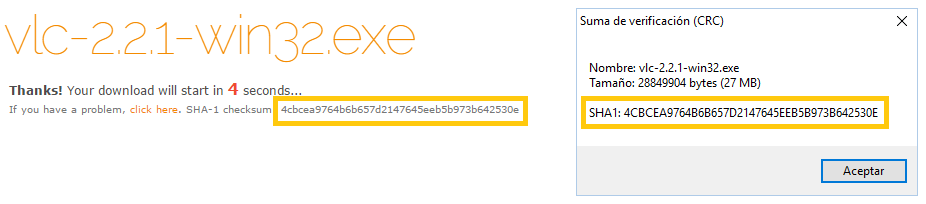
2. Copy the hash code and write down the hash function it was obtained with (like SHA2 or MD5) that the website provides (usually next to the installer, or on some file repository page). Continuing with my example, I note that the “hash function” is “SHA-1”, and the hash code is “4cbcea9764b6b657d2147645eeb5b973b642530e” (Note: if you’re following this example, the hash code on the website may have changed and not match this one; that’s what should happen if they update the file)
3. From our computer, somehow, calculate the hash code of the downloaded file with the same hash function we noted earlier. We’ll continue the example below.
4. Compare both hash codes. If they match, the file was downloaded correctly; if they don’t match, the file was downloaded corrupted
With the 7zip archiver (for Windows)
With this archiving program (similar to WinRar or WinZip, but free and open source) it’s very easy, since from the context menu we can check the hash code of any file we want (although it’s limited to SHA and CRC).
We download the program from 7-Zip. There we click on “Download”.
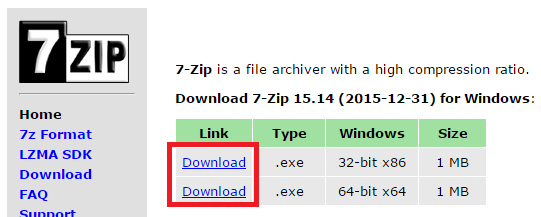
Once it’s downloaded, we install it as usual.
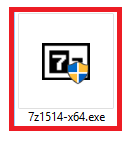
Once it’s installed we can check the hash code of any file.
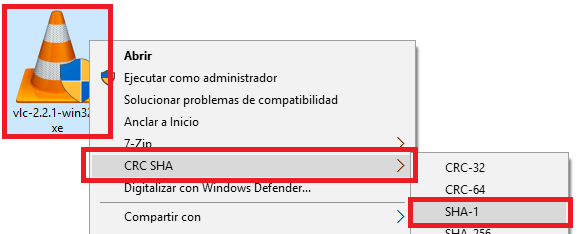
It’s as easy as putting the mouse cursor over the file whose hash code we want to get (in my example, the “vlc” executable), right-clicking, choosing “CRC SHA” and then the hash function we want to check (in my example “SHA-1”)
When the calculation is done, we’ll see a window open showing the calculated hash code. That way we can compare them and see whether it was downloaded correctly or not. For my example I can confirm that it was downloaded correctly (it doesn’t matter whether the letters are uppercase or lowercase):
With Openssl (for Linux, iOS and Windows)
This program lets us check the hash codes SHA1, SHA224, SHA256, SHA384, SHA512, MD2, MD4, MD5, RDC2, RMD160. It has to be done from the command terminal, but it’s very simple.
In addition, Openssl will let us do much more, since it’s a very powerful cryptographic module (such as encrypting files with a password using various encryption functions), even if we only use it to calculate the hash code. More information at https://www.openssl.org/docs/manmaster/apps/openssl.html
We can download it from Cryptography and SSL/TLS Toolkit (OpenSSL)

We extract the file wherever we want (on Windows we can use the “7zip” archiver from the previous example for that).
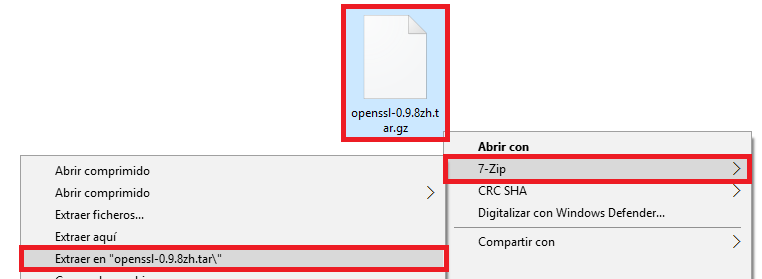
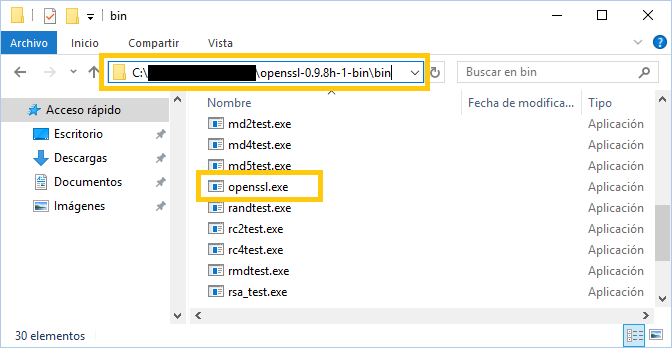
If we go inside the extracted folder, we’ll see that inside the “bin” folder there is a file called “openssl.exe”.
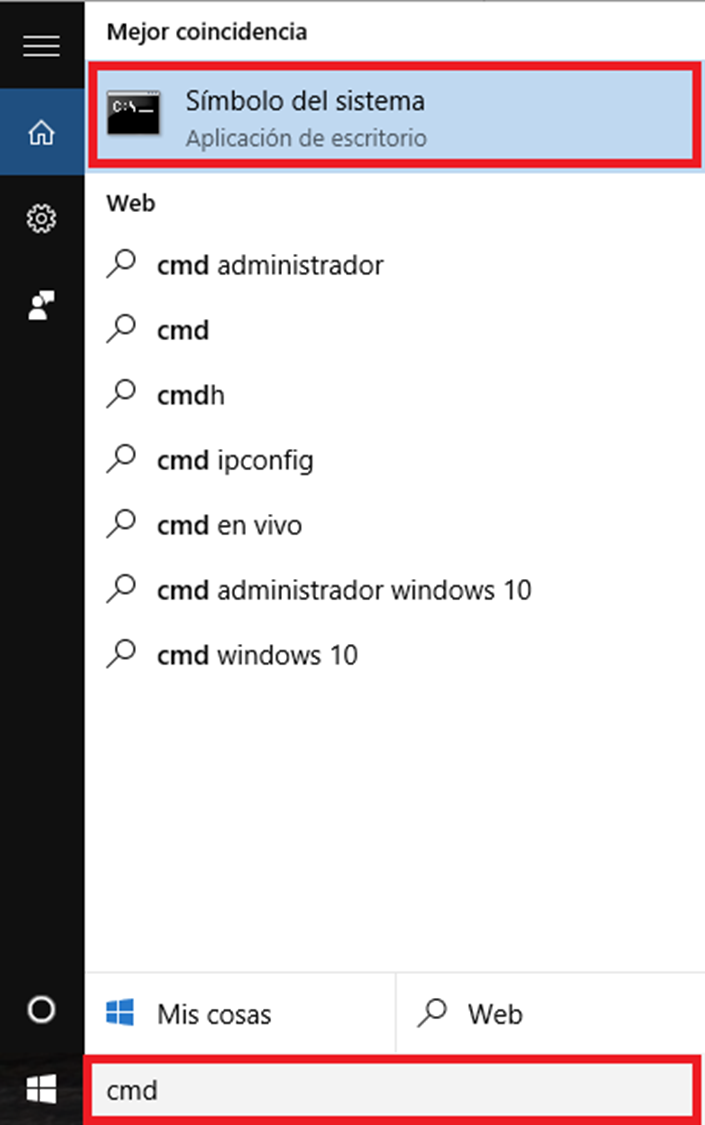
On Windows, to open the command terminal we can look for it in the Windows search box by typing “cmd”. To open the terminal, just click on the result called “Command Prompt”.
In the terminal we’ll go to the path where we extracted the file, typing the word “cd” and a space, and then copying the entire path of the folder where the file “fciv.exe” is extracted. It would look something like:
cd C:\<miruta>\openssl-0.9.8h-1-bin\bin

We simply type “openssl.exe”, a space, followed by “sha1” or “md5”, another space, and the path of the file to check (including the file to check).
In my example case, where I have the file “vlc-2.2.1-win32.exe” in the downloads folder, since I just downloaded it, I’d type (trick: to avoid having to type the whole file path, we can type “openssl.exe sha1 ” and then drag the file onto the terminal, and it will automatically type the path for us):
openssl.exe sha1 C:\Users\<miUsuario>\Downloads\vlc-2.2.1-win32.exe
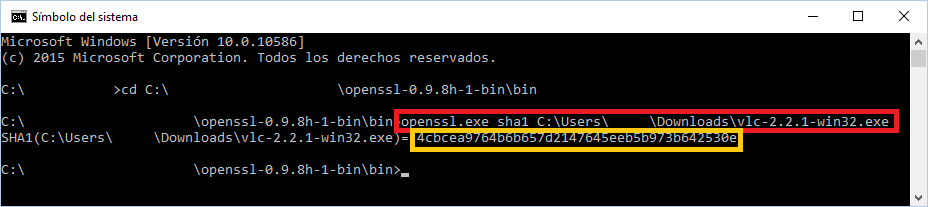
It will calculate the hash code, which we can then check. As you can see above, it’s the same one the website gave us, so my file was downloaded correctly.
From the Windows terminal with Microsoft File Checksum Integrity Verifier (for Windows)
With this program we can check SHA1 and MD5 hash codes. It’s also from the command terminal, but it’s also very easy.
We’ll download Microsoft File Checksum Integrity Verifier from the following address
https://www.microsoft.com/en-us/download/details.aspx?id=11533
By clicking the “Download” button, the file will be downloaded.

The file that was downloaded is actually an archive that we can open with any archiver or by double-clicking it (as if we were going to install it). Here I’ll explain it by double-clicking the file.
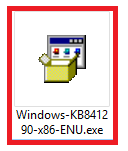
A legal dialog will appear, which we accept by clicking “Yes”.
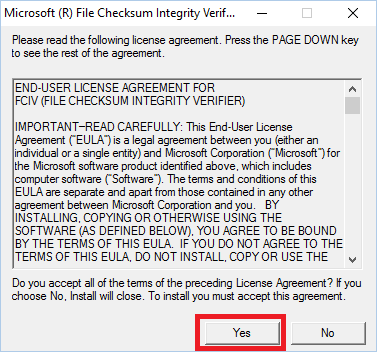
Then, in “Browse…” we’ll look for a place to extract it, like the desktop directly (there are two files, of which we only need one) or like in the following example, where I created a folder called “FCIV”. Then we click “OK” and it will be extracted.
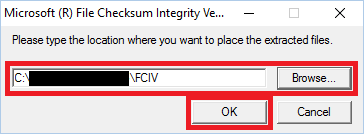
We’ll see there are two files. One called “ReadMe.txt”, and the one we really care about, named “fciv.exe”. We won’t open it here, we’ll use the command terminal for that.
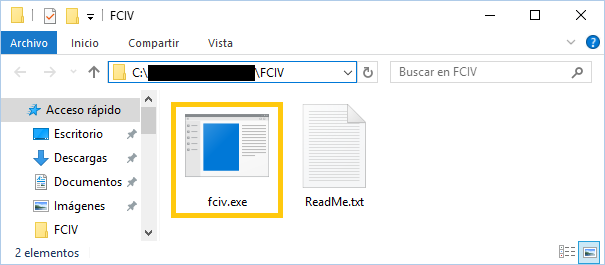
We’ll open the command terminal (searching for it in the Windows search box as “cmd”, and selecting the “Command Prompt” result)
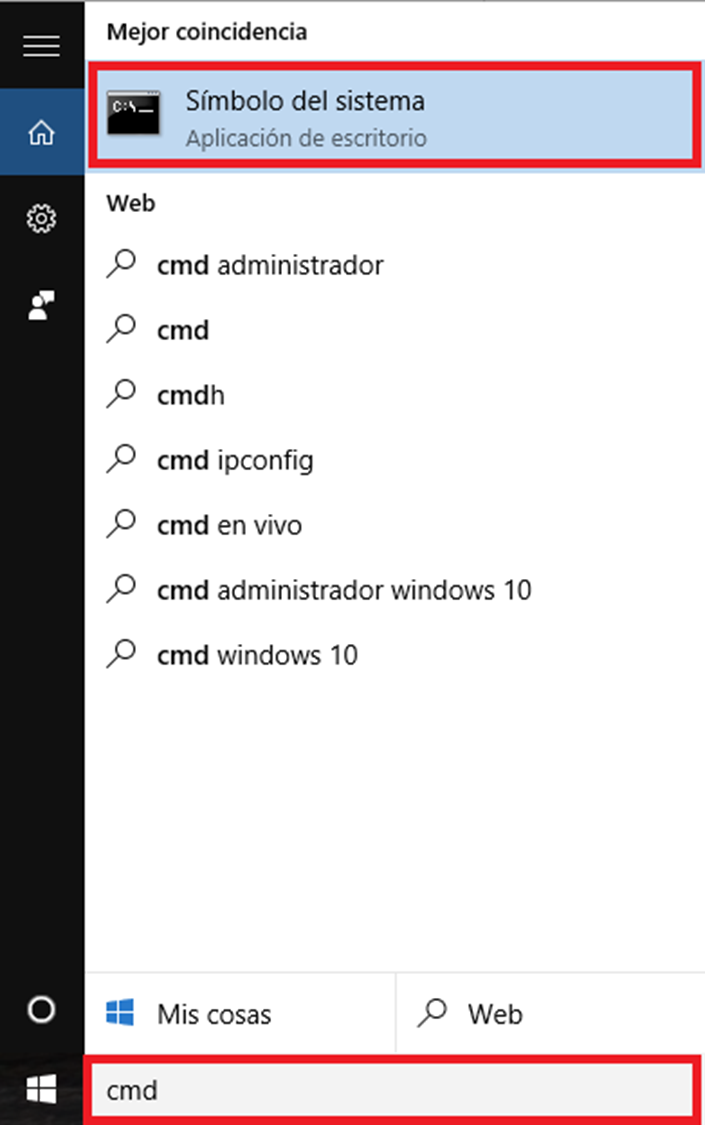
To start, we’ll go to the path where we extracted the file by typing the word “cd” and a space, and then copying the entire path of the folder where the file “fciv.exe” is extracted. It would look something like:
cd C:\<miruta>\FCIV
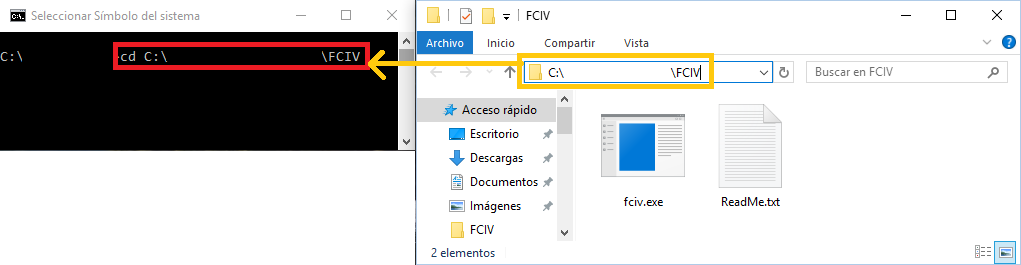
We’re now ready to get the hash of any file.
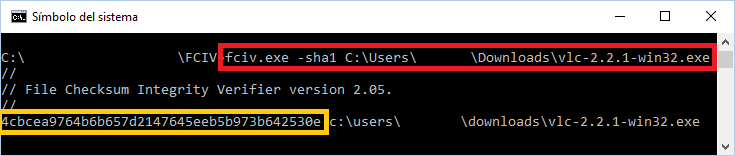
We only have to type “fciv.exe”, a space, followed by “-sha1” or “md5”, another space, and the path of the file to check (including the file to check).
For my example with the file “vlc-2.2.1-win32.exe” that I have in the downloads folder (trick: to quickly type the file path in the terminal, we can type “fciv.exe -sha1” and then drag the file onto the terminal, and it will type the path for us automatically):
fciv.exe -sha1 C:\Users\<miUsuario>\Downloads\vlc-2.2.1-win32.exe
This will calculate the hash code, which we can see is the same one the website gave us (as you can see above); that is, my file was downloaded correctly.
Calculating a hash code with programming
I can’t end the article without what I consider the most important part, and to bring everything together in a single place: programming. I’ll show how to do it in a few programming languages; they aren’t the only languages that can do it nor the only ways of doing it.
For all the examples, we’ll start with a Message whose content is “El mensaje original”, from which we want to get the MD5 hash function in hexadecimal (we could leave it in bytes, which is perfectly valid for doing calculations; but I’ll present all of them in hexadecimal, which is how they’re usually seen). Also, in all the examples we’ll be able to see the following output in the terminal or in the browser:
Mensaje 'El mensaje original' -> Hash MD5: 80c6973ef9ed92f123044cd5c4f7d954
Note: notice how it gives us the same hash code for the same Message regardless of the language used.
Java
All we have to do is the following.
String mensaje = "El mensaje original";

byte[] bytesDelMensaje = mensaje.getBytes();

MessageDigest resumenDelMensaje = MessageDigest.getInstance("MD5");
byte[] bytesDelResumen = resumenDelMensaje.digest(bytesDelMensaje);

BigInteger resumenNumero = new BigInteger(1, bytesDelResumen);
String resumen = resumenNumero.toString(16);

System.out.println("Mensaje '" + mensaje + "' -> Hash MD5:" + resumen);
Using the MessageDigest function (http://docs.oracle.com/javase/6/docs/api/java/security/MessageDigest.html), which takes the message in bytes and returns the result in bytes. What I did, logically, was convert the message from String to byte[], tell MessageDigest that I want it to process it with the “MD5” hash function, and take the Summary, which it returns as byte[]; this byte[] has to be converted into an integer, but since it’s very big we’ll use BigInteger(), to which we’ll set the sign to positive by passing “1” (more information at https://docs.oracle.com/javase/7/docs/api/java/math/BigInteger.html#BigInteger(int,%20byte[]) ), and we’ll convert it to a hexadecimal number with “toString(16)” and also to a String, so we can finally display it on screen.
This way the output in the terminal is:
Mensaje 'El mensaje original' -> Hash MD5: 80c6973ef9ed92f123044cd5c4f7d954
Here’s the class with the complete example:
import java.math.BigInteger;
import java.security.MessageDigest;
import java.security.NoSuchAlgorithmException;

public class miClase {

    public static void main(String[] args) {

        String mensaje = "El mensaje original";
        byte[] bytesDelMensaje = mensaje.getBytes();

        MessageDigest resumenDelMensaje = null;
        try {
            resumenDelMensaje = MessageDigest.getInstance("MD5");
            byte[] bytesDelResumen = resumenDelMensaje.digest(bytesDelMensaje);

            BigInteger resumenNumero = new BigInteger(1, bytesDelResumen);
            String resumen = resumenNumero.toString(16);

            System.out.println("Mensaje '" + mensaje + "' -> Hash MD5: " + resumen);
        } catch (NoSuchAlgorithmException e) {}

    }

}
Javascript
JavaScript doesn’t include any cryptography library by default, but we can download one or link to it directly from its website at https://code.google.com/p/crypto-js/downloads/list
I’m going to add it directly from its website to keep things simple. Between the “head” tags I add the following:
<script src="http://crypto-js.googlecode.com/svn/tags/3.1.2/build/rollups/md5.js"></script>
And simply in the JavaScript.
var mensaje = 'El mensaje original';
var resumen = CryptoJS.MD5(mensaje);
document.write("Mensaje '" + mensaje + "' -> Hash MD5: " + resumen);
The second line “CryptoJS.MD5()” will calculate the summary of the message. The last line “document.write()” (we can replace it with a “console.log()” to write to the console) is to see the result directly in our favorite browser (it writes directly into the “body”).
We’ll be able to see:
Mensaje 'El mensaje original' -> Hash MD5: 80c6973ef9ed92f123044cd5c4f7d954
Now the complete example:
<!DOCTYPE html>
<html>
<head>
     <meta charset="UTF-8">
     <title>Calcular MD5</title>

     <script src="http://crypto-js.googlecode.com/svn/tags/3.1.2/build/rollups/md5.js"></script>
	</head>
<body>
     <script>
          var mensaje = 'El mensaje original';
          var resumen = CryptoJS.MD5(mensaje);
          document.write("Mensaje '" + mensaje + "' -> Hash MD5: " + resumen);
     </script>
</body>
</html>
PHP
With PHP it’s very easy to calculate the MD5 of a text:
<?php

	$mensaje = 'El mensaje original';

	$resumen = md5 ( $mensaje );

	echo "Mensaje '$mensaje' -> Hash MD5: $resumen";

?>
And when you run it, it returns:
Mensaje 'El mensaje original' -> Hash MD5: 80c6973ef9ed92f123044cd5c4f7d954
Bibliography
- Personal handwritten notes taken in the class of the course “Fundamentals of Information Security”. Taught by Juan Alberto de Frutos Velasco, for the UPM
- Slides of “Hash Tables”. By Jenifer Pérez Benedi, for the UPM
- Slides of “Key Transformation (Hashing)”. By Jesús Alonso Segoviano, for the UPM
- The author’s own experience
- http://www.pa.msu.edu/reference/jdk-1.2.2-docs/tooldocs/win32/jarsigner.html
- https://support.microsoft.com/en-us/kb/841290
- MD5 considered harmful today: Creating a rogue CA certificate
- When Will We See Collisions for SHA-1? (Schneier on Security)
- http://docs.oracle.com/javase/6/docs/api/java/security/MessageDigest.html
- MD5 (Wikipedia)
- MD6 (Wikipedia)
- Secure Hash Algorithms (Wikipedia)
- Man-in-the-middle attack (Wikipedia)
- Hash function (Wikipedia)
- Cryptographic hash function (Wikipedia)
“Hash Code” by Ramón Invarato at jarroba.com, licensed under Creative Commons Attribution-NonCommercial-ShareAlike 3.0. Registered at Safe Creative.

You may also like
Hash Tables (or Hash Maps): How They Work
Hash Table explained simply. What is a Hash Table and how does it work without writing code? A key type of "data structure" every developer should know.
Check Digit – Error Detection
The check digit covers several hash codes, such as the parity bit, the digit generated by the Luhn algorithm, the verification letter of national ID numbers, and more.
Leave a comment