
CI/CD: Core Concepts — pipeline, job, stage, step, and gates
The building blocks of any CI/CD pipeline: pipelines, gates, jobs, stages and steps, and what they are called in GitHub Actions, GitLab CI and Jenkins.
Series: CI/CD and AI: From Theory to Practice part 2 of 11
- Introduction
- 1CI/CD: Introduction — What It Is, Why It Matters, and Who Does It
- 2CI/CD: Core Concepts — pipeline, job, stage, step, and gates
- 3CI/CD: Branching, Git Flow, and Pull Requests
- 4Pre-CI: General CI/CD Pipeline Architecture and Pre-checks
- 5CI (Continuous Integration): analysis, tests, quality, and security
- 6CD (Continuous Delivery) — Part 1: packaging, SBOM, and remediation
- 7CD (Continuous Delivery) — Part 2: Image Scan and Service Tests
- 8CD (Continuous Delivery) — Part 3: Deploy to Dev and Smoke Tests
- 9CD (Continuous Delivery) — Part 4: Deploy to Staging and Performance Smoke Tests
- 10CD (Continuous Delivery) — Part 5: LCA — Load, Stress, and Chaos Engineering
- 11CD (Continuous Delivery) — Part 6: Final validations, Manual Approval, and Deploy to Production
Before designing or working with a CI/CD pipeline, you need to master its vocabulary. This article defines the fundamental concepts and maps them to the three most widely used tools: GitHub Actions, GitLab CI, and Jenkins.
Pipeline
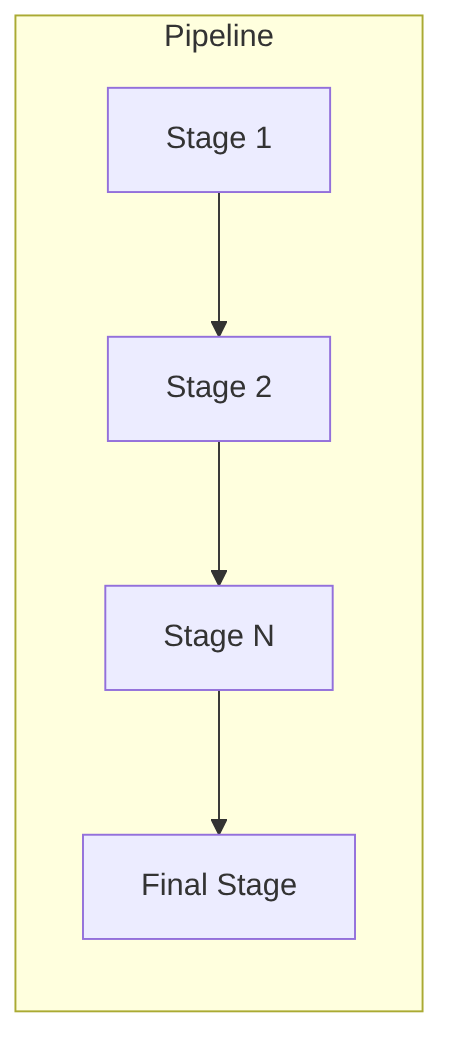
A pipeline is a set of stages that run in sequence to build, test, deploy, and maintain a software product.
Gates
A gate is a mandatory control point within a pipeline where quality, security, or compliance criteria are evaluated before allowing the flow to continue.
- If the gate passes → the pipeline advances to the next stage.
- If the gate fails → the pipeline stops and the error is returned to the developer to fix.

Perhaps the best-known gate is the SonarQube gate (I have seen it in almost every company, or if not, a variant that does something similar): it is a code quality gate that evaluates source code quality and detects potential security issues and vulnerabilities.
Although the formal “gate” lives inside the pipeline, locally there are some “local and mental gates” that a developer passes before committing (before pushing code to the repository):
- The project compiles and runs locally.
- Lint (a tool that checks code style and syntax) with no errors.
- Consistent formatting.
- Unit and integration tests run locally with everything green.
Job
A Job is an executable unit within a pipeline, grouped into stages.
Some typical examples of jobs are:
- Compiling (building) the project.
- Packaging the project into a deployable format (Docker image, JAR, WAR, etc.).
- Running tests (such as unit or integration tests).
Stage and Step
These concepts are very similar (in GitHub Actions, one does not even exist as its own keyword). They are used to group jobs. The difference:
- Stage: a complete phase of the pipeline (i.e., a logical function).
- Step: an individual action within that stage.
That is: a pipeline has stages → a stage has steps → a step has jobs.

Equivalence table: GitHub Actions, GitLab CI, and Jenkins
Naming varies between tools, but the concepts are equivalent:
| Concept | GitHub Actions | GitLab CI | Jenkins | Conceptual equivalent |
|---|---|---|---|---|
| Pipeline (CI/CD flow) | Workflow | Pipeline | Pipeline | The complete CI/CD flow |
| Stage | Does not exist as a keyword (simulated with jobs and needs) |
Stage | Stage | Logical grouping of steps |
| Job | Job | Job | Stage (with steps) | Executable unit with its own agent |
| Step | Step | Script (lines inside the job) | Step | Individual action within a job |
| Runner / Executor | Runner | Runner | Agent | Machine where execution happens |
| Gate / Approval | Environment protection rules | when: manual |
input |
Approval or control point |
| Artifact | actions/upload-artifact |
artifacts: |
archiveArtifacts |
Files passed between stages |
| Dependency | needs: |
needs: |
post / stage order |
Order and dependency control |
Code examples
Pipeline with a manual approval gate
Jenkins (saved in a Jenkinsfile; Jenkinsfile documentation here):
pipeline {
    agent any
    stages {
        stage('Build') {
            steps {
                echo 'Building...'
            }
        }

        stage('Approval Gate') {
            steps {
                script {
                    input message: 'Approve deployment?'
                }
            }
        }

        stage('Deploy') {
            steps {
                echo 'Deploying...'
            }
        }
    }
}
GitHub Actions (saved in .github/workflows/hello.yml; GitHub Actions documentation here):
name: Pipeline with Gate

on:
  workflow_dispatch:

jobs:
  build:
    runs-on: ubuntu-latest
    steps:
      - run: echo "Building..."

  deploy:
    runs-on: ubuntu-latest
    needs: build
    environment: production   # ← GitHub will request approval if the environment has rules
    steps:
      - run: echo "Deploying to production..."
GitLab CI (saved in .gitlab-ci.yml; GitLab CI documentation here):
stages:
  - build
  - deploy

build:
  stage: build
  script:
    - echo "Building..."

deploy:
  stage: deploy
  script:
    - echo "Deploying..."
  when: manual   # ← Manual gate
  allow_failure: false
Main tools
Although the concepts of pipeline, stage, job, and gate are universal, each tool has its own syntax and characteristic configuration file. These are the three most widely used today:
GitHub Actions
CI/CD service managed by GitHub (Microsoft). No infrastructure required — pipelines run on GitHub runners or self-hosted runners.
- Configuration file:
.github/workflows/<name>.yml(inside the repository) - Triggers: push, pull request, schedule, workflow_dispatch, etc.
- When to use: projects on GitHub, startups, open source, teams that want speed without managing servers.
Minimal skeleton:
name: My pipeline

on:
  push:
    branches: [main]

jobs:
  build:
    runs-on: ubuntu-latest
    steps:
      - uses: actions/checkout@v4
      - name: Build
        run: echo "building..."

  test:
    runs-on: ubuntu-latest
    needs: build          # depends on build
    steps:
      - name: Tests
        run: echo "tests..."

  deploy:
    runs-on: ubuntu-latest
    needs: test
    environment: production   # ← approval gate if the environment has rules
    steps:
      - name: Deploy
        run: echo "deploying..."
GitLab CI
CI/CD integrated into GitLab. Available both on the cloud (gitlab.com) and as an on-premise installation. It is the de facto standard in corporate environments that cannot use external services.
- Configuration file:
.gitlab-ci.yml(at the repository root) - Executors: GitLab Runners (very versatile: Linux, Windows, macOS, Kubernetes)
- When to use: companies with on-premise installations, environments with strict security requirements (data that cannot leave the network), large corporations.
- Strength: all-in-one — Docker image registry, SAST/DAST, Kubernetes agent, and reusable corporate templates included out of the box.
Minimal skeleton:
stages:
  - build
  - test
  - deploy

build:
  stage: build
  image: maven:3.9-eclipse-temurin-17
  script:
    - mvn clean package
  artifacts:
    paths:
      - target/*.jar

test:
  stage: test
  image: maven:3.9-eclipse-temurin-17
  script:
    - mvn test

deploy:
  stage: deploy
  script:
    - echo "deploying..."
  when: manual           # ← manual gate (equivalent to GitHub Actions environment)
  allow_failure: false
Jenkins
The veteran of CI/CD. A self-managed server, highly configurable via plugins. It remains the king in companies with legacy on-premise infrastructure or very complex flows that no SaaS can cover.
- Configuration file:
Jenkinsfile(at the repository root, Groovy syntax) - Executors: agents (Jenkins nodes, Kubernetes pods, VMs, Docker)
- When to use: organizations with monoliths or their own infrastructure, when extreme customization or integration with legacy systems is required.
- Weakness: “plugin hell” — updating Jenkins or its plugins can break the pipeline; consumes resources even when idle.
Minimal skeleton (Declarative Pipeline):
pipeline {
    agent any

    stages {
        stage('Build') {
            steps {
                echo 'Building...'
                sh 'mvn clean package'
            }
        }

        stage('Test') {
            steps {
                sh 'mvn test'
            }
        }

        stage('Approval Gate') {
            steps {
                input message: 'Approve deployment to production?'
            }
        }

        stage('Deploy') {
            steps {
                echo 'Deploying...'
            }
        }
    }
}
Jenkins X is a complete rewrite of Jenkins designed for Kubernetes: it uses GitOps out of the box, creates ephemeral environments per Pull Request, and delegates pipeline execution to Tekton (a Kubernetes-native CI/CD framework). It is more complex to operate but eliminates the central server maintenance problem.
Comparison table: which one to choose?
| Tool | Difficulty | Maintenance | When to choose it |
|---|---|---|---|
| GitHub Actions | Low | Almost none (SaaS) | Projects on GitHub, startups, open source, speed without managing servers |
| GitLab CI | Low–Medium | Low if SaaS; medium on-premise | Corporate on-premise environments, strict security requirements, all-in-one |
| Jenkins Classic | Medium–High | High | Legacy infrastructure, extreme customization, no possibility of using cloud |
| Jenkins X | Very High | Medium (on Kubernetes) | 100% Kubernetes teams that want native GitOps and have dedicated DevOps |
Beyond CI: GitOps and CD tools
CI pipelines handle building, testing, and validating code. But CD (Continuous Deployment) can be managed with a different philosophy: GitOps.
What is GitOps?
Git as the single source of truth for system state.
In the traditional model, the pipeline “pushes” changes to the cluster (kubectl apply, helm upgrade). In GitOps, nobody touches the cluster directly: any change goes through a commit in a Git repository. An agent living inside the cluster detects the difference between what Git says and what is deployed, and synchronizes automatically.
Push model (traditional): CI pipeline → kubectl apply → cluster
Pull model (GitOps): commit in Git → agent detects → cluster self-synchronizes
ArgoCD and Flux: the GitOps agents
- ArgoCD: the most popular. Includes a visual web interface showing the state of all deployments in real time. Ideal for teams coming from the Java/Spring Boot world or who prefer graphical visibility.
- Flux: no interface, lighter, integrates more transparently. Preferred by infrastructure teams.
Recommended hybrid flow (the most widely used in modern companies):
- GitHub Actions / GitLab CI → CI: compiles, tests, builds Docker image
- CI updates the version in the configuration repository (Helm chart)
- ArgoCD / Flux detects the change → deploys to Kubernetes automatically
This model clearly separates responsibility: CI validates the code; CD manages the state of the environment.
“CI/CD: Core Concepts — pipeline, job, stage, step, and gates” by Ramón Invarato at jarroba.com, licensed under Creative Commons Attribution-NonCommercial-ShareAlike 3.0. Registered at Safe Creative.

You may also like

How to Adopt AI in Your Organization Without Making the Most Common Mistakes
Failure and success patterns in AI adoption, a practical decision framework, safe use cases, and minimum viable governance for development teams.

The Real Cost of AI: From the Democratic Promise to the Enterprise Model
Copilot moves to token billing, JetBrains cuts quotas, Claude raises costs with new tokenizer. Analysis of the economic divide AI is opening in 2026.
Leave a comment