
Collection View (Grids) in Objective-C: Example (Video)
Learn how to build dynamic Collection Views (UICollectionView) and grids on iPhone with Objective-C in this step-by-step video tutorial and example project.
To download the project for this post, click HERE.
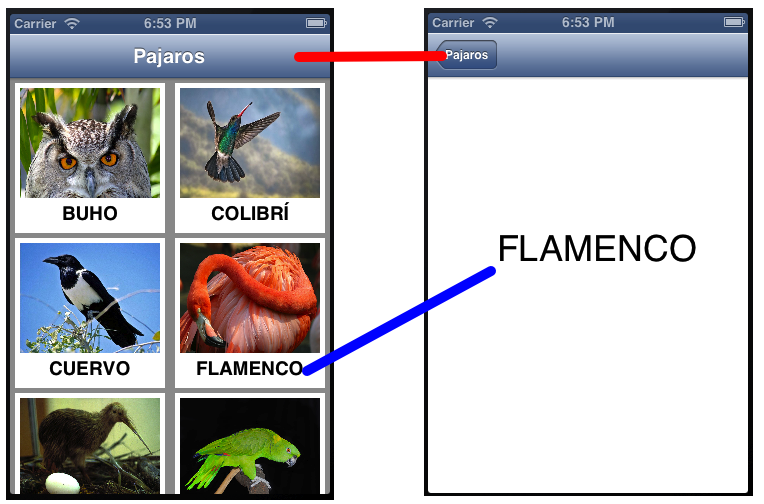
In this video tutorial, you will see how to build Collection Views (UICollectionView) or grids on iPhone dynamically. The example is very similar to the one in the post “UITableView in Objective-C -Example- (Video)” but this time we build it with the UICollectionView object. Another element we will use in this example is the “UINavigationBar”, so you can go back to the CollectionView after selecting one of its cells. In short, the result of the app built in this video tutorial is shown in the following image:
This tutorial also uses “Segues”. To learn more about them, you can check out the tutorial “Passing Data Between ViewControllers Using StoryBoards and Segues (Video)”, although it isn’t essential for this tutorial.
Here is the video of the finished project:
“Collection View (Grids) in Objective-C: Example (Video)” by Ricardo Moya at jarroba.com, licensed under Creative Commons Attribution-NonCommercial-ShareAlike 3.0. Registered at Safe Creative.

You may also like


UITableView in Objective-C: Example (Video)
Learn how to build dynamic tables with UITableView on iPhone in Objective-C, with a video tutorial, a UINavigationBar and a downloadable project.
Tab Bar Controller in Objective-C – Example (Video)
Learn how to work with a Tab Bar Controller in Objective-C and manage each of its views independently, with a video tutorial and example code.
Multiple Picker Views in One View (iPhone) (Video)
Learn how to get several pickers in a single iPhone view using one UIPickerView fed by multiple NSArrays. Watch the video and download the project.
Auto Layout iOS 7 (Video)
Learn how to adapt your iOS app to every iPhone screen size with Auto Layout in iOS 7. Watch the video tutorial and follow the steps with screenshots.
Leave a comment