
Gson (JSON) in Java, with Examples
GSON is a Java API developed by Google to convert Java objects to JSON (serialization) and JSON to Java objects (deserialization). Learn it with examples.
You can download the project for this post by clicking HERE.
GSON is a Java API developed by Google that is used to convert Java objects to JSON (serialization) and JSON to Java objects (deserialization). This tutorial shows some simple serialization and deserialization examples so that you get the basic knowledge you need to read and write JSON.
This library structures JSON in the following way:
- JsonElement: This class represents any element of the JSON, which can be one of the following 4 types:
- JsonObject: This class represents an object in the JSON; that is, a set of key-value pairs where the keys are strings and the values are any other type of JsonElement.
- JsonArray: This class represents an array in the JSON. An array is a list of JsonElements, each of which can be of a different type. It is an ordered list, so the order in which elements are added is preserved.
- JsonPrimitive: This class represents a primitive data type or simple data objects (String, Integer, Double, etc.).
- JsonNull: Represents a null object.
JsonObject, JsonArray, JsonPrimitive and JsonNull inherit from the JsonElement class:

Before we get to the examples, we need to add the following dependency to our application:
Gradle (as it is in the GitHub project):
dependencies {
    compile group: 'com.google.code.gson', name: 'gson', version: '2.8.0'
}
Maven:
<dependency>
    <groupid>com.google.code.gson</groupid>
    <artifactid>gson</artifactid>
    <version>2.8.0</version>
</dependency>
To see the serialization and deserialization examples, we are going to work with objects of a class called “FootballPlayer” that will represent a football player. The FootballPlayer.java class is the following:
public class FootballPlayer {

    private int dorsal;
    private String name;
    private List demarcation;
    private String team;

    public FootballPlayer(int dorsal, String name, List demarcation,
            String team) {
        this.dorsal = dorsal;
        this.name = name;
        this.demarcation = demarcation;
        this.team = team;
    }

    // getter and setter

    @Override
    public String toString() {
        return "Dorsal=" + dorsal + ", Name=" + name + ", Demarcation="
                + demarcation + ", Team=" + team;
    }
}
Each football player is represented by their shirt number, name, the football club they play for, and a list of the positions they can play. An example of the JSON of a list (with one element in this case) of objects of the “FootballPlayer” class would be the following, and the image shows how Gson would structure that JSON:
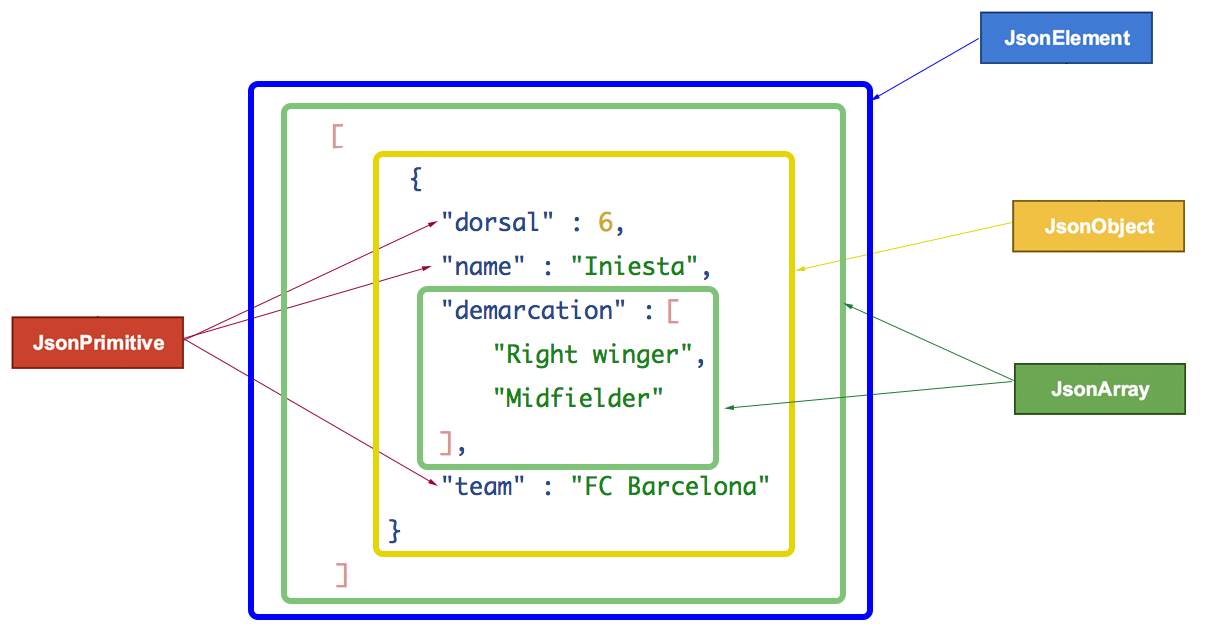
By definition, all the elements of the JSON are of type JsonElement, so we say the whole JSON is a JsonElement. First we find a JsonArray, which is a list (or array) of objects. You can recognize it by the square brackets “[ … ]”. Inside that JsonArray we find a single object of type JsonObject, and that object in turn contains a series of JsonElements, of which 3 are JsonPrimitives and one is again a JsonArray.
An example of how we would turn this JSON into a “FootballPlayer” object “manually” is the following (see ReadJson1.java):
import java.util.ArrayList;
import java.util.List;
import com.google.gson.JsonArray;
import com.google.gson.JsonElement;
import com.google.gson.JsonObject;
import com.google.gson.JsonParser;

/***
 * Manual deserialization example
 *
 * @author RicardoMoya
 *
 */
public class ReadJson1 {

    public static void main(String[] args) {

        String json1 = "[{\"dorsal\":6," + "\"name\":\"Iniesta\","
                + "\"demarcation\":[\"Right winger\",\"Midfielder\"],"
                + "\"team\":\"FC Barcelona\"}]";

        JsonParser parser = new JsonParser();

        // Obtain Array
        JsonArray gsonArr = parser.parse(json1).getAsJsonArray();

        // for each element of array
        for (JsonElement obj : gsonArr) {

            // Object of array
            JsonObject gsonObj = obj.getAsJsonObject();

            // Primitives elements of object
            int dorsal = gsonObj.get("dorsal").getAsInt();
            String name = gsonObj.get("name").getAsString();
            String team = gsonObj.get("team").getAsString();

            // List of primitive elements
            JsonArray demarcation = gsonObj.get("demarcation").getAsJsonArray();
            List listDemarcation = new ArrayList();
            for (JsonElement demarc : demarcation) {
                listDemarcation.add(demarc.getAsString());
            }

            // Object Constructor
            FootballPlayer iniesta = new FootballPlayer(dorsal, name,
                    listDemarcation, team);
            System.out.println(iniesta);
        }
    }
}
Looking at the code in more detail, the first thing we do is define a “parser” (JsonParser) so that, when we pass it a String in JSON format, it converts it into an object of one of the Gson classes; in this case, an object of the JsonArray class:
String json1 = "[{\"dorsal\":6," + "\"name\":\"Iniesta\","
                + "\"demarcation\":[\"Right winger\",\"Midfielder\"],"
                + "\"team\":\"FC Barcelona\"}]";

JsonParser parser = new JsonParser();

// Obtain Array
JsonArray gsonArr = parser.parse(json1).getAsJsonArray();
Once we have a JsonArray, we iterate over this structure as if it were a list, where each element of the list is a JsonElement object. Inside the “foreach” we convert each of these elements (remember that in this case it is an array with a single element) into a JsonObject object, and from that object we get each of its attributes with the “getAsXXX()” methods, depending on the data type. Finally, we build the FootballPlayer object with the values of the JSON object, as shown in the following code snippet:
// for each element of array
for (JsonElement obj : gsonArr) {

    // Object of array
    JsonObject gsonObj = obj.getAsJsonObject();

    // Primitives elements of object
    int dorsal = gsonObj.get("dorsal").getAsInt();
    String name = gsonObj.get("name").getAsString();
    String team = gsonObj.get("team").getAsString();

    // List of primitive elements
    JsonArray demarcation = gsonObj.get("demarcation").getAsJsonArray();
    List listDemarcation = new ArrayList();
    for (JsonElement demarc : demarcation) {
        listDemarcation.add(demarc.getAsString());
    }

    // Object Constructor
    FootballPlayer iniesta = new FootballPlayer(dorsal, name,
            listDemarcation, team);
    System.out.println(iniesta);
}
There is a much simpler way to parse (or deserialize) a JSON without having to map the object element by element. The ideal is that, given a class and a JSON, the JSON gets parsed automatically. An example of this is the one in “ReadJson2.java“, where, given a list of objects in JSON (corresponding to the starting lineup of the Spanish national team that won the 2010 World Cup), it is automatically transformed into a list of FootballPlayer objects:
import com.google.gson.Gson;

/***
 * Automatic deserialization example
 *
 * @author RicardoMoya
 *
 */
public class ReadJson2 {

    public static void main(String[] args) {

        String jsonAll = "[{\"dorsal\":1,\"name\":\"Casillas\",\"demarcation\":[\"Goalkeeper\"],\"team\":\"Real Madrid\"},"
                + "{\"dorsal\":15,\"name\":\"Ramos\",\"demarcation\":[\"Right back\",\"Centre-back\"],\"team\":\"Real Madrid\"},"
                + "{\"dorsal\":3,\"name\":\"Pique\",\"demarcation\":[\"Centre-back\"],\"team\":\"FC Barcelona\"},"
                + "{\"dorsal\":5,\"name\":\"Puyol\",\"demarcation\":[\"Centre-back\"],\"team\":\"FC Barcelona\"},"
                + "{\"dorsal\":11,\"name\":\"Capdevila\",\"demarcation\":[\"Left back\"],\"team\":\"Villareal\"},"
                + "{\"dorsal\":14,\"name\":\"Xabi Alonso\",\"demarcation\":[\"Defensive midfield\",\"Midfield\"],\"team\":\"Real Madrid\"},"
                + "{\"dorsal\":16,\"name\":\"Busquets\",\"demarcation\":[\"Defensive midfield\"],\"team\":\"FC Barcelona\"},"
                + "{\"dorsal\":8,\"name\":\"Xavi Hernandez\",\"demarcation\":[\"Midfielder\"],\"team\":\"FC Barcelona\"},"
                + "{\"dorsal\":18,\"name\":\"Pedrito\",\"demarcation\":[\"Left winger\",\"False forward\"],\"team\":\"FC Barcelona\"},"
                + "{\"dorsal\":6,\"name\":\"Iniesta\",\"demarcation\":[\"Right winger\",\"Midfielder\"],\"team\":\"FC Barcelona\"},"
                + "{\"dorsal\":7,\"name\":\"Villa\",\"demarcation\":[\"Centre forward\"],\"team\":\"FC Barcelona\"}]";

        Gson gson = new Gson();
        FootballPlayer[] footballPlayers = gson.fromJson(jsonAll,
                FootballPlayer[].class);

        for (FootballPlayer footballPlayer : footballPlayers) {
            System.out.println(footballPlayer);
        }
    }
}
Looking at the code closely, we create a “gson” object of the “Gson” class, and with the “fromJson” method, passing it the String with the JSON and the FootballPlayer class as parameters, it automatically transforms it into a list of FootballPlayer objects, as shown in the following code snippet:
Gson gson = new Gson();
FootballPlayer[] footballPlayers = gson.fromJson(jsonAll, FootballPlayer[].class);
Finally, let’s look at the opposite example: serializing a set of FootballPlayer objects into a JSON. To do this, we define 11 FootballPlayer objects representing each of the players in the starting lineup of the Spanish national team that won the 2010 World Cup, and we turn them into a JSON with a list-of-objects structure. The example is in “WriteJson.java” and its code is the following:
import java.util.Arrays;
import java.util.List;
import com.google.gson.Gson;

/***
 * Automatic serialization example
 * @author RicardoMoya
 *
 */
public class WriteJson {

	public static void main(String[] args) {

		List spanishTeam = Arrays.asList(
		        new FootballPlayer(1, "Casillas", Arrays.asList("Goalkeeper"), "Real Madrid"),
			new FootballPlayer(15, "Ramos", Arrays.asList("Right back", "Centre-back"), "Real Madrid"),
			new FootballPlayer(3, "Pique", Arrays.asList("Centre-back"), "FC Barcelona"),
			new FootballPlayer(5, "Puyol", Arrays.asList("Centre-back"), "FC Barcelona"),
			new FootballPlayer(11, "Capdevila", Arrays.asList("Left back"), "Villareal"),
			new FootballPlayer(14, "Xabi Alonso", Arrays.asList("Defensive midfield", "Midfield"), "Real Madrid"),
			new FootballPlayer(16, "Busquets", Arrays.asList("Defensive midfield"), "FC Barcelona"),
			new FootballPlayer(8, "Xavi Hernandez", Arrays.asList("Midfielder"), "FC Barcelona"),
			new FootballPlayer(18, "Pedrito", Arrays.asList("Left winger", "False forward"), "FC Barcelona"),
			new FootballPlayer(6, "Iniesta", Arrays.asList("Right winger", "Midfielder"), "FC Barcelona"),
			new FootballPlayer(7, "Villa", Arrays.asList("Centre forward"), "FC Barcelona")
				);

		String json = new Gson().toJson(spanishTeam);
		System.out.println(json);

	}
}
In this case the explanation is very simple: with the “toJson()” method of the “GSON” class, passing the list of football players as a parameter, you get back a String in JSON format with the list of players:
String json = new Gson().toJson(spanishTeam);
In summary, in this tutorial we have seen how Gson structures JSON and how relatively easy JSON serialization and deserialization are. As mentioned at the beginning, the goal of this tutorial is to show some simple examples of how to use this library so that you have the basic knowledge to start working with this API.
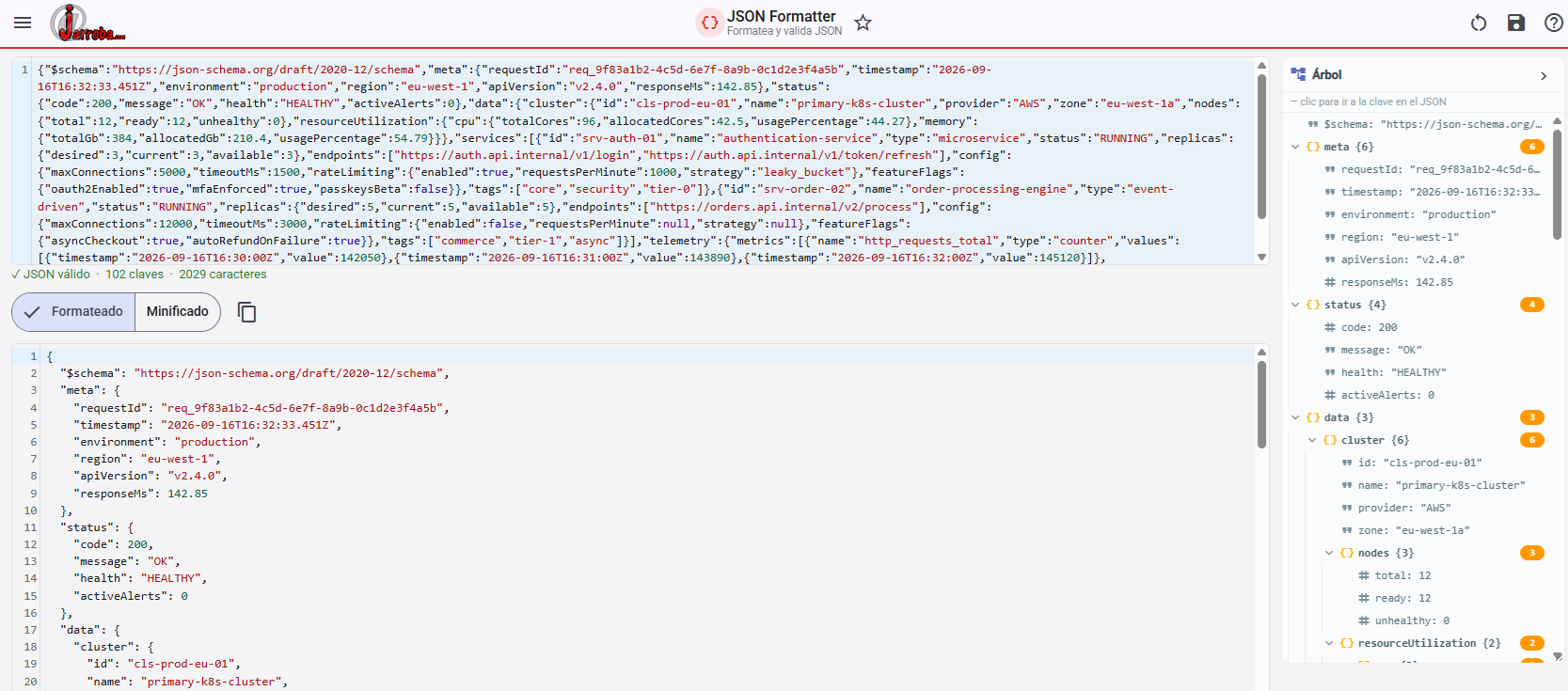
Tool
Free JSON formatter and structure viewer
“Gson (JSON) in Java, with Examples” by Ricardo Moya at jarroba.com, licensed under Creative Commons Attribution-NonCommercial-ShareAlike 3.0. Registered at Safe Creative.

You may also like

Advanced Dockerfile: Multi-Stage Builds, Registries, and Tricks
Free Docker course. Expert Docker tricks: multi-stage builds, optimizing images, faster build times, and distributing images through Docker registries.
Dockerfile: Directives and Dockerizing Projects
Free Docker course. A Dockerfile is a file of directives for building and deploying custom applications with Docker. Learn how to Dockerize your projects.
Leave a comment