
Polymorphism in Java -Interface- (Part II), with Examples
Learn how interfaces work in Java and how they take polymorphism a step further than abstract classes, with a practical example of a football team.
Series: Polymorphism in Java part 2 of 2
You can download the project for this post by clicking HERE.
In this post we are going to keep talking about polymorphism, and specifically we are going to explain "Interfaces", and as always we will do it with an example. To understand what we are going to cover in this post, it is essential that you know what inheritance and polymorphism are, so if you are not very clear on these concepts, we recommend that you check out the following tutorials where we talk about them:
- Inheritance -> Inheritance in Java, with Examples
- Polymorphism -> Polymorphism in Java (Part I), with Examples
The concept of an Interface takes the concept of an abstract class one step further. We saw that an abstract class is a class that cannot be instantiated (you can’t create an object of that class), but you can define attributes and implement methods in it so that its child classes can use them. Well, an Interface is a pure abstract class in which all of its methods are abstract, and therefore cannot be implemented in the Interface itself. You might wonder what use a pure abstract class is if it doesn’t allow you to implement methods and, on top of that, the child classes of that interface must implement those methods "no matter what". Well, Interfaces are used to establish the shape a class must have. An example of an Interface in Java is the Map Interface. In the post "Map in Java, with Examples", we saw that there were different types of Map, specifically HashMap, TreeMap and LinkedHashMap, which means that all Map classes must implement the same methods in their own way, such as "put()", "get()", "remove()", etc. And we saw this in that post, where a HashMap inserts data differently from a TreeMap and a LinkedHashMap. So we can see how a common shape has been established that all Java Maps must follow.
On the other hand, you should know that in an Interface you cannot define attributes unless they are static or constant; that is, "static" or "final".
Following the examples we have been using in the posts on Inheritance and Polymorphism, we are going to look at an example where we will simulate the behavior of the different members of the Spanish national football team, both the players and the coaching staff (coaches, masseurs, etc…). For this example we are going to base ourselves on the following class diagram:
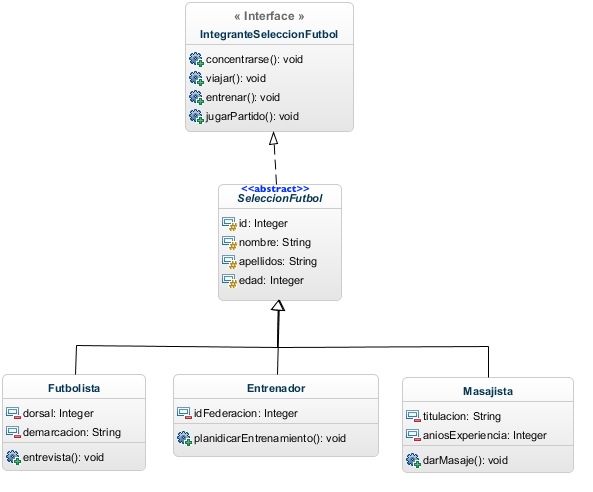
The first thing we see is the class "IntegranteSeleccionFutbol", which is an Interface that defines four methods (that is, a pure abstract class). As we said, this class only defines the methods but doesn’t implement them; so at the code level the class would look like this:
public interface IntegranteSeleccionFutbol {

	void concentrarse();

	void viajar();

	void entrenar();

	void jugarPartido();

}
The next thing we see in the class diagram is the class "SeleccionFutbol", which is an abstract class that uses (implements) the Interface "IntegranteSeleccionFutbol". Since this is an abstract class, it can’t be instantiated, so it isn’t necessary to implement the methods of the "Interface" in it; but it will be mandatory to implement them in its child classes (Futbolista, Entrenador and Masajista). To get a good look at how interfaces are used, we are first going to do a little "quick and dirty hack" to understand how they work. What we are going to do is "not implement the interface’s methods in the abstract class SeleccionFutbol", so that we can see that the child classes will require us to implement the interface’s methods. To do that, the abstract class would look like this (without any method implemented):
public abstract class SeleccionFutbol implements IntegranteSeleccionFutbol {

	protected int id;
	protected String nombre;
	protected String apellidos;
	protected int edad;

	public SeleccionFutbol() {
	}

	public SeleccionFutbol(int id, String nombre, String apellidos, int edad) {
		this.id = id;
		this.nombre = nombre;
		this.apellidos = apellidos;
		this.edad = edad;
	}

        // getter and setter

}
Here we see a new reserved word, "implements", which means that the class "SeleccionFutbol" must be a class that takes on the shape of the Interface "IntegranteSeleccionFutbol"; that is, it must have the Interface’s methods implemented. In this case, since it is an abstract class, we can implement them there (if we want) or in the child classes (mandatory if we don’t implement them in the parent class). That’s why we use this example: to see how the compiler will require those methods to be implemented in the child classes.
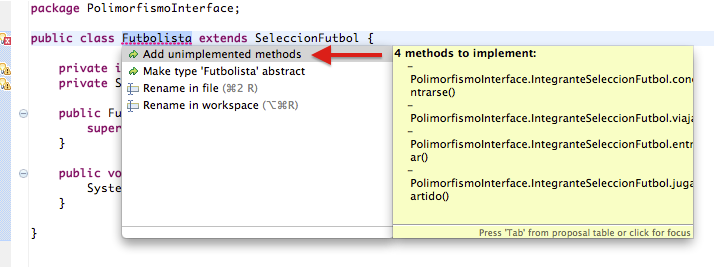
So if we don’t implement the methods in the parent class ("SeleccionFutbol") and we go to any of the child classes (for example, the footballer one), we can see that it requires us to implement those methods:

In the Futbolista class (in the Eclipse IDE) we get an error, and the suggested fix tells us that we have to implement the methods "concentrarse()", "viajar()", etc. If in Eclipse we pick one of the options to fix the error, we see that it offers us the option "Add unimplemented methods":
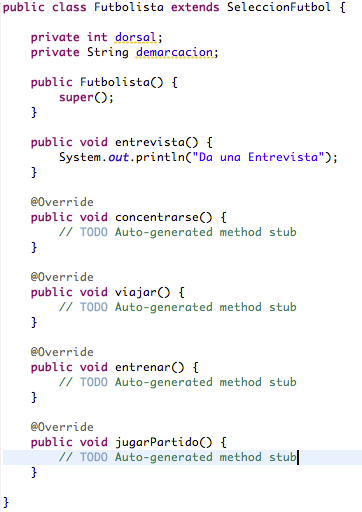
If we select that option, we see that Eclipse automatically implements the Interface’s methods for us:
Now that we’ve seen that the child classes are required to implement the Interface’s methods, let’s do things properly and implement the Interface’s methods in the parent class ("SeleccionFutbol"), so that we only have to implement the methods we want to specialize in the child classes. So the properly implemented "SeleccionFutbol" class would look like this:
public abstract class SeleccionFutbol implements IntegranteSeleccionFutbol {

	protected int id;

	protected String nombre;

	protected String apellidos;

	protected int edad;

	// Constructor, getter and setter

	public void concentrarse() {
		System.out.println("Concentrarse (Clase Padre)");
	}

	public void viajar() {
		System.out.println("Viajar (Clase Padre)");
	}

	public void entrenar() {
		System.out.println("Entrenar (Clase Padre)");
	}

	public void jugarPartido() {
		System.out.println("Asiste al Partido de Fútbol (Clase Padre)");
	}

}
And in the child classes we will only implement the parent class methods that we want to override, so the child classes look like this (remember that the "@Override" annotation means that the method is being overridden)::
public class Futbolista extends SeleccionFutbol {

	private int dorsal;
	private String demarcacion;

	// Constructor, getter and setter

	@Override
	public void entrenar() {
		System.out.println("Realiza un entrenamiento (Clase Futbolista)");
	}

	@Override
	public void jugarPartido() {
		System.out.println("Juega un Partido (Clase Futbolista)");
	}

	public void entrevista() {
		System.out.println("Da una Entrevista");
	}
}
public class Entrenador extends SeleccionFutbol {

	private int idFederacion;

       // Constructor, getter and setter

	@Override
	public void entrenar() {
		System.out.println("Dirige un entrenamiento (Clase Entrenador)");

	}

	@Override
	public void jugarPartido() {
		System.out.println("Dirige un Partido (Clase Entrenador)");
	}

	public void planificarEntrenamiento() {
		System.out.println("Planificar un Entrenamiento");
	}
}
public class Masajista extends SeleccionFutbol {

	private String titulacion;
	private int aniosExperiencia;

	// Constructor, getter and setter

	@Override
	public void entrenar() {
		System.out.println("Da asistencia en el entrenamiento (Clase Masajista)");
	}

	public void darMasaje() {
		System.out.println("Da un Masaje");
	}
}
At this point we have implemented the same functionality we built in the post Polymorphism in Java (Part I), with Examples but designed and implemented in a different way, so we are going to show the code we wrote for that post and the result of running it so you can see the output:
public class Main {

	// ArrayList of SeleccionFutbol objects. Regardless of which child class the object belongs to
	public static ArrayList integrantes = new ArrayList();

	public static void main(String[] args) {

		SeleccionFutbol delBosque = new Entrenador(1, "Vicente", "Del Bosque", 60, 28489);
		SeleccionFutbol iniesta = new Futbolista(2, "Andres", "Iniesta", 29, 6, "Interior Derecho");
		SeleccionFutbol raulMartinez = new Masajista(3, "Raúl", "Martinez", 41, "Licenciado en Fisioterapia", 18);

		integrantes.add(delBosque);
		integrantes.add(iniesta);
		integrantes.add(raulMartinez);

		// CONCENTRACION
		System.out.println("Todos los integrantes comienzan una concentracion. (Todos ejecutan el mismo método)");
		for (SeleccionFutbol integrante : integrantes) {
			System.out.print(integrante.getNombre() + " " + integrante.getApellidos() + " -> ");
			integrante.concentrarse();
		}

		// VIAJE
		System.out.println("nTodos los integrantes viajan para jugar un partido. (Todos ejecutan el mismo método)");
		for (SeleccionFutbol integrante : integrantes) {
			System.out.print(integrante.getNombre() + " " + integrante.getApellidos() + " -> ");
			integrante.viajar();
		}

		// ENTRENAMIENTO
		System.out.println("nEntrenamiento: Todos los integrantes tienen su función en un entrenamiento (Especialización)");
		for (SeleccionFutbol integrante : integrantes) {
			System.out.print(integrante.getNombre() + " " + integrante.getApellidos() + " -> ");
			integrante.entrenar();
		}

		// PARTIDO DE FUTBOL
		System.out.println("nPartido de Fútbol: Todos los integrantes tienen su función en un partido (Especialización)");
		for (SeleccionFutbol integrante : integrantes) {
			System.out.print(integrante.getNombre() + " " + integrante.getApellidos() + " -> ");
			integrante.jugarPartido();
		}

		// PLANIFICAR ENTRENAMIENTO
		System.out.println("nPlanificar Entrenamiento: Solo el entrenador tiene el método para planificar un entrenamiento:");
		System.out.print(delBosque.getNombre() + " " + delBosque.getApellidos() + " -> ");
		((Entrenador) delBosque).planificarEntrenamiento();

		// ENTREVISTA
		System.out.println("nEntrevista: Solo el futbolista tiene el método para dar una entrevista:");
		System.out.print(iniesta.getNombre() + " " + iniesta.getApellidos() + " -> ");
		((Futbolista) iniesta).entrevista();

		// MASAJE
		System.out.println("nMasaje: Solo el masajista tiene el método para dar un masaje:");
		System.out.print(raulMartinez.getNombre() + " " + raulMartinez.getApellidos() + " -> ");
		((Masajista) raulMartinez).darMasaje();

	}
}
This is the result of running this program:
Todos los integrantes comienzan una concentracion. (Todos ejecutan el mismo método)
Vicente Del Bosque -> Concentrarse (Clase Padre)
Andres Iniesta -> Concentrarse (Clase Padre)
Raúl Martinez -> Concentrarse (Clase Padre)

Todos los integrantes viajan para jugar un partido. (Todos ejecutan el mismo método)
Vicente Del Bosque -> Viajar (Clase Padre)
Andres Iniesta -> Viajar (Clase Padre)
Raúl Martinez -> Viajar (Clase Padre)

Entrenamiento: Todos los integrantes tienen su función en un entrenamiento (Especialización)
Vicente Del Bosque -> Dirige un entrenamiento (Clase Entrenador)
Andres Iniesta -> Realiza un entrenamiento (Clase Futbolista)
Raúl Martinez -> Da asistencia en el entrenamiento (Clase Masajista)

Partido de Fútbol: Todos los integrantes tienen su función en un partido (Especialización)
Vicente Del Bosque -> Dirige un Partido (Clase Entrenador)
Andres Iniesta -> Juega un Partido (Clase Futbolista)
Raúl Martinez -> Asiste al Partido de Fútbol (Clase Padre)

Planificar Entrenamiento: Solo el entrenador tiene el método para planificar un entrenamiento:
Vicente Del Bosque -> Planificar un Entrenamiento

Entrevista: Solo el futbolista tiene el método para dar una entrevista:
Andres Iniesta -> Da una Entrevista

Masaje: Solo el masajista tiene el método para dar un masaje:
Raúl Martinez -> Da un Masaje
CONCLUSIONS AND CLARIFICATIONS:
As we have seen, the concept of the Interface goes one step further than the concept of the abstract class. Using Interface classes to define classes that share the same shape, even though they carry out different behaviors, is a very good design practice.
Just as we said in the conclusions of the polymorphism post, it’s quite likely that those of you who are just starting out with OOP won’t see much point in Interface classes. Don’t worry if that’s the case, because these concepts are consolidated through experience and by gaining more knowledge of software architecture and design.
“Polymorphism in Java -Interface- (Part II), with Examples” by Ricardo Moya at jarroba.com, licensed under Creative Commons Attribution-NonCommercial-ShareAlike 3.0. Registered at Safe Creative.

You may also like


Inheritance in Java, with Examples
Learn what inheritance is in object-oriented programming and how it works in Java, using extends, protected and super with a clear, practical example.
Interfaces in Java 8: The Default Method, with Examples
Learn how the default method in Java 8 interfaces works, how it lets you add behavior without touching your classes, and how it simulates multiple inheritance.
Leave a comment