
K-means in Python and Scikit-learn, with Examples
K-means is a clustering method that splits objects into K groups by minimizing inertia. Learn how it works and how to use it in Python with scikit-learn.
Tool
- You can download the project for this post by clicking HERE.
- This post is part of the book "Machine Learning (in Python), with Examples"
K-means is a Clustering method that splits objects into ‘K’ groups (Clusters) of similar variance, minimizing a concept known as inertia, which is the sum of the squared distances from each object in the Cluster to a point ‘μ’ known as the Centroid (the mean point of all the objects in the Cluster).
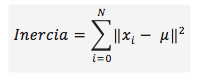
The goal of the K-means algorithm is to choose ‘K’ centroids that minimize the inertia:
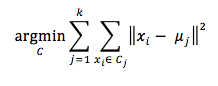
The algorithm starts by choosing a centroid for each of the ‘K’ Clusters. Any method can be used to choose these centroids; the two most common are initializing them randomly, or picking ‘K’ objects from the data set, either randomly or after pre-processing the data. The second option is the recommended one: initialize these Clusters with objects from the data set. Once the centroids are initialized, the algorithm continues alternating the following two steps (assignment and update) iteratively until the centroids converge:
-
Assignment: Each object is assigned to the nearest Cluster, using some distance measure (such as the Euclidean distance) between the object and the Cluster centroid.
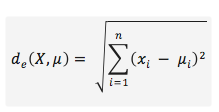
-
Update: Computes the new centroids by averaging the objects that make up the Cluster.
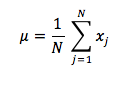
The algorithm is considered finished when the centroids converge or when the difference between the centroid values from one iteration to the next is below a certain threshold.
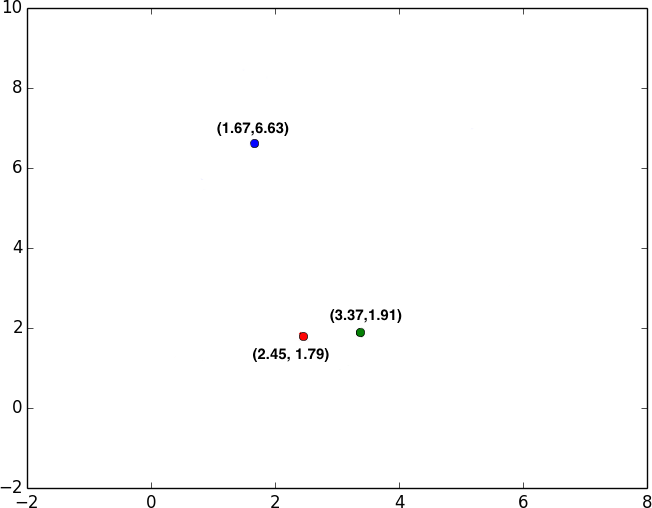
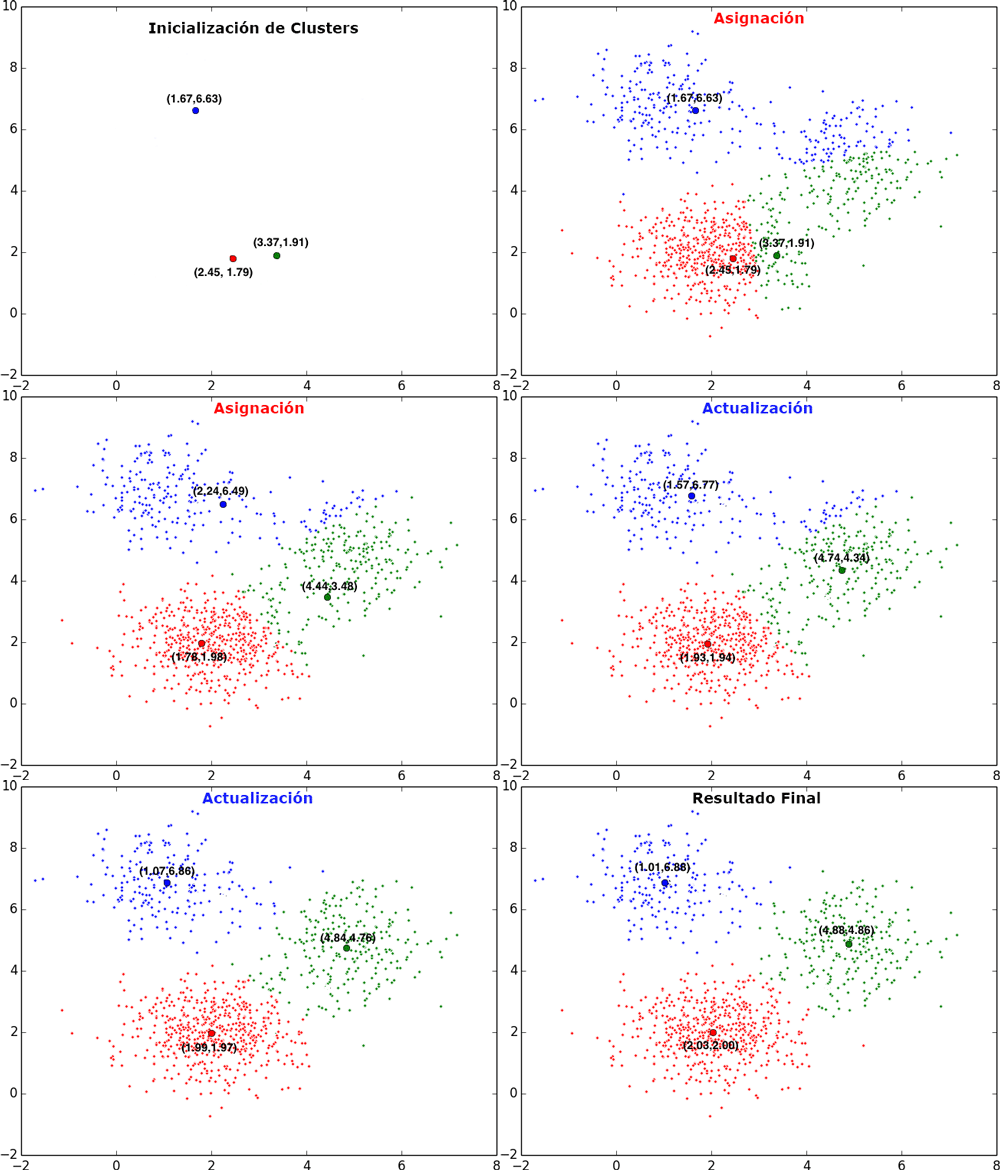
Let’s now look at an example run of K-means for 3 Clusters, given a data set in which each object is represented by a point in a two-dimensional space:
1. Cluster initialization: We pick 3 random points from the data set and assign each one to a Cluster. Since each Cluster has only one point, that point is the Cluster’s centroid:
|
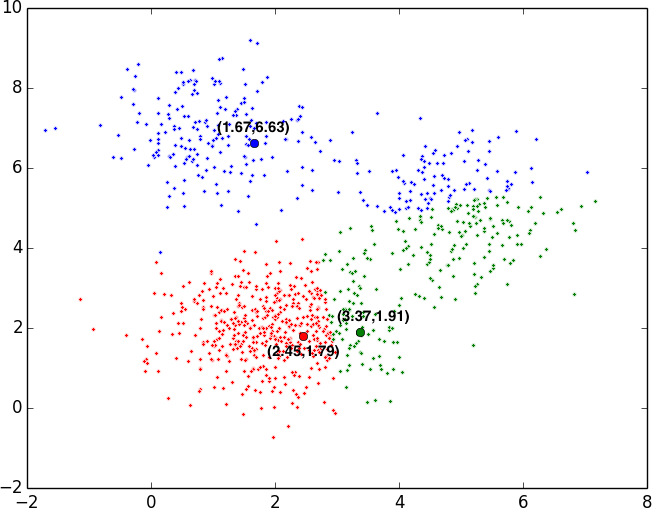
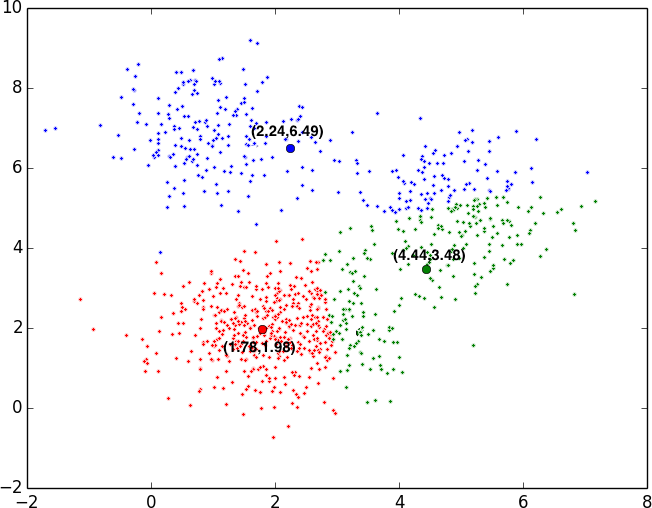
2. First assignment and update: After randomly choosing 3 Clusters, each point is assigned to the nearest Cluster. Once all the points are assigned, a new centroid is computed as the mean value of all the points.
|
|
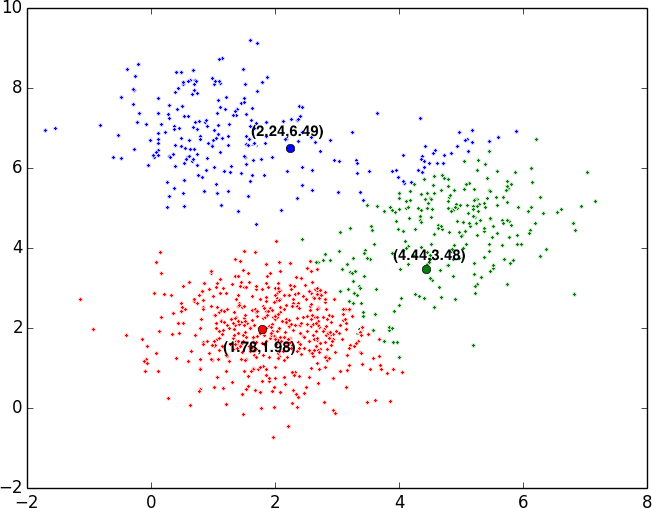
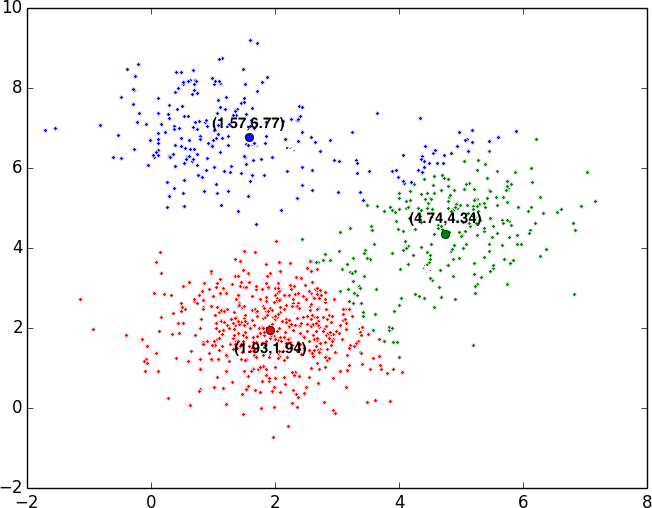
3. Second assignment and update: With the new centroids, we again compute the nearest centroid for each point and assign the point to that centroid. Once the points are assigned to the Clusters, we recompute the centroids.
|
|
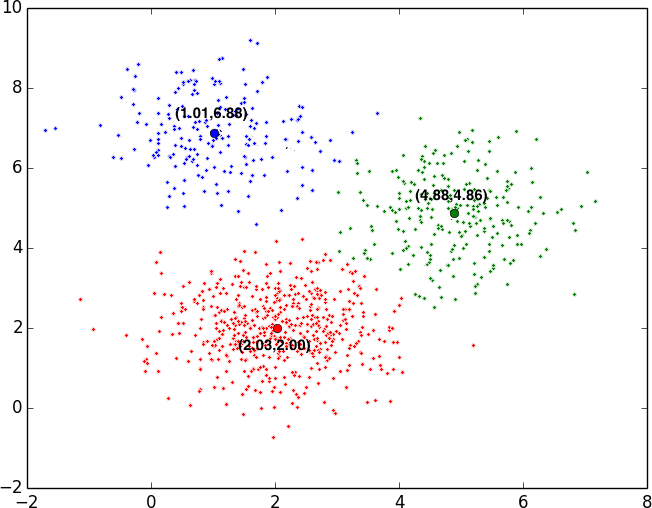
4. Convergence and final result: These assignment and update steps are repeated until the Cluster centroids converge; that is, until the centroid values from the last update iteration match the centroid values from the previous update iteration:
|
Let’s see it animated:
Now that we’ve defined how the algorithm works step by step and with an example, let’s show it in pseudocode:
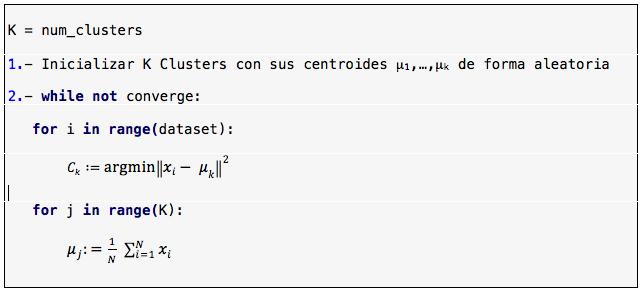
The next two sections, K-means implementation and K-means with scikit-learn, show how to implement K-means and how to use the scikit-learn library to solve a Clustering problem with the K-means algorithm, respectively. The code is available in the following repository:
View on GitHubRicardoMoya/KMeans_Python
The code in this repository uses the numpy, matplotlib, scipy and scikit-learn libraries. To download and install these libraries (or update them to the latest version with the -U option) using the pip package manager, run the following commands:
pip install -U numpy
pip install -U matplotlib
pip install -U scipy
pip install -U scikit-learn
K-means implementation
In this section we show an implementation of K-means (from a teaching point of view) in which the objects are represented by a two-dimensional point {x,y}. The implementation in this example allows objects to have more dimensions, but to keep the teaching focus we show them in two dimensions so that we can visualize the results on a plane and understand how the method works.
To implement K-means, our objects will be represented as 2D points, so we implement a Point class (Point.py) to represent them. We also implement a Cluster class (Cluster.py) to represent the Clusters, made up of a set of Point objects. Finally, we have a script (KMeans.py) that implements K-means with its two steps, assignment and update, for ‘k’ Clusters. Below is a high-level class diagram of the proposed K-means implementation:
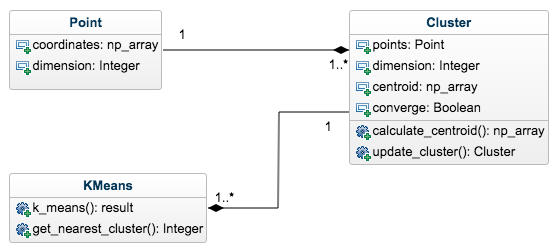
The data sets used in this example (located in the dataSet folder) are text files where each line holds the coordinates of a point {x,y} separated by the “::” separator. Here is an example of these files:
1.857611652::2.114033851
2.34822574::1.58264984
1.998326848::4.118143019
1.714362835::2.468639613
1.656134484::1.909955747
This means that the first point is located at coordinates {1.85,2.11} and the second point at coordinates {2.34,1.58}.
For the examples we have 4 data sets with the following characteristics:
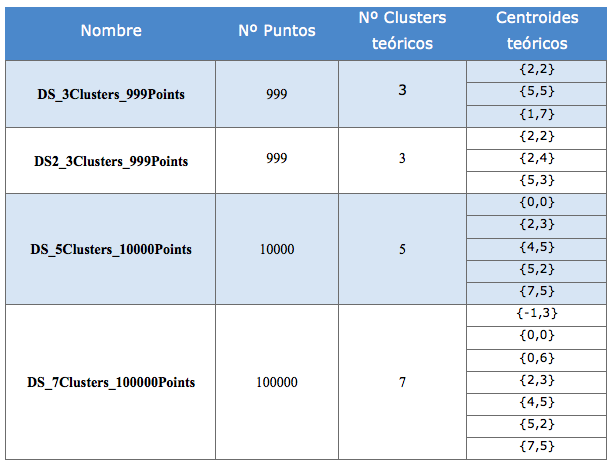
Now that we’ve seen the class diagram and the structure of the data sets, let’s look at the implementation of the Point class (Point.py). Its constructor receives a “numpy array” with the point’s coordinates, and it has as attributes those coordinates and their dimension, which in our example will be 2:
class Point:

    def __init__(self, coordinates):
        self.coordinates = coordinates
        self.dimension = len(coordinates)

    def __repr__(self):
        return 'Coordinates: ' + str(self.coordinates) + \
               ' -> Dimension: ' + str(self.dimension)
Next we have the Cluster class (Cluster.py), whose constructor receives a list of points that make up the Cluster. This class has as attributes the list of points in the Cluster (points), the dimension of the points (dimension), the Cluster centroid (centroid), and an attribute (converge) that tells us whether the centroid is equal (and therefore converged) to the one calculated in the update step of the previous iteration. With the list of points that will form the Cluster, we run the relevant checks (that the Cluster has at least one point and that all the points have the same dimension) so that no exception is thrown. Let’s look at this class’s constructor:
import numpy as np

class Cluster:

    def __init__(self, points):
        if len(points) == 0:
            raise Exception("Cluster cannot have 0 Points")
        else:
            self.points = points
            self.dimension = points[0].dimension

        # Check that all elements of the cluster have the same dimension
        for p in points:
            if p.dimension != self.dimension:
                raise Exception(
                    "Point %s has dimension %d different with %d from the rest "
                    "of points") % (p, len(p), self.dimension)

        # Calculate Centroid
        self.centroid = self.calculate_centroid()
        self.converge = False
As you can see in the centroid attribute, the calculate_centroid() method is called to assign the Cluster its centroid based on the Cluster’s list of points. This method computes the centroid as the mean point of all the points that make up the Cluster.
    def calculate_centroid(self):

        sum_coordinates = np.zeros(self.dimension)
        for p in self.points:
            for i, x in enumerate(p.coordinates):
                sum_coordinates[i] += x

        return (sum_coordinates / len(self.points)).tolist()
Note
The implementation of this method can be optimized by parallelizing the centroid calculation with threads. For teaching purposes, and for the readability and clarity of the code, this method has not been optimized.
Next we implement the update_cluster(points) method, which is in charge of updating the state of the Cluster: it computes the new centroid with the Cluster’s new points after the assignment step, and checks whether the centroids converge by comparing the centroid value from the previous step with the current one. In short, this method updates the state of the Cluster.
    def update_cluster(self, points):

        old_centroid = self.centroid
        self.points = points
        self.centroid = self.calculate_centroid()
        self.converge = np.array_equal(old_centroid, self.centroid)
Now that we’ve explained the Point and Cluster classes we need to structure the information, let’s explain the K-means implementation itself. It lives in the KMeans.py script, shown below, and afterwards we’ll explain each relevant piece of code:
import random
import numpy as np
import matplotlib.pyplot as plt
from scipy.spatial import distance
from Point import Point
from Cluster import Cluster

# -*- coding: utf-8 -*-
__author__ = 'RicardoMoya'

DATASET1 = "./dataSet/DS_3Clusters_999Points.txt"
DATASET2 = "./dataSet/DS2_3Clusters_999Points.txt"
DATASET3 = "./dataSet/DS_5Clusters_10000Points.txt"
DATASET4 = "./dataSet/DS_7Clusters_100000Points.txt"
NUM_CLUSTERS = 3
ITERATIONS = 1000
COLORS = ['red', 'blue', 'green', 'yellow', 'gray', 'pink', 'violet', 'brown',
          'cyan', 'magenta']


def dataset_to_list_points(dir_dataset):
    """
    Read a txt file with a set of points and return a list of objects Point
    :param dir_dataset:
    """
    points = list()
    with open(dir_dataset, 'rt') as reader:
        for point in reader:
            points.append(Point(np.asarray(map(float, point.split("::")))))
    return points


def get_nearest_cluster(clusters, point):
    """
    Calculate the nearest cluster
    :param clusters: old clusters
    :param point: point to assign cluster
    :return: index of list cluster
    """
    dist = np.zeros(len(clusters))
    for i, c in enumerate(clusters):
        dist[i] = distance.euclidean(point.coordinates, c.centroid)
    return np.argmin(dist)


def print_clusters_status(it_counter, clusters):
    print '\nITERATION %d' % it_counter
    for i, c in enumerate(clusters):
        print '\tCentroid Cluster %d: %s' % (i + 1, str(c.centroid))


def print_results(clusters):
    print '\n\nFINAL RESULT:'
    for i, c in enumerate(clusters):
        print '\tCluster %d' % (i + 1)
        print '\t\tNumber Points in Cluster %d' % len(c.points)
        print '\t\tCentroid: %s' % str(c.centroid)


def plot_results(clusters):
    plt.plot()
    for i, c in enumerate(clusters):
        # plot points
        x, y = zip(*[p.coordinates for p in c.points])
        plt.plot(x, y, linestyle='None', color=COLORS[i], marker='.')
        # plot centroids
        plt.plot(c.centroid[0], c.centroid[1], 'o', color=COLORS[i],
                 markeredgecolor='k', markersize=10)
    plt.show()


def k_means(dataset, num_clusters, iterations):
    # Read data set
    points = dataset_to_list_points(dataset)

    # Select N points random to initiacize the N Clusters
    initial = random.sample(points, num_clusters)

    # Create N initial Clusters
    clusters = [Cluster([p]) for p in initial]

    # Inicialize list of lists to save the new points of cluster
    new_points_cluster = [[] for i in range(num_clusters)]

    converge = False
    it_counter = 0

while (not converge) and (it_counter < iterations):
        # Assign points in nearest centroid
        for p in points:
            i_cluster = get_nearest_cluster(clusters, p)
            new_points_cluster[i_cluster].append(p)

        # Set new points in clusters and calculate de new centroids
        for i, c in enumerate(clusters):
            c.update_cluster(new_points_cluster[i])

        # Check that converge all Clusters
        converge = [c.converge for c in clusters].count(False) == 0

        # Increment counter and delete lists of clusters points
        it_counter += 1
        new_points_cluster = [[] for i in range(num_clusters)]

        # Print clusters status
        print_clusters_status(it_counter, clusters)

    # Print final result
    print_results(clusters)

    # Plot Final results
    plot_results(clusters)


if __name__ == '__main__':
    k_means(DATASET1, NUM_CLUSTERS, ITERATIONS)
The first thing that happens when the script runs is a call to the k_means() method, passing it as parameters the data set containing the points, the number of Clusters we want to obtain, and the maximum number of iterations to run in case the centroids never converge. We define these parameters as constants in the script since we have 4 data sets available.
if __name__ == '__main__':
    k_means(DATASET1, NUM_CLUSTERS, ITERATIONS)
The k_means() method implements the K-means algorithm as described in the pseudocode shown earlier. First we read the data set from a file with the dataset_to_list_points(file) method and initialize ‘N’ Clusters (num_clusteres) by randomly selecting ‘N’ points from the data set. Then we start the assignment and update steps of the Clusters until they converge or until we reach the maximum number of iterations (iterations). We do this inside the “While” loop. In each iteration we assign every point in the data set to the Cluster with the nearest centroid (Assignment) using the get_nearest_cluster() method, which computes the Euclidean distance between the point and the centroid and returns the index of the Cluster with the nearest centroid, and once the points are assigned we recompute the Cluster centroids. After that we check the convergence of the centroids to see whether we keep iterating. In the implementation you can also see the print_clusters_status(), print_results() and plot_results() methods, which are helper methods we use to show the state of the Clusters at each iteration and to show and plot (with the matplotlib library) the final result:
def k_means(dataset, num_clusters, iterations):

    points = dataset_to_list_points(dataset)

    # INITIALIZATION: Random selection of N points and creation of the Clusters
    initial = random.sample(points, num_clusters)
    clusters = [Cluster([p]) for p in initial]

    # We initialize a list for the object assignment step
    new_points_cluster = [[] for i in range(num_clusters)]

    converge = False
    it_counter = 0
    while (not converge) and (it_counter < iterations):
        # ASSIGNMENT
        for p in points:
            i_cluster = get_nearest_cluster(clusters, p)
            new_points_cluster[i_cluster].append(p)

        # UPDATE
        for i, c in enumerate(clusters):
            c.update_cluster(new_points_cluster[i])

        # CONVERGED?
        converge = [c.converge for c in clusters].count(False) == 0

        # We increment the counter
        it_counter += 1
        new_points_cluster = [[] for i in range(num_clusters)]

        print_clusters_status(it_counter, clusters)

    print_results(clusters)

    plot_results(clusters)
Note
The implementation of the Assignment and Update steps can be optimized by parallelizing the calculations with threads. For teaching purposes, and for the readability and clarity of the code, this part has not been optimized.
Let’s now look at an example run of this script, which shows the state of each Cluster at every iteration until the final result is reached. For the example we use data set 1 (DATASET1), which has 999 points, and we group them into 3 Clusters:
1. Pick 3 random points to initialize the Clusters. Since each Cluster is initialized with a single point, that point will be its centroid:
CLUSTER 1:
Centroid: [1.537719613, 6.803222336]
Dimension: 2
Puntos: [ 1.53771961  6.80322234]

CLUSTER 2:
Centroid: [4.56416743, 5.372954912]
Dimension: 2
Puntos: [ 4.56416743  5.37295491]

CLUSTER 3:
Centroid: [2.580421023, 2.887390198]
Dimension: 2
Puntos: [ 2.58042102  2.8873902 ]
2. We start iterating. First assignment and centroid update, leaving the centroids as follows:
ITERATION 1
	Centroid Cluster 1: [1.0075506731128203, 6.89332954671282]
	Centroid Cluster 2: [4.965693151866954, 4.989117886197427]
	Centroid Cluster 3: [2.097612910089318, 2.0566417310823106]
3. Iteration 2:
ITERATION 2
	Centroid Cluster 1: [1.0110313303520406, 6.881641713040817]
	Centroid Cluster 2: [4.902010815637452, 4.87296486188048]
	Centroid Cluster 3: [2.0337844236032625, 2.0092213794438396]
4. Iteration 3:
ITERATION 3
	Centroid Cluster 1: [1.0110313303520406, 6.881641713040817]
	Centroid Cluster 2: [4.888163414869566, 4.864725364043481]
	Centroid Cluster 3: [2.0297243138036376, 2.002597935785454]
5. Iteration 4: The centroids converge, having the same values as in iteration 3.
ITERATION 4
	Centroid Cluster 1: [1.0110313303520406, 6.881641713040817]
	Centroid Cluster 2: [4.888163414869566, 4.864725364043481]
	Centroid Cluster 3: [2.0297243138036376, 2.002597935785454]
6. Final result and plot:
FINAL RESULT:
	Cluster 1
		Number Points in Cluster 196
		Centroid: [1.0110313303520406, 6.881641713040817]
	Cluster 2
		Number Points in Cluster 253
		Centroid: [4.888163414869566, 4.864725364043481]
	Cluster 3
		Number Points in Cluster 550
		Centroid: [2.0297243138036376, 2.002597935785454]
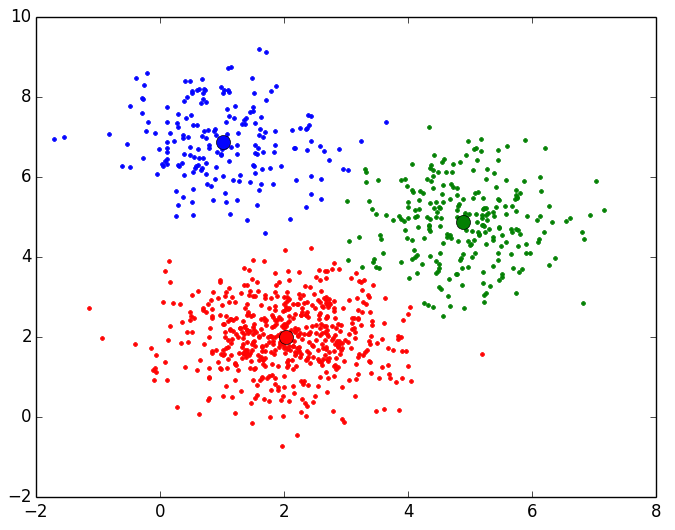
The final result (plotted in 2D) is the following:
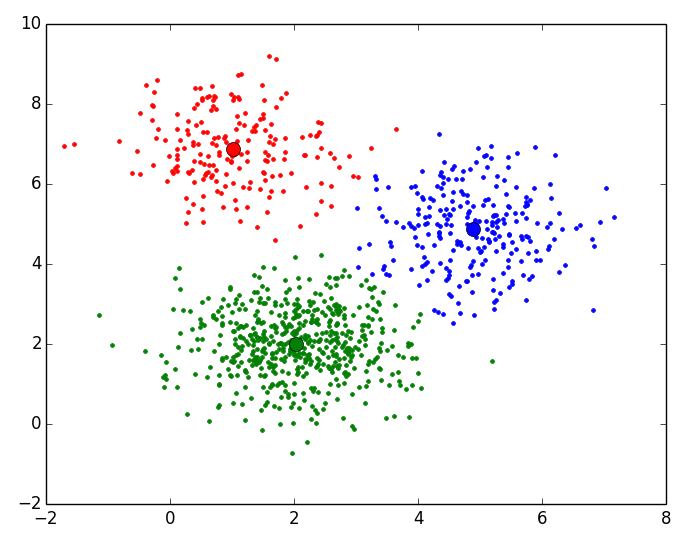
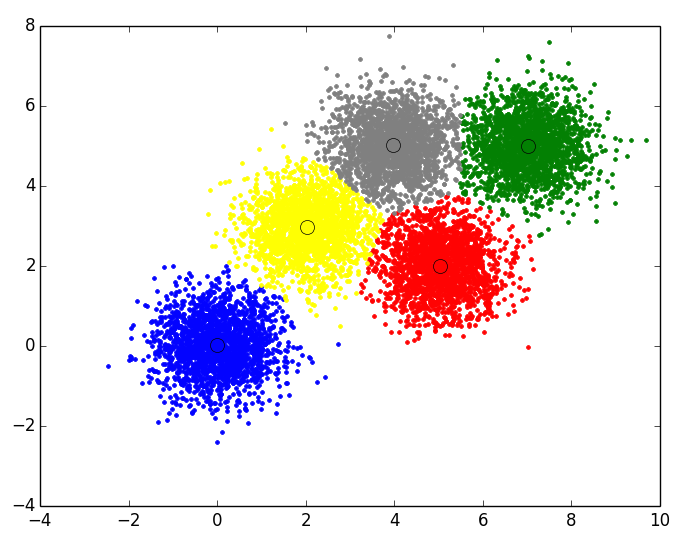
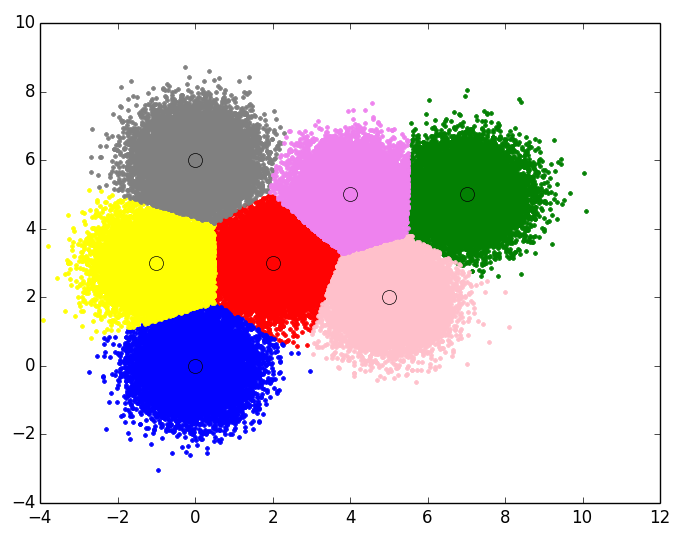
For the rest of the data sets, these are the results plotted in 2 dimensions:
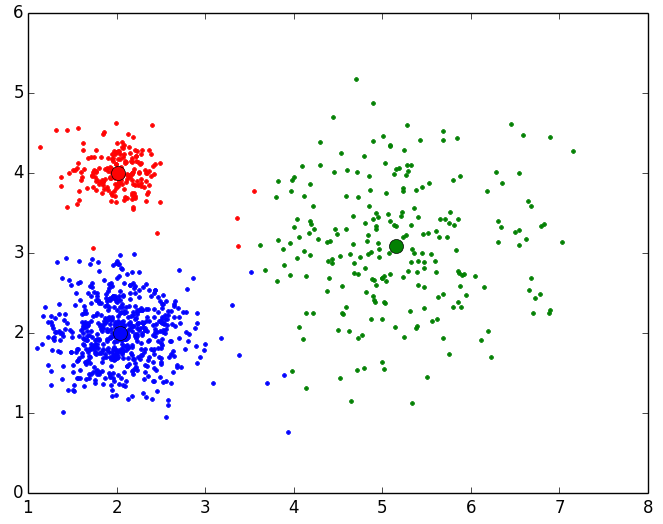
Final result for Data Set 2 with 999 points and 3 Clusters:
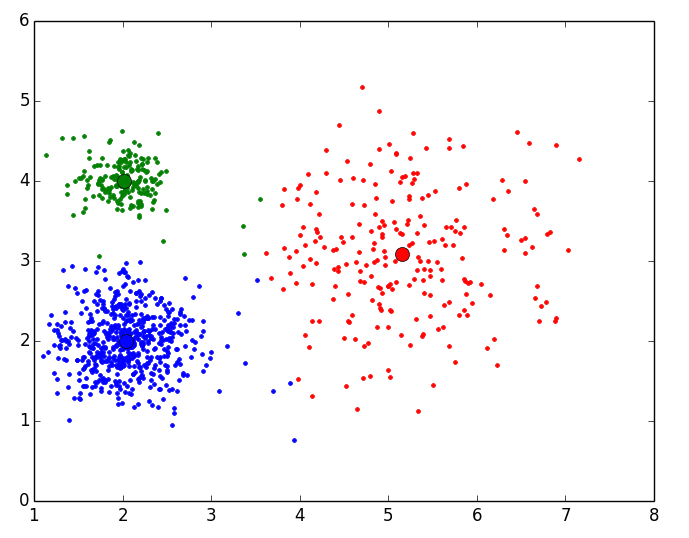 Final result for Data Set 3 with 10000 points and 5 Clusters:
Final result for Data Set 4 with 100000 points and 7 Clusters:
K-means with scikit-learn
The “scikit-learn” library includes a fairly optimized implementation of K-means, which can be run in different ways depending on the parameters you pass to it.
Since libraries in general, and this Machine Learning one in particular, evolve and change over time, we won’t explain every parameter you can pass to the constructor of the sklearn.cluster.KMeans() class (that’s what the scikit-learn documentation is for), but we will show the parameters that are considered important for any K-means implementation.
In version 0.17 of the library (the latest stable version at the time of writing this book) the KMeans class constructor has the following parameters (if they are not specified, they take default values):
class sklearn.cluster.KMeans(n_clusters=8, init='k-means++', n_init=10, max_iter=300, tol=0.0001,precompute_distances='auto', verbose=0, random_state=None, copy_x=True, n_jobs=1)
To make K-means run correctly for the data set you use, you must properly define the following two required, important parameters:
- n_clusters: The number of Clusters we want to obtain to group the objects in the data set.
- max_iter: The maximum number of times to run the assignment and update steps in case the centroids do not converge.
Optionally, we can set a number of parameters to the values we want, the most practical ones (in the author’s opinion) being the following:
- init: How to initialize the Clusters. Earlier we proposed different ways to initialize these Clusters, either randomly or by picking ‘k’ random objects from the data set. Here two options are offered: ‘random’, which initializes the Clusters randomly, and ‘k-means++’, which does a bit of pre-processing on the data set to initialize the Clusters with centroids that are good enough for the algorithm to converge quickly.
- tol: With this value we set the threshold, tolerance or margin of error for the convergence of the Cluster centroids; that is, the centroid values don’t have to be identical from one iteration to the next, but their difference must be smaller than the one set in this parameter.
- n_jobs: The number of threads to use.
Once the KMeans object is built, we must call the appropriate methods to group the data set objects into the different Clusters. In this case, for the example below, we call the fit(x) method, passing it a list of points (each point as a numpy array), and it gives us back the Cluster centroids (in the cluster_centers_ attribute), a list aligned with the list of points we passed in that tells us which Cluster each point belongs to (in the labels_ attribute), and the inertia (in the inertia_ attribute).
Below is the complete script, showing the K-means results for one of the 4 data sets:
import numpy as np
import matplotlib.pyplot as plt
from sklearn.cluster import KMeans

# -*- coding: utf-8 -*-
__author__ = 'RicardoMoya'

# Constant
DATASET1 = "./dataSet/DS_3Clusters_999Points.txt"
DATASET2 = "./dataSet/DS2_3Clusters_999Points.txt"
DATASET3 = "./dataSet/DS_5Clusters_10000Points.txt"
DATASET4 = "./dataSet/DS_7Clusters_100000Points.txt"
NUM_CLUSTERS = 3
MAX_ITERATIONS = 10
INITIALIZE_CLUSTERS = ['k-means++', 'random']
CONVERGENCE_TOLERANCE = 0.001
NUM_THREADS = 8
COLORS = ['red', 'blue', 'green', 'yellow', 'gray', 'pink', 'violet', 'brown',
          'cyan', 'magenta']


def dataset_to_list_points(dir_dataset):
    """
    Read a txt file with a set of points and return a list of objects Point
    :param dir_dataset: path file
    """
    points = list()
    with open(dir_dataset, 'rt') as reader:
        for point in reader:
            points.append(np.asarray(map(float, point.split("::"))))
    return points


def print_results(centroids, num_cluster_points):
    print '\n\nFINAL RESULT:'
    for i, c in enumerate(centroids):
        print '\tCluster %d' % (i + 1)
        print '\t\tNumber Points in Cluster %d' % num_cluster_points.count(i)
        print '\t\tCentroid: %s' % str(centroids[i])


def plot_results(centroids, num_cluster_points, points):
    plt.plot()
    for nc in range(len(centroids)):
        # plot points
        points_in_cluster = [boolP == nc for boolP in num_cluster_points]
        for i, p in enumerate(points_in_cluster):
            if bool(p):
                plt.plot(points[i][0], points[i][1], linestyle='None',
                         color=COLORS[nc], marker='.')
        # plot centroids
        centroid = centroids[nc]
        plt.plot(centroid[0], centroid[1], 'o', markerfacecolor=COLORS[nc],
                 markeredgecolor='k', markersize=10)
    plt.show()


def k_means(dataset, num_clusters, max_iterations, init_cluster, tolerance,
            num_threads):
    # Read data set
    points = dataset_to_list_points(dataset)

    # Object KMeans
    kmeans = KMeans(n_clusters=num_clusters, max_iter=max_iterations,
                    init=init_cluster, tol=tolerance, n_jobs=num_threads)

    # Calculate Kmeans
    kmeans.fit(points)

    # Obtain centroids and number Cluster of each point
    centroids = kmeans.cluster_centers_
    num_cluster_points = kmeans.labels_.tolist()

    # Print final result
    print_results(centroids, num_cluster_points)

    # Plot Final results
    plot_results(centroids, num_cluster_points, points)


if __name__ == '__main__':
    k_means(DATASET1, NUM_CLUSTERS, MAX_ITERATIONS, INITIALIZE_CLUSTERS[0],
            CONVERGENCE_TOLERANCE, NUM_THREADS)
Next we explain in detail how we built the script. All the work is done in the k_means(dataset, num_clusters, max_iterations, init_cluster, tolerance, num_threads) method, which receives as parameters the data set, the number of Clusters, the maximum number of iterations, the Cluster initialization method (random or k-means++), the convergence threshold and the number of threads for the run; in short, all the parameters explained above. We call this method from ‘main’, with the parameters being constants defined at the top of the script:
# Constant
DATASET1 = "./dataSet/DS_3Clusters_999Points.txt"
NUM_CLUSTERS = 3
MAX_ITERATIONS = 100
INITIALIZE_CLUSTERS = ['k-means++', 'random']
CONVERGENCE_TOLERANCE = 0.001
NUM_THREADS = 8

----------------------------------------------------------------------------------

if __name__ == '__main__':
    k_means(DATASET1, NUM_CLUSTERS, MAX_ITERATIONS, INITIALIZE_CLUSTERS[0],
            CONVERGENCE_TOLERANCE, NUM_THREADS)
Inside the k_means() method we start by reading the points from the data set we specify, putting those points into a list of numpy arrays:
def k_means(dataset, num_clusters, max_iterations, init_cluster, tolerance,
            num_threads):
    # Read data set
    points = dataset_to_list_points(dataset)
We initialize the object of the KMeans class (from scikit-learn), passing it as parameters the number of Clusters (n_clusters), the maximum number of iterations (max_iter), the way to initialize the Clusters (init), the tolerance threshold (tol) and the number of threads or parallel runs (n_jobs):
kmeans = KMeans(n_clusters=num_clusters, max_iter=max_iterations,
               init=init_cluster, tol=tolerance, n_jobs=num_threads)
We call the fit(x) method, passing it the list of points (numpy array), so that it computes the Cluster centroids, the Cluster each point belongs to, and the inertia:
kmeans.fit(points)
The centroid values and the Cluster each point belongs to are available in the cluster_centers_ and labels_ attributes respectively, where cluster_centers_ is a numpy array of numpy arrays and labels_ is a list of integers indicating the number of the Cluster each point in the data set belongs to:
centroids = kmeans.cluster_centers_
num_cluster_points = kmeans.labels_.tolist()
Relationship between objects and the Cluster they belong to

Finally, we implement two methods: one to print the results (centroids and number of points in each Cluster) and another to plot (with the matplotlib library) the centroids and the points assigned to each Cluster:
print_results(centroids, num_cluster_points)
plot_results(centroids, num_cluster_points, points)
Applying this script to the 4 proposed data sets, we get the following results:
Data Set 1: Final result for Data Set 1 with 999 points and 3 Clusters (scikit-learn):
FINAL RESULT:
	Cluster 1
		Number Points in Cluster 550
		Centroid: [ 2.02972431  2.00259794]
	Cluster 2
		Number Points in Cluster 196
		Centroid: [ 1.01103133  6.88164171]
	Cluster 3
		Number Points in Cluster 253
		Centroid: [ 4.88816341  4.86472536]
Data Set 2: Final result for Data Set 2 with 999 points and 3 Clusters (scikit-learn):
FINAL RESULT:
	Cluster 1
		Number Points in Cluster 191
		Centroid: [ 2.02022231  4.00032196]
	Cluster 2
		Number Points in Cluster 575
		Centroid: [ 2.04429024  1.99783017]
	Cluster 3
		Number Points in Cluster 233
		Centroid: [ 5.15350073  3.09247426]
Data Set 3: Final result for Data Set 3 with 10000 points and 5 Clusters (scikit-learn):
FINAL RESULT:
	Cluster 1
		Number Points in Cluster 1977
		Centroid: [ 3.96715056  5.01607862]
	Cluster 2
		Number Points in Cluster 1999
		Centroid: [ 0.00084638  0.0212526 ]
	Cluster 3
		Number Points in Cluster 2003
		Centroid: [ 7.01565609  5.00501468]
	Cluster 4
		Number Points in Cluster 2009
		Centroid: [ 5.03315337  2.01020813]
	Cluster 5
		Number Points in Cluster 2012
		Centroid: [ 2.01509102  2.96339142]
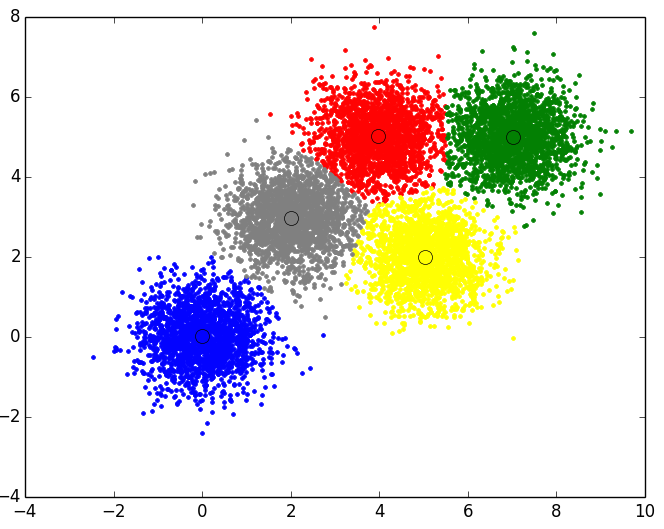
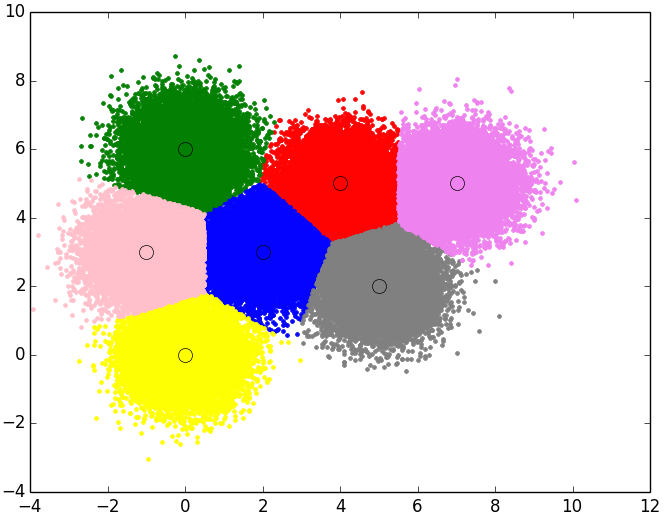
Data Set 4: Final result for Data Set 3 with 100000 points and 7 Clusters (scikit-learn):
FINAL RESULT:
	Cluster 1
		Number Points in Cluster 14235
		Centroid: [ 3.99180237  5.01440659]
	Cluster 2
		Number Points in Cluster 14338
		Centroid: [ 2.0156146   2.99755542]
	Cluster 3
		Number Points in Cluster 14356
		Centroid: [ -5.19034931e-03   5.99360853e+00]
	Cluster 4
		Number Points in Cluster 14285
		Centroid: [ 0.00899975 -0.01445316]
	Cluster 5
		Number Points in Cluster 14273
		Centroid: [ 5.01486554  1.99725272]
	Cluster 6
		Number Points in Cluster 14227
		Centroid: [-1.00989699  2.99240803]
	Cluster 7
		Number Points in Cluster 14286
		Centroid: [ 7.00982285  5.00231668]
“K-means in Python and Scikit-learn, with Examples” by Ricardo Moya at jarroba.com, licensed under Creative Commons Attribution-NonCommercial-ShareAlike 3.0. Registered at Safe Creative.

You may also like
Expectation-Maximization in Python and Scikit-learn, with Examples
Expectation-maximization is a statistical clustering method similar to K-means, but with a probabilistic approach. Learn how it works with Python examples.
Selecting the Optimal Number of Clusters
One of the problems when applying a Clustering method (K-means or EM) is choosing the number of Clusters. Learn the elbow method, dendrograms and the gap.
Leave a comment