
Selecting the Optimal Number of Clusters
One of the problems when applying a Clustering method (K-means or EM) is choosing the number of Clusters. Learn the elbow method, dendrograms and the gap.
Tool
- You can download the project for this post by clicking HERE.
- This post is part of the book "Machine Learning (in Python), with examples"
One of the problems we run into when applying a Clustering method (K-means or EM) is choosing the number of Clusters. There is no objective, widely valid criterion for choosing an optimal number of Clusters; but we have to keep in mind that a bad choice can lead to grouping very heterogeneous data together (too few Clusters), or to putting data that are very similar to each other into different Clusters (too many Clusters).
Although there is no objective criterion for selecting the number of Clusters, several methods have been developed to help us choose an appropriate number of Clusters to group the data, such as the elbow method, the Calinski criterion, Affinity Propagation (AP), the Gap (also with its statistical version), Dendrograms, etc. Given the complexity of some of these methods, we are going to explain the simpler ones, which in most cases give us results good enough to decide what the optimal number of Clusters for the data set will be. These methods are the elbow method, Dendrograms and the Gap.
The methods mentioned are implemented in the following repository:
View on GitHubRicardoMoya/OptimalNumClusters
To run these scripts you need to have the numpy, matplotlib, scipy and scikit-learn libraries installed. To download and install these libraries (or update them to the latest version with the -U option) using the pip package manager, run the following commands:
pip install -U numpy
pip install -U matplotlib
pip install -U scipy
pip install -U scikit-learn
Elbow Method
This method uses the inertia values obtained after applying K-means with different numbers of Clusters (from 1 to N Clusters), where inertia is the sum of the squared distances from each object in the Cluster to its centroid:
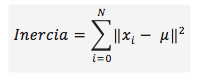
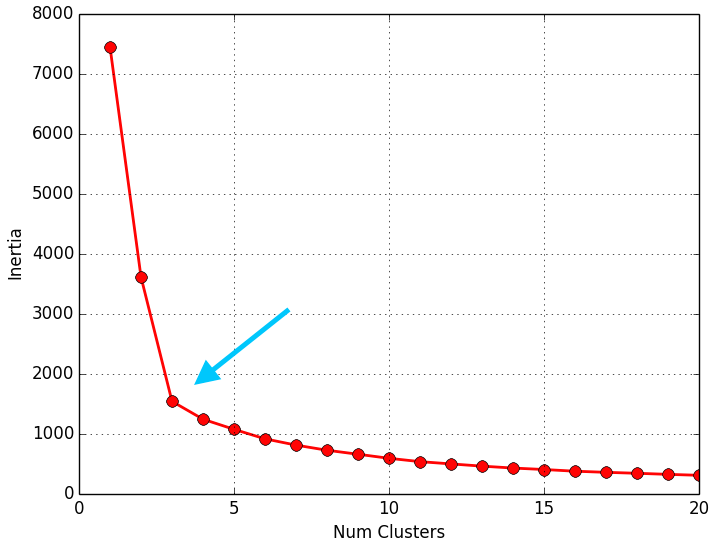
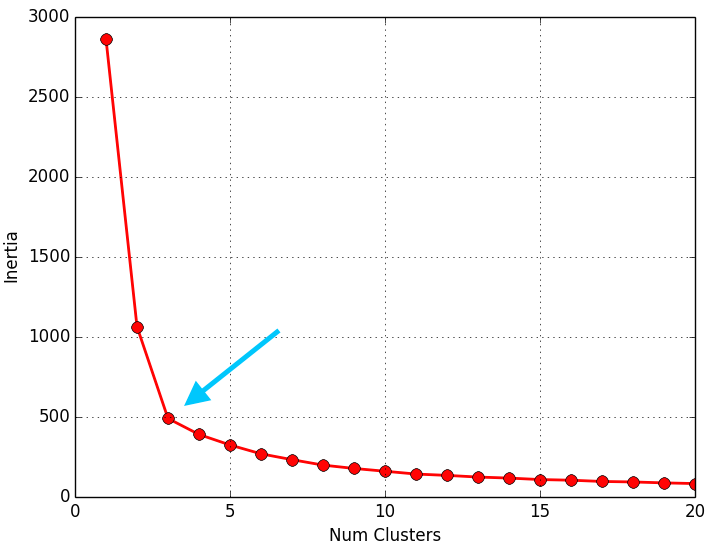
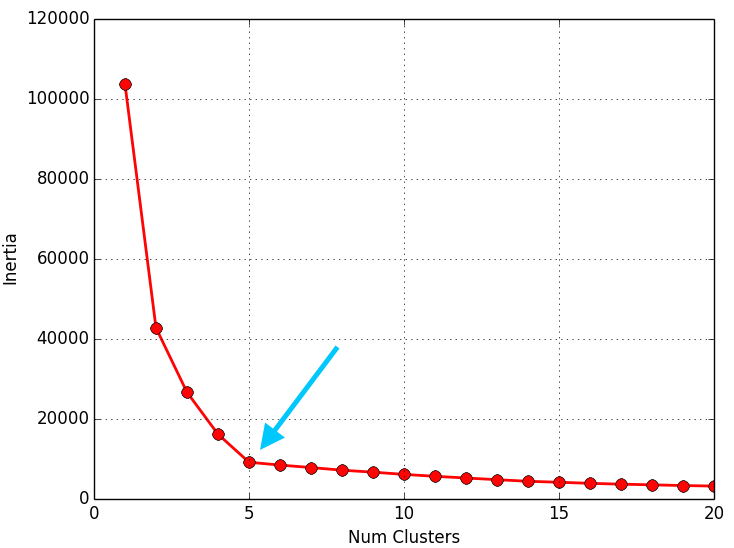
Once we have the inertia values after applying K-means with 1 to N Clusters, we plot the inertia against the number of Clusters on a line chart. In this chart you should see a sharp change in how the inertia evolves, so that the line looks like an arm and its elbow. The point where you see that sharp change in inertia tells you the optimal number of Clusters to pick for that data set; or put another way: the point that represents the elbow of the arm will be the optimal number of Clusters for that data set.
The script below calculates the inertia values after applying K-means with 1 to 20 Clusters (for one of the 3 data sets we have) and plots them on a line chart (number of Clusters against inertia) so you can see “the elbow” and therefore determine the optimal number of Clusters for the data set:
# -*- coding: utf-8 -*-
__author__ = 'RicardoMoya'

import numpy as np
import matplotlib.pyplot as plt
from sklearn.cluster import KMeans

# Constant
DATASET1 = "./dataSet/DS_3Clusters_999Points.txt"
DATASET2 = "./dataSet/DS2_3Clusters_999Points.txt"
DATASET3 = "./dataSet/DS_5Clusters_10000Points.txt"
LOOPS = 20
MAX_ITERATIONS = 10
INITIALIZE_CLUSTERS = 'k-means++'
CONVERGENCE_TOLERANCE = 0.001
NUM_THREADS = 8


def dataset_to_list_points(dir_dataset):
    """
    Read a txt file with a set of points and return a list of objects Point
    :param dir_dataset:
    """
    points = list()
    with open(dir_dataset, 'rt') as reader:
        for point in reader:
            points.append(np.asarray(map(float, point.split("::"))))
    return points


def plot_results(inertials):
    x, y = zip(*[inertia for inertia in inertials])
    plt.plot(x, y, 'ro-', markersize=8, lw=2)
    plt.grid(True)
    plt.xlabel('Num Clusters')
    plt.ylabel('Inertia')
    plt.show()


def select_clusters(dataset, loops, max_iterations, init_cluster, tolerance,
                    num_threads):
    # Read data set
    points = dataset_to_list_points(dataset)

    inertia_clusters = list()

    for i in range(1, loops + 1, 1):
        # Object KMeans
        kmeans = KMeans(n_clusters=i, max_iter=max_iterations,
                        init=init_cluster, tol=tolerance, n_jobs=num_threads)

        # Calculate Kmeans
        kmeans.fit(points)

        # Obtain inertia
        inertia_clusters.append([i, kmeans.inertia_])

    plot_results(inertia_clusters)


if __name__ == '__main__':
    select_clusters(DATASET1, LOOPS, MAX_ITERATIONS, INITIALIZE_CLUSTERS,
                    CONVERGENCE_TOLERANCE, NUM_THREADS)
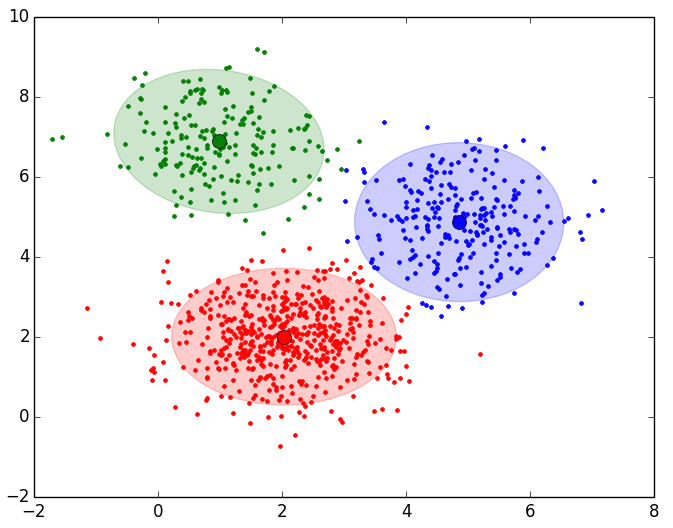
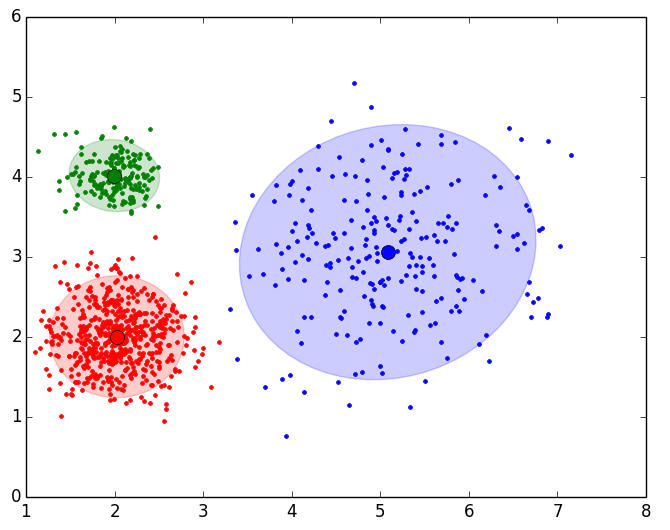
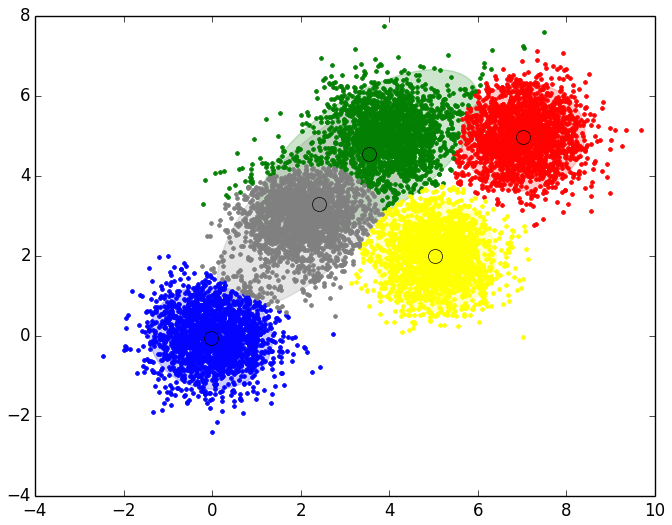
Below are the results obtained for each of the three data sets. The script only returns the line chart. The representation of the Clusters shown next to the line chart was obtained with the script that implements EM and is shown so you can see that the number of Clusters the elbow method gives us is consistent:
|
|
|
|
|
|
As you can see in the results, the elbow method returns very consistent values and matches the expected results. When you apply this method to another data set, you may not see “the elbow” at all, or you may even see two or more elbows (or sharp changes in how the inertia evolves). In that case you would have to study the optimal number of Clusters to select in more detail or with other techniques. Given the didactic purpose of these examples, “the elbow” in the evolution of the inertia is very easy to see, but in the real world you won't always see such a clear behavior.
Dendrograms
A dendrogram is a type of tree-shaped graphical representation that organizes and groups data into subcategories according to their similarity, given by some distance measure. Similar objects are represented in the dendrogram by a link whose position is determined by the level of similarity between the objects or groups of objects. Given these characteristics, dendrograms are a very useful type of diagram for studying groupings of objects; that is, for studying the Clusters that can appear in a data set.
Let's look at a simple example in which we have 9 objects represented on a plane:
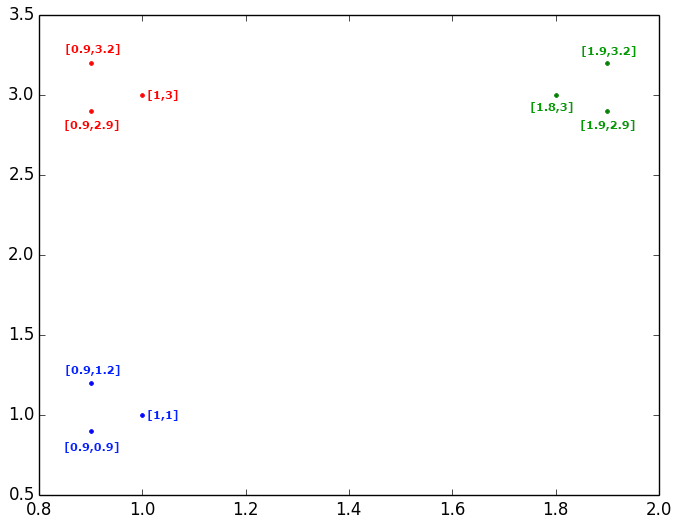
You can clearly see that these 9 objects can be grouped into 3 Clusters, but let's start by studying the similarities and distances between objects. First, let's look at the blue objects and the distances (Euclidean in this case) between them. We see that the two closest points to each other are the point {1,1} and the point {0.9,0.9}, so we would join them in the dendrogram with a link. If we group these two points and calculate their centroid, we get the point {0.95,0.95}, and the closest point to this new point among all those on the plane is {0.9,1.2}; therefore, we would join the first group we formed with the point {0.9,1.2} using another link. In short, what we do is calculate the distance between all the points, take the smallest distance, group those two points, and then calculate again the distance between all the points, or between all the groups already formed and the points.
Following these steps, the resulting dendrogram to study the relationship between the 9 points shown above would be the following, which leads us to interpret that the optimal number of Clusters to select would be 3:
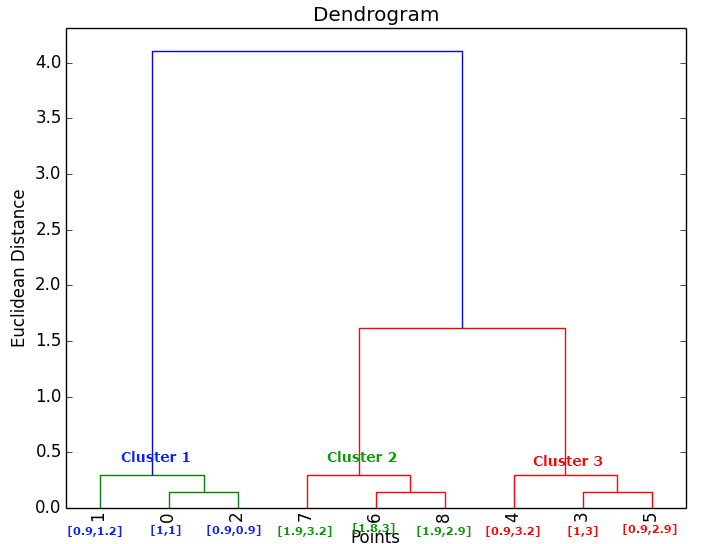
The script below uses the linkage() method to calculate the relationships between the most similar points and groups, and plots these results in a dendrogram where we have limited the level of detail of the groupings so that its lowest level shows 12 groups of objects:
# -*- coding: utf-8 -*-
__author__ = 'RicardoMoya'

import numpy as np
import matplotlib.pyplot as plt
from scipy.cluster.hierarchy import dendrogram, linkage

# Constant
DATASET1 = "./dataSet/DS_3Clusters_999Points.txt"
DATASET2 = "./dataSet/DS2_3Clusters_999Points.txt"
DATASET3 = "./dataSet/DS_5Clusters_10000Points.txt"


def dataset_to_list_points(dir_dataset):
    """
    Read a txt file with a set of points and return a list of objects Point
    :param dir_dataset:
    """
    points = list()
    with open(dir_dataset, 'rt') as reader:
        for point in reader:
            points.append(np.asarray(map(float, point.split("::"))))
    return points


def plot_dendrogram(dataset):
    points = dataset_to_list_points(dataset)

    # Calculate distances between points or groups of points
    Z = linkage(points, metric='euclidean', method='ward')

    plt.title('Dendrogram')
    plt.xlabel('Points')
    plt.ylabel('Euclidean Distance')

    # Generate Dendrogram
    dendrogram(
        Z,
        truncate_mode='lastp',
        p=12,
        leaf_rotation=90.,
        leaf_font_size=12.,
        show_contracted=True
    )

    plt.show()


if __name__ == '__main__':
    plot_dendrogram(DATASET1)
Below are the results obtained for each of the three data sets. The script only returns the dendrogram. The representation of the Clusters shown next to the dendrogram was obtained with the script that implements EM and is shown so you can see the number of Clusters the dendrogram indicates.
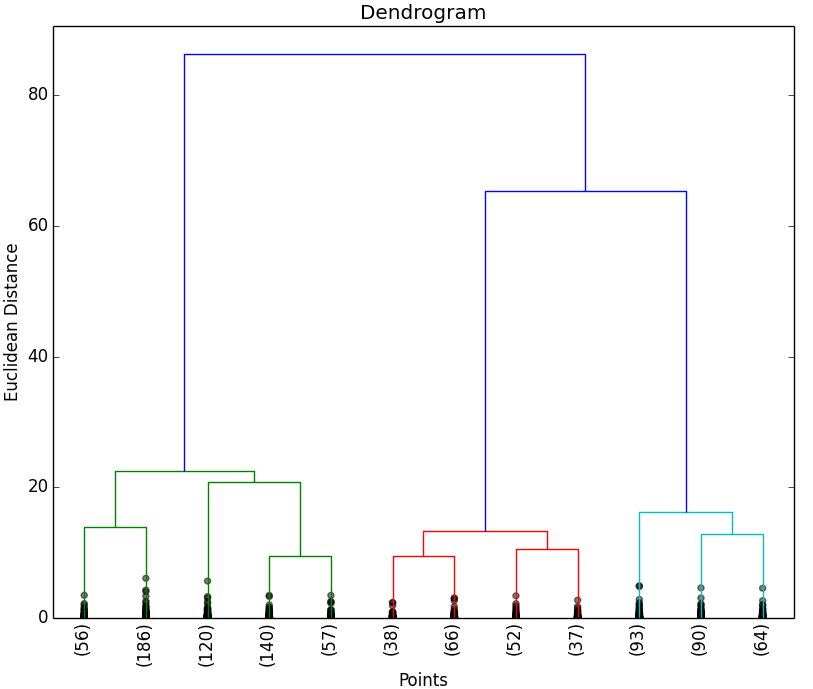
|
|
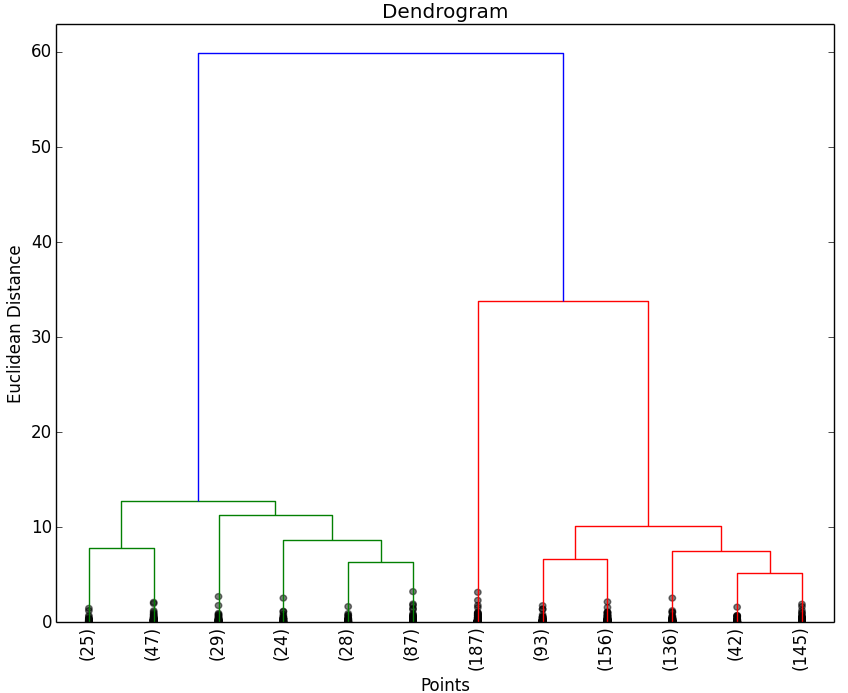
|
|
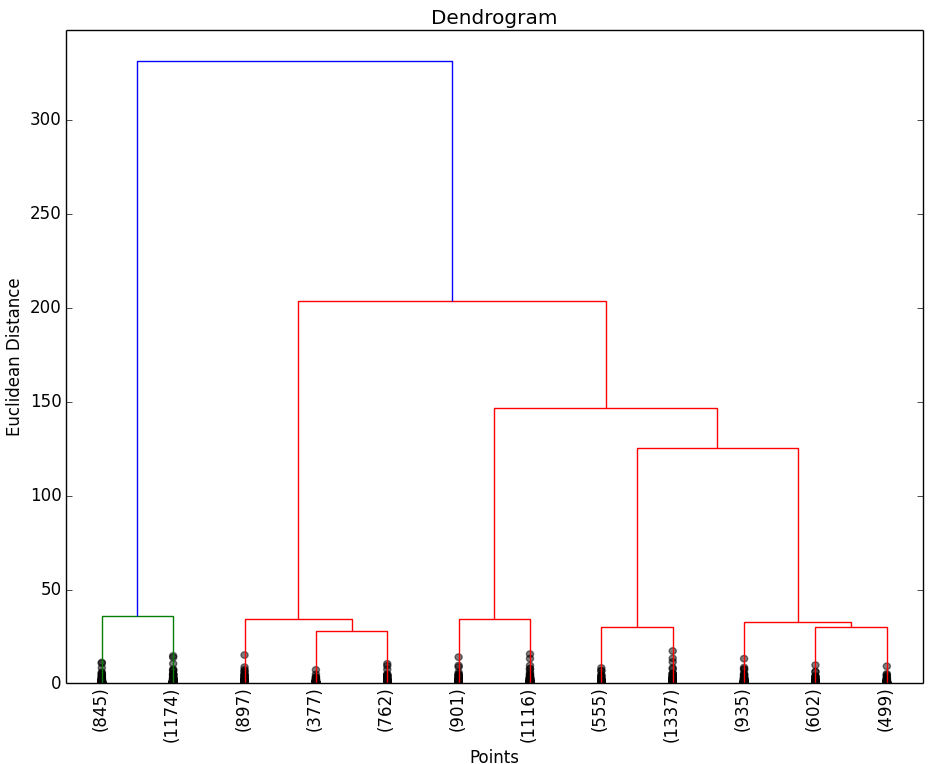
|
|
As you can see in the results, the dendrograms show the expected groupings (Clusters) of objects. As with the elbow method, you may not be able to clearly see the groupings of objects, in which case you would have to study the optimal number of Clusters to select with other techniques.
Gap
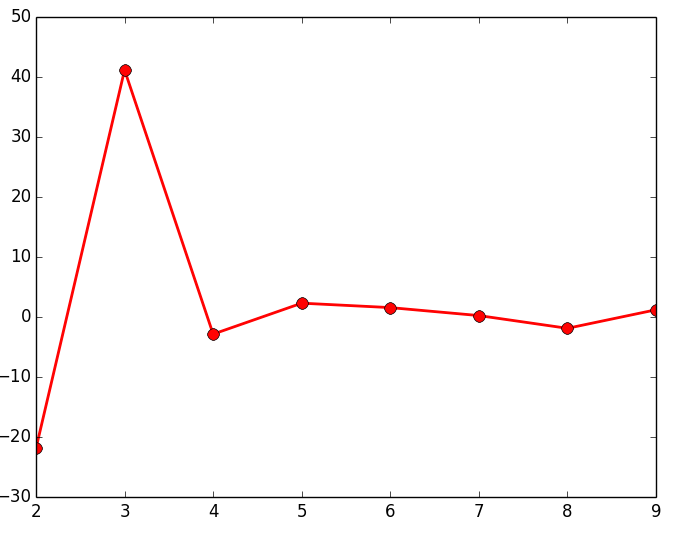
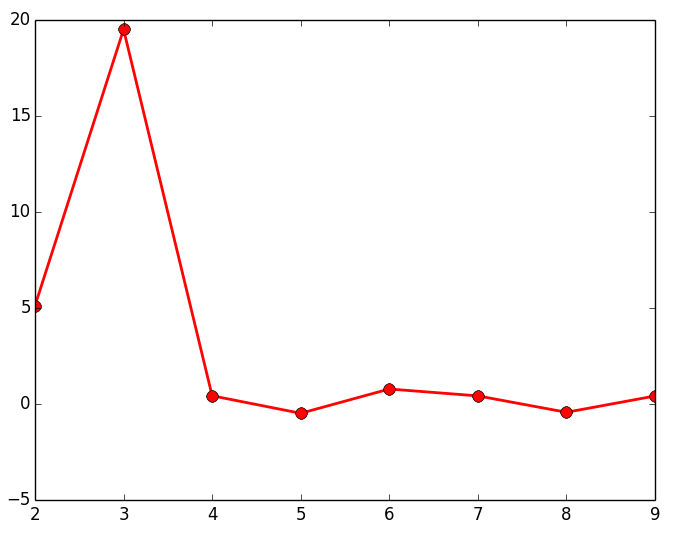
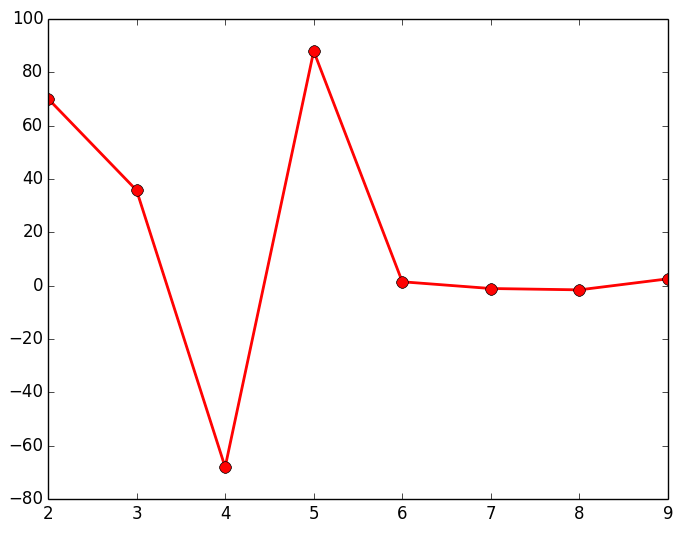
The last method we are going to show is the Gap; similar to the elbow method, its goal is to find the largest difference or distance between the different groups of objects that we form to represent them in a dendrogram. To do this, we take the distances of each of the links that make up the dendrogram and see what the largest difference is between each of these links. The script below calculates these differences (for any of the 3 data sets we have) and plots them on a line chart, where the maximum point is the optimal number of Clusters for that data set.
# -*- coding: utf-8 -*-
__author__ = 'RicardoMoya'

import numpy as np
import matplotlib.pyplot as plt
from scipy.cluster.hierarchy import linkage

# Constant
DATASET1 = "./dataSet/DS_3Clusters_999Points.txt"
DATASET2 = "./dataSet/DS2_3Clusters_999Points.txt"
DATASET3 = "./dataSet/DS_5Clusters_10000Points.txt"


def dataset_to_list_points(dir_dataset):
    """
    Read a txt file with a set of points and return a list of objects Point
    :param dir_dataset:
    """
    points = list()
    with open(dir_dataset, 'rt') as reader:
        for point in reader:
            points.append(np.asarray(map(float, point.split("::"))))
    return points


def plot_gap(dataset):
    points = dataset_to_list_points(dataset)

    # Calculate distances between points or groups of points
    Z = linkage(points, metric='euclidean', method='ward')

    # Obtain the last 10 distances between points
    last = Z[-10:, 2]
    num_clustres = np.arange(1, len(last) + 1)

    # Calculate Gap
    gap = np.diff(last, n=2)  # second derivative
    plt.plot(num_clustres[:-2] + 1, gap[::-1], 'ro-', markersize=8, lw=2)
    plt.show()


if __name__ == '__main__':
    plot_gap(DATASET1)
Below are the results obtained for each of the three data sets. The script only returns the line chart. The representation of the Clusters shown next to the line chart was obtained with the script that implements EM and is shown so you can see the number of Clusters the chart indicates.
|
|
|
|
|
|
As you can see in the results from studying the gap, it returns the expected number of groupings (Clusters). As with the other methods shown above, you may not be able to clearly see the groupings of objects, in which case you would have to study the optimal number of Clusters to select with other techniques.
“Selecting the Optimal Number of Clusters” by Ricardo Moya at jarroba.com, licensed under Creative Commons Attribution-NonCommercial-ShareAlike 3.0. Registered at Safe Creative.

You may also like
Expectation-Maximization in Python and Scikit-learn, with Examples
Expectation-maximization is a statistical clustering method similar to K-means, but with a probabilistic approach. Learn how it works with Python examples.
K-means in Python and Scikit-learn, with Examples
K-means is a clustering method that splits objects into K groups by minimizing inertia. Learn how it works and how to use it in Python with scikit-learn.
Leave a comment