
Pattern Matching – Regular Expressions
Everything about regular expressions (Regexp) and pattern matching, with Java, PHP and JavaScript examples covering every possibility
Pattern matching is designed to save you a lot of time and to run processes in a very optimized way. With patterns we can search for something, replace every match with something else, count what was found, locate the position of what we are looking for, among other advantages. Best of all, practically every programming language supports it, and it works the same in all of them. We will see examples of regular expressions in PHP, JavaScript and Java.
Let’s start with the ninth definition of “patrón” (pattern) from the RAE (the Spanish Royal Academy dictionary; not the first, not the second, and not the eighth either. The ninth definition is the one that matters in the context we work in):
A model that serves as a sample to make something else identical.
A pattern is a model, a template, a mold, a design that lets us obtain several identical things; that is, it is what we look at in order to copy (like someone painting a still life on a canvas, where the still life made of real objects –the banana, the jug, the bread, the grapes– is the pattern). The “something” in the definition doesn’t have to be just a physical object; it can be a text, an image, an idea, a way of life, etc.
And the other word we use is “search”. Put the two together and we get “Pattern search”, from the English “Pattern matching” (“matching” comes from the verb “to match”, which means to coincide with something; that is, “matching a pattern”, a synonym of “pattern search”). Imagine a drawer full of toys, and we want to find the toys that match a pattern, which could be a boat-shaped toy; so from the drawer we will only pick the boats: a pirate ship, an ocean liner, a canoe, etc. This is “pattern search”.
We have gotten sidetracked a lot; let’s get to what interests us. Now let’s focus on programming, where most of the time we will be analyzing text. An example: we receive the following list of texts (they could be whatever we want):
- ¡Hola Mundo!
- miCorreo@gmail.com
- La teoría de “Pattern Machine” dice…
- correoFalso@yahoo.es
- En un lugar de la Mancha, cuyo nombre no quiero acordarme…
- +34 91 123 456 789
- estoNOesUnCorreoNoTieneArroba.com
- RaMoN@jarroba.com
- Calle Alcalá 12345 Madrid, Madrid
And our pattern is “email addresses”. We have to find the email addresses in the list above. That said, if you go back over the list of texts, I’m sure you can pick out all the email addresses in a few seconds. You will have found that there are 3 email addresses (“miCorreo@gmail.com”, “correoFalso@yahoo.es”, and “RaMoN@jarroba.com”); there is one that looks like an email address but isn’t, because it lacks the at sign (“estoNOesUnCorreoNoTieneArroba.com”). You yourself have just applied “pattern matching”.
Paraphrasing Neil deGrasse Tyson –a spectacular astronomer– in the documentary “Cosmos” (Spanish dub):
The human talent for recognizing patterns is a double-edged sword: we are especially good at finding patterns, even when they are not really there.
Although the paragraph has a lot more meaning within the documentary’s script, I have marked in bold what I want to get across to you: “We are especially good at finding patterns”. And I want you to see how easy it is for us to use this tool. Enough running away from the world of “Pattern matching” (you wouldn’t believe how many people avoid using it, claiming it’s difficult), because it is our world, our way of learning, our brain, our thoughts, what we are.
We have to break things down and tell the computer to do the same thing our brain has done. We have to tell it that we only want the email addresses. Since your brain is very good at finding patterns, I’m sure you have noticed what the structure of an email address is.

You will have worked out that an email address is made up of any text, followed by an at sign, followed by any text, then a dot, and ending with yet another piece of any text.
Note for the impatient: If you are in a hurry you can go straight to the “Regular expressions” section. I explain “State diagrams” because it is a very useful tool and very simple; and in our case, it is very useful for breaking down a regular expression. I also explain the difference between “Pattern recognition versus Pattern matching”; it isn’t necessary either to understand how regular expressions are used.
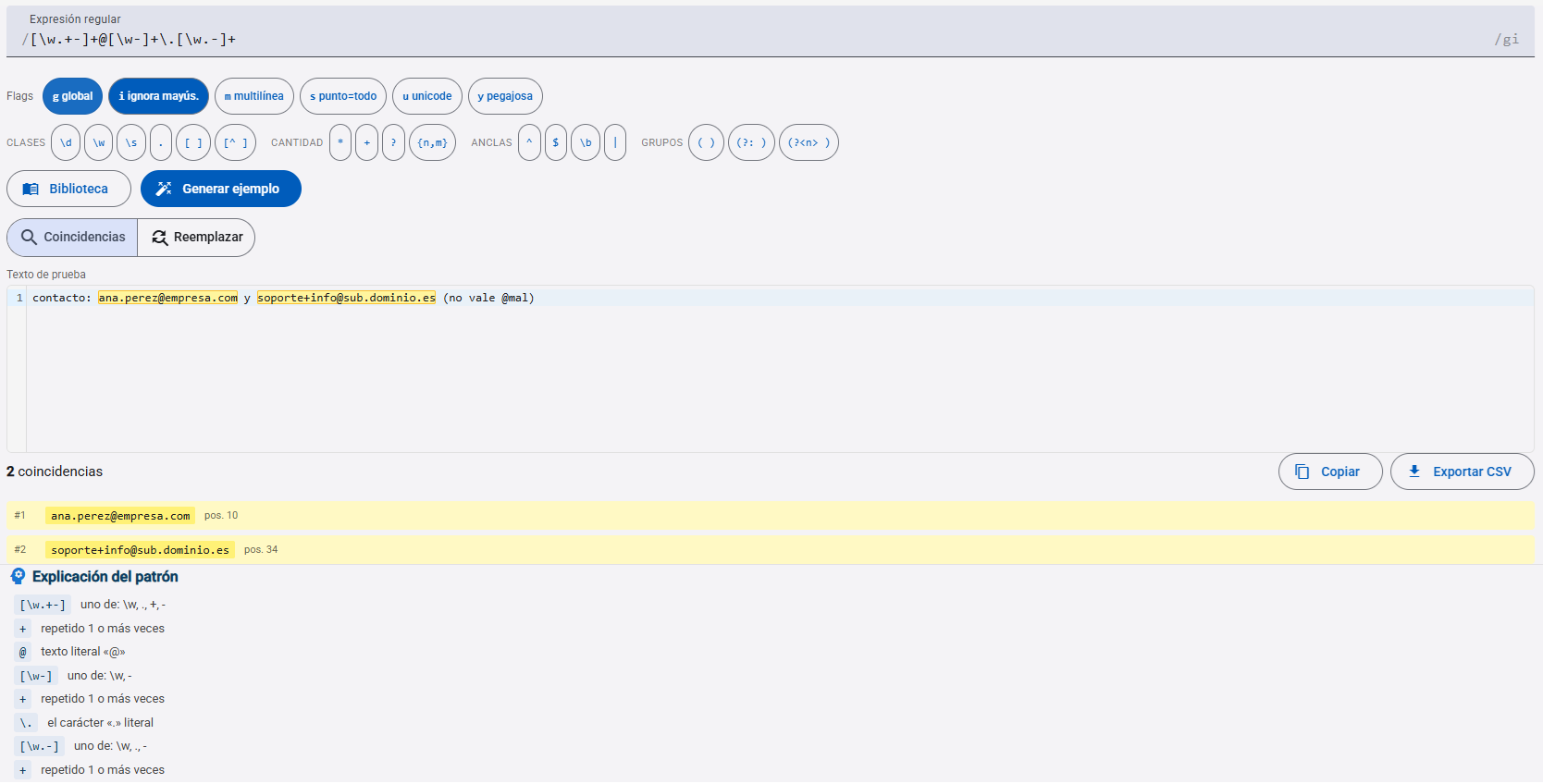
Tool
Free Regex Tester
State diagram
It is easy to create the state diagram or finite automaton for the email pattern. It isn’t necessary in simple cases (once you have a bit of practice, you will come up with regular expressions off the top of your head), but in complex cases I assure you it helps a lot.
The following one looks pretty good:
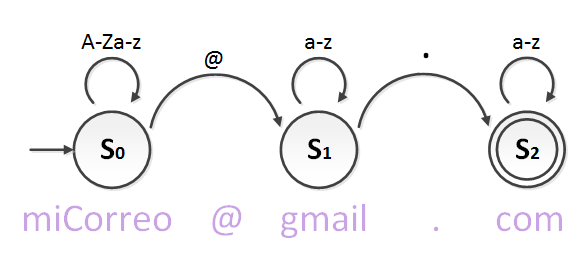
Maybe you have never seen a state diagram or finite automaton. In this short paragraph I’m going to explain everything you need to know about state diagrams. The arrow on the left marks the start. The circle with the S represents the state with its number (the number is there to give the state a unique name, an id; they are usually placed in reading order, although that isn’t mandatory, and when the state diagram has several paths it’s impossible to set an order). The arrows indicate what has to be satisfied to go from one state to another, or to stay in the same one. The circle with another circle inside indicates that this state is a final one. There can be several final states, as well as several starts. The final state is the goal: if we reach it, we will have successfully recognized whatever it is.
In the example, I analyze the email address “miCorreo@gmail.com”. I start at the entry arrow and arrive at S0 with the first letter, “m”. Above state S0 I have put a cyclic arrow “A-Za-z” which indicates that it will recognize any letter one by one (“a-z” means letters from “a” to “z”, the whole alphabet), both uppercase “A-Z” and lowercase “a-z”. The cyclic arrow over state S0 always indicates that anywhere from zero to infinite letters can arrive. We analyze the letter “o” at the end of the word “miCorreo” and then we find an “@”. The at symbol “@” does not belong to the set “A-Za-z”, but it does have another path. As soon as we reach the at sign “@”, we will jump to the next state, S1. In S1 we will only recognize lowercase letters from the set “a-z”. When we reach the dot “.” we will jump to state S2. In S2 we will likewise recognize any lowercase letter. Since S2 is marked as a final state, if we run out of characters to check while in this final state, it means our email address has been validated. To see that the state diagram does its job of validating email addresses, we have to analyze several. For example, with “RaMoN@jarroba.com” we will see that it also passes. If we try to analyze “estoNOesUnCorreoNoTieneArroba.com”, we would never reach the final state S2 -since there is no at sign- so it would not pass validation.
However, if you look closely at the previous state diagram, it allows some undesired inputs 🙁
For example, it allows the email “@.”. Yes, an empty one! Just the at sign and the dot. I made the previous diagram simple so you could grasp the idea at a quick glance and see how cycles between zero and many work; now we are going to complicate it a little to make cycles between one and many. To fix this little problem, what we can do is force there to be at least one letter or more in each part (before the at sign, after the at sign and after the dot).

Now we’re talking 🙂
Our state diagram allows email addresses like “miCorreo@gmail.com” or “RaMoN@jarroba.com”. And it doesn’t allow empty email addresses like “@.” or “@algo.”. If you look at the state diagram, in each part of the email address we force there to be at least one letter (for example, the arrow that goes between S0 and S1); then as many letters as we want (for example, the loop at S1; until we find the dot, the moment to jump to state S2).
Note: to keep the reading light I have described simple email address examples. There are other addresses that are valid under Internet standards, like “correo_Numero8&dolar$@inglaterra.co.uk”. That is, they could have numbers, underscores, a few more characters. And they could even have several extensions in the final part of the domain (normally the activity domain type “.co”, followed by the geographic domain type “.uk”). If you want to know the exact syntax of an email address, it is described at Email address (Wikipedia), where you also have examples of valid and invalid emails.
Technical note on why to use state diagrams to help with regular expressions: A regular expression describes strings in a regular language, which fall within formal languages (put quickly, a formal language is a text that follows certain rules; and in our case the rule is set by the regular expression). Finite automata recognize regular languages. So every regular expression has an associated finite automaton (both deterministic finite automata, or DFA, and nondeterministic finite automata, or NFA).
Pattern recognition versus Pattern matching
What you have just done -breaking down the email address to find the pattern- is called “Pattern recognition”.
You shouldn’t confuse “Pattern matching” with “Pattern recognition”. Here are quick definitions of both:
- Pattern recognition: extracts information from something to obtain a pattern. The result is a pattern. In the email address example we obtained the pattern of email addresses by studying it mentally. Needless to say, it is a computer science field that tries to get a computer to find patterns. For example, face recognition, where the computer, given a front view of a person’s face, has to be able to extract the pattern of that face (Pattern recognition); to then recognize it in different positions (Pattern matching), without mistaking it for other people’s faces.
- Pattern matching: looks for something that matches a pattern. The result is all the matches for a given pattern. In the example, it’s finding all the email addresses knowing the basic structure of an email address (it has an at sign in the middle and a dot); that is, knowing its pattern.
We need to recognize a pattern (in the case of the email address it is very simple), and then use this pattern to search for the texts that match it (in the example we want to find any email address, among the infinite combinations there could be).
Regular expressions
For our computer to be able to recognize email addresses, we have to write the pattern in the format called “regular expression”, or “Regex” or “RegExp”. A regular expression is simply a sequence of characters. The regular expression will be our pattern, which will be used to search for something in a given text (in our example, we want to find email addresses). In programming it is very useful to use regular expressions to search strings or replace texts that satisfy a certain regular expression (that match a certain pattern).
Regular expressions are always written the same way whatever the programming language (luckily it’s a standard). At the beginning and at the end you always have to put delimiters (in some languages it isn’t necessary; I’ll explain that a bit further down), which indicate where the regular expression starts and ends; and in between goes our pattern:
Delimiter Pattern Delimiter
About the symbol tables that follow: I’m going to give you the symbol tables before showing you any example. You might think “now I have to learn a whole bunch of symbols”. I assure you there aren’t that many, many of them are the opposite of another, and the truth is that once you understand a few, the rest come on their own out of pure logical necessity. Just skim the following tables quickly to get an idea of the whole, stop at the symbols you’re curious about, and move on to the next section; the need to use these tables comes on its own, and you end up learning the symbols through use. First I have to tell you how to read the tables. Each table has four columns: the first one, starting from the left and with no heading, we could call “Regular expression symbol”; the second column is the description of what the symbol does; the third and fourth go together: the third is an example regular expression, and the last is the example text where I have marked in bold what the regular expression recognizes. Note that I have run the examples through completely, looking for all the matches. You’re ready, so let’s begin; although we will start with delimiters, something necessary to build regular expressions.
Regular expression delimiters
They are needed to indicate where a pattern starts and ends. They are mandatory in some programming languages or in some functions (in languages where you don’t have to put delimiters, they come with predefined delimiters added automatically). But where they are mandatory, any symbol is allowed as long as the first one matches the last one; a very common one is “/” or “~”. For example
/patron/The only ones we cannot use are “\” and “ ” (blank space).
Another option, if you like it better, is to use opening and closing pairs like “()”, “{}”, “[]” and “<>”. For example, this is valid:
{patron}We may need to use inside the pattern the same symbol we already use as a delimiter. To do that we put the backslash “\” in front of it, which indicates that this character is not special. If we expect to use a symbol a lot, it is best to use another delimiter, since we have the freedom to do so (for example, if you are going to analyze HTML, where we would be analyzing elements like “<b>bold text</b>”, it would be awkward to use “/” or “<>” as delimiters).
<cinco_es\<que_seis>At the end, outside the delimiters, some modifiers of the regular expression can go. We will see them in the tables.
Note that in the examples in the following tables I vary the delimiters to make them easier to read (I use “/” and “~”). Obviously, in languages that don’t need delimiters you wouldn’t have to put them.
Special search characters
| Description | Example pattern | Example match | |
| ^ | Matches the following element at the beginning of a line
Note: used this way it is not a negation. Don’t confuse it with the set negation “[^patron]”, which requires the brackets in addition to the “^” symbol |
/^A/ | AsAdA |
| $ | Matches the preceding element at the end of a line | /A$/ | AsAdA |
| * | Matches the preceding element 0 or more times. It is the same as writing {0,} | /es*/
Note: the “*” only affects “s”, not “e”. If we want it to affect the “e” too, we would have to write “/e*s*/”. The same goes for “+” and “?” |
Es es el ess e os oss esss |
| + | Matches the preceding element 1 or more times. It is the same as writing {1,} | /es+/ | Es es el ess e os oss esss |
| ? | Matches the preceding element 0 or 1 time. It is the same as writing {0,1} | /es?/ | Es es el ess e os oss esss |
| . | Matches any character, except the newline character. It is a wildcard that stands for one character | /s.s/ | Es es el ses e os s aa sos esss |
| \ | The character that follows will be turned into a special character or, if it is already special, stops being special
Note: you can make the backslash “\” itself stop being special. Just write “\\”, where the first backslash is the special character that stops the second backslash from being special. And if we want two backslashes in a row that are not special we will write “\\\\”; every backslash that we want to be non-special must have in front of it a backslash that makes the next backslash stop being special |
/midominio\.com/ | midominio.com
Note: the dot is a special character, and if we want to use it literally it has to stop being special. If we write “/midominio.com/”, without the backslash before the dot, we are saying that “midominioHcom” is also valid, since the dot is a wildcard |
Parentheses
| Description | Example pattern | Example match | |
| [patron] | Matches any character in this set | /[eo]s/ | Es es el ess e os oss esss eos oes uuus |
| [^patron] | Matches any character that is not in this set | /[^eo]s/ | Es es el ess e os oss esss eos oes uuus |
| (patron) | Matches what is between the parentheses and saves it.
Note: Each set of parentheses is saved in a numbered variable between 1 and 99; always incrementing from 1 for each pair of parentheses in the pattern. Variable 0 corresponds to the text that the pattern found. For example: /(A)(B)\2\1/ is equivalent to /(A)(B)BA/. (More examples below) |
/(guarda.)(guarda.)/ | guardaAguardaB
0 = “guardaAguardaB” 1 = “guardaA” 2 = “guardaB” Note: The whole word is recognized and it is also saved in a variable |
| (?:patron) | Matches what is between the parentheses, but doesn’t save it. | /(?:guarda.)(guarda.)/ | guardaAguardaB
0 = “guardaAguardaB” 1 = “guardaB” |
| {num} | Matches the preceding element as many times as the number says. | /s{3}/ | Es es el ess e os oss esss |
| {min,max} | Matches the preceding element a number of times between a minimum (first number) and a maximum (second number), both included. If nothing is put for the maximum, it means infinity | /s{2,3}/ | Es es el ess e os oss esss |
Characters
| Description | Example pattern | Example match | |
| \b | Matches the exact word, always placed at the word boundary, normally a space.
Note: we can match a blank space inside a set by writing “[\b]”, although the blank space itself “[ ]” also works. |
~\bPala~~bra\b ~
Note: it is at the beginning or end of “Palabra” |
PalabraPalabra |
| \B | Matches the exact word, not placed at the word boundary (the opposite of “\b”) | ~Pala\B~~\Bbra~
Note: it is in the middle of “Palabra” |
PalabraPalabra |
| \d | Matches a digit from 0 to 9. It is the same as writing [0-9] | ~\d~ | 5 del 12 de 1984 |
| \D | Matches a character that is not a digit from 0 to 9 (the opposite of “\d”). It is the same as writing [^0-9] | ~\D~ | 5 del 12 de 1984 |
| \f | Matches a form feed character | ~\f~ | Nueva Pagina \f fin |
| \n | Matches a newline character | ~\n~ | Nueva Linea \n fin |
| \t | Matches a tab character | ~\t~ | Tabulacion Horizontal \t fin |
| \v | Matches a vertical tab character
Note: Used for the vertical movement of printers |
~\v~ | Tabulacion Vertical \v fin |
| \r | Matches a carriage return character
Note: When you press the “Enter” key, it comes before the newline |
~\r~ | Retorno de carro \r fin |
| \s | Matches a whitespace character (includes space, tab, form feed, newline, among others) | ~\s~ | Texto separado por espacios
Note: the blank spaces are matched |
| \S | Matches a character that is not whitespace (the opposite of “\s”) | ~\S~ | Texto separado por espacios
Note: everything that is not a blank space is matched |
| \w | Matches an alphanumeric character (includes letters, numbers and underscore). It is the same as writing [A-Za-z0-9_]. | ~\w~ | Ramon_1234&Ricardo_9876@jarroba.com |
| \W | Matches a character that is not alphanumeric (the opposite of “\w”). It is the same as writing [^A-Za-z0-9_]. | ~\W~ | Ramon_1234&Ricardo_9876@jarroba.com |
| \n | It is the saved variable from the parentheses “(patron)”. “n” is a positive number between 1 and 99. | ~Numero capicua: (.).\1~ | Numero capicua: 515
Note: There is a complete example about this further below. |
| \0 | Matches a NUL character. The null character is represented as “\x00” | ~Es un nul: \0~ | Es un nul: \x00 |
| \x{hhhh}\xhhhh | Matches a Unicode character. “hhhh” are four hexadecimal digits. Some programming languages accept both “\x{hhhh}” and “\xhhhh”, or just one of them
Note: You have all the Unicode characters at (note that on that site they appear written as “U+hhhh”, and we have to convert that to “\x{hhhh}”): http://en.wikipedia.org/wiki/List_of_Unicode_characters |
~Unicode del caracter Arroba: \x{0040}~ | Unicode del caracter Arroba: @ |
| \x{hh}\xhh | Matches an ASCII character. “hh” are two hexadecimal digits. Some programming languages accept both “\x{hh}” and “\xhh”, or just one of them
Note: You have all the ASCII characters at (note that on that site they appear written as two hexadecimal digits, and we have to convert that to “\x{hh}”): http://en.wikipedia.org/wiki/ASCII |
~ASCII del caracer Arroba: \x{40}~ | ASCII del caracter Arroba: @ |
Logical operators
| Description | Example pattern | Example match | |
| patron1|patron2 | patron1 or patron2 | ~ojo|a.a~ | ojo asa oro aca |
| patron1 (?=patron2) | Matches patron1 only if it is followed by patron2. patron2 will not be part of the matched result | ~ojo (?=cuidado)~ | ojo cuidado, ojo chispeante |
| patron1 (?!patron2) | Matches patron1 only if it is not followed by patron2. patron2 will not be part of the matched result | ~ojo (?!cuidado)~ | ojo cuidado, ojo chispeante |
Modifiers
These are modifiers of the regular expression. They always go at the end and outside the delimiter. Some programming languages have these modifiers in the form of a function, which affects how the regular expression matches the text.
| Description | Example pattern | Example match | |
| g | Global search for all matches. It doesn’t exist in PHP; you have to use the “preg_match_all()” function | /es/g | Es aqui, es el lugar donde es
Note: “Es” is not matched, because of the uppercase letter “E” |
| i | Don’t distinguish between uppercase and lowercase | /es/i | Es aqui, es el lugar donde es |
| m | Matches the line breaks “\n”, to separate each line of a text. Useful to use with “^” or “$” | /^A/m | ArAdA\nArAdA |
About the tables: To create these tables I have based myself on the work at PCRE (PHP Manual) and RegExp – JavaScript (MDN). There you can find more information on the subject, although I have tried to put together a collection with everything you need. All the examples have been developed and tested by me.
Creating a regular expression
We now have all the information we need, so let’s go back to the last state diagram. We are going to create our regular expression based on the state diagram. Let’s break it down:
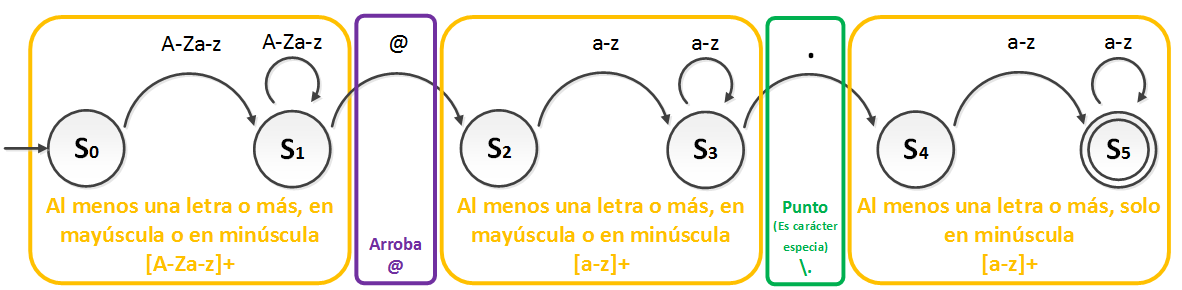
We can see that states S0 and S1 tell us they are uppercase and lowercase letters, and that there has to be at least one letter or more. Checking the tables, we see it makes sense for it to be “[A-Za-z]+” (the first state diagram, the one I said allowed undesired inputs, indicates cycles between zero and many letters; if we look at the tables we will see that the asterisk does the job and it would be enough to write “[A-Za-z]*”). Then for the at sign, it is enough to put “@”. States S2 and S3 are the same as before, except that uppercase isn’t allowed, so “[a-z]+”. Then comes a dot, but careful with this one: if we look at the tables, it appears as a special character. We have to make it stop being special, which is as easy as putting the backslash “\” in front of it. And then states S3 and S4 are the same as before, “[a-z]+”.
So, the regular expression we are looking for would be the following (I have used the slash “/” as the delimiter):
/[A-Za-z]+@[a-z]+\.[a-z]+/Did you know that the parsers of compilers (for Java, Python, etc.) use regular expressions to know whether the code is well written? Now you know who to blame when a “semicolon” is missing at the end of a line of code, it shows up in red in the IDE and then the program doesn’t compile. It’s because the regular expression that analyzes the code has the “semicolon” as mandatory. So, without the “semicolon” the code doesn’t pass validation. However, in other languages like JavaScript, you know the “semicolon” is not mandatory; it is reasonable to think they are using the “?” symbol after the “semicolon” so that it can appear zero or one time, making the “semicolon” optional. I won’t go on any further; you have more information about compilers at Compiler (Wikipedia)
Let’s look at some examples of using regular expressions after answering a few questions: What can be done with regular expressions? What practical use do regular expressions have? What are regular expressions for? I will base the answer on distinguishing the most typical uses of regular expressions in programming, with working code in Java, PHP and JavaScript:
- Search for a pattern and say whether it was found or not
- Replace what a pattern found with something else
- Split parts and save them in variables
- Count all the matches a pattern finds
- Position of each match the pattern has found
Search or Match examples
We want to find the email addresses in the list mentioned earlier. The terminal output in all cases will be:
Correo reconocido: miCorreo@gmail.com
Correo reconocido: correoFalso@yahoo.es
Correo reconocido: RaMoN@jarroba.com
The code will depend on the language. Here are some quick examples in a few languages:
PHP
In PHP we will use the preg_match() function, to which we will pass the pattern and a text from the list. It will tell us whether the text matches the pattern or not.
<?php

	$listaTextos = array(
		'¡Hola Mundo!',
		'miCorreo@gmail.com',
		'La teoría de “Pattern Machine” dice…',
		'correoFalso@yahoo.es',
		'En un lugar de la Mancha, cuyo nombre no quiero acordarme…',
		'+34 91 123 456 789',
		'estoNOesUnCorreoNoTieneArroba.com ',
		'RaMoN@jarroba.com',
		'Calle Alcalá 12345 Madrid, Madrid'
	);

	$patron = '/[A-Za-z]+@[a-z]+\.[a-z]+/';

	foreach ($listaTextos as $texto) {
		$esCoincidente = preg_match($patron, $texto);

		if ($esCoincidente) {
			echo '<br/>Correo reconocido: ' . $texto;
		}
	}
JavaScript
The same but with JavaScript. To do the validation we will use the test() function, whose object is the pattern itself, which we write without quotes (here the regular expression acts as an object, not as a String). We will pass each text from the list to the test() function. It will return “true” if it matches the regular expression, or “false” otherwise.
var listaTextos = [
	'¡Hola Mundo!',
	'miCorreo@gmail.com',
	'La teoría de “Pattern Machine” dice…',
	'correoFalso@yahoo.es',
	'En un lugar de la Mancha, cuyo nombre no quiero acordarme…',
	'+34 91 123 456 789',
	'estoNOesUnCorreoNoTieneArroba.com ',
	'RaMoN@jarroba.com',
	'Calle Alcalá 12345 Madrid, Madrid'
];

var patron = /[A-Za-z]+@[a-z]+\.[a-z]+/;

for (i = 0; i < listaTextos.length; i++) {
	texto = listaTextos[i];
	var esCoincidente = patron.test(texto);

	if (esCoincidente) {
		console.log('Correo reconocido: '+ texto);
	}
}
Java
In Java it is very easy to use regular expressions; everything is done with objects. First we have to have the pattern in a “Pattern” object, where we will put the regular expression without delimiters (I stress “without delimiters”) using the compile() method. Then we only have to match the text against the pattern, and nothing is easier than calling the matcher() method, passing it the text we want to check; it will return an object of type “Matcher”. To validate whether it matches the regular expression or not we use find() on the “Matcher” object, which returns “true” if it matches or “false” if not (a very handy thing is that if there are several matches of the pattern within the same text, each time we call find() it will return the next match; a “while” loop would uncover all of them).
Note: if you look at the regular expression, you will see that the dot has a double backslash “\\” in front of it. The first backslash is for Java (the backslash “\” in Java Strings also turns characters into special ones or makes them stop being special); it has nothing to do with the regular expression; it tells Java that the following backslash “\” is part of the String and that it shouldn’t evaluate it.
package jarroba.com;

import java.util.regex.Matcher;
import java.util.regex.Pattern;

public class expresionesRegulares {

	public static void main(String[] args) {

		String[] listaTextos = {
			"¡Hola Mundo!",
			"miCorreo@gmail.com",
			"La teoría de 'Pattern Machine' dice…",
			"correoFalso@yahoo.es",
			"En un lugar de la Mancha, cuyo nombre no quiero acordarme…",
			"+34 91 123 456 789",
			"estoNOesUnCorreoNoTieneArroba.com",
			"RaMoN@jarroba.com",
			"Calle Alcalá 12345 Madrid, Madrid"
		};

		String regex = "[A-Za-z]+@[a-z]+\\.[a-z]+";
		Pattern patron = Pattern.compile(regex);

		for (String texto : listaTextos) {
			Matcher emparejador = patron.matcher(texto);
			boolean esCoincidente = emparejador.find();

			if (esCoincidente) {
				System.out.println("Correo reconocido: " + texto);
			}
		}

	}
}
HTML
<form method="get">
	Texto a validar con la Expresion Regular: <input type="text" name="texto" pattern="[A-Za-z]+@[a-z]+\.[a-z]+" title="Texto a ser reconocido por el patron"/>
	</br>
	<input type='submit' value="Validar"/>
</form>
If we enter a value that is an email address, it will pass validation (the form is sent when you “submit”). If it doesn’t pass validation, it will show a box warning about it. We would see the following image in the browser (styles vary from one browser to another; this is how it looks in the Chrome browser).

Substitution or Replacement examples
Let’s do an example with capturing parentheses “(patron)”.
We know that each pair of parentheses “()” saves the matching content between the opening and closing parenthesis into a variable, starting from 1. If we have 4 pairs of parentheses, we will have information in variables 1, 2, 3 and 4, where 1 is the leftmost pair of parentheses and 4 the rightmost one in the regular expression.
This is very useful in many cases. For example, if we want to recognize a piece of HTML (or XML) code, like:
<b>Texto en negrita</b>We could design a regular expression like the following (I change the delimiter “/” to “~”, since the closing tag “</b>” requires the “/” symbol, to make it easier to read):
~<.+>.*</.+>~This tells us that in the opening and closing tags we will look for any character 1 or more times (since tags always have to contain something, at least 1), and inside the element we will look for any character 0 or more times (it could be empty, hence 0 or more). The problem is that searches require processing. We can save computation if we store things in variables. We know that what we find in the opening tag has to be equal to the closing one, so we can do the following:
~<(.+)>.*</\1>~This way we search for the match and the parentheses save it in variable “1”. To reference the variable inside the regular expression, we have to treat the “1” as a special symbol, and for that we put “\” in front of it, so we reference the variable as “\1”. As long as we stay inside the regular expression, this works for any language.
Now let’s look at another very interesting use, which is substitution. We have the following date of the type “d de F de Y” (where “d” represents the day with two digits, “F” the month written out, and “Y” the year with four digits):
31 de Enero de 2015We want to convert it to the format “d-F-Y” (that is, to end up as “31-Enero-2015”).
We would write the following regular expression to obtain each part we are interested in and save each part in a variable:
/(\d+) de (\w+) de (\d+)/The first parenthesis, from the opening “(” to its closing “)”, will save the day “31” in variable $1, the second the month “Enero” in variable $2, and the third the year “2015” in variable $3. We use a replace function that lets us use regular expressions and can substitute the variables.
Let’s give some complete examples, whose terminal output is, in all cases:
Resultado despues de la sustitucion: 30-Enero-2015
PHP
It’s as easy as calling the preg_replace() function, to which we pass the regular expression, the text where we have to do the search, and how we want it to substitute the variables; it will return a String with the variables replaced just as we wanted.
$texto = '30 de Enero de 2015';
$patron = '/(\d+) de (\w+) de (\d+)/';

$sustitucion = '$1-$2-$3';
$resultado = preg_replace($patron, $sustitucion, $texto);

echo '<br/>Resultado despues de la sustitucion: "'.$resultado;
JavaScript
Simply by calling the replace() function of the text, to which we pass the pattern and how we want the variables substituted; it will return the result with the variables substituted.
var patron = /(\d+) de (\w+) de (\d+)/;
var texto = '30 de Enero de 2015';

var sustitucion = '$1-$2-$3';
var resultado = texto.replace(patron, sustitucion);

console.log('Resultado despues de la sustitucion: '+ resultado);
Java
We explained the search in the previous Java example (remember that the regular expression must go without delimiters). For the “Matcher” object to search, we have to call find(). Once the match is found, to do the replacement we can call the replaceAll() method, to which we pass a String with how we want it to replace the variables $1, $2 and $3; it will return a String with the variables replaced.
package jarroba.com;

import java.util.regex.Matcher;
import java.util.regex.Pattern;

public class expresionesRegulares {

	public static void main(String[] args) {
		String regex = "(\\d+) de (\\w+) de (\\d+)";
		Pattern patron = Pattern.compile(regex);

		String texto = "30 de Enero de 2015";
		Matcher emparejador = patron.matcher(texto);

		emparejador.find();

		String sustitucion = "$1-$2-$3";
		String resultado = emparejador.replaceAll(sustitucion);

		System.out.println("Resultado despues de la sustitucion: " + resultado);
	}

}
Split or extraction examples
The previous examples are great. But what if what I want is, from a text that matches the regular expression, to keep the parts I’m interested in in variables so I can use them later in my program’s code?
For example, I want to keep the day in one variable, the month in another, and the year in another; so I can use these values in my program (I don’t think I need to tell you to imagine the hundreds of uses this has: knowing whether the day is even or odd, adding one to the day, checking whether the month falls in summer, etc.; and that’s only with dates, imagine with other patterns and texts! The possibilities are endless). Let’s suppose we have the same date as before:
31 de Enero de 2015With the same regular expression I want to extract each part into variables of my programming language so I can use those values:
/(\d+) de (\w+) de (\d+)/Let’s give some complete examples, whose terminal output is the following:
Contenido en la variable $1: ’30’, en la variable $2: ‘Enero’, en la variable $3: ‘2015’
PHP
Simply by using preg_match_all(), to which we pass the regular expression, the text, and an empty Array (it doesn’t need to be initialized) that it will fill with the separated variables. Then we can loop through the Array and get the values.
$texto = '30 de Enero de 2015';
$patron = '/(\d+) de (\w+) de (\d+)/';

preg_match_all($patron, $texto, $coincidencias);

$el1 = $coincidencias[1][0];
$el2 = $coincidencias[2][0];
$el3 = $coincidencias[3][0];

echo 'Contenido en la variable $1: \''.$el1.'\', en la variable $2: \''.$el2.'\', en la variable $3: \''.$el3.'\'';
The two-dimensional Array returned, “$coincidencias”, with its contents (position 0 is the text recognized by the regular expression; the other positions are the variables, each one in order):
array(4) {
	[0]=> array(1) { [0]=> string(19) "30 de Enero de 2015" }
	[1]=> array(1) { [0]=> string(2) "30" }
	[2]=> array(1) { [0]=> string(5) "Enero" }
	[3]=> array(1) { [0]=> string(4) "2015" }
}
JavaScript
Using the match() function, whose object is the text we want to extract the information from, and passing it the regular expression as an argument. We will get an array from which to read the values.
var patron = /(\d+) de (\w+) de (\d+)/;
var texto = '30 de Enero de 2015';

var coincidencias = texto.match(patron);

var el1 = coincidencias[1];
var el2 = coincidencias[2];
var el3 = coincidencias[3];

console.log('Contenido en la variable $1: \''+el1+'\', en la variable $2: \''+el2+'\', en la variable $3: \''+el3+'\'');
Of the “coincidencias” array that it returns, we are interested in positions 1 to 3, with position 0 being the text recognized by the regular expression.
0: "30 de Enero de 2015"
1: "30"
2: "Enero"
3: "2015"
Java
As we did in the other Java examples, we will get the Matcher object from the Pattern object. After finding the matches with find() on the Matcher object, we simply call the group() method of the Matcher object, passing it an integer that corresponds to the position of the variable we want to get (unlike PHP or JavaScript, here it doesn’t return an Array; instead the Matcher object itself returns the separate variables when we call group() with the position we want; if we call position “0” with group(0), it will return the text recognized by the regular expression).
package jarroba.com;

import java.util.regex.Matcher;
import java.util.regex.Pattern;

public class expresionesRegulares {

	public static void main(String[] args) {
		String regex = "(\\d+) de (\\w+) de (\\d+)";
		Pattern patron = Pattern.compile(regex);

		String texto = "30 de Enero de 2015";
		Matcher emparejador = patron.matcher(texto);

		emparejador.find();

		String el1 = emparejador.group(1);
		String el2 = emparejador.group(2);
		String el3 = emparejador.group(3);

	System.out.println("Contenido en la variable $1: \'" + el1 + "\', en la variable $2: \'" + el2 + "\', en la variable $3: \'" + el3 + "\'");
	}

}
Examples of counting matches and the position where each one was found
Here I’m going to take the chance to do two very useful examples -since they’re quite simple. I will count the number of times the match appears and show the position where it was found.
So, I will do two things with the text:
asa ese aca iso ala oso ato
I will count all the matches with the following regular expression:
/.s./And I will say at which position they were found.
We will see that there are 4 matches, and where each word starts.

So the terminal output for the following programming languages will be:
El numero de apariciones del patron .s. es 4
Palabra “asa” encontrada en la posicion 0
Palabra “ese” encontrada en la posicion 4
Palabra “iso” encontrada en la posicion 12
Palabra “oso” encontrada en la posicion 20
PHP
One of the particularities of the preg_match_all() function is that it returns the number of times the text has matched the regular expression. We have the number of occurrences; now we still need to get the position. To do that, it is as simple as adding the “PREG_OFFSET_CAPTURE” flag to the preg_match_all() function, to ask it to also return the position where it locates each word.
$texto = 'asa ese aca iso ala oso ato';
$patron = ' /.s./ ';
$numApariciones = preg_match_all($patron, $texto, $coincidencias, PREG_OFFSET_CAPTURE);
echo '<br/>El número de apariciones del patron .s. es '.$numApariciones;

foreach ($coincidencias[0] as $palabraPosicion) {
	echo '<br/>Palabra "'.$palabraPosicion[0].'" encontrada en la posición '.$palabraPosicion[1];
}
The “coincidencias” array will be a multidimensional array, where each match is saved in another array of two positions. Position 0 of the array will be the word found, and position 1 of the array will be the position of that word in the sentence. The result is:
array(1) {
	[0]=> array(4) {
		[0]=> array(2) {
			[0]=> string(3) "asa"
			[1]=> int(0)
		}
		[1]=> array(2) {
			[0]=> string(3) "ese"
			[1]=> int(4)
		}
		[2]=> array(2) {
			[0]=> string(3) "iso"
			[1]=> int(12)
		}
		[3]=> array(2) {
			[0]=> string(3) "oso"
			[1]=> int(20)
		}
	}
}
JavaScript
In JavaScript we have to indicate that we want to find all the matches of the regular expression with the “g” modifier at the end of the regular expression, so that it searches for all matches in the whole sentence (if we don’t put it, it only finds “asa”; that is, the first one it finds, and stops). Then, to count the matches, we will use the match() function, which returns an array with all the matches, so it’s enough to count the array to know the total. To get the position of each match we will use the exec() method, which will find the matches one by one each time we call it inside a loop; then the position is the “index” attribute that this function returns.
var texto = 'asa ese aca iso ala oso ato';
var patron = /.s./g;

var coincidencias = texto.match(patron);
var numApariciones = coincidencias.length;
console.log("El numero de apariciones del patron .s. es " + numApariciones);

while ((coincidencia = patron.exec(texto)) != null) {
	console.log('Palabra "'+coincidencia+'" encontrada en la posicion '+coincidencia.index);
}
The “coincidencias” array has the following:
0: "asa"
1: "ese"
2: "iso"
3: "oso"
length: 4
And an example of what the “coincidencia” array contains
0: "asa"
index: 0
input: "asa ese aca iso ala oso ato"
Java
Similar to the other Java examples above, we simply use the Matcher object to find each match with the find() method inside a while loop. Then, the Matcher object will internally place its cursor on each match, so if we call the group() function it will return the word at that moment, and to know which position it is at we will call the start() method (and if we want to know where the word ends we can call end()). To count the occurrences we have no choice but to count them one by one. To make the terminal output match the example’s, I have used StringBuilder, which only concatenates Strings with the append() functions (it’s the same as doing “string joined to”+“another string”; but with more options, like the possibility of inserting at the beginning with insert()).
package jarroba.com;

import java.util.regex.Matcher;
import java.util.regex.Pattern;

public class expresionesRegulares {

	public static void main(String[] args) {
		String regex = ".s.";
		Pattern patron = Pattern.compile(regex);

		String texto = "asa ese aca iso ala oso ato";
		Matcher emparejador = patron.matcher(texto);

		StringBuilder devolver = new StringBuilder();

		int numApariciones = 0;

		while (emparejador.find()) {
			devolver.append("\nPalabra \"" + emparejador.group() + "\" encontrada en la posicion " + emparejador.start());
			numApariciones++;
		}

		devolver.insert(0, "El numero de apariciones del patron .s. es " + numApariciones);

		System.out.append(devolver.toString());
	}

}
Various regular expression examples
To clear up doubts, in this section I’m going to put in several examples of regular expressions. You can use them as exercises to get a bit of fluency. Almost everything comes down to thinking a little, drawing the state diagram (if you’re fluent you’ll do it in your head), and looking at the regular expression symbol tables mentioned above.
Regular expression for a landline phone number in Spain
The rules change for other countries, but they are similar, so you already have an exercise 😉
- Spain’s country prefix is always “+34”
- Then comes the autonomous community prefix, which is 2 or 3 digits that always start with “9”
- And then comes the number, which is always 7 numeric digits
- Each of the above groups is separated by a blank space
An example of a valid phone number in Spain is: +34 91 1234567
Its state diagram could be (using regular expression notation it can be simplified enough to understand the steps at a glance):
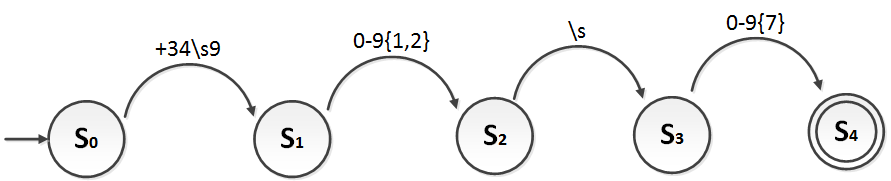
Note that I have added a new symbol between curly braces “{}” to this state diagram. It means the same as in regular expressions: the symbol “{1,2}” indicates there can be from 1 to 2 characters (in this case characters from 0 to 9), and “{7}” indicates there must be exactly 7 characters (in this case from 0 to 9).
I also remind you that “\s” simply means a blank space “ ” is expected (“\s” is also in the regular expression table). In the regular expression it makes no difference whether you write “\s” or “ ”.
The resulting regular expression:
/\+34\s9[0-9]{1,2}\s[0-9]{7}/Or, which is the same:
/\+34 9[0-9]{1,2} [0-9]{7}/
Try it online
You can practice and try out regular expressions online at:
References
- Personal experience (if you have questions, ask)
- Pattern matching (Wikipedia)
- Pattern recognition (Wikipedia)
- Regular expression (Wikipedia)
- Sintaxis de expresiones regulares PCRE (PHP Manual)
- PCRE (PHP Manual)
- RegExp – JavaScript (MDN)
- Lesson: Regular Expressions (The Java Tutorials, Essential Java Classes)
“Pattern Matching – Regular Expressions” by Ramón Invarato at jarroba.com, licensed under Creative Commons Attribution-NonCommercial-ShareAlike 3.0. Registered at Safe Creative.

You may also like

Advanced Dockerfile: Multi-Stage Builds, Registries, and Tricks
Free Docker course. Expert Docker tricks: multi-stage builds, optimizing images, faster build times, and distributing images through Docker registries.
Dockerfile: Directives and Dockerizing Projects
Free Docker course. A Dockerfile is a file of directives for building and deploying custom applications with Docker. Learn how to Dockerize your projects.
Leave a comment