
Python repr vs str
Understand repr vs str in Python and learn how to use them in any custom class. Examples of using repr for debugging.
In Python it’s important to clearly understand the difference between __repr__ vs __str__, which will give us the power to use them whenever we create any custom class.
Code on GitHub (I recommend reading the article first and then downloading/cloning the code at the end):
View on GitHubInvarato/JarrobaPython / repr_y_str
To understand this with examples, we’re going to use a very simple custom Python class where we’ll store sports. In the __init__ we’ll initialize a list of sports (self.listado_deportes) and we’ll have a method to add sports to the class one by one (add_deporte):
class MisDeportes(object):

    def __init__(self):
        self.listado_deportes = []

    def add_deporte(self, deporte: str):
        self.listado_deportes.append(deporte)
Instantiating this class and adding sports to it is very easy:
if __name__ == "__main__":
    mis_deportes = MisDeportes()

    mis_deportes.add_deporte('Running')
    mis_deportes.add_deporte('Futbol')
    mis_deportes.add_deporte('Ciclismo')
Now we want to see what’s inside the object of our custom class, so we decide to print it:
print(mis_deportes)It will print something like this to the terminal:
<__main__.MisDeportes object at 0x00000195FE3F4F98>That’s not what we wanted, because we wanted to see the sports we had added to the object of our custom class.
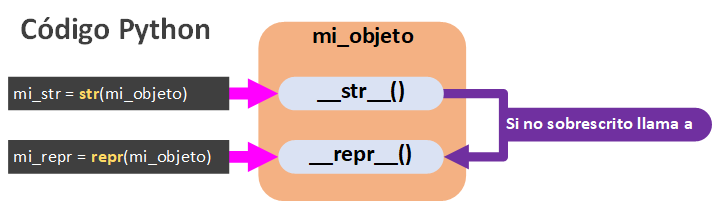
It has printed the name of the class the object belongs to and its memory address in hexadecimal. Where does Python get this from? If the magic method __str__ isn’t implemented, it calls the other magic method __repr__; and if __repr__ isn’t implemented either, it creates this String by default between the less-than and greater-than symbols: “< description of the object >”.
__str__
The goal of the returned String is for a human to read it. It returns a String with a readable representation (easy to read) for a human. It’s an informal representation of the object in String format.
The String that __str__ returns should look nice for humans to read; it’s not meant to be executed or interpreted by any machine.
We need to extend our previous custom class with this method. I want it to show a header text “Objeto de deportes”, and then each sport line by line with a bullet in front, which will be an asterisk (*). We override the magic method __str__ with the behavior we wanted:
class MisDeportes(object):

    # …

    def __str__(self) -> str:
        str_con_el_resultado = 'Objeto de deportes: '
        for deporte in self.listado_deportes:
            str_con_el_resultado += "\n  * {}".format(deporte)
        return str_con_el_resultado
Our complete class looks like this:
class MisDeportes(object):

    def __init__(self):
        self.listado_deportes = []

    def add_deporte(self, deporte: str):
        self.listado_deportes.append(deporte)

    def __str__(self) -> str:
        str_con_el_resultado = 'Objeto de deportes: '
        for deporte in self.listado_deportes:
            str_con_el_resultado += "\n  * {}".format(deporte)
        return str_con_el_resultado
Let’s try printing the object of our class again:
if __name__ == "__main__":
    mis_deportes = MisDeportes()

    mis_deportes.add_deporte('Running')
    mis_deportes.add_deporte('Futbol')
    mis_deportes.add_deporte('Ciclismo')

    print(mis_deportes)
And indeed it shows the contents of our custom object the nice way we wanted to see it in the terminal:
Objeto de deportes:
  * Running
  * Futbol
  * Ciclismo
Although we used Python’s shorthand to print our object (“print(mis_deportes)”), what Python really does is pass our object to the “str()” function, which calls the __str__ method of our object. That is, it does the following:
representacion_para_humanos = str(mis_deportes)
print(representacion_para_humanos)
And it prints the same thing:
Objeto de deportes:
  * Running
  * Futbol
  * Ciclismo
__repr__
The goal of the returned String is for a machine with Python installed to read it (see the “Note” in the next paragraph). It returns a String with a representation of the object’s state, and that String must be interpreted by Python without errors. That is, when __repr__ is called it creates a Python expression that can recreate the object in the same state (with the same values) it had when __repr__ was called. It’s a formal representation of the object in String format.
Note: Really, “Python doesn’t have to read it” as such. It’s the official representation of the object in String format, and it lets a developer debug without ambiguity (unlike __str__, which could be ambiguous; for example, if we print a “set” and a “list” with __str__ to make them look nice, they could look the same and be confused, but never with __repr__). The point of it being something a “machine with Python could interpret” is that it has no ambiguity (since the compiler can’t accept ambiguous code), and that for debugging we can copy and paste the representation to see what it does, which lets us debug our program in a simple way (there are examples of this further on).
An example of using the String returned by __repr__ is that this String could be copied and pasted into a Python terminal to rebuild the object from that very String (and then you could reuse that object).
Another example is that the String returned by __repr__ must be interpretable by the “eval” function (this function evaluates the String passed as a parameter as if it were code, in this case Python code; more information about the “eval()” function at Eval (Wikipedia) ).
To complete our custom class we’ll override the __repr__ method. We want it to return a String that Python can use to instantiate our object. To do this we’ll use the String formatting method “format()”, which can be passed “self” and takes care of automatically generating a String with some values:
- {self.__class__.__name__}: Automatically adds the name of our class to the String being created
- {self.listado_deportes}: Automatically adds the list with the values.
class MisDeportes(object):

    # …

    def __repr__(self) -> str:
        representacion_interpretable = '{self.__class__.__name__}({self.listado_deportes})'.format(self=self)
        return representacion_interpretable
To see what we’re creating we can use the “repr()” function, which is the one that calls __repr__ (just as “str()” called __str__). And we print that String generated by __repr__ with “print()” (let’s not confuse this with the earlier printing of the object “print(mis_deportes)”; here we print a String generated by “repr(mis_deportes)”):
Note: A bit further on I’ll show you the complete “MisDeportes” code; first we need to understand the following.
if __name__ == "__main__":
    mis_deportes = MisDeportes()

    mis_deportes.add_deporte('Running')
    mis_deportes.add_deporte('Futbol')
    mis_deportes.add_deporte('Ciclismo')

    representacion_para_maquinas = repr(mis_deportes)
    print(representacion_para_maquinas)
Which prints:
MisDeportes(['Running', 'Futbol', 'Ciclismo'])If you look closely, the String that was created is the class with the list of sports it contained passed as an argument, which is the way to represent it as a String and as Python code. This class is asking for the __init__ to be extended with this argument.
class MisDeportes(object):

    def __init__(self, listado_deportes=None):
        if listado_deportes is None:
            self.listado_deportes = []
        else:
            self.listado_deportes = listado_deportes

    # …
This means that whenever we use “repr()”, we need the arguments of __init__ to match the representation we’ve created, and those arguments must rebuild the Python object to the same state it was in when the String was created with __repr__.
Our complete class would look like this:
class MisDeportes(object):

    def __init__(self, listado_deportes=None):
        if listado_deportes is None:
            self.listado_deportes = []
        else:
            self.listado_deportes = listado_deportes

    def add_deporte(self, deporte: str):
        self.listado_deportes.append(deporte)

    def __str__(self) -> str:
        str_con_el_resultado = 'Objeto de deportes: '
        for deporte in self.listado_deportes:
            str_con_el_resultado += "\n  * {}".format(deporte)
        return str_con_el_resultado

    def __repr__(self) -> str:
        representacion_interpretable = '{self.__class__.__name__}({self.listado_deportes})'.format(self=self)
        return representacion_interpretable
Testing the value returned by __repr__ and using it for debugging
Let’s check that Python correctly interprets the generated String. To do so we’ll use the “eval()” function, and to the object that “eval()” creates we’ll add a new sport (with the “add_deporte()” method) to check that it still behaves like an object of our custom class “MisDeportes”:
representacion_evaluada = eval("MisDeportes(['Running', 'Futbol', 'Ciclismo'])")
representacion_evaluada.add_deporte('Baloncesto')
Now let’s see that it worked by printing the contents of the object (this time calling __str__ to make it easier to check):
print(representacion_evaluada)And indeed it prints:
Objeto de deportes:
  * Running
  * Futbol
  * Ciclismo
  * Baloncesto
Let’s also try it in the terminal (although it’s almost the same). Save the “MisDeportes” class in a file, which I’ll call, for example, “ClaseMisDeportes.py” and I’ll save it on the “Desktop”.
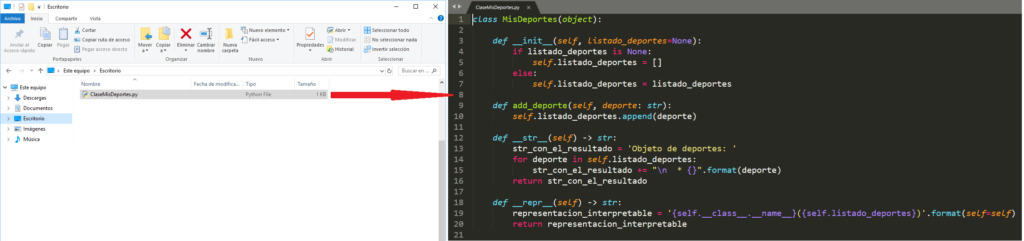
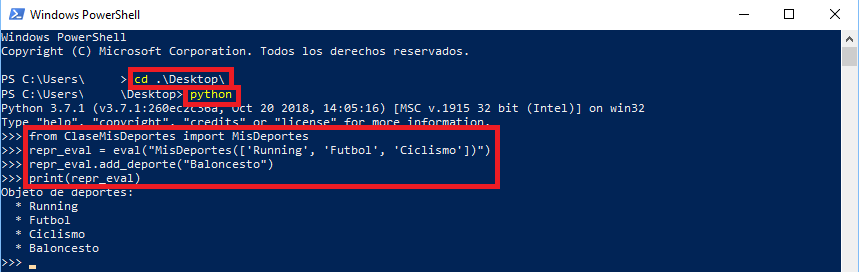
We open a terminal. It doesn’t matter which operating system you work with, it works the same on all of them. I’m going to open a Windows PowerShell (you can also open a CMD on Windows, it works the same).

We go to the directory where our Python file “ClaseMisDeportes.py” is (in my case, the “Desktop”) and run the Python interpreter:
> cd .\Desktop\
> python
And let’s test what __repr__ generated, as before.
We import our “MisDeportes” class from the Python file “ClaseMisDeportes”:
>>> from ClaseMisDeportes import MisDeportesWe evaluate (with the “eval()” function) the String generated by __repr__ which was: “MisDeportes([‘Running’, ‘Futbol’, ‘Ciclismo’])”.
>>> repr_eval = eval("MisDeportes(['Running', 'Futbol', 'Ciclismo'])")Let’s see if it behaves like our object by adding a new sport “Baloncesto” with the “add_deporte()” method we created:
>>> repr_eval.add_deporte("Baloncesto")And let’s print with __str__ to see if it really works:
>>> print(repr_eval)And we can see that it indeed works:
References
“Python repr vs str” by Ramón Invarato at jarroba.com, licensed under Creative Commons Attribution-NonCommercial-ShareAlike 3.0. Registered at Safe Creative.

You may also like

Advanced Dockerfile: Multi-Stage Builds, Registries, and Tricks
Free Docker course. Expert Docker tricks: multi-stage builds, optimizing images, faster build times, and distributing images through Docker registries.
Dockerfile: Directives and Dockerizing Projects
Free Docker course. A Dockerfile is a file of directives for building and deploying custom applications with Docker. Learn how to Dockerize your projects.
Leave a comment