
Web Scraping in Python (BeautifulSoup), with Examples
Web scraping is a set of techniques for automatically getting the content of web pages through their HTML code. Learn how with Python and BeautifulSoup.
You can download the project for this post by clicking HERE.
Web Scraping (or Scraping) is a set of techniques used to automatically get the content of web pages through their HTML code. The goal of these techniques is to gather large amounts of data from different web pages, and that data can later be used in many ways: data homogenization, content processing to extract knowledge, enriching the data of a website, etc. One last thing to say in this introduction: scraping techniques can be framed within the fields of Artificial Intelligence and Big Data, in the first phase of collecting data for its later storage, processing and visualization.
In this tutorial we are going to "scrape" (that is, get the data from) the articles and tutorials of this website, using the "BeautifulSoup" library (for Python), which makes the scraping job much easier for us. The goal of this tutorial is not to be a tutorial for experts, but an introduction to how to make HTTP connections and how to process and extract the content we are interested in from the HTML we get with the JSoup library. For this tutorial you need a minimum knowledge of HTML and CSS (you don’t have to be an expert), since when scraping we need to know HTML tags such as head, body, h1, h2, …, h6, p, div, span, table, etc. and the CSS styles that can be applied to those tags with id and class.
Given the guidelines and the minimum knowledge required for this tutorial, let’s explain how to scrape and get the data from the posts of jarroba.com. First, we need to run "pip install" to download and install the 'requests' and 'beautifulsoup' packages:
$ pip install beautifulsoup4
$ pip install requests
Second, you have to study the HTML structure of the website to see how we can extract its content. In this case, we want to extract the information of each post of this website (title, author and date), and we can see that all the posts are inside 'div' tags with the CSS class 'col-md-4 col-xs-12'; that is (as we can see in the following image), we need to get the content between "<div class="col-md-4 col-xs-12"> content </div>"
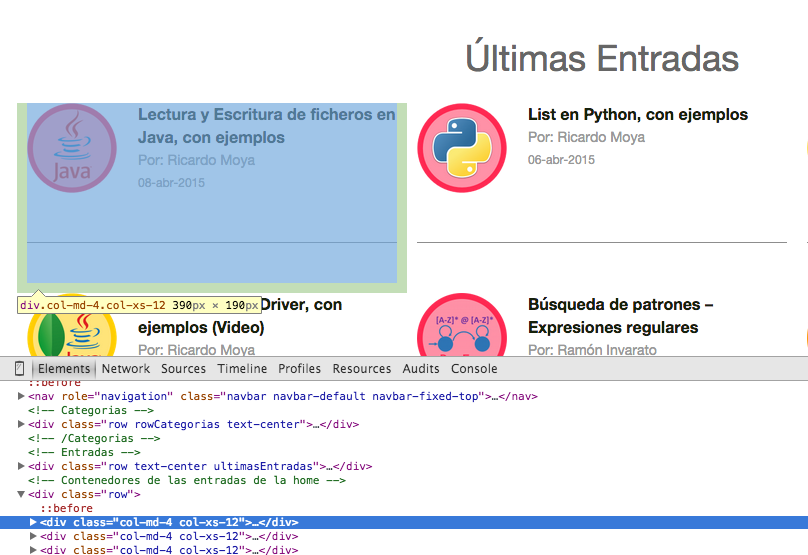
As we can see, it can be relatively easy to write a regular expression and get all the occurrences between the 'div' tags with the CSS class mentioned above (by the way, they are Bootstrap CSS classes), but the BeautifulSoup library already gives us the methods we need (and very well optimized, since Pattern and Matcher are heavy and slow processes) to get the content between HTML tags.
Inside those tags, we still have to extract the title, author and date. If we look at the HTML in more detail, we see the following:

So with this we have studied the HTML and we now know which tags we need to scrape the data from. Let’s now explain how to do the scraping with the Python BeautifulSoup library, also using the requests library to make the HTTP request.
First we need to make an HTTP request to the web page to get its HTML. To do that we will use the 'requests' library and its get method (passing the URL as a parameter), which will give us, among other things, the HTML of the website and its "Status Code". We do it like this:
url = "https://jarroba.com/"
# We make the request to the website
req = requests.get(url)
From the "req" object, which stores a lot of data related to the HTTP request (headers, cookies, etc.), we get the Status Code and the HTML (as a string) of the website. We do it like this:
statusCode = req.status_code
htmlText = req.text
With the Status Code and the HTML of the website, we can start scraping it. Next (now that we have studied the HTML of the website and how to get the HTML and its Status Code) the full code is shown, and then it will be explained step by step, so that you get a more general view:
# -*- coding: utf-8 -*-
__author__ = 'RicardoMoya'

from bs4 import BeautifulSoup
import requests

URL = "https://jarroba.com/"

# We make the request to the website
req = requests.get(URL)

# We check that the request returns a Status Code = 200
status_code = req.status_code
if status_code == 200:

    # We pass the HTML content of the website to a BeautifulSoup() object
    html = BeautifulSoup(req.text, "html.parser")

    # We get all the divs where the posts are
    entradas = html.find_all('div', {'class': 'col-md-4 col-xs-12'})

    # We loop over all the posts to extract the title, author and date
    for i, entrada in enumerate(entradas):
        # The "getText()" method does not return the HTML
        titulo = entrada.find('span', {'class': 'tituloPost'}).getText()
        # If we don't call the "getText()" method, it also returns the HTML
        autor = entrada.find('span', {'class': 'autor'})
        fecha = entrada.find('span', {'class': 'fecha'}).getText()

        # We print the Title, Author and Date of the posts
        print "%d - %s  |  %s  |  %s" % (i + 1, titulo, autor, fecha)

else:
    print "Status Code %d" % status_code
First we define the URL to get the Status Code and the HTML. Second, we check that the "status code" is equal to 200 and, if so, we create an object of the "BeautifulSoup" class, passing it the HTML of the website. With that object, we will be able to get the elements of the website using the appropriate methods. In this case we are going to get all the posts, which we will store in a list, matching a series of tags and CSS styles. Here we will store all the HTML fragments that correspond to each post (see the first image of the post):
# We pass the HTML content of the website to a BeautifulSoup() object
html = BeautifulSoup(req.text, "html.parser")

# We get all the divs where the posts are
entradas = html.find_all('div',{'class':'col-md-4 col-xs-12'})
Here we use the "find_all()" method, which takes all the HTML fragments that correspond to a div tag followed by the classes 'col-md-4' and 'col-xs-12'. Now we have all the posts in HTML in a list (entradas). Next we have to loop over that list and get the title, author and date from those code fragments. In the same way, that information is inside HTML tags and CSS classes that we have to process (as shown in the second image of the post). BeautifulSoup gives us the methods to get the content by passing it the name of the CSS class. It is done like this:
# We loop over all the posts to extract the title, author and date
for i,entrada in enumerate(entradas):
    # The "getText()" method does not return the HTML
    titulo = entrada.find('span', {'class' : 'tituloPost'}).getText()
    # If we don't call the "getText()" method, it also returns the HTML
    autor = entrada.find('span', {'class' : 'autor'})
    fecha = entrada.find('span', {'class' : 'fecha'}).getText()

    # We print the Title, Author and Date of the posts
    print "%d - %s  |  %s  |  %s" %(i+1,titulo,autor,fecha)
As we can see, the "find()" methods are given the name of the CSS class and they get the content between those tags. Finally, note what I left in the comment of the previous code fragment, that if the "getText()" method is not used, the HTML content is shown too, whereas if we use it, we only show the content between the HTML tags. As a result of running the program we get the following:
1 - Arquitectura Android – ART vs Dalvik  |  Por: Ramón	Invarato  |  17-may-2015
2 - Scraping en Java (JSoup), con ejemplos  |  Por: Ricardo	Moya  |  12-may-2015
3 - Diccionario en python, con ejemplos  |  Por: Ricardo	Moya  |  05-may-2015
4 - DataSet de resultados de partidos de fútbol para su predicción (Machine Learning)  |  Por: Ricardo	Moya  |  26-abr-2015
5 - Intalar Ubuntu en una máquina virtual con VirtualBox (Video)  |  Por: Ricardo	Moya  |  15-abr-2015
6 - Lectura y Escritura de ficheros en Java, con ejemplos  |  Por: Ricardo	Moya  |  08-abr-2015
7 - List en Python, con ejemplos  |  Por: Ricardo	Moya  |  06-abr-2015
8 - Python MongoDB Driver (pymongo), con ejemplos (Video)  |  Por: Ricardo	Moya  |  23-mar-2015
9 - Java MongoDB Driver, con ejemplos (Video)  |  Por: Ricardo	Moya  |  18-mar-2015
This BeautifulSoup library is a very powerful library for scraping. In this post we have seen how to make an HTTP connection and get the HTML content to store it in a list, and then pull out elements or fragments of HTML code (find() or find_all()) as if we were parsing with regular expressions, but without getting into the "hassle" of working with regular expressions. BeautifulSoup also has methods to get the content of tags such as h1, h2, …, p, img, etc., which we haven’t seen in this example, but if you check its documentation you will find the methods that let you do those things.
To finish, here is the program that gets all the posts of Jarroba.com (title, author and date) and not just those of the home page as in the example shown:
# -*- coding: utf-8 -*-
__author__ = 'RicardoMoya'

from bs4 import BeautifulSoup
import requests

URL_BASE = "https://jarroba.com/"
MAX_PAGES = 20
counter = 0

for i in range(1, MAX_PAGES):

    # We build the URL
    if i > 1:
        url = "%spage/%d/" % (URL_BASE, i)
    else:
        url = URL_BASE

    # We make the request to the website
    req = requests.get(url)
    # We check that the request returns a Status Code = 200
    statusCode = req.status_code
    if statusCode == 200:

        # We pass the HTML content of the website to a BeautifulSoup() object
        html = BeautifulSoup(req.text, "html.parser")

        # We get all the divs where the posts are
        entradas = html.find_all('div', {'class': 'col-md-4 col-xs-12'})

        # We loop over all the posts to extract the title, author and date
        for entrada in entradas:
            counter += 1
            titulo = entrada.find('span', {'class': 'tituloPost'}).getText()
            autor = entrada.find('span', {'class': 'autor'}).getText()
            fecha = entrada.find('span', {'class': 'fecha'}).getText()

            # We print the Title, Author and Date of the posts
            print "%d - %s  |  %s  |  %s" % (counter, titulo, autor, fecha)

    else:
        # If the page no longer exists and I get a 400
        break
“Web Scraping in Python (BeautifulSoup), with Examples” by Ricardo Moya at jarroba.com, licensed under Creative Commons Attribution-NonCommercial-ShareAlike 3.0. Registered at Safe Creative.

You may also like
Web Scraping in Java with JSoup (with Examples)
Web scraping is a set of techniques for automatically extracting the content of web pages through their HTML code. Learn how to do it in Java with JSoup.

“If It Works, Don’t Touch It” and Other Excuses That No Longer Hold
Four corporate excuse-phrases, why the calculus has changed with AI, and what to do if you're stuck in an inertia-bound organization.
Leave a comment