
Stateless MCP: what changes in the 2026-07-28 specification
The MCP 2026-07-28 specification drops the handshake and sessions. What changes in an HTTP server, and how ours speaks both versions.
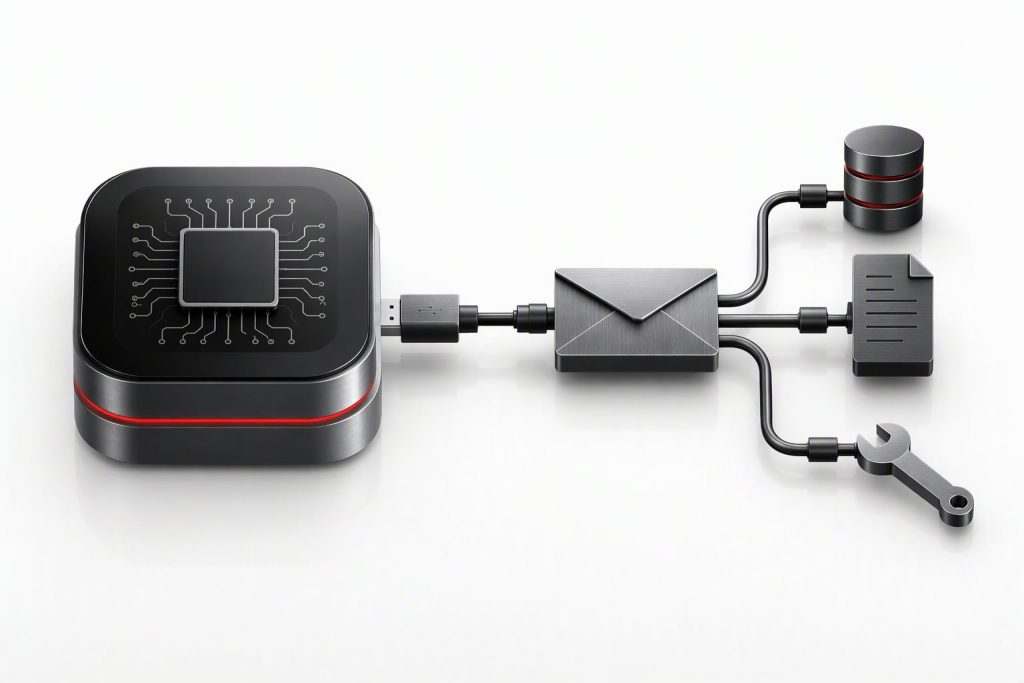
On July 28, 2026, a new revision of the Model Context Protocol (MCP) removed the initial handshake and sessions: each request travels on its own, with its version inside. For an MCP server over HTTP, that changes how the version is chosen, which headers are checked and which errors are returned. The jarroba.com server already speaks the new version and the earlier ones at the same time.
The jarroba.com MCP server
MCP is the protocol an AI assistant (Claude, ChatGPT and others) uses to work with external tools: the assistant asks a server for its list of tools and calls them with JSON-RPC. jarroba.com has one at https://jarroba.com/wp-json/jarroba/v1/mcp, so that an assistant can search for articles and read a summary of each. It is small:
- two tools,
jarroba_searchandjarroba_article, both read-only; - it runs over HTTP, inside WordPress itself, with one POST request per call;
- it keeps nothing between requests: no sessions and no event stream (SSE).
The big change in the new specification is to stop keeping state, and our server already kept none; even so, there was quite a lot of work to do.
What changes in 2026-07-28
The full list is in the specification changelog. What affects a tool server over HTTP:
- There is no handshake anymore. Before, the client started with
initialize, and that is where the version was agreed. Now each request carries its version and the client’s capabilities inparams._meta, under the keysio.modelcontextprotocol/protocolVersionandio.modelcontextprotocol/clientCapabilities. - The version also goes in an HTTP header,
MCP-Protocol-Version, and it has to match the one in the body. - Two more headers:
Mcp-Method, with the method, on every request; andMcp-Name, with the tool name, ontools/call. They let an intermediary (a load balancer, a gateway or a monitoring tool) know what is being requested without reading the body. server/discovermust be implemented, and it lists the versions and capabilities the server has.- Every result carries
resultType("complete"for normal ones), and it is recommended that it also carry the server name in its_meta(io.modelcontextprotocol/serverInfo). - Lists can be cached:
tools/listcarriesttlMs, how long the response is valid, andcacheScope,"public"if it holds nothing specific to a user. pingis gone, and so are sessions (Mcp-Session-Id) and the event stream over GET.- New errors: if the headers do not match the body, HTTP 400 and code
-32020; if the server does not support the version, HTTP 400 and-32022with the list of the ones it does support; a method that does not exist, HTTP 404 and-32601.
Note
The underlying reason, according to the proposal that changed it: with sessions, an MCP server cannot sit behind an ordinary load balancer without pinning each client to the same machine. Without state, any copy of the server can handle any request, as with any other web service.
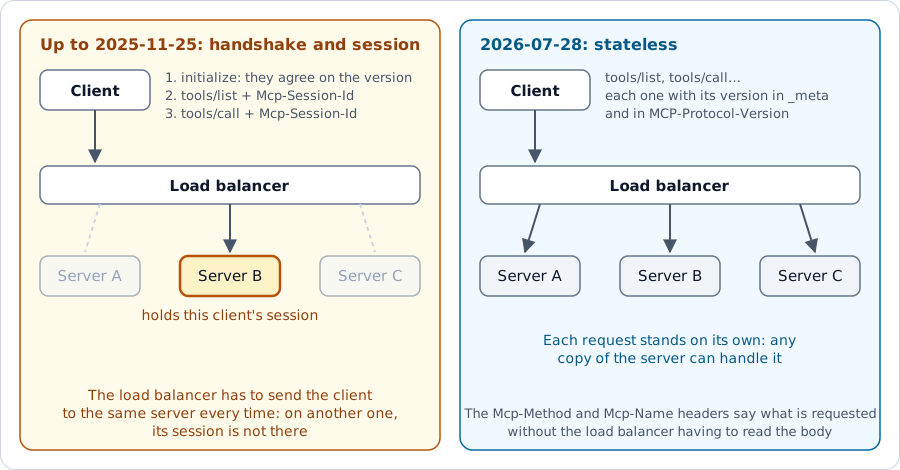
A server for two eras
Clients do not all update at once, so the server has to understand both. The specification allows it and calls it dual-era. The question is how to tell which era each request belongs to, now that there is no handshake to say so:
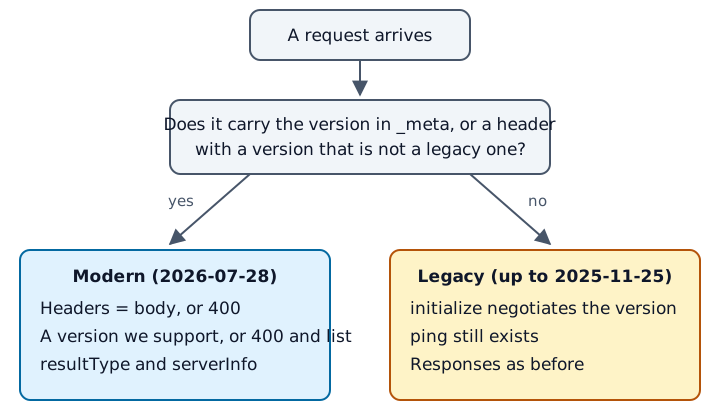
The header alone is not enough to tell them apart: clients from 2025-06-18 onward already sent MCP-Protocol-Version, after initialize. A request is modern if the version comes in _meta, or if the header carries a version that is not a legacy one. The part that decides, in PHP and simplified, written as a WordPress REST API endpoint:
const VERSIONES_ANTIGUAS = array( '2025-11-25', '2025-06-18', '2025-03-26', '2024-11-05' );

$meta   = is_array( $params['_meta'] ?? null ) ? $params['_meta'] : array();
$v_meta = $meta['io.modelcontextprotocol/protocolVersion'] ?? null;
$v_cab  = $peticion->get_header( 'mcp_protocol_version' );

if ( null !== $v_meta || ( null !== $v_cab && ! in_array( $v_cab, VERSIONES_ANTIGUAS, true ) ) ) {
    return responder_moderna( $peticion, $mensaje, $v_meta, $v_cab );
}
// Otherwise, the usual path: initialize, ping, tools/list and tools/call as before.
The tools are the same for both eras; only the response envelope and the checks change.
Checking that the headers match the body
The specification requires rejecting a request whose headers do not match its body: if a load balancer decides based on the header and the server runs what the body says, someone could slip in a different call from the one the load balancer thinks it is letting through.
$cab_metodo = $peticion->get_header( 'mcp_method' );
if ( $cab_metodo !== $metodo ) {
    return error_de_cabeceras( null === $cab_metodo ? 'missing Mcp-Method header'
        : "Mcp-Method header '$cab_metodo' does not match body value '$metodo'" );
}
error_de_cabeceras() responds with HTTP 400 and code -32020. If a name does not fit in an HTTP header (because it has accented letters, for example), it is sent encoded as =?base64?…?=, and it has to be decoded before comparing.
This is how our server responds if the header names one tool and the body another:
$ curl -s -X POST https://jarroba.com/wp-json/jarroba/v1/mcp \
    -H 'Content-Type: application/json' -H 'Accept: application/json, text/event-stream' \
    -H 'MCP-Protocol-Version: 2026-07-28' \
    -H 'Mcp-Method: tools/call' -H 'Mcp-Name: jarroba_article' \
    -d '{"jsonrpc":"2.0","id":2,"method":"tools/call","params":{"name":"jarroba_search","arguments":{"query":"docker"},"_meta":{"io.modelcontextprotocol/protocolVersion":"2026-07-28","io.modelcontextprotocol/clientCapabilities":{}}}}'
{"jsonrpc":"2.0","id":2,"error":{"code":-32020,"message":"Header mismatch: Mcp-Name header 'jarroba_article' does not match body value 'jarroba_search'"}}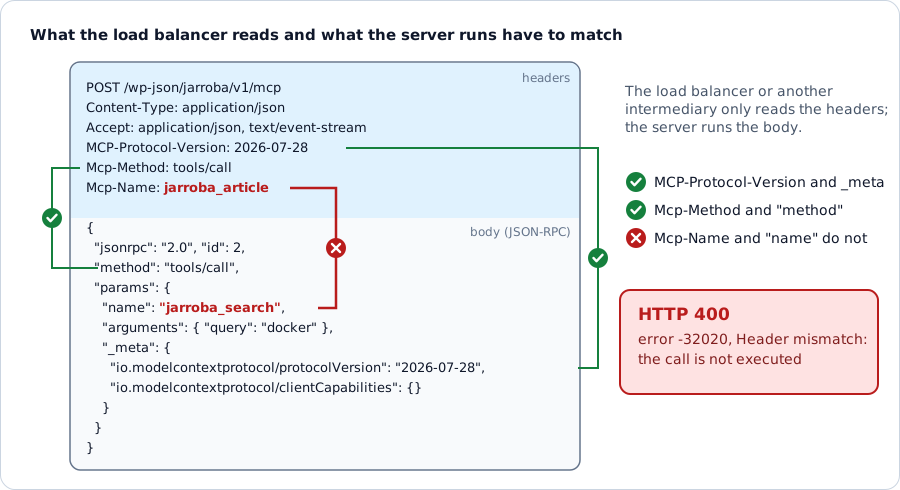
Danger
These checks only apply to modern requests. A legacy client does not send Mcp-Method: if it were required, the client would stop working overnight.
When the client asks for a version you do not have
Instead of simply failing, the server says which versions it has, and the client can retry the request with one of them:
{
  "jsonrpc": "2.0",
  "id": 3,
  "error": {
    "code": -32022,
    "message": "Unsupported protocol version",
    "data": {
      "supported": ["2026-07-28", "2025-11-25", "2025-06-18", "2025-03-26", "2024-11-05"],
      "requested": "2099-01-01"
    }
  }
}
The same list appears in server/discover, which a client can call before anything else to choose a version:
{
  "jsonrpc": "2.0",
  "id": 1,
  "result": {
    "supportedVersions": ["2026-07-28", "2025-11-25", "2025-06-18", "2025-03-26", "2024-11-05"],
    "capabilities": { "tools": {} },
    "instructions": "Search and read computing articles from jarroba.com…",
    "ttlMs": 86400000,
    "cacheScope": "public",
    "resultType": "complete",
    "_meta": {
      "io.modelcontextprotocol/serverInfo": { "name": "jarroba", "title": "Jarroba.com", "version": "1.1.0" }
    }
  }
}
A ttlMs of 86,400,000 is 24 hours: the client can keep this response for a whole day without asking for it again. tools/list carries its own ttlMs; ours is also 24 hours, because the tools hardly ever change.
Testing it with a real client
Testing the server with our own requests proves little: we wrote them with the same reading of the specification as the code. That is why we also tested it with the official MCP client for Python (the mcp package, version 2.3.0, which already speaks 2026-07-28):
import asyncio
from mcp import Client

async def main():
    async with Client("https://jarroba.com/wp-json/jarroba/v1/mcp") as c:
        print("versión:", c.protocol_version)
        herramientas = await c.list_tools()
        print([t.name for t in herramientas.tools])
        r = await c.call_tool("jarroba_search", {"query": "cómo guardo pares clave valor en java", "limit": 2})
        print(r.content[0].text.splitlines()[0])

asyncio.run(main())
versión: 2026-07-28
['jarroba_search', 'jarroba_article']
1. [Map en Java, con ejemplos](https://jarroba.com/en/java-map-examples/) — 2014-03-01 · Lenguajes de ProgramaciónThe client chose the new version on its own, and the question, worded differently from the title, found the right article.
What we learned
If your server already kept no state, the change is small, but it is not zero. For us, it meant era detection, the headers, server/discover, the response envelope and the new errors; the tools did not change. It is worth keeping the legacy part: a server that only understands the new version shuts out clients that have not updated yet, such as those built with the 1.x series of the TypeScript SDK.
Before you start, check which version your SDK speaks. The official Python one already speaks 2026-07-28. The TypeScript one (@modelcontextprotocol/sdk) stays at 2025-11-25 in the latest release of the 1.x series, 1.32.2 (from October 2026); the new one comes in separate packages (@modelcontextprotocol/server, at 2.4.0), with a different API and zod 4: you have to migrate the code, and bumping the package version is not enough. For a local server (stdio), there is less of a rush: there is no load balancer to deal with and no sessions to remove, and clients still speak the earlier versions. You can wait until the 1.x series of the SDK is no longer maintained, or until a major client stops accepting 2025-11-25.
Tool
If you want to try our server from your assistant, the address is https://jarroba.com/wp-json/jarroba/v1/mcp. It is read-only and does not require an account.
Bibliography
- MCP specification 2026-07-28: changelog: the full list of what changes.
- MCP specification 2026-07-28: versioning: how the version is negotiated and how to coexist with legacy clients.
- MCP specification 2026-07-28: HTTP transport: the headers and when to respond with 400 or 404.
- SEP-2575: the proposal that removed the handshake and sessions.
- Official MCP client for Python: the one we used for testing.
“Stateless MCP: what changes in the 2026-07-28 specification” by Ramón Invarato at jarroba.com, licensed under Creative Commons Attribution-NonCommercial-ShareAlike 3.0. Registered at Safe Creative.

You may also like

“If It Works, Don’t Touch It” and Other Excuses That No Longer Hold
Four corporate excuse-phrases, why the calculus has changed with AI, and what to do if you're stuck in an inertia-bound organization.

Tricks for Using AI Well
Context before question, structured prompts, iterative refinement, adversarial agents, human linter, and knowing when to stop. Six AI tricks.
Leave a comment