
Web Scraping in Java with JSoup (with Examples)
Web scraping is a set of techniques for automatically extracting the content of web pages through their HTML code. Learn how to do it in Java with JSoup.
You can download the project for this post by clicking HERE.
Web Scraping (or just Scraping) is a set of techniques used to automatically get the content of web pages through their HTML code. The goal of these techniques is to collect large amounts of data from different web pages, and that data can later be used in many ways: data homogenization, content processing to extract knowledge, enriching the data of a website, etc. Finally, let me say in this introduction that Scraping techniques fall within the fields of Artificial Intelligence and Big Data, in the first phase of collecting data for its later storage, processing and visualization.
In this tutorial we are going to "scrape" (that is, get the data from) the articles and tutorials of this website, using the "JSoup" library (for Java), a library that makes the scraping job much easier. The goal of this tutorial is not to be a tutorial for experts, but an introduction to how to make HTTP connections and how to process and extract the content we are interested in from the HTML we get with the JSoup library. For this tutorial you need a basic knowledge of HTML and CSS (you don't have to be an expert), because when scraping you need to know HTML tags such as head, body, h1, h2, …, h6, p, div, span, table, etc. and the CSS styles that can be applied to those tags with id and class.
Now that we have covered the guidelines and the basic knowledge needed for this tutorial, let's explain how to scrape and get the data of the posts on jarroba.com. First, we are going to use the JSoup library, so we have to import it, either with the ".jar" or through Maven. In this case we created a Maven project and we import JSoup by adding the following to our pom.xml file:
<!-- JSoup -->
<dependency>
	<groupId>org.jsoup</groupId>
	<artifactId>jsoup</artifactId>
	<version>1.8.1</version>
</dependency>
Second, you have to study the HTML structure of the website to see how we can extract its content. In this case we want to extract the information of each post on this website (title, author and date), and we can see that all the posts are inside 'div' tags with the CSS class 'col-md-4 col-xs-12'; that is (as we can see in the following image), we need to get the content between "<div class="col-md-4 col-xs-12"> content </div>"
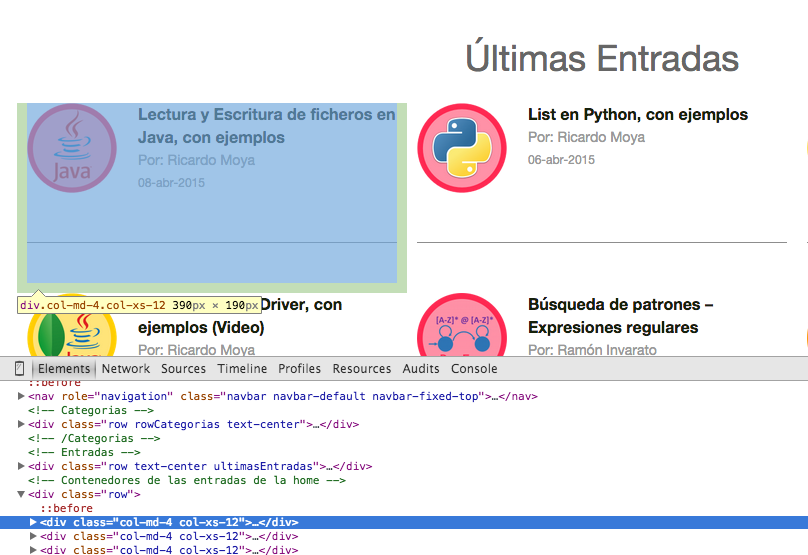
As we can see, it could be relatively easy to write a regular expression and get all the occurrences between the 'div' tags with the CSS class mentioned above (by the way, these are Bootstrap CSS classes), but the JSoup library already gives us the methods we need (and they are very well optimized, since Pattern and Matcher are heavy, slow processes) to get the content between HTML tags.
Inside those tags, we still have to extract the title, author and date. If we look at the HTML in more detail, we see the following:

So with this we have studied the HTML and we already know which tags we have to scrape the data from, so let's now explain how to do the scraping with the JSoup library.
First we have to make an HTTP request to the web page to get its HTML. Beforehand, it would be a good idea (although not necessary, but since we're at it I'll explain it) to know the state, or "status code", of the request to that website. For that, JSoup has the methods we need to get the "status code", and below you can see a method that, given a URL, returns its "status code":
/**
 * With this method I check the Status code of the response I get when making the request
 * E.g.:
 * 		200 OK			300 Multiple Choices
 * 		301 Moved Permanently	305 Use Proxy
 * 		400 Bad Request		403 Forbidden
 * 		404 Not Found		500 Internal Server Error
 * 		502 Bad Gateway		503 Service Unavailable
 * @param url
 * @return Status Code
 */
public static int getStatusConnectionCode(String url) {

    Response response = null;

    try {
	response = Jsoup.connect(url).userAgent("Mozilla/5.0").timeout(100000).ignoreHttpErrors(true).execute();
    } catch (IOException ex) {
	System.out.println("Excepción al obtener el Status Code: " + ex.getMessage());
    }
    return response.statusCode();
}
JSoup gives us the methods we need to get the HTML of a URL; in other words, it makes the HTTP request for a given URL. In the following code snippet we see how, given a URL, it returns an object of the "Document" class with the HTML content:
/**
 * With this method I return an object of the Document class with the
 * HTML content of the website, which will let me parse it with the methods of the JSoup library
 * @param url
 * @return Document with the HTML
 */
public static Document getHtmlDocument(String url) {

    Document doc = null;
	try {
	    doc = Jsoup.connect(url).userAgent("Mozilla/5.0").timeout(100000).get();
	    } catch (IOException ex) {
		System.out.println("Excepción al obtener el HTML de la página" + ex.getMessage());
	    }
    return doc;
}
The "Document" class stores the HTML obtained from a request, and we will later use it to get the content between HTML tags and CSS classes.
Finally, let's show the code that scrapes the posts on the home page of Jarroba.com and then we will explain its details:
public class Scraping {

    public static final String url = "https://jarroba.com/";

    public static void main (String args[]) {

        // I check whether I get a 200 when making the request
        if (getStatusConnectionCode(url) == 200) {

            // I get the HTML of the website in a Document object
            Document document = getHtmlDocument(url);

            // I look for all the posts that are inside:
            Elements entradas = document.select("div.col-md-4.col-xs-12").not("div.col-md-offset-2.col-md-4.col-xs-12");
            System.out.println("Número de entradas en la página inicial de Jarroba: "+entradas.size()+"\n");

            // I go through each one of the posts
            for (Element elem : entradas) {
                String titulo = elem.getElementsByClass("tituloPost").text();
                String autor = elem.getElementsByClass("autor").toString();
                String fecha = elem.getElementsByClass("fecha").text();

                System.out.println(titulo+"\n"+autor+"\n"+fecha+"\n\n");

                // With the "text()" method I get the content inside the HTML tags
                // With the "toString()" method I get all the HTML, tags included
            }

        }else
            System.out.println("El Status Code no es OK es: "+getStatusConnectionCode(url));
    }
}
First we define the URL to get its HTML. Second, we check that the "status code" is equal to 200 and, if so, we get the HTML of the website in an object of the "Document" class. With that Document object, we can get the elements of the website using the appropriate JSoup methods. In this case we are going to get all the posts and store them in an object of the "Elements" class that corresponds to a set of tags and CSS styles. Here we will store all the HTML fragments that correspond to each post (see the first image of this post):
// I get the HTML of the website in a Document object
Document document = getHtmlDocument(url);

// I look for all the meneame stories that are inside:
Elements entradas = document.select("div.col-md-4.col-xs-12").not("div.col-md-offset-2.col-md-4.col-xs-12");
Here we use the "select" method, which takes all the HTML fragments that match a div tag followed by the classes 'col-md-4' and 'col-xs-12'. Since the website has another code fragment that contains the CSS class 'col-md-4', followed by other classes, and it doesn't correspond to any post, so we don't want to select it, we use the "not" method to tell it not to select that HTML fragment. Now we have all the posts in HTML in a list (entradas). Next we have to loop through that list and get the title, author and date from those code fragments. In the same way, that information is inside HTML tags and CSS classes that we have to process (as shown in the second image of this post). JSoup gives us the methods to get the content by passing the name of the CSS class. This is done as follows:
// I go through each one of the posts
for (Element elem : entradas) {
    String titulo = elem.getElementsByClass("tituloPost").text();
    String autor = elem.getElementsByClass("autor").toString();
    String fecha = elem.getElementsByClass("fecha").text();

    System.out.println(titulo+"\n"+autor+"\n"+fecha+"\n\n");

    // With the "text()" method I get the content inside the HTML tags
    // With the "toString()" method I get all the HTML, tags included
}
As we can see, the "getElementsByClass" methods are given the name of the CSS class and they return the content between those tags. Finally, I want to point out what I left in the comment in the previous code snippet: using the "toString()" method is not the same as using the "text()" method. The latter is specific to the JSoup library and gives you the content between the HTML tags, while the "toString()" method gives you the content plus the HTML. Let's look at the output of running the program:
Número de entradas en la página inicial de Jarroba: 9

Diccionario en python, con ejemplos
Por: Ricardo Moya
05-may-2015


DataSet de resultados de partidos de fútbol para su predicción (Machine Learning)
Por: Ricardo Moya
26-abr-2015


Intalar Ubuntu en una máquina virtual con VirtualBox (Video)
Por: Ricardo Moya
15-abr-2015

............
............
The JSoup library is a very powerful library for scraping. In this post we have seen how to make an HTTP connection and get the HTML content to store it in an object of the Document class, and then pull out elements or HTML code fragments (the Element class, or Elements if there are several) as if we were parsing with regular expressions, but without getting into the "hassle" of working with regular expressions. JSoup also has methods to get the content of tags such as h1, h2, …, p, img, etc. which we haven't seen in this example, but if you check its javadoc you will find the methods that let you do those things.
To finish, here is the program that gets all the posts of Jarroba.com (title, author and date), and not only those of the home page as in the example shown:
package com.jarroba.scraping.Scraping_jarroba_java;

import java.io.IOException;

import org.jsoup.Connection.Response;
import org.jsoup.Jsoup;
import org.jsoup.nodes.Document;
import org.jsoup.nodes.Element;
import org.jsoup.select.Elements;

public class Scraping_allPost {

    public static final String url = "https://jarroba.com/page/%s/";
    public static final int maxPages = 20;


    public static void main (String args[]) {

        for (int i=1; i<maxPages; i++){

            String urlPage = String.format(url, i);
            System.out.println("Comprobando entradas de: "+urlPage);

            // I check whether I get a 200 when making the request
            if (getStatusConnectionCode(urlPage) == 200) {

                // I get the HTML of the website in a Document2 object
                Document document = getHtmlDocument(urlPage);

                // I look for all the meneame stories that are inside:
                Elements entradas = document.select("div.col-md-4.col-xs-12").not("div.col-md-offset-2.col-md-4.col-xs-12");

                // I go through each one of the posts
                for (Element elem : entradas) {
                    String titulo = elem.getElementsByClass("tituloPost").text();
                    String autor = elem.getElementsByClass("autor").toString();
                    String fecha = elem.getElementsByClass("fecha").text();

                    System.out.println(titulo+"\n"+autor+"\n"+fecha+"\n");

                }

            }else{
                System.out.println("El Status Code no es OK es: "+getStatusConnectionCode(urlPage));
                break;
            }
        }
    }


    /**
     * With this method I check the Status code of the response I get when making the request
     * E.g.:
     * 		200 OK			300 Multiple Choices
     * 		301 Moved Permanently	305 Use Proxy
     * 		400 Bad Request		403 Forbidden
     * 		404 Not Found		500 Internal Server Error
     * 		502 Bad Gateway		503 Service Unavailable
     * @param url
     * @return Status Code
     */
    public static int getStatusConnectionCode(String url) {

        Response response = null;

        try {
            response = Jsoup.connect(url).userAgent("Mozilla/5.0").timeout(100000).ignoreHttpErrors(true).execute();
        } catch (IOException ex) {
            System.out.println("Excepción al obtener el Status Code: " + ex.getMessage());
        }
        return response.statusCode();
    }


    /**
     * With this method I return an object of the Document class with the
     * HTML content of the website, which will let me parse it with the methods of the JSoup library
     * @param url
     * @return Document with the HTML
     */
    public static Document getHtmlDocument(String url) {

        Document doc = null;

        try {
            doc = Jsoup.connect(url).userAgent("Mozilla/5.0").timeout(100000).get();
        } catch (IOException ex) {
            System.out.println("Excepción al obtener el HTML de la página" + ex.getMessage());
        }

        return doc;

    }
}
“Web Scraping in Java with JSoup (with Examples)” by Ricardo Moya at jarroba.com, licensed under Creative Commons Attribution-NonCommercial-ShareAlike 3.0. Registered at Safe Creative.

You may also like
Web Scraping in Python (BeautifulSoup), with Examples
Web scraping is a set of techniques for automatically getting the content of web pages through their HTML code. Learn how with Python and BeautifulSoup.

“If It Works, Don’t Touch It” and Other Excuses That No Longer Hold
Four corporate excuse-phrases, why the calculus has changed with AI, and what to do if you're stuck in an inertia-bound organization.
Leave a comment