
Analyzing Soccer Results with Power BI
Business Intelligence turns data into information and information into knowledge for business decisions. See it in action analyzing Spanish soccer results with Power BI.
Tool
- You can download the Power BI report from this article by clicking HERE.
Business Intelligence as a concept has existed for many years, although in recent years the term has become very trendy. Business Intelligence is simply a process that consists of transforming data into information and information into knowledge so that this knowledge can be used to make business decisions. The concept itself is simple, but it gets complicated when the amount of data you have is extremely large; that’s why Big Data and Business Intelligence always go hand in hand.
With this short introduction to Business Intelligence out of the way, and since I’ve had to use business intelligence tools like Tableau and Power BI for work, I thought I’d build a report on the results of Spanish league soccer matches from the 1970-71 season to 2016-17, taking advantage of the data set I published and shared in the post “Data Set de resultados de partidos de fútbol para su predicción (Machine Learning)“, which was meant to be used to predict soccer match results using Machine Learning techniques.
The report built for this post can be seen as an exercise in obtaining knowledge from a set of data (business intelligence) that can help you make decisions when filling out a quiniela (the Spanish soccer pools) or placing a bet. With the soccer match data set we can ask ourselves questions like How many matches ended in a home win, an away win, or a draw?, How many matches does a team win, draw or lose?, How many of those matches does it win or lose at its own stadium or away?, and for a specific match, What were its results, how many goals were scored, etc.?, and so on, any question we can think of to help us decide which result to put on the quiniela. To do this kind of analysis you need some knowledge of data processing, such as filtering, grouping and joining data, performing math operations on it, etc. These are concepts we won’t explain in this post; but it’s worth saying that Power BI makes these operations easy, without needing to know any query language, since it offers an environment where you can do filters, group by, joins, etc. interactively. The report I built is shown below, since Power BI lets you embed reports with an iframe (a report with 3 sections).
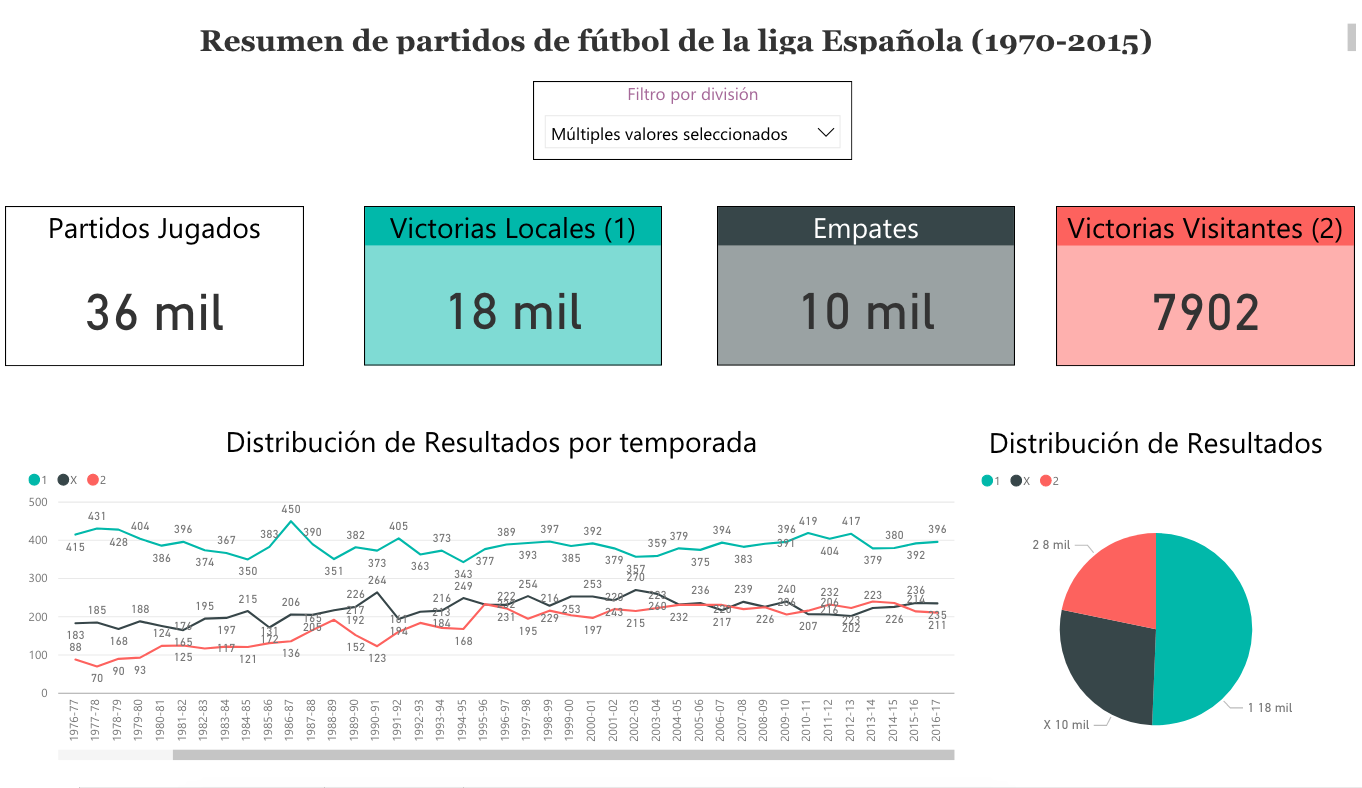
First, we have a count of how many matches have been played (36K), how many ended in a “1” (18K) on the quiniela, and how many in an “X” (10K) and a “2” (7.9K). With this information we can see that almost 51% of results are a “1”, 27.5% are a draw and almost 22% are a “2”. We can also see that historically this has been the trend, although you can also notice that in recent years draws and away wins have been growing:
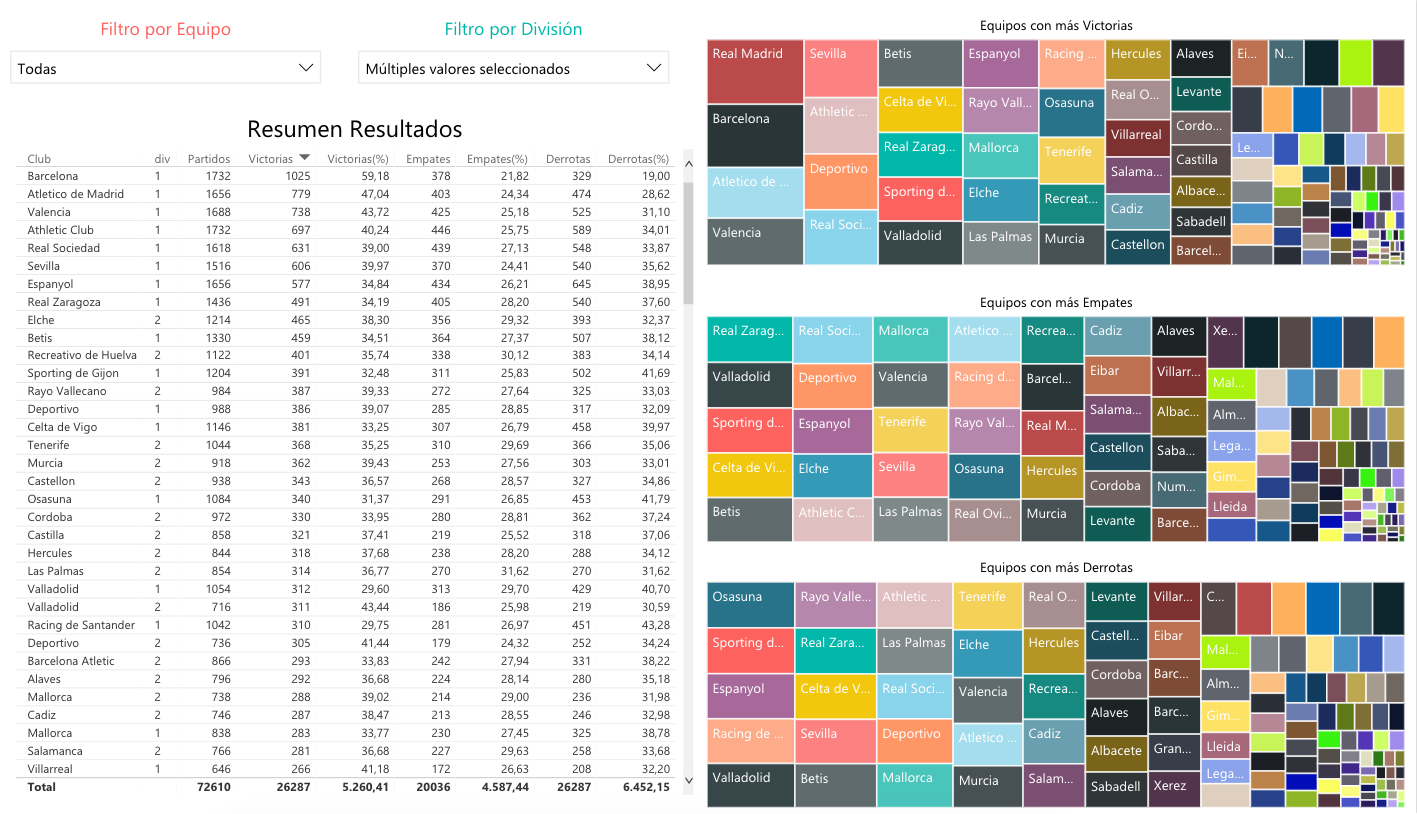
The second report shows, in a table, the number of matches each team has played and how many of them it has won, drawn and lost, along with the corresponding percentages. We can see that Real Madrid and Barça are the two teams that have won the most matches, since by default the table is sorted by number of wins, although you can sort the table by any column you want. In addition, there are three Voronoi charts showing the teams that have won the most matches, the ones that have drawn the most and the ones that have lost the most. As you can see, Zaragoza and Valladolid are the teams that draw the most matches, and Osasuna and Sporting de Gijón are the ones that lose the most.
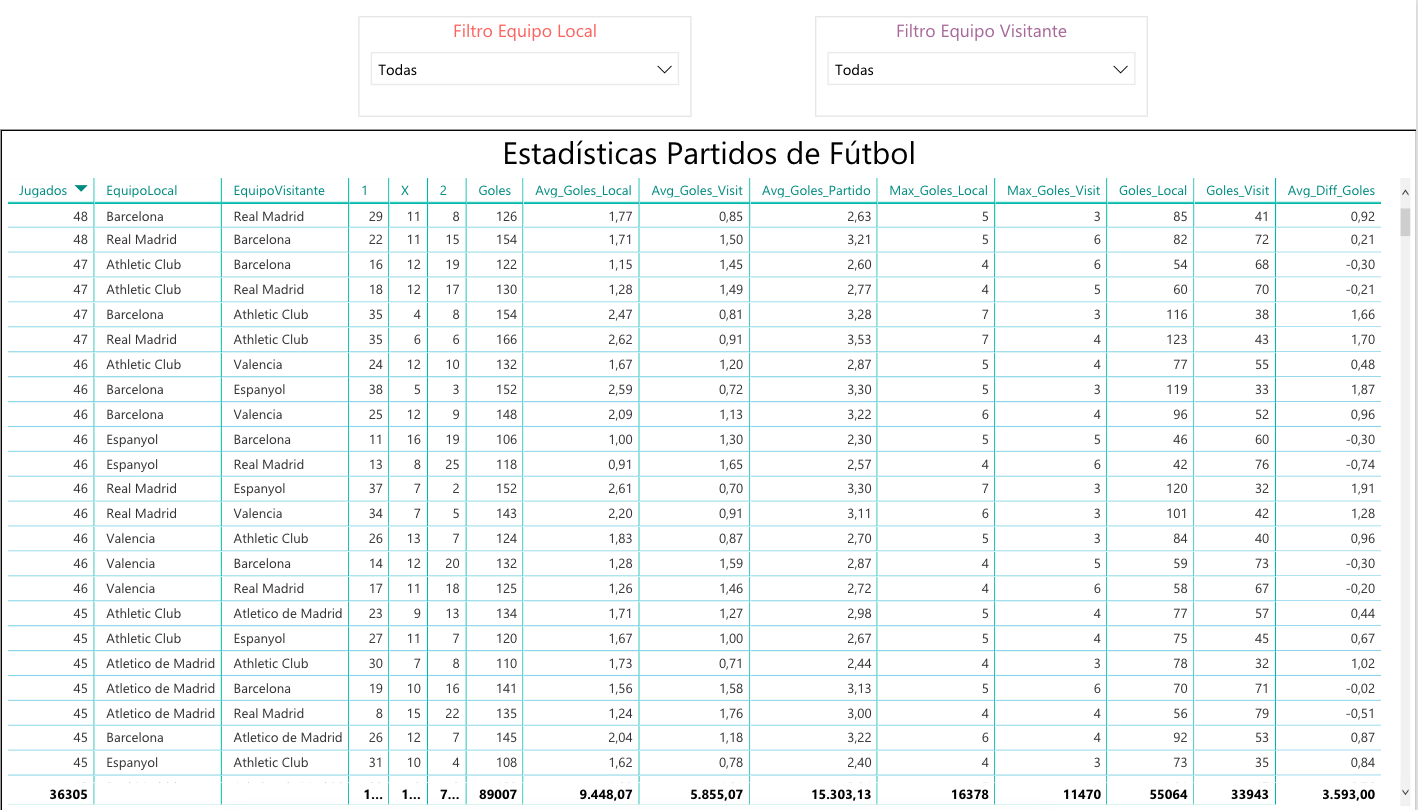
Finally, there is a report by soccer match played, with interesting data about each one. As you can see, the most played matches are Barça-Real Madrid and Real Madrid-Barça, and for those matches you can see information such as: home wins, away wins, draws, how many goals have been scored, the average number of goals per match, how many the home team scores, how many the away team scores, the match in which the home team scored the most goals, how many the away team scored, etc. Also, on the right side of the report you can filter by home team or away team (or both). The table can also be sorted by any field.
With a report like this I don’t think we’ll get a perfect 15 on a quiniela (or maybe we will), but it will surely help us fill one out with a solid understanding of the quiniela and the matches played.
As a quick assessment of Power BI, it’s true that (like Tableau) it is a fairly powerful visual tool that lets you analyze and transform data so it can be drawn in a report. For this report the data set was under 3MB, and I was able to perform quite a few operations on it quickly; however, it lacks certain statistical operations (at least in the free version) such as calculating variance, standard deviation, etc., which libraries like Pandas (for Python) can do, although using them requires programming knowledge. The downside is that these tools can’t handle large amounts of data: I ran tests with the MovieLens data set of 10M ratings (from users), which was around 250MB of data, and it took a very long time to process and analyze (on an i7 with 16GB of RAM); for example, it took 3-4 minutes to do a simple grouping by movie and get the average rating. For cases like this, it’s best to use data in Power BI that has already been processed and aggregated by an external tool.
“Analyzing Soccer Results with Power BI” by Ricardo Moya at jarroba.com, licensed under Creative Commons Attribution-NonCommercial-ShareAlike 3.0. Registered at Safe Creative.

You may also like

“If It Works, Don’t Touch It” and Other Excuses That No Longer Hold
Four corporate excuse-phrases, why the calculus has changed with AI, and what to do if you're stuck in an inertia-bound organization.

Tricks for Using AI Well
Context before question, structured prompts, iterative refinement, adversarial agents, human linter, and knowing when to stop. Six AI tricks.
Leave a comment