
Android Error – Debug Certificate Expired
Android project suddenly shows a red cross after a year? Your debug certificate has expired. Learn how to fix it by deleting debug.keystore in Eclipse.
One day our project works perfectly, and the next day it shows a red cross. This happens when we’ve been working on the same project for exactly one year. What’s going on is that our certificate has expired, since it’s only valid for one year.
We can see the following error in the “Problems” view:
Error generating final archive: Debug Certificate expired on xx/zz/yy hh:mm

Solution
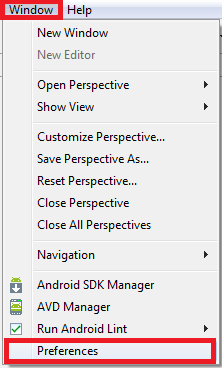
To fix it, we check where the "debug.keystore" is installed in "Windows / Preferences".
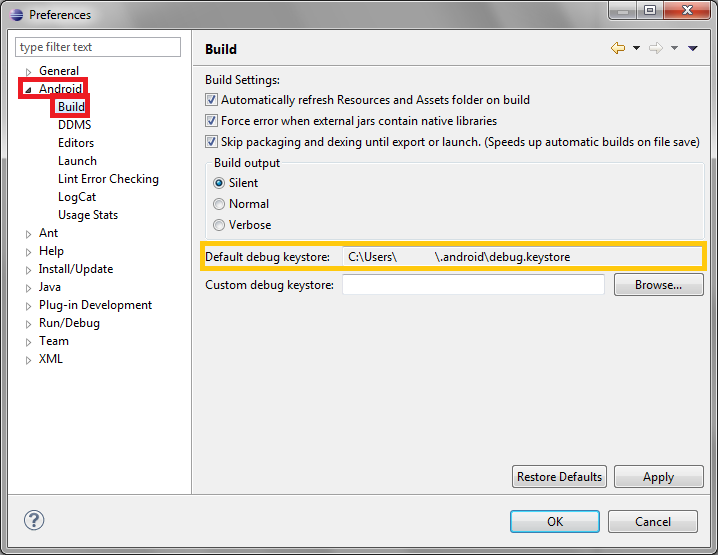
In the sidebar on the right, we select "Android / Build" and look at the path where the keystore is located in "Default debug keystore".
With Eclipse closed, we go to our user folder in Windows and then to the “.android” folder. We find “debug.keystore” and delete it.
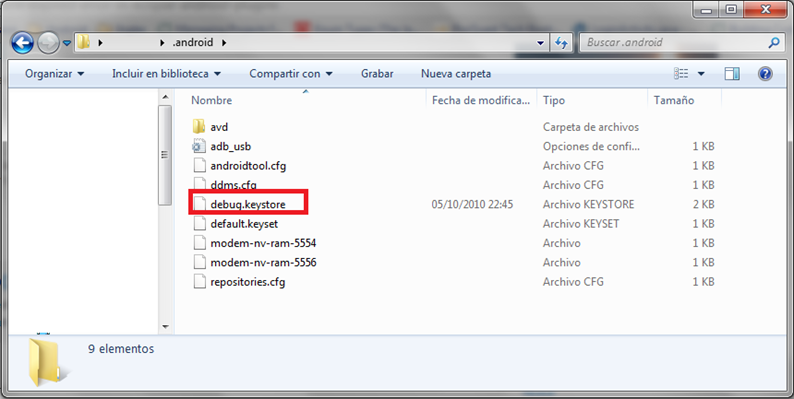
When we restart Eclipse, it will generate a new one that will last another year.
But now you’ll get a different error when you try to run an APK (app) on the emulator where it was previously installed with the old certificate. See the error: Different certificate when trying to reinstall the app on the emulator.
“Android Error – Debug Certificate Expired” by Ramón Invarato at jarroba.com, licensed under Creative Commons Attribution-NonCommercial-ShareAlike 3.0. Registered at Safe Creative.

You may also like


Android Error – Different Certificate When Trying to Reinstall the App on the Emulator or Phone
Getting a 're-installation failed due to different application signatures' error in Android? Learn why it happens and how to fix it step by step.
Android Error – Eclipse Throws an Error That Doesn’t Exist Anywhere
Eclipse shows a red X on your Android project but no error anywhere? Follow these step-by-step solutions to fix the phantom error and the R.java problem.
Android Error – The Log Shows Nothing
Is your Android Log empty even though the emulator or device is connected? Learn how to fix this common Eclipse error with a quick restart.
Android Error – java.lang.NoClassDefFoundError for No Apparent Reason
Getting a java.lang.NoClassDefFoundError in Android for no apparent reason? Follow these two simple fixes in Eclipse to get your project working again.
Leave a comment