
Android Error – Different Certificate When Trying to Reinstall the App on the Emulator or Phone
Getting a 're-installation failed due to different application signatures' error in Android? Learn why it happens and how to fix it step by step.
When you try to run the app, you get the following error:
Re-installation failed due to different application signatures.
You must perform a full unistall of application. WARNING: this will remove the application data!
Please execute 'adb unistall X' in a shell.
Launch canceled!

It may be because the app is used on several computers or because the certificate has been renewed. But most likely the certificates simply don't match (the one from the previously installed version doesn't match the one you are trying to install). This usually happens when you try to launch the same app from a different or moved project.
This error can come from different sources. Let's go through a solution for each one.
Solution for a renewed certificate
Option A (recommended): Uninstall the app from the emulator and run it again from Eclipse (Settings/Apps/Manage apps).
Option B (only if you don't mind losing all the data on the emulator or physical device, this can't be undone): Delete the emulator and create it again. If it's a phone: erase all the data on the phone and leave it as it was at the start (Settings/Privacy/Factory data reset).
Solution for switching computers or moving the project
If you are going to move the project from one computer to another, here is what you need to do to avoid problems.
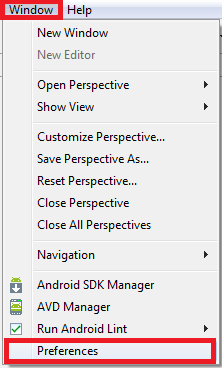
On the old computer, go to "Windows / Preferences".
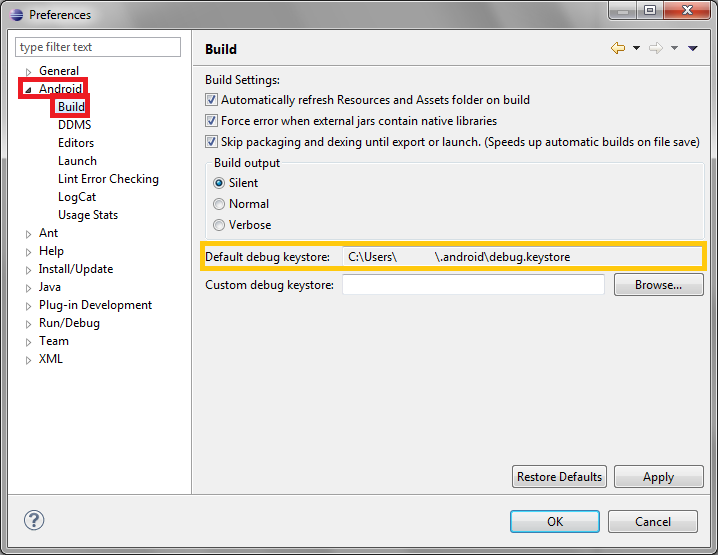
In the panel on the left, select "Android / Build" and check the path where the keystore is located in "Default debug keystore".
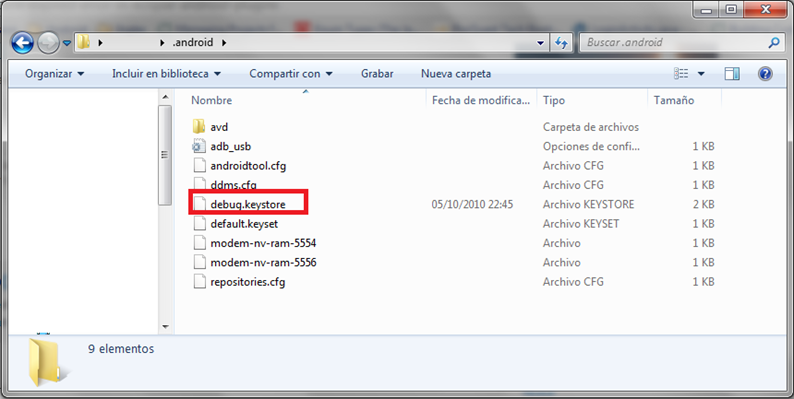
Go to that folder and copy "debug.keystore" to the new computer (for example, to the new computer's desktop).
In Eclipse on the new computer, go back to "Windows / Preferences" and then to "Android / Build". In the "Custom debug keystore" field, select the keystore you brought from the old computer. Click "OK".
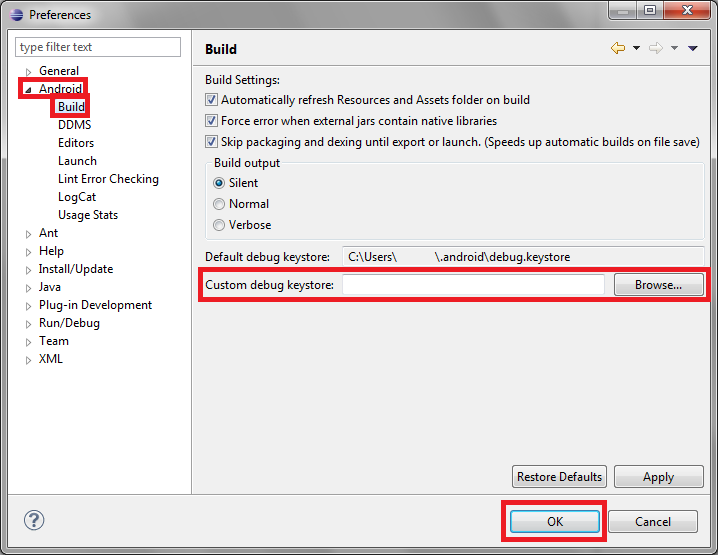
If you run the app again, it should work.
Note: if you get other certificate errors, check that it isn't caused by an expired certificate.
“Android Error – Different Certificate When Trying to Reinstall the App on the Emulator or Phone” by Ramón Invarato at jarroba.com, licensed under Creative Commons Attribution-NonCommercial-ShareAlike 3.0. Registered at Safe Creative.

You may also like


Android Error – Debug Certificate Expired
Android project suddenly shows a red cross after a year? Your debug certificate has expired. Learn how to fix it by deleting debug.keystore in Eclipse.
Android Error: The Android SDK Won’t Let You Update
Android SDK update failing with a 'folder failed to be renamed or moved' warning? Learn why it happens and two simple ways to fix it.
Android Error – Problems Installing the ADT or SDK
Getting "Cannot complete the install because one or more required items could not be found" when installing the Android ADT or SDK? Here is how to fix it.
Android Error – The Emulator Disconnects and Doesn’t Launch the App
Does Eclipse show "Emulator-XXXX disconnected" even though the Android emulator works fine? Find out why it happens and how to fix it quickly.
Leave a comment