
Annotations in Java
Java annotations are simple notes that can change how your program works. Learn to use and create them, with Reflection and Spring dependency injection.
Before you start reading about Annotations in Java, I should point out that this article has two parts, depending on the developer’s point of view:
- As a developer who uses annotations: This is pretty easy to learn if you know basic Java programming. Many libraries use them (like Spring), and even Java itself does (like @Override). So if you get along well with Java and you don’t need to know how to develop annotations, go ahead and keep reading (I’ll let you know when you need Reflection. If you need to learn basic Java, I recommend you read this other article).
- As an annotation developer: This is a different story. Although it’s also easy to learn, this part depends heavily on the Reflection article we already covered (If you don’t know much about Reflection and you plan to keep going anyway, let me try to talk you out of wasting your time with this question: What can you tell me about the classes Class, Field, Method, and other related ones? What you need is in your head)
Java annotations are just that: notes, as the name says. They aren’t very different from the notes you take in a notebook with pen and paper, except that Java ones can change the behavior of the program, if we want.
Note about the Java version: The best version to use annotations is Java 1.8 or later (with Java 1.7 they also work very well, it only lacks some small detail that doesn’t matter much when programming). Earlier versions lack some annotation features (if you follow this article and your IDE tells you that something doesn’t exist, you most likely have a very old version of Java). Java annotations can be used since Java 1.5.
Note about the code in this article: You can download it at the end.
Introduction to annotations
Let’s assume the following example (if it reminds you of school examples, it’s much further from reality, and it’ll be a lot more fun, I promise 🙂 ): we have a “Bolsita” (little bag) that has exactly 50 “almonds”. We know that 1 almond has:
- 500 calories
- The tree it’s the fruit of is the almond tree
- It has vitamin E
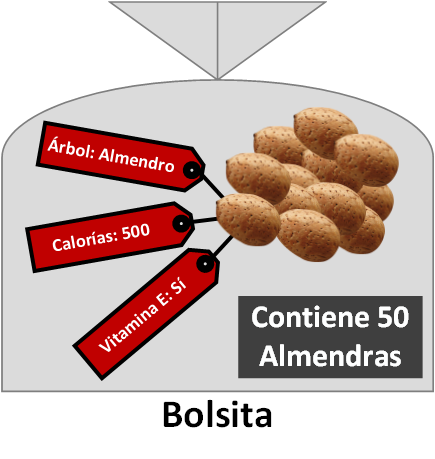
We always want to have all of this data at hand. If we did this with basic Java, we’d end up with the following class:
public class Bolsita {

	// Calories: 500
	// Tree that bears this fruit: Almond tree
	// Has vitamin E: Yes
	private int almendras = 50;

	public int getAlmendras (){
		return almendras;
	}

}
Looking at it this way, it does what we wanted, but it gives us no functionality and it’s pretty ugly. By functionality I mean: how would you calculate the total calories of 35 almonds if the value is in a comment? That is, doing the simple operation “35 * 576”. It’s complicated when the data is in a comment (a comment can be a note, like in this case; but that’s not what we want, we want to annotate so that this data is useful in the program).
We could make a Contract class (a Contract class is a class that only serves to hold final values; in other words, values that will never change and that help the Java IDE give you quick access to them. For example, the names of the tables in a database; that way, when we want to query the database, just by typing the class name and a dot, the IDE will suggest the variables -with the table names- that the class has inside) in which to note the calorie values, the tree, and whether or not it has vitamin E.
public class AlmendraContract {

	public final int calorias = 500;
	public final String arbolQueDaEsteFruto = "Almendro";
	public final boolean tieneVitaminaE = true;

}
A quick aside, because at this point, if you’re an advanced Java developer (if they don’t ring a bell, don’t worry, from now on they will 😀 ), this may have reminded you of Java property/configuration files (Java Property File. These files are used to write constants in a single file, or a few well-placed ones, for possible future modification; they usually store things like access credentials for databases, static paths, or language files with the application’s translations). We could use a property file for this same purpose, as I show in the following example (I’ve written it in Java Property File format, but you may have seen it in XML too), but we lose dynamism. Annotations don’t replace these configuration files in every case; they complement them and give programming much more versatility, ease and clarity. A possible example of a Java Property File would be (if you’re wondering what format they’re saved in: none in particular, it could be a txt or even a Word document, although by convention they usually end in the “properties” extension; you simply create a folder and point to the file in that folder from the Java class; a very common name for these property files is “MyProperties.properties”, and for the Almond example it could be “Almendra.properties”):
# My properties for Almonds (the # symbol starts a comment)
calorias=500
arbolQueDaEsteFruto=Almendro
tieneVitaminaE=true
I’m not going to go further into Java property files, I just wanted you to keep their relationship with Java annotations in mind. If you want to know more, see Properties (The Java Tutorials). Now I’ll continue with the Contract example from before.
This way we could do the following operation to get the total calories of the almonds (I instantiate Bolsita because it’s a class we’ll use the normal way we’re used to working with objects; we’ll be able to modify its contents dynamically, as well as use the methods of the Bolsita object. The Contract class is never instantiated since that makes no sense, you access the value of its variables directly):
Bolsita bolsita = new Bolsita();
int caloriasTotales = bolsita.getAlmendras() * AlmendraContract.calorias;
This is very useful as long as the variables of the Bolsita class don’t change. Suppose that today we make a Bolsita with almonds from a commercial brand that have 576 calories, but tomorrow we make another one with a different brand of almonds that have 345 calories. We’ve already broken it. We could make another Contract class with the new data, but then we have the problem of duplicating classes just to change a single variable. Also -aside from the duplicated classes- this gets us far from having the characteristics of the nut at hand inside a single class, because by making Contract classes we pull the values out of the Bolsita class, and in this case that’s not what we want.
Now suppose we mix nuts with candy inside the same Bolsita, and we want to add up the number of nuts we have. We could have the following structure:
public class Bolsita {

	// It's a nut
	private int almendras = 50;

	// It's a nut
	private int avellanas = 40;

	// It's NOT a nut
	private int caramelos = 30;

}
Wouldn’t it be useful to tell which ones are nuts and which things aren’t?
We could deduce it: I instantiate bolsita and take the values of only “almendras” and “avellanas”, which are nuts. This is useful if we’re sure those variables exist in every case. Let’s add one more “but”: what happens if we aren’t sure which nuts will be inside the Bolsita? Let me explain.
If you’ve never touched annotations you may think: well, I always know which variables my classes have. And what happens if a friend tells you: “I’ll write the Bolsita class for you -but you’ll never know (and I stress never) which variables I’ll write inside- what’s more, I’ll make several bag classes (similar to Bolsita, but not Bolsita) that I can name whatever I want and with different variables in each of them (Your friend could create only the classes BolsitaA and BolsitaB, or go with names like BolsitaMarcaA, BolsitaMarcaB and BolsitaMarcaC; either way, you won’t know: the class name, the number of classes, or the contents); I need you to tell me the sum of all the calories of each bag, counting only the nuts that I’m going to mark on top of each variable”. With traditional programming we may have a problem.
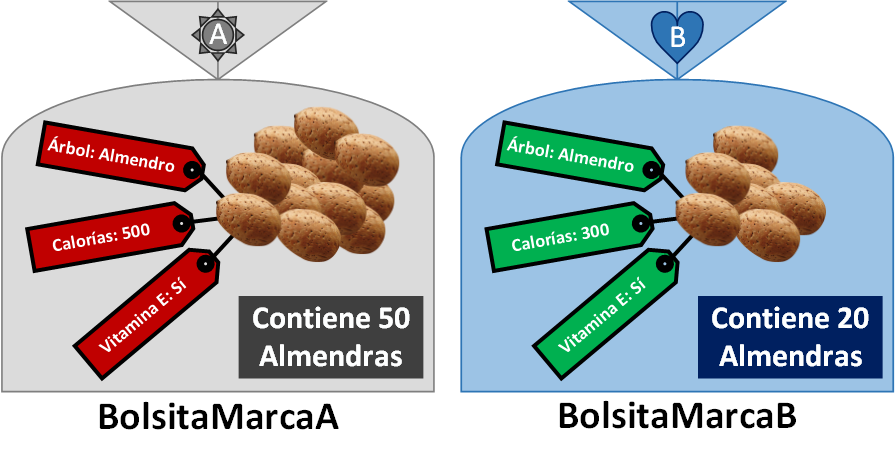
Let’s drop the preamble and head toward the solution to all our problems.
Without explaining anything else, we’ll annotate the above directly with Java annotations. Look how beautiful it is:
public class Bolsita {

	@FrutoSeco(calorias=500, tieneVitaminaE=true, arbolQueDaEsteFruto="Almendro")
	private int almendras = 50;

	@FrutoSeco(calorias=600, tieneVitaminaE=true, arbolQueDaEsteFruto="Avellano")
	private int avellanas = 40;

	@Dulce(calorias=2500)
	private int caramelos = 30;

}
I don’t think I need to tell you much. We’ve annotated the nuts as “FrutoSeco” (nut) and the sweets as “Dulce” (sweet) (besides “FrutoSeco” and “Dulce” there could be other possibilities). Also, we’ve added the information in a way that is very comfortable to read both for us and for the compiler.
If we write the Bolsita class above as-is in our favorite IDE, the compiler will tell us that those annotations don’t exist; we have to create them.
If the nuts topic doesn’t make things clear for you, besides giving you an example of using Spring annotations at the end (more information at the end of the article), I’ll give you another fairly intense example of using annotations, with a library I developed for Android that created the database with its tables automatically (I haven’t made the library public because it’s very alpha; I’m just including it so you can get an idea of how far we can go using annotations). Thanks to annotations I could easily create a Pojo class (a Pojo class only holds stored variables, no logic) with the structure of the database, and it would automatically generate all the SQLite “CREATES” without me getting a single SQL statement wrong. And I could also reuse this structure very easily to work with the application -since it was already the Pojo itself- saving me a lot of code:
@BaseDeDatos(version = 1)
public final class NombreDeLaBaseDeDatos {

	@Tabla
	public final static class miTablaUsuarios {
		@Columna(esPrimaryKey = true, esAutoIncrement = true, esUnique = true)
		public long id;

		@Columna(permitirNull = false, valorPorDefecto = " ")
		public String nombre;

		@Columna()
		public int telefono;
	}

	@Tabla
	public final static class miTablaCoches {
		@Columna(esPrimaryKey = true, esAutoIncrement = true, esUnique = true)
		public long id;

		@Columna
		public String modelo;

		@Columna(permitirNull = false, valorPorDefecto = "X")
		public int matricula;
	}

}
I think this makes the power of Annotation and Reflection clear.
After this introduction to understand how deep annotations go, we’ve reached a turning point. I’m going to show you how to use third-party annotations in the part called “Developer who uses annotations”; it’s very easy and you can continue with the next section without problems. But when you reach the “Annotation developer” section, where I’ll guide you through creating your own annotations, you’ll need a deep knowledge of Reflection.
Developer who uses annotations
Using annotations is pretty easy; we don’t need to know much more than basic Java, since the IDE (like Eclipse) usually makes them easy by suggesting them. Others included in the Java libraries are even easier to use, since the IDE usually adds them automatically or suggests them in warnings.
Although we’ll now see some very commonly used examples, obviously I’m not going to explain every annotation that exists in the Java packages; this article is about annotations in general, and my goal is that after reading it you can get by on your own with ease.
Annotations in comments (to generate Java documentation)
You’ve surely seen hundreds of times how annotations appear everywhere in source code on the Internet, above classes and methods. For example, the following code:
/**
 * Class description
 *
 * @author Ramón Invarato
 * @version 1.2
 * @see <a href="https://jarroba.com/">Jarroba</a>
 *
 */
public class Inicio {

	/**
	 * Method description
	 *
	 * @param caracter asks for a parameter of type char
	 * @param texto asks for a parameter of type String
	 * @return Returns an integer
	 */
	public static int probarComentariosAnotados(char caracter, String texto){
		return 0;
	}

}
These annotations are very useful for creating proper documentation, and automatically at that (What gets created automatically is a website with all the documentation of the classes you’ve written, like the one you can see at Object (Java Platform SE 8) (Oracle Docs); if you thought the IDE read your mind and created the documentation text automatically, I have to break the illusion, because not yet, and I have my doubts it will in the near future, so get to writing documentation by hand like it’s been done since writing was invented, except that at least now we have keyboards 😉 ).
So if you weren’t using them, you no longer have an excuse. I recommend that from now on you use them properly on every method and class; your future self and other developers who use your code or library will thank you.
Some of them are:
- @author: the author of the class or method
- @version: the version of the code
- @see: something that’s worth looking at, such as websites. You can use HTML; for a link we can use the structure: <a href="url">name</a>
- @param variableName: to explain a parameter of the class
- @return: to indicate what the method returns
There are other annotations for creating documentation that you can check at http://docs.oracle.com/javase/1.5.0/docs/tooldocs/windows/javadoc.html
Annotations in code
@Override
This is an annotation already created by Java -and used a lot- when inheriting from a class or an abstract class, as well as when implementing an interface. It’s “@Override”, which means overriding a method. It’s an annotation that helps the programmer, so that at a glance at a class you immediately know whether a method has been overridden from a superior class (inherited, abstract or interface).
For example, suppose we have the following abstract class:
public abstract class ClaseAbstracta {

	public abstract void metodoParaSobrescribirEnHijo();

}
If we write another class in an IDE like Eclipse, where we inherit from the abstract class above:
public class ProbarOverride extends ClaseAbstracta {

}
The IDE will warn us that we must override it, since an abstract method requires being overridden. If we hover the mouse over the red warning, the possible options to fix the problem automatically will appear; although we could also do it manually, it’s better to let the IDE do it for us 🙂

We can click on “Add unimplemented methods” so that Eclipse automatically creates the method with the @Override annotation; we could also write it by hand. In the end we’d have the following:
public class ProbarOverride extends ClaseAbstracta {

	@Override
	public void metodoParaSobrescribirEnHijo() {

	}

}
Although I’ve done it step by step here, using this annotation took us less than a second.
All that’s left is to add the content and keep working.
@SuppressWarnings
This annotation simply tells the IDE not to bother us with certain warnings.
For example, if we use a method that is deprecated, the IDE will underline it in yellow and warn us with a yellow triangle. Suppose we want to use this method at all costs, but we don’t want the IDE to notify us of the warning.
We can either write it by hand or let the IDE write it for us.
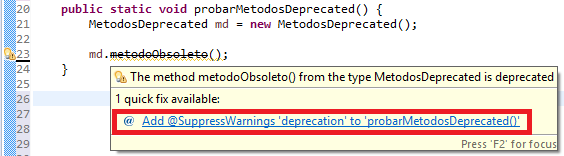
This @SuppressWarnings annotation requires us to pass it a single String value, in which we put predefined texts that tell the IDE which warning we don’t want to be notified about.
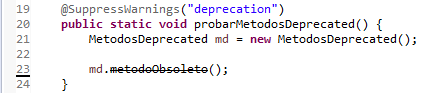
@Deprecated
If you’ve programmed with Java, another annotation you’ll have come across is the one for deprecated code. When we’re learning Java we may have wondered: how do they mark code as deprecated? Very simple, by using the “@Deprecated” annotation on a method. From then on, every time that method is used, the IDE will warn that it’s deprecated and advise using a different one.
To help you understand the context of its use a bit better, here’s an example. Years ago we wrote a class that is widely used by other classes and their methods. After so much time we’ve created another method that does the same thing but better; it may even require a different number of parameters, process differently or return a different type of result with another format or type. The bad part is that we can’t freely clean up the old methods -since we could leave other classes that use them broken- and the old ones must coexist with the new ones. Now, we want the old ones not to be used in the future, and to give priority to the new ones.
For this we annotate the method with @Deprecated, which indicates that it’s already obsolete, that it works but that a better, newer one exists, and that it will possibly not be maintained.
public class MetodosDeprecated {

	@Deprecated
	public void metodoObsoleto(){
	}
}
Along with the @Deprecated method annotation, we usually want to write its documentation (you can see it when hovering over the method if you work with an IDE), telling all developers that this method is deprecated and recommending which one they can use that’s better than the old one. Like the following example:
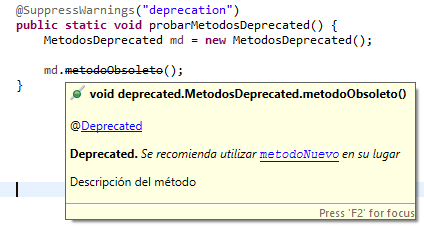
To indicate that it’s deprecated and have the documentation automatically show that it’s deprecated, we simply use @deprecated.
And to be able to click and go directly to the documentation of the new method, we use {@link} like this: {@link package.Class#method() simpleName}
Let’s see how all of this works together:
public class MetodosDeprecated {

	/**
	 * Method description
	 *
	 * @deprecated It's recommended to use {@link deprecated.MetodosDeprecated#metodoNuevo() metodoNuevo} instead
	 */
	@Deprecated
	public void metodoObsoleto(){
	}

	/**
	 * New method
	 */
	public void metodoNuevo(){
	}

}
Then we can use these methods from another class to see how the IDE warns us:
MetodosDeprecated md = new MetodosDeprecated();

md.metodoObsoleto();
md.metodoNuevo();
Annotation developer
We’ll continue and expand the first example with the nuts. We left off with the following code:
public class Bolsita {

	@FrutoSeco(calorias=500, tieneVitaminaE=true, arbolQueDaEsteFruto="Almendro")
	private int almendras = 50;

	@FrutoSeco(calorias=600, tieneVitaminaE=true, arbolQueDaEsteFruto="Avellano")
	private int avellanas = 40;

	@Dulce(calorias=2500)
	private int caramelos = 30;

}
With this we can now program it so that only the nuts are selected, it does the math and returns the total calories. Let’s see how it’s done, but first we need to create the annotations (in the example code above we’ve used the annotations but haven’t created them; so to speak, I’ve created the instantiated object for you, and the class is still missing). If you know how to create a Java class or interface, it’s almost the same with a few extras.
We’re going to start complicating it a bit more, but only a bit, so that you see it as clear as crystal water.
- First, we know we can have several kinds of “Bolsita” classes with different things inside, so I’ll rename it to “BolsitaMarcaA” (Reason? Simply because I feel like it, and because I want you to see how it works when processing several different classes 😉 ).
- Second, we add another nut such as “pinones” (pine nuts; compilers don’t like the “Ñ” in “piñones”). To it we add the annotation with the calories and the tree, but we don’t add whether or not it has vitamin E. Leaving out the vitamin E variable is meant to show that it isn’t mandatory to add all the variables; although for others we’ll want to define them as mandatory, like “calories”, since without it we can’t do the calculation.
- Third, we’ll add some more sweets. The “Dulce” annotation has only one value inside. Why write “calorias=2500” if we only want a single value, “2500”? Well, out with “calorias=”, leaving: “@Dulce(2500)”. Note that this trick of dropping the variable name only works if a single value is passed to the annotation.
Fourth, I’ll add some other variables without annotations to show that it doesn’t affect us if something has no annotation. We could also add methods, constructors and inner classes, and without annotations we won’t read them; we’ll only read what we want, what we’ve annotated.
public class BolsitaMarcaA {
	@FrutoSeco(calorias=500, tieneVitaminaE=true, arbolQueDaEsteFruto="Almendro")
	private int almendras = 50;

	@FrutoSeco(calorias=600, tieneVitaminaE=true, arbolQueDaEsteFruto="Avellano")
	private int avellanas = 40;

	@FrutoSeco(calorias=700, arbolQueDaEsteFruto="Pino")
	private int pinones = 30;

	@Dulce(2500)
	private int caramelos = 20;

	@Dulce(3800)
	private int chocolates = 15;

	private int juguetesPromocionales = 1;
}
Let’s get to work. We need to create two annotations, “FrutoSeco” and “Dulce”. In the end we’ll have a project structure like the following (I created the package structure however I saw fit):
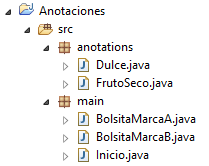
Declaring our annotations
To create the annotation inside the file “FrutoSeco.java”, we simply write, as in every class, “public” followed by the name of the file (in this case, of the annotation). One difference is that where the word “class” usually goes in a class declaration (for example “public class MyClass {}”), here you write the word that contains an at sign, “@interface” (This shouldn’t be confused with a Java interface, although the idea is very similar).
public @interface FrutoSeco {

}
Inside we have to declare the variables we use when using the annotation, which were:
- “tieneVitaminaE” of type boolean
- “calorias” of type int
- “arbolQueDaEsteFruto” of type String
In the second step above we saw that we can declare variables as mandatory or optional. For that we use the word “default” followed by the default value, so that the developer using our annotation has the option of adding the value of the variables if they wish. On the other hand, if we want its declaration to be mandatory, we simply won’t put “default”.
In our example we’ll make “tieneVitaminaE” and “arbolQueDaEsteFruto” optional, and “calorias” mandatory.
public @interface FrutoSeco {
	boolean tieneVitaminaE() default false;

	int calorias();

	String arbolQueDaEsteFruto() default "";
}
We almost have it. What do you mean almost, isn’t it all done? Let’s not celebrate too early, two things are missing: where our annotation will be placed (on a class, on a variable, etc.) and whether it will be usable at runtime (maybe we only want it to warn us in the compiler, but not at all at runtime). For that we’ll use two annotations that are meant for creating annotations:
- @Target: the target of our annotation, that is, where we’ll allow it to be placed: variable, class, method, constructor, etc. Not all annotations are for annotating everything; some may work on several things, others on only one. This annotation can be passed one element type (ElementType) or several in an array (for example, if we want it to be used only on global variables and methods we’d write: “@Target({ElementType.FIELD, ElementType.METHOD})”). The ElementType enum consists of:
-ANNOTATION_TYPE: annotation.
-CONSTRUCTOR: constructor.
-FIELD: global variable (a variable inside a class, but outside the methods).
-LOCAL_VARIABLE: local variable (a variable inside a method).
-METHOD: method.
-PACKAGE: package (“package” appears on the first line of any “.java” file).
-PARAMETER: a method parameter.
-TYPE_USE: types (object types, such as: String, int, Object, MyObject, etc; and even array declarations, that is, before the brackets “[]”)
-TYPE_PARAMETER: type parameter (for the parameters of generic types; that is, to annotate the parameters in the following example: “<typeParameterA, typeParameterB>” )
-TYPE: any element (yes, it’s a wildcard so that it works with everything: classes, methods, variables, etc)
- @Retention: Indicates how the annotation is going to be stored. We have to choose a single enum value of RetentionPolicy:
-SOURCE: The annotation is retained only at the source code level; that is, the annotation is discarded during compilation (it won’t be written to your program’s bytecode, so it can’t be used at runtime).
-CLASS: The annotation is retained by the compiler at compile time, but the Java Virtual Machine ignores it.
-RUNTIME: It’s retained by the Java Virtual Machine, so it can be used at runtime. This means the annotation will be available at runtime through Reflection.
So, if we want it only for global variables, “@Target(ElementType.FIELD)”, and we want to be able to read it at runtime, “@Retention(RetentionPolicy.RUNTIME)”, we’ll get the following:
@Retention(RetentionPolicy.RUNTIME)
@Target(ElementType.FIELD)
public @interface FrutoSeco {
	boolean tieneVitaminaE() default false;

	int calorias() default 0;

	String arbolQueDaEsteFruto() default "";
}
Easy, right? Let’s practice with the “@Dulce” annotation, which is much simpler.
I’ll just add a trick that you’ll find very useful: you can add public variables for the default values (this is very useful if we want to know in code whether the value has been modified or not, or to know what the default value is). The rest is the same as before (just don’t confuse the value of the annotation with the public global variable):
@Retention(RetentionPolicy.RUNTIME)
@Target(ElementType.FIELD)
public @interface Dulce {
	public static final int VALOR_POR_DEFECTO = 0;

	int value() default VALOR_POR_DEFECTO;
}
This way we can get this default value from any other class with:
int valor = Dulce.VALOR_POR_DEFECTO;
Reading annotation values with Reflection
Here there’s little I can tell you that you won’t already know after having read the Reflection article.
The only new thing is “getAnnotation()” on the “Field” variable (you have to pass it the “class” of the annotation we’re going to read). It works the same as “getField()”, except that instead of returning a variable, it returns an annotation.
It’s a good idea to make sure we’ve obtained the annotation correctly and not something else, so we can use the following conditional before doing the full cast, which will avoid errors:
final Annotation anotacionObtenida = variable.getAnnotation(FrutoSeco.class);

if (anotacionObtenida != null && anotacionObtenida instanceof FrutoSeco){
	final FrutoSeco anotacionFrutoSeco = (FrutoSeco) anotacionObtenida;
}
In the same way, there’s “getAnnotations()” to get all the annotations and “getDeclaredAnnotations()” to read the private annotations. And to top it off, we can ask whether an annotation exists with “isAnnotationPresent()”, to which we also pass the “class” of the annotation.
I’ll give you the whole code of the “Inicio” class directly; it will be in charge of processing the annotations in the “contarCaloriasTotalesFrutosSecos()” method.
public class Inicio {

	public static void main(String[] args) {

		BolsitaMarcaA bolsitaMarcaA = new BolsitaMarcaA();
		int caloriasTotalesA = contarCaloriasTotalesFrutosSecos(bolsitaMarcaA);
		System.out.println("Calorias totales de los frutos secos de una bolsita de la marca 'A': " + caloriasTotalesA);

	}

	public static int contarCaloriasTotalesFrutosSecos(final Object bolsita) {
		Class<?> claseBolsita = bolsita.getClass();

		int caloriasTotales = 0;

		final Field[] variables = claseBolsita.getDeclaredFields();
		for (final Field variable : variables) {

			final Annotation anotacionObtenida = variable.getAnnotation(FrutoSeco.class);

			if (anotacionObtenida != null && anotacionObtenida instanceof FrutoSeco) {
				final FrutoSeco anotacionFrutoSeco = (FrutoSeco) anotacionObtenida;

				int calorias = anotacionFrutoSeco.calorias();

				int cantidad = 0;
				try {
					variable.setAccessible(true);
					cantidad = variable.getInt(bolsita);
				} catch (IllegalArgumentException | IllegalAccessException e) {
					e.printStackTrace();
				}

				String nombreFrutoSeco = variable.getName();

				System.out.println("	-Hay " + cantidad + " de " + nombreFrutoSeco + ", y cada una tiene " + calorias + " calorías");

				caloriasTotales += (cantidad * calorias);
			}
		}

		return caloriasTotales;
	}
}
If we run it, it will show the following in the terminal (Note: the rest of the example is in the next section, as well as with all the code at the end of the article):
	-Hay 50 de almendras, y cada una tiene 500 calorías
	-Hay 40 de avellanas, y cada una tiene 600 calorías
	-Hay 30 de pinones, y cada una tiene 700 calorías
Calorias totales de los frutos secos de una bolsita de la marca 'A': 70000
The rest of the example
I’m not going to teach you anything new here. I’m just going to finish what I started.
If you want to see how to also process the annotations of “BolsitaMarcaB”, you can extend the previous code by replacing the main() of the “Inicio” class with:
public static void main(String[] args) {

	BolsitaMarcaA bolsitaMarcaA = new BolsitaMarcaA();
	int caloriasTotalesA = contarCaloriasTotalesFrutosSecos(bolsitaMarcaA);
	System.out.println("Calorias totales de los frutos secos de una bolsita de la marca 'A': " + caloriasTotalesA);

	System.out.println("");

	BolsitaMarcaB bolsitaMarcaB = new BolsitaMarcaB();
	int caloriasTotalesB = contarCaloriasTotalesFrutosSecos(bolsitaMarcaB);
	System.out.println("Calorias totales de los frutos secos de una bolsita de la marca 'B': " + caloriasTotalesB);

}
For the code of “BolsitaMarcaB” you can write whatever you want, for example:
public class BolsitaMarcaB {
	@FrutoSeco(calorias=300, tieneVitaminaE=true, arbolQueDaEsteFruto="Almendro")
	private int almendras = 20;

	@FrutoSeco(calorias=250, tieneVitaminaE=true)
	private int nueces = 30;

	@Dulce(1500)
	private int azucarillos = 15;

	@SuppressWarnings("unused")
	private int tornillos = 2;
}
It would show in the terminal:
	-Hay 50 de almendras, y cada una tiene 500 calorías
	-Hay 40 de avellanas, y cada una tiene 600 calorías
	-Hay 30 de pinones, y cada una tiene 700 calorías
Calorias totales de los frutos secos de una bolsita de la marca 'A': 70000

	-Hay 20 de almendras, y cada una tiene 300 calorías
	-Hay 30 de nueces, y cada una tiene 250 calorías
Calorias totales de los frutos secos de una bolsita de la marca 'B': 13500
Dependency Injection
As an extra (this part isn’t necessary for properly understanding Annotations), I’m going to create a mini Spring (Spring is a Java Framework for developing applications) where I’ll briefly simulate its great Inversion of Control Container, and with it its famous @Autowired annotation.
The @Autowired annotation lets you indicate which variable to inject a dependency into (put quickly: dependency = an object of a class). I won’t go into more detail about @Autowired; what I’m going to do is enough for my purposes (If you’re curious, you have more information in its official documentation: Autowired (Spring Framework 7.0.9 API))
Annotations together with Reflection are perfect for dependency injection, and the Spring folks know it, and boy do they know it; if you use Spring you’ll know that Annotations managed by Reflection are used everywhere.
Here’s a quick definition of the “dependency injection” pattern. It means we’re not going to create the object inside a class; instead, another external class will pass it to us. This may sound a bit peculiar, since we’ve almost always instantiated objects with:
MiClase miObjeto = new MiClase();
Dependencies create tight coupling between classes; that is, the class that creates the object of another class can’t live without that other class.
Dependency injection with @Autowired is simply this:
@Autowired
MiClase miObjeto;
That is, another class creates my object and hands it to me where the annotation is. This other class, using Reflection, will have to get the type, find the class, instantiate it and inject it into the variable with the @Autowired annotation.
“Dependency injection” makes code loosely coupled.
It’s very useful if we need different implementations of the same class or different configurations. It separates behavior from object construction. It reduces the “repeated code” (boilerplate code) of having to create the objects every time. It makes unit testing easier, since it’s very simple to use stub methods and mock objects.
It allows changing instances of the injected object at runtime, by assigning a different instance from the one that was injected.
Now that we’ve seen what we want to do, I’ll start by showing you the following project structure:

Spring is really a separate library, and the class that defines the Autowired annotation is also in that same Spring library; here, for simplicity, I’m putting everything together. To give you an idea, the representation would be the following:
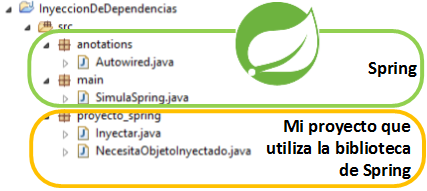
Assuming I’m a user of the Spring library, the first thing I’d have to do is create a class whose objects we want to inject:
public class Inyectar {

	private String algoQueDevolver = "'Algo devuelto desde el objeto inyectado'";

	public String metodoDeObjetoInyectado(){
		return algoQueDevolver;
	}

}
Note for Spring users: if you’ve used Spring, you know there’s a lot more configuration beforehand. This isn’t an article about Spring; because of its popularity I thought it was a good example of Reflection and Annotation, as well as of revealing its inner magic 😉 . Here I focus directly on what dependency injection with @Autowired is.
Now we need another object that requires an injected object (notice the @Autowired and the variable that goes with it):
public class NecesitaObjetoInyectado {

	@Autowired
	private Inyectar miObjetoInyectado;

	public void usarObjetoInyectadoYMostrarPorPantalla() {
		String textoObtenidoDeObjetoInyectado = miObjetoInyectado.metodoDeObjetoInyectado();
		System.out.println("Lo que me devuelve el método del objeto que me han inyectado: " + textoObtenidoDeObjetoInyectado);
	}

}
For this example we want something very simple, which is to use the method inside the previous class that is going to be injected (look at the methods of both classes).
With this we’d run Spring and it should work, printing to the terminal:
Lo que me devuelve el método del objeto que me han inyectado: 'Algo devuelto desde el objeto inyectado'
But since here we’re creating Spring, let’s define its Annotation called Autowired:
@Documented
@Retention(RetentionPolicy.RUNTIME)
@Target(ElementType.FIELD)
public @interface Autowired {

}
As you can see, it’s a very simple annotation, so simple that it has no content.
And all we have left is the Spring simulator:
public class SimulaSpring {

	public static void main(String[] args) {
		NecesitaObjetoInyectado necesitaInyeccion = new NecesitaObjetoInyectado();

		//Spring makes this a bit easier when instantiating the objects and doesn't need to ask an object directly for the injection; to keep it simple we'll request the injection directly
		inyectorDeObjetos (necesitaInyeccion);

		necesitaInyeccion.usarObjetoInyectadoYMostrarPorPantalla();
	}

	/**
	 * Injects any object that is annotated with @Autowired (This method simulates the Spring Framework)
	 *
	 * @param objetoNecesitaInyeccion object that requires injection
	 */
	public static void inyectorDeObjetos (final Object objetoNecesitaInyeccion) {
		Class<?> claseObjetoNecesitaInyeccion = objetoNecesitaInyeccion.getClass();

		final Field[] variables = claseObjetoNecesitaInyeccion.getDeclaredFields();
		for (final Field variable : variables) {
			final Annotation anotacionObtenida = variable.getAnnotation(Autowired.class);

			if (anotacionObtenida != null && anotacionObtenida instanceof Autowired) {
				//Gets the type of class to inject, regardless of the type
				Class<?> claseInyectar = variable.getType();

				try {
					//We instantiate the object to inject
					Object nuevoObjetoDeMiClase = claseInyectar.getConstructor().newInstance();

					variable.setAccessible(true);

					//We inject the object into the variable of the object that requires the injection
					variable.set(objetoNecesitaInyeccion, nuevoObjetoDeMiClase);
				} catch (InstantiationException | IllegalAccessException | IllegalArgumentException | InvocationTargetException | NoSuchMethodException | SecurityException e) {
					e.printStackTrace();
				}
			}
		}

	}

}
Here we haven’t done anything weird that we haven’t already explained both in this article and in the Reflection one.
You can see that what the inyectorDeObjetos() method does is: given any type of object (yes, this method is able to inject anything); it gets all its variables annotated with @Autowired, regardless of whether they’re private or not (Spring does it this way too, it’s able to read private variables, there you have its best-kept trick revealed 😀 ); it gets the type of the variable to be injected, and instantiates it directly with Reflection; we access the variable, and insert the value we’ve just created, whether it’s private or not.
That’s it, quick, easy and for the whole family 🙂
Code
You have all the code at:
Bibliography
- Lesson: Annotations (The Java Tutorials)
- Target (Java Platform SE 8)
- ElementType (Java Platform SE 8)
- Retention (Java Platform SE 8)
- Java annotation (Wikipedia)
- http://docs.oracle.com/javase/1.5.0/docs/tooldocs/windows/javadoc.html
- Javadoc Technology (Java SE 8 docs)
- Spring Framework (Wikipedia)
- Dependency injection (Wikipedia)
Image credits
From Jarroba.com we have used or modified some images to create others in support of the article (the modified ones are work of www.Jarroba.com). Here are the credits:
- «Almendras-rafax» by Rafael Ortega Díaz – Own work. Available under the Public domain license via Wikimedia Commons – https://commons.wikimedia.org/wiki/File:Almendras-rafax.JPG#/media/File:Almendras-rafax.JPG
“Annotations in Java” by Ramón Invarato at jarroba.com, licensed under Creative Commons Attribution-NonCommercial-ShareAlike 3.0. Registered at Safe Creative.

You may also like
Reflection in Java
Reflection in Java lets you pick a class you wrote earlier and inspect or modify it while the program runs. It's easy to learn with practical examples.


Advanced Dockerfile: Multi-Stage Builds, Registries, and Tricks
Free Docker course. Expert Docker tricks: multi-stage builds, optimizing images, faster build times, and distributing images through Docker registries.
Leave a comment