
Reflection in Java
Reflection in Java lets you pick a class you wrote earlier and inspect or modify it while the program runs. It's easy to learn with practical examples.
Reflection in Java is a wonderful technology that is very easy to apply; but like all great power, it comes with great responsibility.
Note for new Java developers: if you are just starting out with Java, I don’t recommend using Reflection until you have mastered object-oriented programming. Make sure you have a solid grasp of the basics first, such as basic Java, inheritance, polymorphism, among others.
Note on using Reflection: Whenever possible, it’s better to do without Reflection because it hurts the performance of your program. It’s worth using when it makes development easier, that is, when not using it would be more complicated or require a lot more code. You also have to keep security in mind, since you need to make sure only accepted classes are used, as it could be open to code execution (something similar to the security holes of the eval() function, although if you use Reflection properly there won’t be any security problem)
Note on what you will learn in this article: This article condenses dozens of tutorials about Reflection; it’s a very complete collection of information that I have gathered over the years.
What is Reflection in Java for? I’ll answer with questions. Could you sit down and write me a program that tells me the type of a class’s variable: int, String, float, boolean, etc.? You might come up with some convoluted way; let’s try another: could you tell me whether a variable of a class is public, private, final or static? At first glance it doesn’t seem very useful, but we’ll see that sometimes it’s very necessary; another question: how many parameters does a function of a class receive? Or: can you write a program that on its own prints the name of every class, function and variable it contains? Or even harder: could you use a private function of an object from outside the class, or directly access a private variable of another class?
I bet you’re baffled, especially by the part about accessing private functions when you should never do that. Never? It should tend toward zero, although sometimes, to unit test a private function of a class, we’ll have no choice but to use Reflection 😉
The concept of Reflection simply tells us that the program has the ability to observe and modify its own structure dynamically. Hence the name, since the program reflects its own code: we can pick a class that we wrote earlier in an IDE and, after it has been compiled, while the program is running, modify it.
At the end I leave a link with all the code. If you’ve never done anything with Reflection, I recommend that you -with your IDE (such as Eclipse) in front of you- go step by step programming it along with me, running it and seeing how it works.
After reading this article about Reflection you may get hooked on Annotations, because once you know how to use Reflection properly, designing our own annotations is very easy, and if you don’t believe it I invite you to read this next tutorial about Java Annotations.
Class
Suppose we have this class:
public class MiClase {

	public String unaVariableString = "Un Texto";
	private int unaVariableInt = 5;

	public String getUnaVariableString(String concatenar) {
		return unaVariableString + concatenar;
	}

	private int getUnaVariableInt(int suma) {
		return unaVariableInt + suma;
	}

}
The Java virtual machine creates an instance of Class for each type of object, which includes functions to examine the object’s properties and type information, all at runtime. The following image shows the process when creating a class and instantiating it (some parts of the image are explained a bit later):

So, to access the information about variables and functions, we need to get the Class of whatever we want (to get the Class you need to specify the <generic type>; usually writing “Class<?>” is enough, especially when we loop over several objects of different classes. Although there can be a security problem here if we don’t define the generic type correctly; to avoid security problems, we can tell it to take an object that extends my class <? extends MiClase>, so we make sure nobody can insert other things, since they wouldn’t extend MiClase). To do so we’ll extract it from the object with the getClass() function:
MiClase objetoDeMiClase = new MiClase();

Class<? extends MiClase> objetoDeClassConInfoDeMiClase = objetoDeMiClase.getClass();
Although we’ll see more examples later, I think it’s a good idea to gather the most commonly used ways to get the Class here:
//Get the Class directly from an object (Reminder: a valid String object is a text between quotes)
Class classDelTexto = "Un texto".getClass();

Integer numero = 5;
Class classDelNumero = numero.getClass();

//For primitive types we have to use “.class” or “.TYPE” (preferably use “.class”) (Reminder: some primitive types are int, boolean, float, etc)
Class classDeBooleanA = boolean.class;
Class classDeBooleanB = boolean.TYPE;

//We can also get a class from a fully-qualified name; that is, the name of the package where our class is, followed by the name of the class
Class c = Class.forName("com.paquete.MiClase");
Then we can get information directly from the class, for example:
//Get the name of the class
String nombreDeLaClase = objetoDeClassConInfoDeMiClase.getSimpleName();
This may seem a bit confusing: I have to use a Class object to access the information of my class, which is somewhere else; it’s too complicated… Not complicated at all. A trick is to think of the Class object extracted from your class as your own class without being instantiated.
Getting Variables
The trick I just showed you works because you can say: give me all the global variables I’ve declared in my class.
//If we want to get a public variable
Field variableString = objetoDeClassConInfoDeMiClase.getField("unaVariableString");

//If we want to get a variable, whether private or not
Field variableInt = objetoDeClassConInfoDeMiClase.getDeclaredField("unaVariableInt");

//If we want to get an array with all the public variables of our class
Field[] todasLasVariables = objetoDeClassConInfoDeMiClase.getFields();

//If we want to get all the variables, regardless of whether they are private or not
Field[] todasLasVariablesDeclaradas = objetoDeClassConInfoDeMiClase.getDeclaredFields();
When we get just one variable of type Field by a “hardcoded” name (“hardcoded” means that some text is written directly in the source code in a String; for example we wrote "unaVariableString" and passed it to getField()); as a precaution against errors, since the variable whose name is “hardcoded” might not exist, the IDE we use will ask us to add a try and catch.
An example of how it would look:
Field variableString = null;
try {
	variableString = objetoDeClassConInfoDeMiClase.getField("unaVariableString");
} catch (NoSuchFieldException | SecurityException e) {
	e.printStackTrace();
}
Good programming note: For good programming, the error has to be handled (I don’t care what you do: notify the user with a message if necessary, or have it correct itself by running other code), don’t leave me an “e.printStackTrace()” like I did. I know I preach one thing and do the opposite; let me keep things simple so they’re easy and clear to understand 😉
For the methods that return the Field[] list, you don’t need a try and catch, since there’s no chance of errors.
Getting Functions
Or give me all the functions the class has:
//If we want to get a public method. If it has parameters we can pass each of their types.class in order after the name
Method metodoGetString = objetoDeClassConInfoDeMiClase.getMethod("getUnaVariableString", String.class);

//If we want to get a method, whether private or not. If it has parameters we can pass each of their types.class in order after the name
Method metodoGetInt = objetoDeClassConInfoDeMiClase.getDeclaredMethod("getUnaVariableInt", int.class);

//If we want to get an array with all the public variables of our class
Method[] todosLosMetodos = objetoDeClassConInfoDeMiClase.getMethods();

//If we want to get all the methods, regardless of whether they are private or not
Method[] todosLosMetodosDeclarados = objetoDeClassConInfoDeMiClase.getDeclaredMethods();
Just like with Field, if we get them with “hardcoded” texts, we’ll have to add the try and catch.
Also, with these two ways of getting an individual method, if it has parameters we can pass them after the name; you have to pass as many as it has (if it has none, you pass nothing). For example, if we had the function:
public void getUnaVariableString(String a, int b, float c) {
	//Content…
}
We would have to write:
Method metodo = objeto.getMethod("nomVariable”, String.class, int.class, float.class);
Getting Constructors
And the same goes for constructors, even though our example doesn’t have any:
//You can use getConstructor() by passing it an array with the input parameter types (of type Class) of the constructor, so that it returns the Constructor object. It's not normally used and to keep the code short we don't give examples (if you want to know more, there is more information in the bibliography)

//If we want to get an array with all the public constructors of our class
Constructor[] todosLosConstructores = objetoDeClassConInfoDeMiClase.getConstructors();

//If we want to get all the methods, regardless of whether they are private or not
Constructor[] todosLosConstructores = objetoDeClassConInfoDeMiClase.getDeclaredConstructors();
Examining Basic Information
Let’s look at an example. We get all the variables of the class “MiClase” with:
Field[] todasLasVariablesDeclaradas = objetoDeClassConInfoDeMiClase.getDeclaredFields();
Inside the list “todasLasVariablesDeclaradas” we’ll have:
public String unaVariableString = "Un Texto";
private int unaVariableInt = 5;
We can loop over the previous list with:
for (Field variable : todasLasVariablesDeclaradas) {
	System.out.println(variable);
}
This shows us the following information about each variable in the terminal:
public java.lang.String main.MiClase.unaVariableString
private int main.MiClase.unaVariableInt
But let’s not get confused: the information above just shows what the Field object returns through its default toString(). It’s nothing like what we need; and besides, it could change tomorrow with the next version, since the text returned by toString() isn’t guaranteed to stay the same.
What we need is certain information in handy Java variables 😀
We can get the name of a variable (a Field object) with:
//To get the name of the variable
String nombreVariable = variable.getName();
This way, if we write the previous loop with this data:
for (Field variable : todasLasVariablesDeclaradas) {
	String nombreVariable = variable.getName();
	System.out.println("\nNombre de la VARIABLE GLOBAL: " + nombreVariable);
}
We get the information just the way we want it:
Nombre de la VARIABLE GLOBAL: unaVariableString

Nombre de la VARIABLE GLOBAL: unaVariableInt
So far we’ve obtained very little information. We’ll see how to get more, since we need to understand a few other things first that will give us a lot of extra information.
We’re interested in knowing the Modifiers and the Types.
In the same way we can loop over methods and constructors.
For example, for the methods we want to know their name and the number of parameters passed to them:
final Method[] metodos = objetoDeClassConInfoDeMiClase.getDeclaredMethods();
for (final Method metodo : metodos) {
	System.out.println("\nNombre del MÉTODO: " + metodo.getName());
	System.out.println("  Cantidad de parámetros: " + metodo.getParameterCount());
}
The terminal will show:
Nombre del MÉTODO: getUnaVariableInt
  Cantidad de parámetros: 1

Nombre del MÉTODO: getUnaVariableString
  Cantidad de parámetros: 1
Examining Modifiers (Modifier)
Let me refresh a bit of Java theory: public, protected, private, abstract, static, final and others that are less commonly used are called Modifiers (Modifier). The name comes from the fact that they modify the behavior of the variable, class or function they accompany.
Well, to get them from a variable (a Field object) it’s as easy as saying:
int modificador = variable.getModifiers();
It returns an integer that indicates which kind of modifier it is. Do I have to learn all the modifier codes? Not at all, it’s as easy as asking the Modifier class about the modifier we want to know; some examples:
Boolean esPublic = Modifier.isPublic(modificador);
Boolean esPrivate = Modifier.isPrivate(modificador);
Boolean esFinal = Modifier.isFinal(modificador);
Boolean esStatic = Modifier.isStatic(modificador);
Since I don’t want you to just take my word for it, let’s see it in the example:
for (Field variable : todasLasVariablesDeclaradas) {
	String nombreVariable = variable.getName();
	System.out.println("\nNombre de la VARIABLE GLOBAL: " + nombreVariable);

	Boolean esPublic = Modifier.isPublic(modificador);
	System.out.println("   Es public: " + esPublic);

	Boolean esPrivate = Modifier.isPrivate(modificador);
	System.out.println("   Es private: " + esPrivate);
}
Which returns in the terminal:
Nombre de la VARIABLE GLOBAL: unaVariableString
   Es public: true
   Es private: false

Nombre de la VARIABLE GLOBAL: unaVariableInt
   Es public: false
   Es private: true
Now we have more information 😀
The same goes for methods and constructors. We can get their modifiers, for example for methods:
for (final Method metodo : metodos) {
	System.out.println("Nombre del MÉTODO: " + metodo.getName());

	System.out.println("   Es public: " + Modifier.isPublic(metodo.getModifiers()));
	System.out.println("   Es private: " + Modifier.isPrivate(metodo.getModifiers()));
}
The terminal shows us:
Nombre del MÉTODO: getUnaVariableInt
   Es public: false
   Es private: true

Nombre del MÉTODO: getUnaVariableString
   Es public: true
   Es private: false
Examining Types (Type)
I’ve left types for last, since they’re a bit more special, although very similar to Modifier. To get the type of the variable (a Field object):
Type tipo = variable.getGenericType();
Getting the name of the type is as simple as:
String nombreTipoVariable = tipo.getTypeName();
For methods and constructors it’s similar.
In methods, types are located in several places: in the return, in the parameters and in the throws (exceptions):
//Get the type of the return
Type tipos = metodo.getGenericReturnType();

//Get all the types of the parameters
Type[] tipos = metodo.getGenericParameterTypes();

//Get all the throws
Type[] tipos = metodo.getGenericExceptionTypes();
And to get the name, same as before, use getTypeName().
I’m going to put the previous example together and take the chance to give you the whole class, so you can try it yourself:
import java.lang.reflect.Field;
import java.lang.reflect.Modifier;
import java.lang.reflect.Type;

public class Inicio {

	public static void main(String[] args) {

		MiClase objetoDeMiClase = new MiClase();

		Class<? extends MiClase> objetoDeClassConInfoDeMiClase = objetoDeMiClase.getClass();

		//Loop over all the variables of the class
		Field[] todasLasVariablesDeclaradas = objetoDeClassConInfoDeMiClase.getDeclaredFields();
		for (Field variable : todasLasVariablesDeclaradas) {
			String nombreVariable = variable.getName();
			System.out.println("\nNombre de la VARIABLE GLOBAL: " + nombreVariable);

			Type tipo = variable.getGenericType();
			String nombreTipoVariable = tipo.getTypeName();
			System.out.println("  Tipo: " + nombreTipoVariable);

			int modificador = variable.getModifiers();

			Boolean esPublic = Modifier.isPublic(modificador);
			System.out.println("  Es public: " + esPublic);

			Boolean esPrivate = Modifier.isPrivate(modificador);
			System.out.println("  Es private: " + esPrivate);
		}

		//Loop over all the methods of the class
		final Method[] metodos = objetoDeClassConInfoDeMiClase.getDeclaredMethods();
		for (final Method metodo : metodos) {
			System.out.println("\nNombre del MÉTODO: " + metodo.getName());
			System.out.println("  Cantidad de parámetros: " + metodo.getParameterCount());

			System.out.println("  Es public: " + Modifier.isPublic(metodo.getModifiers()));
			System.out.println("  Es private: " + Modifier.isPrivate(metodo.getModifiers()));

			System.out.println("  Tipo del return: "+metodo.getGenericReturnType().getTypeName());
			Type[] tipos = metodo.getGenericParameterTypes();

			System.out.println("  Tipos de los parámetros:");
			for (Type tipo : tipos) {
				System.out.println("    "+tipo.getTypeName());
			}
		}
	}

}
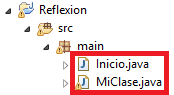
Your project should look something like this (remember that MiClase is at the beginning of the article 😉 and the code is available to download at the end of the article):
Note on the yellow triangle warning: for this example I declared a private method that isn’t used, hence the warning the IDE shows (in my case Eclipse)
And if you run it, you’ll see that it gives us all the information about each variable in the terminal:
Nombre de la VARIABLE GLOBAL: unaVariableString
  Tipo: java.lang.String
  Es public: true
  Es private: false

Nombre de la VARIABLE GLOBAL: unaVariableInt
  Tipo: int
  Es public: false
  Es private: true

Nombre del MÉTODO: getUnaVariableInt
  Cantidad de parámetros: 1
  Es public: false
  Es private: true
  Tipo del return: int
  Tipos de los parámetros:
    int

Nombre del MÉTODO: getUnaVariableString
  Cantidad de parámetros: 1
  Es public: true
  Es private: false
  Tipo del return: class java.lang.String
  Tipos de los parámetros:
    class java.lang.String
Getting the Value of a Variable
Obviously, using Reflection to get a value is a code smell (“bad smell” means that what we’re programming can probably be done in a much better way), because if we want to get the value, the best thing is to get it directly, even if it’s by calling it directly.
String textoObtenido = objetoDeMiClase.unaVariableString;
But if we want to get the value of a private variable, for example, we can’t access it directly. Or if we’re looping over Field variables whose types are different, we can’t access them so directly if we want to do different things for each type of variable. For that, we’re allowed to get the value through Reflection. We just have to use the get() method of the Field object we obtained earlier (that is, the variable of the class). This get() method is a bit peculiar: you have to pass it the instance of our class in order to get the value we want; the reason is that the values of the variables are not stored in the generated Class, so you have to pass the instance (this can be a bit confusing, since we have the Class instance on one side, the Field on another, and our MiClase object on yet another; we simply have to pass the instance that holds the values, that is, the MiClase instance that we called “objetoDeMiClase” in the example). The get() method returns an object of type Object; if we want to convert it to String, for example, we have to cast it with “(String)” as has always been done in Java.
Field variableString = null;
String textoObtenido = null;
try {
	variableString = objetoDeClassConInfoDeMiClase.getField("unaVariableString");
	textoObtenido = (String) variableString.get(objetoDeMiClase);
} catch (IllegalArgumentException | IllegalAccessException | NoSuchFieldException | SecurityException e) {
	e.printStackTrace();
}
System.out.println("Valor de la variable de tipo String: " + textoObtenido);
Besides the try and catch that the Field needs, we also have to add those for get(), in case we don’t get the type we expected (imagine a number arrives and we were expecting a String; now we have a problem).
The result in the terminal will be:
Valor de la variable de tipo String: Un Texto
If it’s a primitive type we have to do something else; thanks to which we save ourselves the cast. The downside is that we have to call the appropriate getX(), where X is a primitive type such as int, float, char, etc.
The complete list for getting primitive type values is:
byte valor = field.getByte(obj)
char valor = field.getChar(obj);
boolean valor = field.getBoolean(obj);
double valor = field.getDouble(obj);
float valor = field.getFloat(obj);
int valor = field.getInt(obj);
long valor = field.getLong(obj);
short valor = field.getShort(obj);
If we do the example to get the primitive int the way we did in the previous example, it will give us an error because we can’t access the data of the private variable. To fix that we’ll “hack” it by making it accessible with setAccessible(true). It will look like this:
Field variableInt = null;
int intObtenido = -1;
try {
	variableInt = objetoDeClassConInfoDeMiClase.getDeclaredField("unaVariableInt");
	variableInt.setAccessible(true);
	intObtenido = variableInt.getInt(objetoDeMiClase);
} catch (IllegalArgumentException | IllegalAccessException | NoSuchFieldException | SecurityException e) {
	e.printStackTrace();
}
System.out.println("Valor de la variable de tipo int: " + intObtenido);
And we’ll get in the terminal:
Valor de la variable de tipo int: 5
Good programming note: The motto in your life should be that private variables stay private; don’t access them unless it’s the very last thing you can do. In other words, most likely you’ll never have to use the “setAccessible(true)” method, which is forbidden except in a few rare cases. In the examples I give you here I want you to have all the information, in case the need ever arises. Sometimes it’s necessary if you’re building certain kinds of code; for example, some libraries such as Spring access all the variables and all their values directly from the classes.
In conclusion, most of the time get(), which returns the Object, will suit us better, since either we won’t know which type is coming or it will be a class we created ourselves. For example in a loop like the one we did in Modifiers or Type.
for (Field variable : todasLasVariablesDeclaradas) {
	String nombreVariable = variable.getName();

	Object valorVariable = null;
	try {
		variable.setAccessible(true);
		valorVariable = variable.get(objetoDeMiClase);
	} catch (IllegalArgumentException | IllegalAccessException e) {
		e.printStackTrace();
	}
	System.out.println("\nValor de la variable " + nombreVariable + " es: " + valorVariable);
}
It will print in the terminal:
Valor de la variable unaVariableString es: Un Texto

Valor de la variable unaVariableInt es: 5
Remember that this way the value is obtained through toString(); for printing it in the terminal it works for this example, but if you want to use the int as an int you have to do other things.
Setting the Value of Global Variables (Fields)
We’ve extracted data, now let’s put some in.
It may not make much sense to change the value of a public global variable of a class, since we can do it directly; but what if we want to change the value of a private variable? I know this sounds crazy. Why change the value of private variables, wouldn’t you just make them public? Well, the answers here could be: to change them for testing; or simply that we don’t want anyone to touch those variables, because we’re building a library for others, but we do want to touch them ourselves.
The reason to change a public variable through Reflection is when you loop over a list of variables that can be public or private, whose names we don’t know; then we use Reflection and problem solved.
Note on setting global variables: Reflection consumes a huge amount of processing time, so if you have to choose between a direct assignment of the value and Reflection, direct assignment consumes practically nothing
To do it, on the Field object we simply call the set() method, which will ask us for the object of the class that holds the variable to change, and the new value. If the variable is of a primitive type there are setX() methods, where X is int, float, etc.
In the following example you’ll see that we loop over the list of variables; on each iteration of the loop we’ll be dealing with one that, in our case, can be of type String or int. So that the program doesn’t throw an error by assigning a text to an int, we separate them with the if by type. We could have separated them by the names of the variables, but in practice, since we don’t know the variable names and they would also have to be “hardcoded”, that turns out to be unproductive.
for (Field variable : todasLasVariablesDeclaradas) {
	String nombreVariable = variable.getName();

	try {
		if (String.class == tipo) {
			variable.set(objetoDeMiClase, "Texto cambiado en la variable");

			System.out.println("  Valor cambiado de la variable " + nombreVariable + " es: " + objetoDeMiClase.unaVariableString);
		} else if (int.class == tipo) {
			variable.setInt(objetoDeMiClase, 123456789);

			variableInt.setAccessible(true);
			intObtenido = variableInt.getInt(objetoDeMiClase);
			System.out.println("  Valor cambiado de la variable " + nombreVariable + " es: " + intObtenido);
				}

	} catch (IllegalArgumentException | IllegalAccessException e) {
		e.printStackTrace();
	}
}
It prints in the terminal:
Valor cambiado de la variable unaVariableString es: Texto cambiado en la variable

Valor cambiado de la variable unaVariableInt es: 12345
Invoking Methods
Yes, you can also invoke any method of a class directly through Reflection.
As we’ll see in the unit test example, it’s useful for running, and therefore testing, private methods.
Invoking a method of a class is as simple as calling invoke() on the Method object. You have to pass invoke() the object of the class that contains the method to invoke, followed by all its parameters.
MiClase objetoDeMiClase = new MiClase();

Method metodo = objetoDeClassConInfoDeMiClase.getDeclaredMethod("getUnaVariableInt", int.class);

int valorRetorno = metodo.invoke(objetoDeMiClase, 100);
In a loop there can be problems when adding the parameter values, so it may be better to pass Object directly as the parameters. In the following example we choose the value to pass based on the method name as an example, and we store it in an object of type Object to pass it to invoke(); this way we invoke the method and get the return value.
for (final Method metodo : metodos) {
	System.out.println("\nNombre del MÉTODO: " + metodo.getName());

	try {
		if (Modifier.isPrivate(metodo.getModifiers())) {
			metodo.setAccessible(true);
		}

		Object valorPasar = null;

		if (metodo.getName() == "getUnaVariableString"){
			valorPasar = " Añadir otra cosa";
		} else if (metodo.getName() == "getUnaVariableInt") {
			valorPasar = 100;
		}

		Object valorRetornoMetodoInvocado = metodo.invoke(objetoDeMiClase, valorPasar);
		System.out.println("  Valor del método invocado: " + valorRetornoMetodoInvocado);

	} catch (IllegalAccessException | IllegalArgumentException | InvocationTargetException e) {
		e.printStackTrace();
	}

}
The terminal gives us:
Nombre del MÉTODO: getUnaVariableInt
  Valor del método invocado: 105

Nombre del MÉTODO: getUnaVariableString
  Valor del método invocado: Un Texto Añadir otra cosa
Creating a New Instance of a Class
And finally, creating an instance of an object with Reflection.
Very useful when you want to use the “Dependency Injection” pattern (put quickly, it means we won’t create the object inside a class, but rather an external class will pass it to us already created).
Very simple: we only have to get, in a Constructor object, the constructor we want to use to instantiate the new object. Remember that if we don’t create a constructor in the class, it will always have a no-argument one by default; and that’s the one we’re going to use in this example. First we get the Constructor object with getConstructor(). To the getConstructor() method we can pass the types of the arguments (such as int.class) in a similar way to how we did with normal methods; that way we choose the one we want. From this Constructor object we call its newInstance() method, to which we have to pass the values of the parameters (for example, if we passed int.class to getConstructor(), here we could simply pass: 123).
Now we have the object created. You already know the rest: assign values to variables or get them, run methods, etc.
try {
	Constructor constructorSinParametros = objetoDeClassConInfoDeMiClase.getConstructor();

	MiClase nuevoObjetoDeMiClase = (MiClase) constructorSinParametros.newInstance();

	Field variableString2 = nuevoObjetoDeMiClase.getClass().getField("unaVariableString");
	variableString2.set(nuevoObjetoDeMiClase, "Texto para nuevo objeto");

	System.out.println("\nNuevo objeto creado");
	System.out.println("  Valor de la variable asignada: " + nuevoObjetoDeMiClase.unaVariableString);

} catch (InstantiationException | IllegalAccessException | IllegalArgumentException | InvocationTargetException | NoSuchFieldException | SecurityException | NoSuchMethodException e) {
	e.printStackTrace();
}
If you want to learn more uses, such as how to use Java Annotations and how "dependency injection" works in professional frameworks like Spring, you can keep reading the next article about Java Annotations.
Unit Tests of Private Methods with JUnit
As a rule, law, obligation, moral principle, etc; call it whatever you want as long as it gets stuck in your brain: using Reflection to test private methods should be the last thing that crosses your mind. If nobody can call them from outside a class, why would we test them directly? Not even the IDE suggests private methods (for example in Eclipse, when you type an object in another class, it will show you the public methods, never the private ones of that object’s class). First I’ll give you an awareness talk and at the end I’ll explain it.
Unit tests are used to check that the objects of a class work correctly, without having to open the class to see what’s inside. That is, private methods have to be tested indirectly. You can think of it like this: someone has instantiated an object of a class for you, and you don’t know the contents of the class, only the object; so you know its public methods, never the private ones. In many cases this kind of test makes no sense.
You should always test all the “public” methods of each class, no doubt about that. If everything works correctly when testing these public methods, then we can deduce that the “private” methods (the same goes for “protected” ones) also work correctly.
It’s true that there are a few rare and very limited exceptions. Maybe because the private method does a lot of things under the hood with a very high statistical likelihood of failure; or because the probability that it gets executed during the normal operation of the program is very small; or because the public methods that call it generate random content (they use random generators, or work with data we don’t know a priori, such as data received from the Internet); or perhaps we work with threads, so there’s hardly any chance to test the private methods unless certain race conditions occur; or maybe we’re working on a library that we can’t run because we depend on extra code, a database, etc. that we don’t have yet, and we have no choice but to test it somehow. These are some of the excuses (all debatable depending on the point of view and the circumstances) for which it might be justifiable to use Reflection to test private methods, so I’m going to explain it.
My recommendation: if you can, don’t use Reflection to write unit tests, except in cases of absolute necessity.
We have two methods to test in the class “MiClase”, one public and one private. As in any unit test, we create the object, call the method and add parameters if it has any. The method’s “return” will give us a result.
Let’s look at the example as a review and comparison. We’re going to test the public method getUnaVariableString(), to which another String that we pass to the method is concatenated, returning a String made up of what the class had plus what we pass in. We want to test that what it returns is “not null” and that we get “the expected text".
@Test
public void testGetUnaVariableString() {
	MiClase objetoDeMiClase = new MiClase();
	String valor = objetoDeMiClase.getUnaVariableString(" Cualquiera");

	assertNotNull(valor);
	assertEquals("Un Texto Cualquiera", valor);
}
So far everything is correct and perfectly normal: a public method that we test; it indeed works as expected, with no errors. And the private method? Very similar, we’ll do the same as before but applying Reflection.
Now we have a private method getUnaVariableInt() to which we pass an integer to be added to the one the class holds inside; it returns an “int” that will be the sum. And we’ll run the same tests as before: that it’s “not null” and that we get “the expected number”.
As we did before, we’ll get the “Class” object, from which we’ll get the method and invoke it so that it runs.
@Test
public void testGetUnaVariableInt() {
	MiClase objetoDeMiClase = new MiClase();

	Class<? extends MiClase> objetoDeClassConInfoDeMiClase = objetoDeMiClase.getClass();
	Method metodo;
	int valor;
	try {
		metodo = objetoDeClassConInfoDeMiClase.getDeclaredMethod("getUnaVariableInt", int.class);
		metodo.setAccessible(true);
		valor = (int) metodo.invoke(objetoDeMiClase, 2);

		assertNotNull(valor);
		assertEquals(7, valor);
	} catch (NoSuchMethodException | SecurityException | IllegalAccessException | IllegalArgumentException | InvocationTargetException e) {
		e.printStackTrace();
	}
}
The private method is now tested. Just so you know, it hurt me to write it, so avoid using it 😉
The complete test class would look like this:
import static org.junit.Assert.assertEquals;
import static org.junit.Assert.assertNotNull;

import java.lang.reflect.InvocationTargetException;
import java.lang.reflect.Method;

import org.junit.Test;

public class MiClaseTest {

	@Test
	public void testGetUnaVariableString() {
		MiClase objetoDeMiClase = new MiClase();
		String valor = objetoDeMiClase.getUnaVariableString(" Cualquiera");

		assertNotNull(valor);
		assertEquals("Un Texto Cualquiera", valor);
	}

	@Test
	public void testGetUnaVariableInt() {
		MiClase objetoDeMiClase = new MiClase();

		Class<? extends MiClase> objetoDeClassConInfoDeMiClase = objetoDeMiClase.getClass();
		Method metodo;
		int valor;
		try {
			metodo = objetoDeClassConInfoDeMiClase.getDeclaredMethod("getUnaVariableInt", int.class);
			metodo.setAccessible(true);
			valor = (int) metodo.invoke(objetoDeMiClase, 2);

			assertNotNull(valor);
			assertEquals(7, valor);
		} catch (NoSuchMethodException | SecurityException | IllegalAccessException | IllegalArgumentException | InvocationTargetException e) {
			e.printStackTrace();
		}
	}

}
Code
You can find all the code at: View on GitHubjarroba/Reflection
Bibliography
“Reflection in Java” by Ramón Invarato at jarroba.com, licensed under Creative Commons Attribution-NonCommercial-ShareAlike 3.0. Registered at Safe Creative.

You may also like

Annotations in Java
Java annotations are simple notes that can change how your program works. Learn to use and create them, with Reflection and Spring dependency injection.

Advanced Dockerfile: Multi-Stage Builds, Registries, and Tricks
Free Docker course. Expert Docker tricks: multi-stage builds, optimizing images, faster build times, and distributing images through Docker registries.
Leave a comment