
A Lot of Java in One Simple Tutorial (for Dummies)
Learn Java basics by building a car engine in Eclipse: variables, methods, constructors, objects, visibility and if-else, explained step by step.
We are going to look at something very important both in programming and in life itself: keeping things in order.
In the previous tutorial we started a project called “proyecto_barco_en_una_botella” (“ship in a bottle project”). It was very useful for understanding the idea of an IDE, but there isn’t much more juice we can squeeze out of it. We have the ship in a package, and we could create another package for the bottle, but what code would we put in it? It’s static: a ship in a bottle is an inanimate ornament, and programming is all about producing something that has to move. A computer is a tool for automating things we do. You can’t automate anything about an ornament sitting on a shelf!
That’s why we’re going a bit further to understand programming in Java. Let’s think of something that moves, and to understand it even better, something designed by humans. Let’s go all out: a car.

This is our idea: build a car and make it work.
As developers, we aren’t interested in the drawing of the car or its shape, but in its input-output functionality. What is this input-output thing? The name isn’t exactly pretty or original, but that’s what it is: something goes in and something comes out.
Let’s take it step by step. Let’s think about the car’s engine. As developers we can’t stay on the superficial side: we’re going to build something that has functionality, and to build something with functionality we need to understand how it works at the deepest level. In case you didn’t know, consider this a double class in programming and basic car mechanics: the car engine has pistons inside. Let’s assume it’s a four-stroke engine (more information at: Motor de cuatro tiempos (Wikipedia)) like the one below -look at the animated GIF and the number of each step. For a four-stroke piston to work, it follows these steps:
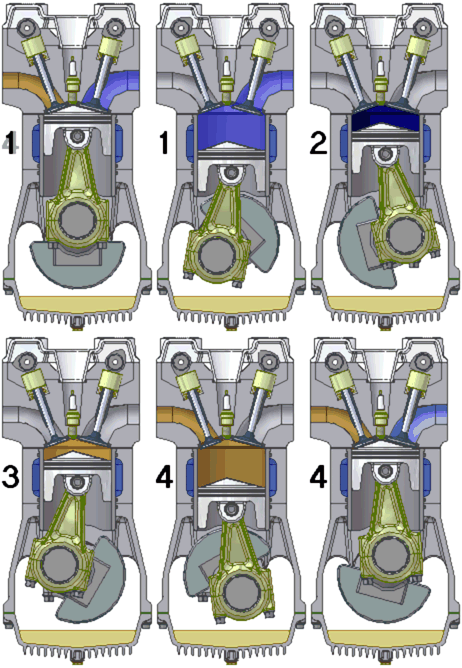
1.Gasoline and oxygen enter the piston -notice the “enter”, it’s an Input 2. The gasoline is compressed 3. The gasoline is ignited so that it explodes 4. Gases and movement come out -notice the “come out”, it’s the Output
We already have some ideas for programming the car. Let’s start little by little.
Let’s keep filling up our folder, which acts as the “briefcase” for our projects.
If you closed Eclipse, when you open it again it will ask you which workspace you want to use. By default it remembers the last one you used, so you can accept it or browse for it and accept -if you have doubts, check the Eclipse installation tutorial, in the part where it’s opened.
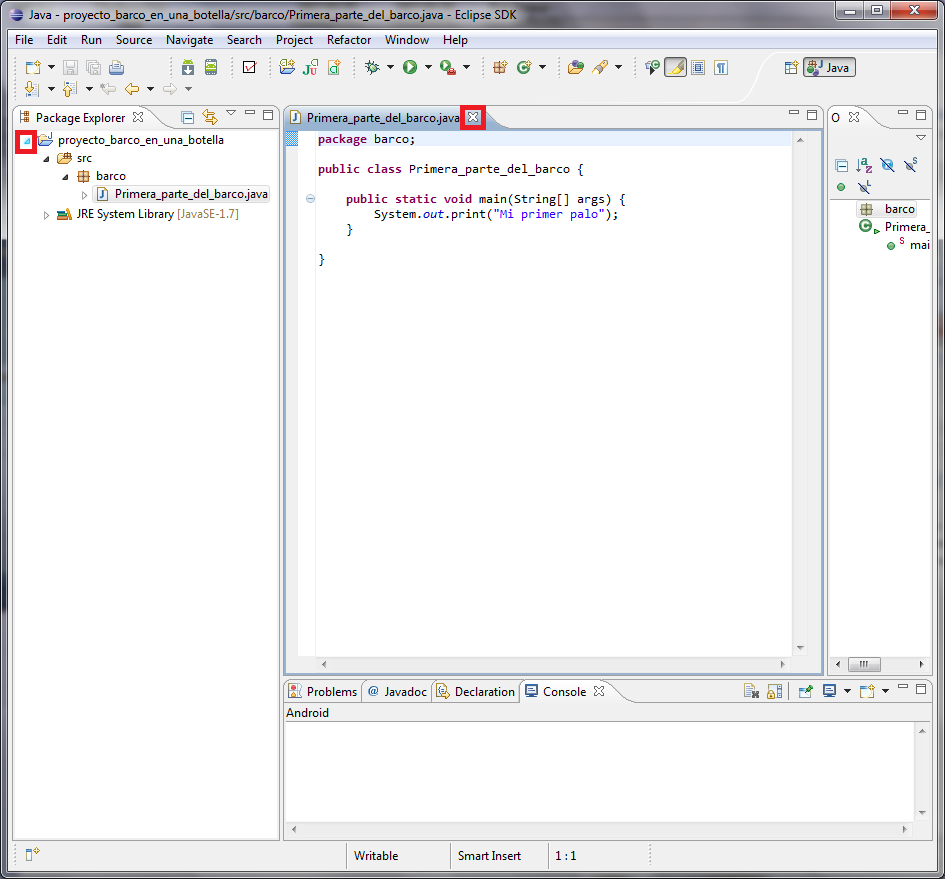
Before, we had a very simple program called “proyecto_barco_en_una_botella”. Well, let’s set the previous project aside by collapsing the project’s folder tree and closing anything we have open. That’s already saved and it will stay there; it’s a finished project -sadly finished, it’s barely a couple of lines of code, but it is what it is.
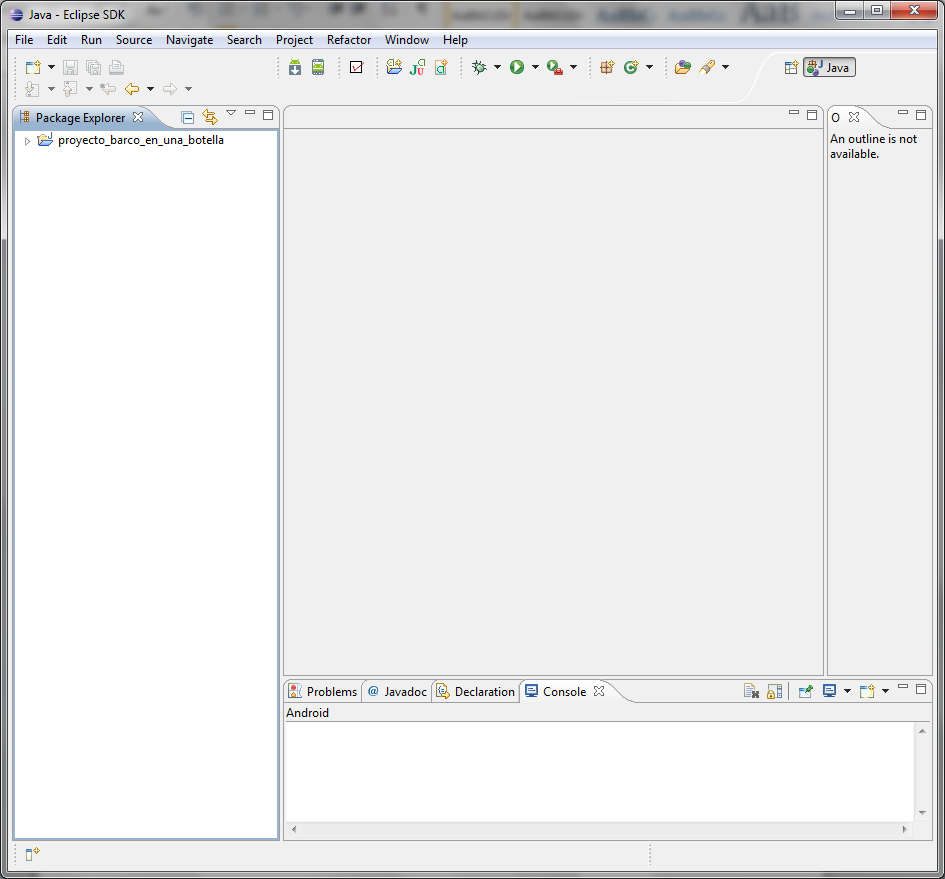
We’ll be ready to start working on a new project when it looks like this.
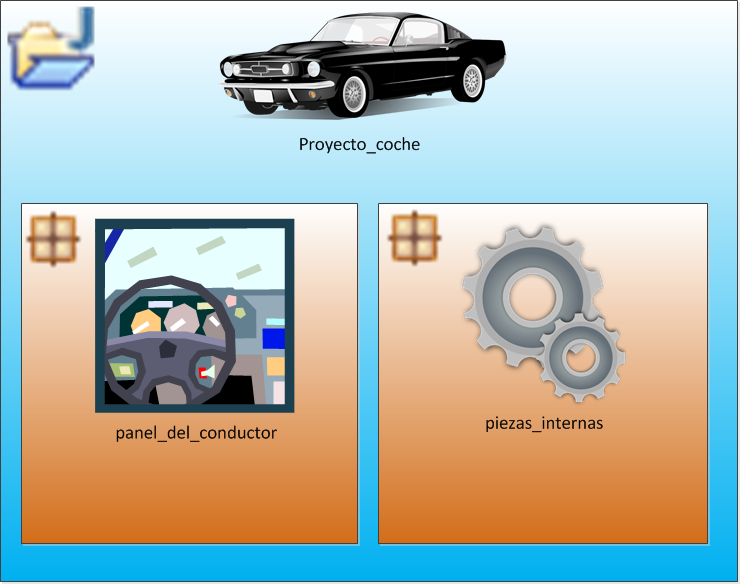
Now a quick review of the basics of creating a project in Eclipse. Check the tutorial on creating our first project in Eclipse if you have doubts about creating a new project. We’ll call the new project, for example, “proyecto_coche” (“car project”). Then we thought it would be a good idea to create a couple of packages inside it: “panel_de_conductor” (“driver panel”) -which will be in charge of communicating with the driver- and “piezas_internas” (“internal parts”) -which will hold the rest of the car’s components that the driver doesn’t touch directly, such as the engine, among others. We thought these packages were a good way to organize things, but everyone can use whichever packages suit them, the fewer the better, as long as everything is organized -for small programs, one package and one class is plenty, but here, to be didactic, we’ll create several packages and several classes.
The idea would be the following:
Which would translate in Eclipse to this (as I said, if you don’t know how these steps were done, review the previous tutorial):
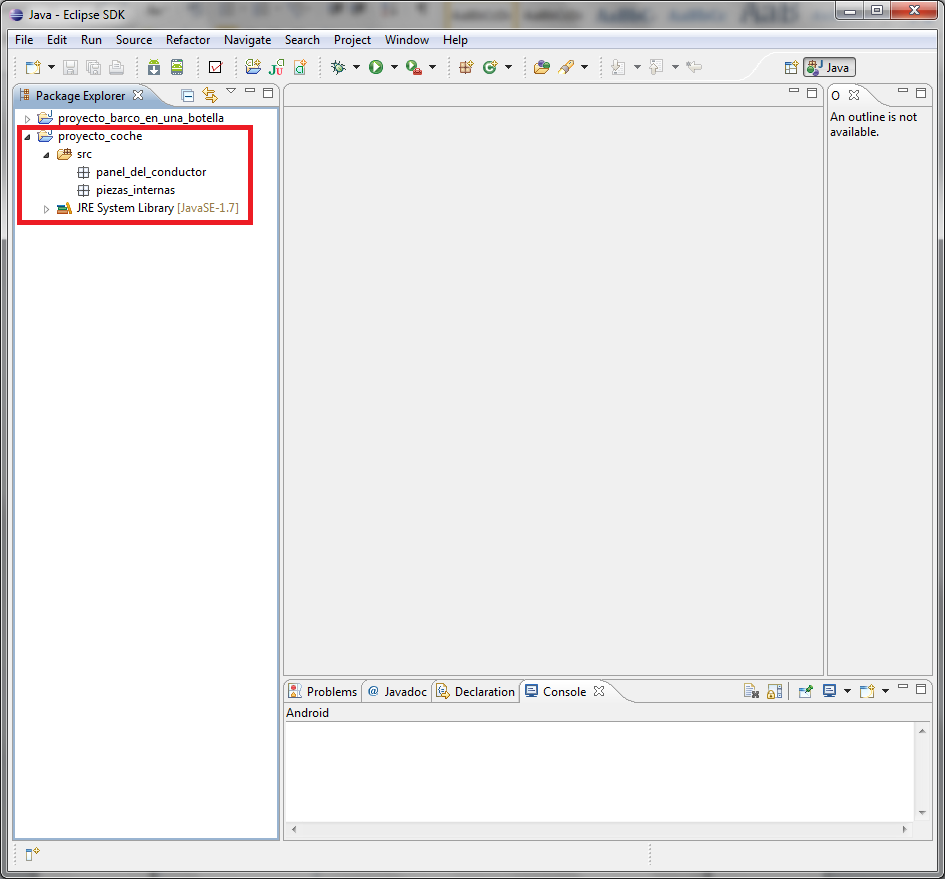
We have the packages; now we need to add the classes. What we need our program to have is a piece of code that makes it start, and from there on it runs statement by statement.
Now we want our project to follow this idea:
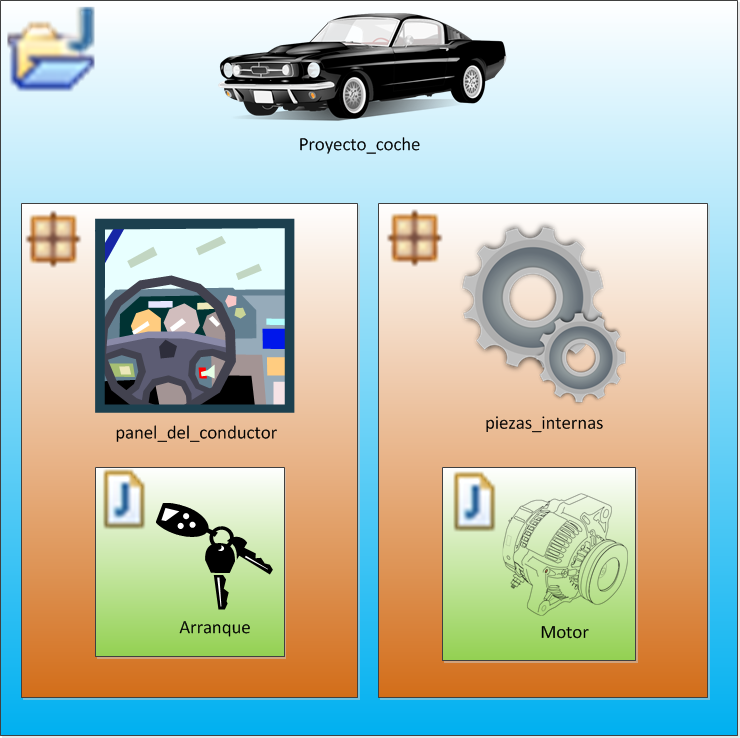
We thought it would be interesting for the class in charge of starting the program to be in the driver’s package, since the driver is the one who puts the key in the car, and when the contact is made the car starts. So, in the “panel_de_conductor” package we’ll create a class called “Arranque” (“Start”), and in the “piezas_internas” package we’ll create another class called “Motor” (“Engine”) (creating these two classes is left as a review exercise from the previous tutorial).
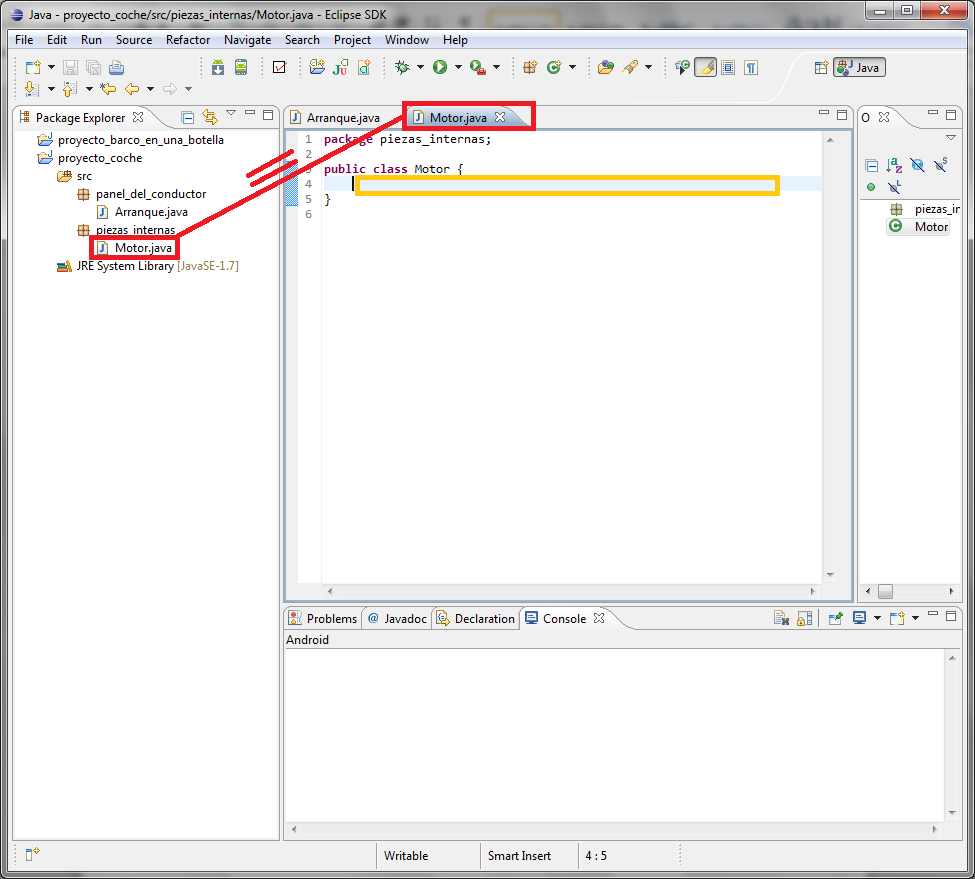
We’ll start with the car’s parts. So, we’ll start with the engine. To open the class to edit it, either double-click the class inside the package, or click the “Motor.java” tab if it’s already open. Either way we’ll end up in the place where we have to edit the Motor class. In the following image, marked with an amber box, you can see where we have to enter the code that will make the engine work, because for now it’s an empty shell.
Now let’s think about what an engine does: it turns something into movement. So an engine has movement. We have to represent that movement in our Motor class, and for that we’re going to use a variable.
|
Data types for a variable A variable is used to store any kind of data, such as a number, a text, etc. You have to understand that we’re working with a computer, and that it has simple -or primitive- data types, which are usually the most common ones:
Other simple data types tend to be used, but we haven’t listed them for a reason: one thing you shouldn’t do when programming is memorize things. You look things up when you need to use them. In this case we’ve explained these ones because we’re going to use them in this example, or because they’re used so often that you’ll end up learning them anyway. You could say that these variables are the most commonly used words in programming, although there are others, which you can easily find if you’re curious by typing into a search engine: Java data types. |
To store a value that represents movement, which type of variable from the table above would be best to use? Obviously, it has to be a number: int or double. Since we’ll represent it in whole units, we pick int.
All we need is to declare the variable, but how do you declare it?
|
Declaring a variable Remember how in school, in math class, they told us that a variable X (watch out for the word variable) was equal to a number, such as X=5, where X is worth 5. The idea is identical, although in school the variables could be set to any kind of number (watch out for the word kind), but what about text? That would be like saying: X=“Five”. As we saw in the previous table of variable types, it could have the type String and hold text. Well, we have to tell Java this: tell it what type of data our variable is going to hold. To declare a variable in Java, you follow this pattern (every Java statement ends with a semicolon): Un_tipo_de_dato_que_es Nombre_de_la_variable = Un_valor_del_tipo_de_dato_de_la_variable; Which is the same as:
The two purple boxes are the same as declaring that the variable X will only hold, for example, integers; the arrow is the equals sign, and the green box is the value of the data type it’s going to hold, for example 5. This is how it would be declared in Java:
int X = 5; Now that this is clear, let’s look at an example declaration for each data type in the previous table.
|


To keep things easy, we’ll call the variable velocidad_de_rotacion_del_motor (engine rotation speed) and initialize it to 0. Our Motor class code should end up like this (we’ll look at the words private and public a bit later, in the Visibility level box):
package piezas_internas;

public class Motor {
	private int velocidad_de_rotacion_del_motor = 0;
}
In Eclipse the variable will probably show up underlined in yellow; ignore it. This is a warning –Eclipse labels it as Warning. It’s telling you that you aren’t using that variable, and that’s true: it’s all alone and nobody uses it.
We’ve set the engine’s rotation speed to zero because nothing is moving it; it’s at rest. This variable will hold the state of the engine’s speed before and after the engine runs.
We’re still treating the engine as an empty shell. We need something inside. The piston we talked about earlier would be perfect. What do we know about the piston? We know that to work it needs some gasoline and some oxygen. And that it gives back a force to make the car move, plus carbon dioxide; since we only care about what it gives back to make things work, we’ll ignore the carbon dioxide.
The piston will therefore be a method, which means it will be a part of the engine.
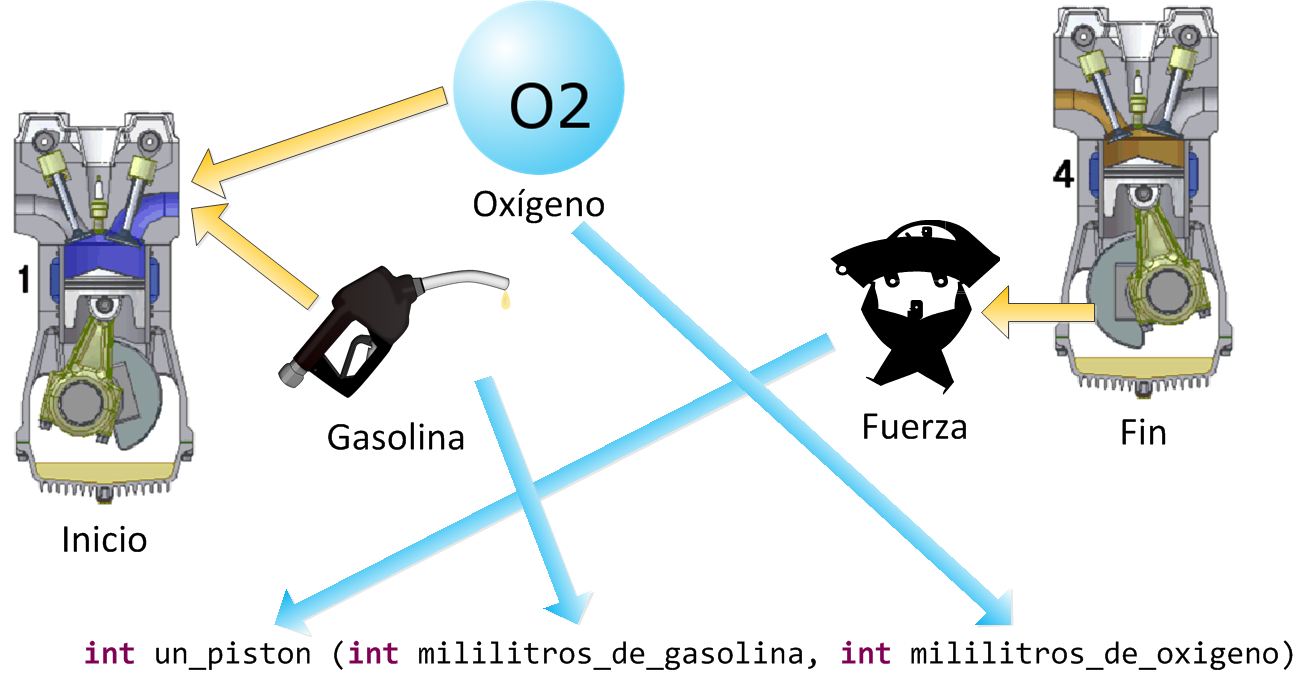
So, some milliliters of gasoline and oxygen go in, and what goes in has to be whole numbers. Also, when the piston works, it will return a force, which will be another integer. How does it do this? Let’s keep going.
Writing the method the way the image above shows is fine, but you always have to write the visibility level in front of the method.
|
Visibility level Methods and classes must always have a word in front of them that indicates the visibility level. For variables it isn’t always written. There are three visibility levels (if you’ve never seen this before, I recommend you only read about public and private and ignore protected, since you need a bit more background for it, but we’ll get to it in later tutorials):
|
So, we want the piston to be usable only by the Motor. Why would we let anything else, or the driver, touch it? So they can break it?
One thing we left out is the visibility of the first variable we created, velocidad_de_rotacion_del_motor. Since it’s an internal state of the engine, it belongs only to the engine, so it’s private too.
We write our code so that it looks like this:
package piezas_internas;

public class Motor {
    private int velocidad_de_rotacion_del_motor = 0;

    private int un_piston (int mililitros_de_gasolina, int mililitros_de_oxigeno){
        int fuerza_del_piston = 0;
        return fuerza_del_piston;
    }

}
Eclipse will have underlined the method in yellow. It’s telling you that we aren’t using the piston anywhere, and that’s true, right? The engine has the piston inside but doesn’t use it anywhere.
Let’s focus on what’s in the piston’s code:
private int un_piston (int mililitros_de_gasolina, int mililitros_de_oxigeno){
    int fuerza_del_piston = 0;
    return fuerza_del_piston;
}
We’ve written a variable inside the method called fuerza_del_piston (piston force), which will serve something similar to what the variable velocidad_de_rotacion_del_motor does. Careful now! Look at the curly braces that contain what’s inside the method: the variable fuerza_del_piston will only be used inside that method. The variable velocidad_de_rotacion_del_motor, on the other hand, can be used inside this method or in any other in the class (But if it’s private, how is it going to be used? If you’re asking yourself that, you haven’t quite gotten it yet: we’re inside the Motor class, and it’s private for those on the outside. Think of a physical car engine when you open the hood: is the piston accessible to you? No. And the engine’s rotation speed? Yes, but through the transmission belt; when it’s first generated inside the engine, no, because we haven’t reached the engine’s output yet. Private and public may become clearer when we use the engine, which is where you actually see the difference).
Another thing: fuerza_del_piston doesn’t need anything in front of it for visibility, because it’s a local variable, and everything inside a method is private and only for that method. If you hold a piston in your hand, whatever it has inside is not accessible in any way, right? Except by breaking it, but then it stops working, and just like in code, if it’s broken it doesn’t work.
Let’s keep adding logic and behavior to the piston (that is, steps 2 and 3 in the piston’s animated GIF). Let’s assume the following: the piston only withstands less than 30 milliliters of gasoline, otherwise it explodes. The operation will be very simple: the amount of oxygen will be multiplied by the amount of gasoline, and the result is the force. Let’s analyze the two previous sentences:

We’re dealing with a full-blown conditional. The conversion to Java would be:

Since we weren’t going to cause an error in the program when the value is greater than or equal to 30, we’ve chosen to show a symbolic message about the explosion in the Eclipse console.
Our Motor class should end up looking like this:
package piezas_internas;

public class Motor {
    private int velocidad_de_rotacion_del_motor = 0;

    private int un_piston (int mililitros_de_gasolina, int mililitros_de_oxigeno){
        int fuerza_del_piston = 0;

        if (mililitros_de_gasolina<30){
            fuerza_del_piston = mililitros_de_gasolina * mililitros_de_oxigeno;
        }else{
            System.out.println("¡El pistón ha sido demasiado cargado de gasolina y ha explotado!");
        }

        return fuerza_del_piston;
    }

}
This way, if the gasoline is less than 30, we get a piston force, and when the code reaches return, that amount is handed back outside the method to whoever asked for it (for example, if the gasoline is 3 and the oxygen is 5, since gasoline<30 the piston force is 3×5, which is 15).
Now let’s connect the engine’s circuits to the piston. To do that we need to create another method in the class, but this method is special: its visibility is always public, it never returns anything, and it has the same name as the class. This is commonly called a constructor rather than a method, since it runs at the exact moment the class is used for the first time.
In this case we’ll create the constructor with one input for the gasoline (imagine the physical engine with an intake tube for the gasoline); the air is ambient air that comes in through the engine’s vent, and let’s assume that each piston receives 2 milliliters of oxygen. Since the piston returns the force it obtained, and in this case all of it is transmitted to the engine as rotation speed, we get:
public Motor (int mililitros_de_gasolina){
    velocidad_de_rotacion_del_motor = un_piston (mililitros_de_gasolina, 2);
}
We’ll insert the constructor lines so that the code looks like this (as a general rule among developers, the constructor or constructors go before all the methods, but after the global variables):
public class Motor {
    private int velocidad_de_rotacion_del_motor = 0;
    private final int capacidad_maxima_en_mililitros_de_gasolina_para_un_piston = 30;

    public Motor (int mililitros_de_gasolina){
        velocidad_de_rotacion_del_motor = un_piston (mililitros_de_gasolina, 2);
    }

    private int un_piston (int mililitros_de_gasolina, int mililitros_de_oxigeno){
        int fuerza_del_piston = 0;

        if (mililitros_de_gasolina<capacidad_maxima_en_mililitros_de_gasolina_para_un_piston){
            fuerza_del_piston = mililitros_de_gasolina * mililitros_de_oxigeno;
        }else{
            System.out.println("¡El pistón ha sido demasiado cargado de gasolina y ha explotado!");
        }

        return fuerza_del_piston;
    }

}
We have the engine’s state (velocidad_de_rotación_del_motor), we have the engine’s startup (the constructor), and we have the engine’s internal workings (the piston). If we picture the engine, what’s left is the place where the transmission belt attaches, that is, the engine’s output.
As a review we’ll create the data output method; you should already know how to do this from what we explained before. We create a new method, a very simple one: it has no inputs, only the output, which will be the engine’s rotation speed, and since it goes to the transmission belt, it’s public so that other parts (classes) can use it.
public int get_velocidad_de_rotacion_del_motor(){
    return velocidad_de_rotacion_del_motor;
}
As a convention among developers, a method that returns something gets “get” in front of it (it means “give me”), and one that puts some value into the class gets “set”. In this case there’s no “set”, since the class’s constructor takes care of getting the data.
If we add it to the full code, our final Motor class looks like this:
package piezas_internas;

public class Motor {
    private int velocidad_de_rotacion_del_motor = 0;
    private final int capacidad_maxima_en_mililitros_de_gasolina_para_un_piston = 30;

    public Motor (int mililitros_de_gasolina){
        velocidad_de_rotacion_del_motor = un_piston (mililitros_de_gasolina, 2);
    }

    private int un_piston (int mililitros_de_gasolina, int mililitros_de_oxigeno){
        int fuerza_del_piston = 0;

        if (mililitros_de_gasolina<capacidad_maxima_en_mililitros_de_gasolina_para_un_piston){
            fuerza_del_piston = mililitros_de_gasolina * mililitros_de_oxigeno;
        }else{
            System.out.println("¡El pistón ha sido demasiado cargado de gasolina y ha explotado!");
        }

        return fuerza_del_piston;
    }

    public int get_velocidad_de_rotacion_del_motor(){
        return velocidad_de_rotacion_del_motor;
    }

}
Let’s take a moment to analyze what we’ve done in this class:
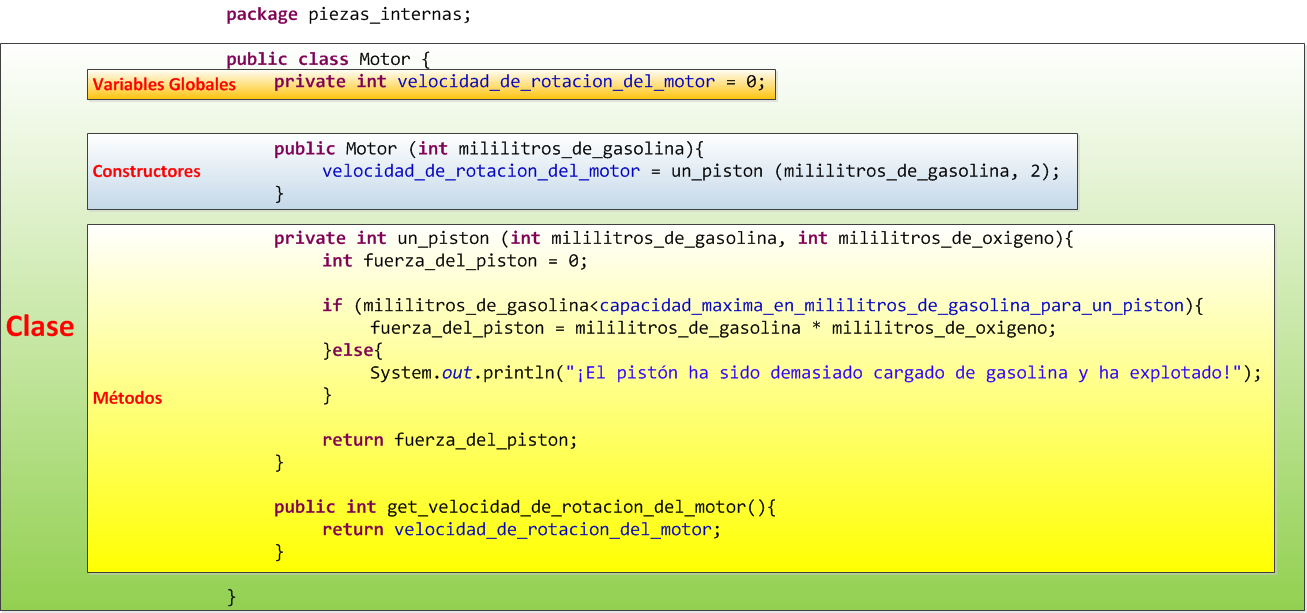
After all that, we’ve finally built the engine! Let’s save everything so we don’t lose our changes. Now all that’s left is to test this class.
For that, let’s edit the Arranque class. In it we add the program’s start method, main.
package panel_del_conductor;

public class Arranque {

    public static void main(String[] args) {

    }

}|
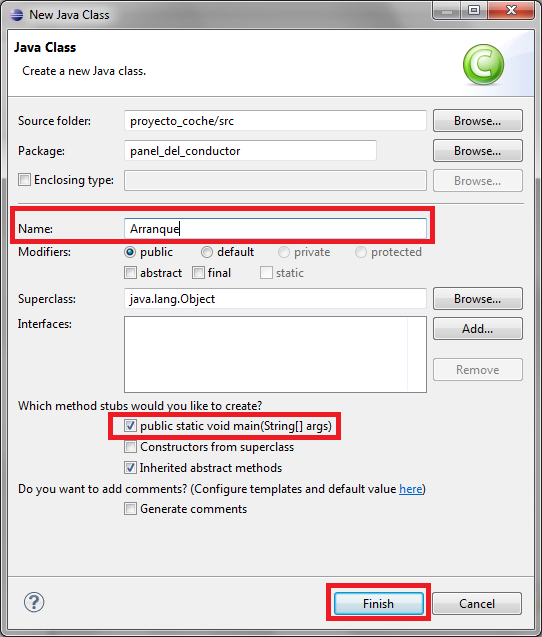
TRICK TO AUTOMATICALLY CREATE THE MAIN METHOD: For the class that starts the program, when we click New/Class, in the pop-up window we can check the “public static void main(String[] args)” box.
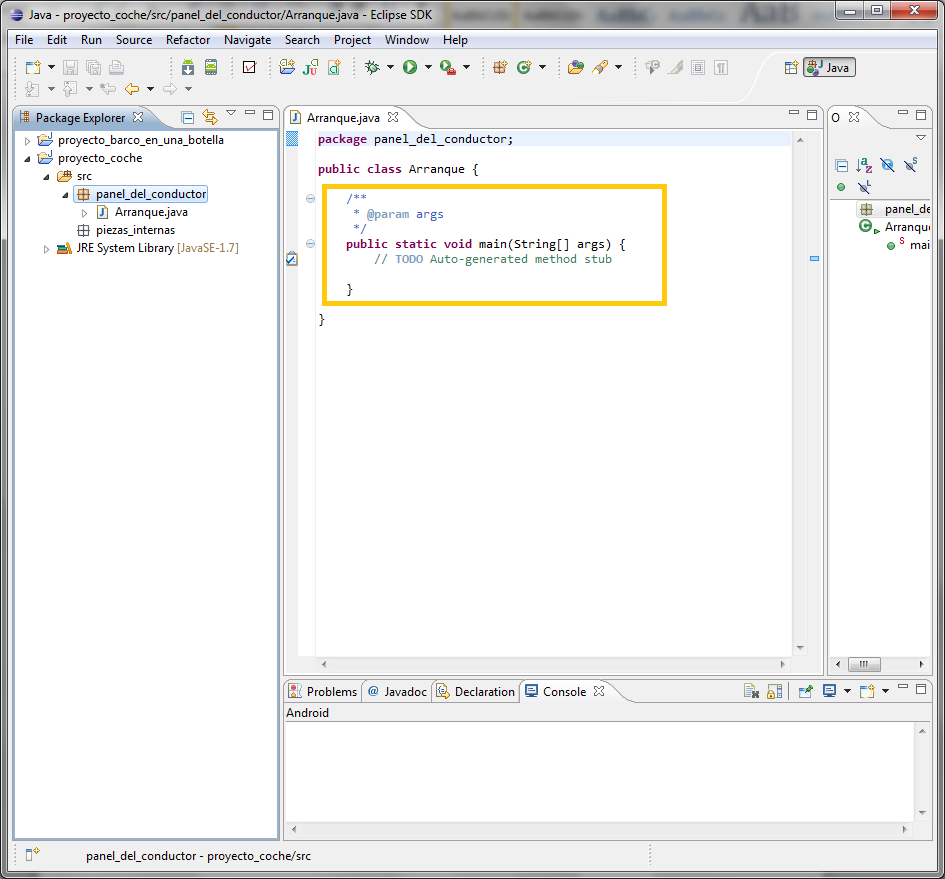
That way Eclipse saves us part of the work. If you’re thinking “If Eclipse does the work for me, I won’t learn!”, that’s true, but in programming you don’t have to memorize code either; that’s what the documentation is for, which we’ll see later. So, if we know when to check this box so that Eclipse does it for us -and it doesn’t add that much code, as you’ll see when you click “Finish”- that will be something well learned. After all, we’re learning not only to program in Java, but to use an IDE –and an IDE is a set of tools, and this one makes our life a little easier. We can see that the code Eclipse has automatically added is the following.
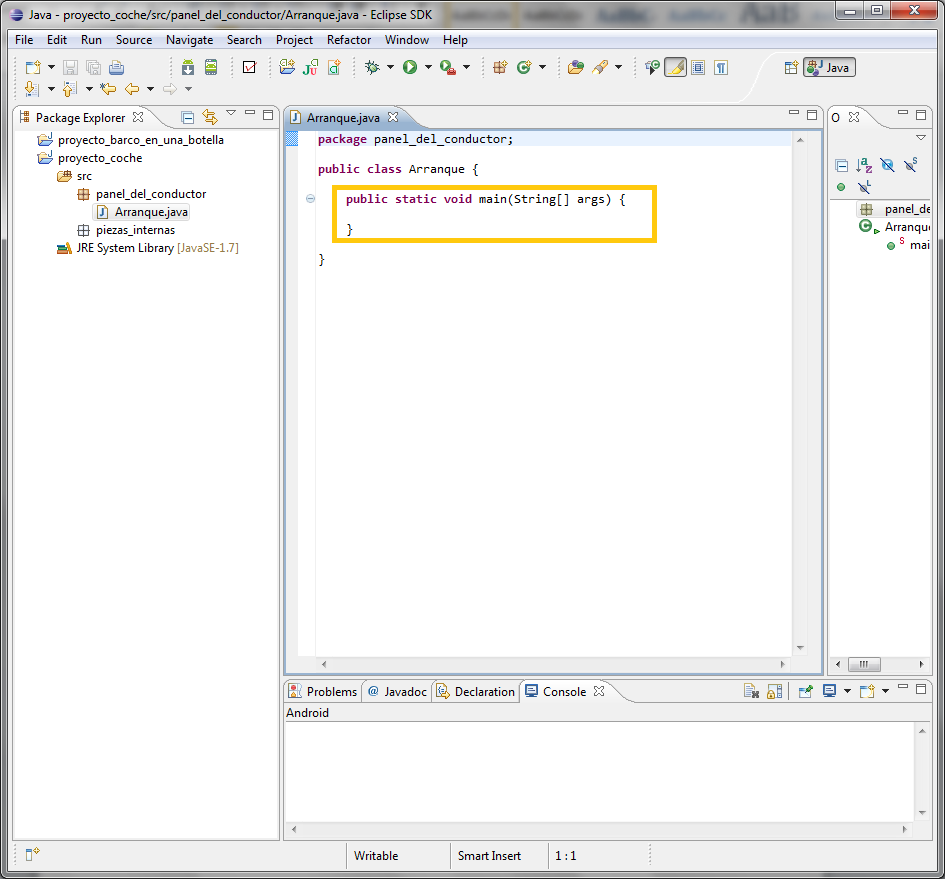
It has added a lot of weird things that we won’t explain for now -we’ll leave them for a bit later. Let’s delete everything we don’t need for the moment until it looks like this:
Much better, right? Just like in the previous tutorial. Now we only need to fill it in. When we learn more in the near future, we’ll see that what we’ve deleted is useful too. |
Let’s use the engine at startup. How do we do that? Easy. In the same way that we create a variable declaration, we create one for the engine inside the main class. Remember int X = 5? Well, same thing, but the type won’t be one of the simple ones, but a compound one that we created ourselves: it will be Motor, that is, the Motor class will act as a data type.
Motor mi_motor =Here we have something called mi_motor (“my engine”), like an X, that only accepts something of type Motor but doesn’t point to anything yet. And what value do we store? Well, an engine that we have to create new, and since our constructor needs the amount of gasoline, we pass it, for example, 20.
Motor mi_motor = new Motor (20);Here we need to be clear about the difference between Motor, which is the class, and mi_motor, which is the object (without realizing it, we’ve dragged you into the fabulous world of objects in a single programming tutorial). A class is, so to speak, the mold for shaping objects, and an object is an object, pardon the redundancy -it’s white and comes in a bottle, if you catch my drift. Motor is the mold and mi_motor is the object created with the mold. Let’s add this line to the code to see what happens:
package panel_del_conductor;

public class Arranque {

    public static void main(String[] args) {
        Motor mi_motor = new Motor (20);
    }

}
Eclipse complains by underlining the word Motor in red. Don’t worry, we haven’t made a mistake. If we place the cursor over the problem, Eclipse will tell us what we can do. In this case the first option is the ideal one, since we have to tell Java that this Arranque class is going to use another class called Motor. So we click the one that says “Import Motor (piezas_internas)” and it’s solved.
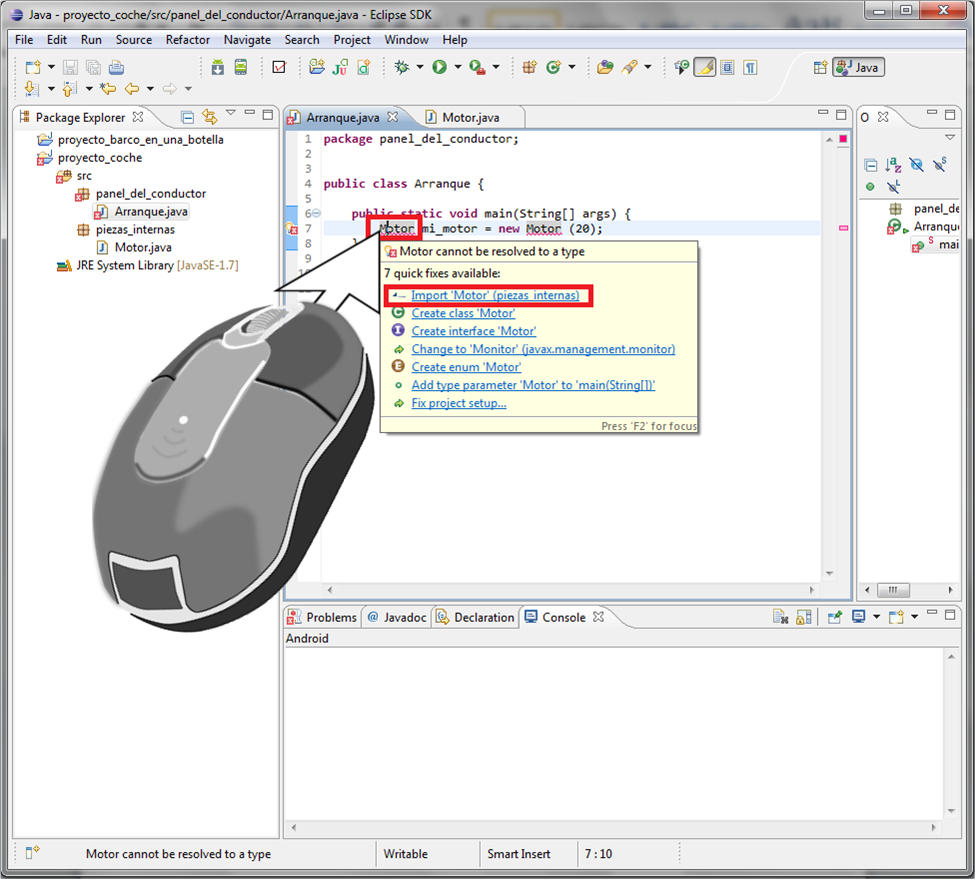
You’ll see that Eclipse has automatically added an import line for us, which is:
import piezas_internas.Motor;Let’s keep going; we’re almost there to test what we’ve done.
Below the creation of the mi_motor object we create an integer variable called velocidad_coche (car speed), which will hold the value that the transmission belt passes it from mi_motor (imagine we have the physical engine and want to attach the transmission belt somewhere). To call a method of the object, we write the object’s name followed by a dot. Eclipse has surely shown you a bunch of suggestions, among which is one we wrote ourselves, called: “get_velocidad_de_rotacion_del_motor():int – Motor” (I’m sure we don’t need to explain this line much: after the final colon comes int, which is the value it returns, namely the engine’s rotation speed; and after the dash comes Motor, which is the class Eclipse is pulling this method from to show it to you). As a curiosity, and in case you didn’t understand visibility, it’s the only method we declared as public earlier in the Motor class -other than the constructor- that appears in this list; the private one doesn’t show up (try going to the Motor class and changing private to public, save, and then go back to the Arranque class to see Eclipse’s suggestions again; you’ll surely see the one that is now public).

We select it, add the semicolon, and it will be in place.
int velocidad_coche = mi_motor.get_velocidad_de_rotacion_del_motor();To finish, below this line we write the following so that it shows us the result in the terminal:
System.out.println("La velocidad del coche es "+velocidad_coche+" km/h");So the final code looks like this:
package panel_del_conductor;

import piezas_internas.Motor;

public class Arranque {

    public static void main(String[] args) {
        Motor mi_motor = new Motor (20);
        int velocidad_coche = mi_motor.get_velocidad_de_rotacion_del_motor();
        System.out.println("La velocidad del coche es "+velocidad_coche+" km/h");
    }

}
We click to run our code (green circle with the arrow; see the previous tutorial if you don’t remember).
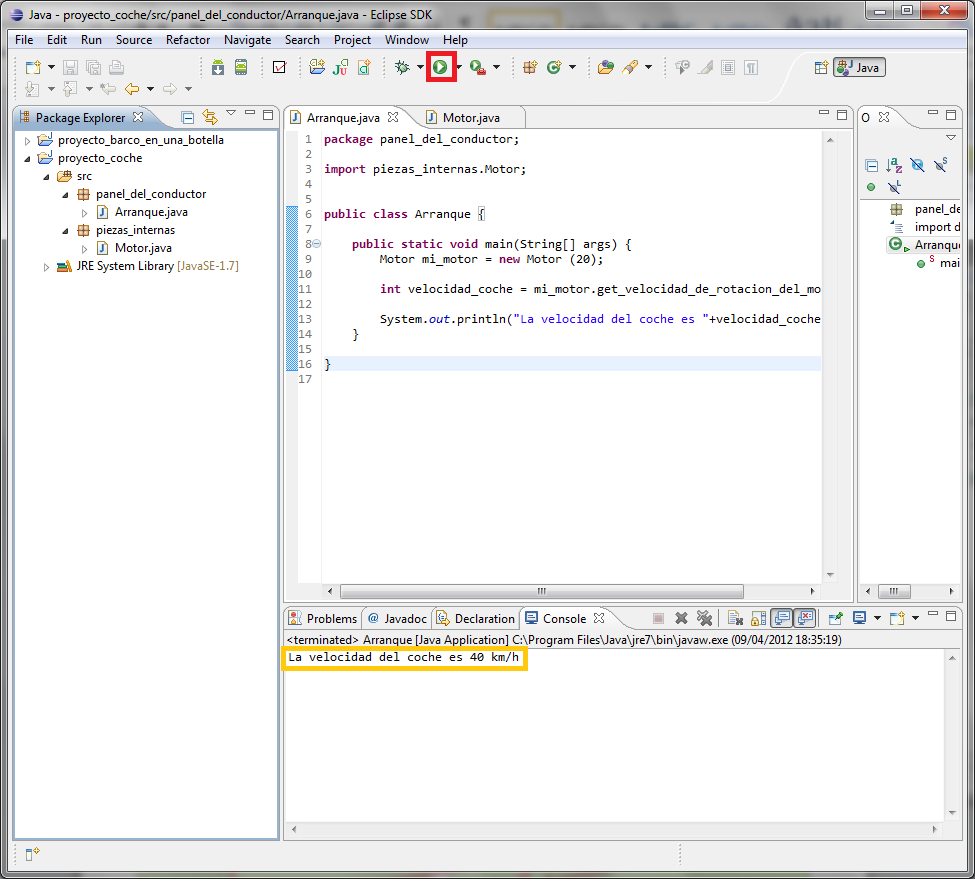
We can see the result displayed on screen, which is 40 (20 of gasoline times 2 of oxygen).
We remember that we added a conditional. Let’s try changing the 20 in the engine to a number greater than or equal to thirty, for example 100.

As expected, if we give the engine 100 of gasoline, the piston explodes. And since it exploded, no multiplication was calculated, so it returns the initial value of the speed, which was 0.
Let’s review the code a bit to see what it did to produce this result. Look at the following image, starting with the command to the computer to run, and follow the red arrows.
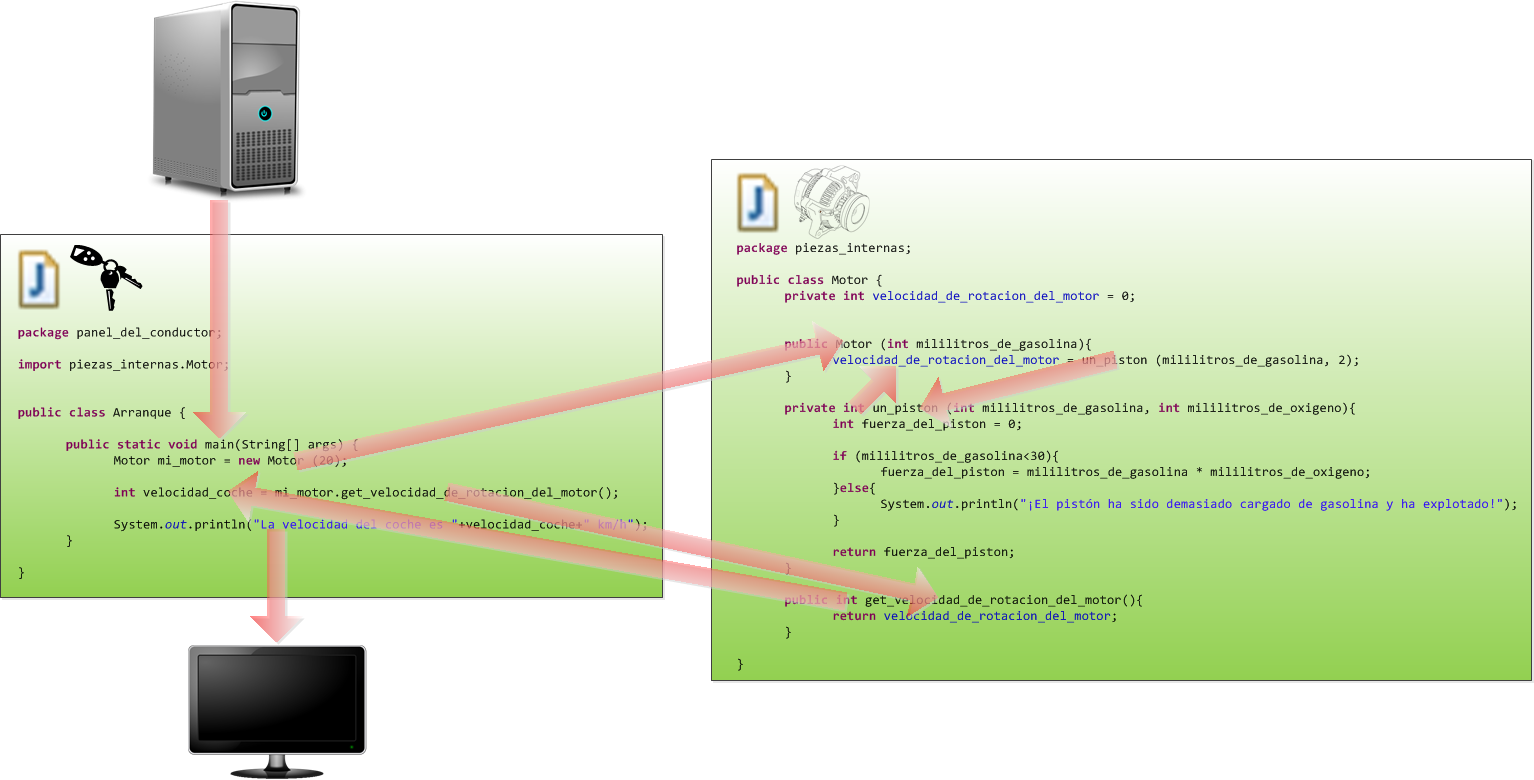
Everything is done sequentially, line by line, starting with the main method, but when it encounters a call to the Motor class we jump to the engine, and when it finishes we continue. The red arrows show the calls to each method and the data they return.
If you’ve made it this far, you’ve finished the tutorial, so congratulations! You’ll have learned a ton of things about Java and Eclipse:
- Organizing our projects in Eclipse
- Declaring all kinds of variables, both simple and complex, global or local.
- Using methods with input and return values (input and output).
- Using constructors.
- Using objects.
- Public and private visibility.
- If-else conditional.
- Using the Eclipse console.
- And even how a four-stroke engine works!
“A Lot of Java in One Simple Tutorial (for Dummies)” by Ramón Invarato at jarroba.com, licensed under Creative Commons Attribution-NonCommercial-ShareAlike 3.0. Registered at Safe Creative.

You may also like


Debug Mode in Eclipse for Java (Video)
Learn how to use debug mode in Eclipse to debug a Java program: breakpoints, step-by-step execution with F5-F8, and a video tutorial.

Advanced Dockerfile: Multi-Stage Builds, Registries, and Tricks
Free Docker course. Expert Docker tricks: multi-stage builds, optimizing images, faster build times, and distributing images through Docker registries.
Leave a comment