
Charts on Web Pages with Highcharts
Learn how to add line and pie charts to your web pages with Highcharts JS and jQuery, and feed them with JSON data from a database using PHP.
You can download the code for this tutorial by clicking HERE.
In this tutorial we are going to explain how we built the charts in the "Visitas" section of this site. We made these charts with the libraries provided by "Highcharts JS" and with jQuery. If you go to the "Demos" section of their site you can see the different types of charts they offer, and you can even customize them from an editor. In this tutorial we are going to explain how to integrate them into a web page, because if you copy the JavaScript code they give you directly, the page doesn’t load right away, so in the project we have shared you can see the differences.
First, we are going to start with the line chart that you can see in the following image:
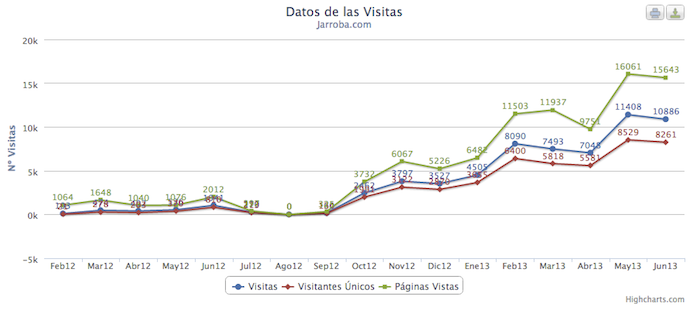
In this first example we are going to do it in a plain "html" file. The first thing is to import the Highcharts and jQuery libraries, which you have in the shared project:
<script type="text/javascript" src="js/jquery-1.7.1.min.js"></script>
<script type="text/javascript" src="js/highcharts.js"></script>
<script type="text/javascript" src="js/exporting.js"></script>
Then we have to define the function that will draw the chart, which will be the following:
<script type="text/javascript">
	var chart;
	$(document).ready(function() {

		chart = new Highcharts.Chart({
			chart: {
				renderTo: 'graficaLineal', 	// I give the chart its name
				defaultSeriesType: 'line'	// I set the chart type
			},
			title: {
				text: 'Datos de las Visitas'	// Title (Optional)
			},
			subtitle: {
				text: 'Jarroba.com'		// Subtitle (Optional)
			},
			// I set the data on the 'X' axis
			xAxis: {
				categories: ['Feb12','Mar12','Abr12','May12','Jun12','Jul12','Ago12','Sep12','Oct12','Nov12',
'Dic12','Ene13','Feb13','Mar13','Abr13','May13','Jun13'],
				// I set the title for the 'X' axis
				title: {
					text: 'Meses'
				}
			},
			yAxis: {
				// I set the title for the 'Y' axis
				title: {
					text: 'Nº Visitas'
				}
			},
			// I format the "little box" that appears when you hover the mouse over the chart
			tooltip: {
				enabled: true,
				formatter: function() {
					return '<b>'+ this.series.name +'</b><br/>'+
						this.x +': '+ this.y +' '+this.series.name;
				}
			},
			// I set the chart options
			plotOptions: {
				line: {
					dataLabels: {
						enabled: true
					},
					enableMouseTracking: true
				}
			},
			// I provide the data to draw the chart
			series: [{
		                name: 'Visitas',
		                data: [103,474,402,536,1041,270,0,160,2462,3797,3527,4505,8090,7493,7048,11408,10886]
		            },
		            {
		                name: 'Visitantes Únicos',
		                data: [21,278,203,370,810,213,0,134,1991,3122,2870,3655,6400,5818,5581,8529,8261]
		            },
		            {
		                name: 'Páginas Vistas',
		                data: [1064,1648,1040,1076,2012,397,0,325,3732,6067,5226,6482,11503,11937,9751,16061,15643]
		            }],
		});
	});
</script>
And finally, we have to put in the "body" the layer where the chart will be drawn, giving it its corresponding identifier (in this case "graficaLineal"):
<div id="graficaLineal" style="width: 100%; height: 500px; margin: 0 auto">
</div>
To make the following pie chart, we follow the same steps but change the JavaScript function:

<script type="text/javascript">
	var chart;
	$(document).ready(function() {
		chart = new Highcharts.Chart({
			chart: {
				renderTo: 'graficaCircular'
			},
			title: {
				text: 'Porcentaje de Visitas por Paises'
			},
			subtitle: {
				text: 'Jarroba.com'
			},
			plotArea: {
				shadow: null,
				borderWidth: null,
				backgroundColor: null
			},
			tooltip: {
				formatter: function() {
					return '<b>'+ this.point.name +'</b>: '+ this.y +' %';
				}
			},
			plotOptions: {
				pie: {
					allowPointSelect: true,
					cursor: 'pointer',
					dataLabels: {
						enabled: true,
						color: '#000000',
						connectorColor: '#000000',
						formatter: function() {
							return '<b>'+ this.point.name +'</b>: '+ this.y +' %';
						}
					}
				}
			},
		    series: [{
				type: 'pie',
				name: 'Browser share',
				data: [
						['España',35.38],
						['México',21.0],
						['Colombia',9.45],
						['Perú',5.74],
						['Argentina',5.14],
						['Chile',4.89],
						['Venezuela',3.04],
						['Ecuador',2.53],
						['Bolivia',1.66],
						['Rep. Dominicana',1.12],
						['Guatemala',1.08],
						['Costa Rica',1.07],
						['Estados Unidos',1.03],
						['+81 paises',6.87]
					]
			}]
		});
	});
</script>
If you look closely, and this is something that is very well done, the data to draw in the chart has JSON format, so it is very easy to use these charts and draw them directly by querying the data to plot from the database (with the corresponding format, obviously), parsing that query to JSON (with the "json_encode" function in PHP) and passing it directly to the JavaScript function that draws the chart. In the example of the line chart that we have on the site, we query the database and it returns some arrays that, if we write them directly in PHP, will look like this:
$visitas = array( 'name' => 'Visitas' , 'data' => array(103,474,402,536,1041,270,0,160,2462,3797,3527,4505,8090,7493,7048,11408,10886)) ;
$unicas = array( 'name' => 'Visitantes Únicos' , 'data' => array(21,278,203,370,810,213,0,134,1991,3122,2870,3655,6400,5818,5581,8529,8261));
$pagVistas = array( 'name' => 'Páginas Vistas' , 'data' => array(1064,1648,1040,1076,2012,397,0,325,3732,6067,5226,6482,11503,11937,9751,16061,15643)) ;
Or we can also copy the following PHP code:
<?php
	$visitas = array( 'name' => 'Visitas' , 'data' => array(103,474,402,536,1041,270,0,160,2462,3797,3527,4505,8090,7493,7048,11408,10886)) ;
	$unicas = array( 'name' => 'Visitantes Únicos' , 'data' => array(21,278,203,370,810,213,0,134,1991,3122,2870,3655,6400,5818,5581,8529,8261));
	$pagVistas = array( 'name' => 'Páginas Vistas' , 'data' => array(1064,1648,1040,1076,2012,397,0,325,3732,6067,5226,6482,11503,11937,9751,16061,15643));

	$entrenamientos = array();
	array_push( $entrenamientos, $visitas);
	array_push( $entrenamientos, $unicas);
	array_push( $entrenamientos, $pagVistas);

	// An array is created to put on the 'X' axis
	$semanas = array(Feb12,Mar12,Abr12,May12,Jun12,Jul12,Ago12,Sep12,Oct12,Nov12,Dic12,Ene13,Feb13,Mar13,Abr13,May13,Jun13);
?>
And with this data, the JavaScript function will look like this:
<script type="text/javascript">
	var chart;
	$(document).ready(function() {

		chart = new Highcharts.Chart({
			chart: {
				renderTo: 'container',
				defaultSeriesType: 'line'
			},
			title: {
				text: 'Datos de las Visitas'
			},
			subtitle: {
				text: 'Jarroba.com'
			},
			xAxis: {
				// We pass it the data for the 'X' axis as JSON
				categories: <?php echo json_encode( $semanas) ?>
			},
			yAxis: {
				title: {
					text: 'Nº Visitas'
				}
			},
			tooltip: {
				enabled: true,
				formatter: function() {
					return '<b>'+ this.series.name +'</b><br/>'+
						this.x +': '+ this.y +' '+this.series.name;
				}
			},
			plotOptions: {
				line: {
					dataLabels: {
						enabled: true
					},
					enableMouseTracking: true
				}
			},
			// We pass it the data as JSON
			series: <?php echo json_encode( $entrenamientos) ?>
		});
	});
</script>
As you can see, this way the code is much cleaner, and by querying the database we can draw the charts directly.
In this case we have only shown how to make two types of charts. The Highcharts site has many more chart types, and you only need to pay attention to the shape in which the data has to be passed to the function.
“Charts on Web Pages with Highcharts” by Ricardo Moya at jarroba.com, licensed under Creative Commons Attribution-NonCommercial-ShareAlike 3.0. Registered at Safe Creative.

You may also like


Charts on Web Pages with Google Charts
Learn how to create line, pie and geo charts on your web pages with the free Google Charts API and JavaScript, with complete code examples.
LAMP Step by Step on Your Own Server
Learn step by step how to build a dynamic website with the full LAMP architecture: Linux, Apache, MySQL or MariaDB, and PHP, Perl or Python.
Leave a comment