
Finding a path: an AI that learns nothing
How an AI finds a path without learning: breadth-first, depth-first, uniform cost, greedy and A*, step by step on a grid. AI course, 0.5.

AI from the First Bit › Level 0 — How a machine sees the world part 5 of 6
Course modules
- 1Everything is a number (yes, even your name)
- 2An image is a table of numbers
- 3A corrupted bit: how to fix it without knowing which one it is
- 4What is a model (and why a straight line already counts as one)
- 5Finding a path: an AI that learns nothing
- 6Playing against a machine: minimax and alpha-beta pruning
Not all artificial intelligence learns from data. One of its oldest branches solves problems by searching: it tries possible paths in an order designed to find a good one early, like someone looking for the way out of a maze (History of artificial intelligence, on Wikipedia). One of the most widely used algorithms of that family, A*, was published by Peter Hart, Nils Nilsson and Bertram Raphael in 1968, so that a robot, Shakey, could plan where to move (A* search algorithm, on Wikipedia). And it learns nothing: everything it knows, a person told it.
Try this first
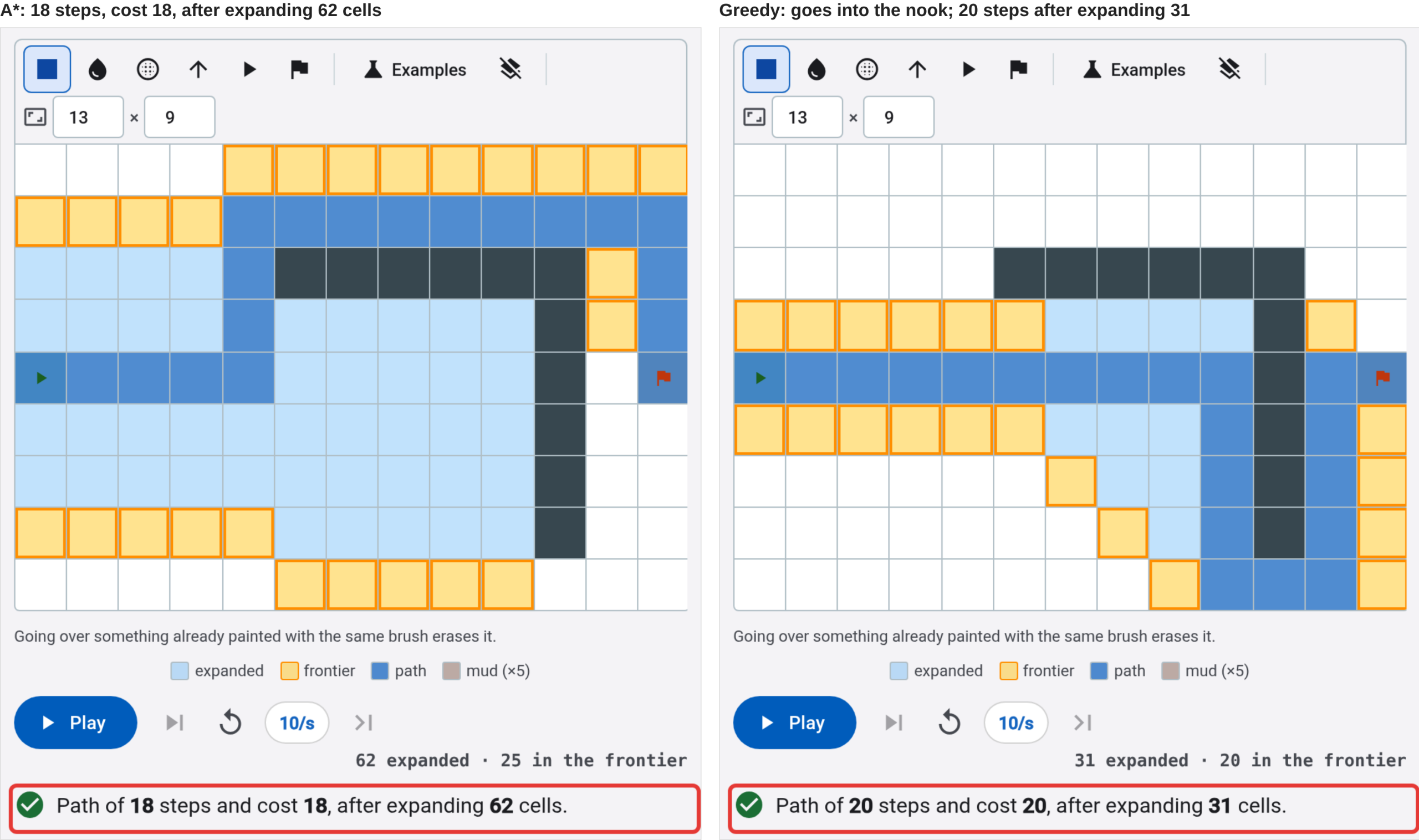
Open the Search tool with a corner wall. The triangle is the start, the flag is the goal and the dark cells are walls. The chosen algorithm is A*. Press Play and watch how the grid is painted: in light blue, the cells it has already looked at; in yellow with an orange border, the ones it has discovered and still has pending. At the end, the path shows in blue, and below it: “Path of 18 steps and cost 18, after expanding 62 cells.”
Now change Algorithm to Greedy, or open the same corner with greedy, and press Play again. It heads straight for the goal, goes into the nook of the corner, hits the wall and has to go around it from below: “Path of 20 steps and cost 20, after expanding 31 cells.” It has looked at half as many cells, but its path is longer.
Below the grid, the table All five on this same grid compares all the algorithms at once, without your having to run them one by one:
| Algorithm | Expanded | Steps | Cost |
|---|---|---|---|
| Breadth-first (BFS) | 103 | 18 | 18 |
| Depth-first (DFS) | 21 | 20 | 20 |
| Uniform cost | 103 | 18 | 18 |
| Greedy | 31 | 20 | 20 |
| A* | 62 | 18 | 18 |
What just happened
To a program, the grid is a set of states (each cell) and of actions (moving to a neighboring cell: up, down, left or right). Each move costs 1, except entering a mud cell, which costs 5. Finding a path means deciding in what order to look at the cells until reaching the goal.
With the bar above the grid you can paint other cells besides walls. Each button on the bar is in the same order as its cell, below it:
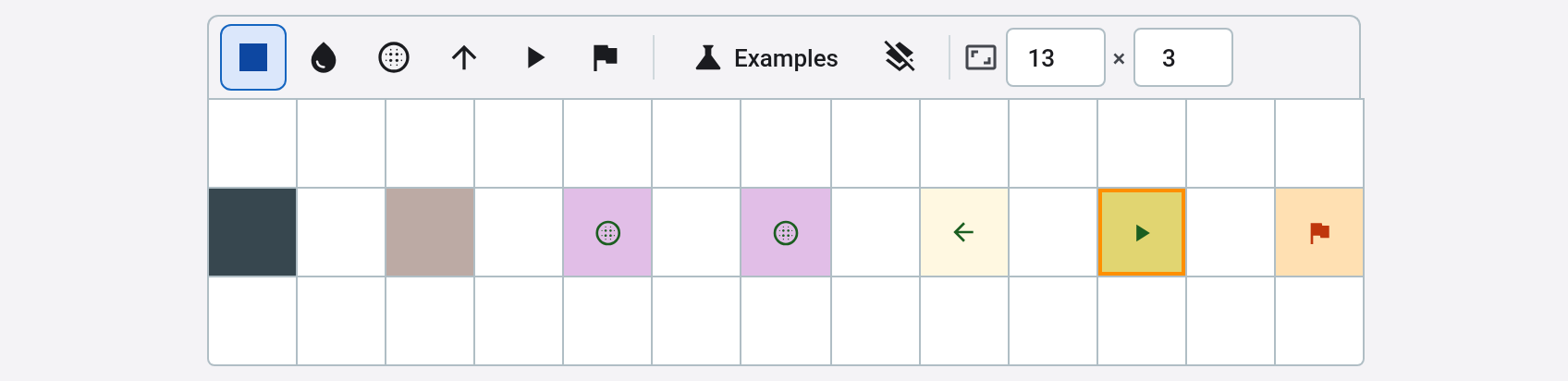
| Cell | What it does | How each algorithm treats it |
|---|---|---|
| Start (triangle) and goal (flag) | Where it starts and where it has to get to | Same for all |
| Wall (dark gray) | It cannot be crossed | All go around it |
| Mud (brown) | It can be crossed, but entering costs 5 instead of 1 | Breadth-first, depth-first and greedy do not look at the cost and cross it like any other cell; uniform cost and A* go around it if the detour is cheaper |
| One-way (arrow) | You can only leave it in the direction the arrow points | All respect it |
| Portal (purple, they come in pairs) | Whoever goes in through one comes out through its pair | All can use it; you will see what it changes in the last exercise |
The five algorithms do the same thing over and over: they take a cell out of the pending ones, expand it (look at its neighbors) and note the new neighbors as pending. That list of pending cells is called the frontier. The only thing that changes from one to another is which cell of the frontier they take first:
- Breadth-first (BFS) takes the oldest. It advances in waves: all the cells one step away, then two… It finds the path with the fewest steps, but looks at almost everything: 103 cells.
- Depth-first (DFS) takes the newest. It goes down one corridor to the end before trying another. It looks at little, but the first path it finds is not necessarily the best.
- Uniform cost takes the one that has cost the least to reach from the start. Without mud, it is the same as breadth-first; with mud, it prefers a detour to crossing it.
- Greedy takes the one that seems closest to the goal. To know that, it uses a heuristic, a quick estimate: the horizontal and vertical steps that would be left if there were no walls. It is called Manhattan distance after the grid of streets in that New York borough, where to get from one place to another you can only move along or across. That is why it goes into the nook: from inside, the goal “seems” close.
- A* adds the two things together: what it has cost to reach a cell and what seems to be left from it. The tool writes it as g + h: g, what has been spent; h, what the heuristic estimates.
Whether A* finds the cheapest path depends on one condition: that the heuristic never exaggerates what is left. Counting the steps as if there were no walls never exaggerates, because a wall can only lengthen the path, never shorten it. With that, A* reaches the same cost as uniform cost, 18, looking at 62 cells instead of 103.
The Heuristic weight slider multiplies h and shows what happens when the estimate is trusted more. In the corner, A* with weight 1 looks at 62 cells and finds the path of cost 18; with weight 2, 46 cells and cost 20; with weight 5, 33 cells and cost 20, almost the same as greedy. The more the estimate weighs, the less it looks at and the less it guarantees.
Note
The weight multiplies the estimate in the formula A* uses to choose the next cell. A cell that cost 6 to reach and that, according to the estimate, has 8 left, is worth 6 + 8 = 14 with weight 1, and 6 + 2 × 8 = 22 with weight 2: the more it weighs, the more what is left counts against what has been spent. In the corner:
| Weight | What A* compares | Cells expanded | Path cost |
|---|---|---|---|
| 1 | g + h | 62 | 18 |
| 2 | g + 2 × h | 46 | 20 |
| 5 | g + 5 × h | 33 | 20 |
| (greedy) | h only | 31 | 20 |
None of this has learned from any data. In What is a model, the line came out of the points. Here, what makes the search smart is the heuristic, and it was written by a person who knew something about the problem: that walls never shorten a path.
The classic mistake
You might think the smartest thing would be to always head toward the goal. That is what greedy does, and in the corner it leads it into a dead-end nook and to a path 2 steps longer. Looking at few cells is not enough to find the best path.
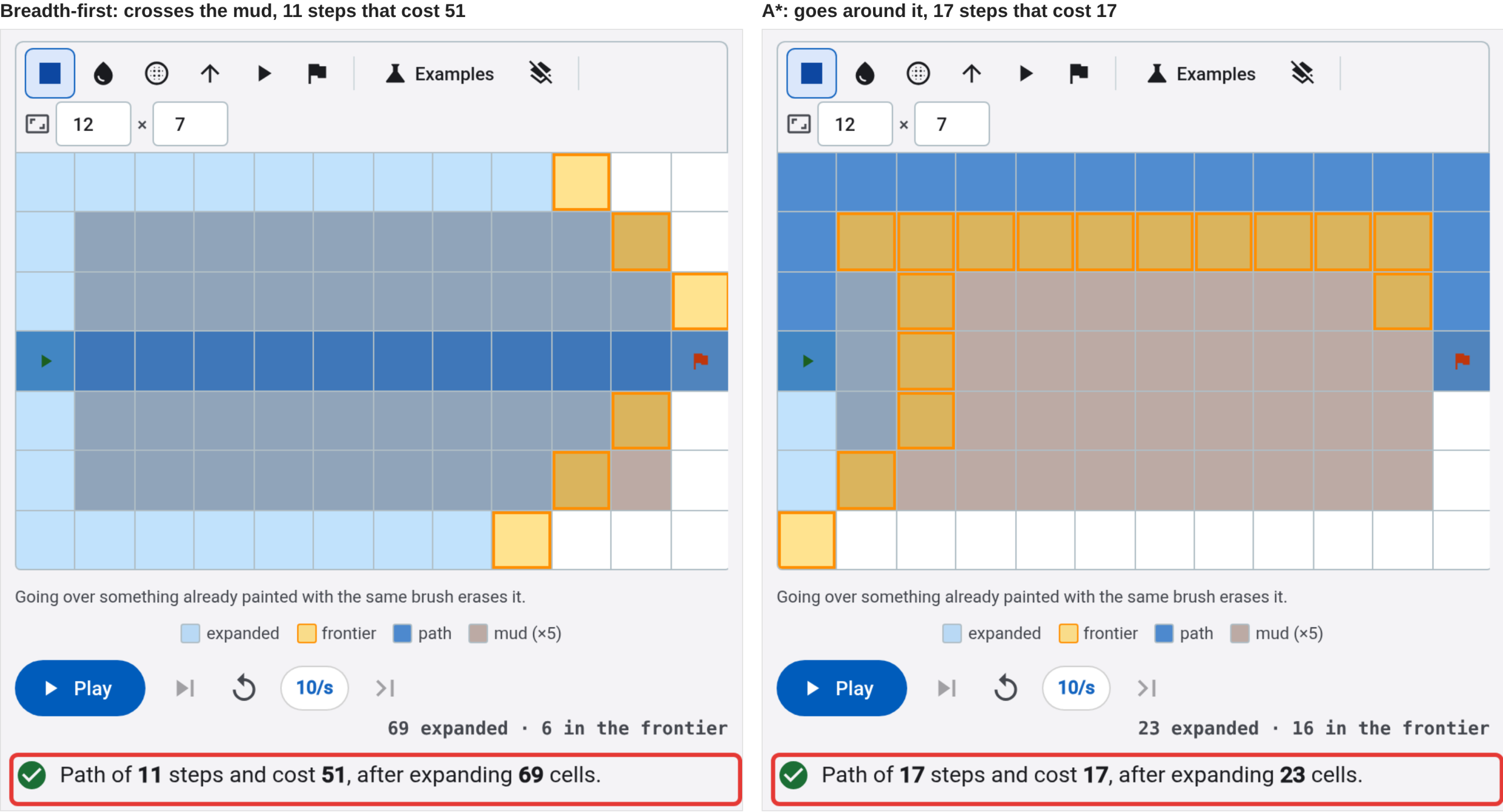
The same goes for steps and cost. Open the mud in the middle, which is also in Examples as Mud in the middle (fewer steps is not cheaper), and change the algorithm: breadth-first and greedy cross the mud in a straight line, 11 steps that cost 51; uniform cost and A* go around it, 17 steps that cost 17.
Try it yourself
- Open the Search tool with the maze. Before looking at the table, make a guess: which algorithm will give the longest path and which will look at the fewest cells? Check it.
- Go back to the corner and move the goal (with the flag on the bar above the grid) into the nook, next to the wall. Is greedy still wrong?
Test yourself
Open the mud with A* and raise the Heuristic weight little by little. At what weight does A* stop going around the mud and cross it instead?
Weight: ___
Look at A*’s “Cost” column in the table: going around it costs 17; crossing, 51.
See the answer
Answer: 4.
With weight 3, A* still goes around the mud: 17 steps that cost 17. With weight 4 it crosses it in a straight line, 11 steps that cost 51, just like greedy. The more the distance left weighs, the less it cares about what it has already spent, and the mud only shows in what has been spent. With weight 4, getting closer to the goal weighs more than the mud it has to step on.
Test yourself
In the corner wall, set A*’s weight to 3. How many cells does it expand and what does its path cost?
It expands ___ cells, and its path costs ___.
Change the Heuristic weight and look at A*’s row in the table.
See the answer
Answers: 36 and 20.
That is fewer cells than with weight 2 (46) and the same path of cost 20, which is not the cheapest (18). In the corner, A* already stops giving the cheapest at weight 2; from there on, raising the weight only saves it work.
Test yourself
A cell is 5 steps from the start (g = 5) and, counting without walls, 7 from the goal (h = 7). With weight 2, A* gives it an f of ___. Greedy, on the other hand, only looks at [g / h / g + h].
See the answer
Answers: 19 and h.
A* with weight 2 calculates g + 2 × h = 5 + 2 × 7 = 19. Greedy only looks at h, what is left, and does not care what it has cost to get there: that is why it goes into the nook of the corner.
Test yourself
Open the portal: whoever goes in through a portal comes out through its pair. Why does A* no longer find the cheapest path?
- Because entering a portal costs more than a normal cell.
- Because the portal shortens the path, and counting the steps without walls can now exaggerate what is left.
- Because A* does not use portals: it does not know they exist.
See the answer
The answer is B.
The portal costs 1, like any cell, and all the algorithms use it. What fails is the condition A* required: that the heuristic never exaggerate. Counting the steps as if there were no walls never exaggerated, because a wall only lengthens the path. A portal shortens it: from near a portal, the goal can be fewer steps away than the heuristic counts, and A* stops looking at paths that were better.
Further reading
- Playing against a machine: minimax and alpha-beta pruning, from the same course: the other classic search, the one for two-player games, in tic-tac-toe and Connect 4, with the Game tab of the same tool.
- Introduction to the A* Algorithm, by Red Blob Games: four of these algorithms (all but depth-first), with interactive drawings and their code, for anyone who wants to program them.
- A* search algorithm, on Wikipedia: the history, from the robot Shakey, and why the heuristic must not exaggerate. It takes a bit more math.
- Learning from reward, from the same course: the same grid, when the agent does not know the map and learns from rewards and punishments.
- Anatomy of an agent, later in the course: an agent also decides what step to take next, even if its options do not fit on a grid.
“Finding a path: an AI that learns nothing” by Ramón Invarato at jarroba.com, licensed under Creative Commons Attribution-NonCommercial-ShareAlike 3.0. Registered at Safe Creative.

You may also like

Playing against a machine: minimax and alpha-beta pruning
How a machine that never loses plays: minimax assumes the opponent's worst and alpha-beta pruning gives the same move by looking at less. AI course, 0.6.

What is a model (and why a straight line already counts as one)
What a model is, what training and predicting mean, with a line you fit by dragging points. And why a model does not understand its data. AI course, 0.4.
Leave a comment