
Mutable and Immutable Types in Python
Learn whether a variable can change (mutable) or not (immutable). Mutable: List, Dict, Set. Immutable: String, Int, Float, Bool, Tuple, Range, Decimal.
Mutability and immutability in Python (and in other programming languages): variables that can change (mutable) or not (immutable). Can’t the content of any variable change, unless it is “final” (that is more of a Java thing)? Yes, being “final” means the variable is a constant and will never change during the execution of the program. In reality, the value of variables “under the hood” changes for some and not for others, even though it looks like they all change.
Note on the languages this applies to: Although here I will show Python examples, this applies in a very similar way, or exactly the same, in most (if not “all”) languages, such as Java, JavaScript, PHP, etc.
Code on GitHub (I recommend reading the article first and then downloading/cloning the code at the end): View on GitHubInvarato/JarrobaPython / mutables_e_inmutables
Before we start, let’s look at a very simple Python example to discover some details:
mi_texto = "un texto"
We can change the value of the variable by adding something more:
mi_texto = mi_texto + " y algo más"
So when we print the variable to the screen:
print(mi_texto)
It will show:
un texto y algo más
Since the String value of the variable mi_texto can be changed, I ask you: is String mutable? Well, no, String is Immutable, because in RAM the previously stored “un texto” has not been extended. Instead, it has been copied together with the addition of ” y algo más” to store the whole “un texto y algo más” somewhere else in RAM, and the variable will point to the last stored value. That is, a String is always created anew (immutable) even though we think it is being modified (a false belief of mutability). Let’s look at this in detail.
Immutables
Immutables are the easiest to use in programming (they are usually the simple data types: String, Integer, Boolean, etc.) because they do exactly what you expect them to do at every moment. Paradoxically, to work this way they are the ones that punish memory the most (they are not optimized to take up less memory when copied, and they wear out the memory more because they are written more times).
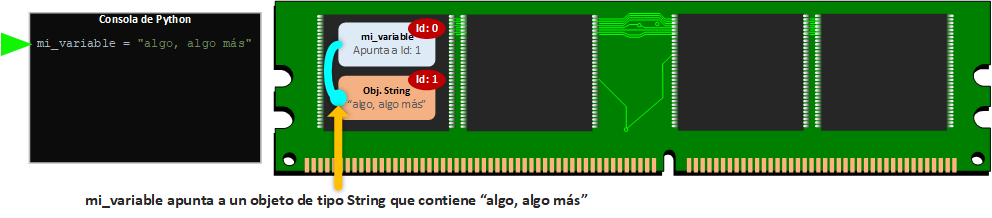
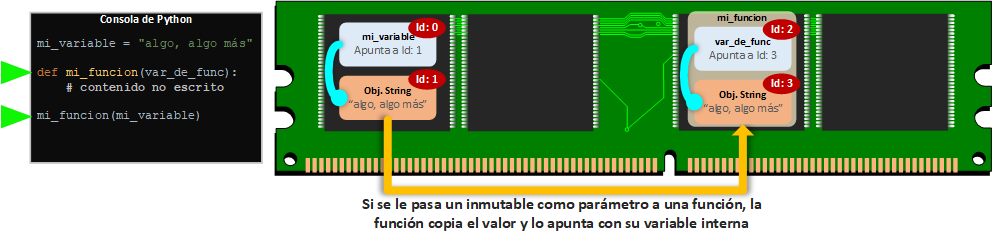
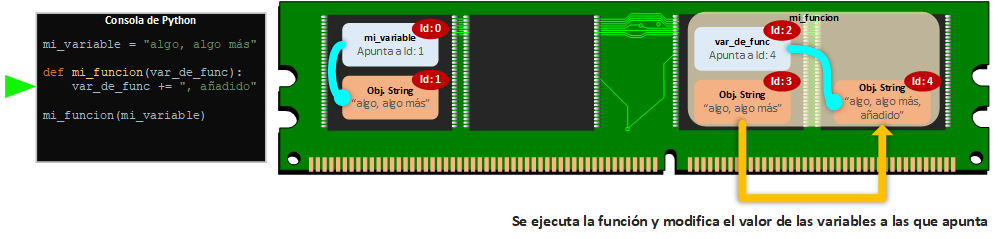
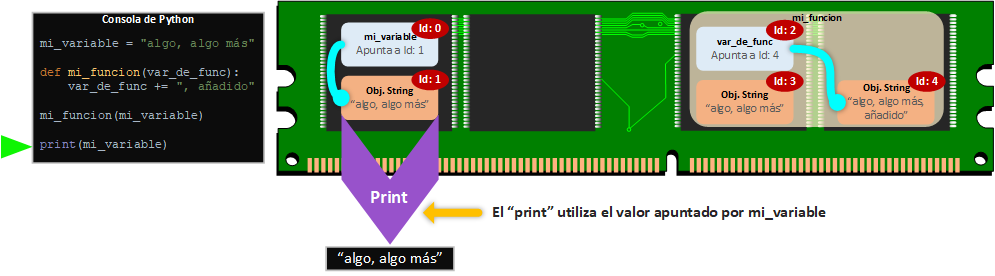
An immutable object once created, as its name says, cannot change its state once it has been created. But I have changed String or int values many times after creating them, haven’t I? Apparently, but nothing really changes, and I’ll explain it next (I suggest that as you read each of the next paragraphs you look at the image below it; in the following images, you read first from the left the “Python Console” with a green arrow indicating the added line of code, and then the right part with the memory and its occupants).
When we declare a variable (in the following image “mi_variable”) in Python (or any other programming language), a variable is created in memory at a memory address (in the image it will be stored at memory address “id: 0”). If we then assign to it (the variable is a cursor or pointer that “points to the memory address of its value”) an immutable value, which for this example will be a text (String, in the image “algo, algo más”), it will be created at another memory location (in the image at memory address “id: 1”); then the variable will point to the immutable object that holds its value.
Although I could do a simple example, here I’m going to show you two cases of immutability (deep down they are the same thing, but this first case clears up many concepts). The first case of immutability, and the one I think is most important because it’s usually the one that confuses people most, is when an immutable value (of a variable) is passed as a parameter to a function. When the immutable value is passed as a parameter to a function (in the image, to the variable “var_de_func” at memory address “Id:2”), that value is immediately copied to another memory address (in the image “Id: 3”); so you can deduce that if it is modified inside the function, you have to extract it (usually with “return” inside the function) to be able to use it outside the function. Therefore, what happens inside the function stays inside the function (as the saying goes, “what happens in Vegas stays in Vegas” 😛 ) and won’t affect variables outside the function (unless it is returned with “return”).
The second case of immutability is not as noticeable and goes more unnoticed. This is when an object with an immutable value is modified, what really happens is that it is copied and the modification is stored at another memory address (in the image “Id: 4”), making the variable point to this new object and deleting the object that nobody points to (normally the deletion is done by garbage collectors, which look for objects that nobody points to and free that memory).
This way, if at the end we print the value stored in “mi_variable”, it will return what is stored at the memory location it points to (which is what was there at the beginning, since it has not been touched):
Or if we print what is inside the function, it would print what the variable “var_de_func” points to:
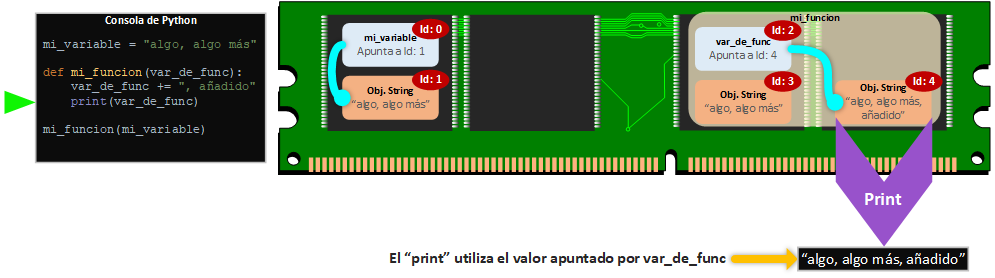
In short, an immutable value will never change once stored at a memory location, and if it has to be used, it is copied.
Memory location identifier in Python
In Python we can use the built-in function “id()” to get the identifier of the object of the variable we pass to it. This identifier number returned by “id()” is the address of the object in memory (each memory location is unique, so it can be used as a unique identifier, which is what Python does).
mi_texto = "un texto"

identificador = id(mi_texto)

print("Id de mi_texto: {}".format(identificador))
It will print the memory location it occupies, in my case:
Id de mi_texto: 31818126
More information about this method at: Built-in Functions (Python docs)
Immutable code example
Try it yourself:
if __name__ == "__main__":
    mi_variable_inmutable = "algo, algo más"
    print("mi_variable_inmutable (id: {}): {}".format(id(mi_variable_inmutable), mi_variable_inmutable))

    def mi_funcion(var_de_func):
        print("var_de_func antes de retornar (id: {}): {}".format(id(var_de_func), var_de_func))
        var_de_func += ", añadido"
        print("var_de_func (id: {}): {}".format(id(var_de_func), var_de_func))
        return var_de_func

    retorno_de_funcion = mi_funcion(mi_variable_inmutable)
    print("retorno_de_funcion (id: {}): {}".format(id(retorno_de_funcion),retorno_de_funcion))

    print("mi_variable_inmutable después de función (id: {}): {}".format(id(mi_variable_inmutable), mi_variable_inmutable))
It prints:
mi_variable_inmutable (id: 48154248): algo, algo más
var_de_func antes de retornar (id: 48154248): algo, algo más
var_de_func (id: 52186528): algo, algo más, añadido
retorno_de_funcion (id: 52186528): algo, algo más, añadido
mi_variable_inmutable después de función (id: 48356248): algo, algo más
Studying the result, especially the memory address given by “id()”, we see that three objects have indeed been created:
- At the start of the program, mi_variable_inmutable, which is kept until the end
- When it is passed as a parameter to var_de_func
- When var_de_func is modified (this last one is then returned in the “return”)
Mutables
Mutables are objects whose state can change in the future once they have been created.
Mutables are the most “complex” to use in programming (they are usually data structures such as dict, list, etc.), and not only because they are more complex since they are structures that hold things, but because they tend to get tangled up with pointers. Paradoxically, they are the ones that harm memory the least (they are written only once and always reused). It must be said that mutables are designed this way on purpose, because copying a whole data structure (although you can) would take a long time and use a lot of memory, probably without making use of the copy (copying a String object is not the same as copying a list with millions of String objects, only to find out you didn’t need the copy; it becomes a waste of processor and memory).
As we did before with Immutables, now we’ll see an example of a Mutable, specifically a list of String values. The variable “mi_variable” will be stored in a memory space (in the image “Id: 0”) and it points to another memory location (in the image “Id: 1”) where our Immutable object of type list will be. To start, we’ll initialize the list with two Strings (in the image it points to “Id: 90” and “Id: 91”).
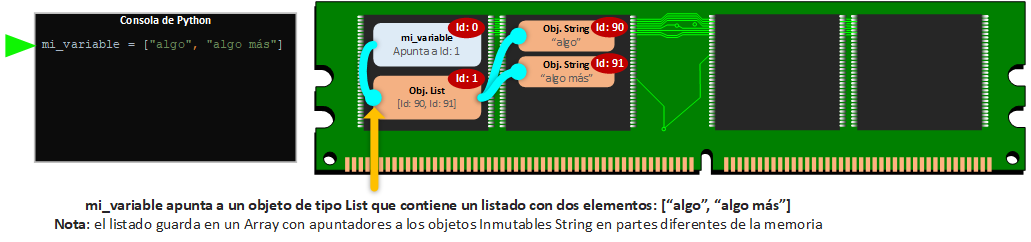
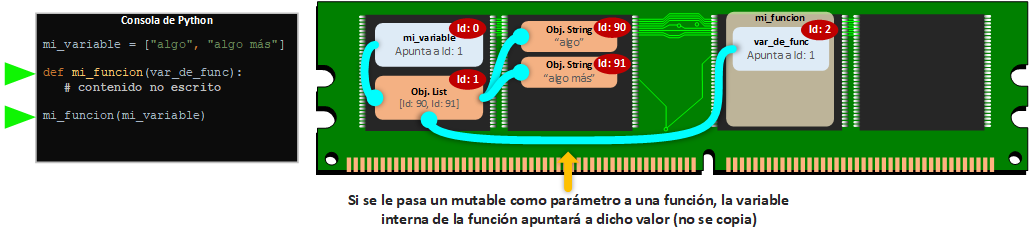
When the mutable value is passed as a parameter to a function (in the image, to the variable “var_de_func” at memory address “Id:2”), the variable will point to the mutable object (in the image “Id: 1”), so it is NOT copied. Here you can already deduce some problems (when the object is modified inside the function, it will be modified outside) and advantages (it doesn’t take up more memory and the “copy” of a gigantic mutable is immediate).
Thus, when the mutable object is modified from inside the function, it is modified for everyone (inside and outside the function). In this example we’ll add a new String value to the list.
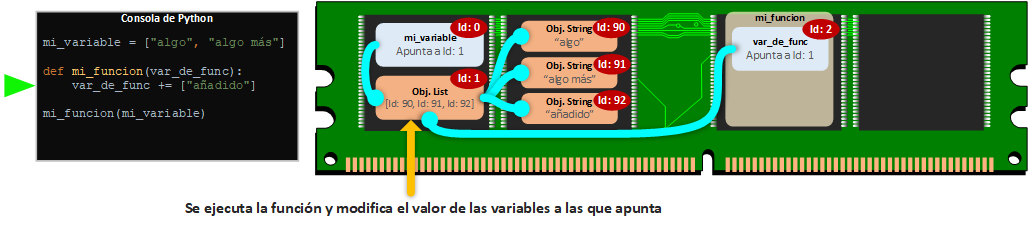
If we print mi_variable from outside the function, we’ll see that “someone” has indeed modified our mutable object.
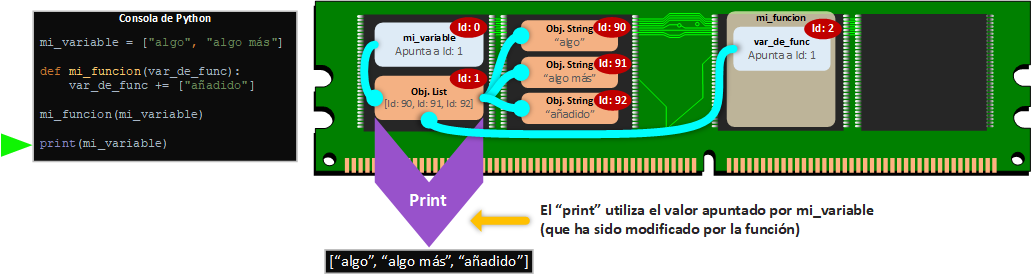
On the other hand, if we print var_de_func inside the function, since it points to the same object, it will print the same thing.
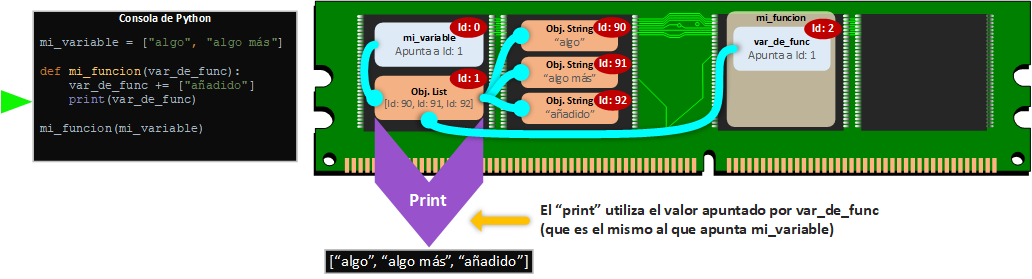
In short, a mutable value can be changed in the future once stored at a memory location, and if it has to be used, the same object is always used, pointed to from different variables.
Mutable code example
Try it yourself:
if __name__ == "__main__":
  def mi_funcion(var_de_func):
        print("var_de_func (id: {}): {}".format(id(var_de_func), var_de_func))
        var_de_func += ["añadido"]
        print("var_de_func antes de retornar (id: {}): {}".format(id(var_de_func), var_de_func))
        return var_de_func

    mi_variable_mutable = ["algo", "algo más"]
    print("mi_variable_mutable (id: {}): {}".format(id(mi_variable_mutable), mi_variable_mutable))

    retorno_de_funcion = mi_funcion(mi_variable_mutable)
    print("retorno_de_funcion (id: {}): {}".format(id(retorno_de_funcion), retorno_de_funcion))

    print("mi_variable_mutable después de función (id: {}):\t.\t{}".format(id(mi_variable_mutable), mi_variable_mutable))
It will print the memory location it occupies, in my case:
mi_variable_mutable (id: 52183808): ['algo', 'algo más']
var_de_func (id: 52183808): ['algo', 'algo más']
var_de_func antes de retornar (id: 52183808): ['algo', 'algo más', 'añadido']
retorno_de_funcion (id: 52183808): ['algo', 'algo más', 'añadido']
mi_variable_mutable después de función (id: 52183808): ['algo', 'algo más', 'añadido']
Studying the result, especially the memory address given by “id()”, we see that no object has been created other than the first one, and all the modifications have been made on the same object.
Copying the Mutable object to another memory address
First of all, a warning: this is NOT making a mutable object immutable.
It is very easy to copy a mutable object to another memory address, simply by using its constructor (for a list “list()”, for a dictionary “dict()”, for a set “set()”) and passing the mutable object itself as a parameter. For example:
mi_variable_mutable = ["valor 1", "valor 2"]
print("mi_variable_mutable (id: {}): {}".format(id(mi_variable_mutable), mi_variable_mutable))

mi_variable_mutable_copiado = list(mi_variable_mutable)
print("mi_variable_mutable_copiado (id: {}): {}".format(id(mi_variable_mutable_copiado), mi_variable_mutable_copiado))
When printing the result, we can see that while holding the same content, the memory address is different:
mi_variable_mutable (id: 48398336): ['valor 1', 'valor 2']
mi_variable_mutable_copiado (id: 51397696): ['valor 1', 'valor 2']
Python types classified as Immutable and Mutable
Immutables:
- Strings (Text)
- Int (Integer number)
- Float (Floating-point number)
- Decimal (Decimal number)
- Complex (Complex number)
- Bool (Boolean)
- Tuple: Acts as an immutable list as long as its elements are Hashable.
- Frozenset (Frozen set): Acts as an immutable set as long as its elements are Hashable
- Bytes
- Range
- None (Null)
Mutables:
- List: Accepts any type of values
- Dict (Dictionary): Accepts only Hashable keys and values of any type
- Set: Accepts only Hashable values
- Bytearray (array of bytes): Among other uses, it can be used as a mutable String.
- MemoryView (Memory view): Reference to objects
- Class defined by the developer. More information in the article about Hashable.
More information about each type in the official documentation at: Built-in Types (Python docs)
And if you want to expand your knowledge about Mutables and Immutables, I recommend you take a look at the article about Hashables.
Bibliography
- Personal experience
- Built-in Functions (Python docs)
- Built-in Types (Python docs)
- gc — Garbage Collector interface (Python docs)
- Programming FAQ (Python docs)
- Design and History FAQ (Python docs)
- https://codehabitude.com/2013/12/24/python-objects-mutable-vs-immutable/
- Mutable vs Immutable Objects in Python (Medium)
“Mutable and Immutable Types in Python” by Ramón Invarato at jarroba.com, licensed under Creative Commons Attribution-NonCommercial-ShareAlike 3.0. Registered at Safe Creative.

You may also like
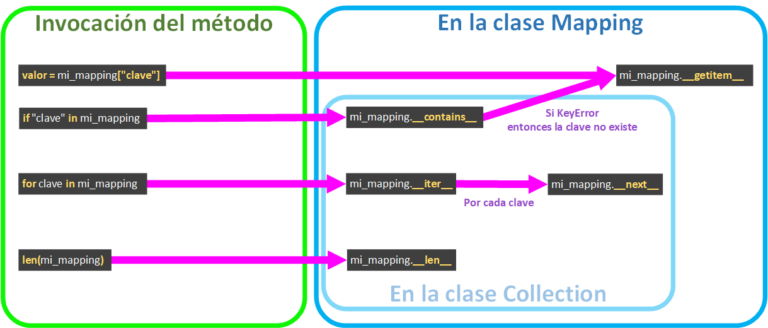
Mapping and MutableMapping in Python
Learn how to build your own dictionary-like classes in Python with Mapping and MutableMapping: magic methods, lifecycle, repr, str and a full working example.
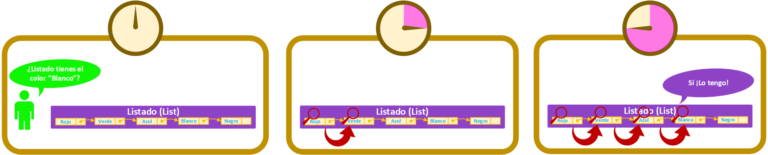
Hashables in Python
A hashable is any object that returns its "Hash Code" when asked, and that code stays the same for the whole life of the object. Learn how it works in Python.
Leave a comment