
Mapping and MutableMapping in Python
Learn how to build your own dictionary-like classes in Python with Mapping and MutableMapping: magic methods, lifecycle, repr, str and a full working example.
It’s very useful to learn Mapping and MutableMapping together, since you rarely need plain Mapping on its own, and learning both at the same time is the most effective way to understand how it works.
Before continuing, I recommend a quick read of the previous article about specializing collection types in Python at
https://jarroba.com/especializa-tu-propia-coleccion-en-python/ to get a broader view of the different data structures that can help us create our new data type.
Just out of curiosity, and not needed to understand this article: if you have used libraries like Python’s Pandas (Pandas is a library specialized in analyzing data, especially when talking about “Big Data”; if you’re curious about how to use Pandas, you have more details at https://jarroba.com/pandas-python-ejemplos-parte-i-introduccion/), you’ll notice that under the hood they must have used more than one trick that we’ll show in this article, so with what you learn here you’ll be able to create your own data-processing library to your liking 😉
Code on GitHub (I recommend reading the article first and then downloading/cloning the code at the end):
View on GitHubInvarato/JarrobaPython / mapeo_y_mapeo_mutable
Mapping
You probably already know this and can skip the following short box, but I want to make clear what mapping is.
What is Mapping?
Suppose you’re an explorer and you want to match each country with its coordinates on a paper map (this is called “cartography” or also “mapping”). So each country name is associated with its coordinates, for example (I took the coordinates from Wikipedia and rounded them):
- España -> 40°North 4°West
- México -> 19°North 99°West
- Perú -> 12°South 77°West
- Argentina -> 34°South 58°West
This way, if I want to know, for example, where “México” is, in my mapping I’d go straight to where I wrote “México”, and without having to search any further I’d get the coordinates directly (that is, the same thing a “Hash Table” does, since a dictionary is one; more information at https://jarroba.com/tablas-hash-o-tabla-de-dispersion/ ).
Mapping in the different programming languages is similar, and is called “Dictionaries” (for example, in Python “dict”) or “Maps” (for example, Java uses “Map”, like “HashMap”). This article is about Python, so if we wanted to map the above we could use a dictionary like this:
mi_mapa = {
    'España': '40°Norte 4°Oeste',
    'México': '19°Norte 99°Oeste',
    'Perú': '12°Sur 77°Oeste',
    'Argentina': '34°Sur 58°Oeste'
}
And in Python we would ask my map (the dictionary we called “mi_mapa”) for the coordinates of a given key (for example, “Perú”) like this:
coordenadas_del_pais_elegido = mi_mapa['Perú']The “Mapping” class is a specialization of “Collection”, and it gives us the ability to use the object instantiated from our own class as if it were a Python dictionary (dict). That is, if we have the dictionary:
mi_diccionario = {
    'clave1': 'valorA',
    'clave2': 'valorB',
    'clave3': 'valorC'
}
We can get any value with its key as follows:
valor = mi_diccionario['clave2']We can also loop over its inserted keys:
for clave in mi_diccionario:
    print('Clave de mi_diccionario: {}'.format(clave))
If we inherit from Mapping, it will ask us to override the following “magic” methods:
from collections import abc


class MiMapeo(abc.Mapping):

    # Inherited from the Mapping class
    def __getitem__(self, clave):
        pass

    # Inherited from the Sized class (which belongs to Collection)
    def __len__(self):
        pass

    # Inherited from the Iterable class (which belongs to Collection)
    def __iter__(self):
        pass
As you can guess from the name of the new magic method, __getitem__ will be in charge of looking up the value associated with a key and returning that value (in other words, it will kick in when we write the syntax: mi_objeto[‘clave’] ).
You can review the __len__ and __iter__ methods at https://jarroba.com/nuestra-propia-coleccion-en-python/
Note
?And where is the __contains__ magic method of the “Container” class that belongs to “Collection” (seen in the previous article https://jarroba.com/nuestra-propia-coleccion-en-python/ )?
You don’t need to override it, because inherited “magic methods” that don’t require overriding are already “written”. That is, if we use them without overriding them, they will work (one more thing that makes it easier to build a proper Collection 😀 ), but we can override their behavior if we want.
Although the optionally overridable magic methods will work for us most of the time (for example, __contains__ is already programmed by default to look for the key and return whether it exists or not), sometimes we’ll want to override them to change their behavior (for example, if we create a dictionary of Spanish synonyms, and one key is “casa”, if we ask __contains__ whether the key “hogar”, a synonym of “casa”, exists, we want it to return “true”, and not “false”, which is what is programmed by default when doing a direct comparison, so we’d have to override this method).
Lifecycle of the methods of a Mapping
There really isn’t much to add to the lifecycle we saw for Collection in the article https://jarroba.com/nuestra-propia-coleccion-en-python/. We add the lifecycle of
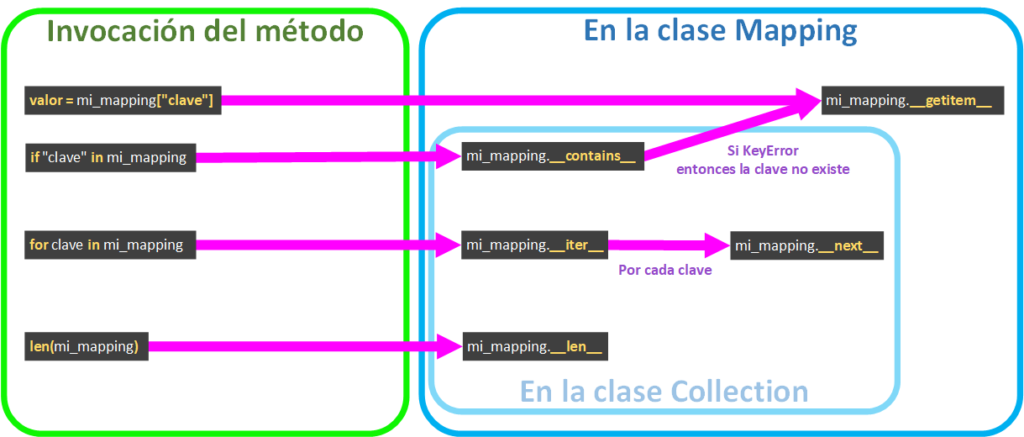
- Getting a value given a key ( valor = collection[“clave”] ) calls __getitem__.
- if “clave” in mapping: calls the __contains__ method to ask whether it has the key. Mapping’s __contains__ is implemented by default to call __getitem__, but not to get the value, rather to see whether __getitem__ raises the KeyError exception. If it does, it means the key isn’t there, so __contains__ will return “False”; if the KeyError exception isn’t raised, it means the key exists and it will return “True”.
MutableMapping
We might want our dictionary implementation to only allow querying its items with __getitem__ (for example, if we program a “Contract” class; that is, a class that has final values that we don’t want modified and that can only be read).
But we probably want our class to do more. What if we want to modify or delete the elements we insert? Then we have to offer all the minimum capabilities that any self-respecting data structure has (the acronym “CRUD” may ring a bell; it’s widely used in databases and comes from “Create, Read, Update, Delete”; you have more information at https://jarroba.com/curso-de-bases-de-datos-con-mysql-parte-iii-video-definitionmanipulation/ and at CRUD (Wikipedia) ):
- Insert (or Create): Insert a new element (key and value) into our mapping.
- Query (or Read): Query an element that exists in our mapping.
- Modify (or Update): Modify an element previously inserted into our mapping.
- Delete: Delete an element that exists in our mapping.
The “Mapping” class gives us the immutable capabilities; that is, the mapping can NOT be modified:
- Query: with __getitem__. It lets you use the following syntax to get the value:
valor = mi_diccionario['clave']If we want it to be modifiable (to be able to “mutate”) we’ll use the “MutableMapping” class, which inherits everything we saw earlier from the “Mapping” class.
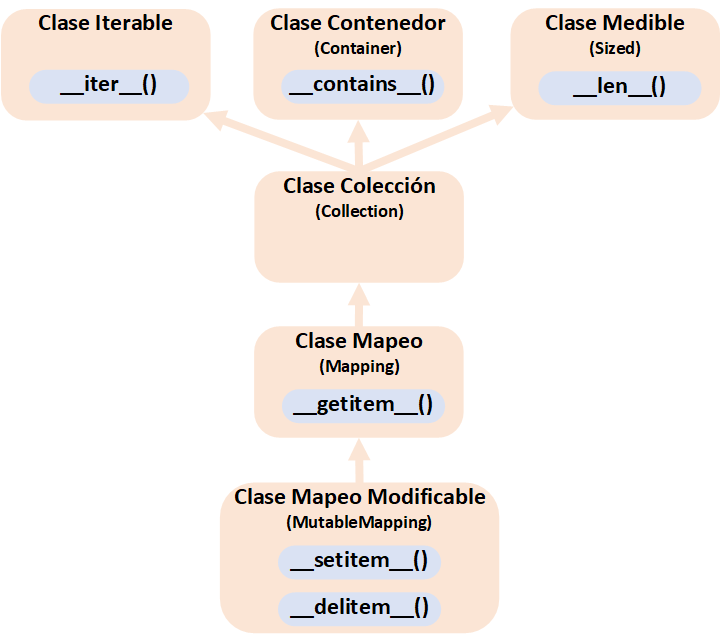
And “MutableMapping” gives us two new magic methods for:
- Insert and Modify: with __setitem__. It lets you insert a new item (insert the key with its value) or replace it if it already exists, by writing the following simple Python syntax:
mi_diccionario['clave'] = 'valor a insertar o modificar'- Delete: with __delitem__. It lets you delete easily by writing:
del mi_diccionario['clave']By inheriting from “MutableMapping” we’ll be asked to implement exactly what we need for our mutable mapping to make sense:
from collections import abc
from typing import Iterator


class MiMapeo(abc.MutableMapping):

    # Inherited from the Sized class
    def __len__(self):
        pass

    # Inherited from the Iterable class
    def __iter__(self) -> Iterator[_T_co]:
        pass

    # Inherited from the MutableMapping class
    def __setitem__(self, clave, valor):
        pass

    # Inherited from the MutableMapping class
    def __delitem__(self, valor):
        pass

    # Inherited from the Mapping class
    def __getitem__(self, clave):
        pass
Basic use of MutableMapping
We want to create a dictionary to store only sweets (like “galleta” (cookie) or “gofre” (waffle)) with their associated calories (that is, the key will be the name of the sweet and the value will be a number representing that sweet’s calories). The things we won’t allow in our dictionary will be listed in a set of values like the following:
cosas_que_no_son_dulces = {
    "TELEVISION",
    "FLOR",
    "MARTILLO",
    "LAPIZ",
     "RELOJ"
}
Reminder about sets: we initialize the values of a set with curly braces {…} (as opposed to square brackets […], which mean we’re initializing a list), and a set only allows values that are not repeated (we’ll use sets so our program is faster at searching for values, since we could have many values; if you’re not used to using sets, they simply work like a list, but for searches a set is much faster than a list, and it also allows operations between sets).
This set will tell our dictionary which things it is NOT allowed to store.
And we’ll feed our custom dictionary with a simple dictionary with some values like:
- “Tortita”: 227
- “Gofre”: 291
- “Galleta”: 488
- “Torrija”: 229
- “Tarta”: 372
- “Magdalena”: 377
- “Croissant”: 466
- “MARTILLO”: 1000000
The last one is a “MARTILLO” (hammer), which our custom dictionary should not accept. However, a simple dictionary accepts any value, like:
diccionario_simple_de_dulces_con_sus_calorias = {
    "Tortita": 227,
    "Gofre": 291,
    "Galleta": 488,
    "Torrija": 229,
    "Tarta": 372,
    "Magdalena": 377,
    "Croissant": 466,
    "MARTILLO": 1000000
}
If we look up the NOT allowed key, we see it’s inside the simple dictionary:
print("Permite una clave no deseada -> {}: {}".format("MARTILLO", diccionario_simple_de_dulces_con_sus_calorias["MARTILLO"]))It shows us:
Permite una clave no deseada -> MARTILLO: 1000000And that’s not what we want. What we want is for our custom dictionary to be smart enough to discard what’s unwanted when adding keys and values.
Now let’s study the structure of the custom dictionary we’ll create (we also want it to be as easy to use as Python’s simple dictionaries), so:
- We have to be able to instantiate it
- We have to be able to add keys and values (in this example, the key will be the name of the sweet and the value an integer with the calories of that sweet. By the way, I made up the calories)
That is, we want our custom dictionary to be built like this:
# Instantiation of our custom dictionary
mi_diccionario_de_dulces = MiDiccionarioEspecialDeDulces()

# Add elements to our custom dictionary
mi_diccionario_de_dulces["Gofre"] = 291
mi_diccionario_de_dulces["Galleta"] = 488
Also, one thing is missing: we want to add the set of things that aren’t sweets, so right after instantiating it we’ll have to add it somehow. To make it easy to understand, we choose to add it with a method called “nuevo_conjunto_de_cosas_que_no_son_dulces”:
# Instantiation of our custom dictionary
mi_diccionario_de_dulces = MiDiccionarioEspecialDeDulces()

# Set with the things that aren't sweets
cosas_que_no_son_dulces = {
    "TELEVISION",
    "FLOR",
    "MARTILLO",
    "LAPIZ",
    "RELOJ"
}

# We add the set of things that aren't sweets to our custom dictionary
mi_diccionario_de_dulces.nuevo_conjunto_de_cosas_que_no_son_dulces(cosas_que_no_son_dulces)

# Add elements to our custom dictionary
mi_diccionario_de_dulces["Gofre"] = 291
mi_diccionario_de_dulces["Galleta"] = 488
Just as we wanted, we now have the simple usage of our custom dictionary; now it’s time to implement it.
As before, we create a class that we’ll call “MiDiccionarioEspecialDeDulces” that will inherit from “MutableMapping”, and we implement the following methods inside the class. Before showing you the code, let me summarize in words what each method will do inside (you probably already know many of them and can guess what they’ll do):
- __init__: Where we’ll initialize to empty the variables that will store both the sweets’ data and the set of things that aren’t sweets (later I’ll explain the correct way to write an initializer for a dictionary; this one is simple so as not to overload the code before you’ve understood the basics).
- __len__: Will return the number of stored sweets.
- __iter__: Will return an iterator over the sweets (keys). And what about iterating over the values or the items? (We’ll see some examples later, mainly with Views, which you can see in the previous article https://jarroba.com/vistas-de-los-diccionarios-de-python-keys-values-e-items/)
- __setitem__: Will let us add the name of a sweet (key) associated with its calories (value).
- __delitem__: Will let us delete a sweet that exists (a key that exists) from our custom dictionary; if it doesn’t exist, it will raise an error.
- __getitem__: Will let us get the calories (value) of a sweet (given a key).
- nuevo_conjunto_de_cosas_que_no_son_dulces: this method that we’ll create to give new functionality to our custom dictionary will store a new set of things that aren’t sweets, and then check that whatever was inserted earlier (before storing this new set) doesn’t belong to this set. We do this check by taking advantage of the speed of searching for values between two sets with the intersection operation “&” (remember that the intersection is the values common to both sets, for example: {A, B, C} & {D, B, C} = {B, C} ), and then we’ll iterate, deleting the few things that aren’t sweets (a very efficient way, especially if we have thousands of items in our dictionary); the other, not at all efficient way to do it without set operations would be to go through all the elements of our dictionary, asking for each one whether it’s a sweet or not (the good old “for” loop from start to finish; when designing your own collection, always remember that it may end up storing millions of elements, so you should always try to use the most efficient approach possible).
And now let’s see what our code looks like:
Note about parameter typing: in the examples I’m going to add type hints to the methods’ parameters as is done in Python 3; you can choose not to type them as was done in earlier versions of Python, but then the IDE won’t help you with the types, and type hints are quite handy both for preventing errors and for documenting, right in the code, the type of data the method takes in and returns.
from collections import abc
from typing import Iterator


class MiDiccionarioEspecialDeDulces(abc.MutableMapping):

    def __init__(self):
        self.diccionario_de_dulces_con_sus_calorias = {}
        self.cosas_que_no_son_dulces = set()

        # Note: an empty set is initialized with “set()” and not with “{}” because without “values” or “keys and values” Python always interprets it as a dictionary

    def __len__(self) -> int:
        cantidad_de_dulces = len(self.diccionario_de_dulces_con_sus_calorias)
        return cantidad_de_dulces

    def __iter__(self) -> Iterator[str]:
        iterador_de_dulces = self.diccionario_de_dulces_con_sus_calorias.__iter__()
        return iterador_de_dulces

    def __setitem__(self, clave: str, valor: int) -> None:
        if clave in self.cosas_que_no_son_dulces:
            print('Se ha descartado "{}" porque no es un dulce'.format(clave))
        else:
            self.diccionario_de_dulces_con_sus_calorias[clave] = valor

    def __delitem__(self, clave: str) -> None:
        try:
            del self.diccionario_de_dulces_con_sus_calorias[clave]
        except KeyError:
            raise KeyError("Este Contenedor no tiene la clave '{}'".format(clave))

    def __getitem__(self, clave: str) -> int:
        try:
            calorias_del_pastel = self.diccionario_de_dulces_con_sus_calorias[clave]
            return calorias_del_pastel
        except KeyError:
            raise KeyError("Este Contenedor no tiene la clave '{}'".format(clave))

    def nuevo_conjunto_de_cosas_que_no_son_dulces(self, cosas_que_no_son_dulces: set) -> None:
        # If a None is slipped into the parameter cosas_que_no_son_dulces we'll treat it as an empty set set()
        if cosas_que_no_son_dulces is None:
            self.cosas_que_no_son_dulces = set()
        else:
            self.cosas_que_no_son_dulces = cosas_que_no_son_dulces

        # When adding a new set of things that aren't sweets we want to check that nothing that isn't a sweet slipped in earlier, so we check it
        conjunto_de_claves_dulces = set(self.diccionario_de_dulces_con_sus_calorias.keys())
        conjunto_algo_no_dulce_entre_las_claves = conjunto_de_claves_dulces & self.cosas_que_no_son_dulces
        for clave_no_valida in conjunto_algo_no_dulce_entre_las_claves:
            print('Se ha eliminado "{}" porque no es un dulce'.format(clave_no_valida))
            del self.diccionario_de_dulces_con_sus_calorias[clave_no_valida]
        # The values that are equal in conjunto_de_claves_dulces and (&) in the set self.cosas_que_no_son_dulces will be the non-sweets that slipped in and must be removed
From here we can test how our custom dictionary does exactly what we want 🙂
We instantiate our dictionary and add the set of things that are NOT sweets:
mi_diccionario_de_dulces = MiDiccionarioEspecialDeDulces ()

cosas_que_no_son_dulces = {
    "TELEVISION",
    "FLOR",
    "MARTILLO",
    "LAPIZ",
    "RELOJ"
}

mi_diccionario_de_dulces.nuevo_conjunto_de_cosas_que_no_son_dulces(cosas_que_no_son_dulces)
We add sweets and something that isn’t a sweet to see how it behaves:
mi_diccionario_de_dulces["Tortita"] = 227
mi_diccionario_de_dulces["Gofre"] = 291
mi_diccionario_de_dulces["Galleta"] = 488
mi_diccionario_de_dulces["Torrija"] = 229
mi_diccionario_de_dulces["Tarta"] = 372
mi_diccionario_de_dulces["Magdalena"] = 377
mi_diccionario_de_dulces["Croissant"] = 466
mi_diccionario_de_dulces["MARTILLO"] = 1000000
If we run this, we’ll see in the terminal:
Se ha descartado "MARTILLO" porque no es un dulceSince we tried to insert a “MARTILLO” that belongs to the “cosas_que_no_son_dulces” set, it discards it (and warns us in the terminal, which is what the “print()” is for; we could have put a “raise KeyError” to throw an exception, but we didn’t want the program to fail, we wanted it to discard what isn’t valid and carry on).
Since we’ve implemented __iter__ we can iterate over all the inserted keys:
for clave in mi_diccionario_de_dulces:
    print('Clave de mi_diccionario_de_dulces: {}'.format(clave))
Sure enough, it will show us all the keys, which are our sweets:
Clave de mi_diccionario_de_dulces: Tortita
Clave de mi_diccionario_de_dulces: Gofre
Clave de mi_diccionario_de_dulces: Galleta
Clave de mi_diccionario_de_dulces: Torrija
Clave de mi_diccionario_de_dulces: Tarta
Clave de mi_diccionario_de_dulces: Magdalena
Clave de mi_diccionario_de_dulces: Croissant
Now let’s delete a sweet, like “Tarta”, and iterate over all the elements again to see whether it was actually removed:
del mi_diccionario_de_dulces["Tarta"]

for clave in mi_diccionario_de_dulces:
    print('Clave de mi_diccionario_de_dulces: {}'.format(clave))
And as expected, it’s gone:
Clave de mi_diccionario_de_dulces: Tortita
Clave de mi_diccionario_de_dulces: Gofre
Clave de mi_diccionario_de_dulces: Galleta
Clave de mi_diccionario_de_dulces: Torrija
Clave de mi_diccionario_de_dulces: Magdalena
Clave de mi_diccionario_de_dulces: Croissant
Let’s try asking whether it has a sweet (key), for example “Gofre”, which still exists:
if "Gofre" in mi_diccionario_de_dulces:
    print('La clave "Gofre" EXISTE')
else:
    print('La clave "Gofre" NO EXISTE')
The sweet “Gofre” will tell us it exists since it’s inside our dictionary:
La clave "Gofre" EXISTEIf we want to get the calories of this sweet:
valor = mi_diccionario_de_dulces["Gofre"]
print('Valor obtenido con la clave "Gofre" de mi_diccionario_de_dulces: {}'.format(valor))
It has to give it to us:
Valor obtenido con la clave "Gofre" de mi_diccionario_de_dulces: 291But what if the key doesn’t exist, for example, we haven’t added “Donut” to our dictionary? That has to work too. We ask whether it exists:
if "Donut" in mi_diccionario_de_dulces:
    print('La clave "Donut" EXISTE')
else:
    print('La clave "Donut" NO EXISTE')
And indeed it tells us it doesn’t exist:
La clave "Donut" NO EXISTESince that key doesn’t exist, trying to get it should return an error (we wrap it in a “try/except” to catch the KeyError exception that shows the key doesn’t exist):
try:
    valor = mi_diccionario_de_dulces["Donut"]
    print('Valor obtenido con la clave "Donut" de mi_diccionario_de_dulces: {}'.format(valor))
except KeyError as err:
    print('Error devuelto: {}'.format(err))
And the error it returned:
Error devuelto: "Este Contenedor no tiene la clave 'Donut'"And if we add the key “Donut” and then try to get it again, it will now exist in our custom dictionary:
mi_diccionario_de_dulces["Donut"] = 452

try:
    valor = mi_diccionario_de_dulces["Donut"]
    print('Valor obtenido con la clave "Donut" de mi_diccionario_de_dulces: {}'.format(valor))
except KeyError as err:
    print('Error devuelto: {}'.format(err))
It will tell us it now exists:
Valor obtenido con la clave "Donut" de mi_diccionario_de_dulces: 452Complete use of MutableMapping
So far we’ve seen how to create a MutableMapping in a very simple way, but some very important details are still missing; we needed to know the above to be able to understand what comes next.
Starting from the previous basic example, we’ll modify it step by step so it meets all the properties of a proper Container.
Passing initial data in the constructor
Earlier we created the following __init__ (constructor) without parameters:
class MiDiccionarioEspecialDeDulces(abc.MutableMapping):

    def __init__(self):
        self.diccionario_de_dulces_con_sus_calorias = {}
        self.cosas_que_no_son_dulces = set()

    # …
It’s important that the constructor can take in any parameters you want, so you can rebuild or initialize our dictionary more easily. In Python it’s good practice to be able to rebuild the data structure from __init__ (for example, from the __repr__ representation, as we saw in the article we dedicated to it https://jarroba.com/repr-y-str-de-python/).
For this we can use the update() method that MutableMapping includes. update() takes a dictionary as a parameter and calls __setitem__ for each key-value pair until it has inserted them all. To quickly build the dictionary with dict() we pass it all the args (arguments without a key) and kwargs (arguments with a key and value “key=value”) as they are, expanding them with the asterisks (* and **) in dict() (more information about the args and kwargs parameters at https://jarroba.com/args-kwargs-python-ejemplos/). I’ll add a keyword parameter called “cosas_que_no_son_dulces” that will ask for the set of things that aren’t sweets, which will be passed as is to the nuevo_conjunto_de_cosas_que_no_son_dulces() method, which is there for that purpose (we don’t assign it directly to “self.cosas_que_no_son_dulces”, because remember that the method does more checks). With all this we’ll completely rebuild our dictionary from __init__.
class MiDiccionarioEspecialDeDulces(abc.MutableMapping):

    def __init__(self, *args, cosas_que_no_son_dulces: set = None, **kwargs):
        self.diccionario_de_dulces_con_sus_calorias = {}
        self.cosas_que_no_son_dulces = set()

        self.nuevo_conjunto_de_cosas_que_no_son_dulces(cosas_que_no_son_dulces)

        self.update(dict(*args, **kwargs))

    # …
Now we can rebuild our dictionary directly from the constructor (__init__). In the following example I’m going to rebuild the dictionary with new things: I’ll pass it a dictionary with two new sweets and something that isn’t a sweet, and at the same time I’ll add the set of objects that aren’t sweets (with the special keyword we mentioned earlier, “cosas_que_no_son_dulces”). And to prove everything is stored properly, I’ll iterate over it:
mi_segundo_diccionario_de_dulces = MiDiccionarioEspecialDeDulces({'Caramelo': 147, 'Piruleta': 269, 'MESA': 10000000}, cosas_que_no_son_dulces={'SILLA', 'MESA'})

for clave in mi_segundo_diccionario_de_dulces:
        print('Clave de mi_diccionario_de_dulces: {}'.format(clave))
We see that it works correctly, that the non-sweet we tried to sneak in was removed, and that it only has the keys that are sweets:
Se ha descartado "MESA" porque no es un dulce

Clave de mi_diccionario_de_dulces: Caramelo
Clave de mi_diccionario_de_dulces: Piruleta
Another way to pass the constructor’s *args and **kwargs parameters (especially for Python 2)
Another valid option (and the only one in Python 2) that you see quite often is to not declare the parameter with the key “cosas_que_no_son_dulces” (although the IDE won’t help you) and then get it from the dictionary that “kwargs” returns (and delete it so it isn’t passed to the update() method ) as in this example:
class MiDiccionarioEspecialDeDulces(abc.MutableMapping):

    def __init__(self, *args, **kwargs):
        self.diccionario_de_dulces_con_sus_calorias = {}
        self.cosas_que_no_son_dulces = set()

        cosas_que_no_son_dulces = kwargs["cosas_que_no_son_dulces"]
        self.nuevo_conjunto_de_cosas_que_no_son_dulces(cosas_que_no_son_dulces)
        del kwargs["cosas_que_no_son_dulces"]

        self.update(dict(*args, **kwargs))

    # …
This is a matter of taste; I prefer to do it the way you saw before this box (which only works from Python 3). My main reasons for writing out the parameter name are several: the IDE helps you remember the class’s parameter and its type, the extra parameters are visible at a glance, and it helps with documentation (and with auto-generated documentation).
Either way, I’ve shown you both ways of doing it.
You have more information in the article about the args and kwargs parameters at https://jarroba.com/args-kwargs-python-ejemplos/
Representation of our dictionary
We covered this in depth in the “repr and str” article https://jarroba.com/repr-y-str-de-python/
To represent it for “machines” (development), __repr__ simply has to return a representation of our dictionary that matches what we asked for earlier in the constructor (__init__).
class MiDiccionarioEspecialDeDulces(abc.MutableMapping):

    # …

    def __repr__(self):
        return '{self.__class__.__name__}({self.diccionario_de_dulces_con_sus_calorias}, cosas_que_no_son_dulces={self.cosas_que_no_son_dulces})'.format(
            self=self)
If we try it with our first dictionary:
print(repr(mi_diccionario_de_dulces))We see that it returns our representation just as we designed it:
MiDiccionarioEspecialDeDulces({'Tortita': 227, 'Galleta': 488, 'Torrija': 229, 'Tarta': 372, 'Magdalena': 377, 'Croissant': 466, 'Donut': 452}, cosas_que_no_son_dulces={'FLOR', 'MARTILLO', 'RELOJ', 'LAPIZ', 'TELEVISION'})We could run this representation and get our complete dictionary, ready to keep using just as we left it.
And to represent it for humans (so it looks nice), we override __str__. For example, I’ll write the text “* <key> has <value> calories”, and each key-value tuple will go on a different line (we could also write the set cosas_que_no_son_dulces in __str__, but I won’t, to avoid complicating the code further):
class MiDiccionarioEspecialDeDulces(abc.MutableMapping):

    # …

    def __str__(self):
        str_con_el_resultado = ''
        for nombre_del_pastel, calorias_del_pastel in self.diccionario_de_dulces_con_sus_calorias.items():
            str_con_el_resultado += "\n  * {} tiene {} calorías.".format(nombre_del_pastel, calorias_del_pastel)

        return str_con_el_resultado
It’s very quick to test:
print(mi_diccionario_de_dulces)And we see that it prints in a way that’s easier to read:
  * Tortita tiene 227 calorías.
  * Galleta tiene 488 calorías.
  * Torrija tiene 229 calorías.
  * Tarta tiene 372 calorías.
  * Magdalena tiene 377 calorías.
  * Croissant tiene 466 calorías.
  * Donut tiene 452 calorías.
Keys, Values and Items
As we saw in the article about dictionary Views https://jarroba.com/vistas-de-los-diccionarios-de-python-keys-values-e-items/, remember that you can use the keys(), values() and items() methods to see a representation of the data we need. We can simply try the three Views (KeysView, ValuesView and ItemsView) without having to override anything else (and this also shows a use of __repr__, since the Views are printed based on what we wrote in __repr__):
vista_claves = mi_diccionario_de_dulces.keys()
print("vista_claves: {}".format(vista_claves))
for clave in vista_claves:
    print('Clave de mi_diccionario_de_dulces: {}'.format(clave))

vista_valores = mi_diccionario_de_dulces.values()
print("vista_valores: {}".format(vista_valores))
for valor in vista_valores:
    print('Valor de mi_diccionario_de_dulces: {}'.format(valor))

vista_items = mi_diccionario_de_dulces.items()
print("vista_items: {}".format(vista_items))
for item in vista_items:
    print('Item de mi_diccionario_de_dulces: {}'.format(item))
Let’s check:
vista_claves: KeysView(MiDiccionarioEspecialDeDulces({'Tortita': 227, 'Galleta': 488, 'Torrija': 229, 'Tarta': 372, 'Magdalena': 377, 'Croissant': 466, 'Donut': 452}, cosas_que_no_son_dulces={'RELOJ', 'FLOR', 'MARTILLO', 'LAPIZ', 'TELEVISION'}))
Clave de mi_diccionario_de_dulces: Croissant
Clave de mi_diccionario_de_dulces: Donut
Clave de mi_diccionario_de_dulces: Galleta
Clave de mi_diccionario_de_dulces: Magdalena
Clave de mi_diccionario_de_dulces: Tarta
Clave de mi_diccionario_de_dulces: Torrija
Clave de mi_diccionario_de_dulces: Tortita

vista_valores: ValuesView(MiDiccionarioEspecialDeDulces({'Tortita': 227, 'Galleta': 488, 'Torrija': 229, 'Tarta': 372, 'Magdalena': 377, 'Croissant': 466, 'Donut': 452}, cosas_que_no_son_dulces={'RELOJ', 'FLOR', 'MARTILLO', 'LAPIZ', 'TELEVISION'}))
Valor de mi_diccionario_de_dulces: 466
Valor de mi_diccionario_de_dulces: 452
Valor de mi_diccionario_de_dulces: 488
Valor de mi_diccionario_de_dulces: 377
Valor de mi_diccionario_de_dulces: 372
Valor de mi_diccionario_de_dulces: 229
Valor de mi_diccionario_de_dulces: 227

vista_items: ItemsView(MiDiccionarioEspecialDeDulces({'Tortita': 227, 'Galleta': 488, 'Torrija': 229, 'Tarta': 372, 'Magdalena': 377, 'Croissant': 466, 'Donut': 452}, cosas_que_no_son_dulces={'RELOJ', 'FLOR', 'MARTILLO', 'LAPIZ', 'TELEVISION'}))
Item de mi_diccionario_de_dulces: ('Croissant', 466)
Item de mi_diccionario_de_dulces: ('Donut', 452)
Item de mi_diccionario_de_dulces: ('Galleta', 488)
Item de mi_diccionario_de_dulces: ('Magdalena', 377)
Item de mi_diccionario_de_dulces: ('Tarta', 372)
Item de mi_diccionario_de_dulces: ('Torrija', 229)
Item de mi_diccionario_de_dulces: ('Tortita', 227)
Turning it into an “iterable iterator”
To iterate over the keys and values of our dictionary we’ve used the __iter__ method, which returns an iterable, but what if we want to do something with each value as the iterator goes along? That is, take advantage of the iteration (in a FOR loop) to do some calculation (for example, we could count the letters of each key while iterating, saving us from having to go through all the keys again, which can mean a huge saving of resources, besides having the results in real time/Streaming) or change the order of the keys (for example, return the keys in alphabetical order).
Reminder about iterable vs iterator: don’t confuse “iterable”, which implements __iter__, with “iterator”, which implements __next__, nor with “iterable iterator”, which implements both __iter__ and __next__; it’s explained in detail in the previous article https://jarroba.com/nuestra-propia-coleccion-en-python).
For example, we’ll make the sweets sorted alphabetically in a list, and each time the iterable is iterated (__iter__) using an iterator (each time __next__ is called), it returns the next position of that list. To do this we’ll make the following changes to the code:
- We add abc.Iterator to the inheritance of the class.
- In __init__ we’ll add a list to store our sorted list (which I’ll call “lista_ordenada_de_nombres_de_pasteles”).
- In __next__ we do two things. First, if “lista_ordenada_de_nombres_de_pasteles” is None, it gets the keys of our dictionary and sorts them. Second, on each call to __next__ we pop (get the value of a variable while removing it from the list) the first element of the list and return it, since it will be the next sorted value; until no elements are left, at which point it raises the IndexError exception and we stop the iteration with StopIteration.
- Each time __iter__ is called, it will set the variable “lista_ordenada_de_nombres_de_pasteles” to None, which forces it to restart on the next call to __next__.
class MiDiccionarioEspecialDeDulces(abc.MutableMapping, abc.Iterator):

    def __init__(self, *args, cosas_que_no_son_dulces: set = None, **kwargs):
        # …
        self.lista_ordenada_de_nombres_de_pasteles = None

    def __next__(self) -> str:
        if self.lista_ordenada_de_nombres_de_pasteles is None:
            lista_nombres_pasteles_desordenado = self.diccionario_de_dulces_con_sus_calorias.keys()
            self.lista_ordenada_de_nombres_de_pasteles = sorted(lista_nombres_pasteles_desordenado)

        try:
            return self.lista_ordenada_de_nombres_de_pasteles.pop(0)
        except IndexError:
            raise StopIteration

    def __iter__(self) -> Iterator[str]:
        self.lista_ordenada_de_nombres_de_pasteles = None
        return self
We can try out our “iterable iterator”:
for clave in mi_diccionario_de_dulces:
    print('Clave de mi_diccionario_de_dulces: {}'.format(clave))
We check that it indeed returns the values one by one, in order:
Clave de mi_diccionario_de_dulces: Croissant
Clave de mi_diccionario_de_dulces: Galleta
Clave de mi_diccionario_de_dulces: Gofre
Clave de mi_diccionario_de_dulces: Magdalena
Clave de mi_diccionario_de_dulces: Tarta
Clave de mi_diccionario_de_dulces: Torrija
Clave de mi_diccionario_de_dulces: Tortita
Note about the previous code: We could have returned the list “lista_ordenada_de_nombres_de_pasteles” in __iter__ and saved ourselves all the steps in __next__, but here I wanted to show you an example with a visible, direct result when implementing the body of __next__. We could have done other interesting things in __next__ instead of returning the sorted values, such as counting the letters of each key/word each time it’s about to be returned, which would be Streaming information processing, one process per data request; but returning the number of letters would have to be done in a different method of the class, which would complicate the example code here (returning something other than the key in the “return” of __next__ would break MutableMapping’s default behavior).
Complete code
Here’s the complete code for this section so you can review it in perspective:
class MiDiccionarioEspecialDeDulces(abc.MutableMapping,
                                    abc.Iterator):

    def __init__(self, *args, cosas_que_no_son_dulces: set = None, **kwargs):

        self.diccionario_de_dulces_con_sus_calorias = {}
        self.cosas_que_no_son_dulces = set()

        self.nuevo_conjunto_de_cosas_que_no_son_dulces(cosas_que_no_son_dulces)

        self.update(dict(*args, **kwargs))

        self.lista_ordenada_de_nombres_de_pasteles = None

    def nuevo_conjunto_de_cosas_que_no_son_dulces(self, cosas_que_no_son_dulces: set = None) -> None:
        """
        Method that replaces the previous set and checks that all the elements in the list are sweets
        :param cosas_que_no_son_dulces: set of str values with the things that aren't sweets
        :return: None
        """
        if cosas_que_no_son_dulces is None:
            self.cosas_que_no_son_dulces = set()
        else:
            self.cosas_que_no_son_dulces = cosas_que_no_son_dulces

        # Check that nothing that isn't a sweet slips into the dictionary of sweets
        conjunto_de_claves_dulces = set(self.diccionario_de_dulces_con_sus_calorias.keys())
        conjunto_algo_no_dulce_entre_las_claves = conjunto_de_claves_dulces & self.cosas_que_no_son_dulces
        for clave_no_valida in conjunto_algo_no_dulce_entre_las_claves:
            print('Se ha eliminado "{}" porque no es un dulce'.format(clave_no_valida))
            del self.diccionario_de_dulces_con_sus_calorias[clave_no_valida]

    def __getitem__(self, clave: str) -> int:
        try:
            calorias_del_pastel = self.diccionario_de_dulces_con_sus_calorias[clave]
            return calorias_del_pastel
        except KeyError:
            raise KeyError("Este Contenedor no tiene la clave '{}'".format(clave))

    def __setitem__(self, clave: str, valor: int) -> None:
        if clave in self.cosas_que_no_son_dulces:
            print('Se ha descartado "{}" porque no es un dulce'.format(clave))
        else:
            self.diccionario_de_dulces_con_sus_calorias[clave] = valor

    def __delitem__(self, clave: str) -> None:
        try:
            del self.diccionario_de_dulces_con_sus_calorias[clave]
        except KeyError:
            raise KeyError("Este Contenedor no tiene la clave '{}'".format(clave))

    def __len__(self) -> int:
        cantidad_de_dulces = len(self.diccionario_de_dulces_con_sus_calorias)
        return cantidad_de_dulces

    def __next__(self) -> str:
        if self.lista_ordenada_de_nombres_de_pasteles is None:
            lista_nombres_pasteles_desordenado = self.diccionario_de_dulces_con_sus_calorias.keys()
            self.lista_ordenada_de_nombres_de_pasteles = sorted(lista_nombres_pasteles_desordenado)

        try:
            return self.lista_ordenada_de_nombres_de_pasteles.pop(0)
        except IndexError:
            raise StopIteration

    def __iter__(self) -> Iterator[str]:
        self.lista_ordenada_de_nombres_de_pasteles = None
        return self

    def __repr__(self):
        return '{self.__class__.__name__}({self.diccionario_de_dulces_con_sus_calorias}, cosas_que_no_son_dulces={self.cosas_que_no_son_dulces})'.format(
            self=self)

    def __str__(self):
        str_con_el_resultado = ''
        for nombre_del_pastel, calorias_del_pastel in self.diccionario_de_dulces_con_sus_calorias.items():
            str_con_el_resultado += "\n  * {} tiene {} calorías.".format(nombre_del_pastel, calorias_del_pastel)
        return str_con_el_resultado
Lifecycle of the methods of a MutableMapping
There really isn’t much of a lifecycle, even though in this article we’ve learned a ton of things. The lifecycle of MutableMapping is:
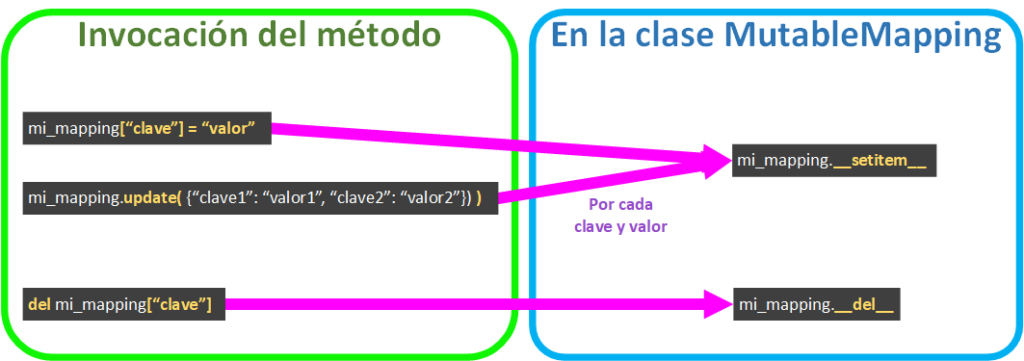
- Storing (replacing if it exists) a value under a key ( mutable_mapping[“clave”] = valor ) calls __setitem__.
- If we want to use a dictionary to fill our custom dictionary, we can use update(), which calls __setitem__ for each key-value pair in the dictionary we pass it.
- Deleting a key with its value ( del mutable_mapping[“clave”] ) calls __del__.
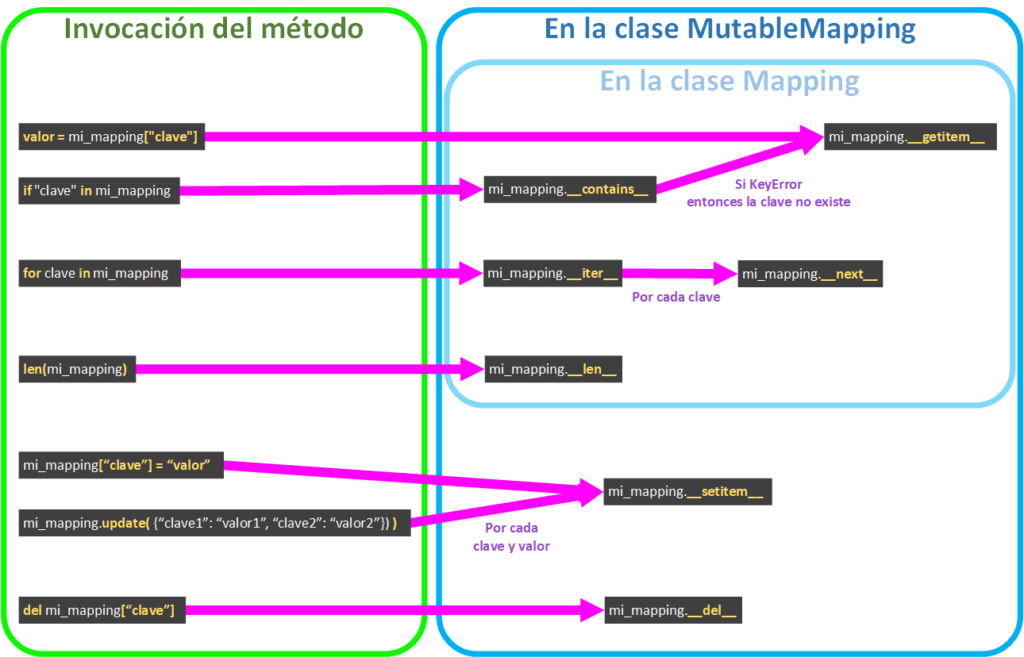
Remember that MutableMapping inherits from Mapping, so we actually have all of these lifecycles (plus those of the Views, which you can find at https://jarroba.com/vistas-de-los-diccionarios-de-python-keys-values-e-items/):
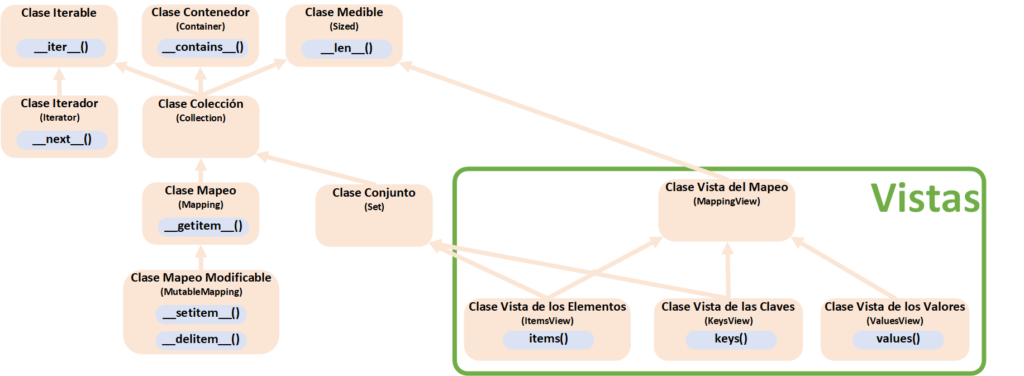
In perspective
Here is the diagram with all the classes we’ve seen so far across all the articles:
References
“Mapping and MutableMapping in Python” by Ramón Invarato at jarroba.com, licensed under Creative Commons Attribution-NonCommercial-ShareAlike 3.0. Registered at Safe Creative.

You may also like
Mutable and Immutable Types in Python
Learn whether a variable can change (mutable) or not (immutable). Mutable: List, Dict, Set. Immutable: String, Int, Float, Bool, Tuple, Range, Decimal.

Advanced Dockerfile: Multi-Stage Builds, Registries, and Tricks
Free Docker course. Expert Docker tricks: multi-stage builds, optimizing images, faster build times, and distributing images through Docker registries.
Leave a comment