
Hashables in Python
A hashable is any object that returns its "Hash Code" when asked, and that code stays the same for the whole life of the object. Learn how it works in Python.
Have you ever wondered why a dictionary (dict) only accepts different keys (it can’t have two equal keys) and why they are so fast at returning the value they store when you look it up? Maybe it’s not a question everyone asks themselves just like that, but it is curious enough to dig into the answer, and that answer will give us a very broad view of how it works, along with all the possibilities that Hashables offer if you take good advantage of them.
If you are reading this article you have probably used dictionaries (more examples and explanations about dictionaries in Python at https://jarroba.com/diccionario-python-ejemplos/). In Python we can write one like this:
mi_diccionario = {
    'Una clave': 'Un valor',
    'Otra clave': 'Otro valor',
    'Otra clave diferente más': 'Otro valor más'
}
The beauty of dictionaries is that they behave like “hash tables” (if you are curious about how a “hash table” works, it is explained in detail at https://jarroba.com/tablas-hash-o-tabla-de-dispersion/ ).
To see this better, my first example is the list, which does NOT behave like a “hash table”; if we want to find out whether the list contains a value, we have to go position by position asking whether the value is there or not, and if the value doesn’t exist in the list, we would have to go through it to the very end to make sure the value isn’t in any position.

With dictionaries this doesn’t happen: we ask whether it has a key (the key would be like the stored value in lists) and, without having to go through anything, it immediately tells us whether it has the key or not.

Let’s imagine we have two things: a list with infinite values (as a thought experiment, since it’s impossible for it to be infinite) and a dictionary with infinite data. If we want to know whether any value exists in this list, we would have to wait a long time to find out (for example, if it’s somewhere in the middle of the list) or an infinite amount of time to be sure it doesn’t exist. With the dictionary holding infinite data, however, knowing whether it has a value would be instantaneous. Dictionaries achieve this speed because their keys can only be Hashables.
Code on GitHub (I recommend reading the article first, and then downloading/cloning the code at the end or to resolve doubts): View on GitHubInvarato/JarrobaPython / resumibles
Difference between Hashables and non-Hashables
That said, let me ask you: is a dictionary Hashable? A dictionary is NOT Hashable.
So, was everything explained above useless? Not at all. I want to make it clear and stress that being Hashable is not the same as behaving like a “Hash table”. Whenever something behaves like a “Hash table”, it has to use some Hashable element (a key or a value).
And why isn’t a dictionary Hashable? Hashable means any object that returns its “Hash Code” when asked, and this “Hash Code” is always going to be the same at any moment of that object’s life (the “Hash Code” won’t change during the object’s entire life; it’s very interesting and I recommend understanding the “Hash Code” before continuing, which is why we dedicated an earlier article to it at https://jarroba.com/codigo-hash/). As a reminder, the “Hash Code” of something is a short text that summarizes it, and from this summary (“Hash Code”) it is impossible to find out what was summarized. And a dictionary is not Hashable because, since its content can change, its “Hash Code” could change at some point in its life (as a comparison, think of a book and its summary: if the author later adds or removes chapters, the summary you read before may no longer be valid and may become a different one, even if only a single letter changes).
For this reason, non-Hashables are usually the mutable ones (we dedicate an article to mutability and immutability https://jarroba.com/mutables-e-inmutables/ that we recommend understanding to learn all the secrets of “Hashables”):
- List: Accepts any type of values
- Dict (Dictionary): Accepts only Hashable keys and values of any type
- Set: Accepts only Hashable values
And the following immutable types, for example, are Hashable:
- Strings (Text)
- Int (Integer number)
- Float (Decimal number)
- Bool (Boolean)
So can we conclude that Hashable = Immutable and non-Hashable = Mutable? By default, for Python’s built-in classes, yes (the ones we saw before follow it: Dict, List, String, int, etc.). However, when we create our own class (our own “Object”), by default it is going to be Hashable and mutable. It’s a bit peculiar because it is Hashable and, on the other hand, mutable (since it can change its state once created), I’ll expand on this later.
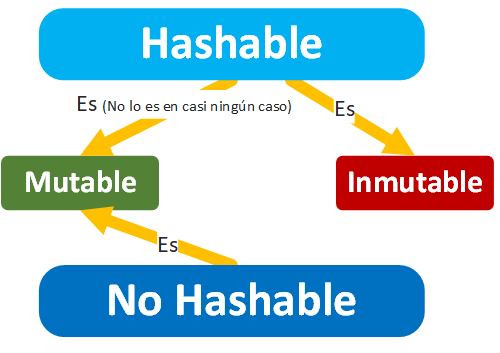
Can’t the value of a variable that is, say, a String change? A String only changes in “appearance”; it is actually copied to another memory location with the change (here is a very quick summary as a reminder, you have the full answer at https://jarroba.com/mutables-e-inmutables/ ).
And what if we copy a dictionary and insert it into another one as a key? Because you can copy a dictionary with:
copia_de_mi_diccionario = dict(mi_diccionario)
But it will still be pointed to by a variable that could mutate it in the future (that’s why a dictionary is always mutable). And a mutable is always passed by reference, that is, a pointer to that object is passed, it isn’t copied (unless we copy it explicitly as in the previous code example), the same one is used. Therefore, it can never be used as a Hashable, so no creating keys out of dictionaries for dictionaries 😉
Getting the hash of any Python object
You can get the hash of any Hashable object with the hash() function because its class implements the __hash__ method (which we’ll see with examples later).
hash_de_mi_objeto_hashable = hash(mi_objeto_hashable)
If we try it with a hashable object built into Python (like “String” or “int”) we can see how it works. For example:
if __name__ == "__main__":
    mi_string = "Un texto"
    hash_de_mi_string = hash(mi_string)
    print('Hash de mi_string: {}'.format(hash_de_mi_string))
It prints:
Hash de mi_string: 1022738295
Creating our own Hashable
If we want a class we create to be Hashable, it has to inherit from “Hashable” and override at least the __hash__ method and optionally __eq__.
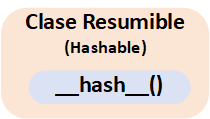
If we inherit from “Hashable” we will only be required to override __hash__, which is always mandatory. However, __eq__ is only mandatory in some cases where, because of the logic of our code, we can’t avoid implementing it. Also, __eq__ is not mandatory because it is a MixIn method of “Hashable” (that is, if it isn’t overridden, the parent class has default code that the child class can use directly; therefore, overriding it is optional, since it works on its own).
The difference between the two methods (we’ll see code examples later):
- __hash__: returns an integer that will be the “Hash Code”. It is used to check whether two variables are the same object
- __eq__: returns a boolean, “True” if they are equal or “False” if they are not. It is used to check whether the content of two objects is the same (that is, the values stored in one object are compared with the ones stored in the other).
We’ll want a class to be Hashable so we can use its instances as a key in a Dictionary (dict) or Mapping (Mapping), or as a value in a Set (Set). These structures use the “Hash Code” to make comparisons and direct lookups in memory very quickly.
__hash__
Being Hashable means that the object’s “Hash Code” won’t change during its lifetime. The __hash__ method must ensure that it returns a unique “Hash Code” for each object, and that it stays unchanged even if the object’s state changes (that is, if we have a class from which we create two objects X and Y, the “Hash Code” of X has to be different from that of Y; but the “Hash Code” of object X will always be the same, even if the state of object X changes in the future).
Also, the returned “Hash Code” must be unpredictable (impossible to calculate from outside the object) for security reasons; there are some attacks that take advantage of “Hash Code” collisions, and making it unpredictable avoids this kind of attack (suppose our class returns the “Hash Code” 123456 for all objects; an attacker could use an object they created that returns the same “Hash Code” 123456, so there would be a collision, and if Python picks theirs instead of mine, unwanted things will run in our program).
Now you may get a pleasant surprise, because you almost never need to override __hash__, since it already comes implemented as a “MixIn” method (see the box further below titled “Python calculates the hash using the id() method”) in any class we create by default (remember that inheriting from “object” in Python is like not inheriting from anything, it is the base of all classes):
class MiClase(object):

    def __init__(self):
        self.valor_guardado = None

    def set_valor(self, valor):
        self.valor_guardado = valor
And we can prove it’s true with (“hash(un_objeto)” calls the object’s “__hash__”):
if __name__ == "__main__":
    mi_objeto_x = MiClase()
    mi_objeto_y = MiClase()

    print('Hash de mi_objeto_x: {}'.format(hash(mi_objeto_x)))
    print('Hash de mi_objeto_y: {}'.format(hash(mi_objeto_y)))
Which prints to the screen:
Hash de mi_objeto_x: 1362574070
Hash de mi_objeto_y: 1364705917
Note
Python calculates the hash using the id() method
The id() method returns the object’s “identity” (as if it were an ID card number) and all objects have it, whether they are Hashable or not. The identity is the memory address (note: at least when using the CPython interpreter) where that object is located. Like any “identity” in the world, it is unique, in this case unique for each of the objects we need to create in Python (we take advantage of the fact that each memory address on your computer is unique to use it as the “identity”) (more information about id() at https://jarroba.com/mutables-e-inmutables/ ).
It’s worth clarifying that every time we run our code, the hash of the objects will change, even if our code is exactly the same between runs (as we said, since the hash is calculated with id(), which uses the memory address assigned to each object at runtime, in future runs the objects will be at different memory addresses).
And what if we need to return our own __hash__? Then we inherit from “Hashable” and override __hash__.
We have to make sure that the number returned by the __hash__ method meets all the conditions set above:
- Different for each instance
- Always the same, even if the object changes inside
- Not repeated across different runs (not predictable)
We could create the “object hash” with Python’s “hash()” function (it has the same name as the function that calls __hash__, so don’t mix them up), which helps us. We can pass the “hash()” function a tuple with all the variables of our class (so that the “Hash Code” signs that class by using its variables) and a “salt” (a random number that ensures the generated “Hash Code” is unpredictable), and it returns a number (positive or negative) that is the “Hash Code” calculated from what we wanted. If we calculate the “Hash Code” in the constructor (__init__), we already ensure it is always the same for the object, but not for other instances; that way, when __hash__ is called, we return this calculated “Hash Code”. And as you can see, the rest of the class’s states, whatever happens, have no influence on this calculation.
from collections import abc
import random


class MiHashable(abc.Hashable):

    def __init__(self):
        self.valor_guardado = None

        salt = random.random()
        tupla_de_parametros_de_mi_clase = (salt, self.valor_guardado)
        self.codigo_hash_del_objeto = hash(tupla_de_parametros_de_mi_clase)

    def set_valor(self, valor):
        self.valor_guardado = valor

    def get_valor(self):
        return self.valor_guardado

    def __hash__(self):
        return self.codigo_hash_del_objeto
Let’s test it (the following “hash(mi_objeto)” calls call the “__hash__” of our class):
if __name__ == "__main__":
    mi_objeto_x = MiHashable()
    mi_objeto_y = MiHashable()

    print('Hash de mi_objeto_x: {}'.format(hash(mi_objeto_x)))
    print('Hash de mi_objeto_y: {}'.format(hash(mi_objeto_y)))

    mi_objeto_x.set_valor("Un valor")
    mi_objeto_y.set_valor("Otro valor diferente")

    print('Hash de mi_objeto_x después de modificar el estado: {}'.format(hash(mi_objeto_x)))
    print('Hash de mi_objeto_y después de modificar el estado: {}'.format(hash(mi_objeto_y)))
It prints to the screen:
Hash de mi_objeto_x: 1203702863
Hash de mi_objeto_y: -1109119906
Hash de mi_objeto_x después de modificar el estado: 1203702863
Hash de mi_objeto_y después de modificar el estado: -1109119906
We confirm that, indeed, even if we change the internal state (the values it stores), the generated “Hash Code” doesn’t change, and for the two different instances of the same class the “Hash Codes” are different.
Note
id() vs hash()
A very common confusion is thinking that id() is the same as hash(), and we’re clearing that up right now:
- __hash__ by default (as a “MixIn”) uses id().
- If we override __hash__, we don’t have to use id() if we don’t want to.
- If the object is not Hashable, it won’t have __hash__ but it will have id().
- Practically all Mutable objects are non-Hashable, so a mutable almost certainly won’t have __hash__ but will always have id().
- id() never uses __hash__ (or “hash()”).
- All objects have id(), whether mutable or immutable, Hashable or non-Hashable.
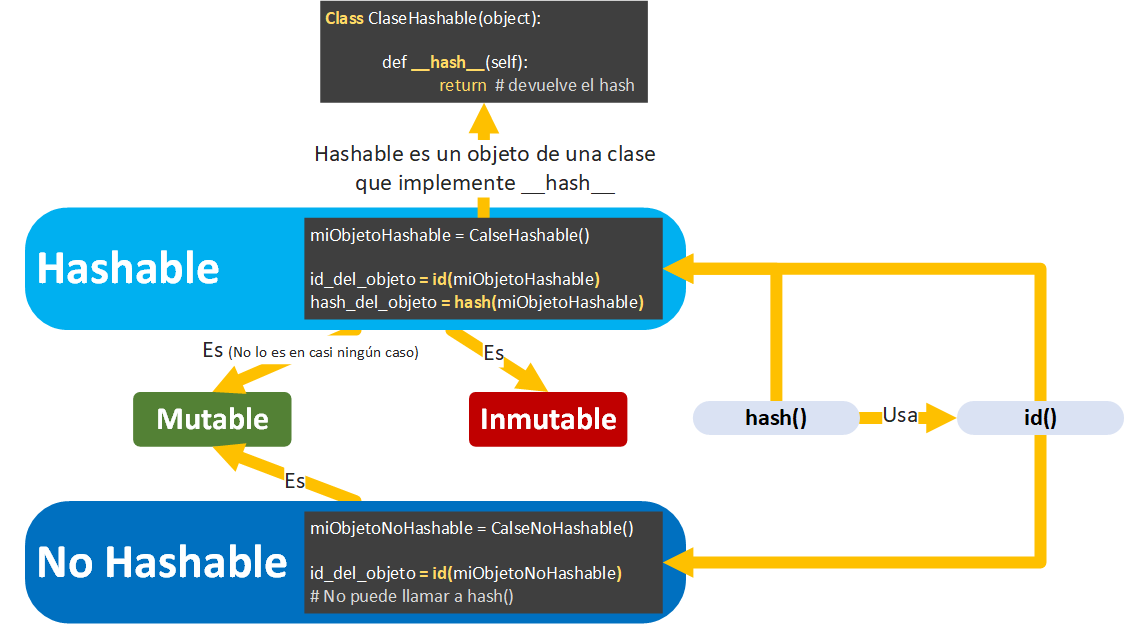
We had left the following question pending: will a class we create ourselves by default satisfy Hashable = immutable and non-Hashable = mutable? And the answer is NO, because it is Hashable, since it automatically implements the __hash__ method, but it is mutable (since it can change its state once created; also, if it is modified its hash is not affected, because it isn’t copied to another part of memory). Although we can always modify our own class to behave however we want, for example by overriding __hash__ or by making it immutable if we manage to prevent its attributes from being modified (for example, with slots or by raising an exception if any of its states is modified after creation); that is, whenever it makes sense we can get any of the variants: Hashable or non-Hashable, immutable or mutable.
Note
Immutable vs Hashable vs Mutable
These ideas are often mixed up; although they are closely linked, they are different concepts:
- Hashable indicates that a summary can be obtained (more information about summaries or hashes at https://jarroba.com/codigo-hash/ ) from any piece of data (in real life, a book can be summarized). For example, being able to get a hash of an object (that’s why it’s “Hashable”) with the hash() function because it implements __hash__.
- Immutable indicates that something cannot change once it has been created (in real life, the content of Don Quixote can’t change a single comma, because otherwise it wouldn’t be the book its author Cervantes wrote, and since he has passed away, the book can’t change and therefore its summary will never change). Therefore, its summary (hash) will never change.
- Mutable indicates that something can change once it has been created (in real life, imagine a living author who changes the content of his book every day: even though the book can be summarized, the summary isn’t very useful for knowing what the book is about, since it changes every day). Therefore, it won’t have a summary (hash), so it won’t be Hashable, or the summary will change every time the object is modified (and that isn’t very useful).
__eq__
We also have the option of overriding the __eq__ method, which will define value equality, when inheriting from Hashable. __eq__ has to return “True” if the content of one object is equal to the content of another, and “False” otherwise.
If an object has the __eq__ method, it is called “Comparable” (because it can be compared).
If we create our own class, it will always be hashable and immutable by default. But if we only override the __eq__ method (without overriding __hash__), the object automatically becomes mutable and the returned __hash__ will no longer be valid (therefore, it will stop being “Hashable” and will be only “Comparable”). If we want it to remain Hashable when we override the __eq__ method, it will be mandatory to also override the __hash__ method. That’s why __hash__ and __eq__ go hand in hand in the “Hashable” class; but remember that the reverse doesn’t apply, that is, if we override __hash__, it isn’t mandatory to override __eq__ for our own class to remain Hashable.
Note: Although you can override either __eq__ or __cmp__, __cmp__ is already obsolete and doesn’t exist in Python 3. So it’s always recommended to use __eq__.
Using the __eq__ method in a Hashable is very simple: we only have to compare all the values inside our class that we want to mean equality for our object. This is easier to see if we add the following code to our previous Hashable class (I’ll show pseudocode, and later I’ll give you the full code):
class MiHashable(abc.Hashable):

    def __init__(self):
        self.valor_guardado = None

    def set_valor(self, valor):
        self.valor_guardado = valor

    def get_valor(self):
        return self.valor_guardado

    # Resto del código …

    def __eq__(self, otro_objeto):
        valor_del_otro_objeto = otro_objeto.get_valor()
        return valor_del_otro_objeto == self.valor_guardado
If you look closely, the __eq__ method receives as a parameter another object to compare against. What it does is get the value of the other object and compare it with the one the object it was called on already has. That is, it could be used like this:
son_iguales = mi_objeto_x.__eq__(mi_objeto_y)

if son_iguales:
    print("El contenido de mi_objeto_x es igual que el de mi_objeto_y")
else:
    print("El contenido de mi_objeto_x NO es igual que el de mi_objeto_y")
Although Python makes it easier for us by letting us use the “==” symbol:
if mi_objeto_x == mi_objeto_y:
    print("El contenido de mi_objeto_x es igual que el de mi_objeto_y")
else:
    print("El contenido de mi_objeto_x NO es igual que el de mi_objeto_y")
As you can see, the double equals symbol (==) is the same as passing the second object as a parameter to the __eq__ method of the first object.
On the other hand, if we don’t define __eq__ (remember it is a MixIn with a default behavior), both objects will be compared by id().
Try it yourself
Here is the complete code:
from collections import abc
import random


class MiHashable(abc.Hashable):

    def __init__(self):
        self.valor_guardado = None

        salt = random.random()
        tupla_de_parametros_de_mi_clase = (salt, self.valor_guardado)
        self.codigo_hash_del_objeto = hash(tupla_de_parametros_de_mi_clase)

    def set_valor(self, valor):
        self.valor_guardado = valor

    def get_valor(self):
        return self.valor_guardado

    def __hash__(self) -> int:
        return self.codigo_hash_del_objeto

    def __eq__(self, otro_objeto):
        valor_del_otro_objeto = otro_objeto.get_valor()
        return valor_del_otro_objeto == self.valor_guardado
And so you can run it, here is the code. In this case, the objects have different stored values:
if __name__ == "__main__":
    mi_objeto_x = MiHashable()
    mi_objeto_y = MiHashable()

    # Si tienen diferentes valores guardados los objetos
    mi_objeto_x.set_valor("Un valor")
    mi_objeto_y.set_valor("Otro valor diferente")

    if mi_objeto_x == mi_objeto_y:
        print("El contenido de mi_objeto_x es igual que el de mi_objeto_y")
    else:
        print("El contenido de mi_objeto_x NO es igual que el de mi_objeto_y")
It prints:
El contenido de mi_objeto_x NO es igual que el de mi_objeto_y
Or if both objects have the same stored value:
if __name__ == "__main__":
    mi_objeto_x = MiHashable()
    mi_objeto_y = MiHashable()

    # O si tienen el mismo valor guardado los dos objetos
    mi_objeto_x.set_valor("El mismo valor")
    mi_objeto_y.set_valor("El mismo valor")

    if mi_objeto_x == mi_objeto_y:
        print("El contenido de mi_objeto_x es igual que el de mi_objeto_y")
    else:
        print("El contenido de mi_objeto_x NO es igual que el de mi_objeto_y")
It prints:
El contenido de mi_objeto_x es igual que el de mi_objeto_y
== vs is
They are very often confused, but I’ll clear it up quickly.
Objeto_a == objeto_b
The double equals (==, which we could translate as “the values of A are equal to the values of B”) is called the equality comparator. It compares whether the values stored by the objects on the left and right of the double equals (==) are equal. That is, when passing objeto_b as a parameter to the __eq__ method of objeto_a, it returns True if the internal values are equal (as we saw earlier), or False otherwise.
son_iguales = objeto_a == objeto_b
A working code example:
if __name__ == "__main__":
    mi_objeto_a = "Un texto"
    mi_objeto_b = "Un texto"

    if mi_objeto_a == mi_objeto_b:
        print("El contenido de mi_objeto_a es igual que el de mi_objeto_b")
    else:
        print("El contenido de mi_objeto_a NO es igual que el de mi_objeto_b")
It prints:
El contenido de mi_objeto_a es igual que el de mi_objeto_b
Note: in this context, the word “equal” is not the same as “identical”.
objeto_a is objeto_b
is (which we could translate as “the identity of A is identical to the identity of B”) is called the identity comparator. It compares whether the objects on the left and right of the “is” have the same identity. That is, whether the id() method of both objects (objeto_a and objeto_b) returns the same identifier number for objeto_a and objeto_b, giving True, or False otherwise.
son_identicos = objeto_a is objeto_b
Which is the same as writing:
son_iguales = id(objeto_a) == id(objeto_b)
And here is the working example with two objects with different identities (I’m also showing you what the id() method returns for each object):
if __name__ == "__main__":
    mi_objeto_a = "Un texto"
    mi_objeto_b = "Otro texto"

    print("Identidad de mi_objeto_a: {}".format(id(mi_objeto_a)))
    print("Identidad de mi_objeto_b: {}".format(id(mi_objeto_b)))

    if mi_objeto_a is mi_objeto_b:
        print("La identidad de mi_objeto_a es igual que la de mi_objeto_b")
    else:
        print("La identidad de mi_objeto_a NO es igual que la de mi_objeto_b")
It prints:
entidad de mi_objeto_a: 51311712
entidad de mi_objeto_b: 51311864
La identidad de mi_objeto_a NO es igual que la de mi_objeto_b
However, if the two objects return the same identity (that is, they are the same object):
if __name__ == "__main__":
    mi_objeto_a = "Un texto"
    mi_objeto_b = mi_objeto_a

    print("entidad de mi_objeto_a: {}".format(id(mi_objeto_a)))
    print("entidad de mi_objeto_b: {}".format(id(mi_objeto_b)))

    if mi_objeto_a is mi_objeto_b:
        print("La identidad de mi_objeto_a es igual que la de mi_objeto_b")
    else:
        print("La identidad de mi_objeto_a NO es igual que la de mi_objeto_b")
It prints:
entidad de mi_objeto_a: 12975844
entidad de mi_objeto_b: 12975844
La identidad de mi_objeto_a es igual que la de mi_objeto_b
Note on Python optimizations: an optimization Python performs to use fewer resources can create confusion. When we declare two objects of built-in Python classes with the same value (for example, two Strings with the same value “Un texto”), the variables we create afterwards with the same value will point to the first one. If we try it with code, we’ll see the behavior:
if __name__ == "__main__":
    mi_objeto_a = "Un texto"
    mi_objeto_b = "Un texto"

    print("entidad de mi_objeto_a: {}".format(id(mi_objeto_a)))
    print("entidad de mi_objeto_b: {}".format(id(mi_objeto_b)))

    if mi_objeto_a is mi_objeto_b:
        print("La identidad de mi_objeto_a es igual que la de mi_objeto_b")
    else:
        print("La identidad de mi_objeto_a NO es igual que la de mi_objeto_b")
It prints:
entidad de mi_objeto_a: 20051432
entidad de mi_objeto_b: 20051432
La identidad de mi_objeto_a es igual que la de mi_objeto_b
The identifier returned by id(), which, remember, the CPython interpreter gets from the memory address, is telling us that the second variable (mi_objeto_b) is pointing to the first one (mi_objeto_a).
Since String is a mutable class type, it’s enough to change its value in some way for a new object to be created. For example:
if __name__ == "__main__":
    mi_objeto_a = "Un texto"
    mi_objeto_b = "Un texto"

    print("[Antes] entidad de mi_objeto_a: {}".format(id(mi_objeto_a)))
    print("[Antes] entidad de mi_objeto_b: {}".format(id(mi_objeto_b)))

    mi_objeto_b += " y algo más"

    print("[Despues] entidad de mi_objeto_a: {}".format(id(mi_objeto_a)))
    print("[Despues] entidad de mi_objeto_b: {}".format(id(mi_objeto_b)))

    if mi_objeto_a is mi_objeto_b:
        print("La identidad de mi_objeto_a es igual que la de mi_objeto_b")
    else:
        print("La identidad de mi_objeto_a NO es igual que la de mi_objeto_b")
It prints:
[Antes] entidad de mi_objeto_a: 46137120
[Antes] entidad de mi_objeto_b: 46137120
[Despues] entidad de mi_objeto_a: 46137120
[Despues] entidad de mi_objeto_b: 47049896
La identidad de mi_objeto_a NO es igual que la de mi_objeto_b
“Before” modifying it, mi_objeto_b pointed to mi_objeto_a because they had the same value (so they were identical, they were the same object), but “After” modifying mi_objeto_b they stopped being identical (they were now two different objects).
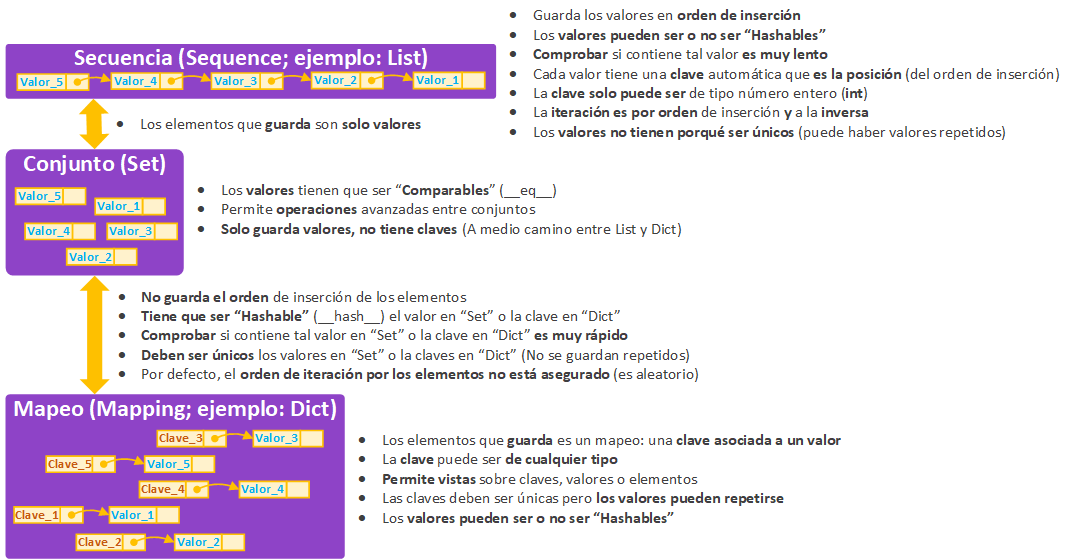
Values and keys of Dictionaries (dict), Sets (set) and Lists (list)
You need to understand well the differences and similarities between Dictionaries (dict), Sets (set) and Lists (list) to understand what each one needs. To understand it in a matter of seconds, here is the following comparison, which I’ve tried to make as complete and simple as possible:
More information at:
- List: https://jarroba.com/list-python-ejemplos/
- Dictionary: https://jarroba.com/diccionario-python-ejemplos/
- Python structures in general: https://jarroba.com/6-formas-mejorar-rendimiento-python/
References
- Glossary (Python docs)
- oCERT-2011-003: multiple implementations denial-of-service via hash algorithm collision (oCERT)
- Design and History FAQ (Python docs)
- Design and History FAQ (Python docs)
- github.com/python/cpython/blob/master/Objects/dictobject.c
- Python dictionary implementation (Laurent Luce's Blog)
- dictobject.c — Dictionary object implementation using a hash table (Python SVN)
- Hash table (Wikipedia)
- stackoverflow.com/questions/2671376/hashable-immutable
- stackoverflow.com/questions/34402522/difference-between-hash-and-id
- docs.python.org/2/reference/datamodel.html
- Built-in Types (Python docs)
- Programming FAQ (Python docs)
- 3.1 Objects, values and types (Python 2.0 Reference Manual)
“Hashables in Python” by Ramón Invarato at jarroba.com, licensed under Creative Commons Attribution-NonCommercial-ShareAlike 3.0. Registered at Safe Creative.

You may also like
Mutable and Immutable Types in Python
Learn whether a variable can change (mutable) or not (immutable). Mutable: List, Dict, Set. Immutable: String, Int, Float, Bool, Tuple, Range, Decimal.

Advanced Dockerfile: Multi-Stage Builds, Registries, and Tricks
Free Docker course. Expert Docker tricks: multi-stage builds, optimizing images, faster build times, and distributing images through Docker registries.
Leave a comment