
Python MongoDB Driver (pymongo) with Examples (Video)
Learn how to use the Python driver (pymongo) for MongoDB with a hands-on example: connecting to the server and building a simple CRUD.
You can download the project for this post by clicking HERE.
In this post we are going to build a simple example of how to use the Python driver (pymongo) to work with MongoDB, where we will see how to connect to the server and write a simple CRUD. The goal of this tutorial is to give you an example to use as a starting point if you are beginning to work with MongoDB using Python, so you can then dig deeper and write more complex queries, etc. As you will see in this tutorial, the queries (or rather, the functions that let you run queries) that you write in Python code for Mongo have a syntax very close to the one used when querying from the shell, unlike what happens with other drivers such as the Java one; so working with Python and MongoDB can be pretty easy.
Although the goal of this tutorial is not to teach MongoDB concepts, queries, features, etc., we will start by showing an "equivalence table" between Relational Database concepts and MongoDB ones so you can follow the tutorial.
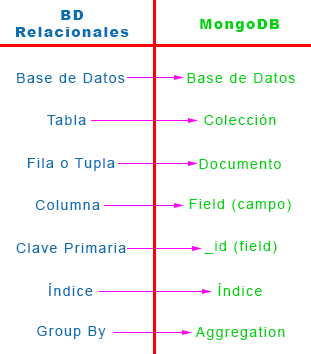
The first thing we need to do before we start "banging out code" is install the Python libraries for MongoDB. To do that we run a "pip install" to download and install the MongoDB packages. Explaining how to install packages from "PyPI" is not the goal of this tutorial, since we assume that anyone following it has a minimum knowledge of Python, so we install the MongoDB libraries for Python by opening a terminal and running:
$ pip install pymongo
If we don’t specify the version when installing the libraries, PyPI will install the latest stable version of "pymongo"; but if you want, you can specify the library version (in this example 2.8) like this:
$ pip install pymongo==2.8
In this tutorial we are going to store information about football players in a database collection that we will call "Futbolistas". To structure the project well, the first thing we will do is define the Futbolista class, which looks like this:
def __init__(self, nombre, apellidos, edad, demarcacion, internacional):
    self.nombre = nombre
    self.apellidos = apellidos
    self.edad = edad
    self.demarcacion = demarcacion
    self.internacional = internacional
To make this example a bit more complete, we are going to define several data types to see how to store and handle them. In this example the attributes ‘nombre’ and ‘apellidos’ will be of type "String", the attribute ‘edad’ will be of type "Integer", ‘demarcacion’ will be an array and ‘internacional’ will be a "Boolean". We make this clarification about data types because Python is a dynamically typed language, so you don’t have to declare the data type of each attribute, although in this example we mention them so we know which data types we are working with.
In our main script (Main.py) we are going to declare a list of objects of the Futbolista class, which we will use to do the CRUD in the example of this tutorial. The list of players is the following:
# Creo una lista de objetos futbolista a insertar en la BD
futbolistas = [
    Futbolista('Iker','Casillas',33,['Portero'],True),
    Futbolista('Carles','Puyol',36,['Central', 'Lateral'],True),
    Futbolista('Sergio','Ramos',28,['Lateral','Central'],True),
    Futbolista('Andrés','Iniesta',30,['Centrocampista','Delantero'],True),
    Futbolista('Fernando','Torres',30,['Delantero'],True),
    Futbolista('Leo','Baptistao',22,['Delantero'],False)
]
Once we have defined what we want to store in our database, let’s see how to connect to it so we can run whatever queries we want. First, we need to connect to the server where our "MongoDB server" is hosted:
# PASO 1: Conexión al Server de MongoDB Pasandole el host y el puerto
mongoClient = MongoClient('localhost',27017)
In this example the "server" will be our own machine, "localhost" (Very important: you must have MongoDB installed on your machine: "Install MongoDB on Mac OS X") and we will connect through port 27017, which is the port MongoDB uses with the default installation. If your MongoDB is hosted on another machine, you need to set its URL or IP correctly, followed by the port.
After connecting to the server, we need to connect to the database, which we have named "Futbol", and then we specify the Collection (in SQL it would be the table) we are going to work with, which will be called "Futbolistas":
# PASO 2: Conexión a la base de datos
db = mongoClient.Futbol

# PASO 3: Obtenemos una coleccion para trabajar con ella
collection = db.Futbolistas
At this point we have our database connection ready and a reference to the "Futbolistas" collection (in the variable ‘collection’) that we will use to do the CRUD.
Before moving on to the CRUD, we have to say that the MongoDB package for Python "doesn’t understand" Python classes or objects, so we can’t pass Python objects to the functions that let us run queries. For that, Python has a data type that fits MongoDB very well: "dictionaries", which are data structures made of "<key, value>" pairs; so when working with Python and MongoDB we are going to use these data structures, since MongoDB stores documents (in JSON format) with a "<key,value>" structure. To work in a cleaner and more organized way, I have created a function in the "Futbolista" class (toDBCollection) that turns a Futbolista object into a dictionary with the "<key,value>" pairs that we will store in MongoDB. It looks like this:
def toDBCollection (self):
        return {
            "nombre":self.nombre,
            "apellidos":self.apellidos,
            "edad": self.edad,
            "demarcacion":self.demarcacion,
            "internacional":self.internacional
        }
Now that we have everything we need to do the CRUD, let’s get to it:
CREATE:
We are going to insert into the Futbolistas collection each of the player objects that we created and that are in the ‘futbolistas’ list. To do so we will use the "insert" function, applied to the Futbolistas collection. By looping over the futbolistas list with a "foreach", we insert the players’ data into the database:
# PASO 4.1: "CREATE" -> Metemos los objetos futbolista (o documentos en Mongo) en la coleccion Futbolista
for futbolista in futbolistas:
    collection.insert(futbolista.toDBCollection())
As we can see, by calling the "toDBCollection" function we transform the object into a "dictionary" that the MongoDB libraries "understand". As a result of inserting the players, we have the following in the Futbolistas collection:
{
	"_id" : ObjectId("55084a2d0364d3a7933fe621"),
	"nombre" : "Iker",
	"apellidos" : "Casillas",
	"edad" : 33,
	"demarcacion" : [
		"Portero"
	],
	"internacional" : true
}
{
	"_id" : ObjectId("55084a2d0364d3a7933fe622"),
	"nombre" : "Carles",
	"apellidos" : "Puyol",
	"edad" : 36,
	"demarcacion" : [
		"Central",
		"Lateral"
	],
	"internacional" : true
}
......
......
READ:
As a first query, we are going to read all the documents in the Futbolistas collection. When reading (or running find queries), Mongo returns a list (or a cursor) of objects made of "<key,value>" pairs; so, once the query is done, we have to loop through (in this case with a "foreach") each of the objects and access their keys in order to print them to the screen:
# PASO 4.2.1: "READ" -> Leemos todos los documentos de la base de datos
cursor = collection.find()
for fut in cursor:
    print "%s - %s - %i - %s - %r" \
          %(fut['nombre'], fut['apellidos'], fut['edad'], fut['demarcacion'], fut['internacional'])
The result is the following:
Iker - Casillas - 33 - [u'Portero'] - True
Carles - Puyol - 36 - [u'Central', u'Lateral'] - True
Sergio - Ramos - 28 - [u'Lateral', u'Central'] - True
Andrés - Iniesta - 30 - [u'Centrocampista', u'Delantero'] - True
Fernando - Torres - 30 - [u'Delantero'] - True
Leo - Baptistao - 22 - [u'Delantero'] - False
Now we are going to run a query that shows us the players who can play, or do play, in the Delantero (forward) position. This time it is a query with a condition, so let’s see how it’s done:
# PASO 4.2.2: "READ" -> Hacemos una Query con condiciones y lo pasamos a un objeto Futbolista
print "\n\n*** Buqueda de los futbolistas que sean delanteros ***"
cursor = collection.find({"demarcacion":{"$in":["Delantero"]}})
for fut in cursor:
    print "%s - %s - %i - %s - %r" \
          %(fut['nombre'], fut['apellidos'], fut['edad'], fut['demarcacion'], fut['internacional'])
As a result we get the players who play (or can play) as forwards:
Andrés - Iniesta - 30 - [u'Centrocampista', u'Delantero'] - True
Fernando - Torres - 30 - [u'Delantero'] - True
Leo - Baptistao - 22 - [u'Delantero'] - False
UPDATE:
Now let’s update or modify some documents. For this example, we are going to add ‘100’ to the age of every player older than 30. Update queries require 4 parameters: one is the search for the documents to update, another is the field to update, and the last two are "upsert" (if it doesn’t exist you insert it, and if it exists you update it) and "multi" (to apply it to the first document found or to all of them). Let’s see the example:
# PASO 4.3: "UPDATE" -> Actualizamos la edad de los jugadores.
collection.update({"edad":{"$gt":30}},{"$inc":{"edad":100}}, upsert = False, multi = True)
Running this code modifies two documents, which are the following:
{
	"_id" : ObjectId("55084a2d0364d3a7933fe621"),
	"nombre" : "Iker",
	"apellidos" : "Casillas",
	"edad" : 133,
	"demarcacion" : [
		"Portero"
	],
	"internacional" : true
}
{
	"_id" : ObjectId("55084a2d0364d3a7933fe622"),
	"nombre" : "Carles",
	"apellidos" : "Puyol",
	"edad" : 136,
	"demarcacion" : [
		"Central",
		"Lateral"
	],
	"internacional" : true
}
As we can see, the update query that we write in code is very similar to the one we would write in the shell.
DELETE:
Finally, we are going to show how to delete documents. For that we use the "remove" function, which takes as a parameter the search for the documents to delete. In the example, we are going to delete all the documents whose ‘internacional’ field has the value ‘True’:
# PASO 4.4: "DELETE" -> Borramos todos los futbolistas que sean internacionales (internacional = true)
collection.remove({"internacional":True})
We can see how we first search for the documents with "internacional = true" and then the ‘remove’ method deletes them, leaving in the database a single document with "internacional = false", which is the following:
{
	"_id" : ObjectId("550849e303645b46b491c39e"),
	"nombre" : "Leo",
	"apellidos" : " Baptistao",
	"edad" : 22,
	"demarcacion" : [
		"Delantero"
	],
	"internacional" : false
}
With all this we have seen how to use the Python libraries for MongoDB, connecting to the server and doing a very simple CRUD that can get as complicated as you want depending on the queries you need to write. But as we have seen, the syntax used to write the queries is very similar to the one used when writing queries in the shell (unlike other libraries such as the Java one).
Below is the complete code of the project:
Main.py
# -*- coding: utf-8 -*-
__author__ = 'Ricardo Moya'

from pymongo import MongoClient
from Futbolista import Futbolista

# Creo una lista de objetos futbolista a insertar en la BD
futbolistas = [
    Futbolista('Iker','Casillas',33,['Portero'],True),
    Futbolista('Carles','Puyol',36,['Central', 'Lateral'],True),
    Futbolista('Sergio','Ramos',28,['Lateral','Central'],True),
    Futbolista('Andrés','Iniesta',30,['Centrocampista','Delantero'],True),
    Futbolista('Fernando','Torres',30,['Delantero'],True),
    Futbolista('Leo','Baptistao',22,['Delantero'],False)
]


# PASO 1: Conexión al Server de MongoDB Pasandole el host y el puerto
mongoClient = MongoClient('localhost',27017)


# PASO 2: Conexión a la base de datos
db = mongoClient.Futbol


# PASO 3: Obtenemos una coleccion para trabajar con ella
collection = db.Futbolistas


# PASO 4: CRUD (Create-Read-Update-Delete)

# PASO 4.1: "CREATE" -> Metemos los objetos futbolista (o documentos en Mongo) en la coleccion Futbolista
for futbolista in futbolistas:
    collection.insert(futbolista.toDBCollection())


# PASO 4.2.1: "READ" -> Leemos todos los documentos de la base de datos
cursor = collection.find()
for fut in cursor:
    print "%s - %s - %i - %s - %r" \
          %(fut['nombre'], fut['apellidos'], fut['edad'], fut['demarcacion'], fut['internacional'])

# PASO 4.2.2: "READ" -> Hacemos una Query con condiciones y lo pasamos a un objeto Futbolista
print "\n\n*** Buqueda de los futbolistas que sean delanteros ***"
cursor = collection.find({"demarcacion":{"$in":["Delantero"]}})
for fut in cursor:
    print "%s - %s - %i - %s - %r" \
          %(fut['nombre'], fut['apellidos'], fut['edad'], fut['demarcacion'], fut['internacional'])


# PASO 4.3: "UPDATE" -> Actualizamos la edad de los jugadores.
collection.update({"edad":{"$gt":30}},{"$inc":{"edad":100}}, upsert = False, multi = True)


# PASO 4.4: "DELETE" -> Borramos todos los futbolistas que sean internacionales (internacional = true)
collection.remove({"internacional":True})


# PASO FINAL: Cerrar la conexion
mongoClient.close()
Futbolista.py
# -*- coding: utf-8 -*-
__author__ = 'Ricardo Moya'

class Futbolista:

    def __init__(self, nombre, apellidos, edad, demarcacion, internacional):
        self.nombre = nombre
        self.apellidos = apellidos
        self.edad = edad
        self.demarcacion = demarcacion
        self.internacional = internacional

    def toDBCollection (self):
        return {
            "nombre":self.nombre,
            "apellidos":self.apellidos,
            "edad": self.edad,
            "demarcacion":self.demarcacion,
            "internacional":self.internacional
        }

    def __str__(self):
        return "Nombre: %s - Apellidos: %s - Edad: %i - Demarcación: %s - Internacional: %r" \
               %(self.nombre, self.apellidos, self.edad, self.demarcacion, self.internacional)
“Python MongoDB Driver (pymongo) with Examples (Video)” by Ricardo Moya at jarroba.com, licensed under Creative Commons Attribution-NonCommercial-ShareAlike 3.0. Registered at Safe Creative.

You may also like
Java MongoDB Driver, with Examples (Video)
In this post we build a simple example of how to use the Java driver to work with MongoDB: connecting to the server and running basic CRUD operations.


MongoDB Course – Part I (Video) – “Introduction”
Start our practical MongoDB course: learn what a document-oriented database is, how MongoDB stores JSON data, and how it compares to relational databases.
Leave a comment