
Java MongoDB Driver, with Examples (Video)
In this post we build a simple example of how to use the Java driver to work with MongoDB: connecting to the server and running basic CRUD operations.
You can download the project for this post by clicking HERE.
In this post we’re going to build a simple example of how to use the Java driver (or libraries) to work with MongoDB. We’ll see how to connect to the server and how to do a simple CRUD. The goal of this tutorial is to give you an example that works as a starting point for everyone who is just beginning to work with MongoDB using Java, so you can dig deeper later and write more complex queries, etc.
Although the goal of this tutorial is not to teach the concepts, queries, features, etc. of MongoDB, we will start by showing an "equivalence table" between Relational Database concepts and MongoDB ones so you can follow the tutorial.
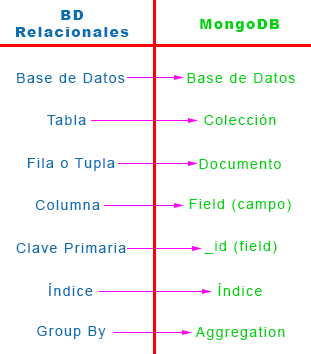
The first thing we need to do before we start "banging out code" is import the Java driver for MongoDB. In this tutorial we’re going to create a Maven project (if you don’t know what Maven is, check out these tutorials: Maven and Maven for Eclipse), so in our "pom.xml" file we need to copy the Java driver dependency as shown below. If you don’t use Maven, you need to import the MongoDB driver ".jar" into your project.
<dependency>
    <groupId>org.mongodb</groupId>
    <artifactId>mongo-java-driver</artifactId>
    <version>2.13.0</version>
</dependency>
In this tutorial we’re going to store information about football players in a database collection that we’ll call "Futbolistas". To structure the project well, the first thing we’ll do is define the Futbolista class, which looks like this:
public class Futbolista {

	private String nombre;
	private String apellidos;
	private Integer edad;
	private ArrayList<String> demarcacion;
	private Boolean internacional;

        // Constructor
        // getter y setter
}
In our Main method we’re going to create 6 objects of the Futbolista class and store them in an ArrayList, so we can later do a CRUD with them in MongoDB. The Futbolista objects are the following:
ArrayList<Futbolista> futbolistas = new ArrayList<Futbolista>();

futbolistas.add(new Futbolista("Iker", "Casillas", 33,
		new ArrayList<String>(Arrays.asList("Portero")), true));
futbolistas.add(new Futbolista("Carles", "Puyol", 36,
		new ArrayList<String>(Arrays.asList("Central", "Lateral")), true));
futbolistas.add(new Futbolista("Sergio", "Ramos", 28,
		new ArrayList<String>(Arrays.asList("Lateral", "Central")), true));
futbolistas.add(new Futbolista("Andrés", "Iniesta", 30,
		new ArrayList<String>(Arrays.asList("Centrocampista", "Delantero")), true));
futbolistas.add(new Futbolista("Fernando", "Torres", 30,
		new ArrayList<String>(Arrays.asList("Delantero")), true));
futbolistas.add(new Futbolista("Leo", " Baptistao", 22,
		new ArrayList<String>(Arrays.asList("Delantero")), false));
As you can see in this example, we use different data types (String, Integer, Array, Boolean) to make the example a bit more complete and to get different kinds of queries, as we’ll see next.
Once we’ve defined what we want to store in our database, let’s see how to connect to it so we can run the queries we want. First, we need to connect to the server where our "MongoDB server" is hosted:
// PASO 1: Conexión al Server de MongoDB Pasandole el host y el puerto
MongoClient mongoClient = new MongoClient("localhost", 27017);
In this example the "server" will be our own machine, "localhost" (Very important: you must have MongoDB installed on your machine "Install MongoDB on Mac OS X") and we’ll connect through port 27017, which is the port MongoDB uses if you do the default installation. If your MongoDB is hosted on another machine, make sure you enter its URL or IP correctly, followed by the port.
After connecting to the server, we need to connect to the database, which we’ve called "Futbol", and then we’ll specify the Collection (in SQL it would be the table) we’re going to work with, which will be called "Futbolistas":
// PASO 2: Conexión a la base de datos
DB db = mongoClient.getDB("Futbol");

// PASO 3: Obtenemos una coleccion para trabajar con ella
DBCollection collection = db.getCollection("Futbolistas");
At this point we’ve connected to the database and we have a reference to the "Futbolistas" collection (in the ‘collection’ variable) that we’ll use for the CRUD. Although I glossed over it, to make these connections we created objects of the MongoClient, DB and DBCollection classes, which are classes provided by the Java driver.
Now that we have the connection to MongoDB, we’re going to do the CRUD with the Futbolista objects, but first there’s something very important to say when working with the Java libraries for MongoDB. The MongoDB library "doesn’t understand" Java objects, so it doesn’t know how to work with them. This library only understands objects of the "BasicDBObject" class (which implements the "DBObject" interface), a class you pass two parameters: the name of the document field and the value of the field. So, in a way, it’s a "mapper" or "adapter" object from the Java class to the MongoDB document:
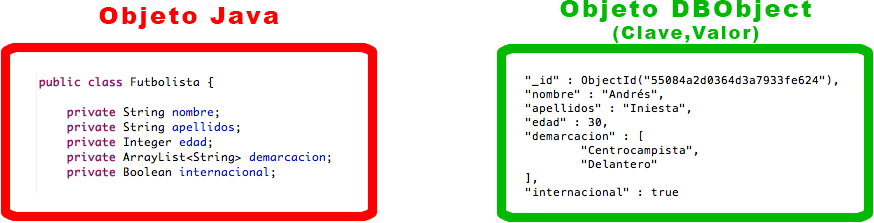
So, to work with both Java objects and BasicDBObject objects, I’m going to create a method in the Futbolista class that converts a Java object into a BasicDBObject object that the Java library’s queries can understand. This is the method, where you can see how the field name is passed on one side and the value on the other:
public BasicDBObject toDBObjectFutbolista() {

    // Creamos una instancia BasicDBObject
    BasicDBObject dBObjectFutbolista = new BasicDBObject();

    dBObjectFutbolista.append("nombre", this.getNombre());
    dBObjectFutbolista.append("apellidos", this.getApellidos());
    dBObjectFutbolista.append("edad", this.getEdad());
    dBObjectFutbolista.append("demarcacion", this.getDemarcacion());
    dBObjectFutbolista.append("internacional", this.getInternacional());

    return dBObjectFutbolista;
}
Creating this method to convert a Java object into one that MongoDB understands isn’t strictly necessary, but I think it’s good practice to have methods like this so our code is cleaner and more concise.
Now that we have everything we need for the CRUD, let’s get to it:
CREATE:
We’re going to insert into the Futbolistas collection each of the Futbolista objects we created and that we have in the ‘futbolistas’ ArrayList. To do this we’ll use the "insert" method of the "DBCollection" class; as we did before, we’ve created an object of that class called ‘collection’. We pass the "insert" method the "BasicDBObject" object that it must insert into the database. For that we use the "toDBObjectFutbolista()" method we defined earlier. By looping through the ArrayList of players, it inserts the players’ data into the database:
for (Futbolista fut : futbolistas) {
    collection.insert(fut.toDBObjectFutbolista());
}
In the Futbolistas collection, we have the following:
{
	"_id" : ObjectId("55084a2d0364d3a7933fe621"),
	"nombre" : "Iker",
	"apellidos" : "Casillas",
	"edad" : 33,
	"demarcacion" : [
		"Portero"
	],
	"internacional" : true
}
{
	"_id" : ObjectId("55084a2d0364d3a7933fe622"),
	"nombre" : "Carles",
	"apellidos" : "Puyol",
	"edad" : 36,
	"demarcacion" : [
		"Central",
		"Lateral"
	],
	"internacional" : true
}
......
......
We can see that it did insert the players’ data into the collection, assigning each one an "_id".
READ:
For our first query, we’re going to read all the documents in the Futbolistas collection. To do reads, you use an object of the "DBCursor" class, which is a cursor over the selected documents. Let’s see how we do a "db.Futbolistas.find()" and print it to the screen:
DBCursor cursor = collection.find();
try {
	while (cursor.hasNext()) {
	    System.out.println(cursor.next().toString());
    }
} finally {
	cursor.close();
}
As you can see, we have the documents in the cursor and we loop through it to print them to the screen, very much like we would loop through an ArrayList. The result is the following:
{ "_id" : { "$oid" : "55084a2d0364d3a7933fe621"} , "nombre" : "Iker" , "apellidos" : "Casillas" , "edad" : 33 , "demarcacion" : [ "Portero"] , "internacional" : true}
{ "_id" : { "$oid" : "55084a2d0364d3a7933fe622"} , "nombre" : "Carles" , "apellidos" : "Puyol" , "edad" : 36 , "demarcacion" : [ "Central" , "Lateral"] , "internacional" : true}
{ "_id" : { "$oid" : "55084a2d0364d3a7933fe623"} , "nombre" : "Sergio" , "apellidos" : "Ramos" , "edad" : 28 , "demarcacion" : [ "Lateral" , "Central"] , "internacional" : true}
{ "_id" : { "$oid" : "55084a2d0364d3a7933fe624"} , "nombre" : "Andrés" , "apellidos" : "Iniesta" , "edad" : 30 , "demarcacion" : [ "Centrocampista" , "Delantero"] , "internacional" : true}
{ "_id" : { "$oid" : "55084a2d0364d3a7933fe625"} , "nombre" : "Fernando" , "apellidos" : "Torres" , "edad" : 30 , "demarcacion" : [ "Delantero"] , "internacional" : true}
{ "_id" : { "$oid" : "55084a2d0364d3a7933fe626"} , "nombre" : "Leo" , "apellidos" : " Baptistao" , "edad" : 22 , "demarcacion" : [ "Delantero"] , "internacional" : false}
Now we’re going to run a query that shows us the players who can play, or do play, in the Delantero (forward) position. This is already a query with a condition, so let’s see how it’s done:
DBObject query = new BasicDBObject("demarcacion", new BasicDBObject("$regex", "Delantero"));
cursor = collection.find(query);
try {
	while (cursor.hasNext()) {
		Futbolista futbolista = new Futbolista((BasicDBObject) cursor.next());
		System.out.println(futbolista.toString());
	}
} finally {
	cursor.close();
}
As you can see, we create a query that will be an object of the "BasicDBObject" class, telling it to search the "demarcacion" field (which is an array) for documents that contain the Delantero position. Once we have that data in the cursor, we print it using the Futbolista class constructor that takes a BasicDBObject and turns it into a Java object, giving us the following result:
Nombre: Andrés Iniesta / Edad: 30 / Demarcación: [Centrocampista, Delantero] / Internacional: true
Nombre: Fernando Torres / Edad: 30 / Demarcación: [Delantero] / Internacional: true
Nombre: Leo  Baptistao / Edad: 22 / Demarcación: [Delantero] / Internacional: false
UPDATE:
Now let’s move on to updating or modifying documents. For this example, we’re going to add ‘100’ to the age of every player older than 30. Update queries require two parameters: one is the search for the documents to update, and the other is the field to update. Let’s look at the example:
DBObject find = new BasicDBObject("edad", new BasicDBObject("$gt", 30));
DBObject updated = new BasicDBObject().append("$inc", new BasicDBObject().append("edad", 100));
collection.update(find, updated, false, true);
First (in the ‘find’ variable) we search for documents whose age field is greater than ’30’, and then in the ‘updated’ variable we apply the increment of ‘+100’ to the age field. Finally we call the "update" method, which has 4 parameters. The first is the search for the documents to update and the second is the update to apply, so we pass those two parameters, which are objects of the "BasicDBObject" class. The other 2 parameters (the 3rd and 4th) are Upsert (if the field exists it’s updated, otherwise it’s created) and Multiple (whether the modification is applied to all documents or only to the first one found), but that’s more about knowing how MongoDB queries work than about the Java driver. Running this code modifies two documents, which are the following:
{
	"_id" : ObjectId("55084a2d0364d3a7933fe621"),
	"nombre" : "Iker",
	"apellidos" : "Casillas",
	"edad" : 133,
	"demarcacion" : [
		"Portero"
	],
	"internacional" : true
}
{
	"_id" : ObjectId("55084a2d0364d3a7933fe622"),
	"nombre" : "Carles",
	"apellidos" : "Puyol",
	"edad" : 136,
	"demarcacion" : [
		"Central",
		"Lateral"
	],
	"internacional" : true
}
DELETE:
Finally, let’s show how to delete documents. For this we’ll use the "remove" method of the "DBCollection" class, which takes as a parameter the search for the documents to delete. In the example, we’re going to delete all the documents that have the value ‘true’ in the ‘internacional’ field:
DBObject findDoc = new BasicDBObject("internacional", true);
collection.remove(findDoc);
As you can see, first we search for the documents with "internacional = true" and then the ‘remove’ method deletes them, leaving a single document in the database with "internacional = false", which is the following:
{
	"_id" : ObjectId("550849e303645b46b491c39e"),
	"nombre" : "Leo",
	"apellidos" : " Baptistao",
	"edad" : 22,
	"demarcacion" : [
		"Delantero"
	],
	"internacional" : false
}
With all this, we’ve seen how to use the Java driver for MongoDB, connecting to the server and doing a very simple CRUD that can get as complicated as you like depending on the queries you need to run. Don’t take this tutorial as the way to work with MongoDB in Java, since its only purpose is to show an example that serves as a foundation for those of you just starting out. If you want to build something bigger and more complex, I recommend using the "Spring Data MongoDB" framework and structuring your project better, since, as you can see if you download the project from GitHub, I haven’t structured this project following the MVC pattern, which is how it should be done in these cases. So take this tutorial for what it is: a first taste of MongoDB for Java.
Below is the full code of the project:
Main.java
package com.jarroba.MongoJava.MongoJava_ejemplo;

import java.net.UnknownHostException;
import java.util.ArrayList;
import java.util.Arrays;

import com.mongodb.BasicDBObject;
import com.mongodb.DB;
import com.mongodb.DBCollection;
import com.mongodb.DBCursor;
import com.mongodb.DBObject;
import com.mongodb.MongoClient;

public class Main {

  public static void main(String args[]) {

    ArrayList<Futbolista> futbolistas = new ArrayList<Futbolista>();

    futbolistas.add(new Futbolista("Iker", "Casillas", 33,
                    new ArrayList<String>(Arrays.asList("Portero")), true));
    futbolistas.add(new Futbolista("Carles", "Puyol", 36,
                    new ArrayList<String>(Arrays.asList("Central", "Lateral")), true));
    futbolistas.add(new Futbolista("Sergio", "Ramos", 28,
                    new ArrayList<String>(Arrays.asList("Lateral", "Central")), true));
    futbolistas.add(new Futbolista("Andrés", "Iniesta", 30,
                    new ArrayList<String>(Arrays.asList("Centrocampista", "Delantero")), true));
    futbolistas.add(new Futbolista("Fernando", "Torres", 30,
                    new ArrayList<String>(Arrays.asList("Delantero")), true));
    futbolistas.add(new Futbolista("Leo", " Baptistao", 22,
                    new ArrayList<String>(Arrays.asList("Delantero")), false));

    try {
    // PASO 1: Conexión al Server de MongoDB Pasandole el host y el puerto
      MongoClient mongoClient = new MongoClient("localhost", 27017);

    // PASO 2: Conexión a la base de datos
      DB db = mongoClient.getDB("Futbol");

    // PASO 3: Obtenemos una coleccion para trabajar con ella
      DBCollection collection = db.getCollection("Futbolistas");

    // PASO 4: CRUD (Create-Read-Update-Delete)

      // PASO 4.1: "CREATE" -> Metemos los objetos futbolistas (o documentos en Mongo) en la coleccion Futbolista
      for (Futbolista fut : futbolistas) {
        collection.insert(fut.toDBObjectFutbolista());
      }

      // PASO 4.2.1: "READ" -> Leemos todos los documentos de la base de datos
      int numDocumentos = (int) collection.getCount();
      System.out.println("Número de documentos en la colección Futbolistas: " + numDocumentos + "\n");

      // Busco todos los documentos de la colección y los imprimo
      DBCursor cursor = collection.find();
      try {
        while (cursor.hasNext()) {
          System.out.println(cursor.next().toString());
        }
      } finally {
        cursor.close();
      }

      // PASO 4.2.2: "READ" -> Hacemos una Query con condiciones y lo pasamos a un objeto Java
      System.out.println("\nFutbolistas que juegan en la posición de Delantero");
      DBObject query = new BasicDBObject("demarcacion", new BasicDBObject("$regex", "Delantero"));
      cursor = collection.find(query);
      try {
        while (cursor.hasNext()) {
          Futbolista futbolista = new Futbolista((BasicDBObject) cursor.next());
          System.out.println(futbolista.toString());
        }
      } finally {
        cursor.close();
      }

      // PASO 4.3: "UPDATE" -> Actualizamos la edad de los jugadores.
      DBObject find = new BasicDBObject("edad", new BasicDBObject("$gt", 30));
      DBObject updated = new BasicDBObject().append("$inc", new BasicDBObject().append("edad", 100));
      collection.update(find, updated, false, true);

      // PASO 4.4: "DELETE" -> Borramos todos los futbolistas que sean internacionales (internacional = true)
      DBObject findDoc = new BasicDBObject("internacional", true);
      collection.remove(findDoc);

    // PASO FINAL: Cerrar la conexion
      mongoClient.close();

    } catch (UnknownHostException ex) {
      System.out.println("Exception al conectar al server de Mongo: " + ex.getMessage());
    }
  }
}
Futbolista.java
package com.jarroba.MongoJava.MongoJava_ejemplo;

import java.util.ArrayList;

import com.mongodb.BasicDBList;
import com.mongodb.BasicDBObject;

public class Futbolista {

	private String nombre;
	private String apellidos;
	private Integer edad;
	private ArrayList<String> demarcacion;
	private Boolean internacional;

	public Futbolista() {
	}

	public Futbolista(String nombre, String apellidos, Integer edad, ArrayList<String> demarcacion, Boolean internacional) {
		this.nombre = nombre;
		this.apellidos = apellidos;
		this.edad = edad;
		this.demarcacion = demarcacion;
		this.internacional = internacional;
	}

	// Transformo un objecto que me da MongoDB a un Objecto Java
	public Futbolista(BasicDBObject dBObjectFutbolista) {
		this.nombre = dBObjectFutbolista.getString("nombre");
		this.apellidos = dBObjectFutbolista.getString("apellidos");
		this.edad = dBObjectFutbolista.getInt("edad");

		// Cuidado cuando trabajamos con Arrays o Listas
		BasicDBList listDemarcaciones = (BasicDBList) dBObjectFutbolista.get("demarcacion");
		this.demarcacion = new ArrayList<String>();
		for (Object demarc : listDemarcaciones) {
			this.demarcacion.add(demarc.toString());
		}

		this.internacional = dBObjectFutbolista.getBoolean("internacional");
	}

	public BasicDBObject toDBObjectFutbolista() {

		// Creamos una instancia BasicDBObject
		BasicDBObject dBObjectFutbolista = new BasicDBObject();

		dBObjectFutbolista.append("nombre", this.getNombre());
		dBObjectFutbolista.append("apellidos", this.getApellidos());
		dBObjectFutbolista.append("edad", this.getEdad());
		dBObjectFutbolista.append("demarcacion", this.getDemarcacion());
		dBObjectFutbolista.append("internacional", this.getInternacional());

		return dBObjectFutbolista;
	}

	public String getNombre() {
		return nombre;
	}

	public void setNombre(String nombre) {
		this.nombre = nombre;
	}

	public String getApellidos() {
		return apellidos;
	}

	public void setApellidos(String apellidos) {
		this.apellidos = apellidos;
	}

	public Integer getEdad() {
		return edad;
	}

	public void setEdad(Integer edad) {
		this.edad = edad;
	}

	public ArrayList<String> getDemarcacion() {
		return demarcacion;
	}

	public void setDemarcacion(ArrayList<String> demarcacion) {
		this.demarcacion = demarcacion;
	}

	public Boolean getInternacional() {
		return internacional;
	}

	public void setInternacional(Boolean internacional) {
		this.internacional = internacional;
	}

	@Override
	public String toString() {
		return "Nombre: " + this.getNombre() + " " + this.getApellidos() + " / Edad: " + this.edad + " / Demarcación: " + this.demarcacion.toString() + " / Internacional: " + this.internacional;
	}
}
pom.xml
<project xmlns="http://maven.apache.org/POM/4.0.0" xmlns:xsi="http://www.w3.org/2001/XMLSchema-instance"
	xsi:schemaLocation="http://maven.apache.org/POM/4.0.0 http://maven.apache.org/xsd/maven-4.0.0.xsd">
	<modelVersion>4.0.0</modelVersion>

	<groupId>com.jarroba.MongoJava</groupId>
	<artifactId>MongoJava_ejemplo</artifactId>
	<version>0.0.1-SNAPSHOT</version>
	<packaging>jar</packaging>

	<name>MongoJava_ejemplo</name>
	<url>http://maven.apache.org</url>

	<properties>
		<project.build.sourceEncoding>UTF-8</project.build.sourceEncoding>
	</properties>

	<dependencies>

		<!-- Add the MongoDB driver for Java -->
		<dependency>
			<groupId>org.mongodb</groupId>
			<artifactId>mongo-java-driver</artifactId>
			<version>2.13.0</version>
		</dependency>

	</dependencies>
</project>
“Java MongoDB Driver, with Examples (Video)” by Ricardo Moya at jarroba.com, licensed under Creative Commons Attribution-NonCommercial-ShareAlike 3.0. Registered at Safe Creative.

You may also like
Python MongoDB Driver (pymongo) with Examples (Video)
Learn how to use the Python driver (pymongo) for MongoDB with a hands-on example: connecting to the server and building a simple CRUD.


MongoDB Course – Part I (Video) – “Introduction”
Start our practical MongoDB course: learn what a document-oriented database is, how MongoDB stores JSON data, and how it compares to relational databases.
Leave a comment