
MongoDB Course – Part I (Video) – “Introduction”
Start our practical MongoDB course: learn what a document-oriented database is, how MongoDB stores JSON data, and how it compares to relational databases.
 MongoDB is a cross-platform, document-oriented "database" system with a schema-free design. People also often describe MongoDB as a "NoSQL" or "non-relational" database system, although I don’t really like these last two ways of describing MongoDB (NoSQL and non-relational), because MongoDB takes a different approach to storing data compared to relational databases (and not an opposing one, as many people think).
Since most of the things we do on this site are practical, we are going to take this MongoDB course from a more practical than theoretical point of view, so that you can start working with the MongoDB database as soon as possible. As a "prerequisite" for reading and following this course, it would be good if you had some basic knowledge of software design, OOP (Object-Oriented Programming) and databases. This is not strictly required, but with this background you will be able to follow the course very well.
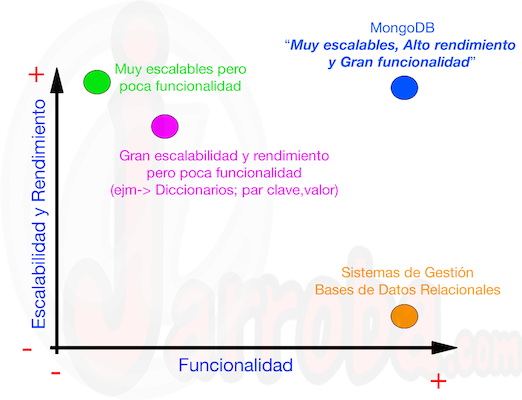
First, let’s look at what MongoDB offers (according to MongoDB University) compared to the other database systems out there today. MongoDB University usually starts its courses with a chart (Functionality vs. Scalability and Performance) where database systems are placed according to those characteristics. At first, without knowing anything about databases, you might think that if a database system has great scalability and performance, it must have low functionality, and vice versa. That’s true of the database systems that exist: databases that store "key-value" pairs (dictionaries) have high scalability and performance but little functionality, unlike relational database management systems, which have low performance and scalability but are very functional. As you can guess, "MongoDB" is going to be the "galáctico" of database systems, offering great functionality along with great scalability and performance. This is how the MongoDB folks "sell" us their document-oriented database system, taking the best of each existing database system, with a chart like this:
Now that we’ve seen MongoDB’s characteristics compared to other database systems, let’s go through an example. Before we start, we want to make it very clear that at no point are we going to say that MongoDB is much better than any other database system. You see many blogs and websites (MongoDB "fanatics") saying that MongoDB is the best "in the whole wide world", and that is a big lie, because depending on the characteristics of each software system, you should choose the database system that best fits the project given its characteristics, whether that’s MongoDB or relational databases.
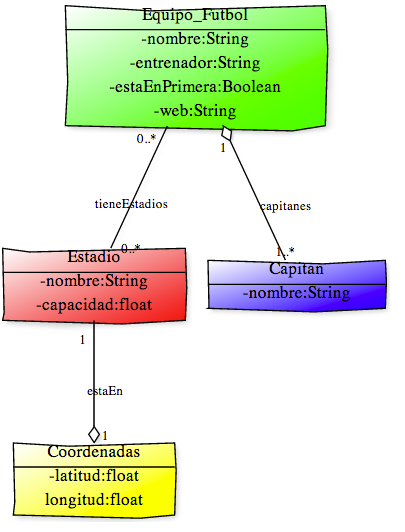
In this example we are going to see what an application, or a data management system, for "football clubs" would look like built with MongoDB and built with relational databases, to see the differences. Let’s suppose our application needs to work with certain data about football teams: the name of the club, who its coach is, who the team captain or captains are, whether the team is in the first division or not, the club’s website, and data about the stadium where the club plays: its name, capacity and geographic coordinates. There are always some constraints on the data, for example that a club may have no stadium or more than one; that it may not have a website; or that the club may have several captains. Knowing the characteristics our application will have, we can capture the classes our system needs in a class diagram (to understand this, it helps to know a bit about design and OOP):
If we had to store the data our application needs in a relational database (MySQL, for example), we would have the following tables to hold this data, shown in the following "Entity-Relationship" diagram:
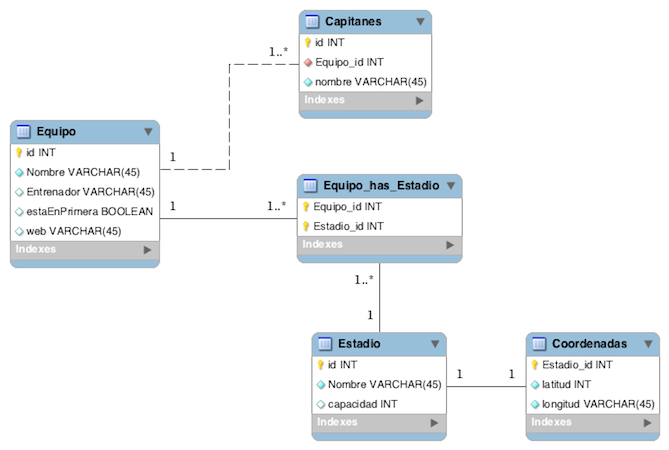
NOTE: I’m not going to judge whether this "Entity-Relationship" diagram could have been done better or normalized to "Boyce-Codd Normal Form", it’s just an example ;).
With these tables in the database shown in the "Entity-Relationship" diagram, I ask you: how would you write a query to get all the data of a club in order to display it on screen? It’s true that SQL experts will be laughing at the question I’ve asked, because it won’t seem complicated to them, but many others (myself included) would take a while to come up with the query that gets the data needed to display something like the following "document" (e.g., Atlético de Madrid):
"club" : "Club Atletico de Madrid"
"entrenador" : "El Cholo"
"capitan" : "Gabi"
"estaEnPrimera" : SI
"estadio" :
	"nombreEstadio" : "Vicente Calderon"
	"capacidad" : 54851
	"coordenadas" ->	"latitud" : 40.4015213,		"longitud" : -3.7214151000000584
"webClub" : "http://www.clubatleticodemadrid.com/"
What I really wanted with this example was to show you a "trick" example so you can see how MongoDB stores data. As I said at the beginning of this post, MongoDB is document-oriented and it stores data in documents in JSON format. Well, actually the machines store documents in BSON (Binary JSON) format, but for now we’ll consider that it stores documents in JSON format, which is the format you see when you run queries. So if we wanted to get all the data for Atlético de Madrid from the database, we would run the following query (we’ll explain how queries work later, this is just an example):
db.equiposFutbol.find({"club":"Club Atletico de Madrid"})The result of this query is a JSON document with the following content:
{
	"_id" : ObjectId("525ee424ecc5dd1123ccbd1f"),
	"club" : "Club Atletico de Madrid",
	"entrenador" : "El Cholo",
	"capitan" : "Gabi",
	"estaEnPrimera" : true,
	"estadio" : {
		"nombreEstadio" : "Vicente Calderon",
		"capacidad" : 54851,
		"coordenadas" : {
			"latitud" : 40.4015213,
			"longitud" : -3.7214151000000584
		}
	},
	"webClub" : "http://www.clubatleticodemadrid.com/"
}
Of course, in any kind of application, JSON documents have to be parsed to show them to the user in a friendlier way, although it’s true that a document in this format is fairly easy to understand. It’s also true that most programming languages (if not all of them) have libraries or APIs that parse this kind of document quickly and conveniently for the developer. So, from the start we can see that MongoDB serves the data after a query in a very "understandable" and lightweight format: JSON.
Next, we’re going to show another of the "advantages" that, in my opinion, MongoDB has over relational databases. Before revealing it, I’ll show part of the result of a query I’ll run against the database:
{
	"_id" : ObjectId("525ee1d4ecc5dd1123ccbd1d"),
	"capitan" : [
		"Puyol",
		"Xavi"
	],
	"club" : "FC Barcelona",
	"entrenador" : "Tata Martino",
	"estaEnPrimera" : true,
	"estadio" : {
		"nombreEstadio" : "Camp Nou",
		"capacidad" : 99354,
		"coordenadas" : {
			"latitud" : 41.3809029,
			"longitud" : 2.1227777999999944
		}
	},
	"webClub" : "http://www.fcbarcelona.es/"
}
{
	"_id" : ObjectId("525ee424ecc5dd1123ccbd1f"),
	"club" : "Club Atletico de Madrid",
	"entrenador" : "El Cholo",
	"capitan" : "Gabi",
	"estaEnPrimera" : true,
	"estadio" : {
		"nombreEstadio" : "Vicente Calderon",
		"capacidad" : 54851,
		"coordenadas" : {
			"latitud" : 40.4015213,
			"longitud" : -3.7214151000000584
		}
	},
	"webClub" : "http://www.clubatleticodemadrid.com/"
}
{
	"_id" : ObjectId("525ee4caecc5dd1123ccbd20"),
	"club" : "Sporting de Gijon",
	"estaEnPrimera" : false,
	"estadio" : {
		"nombreEstadio" : "El Molinon",
		"capacidad" : 30000
	},
	"webClub" : "http://www.realsporting.com/"
}
After seeing the document MongoDB gives me after running a query, I ask you: do you see anything odd in the structure of the document?… If you spend a minute on it, you’ll see that the Atlético de Madrid and Barça documents have the same attributes (though not in the same order), while the Sporting de Gijón document is missing some attributes. This isn’t really an advantage in itself, but it is true that if you don’t have a piece of data, in MongoDB you don’t need to set that attribute to "null"; the attribute simply doesn’t exist and isn’t included. On the other hand, you can also add new attributes to documents without having to modify the database structure at all, unlike relational databases, where you’d have to modify the table structures or add new tables. In my opinion, this last point is a real advantage during development, because how many times has it happened that after 2 or 3 months of work on a project the client comes to you and asks you to add a new requirement, such as: "Now we need to store the personal data of the football players of each club"? Then you’d have to add a new table and new relationships between them, whereas in MongoDB you’d only have to add a new collection or new attributes to the MongoDB document.
Finally, to wrap up this first post, I want to explain why I said at the beginning that MongoDB is very scalable and very functional. It’s true that MongoDB is scalable "to infinity", or at least until it fills all the storage space of the machines where the database is stored, since MongoDB stores data in BSON format and displays it in JSON format. As I say, MongoDB is scalable up to the maximum capacity of our machines, whether that’s 1 GB or 100,000 GB. On the other hand, MongoDB is very functional. We’re not going to explain in this course how MongoDB works "under the hood", but briefly, it has a cluster structure that makes MongoDB very functional and gives it very good performance. In this course we’ll simply show how to work with the data stored in a MongoDB database.
To sum up: in this first post of the course we wanted to explain how MongoDB stores data (in JSON format and not in BSON format) and some of its advantages. We wanted to compare, with an example that could be real, how the data would be stored in a relational database and in MongoDB, looking at its advantages. It’s true that we chose this example to "sell" MongoDB’s advantages, but it’s also true that if we had come up with an application for a very different system, with many relationships between its entities, it would have been better to choose relational databases over MongoDB. As we said at the start, the goal of this course is not to belittle other database systems, but to show how MongoDB works.
Below you’ll find a video explaining everything covered in this post:
“MongoDB Course – Part I (Video) – “Introduction”” by Ricardo Moya at jarroba.com, licensed under Creative Commons Attribution-NonCommercial-ShareAlike 3.0. Registered at Safe Creative.

You may also like


MySQL Database Course – Part I – (Video)
Learn how to install MySQL Server and MySQL Workbench, set the root password, and get ready to work with relational databases in this video tutorial.
MySQL Database Course – Part II (Video) – Entity-Relationship
In this second part of the database course, you'll learn how to create tables with MySQL Workbench and how to relate them (1:1, 1:N, N:M).
Java MongoDB Driver, with Examples (Video)
In this post we build a simple example of how to use the Java driver to work with MongoDB: connecting to the server and running basic CRUD operations.
Python MongoDB Driver (pymongo) with Examples (Video)
Learn how to use the Python driver (pymongo) for MongoDB with a hands-on example: connecting to the server and building a simple CRUD.