
Python vs NumPy vs GPU (TensorFlow): Execution Times
Want to know how much faster a GPU is than a CPU for training neural networks? We measure execution times for Python, NumPy and TensorFlow on a GPU.
You can download the Notebook with the code for this article by clicking HERE.
Everyone who works in the world of Deep Learning uses devices called GPUs (Graphics Processing Unit) to train neural networks much faster than they could be trained on a CPU (Central Processing Unit).
In this article we won’t talk about neural networks, but we will mention that they are defined by a set of parameters (a parameter is just a decimal number) that have to be calculated (tuned) so that the neural network solves its task with the smallest possible error. Calculating these parameters (simplifying a lot) is done with simple operations, such as additions and multiplications. The problem is that a neural network can have anywhere from hundreds to billions of parameters, and that is where the problem lies: the huge number of calculations needed to train a neural network.
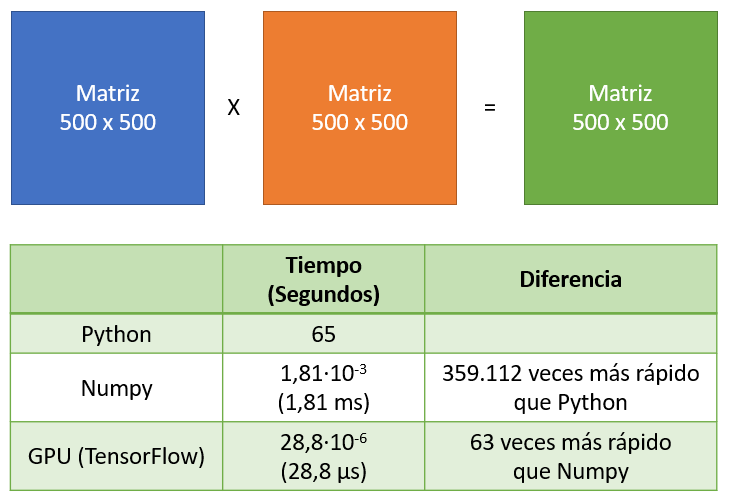
Let’s do the exercise of multiplying 2 matrices, which in the end is solved with additions and multiplications: just like neural networks!!
Computationally, this operation has cubic complexity O(n3) because computing the resulting matrix takes 3 <<for>> loops. If we program this in Python, the code looks like this:
import numpy as np

# Matrix size SIZExSIZE
SIZE = 500
a = np.random.rand(SIZE, SIZE)
b = np.random.rand(SIZE, SIZE)

result = np.zeros((SIZE, SIZE))
for i in range(SIZE):
    for j in range(SIZE):
        for k in range(SIZE):
            result[i,j] += a[i,k] * b[k,j]
If we multiply 2 matrices of 500 x 500, we have to perform 125 million “multiply-add” operations, and Python takes a while to compute it (on my computer, 65 seconds):
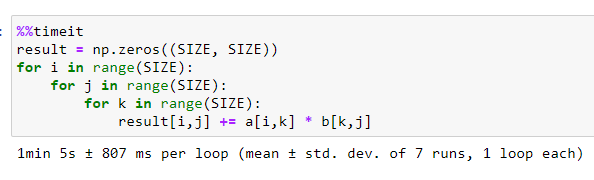
If we use the NumPy library to do the same operation, it takes considerably less time; on my computer, it took 1.81 ms, or 1.81·10-3 seconds. That is 359,112 times faster than Python:

Both Python and NumPy use the CPU to do the “multiply-add” calculations. But what would happen if we used a GPU to multiply matrices?
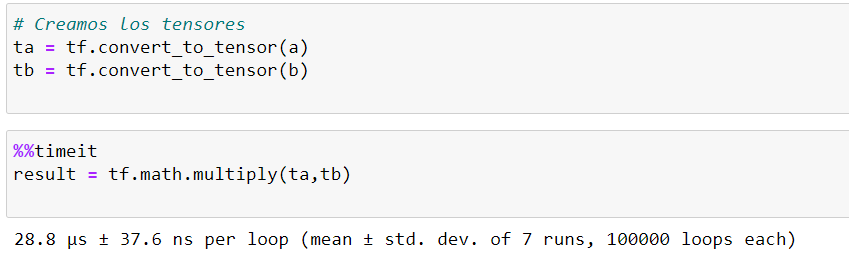
For this test we’ll use the TensorFlow library with the GPU properly set up on the PC: Nvidia drivers + CUDA + CUDNN (we’ll leave that setup for another tutorial, since it’s a real headache). We define 2 tensors (matrices) and perform the multiplication. This test took 28.8 µs, or 28.8·10-6 seconds. That is 63 times faster than NumPy and 2.25 million times faster than Python:
We can summarize the test in the following image:
So why is there such a big difference in computation times? To understand it, we need to know the differences between a CPU and a GPU.
Note
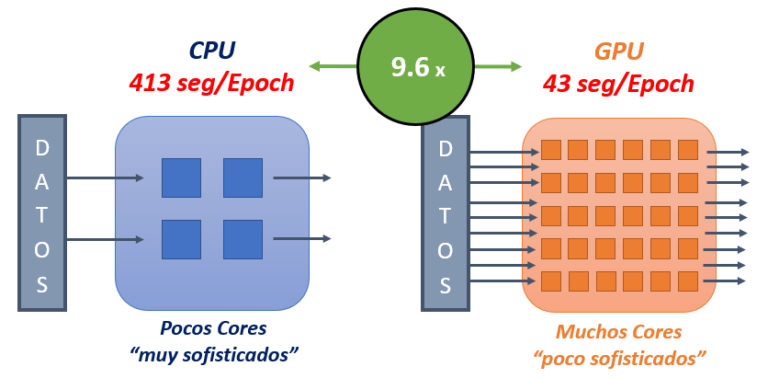
To really understand the differences between CPUs and GPUs and their performance, we would need fairly advanced knowledge of computer architecture and operating systems, subjects that take up a huge number of hours in Computer Science degrees. Since the goal of this tutorial is to understand the concept (not the details), things will be explained in an unorthodox way and with perhaps inaccurate wording, but focused on understanding the differences.CPUs are “high-performance” processing units that can run very complex operations (instructions) very quickly. Imagine a very expensive scientific calculator; we could say that a CPU has a few very powerful, expensive scientific calculators inside, called Cores. A personal computer can have between 2 and 16 Cores, although you can find processors with more.
GPUs (which were born for video games and graphics processing) contain “low-performance” processing units; but unlike CPUs, GPUs have hundreds or thousands of these “low-performance” units that solve very simple operations (like additions and multiplications) and do so more slowly. Imagine the “cheapest, crummiest calculator” you can find in a store; the GPU would have hundreds or thousands of those “crummy calculators” inside.
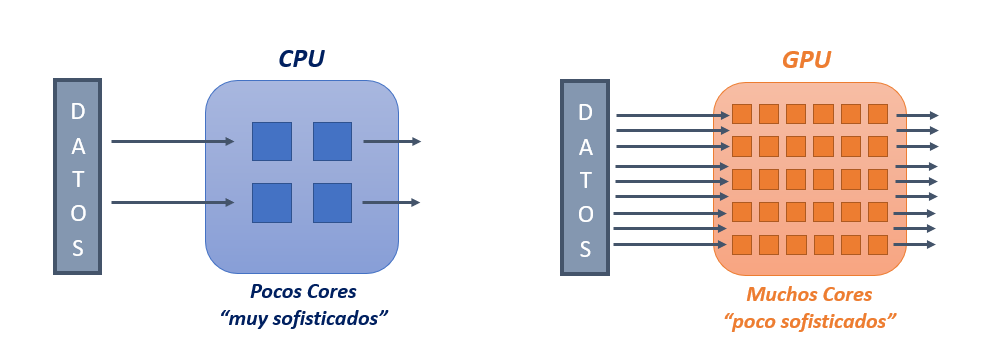
With the “characteristics” of the CPU and GPU explained, you can already guess why the execution times differ between Python, NumPy and GPU (with TensorFlow):
- Python uses the CPU to do the calculations; and since we implemented the matrix multiplication ourselves (a poorly optimized implementation), it sends the multiply-add operations one by one, as we wrote them in the innermost <<for>> loop, to a single CPU Core. For the example of multiplying two 500 by 500 matrices, it has to do 125 million multiply-add operations, so it makes sense that it takes a long time to process.
- NumPy is a Python library specialized in numerical computing, and its implementation is optimized to make the most of the CPU’s resources. As we said, CPUs have a few “high-performance” Cores (between 2 and 16), and NumPy uses all the CPU Cores to perform the operations needed for matrix multiplication; in other words, NumPy takes advantage of the “parallelism” (Multitasking) that the CPU offers, using each Core independently to perform the operations. This is why (besides having more optimized code) NumPy takes much less time than Python to get the result.
- GPU (TensorFlow) uses the “parallelism” that comes from having hundreds of “low-performance” Cores. Even though a GPU Core takes longer to run an operation than a CPU Core, running hundreds of “slow” operations at once is faster than running between 2 and 16 “fast” operations at once. This explains why the GPU (TensorFlow) takes much less time to get the result than NumPy and, obviously, than Python.
BONUS TRACK
When using TensorFlow with a GPU, it’s a good idea to limit the GPU memory usage (so your training runs don’t “crash”), and it’s also worth making sure you’re actually using the GPU (and not the CPU). The following code snippet shows how to limit the memory and how to enable the GPU, printing the GPU information and the CUDA and CUDNN versions:
import tensorflow

from tensorflow.python.client import device_lib

# Limit the GPU memory
config = tensorflow.compat.v1.ConfigProto(allow_soft_placement=True)
config.gpu_options.per_process_gpu_memory_fraction = 0.6
tensorflow.compat.v1.keras.backend.set_session(tensorflow.compat.v1.Session(config=config))

# Allow memory growth
physical_devices = tensorflow.config.list_physical_devices('GPU')
try:
    tensorflow.config.experimental.set_memory_growth(physical_devices[0], True)
except:
    print('Invalid device or cannot modify virtual devices once initialized.')

print('#### INFORMACIÓN ####')
print('  Versión de TensorFlow: {}'.format(tensorflow.__version__))
print('  GPU: {}'.format([x.physical_device_desc for x in device_lib.list_local_devices() if x.device_type == 'GPU']))
print('  Versión Cuda  -> {}'.format(tensorflow.sysconfig.get_build_info()['cuda_version']))
print('  Versión Cudnn -> {}\n'.format(tensorflow.sysconfig.get_build_info()['cudnn_version']))
“Python vs NumPy vs GPU (TensorFlow): Execution Times” by Ricardo Moya at jarroba.com, licensed under Creative Commons Attribution-NonCommercial-ShareAlike 3.0. Registered at Safe Creative.

You may also like
CPU vs GPU in Deep Learning: How Big Is the Difference in Training Time?
Do you know how much faster a Deep Learning model trains on a GPU than on a CPU? In this article we measure the training time difference and show you.

Advanced Dockerfile: Multi-Stage Builds, Registries, and Tricks
Free Docker course. Expert Docker tricks: multi-stage builds, optimizing images, faster build times, and distributing images through Docker registries.
Leave a comment