
Multitasking and Threads: Easy, With Lots of Benefits
Learn what multitasking and threads are, how concurrency and parallelism differ, and why cores matter, explained with simple comic-style examples.
The description you are about to read, despite its simple and illustrative nature, is packed with information. The author considers that what is written below may not be understandable to someone who doesn’t yet have a firm grasp of object orientation (I recommend reading this other tutorial first). And without further ado…
There is a law in computing called Wirth’s law that says (taken from Ley de Wirth (Wikipedia)):
“Software is getting slower more rapidly than hardware becomes faster”
And I’m sorry to say, I have to agree, because application developers, in most cases, don’t know how to use the power of the hardware and don’t optimize. This article will try to fix a big part of that.
Doing several things at the same time: what a great gift, and what a mess, right? No, you just have to understand what it is based on and how it is programmed.
A gift? You may also be asking yourself: what do we want multitasking for? A quick answer would be: so the user doesn’t get angry with us for waiting too long at moments when it isn’t necessary (I’m sure you remember some “Loading…” screen. Was it really necessary?). Note that we are referring to how pointless it is, most of the time, to block the user, not to the execution going on underneath that loading screen.
Another annoying effect, and you’ll agree with me, is when the user presses a button and the application freezes, not because of an error, but because underneath a bunch of code is running that needs processing time to finish (yes, don’t laugh as you remember some “for” or “while” loop that took longer than it should to finish and you could tell; we’ve all done it 😉 ). All of this is solved with multitasking. All of it? Yes, but you may first need to think a bit to arrive at the solution with it. With multitasking the user is never blocked, and can keep using the application while something very heavy runs underneath; most loading screens disappear or at least won’t interrupt the user’s experience of the application; and it runs more efficiently, so the processor isn’t constantly waiting or hit by bottlenecks from a pile of things arriving at once. Of course, if it’s done right.
It is very important to understand well how multitasking is controlled, because it is the only way we have to break down an application’s code so that it runs in less time or doesn’t block the user.
The concept of Threads helps us. A thread is a piece of our program’s code that can run at the same time as another. What can run simultaneously with something else? Let’s take the following example: imagine we want to see a list of 100 images that are downloaded from the Internet. As a user, which of the following two options would you choose?:
A) Download all 100 images, making the user wait with a “loading” screen until they have all been downloaded. Then they can see the list with the images.
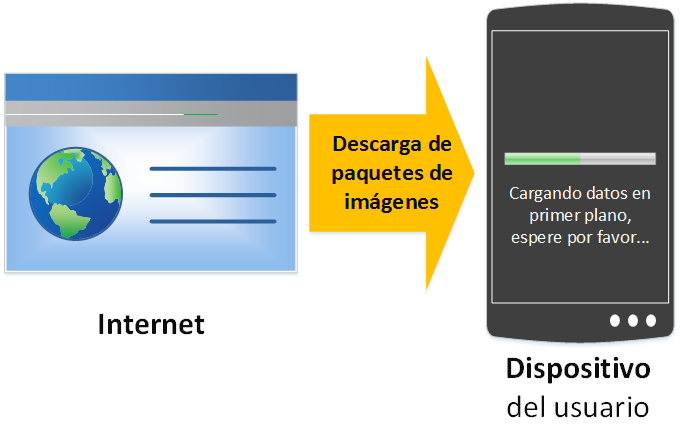
B) While the 100 images are being downloaded, the user can already see and use the ones that have been downloaded so far.
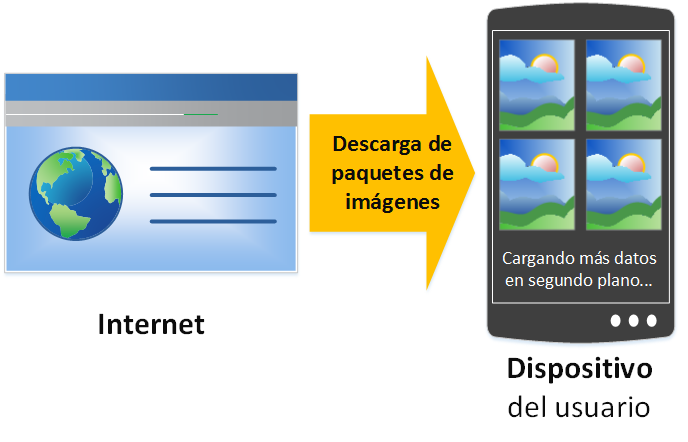
As a developer, option A is simpler. Is it, though? But I didn’t ask you as a developer, I asked what a user would prefer. B is what every user wants from an application; having to wait is not an option. Going back to the developer’s point of view, it isn’t an option either. A good application developer does things right and goes for option B (option A doesn’t exist, option A leads us straight into the “Wirth’s law” described above). We want to be professionals, and option B fills us with joy.
From the user’s point of view there are two clearly different areas that the developer has to keep in mind:
- Foreground: Only one thread runs here, called the “main thread”. This is where we have always programmed, without knowing we were already working with threads. It is the thread that works with the views, that is, the graphical interface the user sees: buttons, pop-up windows, editable fields, etc. It can also be used to do calculations or other complex processing, although you should avoid doing that in this thread at all costs, unless it’s impossible to do it in another thread. It’s worth pointing out that the foreground affects how happy the user is with our application. This is where the user interacts directly, and everything that happens here is seen and felt. The developer has to be especially careful when working with the main thread, because the user will judge it: if the application is slow, it’s because the foreground is slow, and the user doesn’t like that at all. It’s also important to know that poor foreground management by the developer will be punished by the operating system (for example: in Android, if an application’s main thread is blocked for more than 5 seconds, the application will be closed and a force close dialog will be shown; and I’m sure you remember similar behavior in other operating systems when they tell you “the application is not responding, do you want to end it?”).
- Background: All the rest of the threads run here. The background happens at the same moment as the foreground. Here the threads should carry the heavy executions of the application. The user doesn’t see the background, in fact doesn’t even care about it; for the user it doesn’t exist. So, as you will understand, the developer can move freely in this background, within certain limits. Here the developer can let loose and make, for example, a method take hours to run, since the user won’t even feel it (although if they are waiting for it they will notice, so a bit of care here too).
The main point is clear: we must never interrupt the user. So we must not do resource-hungry things in the main thread, the thread that runs in the foreground. In fact, once you understand 100% how threads work, almost all of our program should run in well-separated threads, and the smaller the better.
Before continuing, let’s note something that tends to raise doubts: let’s not confuse the term process with thread. A process is the program or application in execution (let me expand a bit so the differences are clear. What we call an application is the executable file stored in memory. Several processes can run several instances of the same program, as when you open several Notepad or Word windows). So, it follows, and it’s true, that a process contains one thread (at least the main thread that runs in the foreground) or several threads (the main one plus some in the background).
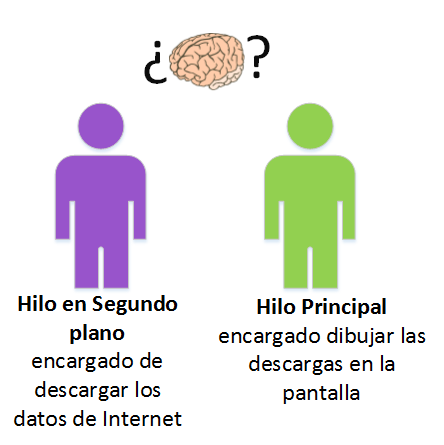
So we don’t get tangled up with threads (a weak joke, I know), let’s look at an example in comic form. Let’s go back to the previous example: a list of images downloaded from the Internet. To make it easier and more understandable, we’ll illustrate it with people. A person is a thread, like this one:

This honorable worker (our thread) does his job the best way he knows how, but he has too many responsibilities. What he was hired for is to carry packages from a factory to a store window. Also, this worker/thread is the main thread of the application.
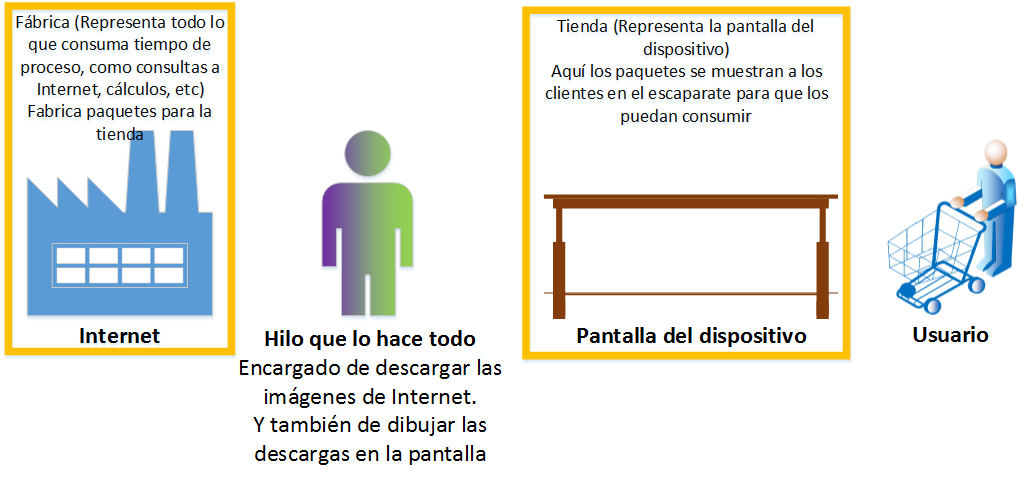
Let’s comfortably go through the steps, in comic form, of this worker/thread’s whole process, with their corresponding equivalents in the life of a program. A quick aside before continuing: the worker has a brain. You already knew that, right? Whether you did or not doesn’t matter, because for now you’re not going to pay any attention to the brain in the following images; the meaning of the brain will be revealed later. For now I’m happy if you believe he has a brain and ignore it 😀 . Here comes the example; the strange words in the title will also be explained later. It’s important to first understand how threads work, and then the meaning of the strange words will come by itself. The full cycle of what this worker/thread does is:
Example without concurrency or parallelism, that is, without multitasking
1) First he looks for all the data packages with the “images” in a factory called “Internet”.
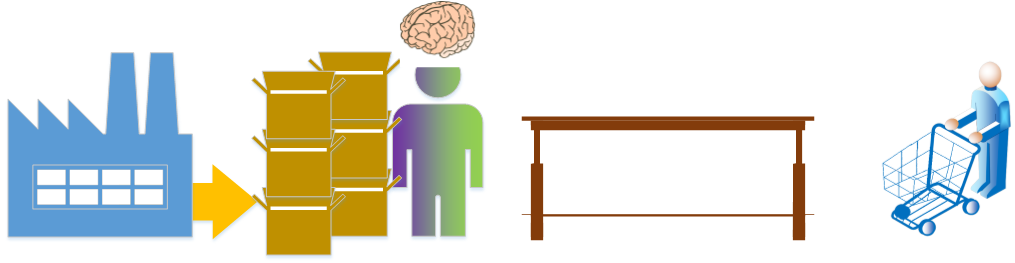
2) He carries all these packages by truck and unloads them at a store called “user’s device”.
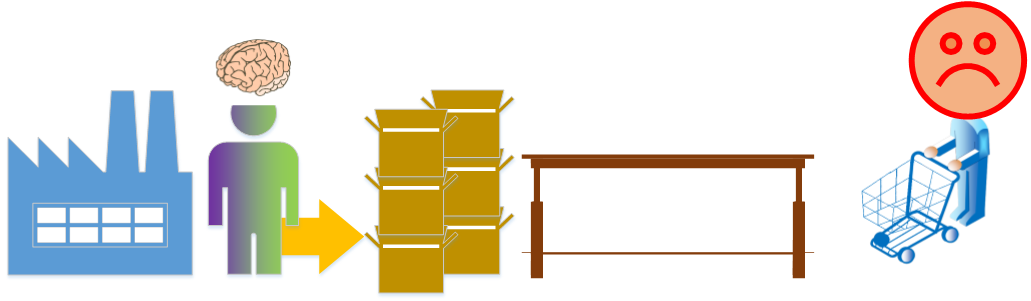
3) Then he has to place each and every package he has transported in the store window, which, to be clear, we can also call the “device screen”.

4) All this is done so that the customer or “user” can consume them. But only at this moment is the user allowed to consume them (it’s the moment when there is something to consume; before there was nothing), so the rest of the time he was waiting.

A sad emoticon, verging on very angry? Yes, the user has been angry with our application for quite a while. He has had to wait too long, and when it wasn’t even necessary. An unhappy user will translate into fewer stars for our application, bad reviews, or other ways of expressing a negative opinion about our program.
I’m sure you noticed the two colors on our worker/thread, who is entirely a main thread. He has two colors to represent the heavy workload this thread has. We’ll have to investigate whether we can turn him into two different threads. Will it be necessary to hire a second worker/thread? I hope you answer yes, since this can be done in two different threads: one main thread in charge of drawing on the screen, and another in the background in charge of downloading the data from the Internet.
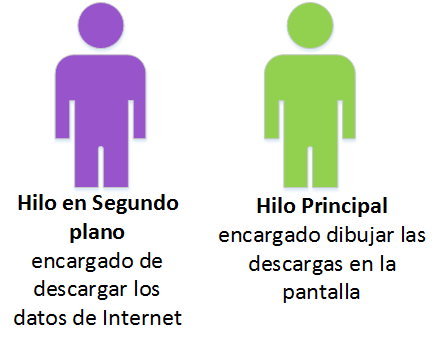
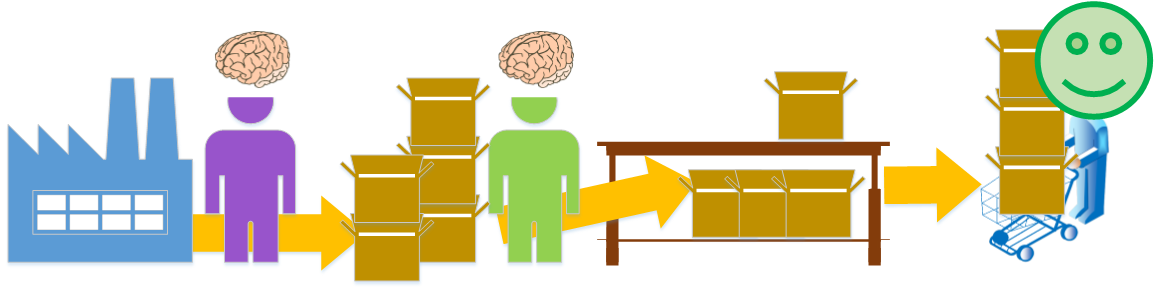
With two workers/threads it’s logical to think that everything will go better and faster (that’s why we hired more hands!). We’ll have a main worker/thread whose dedication is exclusively to the user. And another worker/thread in the background, who is dedicated to downloading the data packages, whose work the user doesn’t feel and who will never know he’s there working for him. Once again I’ll note that for now you shouldn’t pay attention to the brain in the image; there isn’t long to go before we talk about this processing organ (it’s a hint of what it will be about, but we don’t need to worry about it now, only a bit later). So the way these workers/threads will process is as follows:
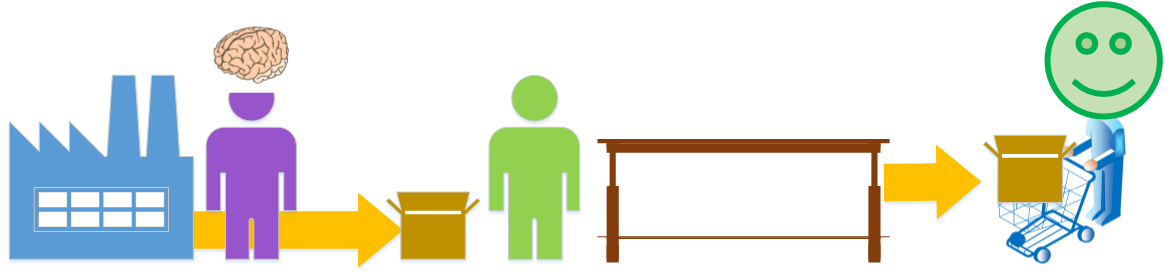
Example of concurrency and parallelism, multitasking in all its glory
1) To begin with, the background worker/thread takes a data package from the factory we call “Internet”, carries it by truck and unloads it at the store. There the main worker/thread is waiting for a package to arrive so he can do his job.
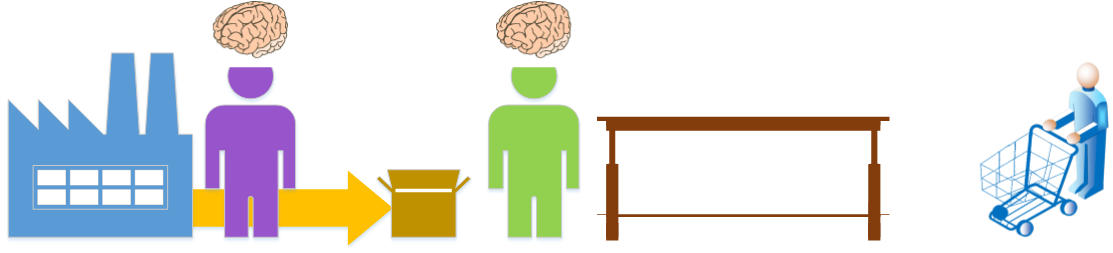
2) The main worker/thread now has something to do. He takes the package that has arrived and places it in the store window (which we have coincidentally called the “device screen”). Meanwhile, the background worker/thread hasn’t finished his job, so he keeps carrying packages to the store from the factory. Note that, no sooner said than done, the customer/user already has at least one package to consume in the store.

3) The process continues. The background worker/thread brings packages to the store so that the foreground worker/thread places them in the window. So, the customer/user can consume as much as he wants of what is already in the window.
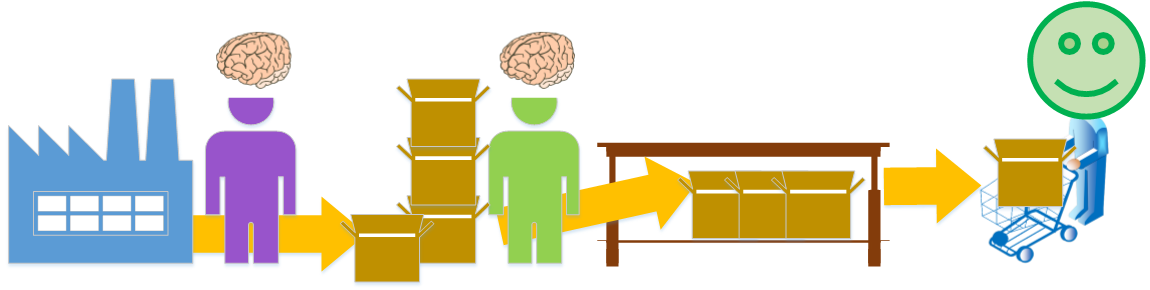
4) This will last until some finishing or interruption condition of one of the workers/threads is met, and there can be many (for example: turning off the device, running out of packages to download, etc.).
With threads the real magic appears: concurrency. Concurrency? And with it, parallel programming becomes possible. Parallel? Here we go with the strange terms of multitasking in all its glory. Don’t worry about the odd words, you don’t need to memorize them, but in the end you’ll end up knowing them through repetition and sheer logic.
Do you remember the first example with the factory and the store (recall the “Example without concurrency or parallelism, that is, without multitasking”), in which there was only one main thread doing everything? In that example, everything is done in a time X that is estimated to be long. We can represent it with the following time bar, from the start of the thread’s execution to its end:

Compare that with this second example, in which we already have two threads, one main and one secondary, working simultaneously. It can be deduced that the time the whole process takes is considerably shorter, since the times of both threads overlap. In the following representation we see how the main thread runs “in parallel” with the background thread, and that it is shorter than the previous time bar:

This brings us to the definition of parallel: two or more threads that run simultaneously.
But do all the threads that can run in parallel all run at once? Not always. It depends on one more limiting factor to keep in mind, which, although the application developer doesn’t control it, always exists. In fact, the application developer doesn’t care much about it, but knowing it explains a lot and is very useful for understanding quite a bit, so at Jarroba.com we’ll help you understand it.
Let’s flood ourselves with a piece of knowledge we’ve surely heard dozens of times, what do I say dozens, thousands of times: the cores of a processor. Oh yes, how many times have they sold us a computer or phone by the cores of its processor, convincing us it would be faster, decorated with the word “multitasking”. What a disappointment! Most applications don’t take advantage of them because application developers haven’t taken them into account and haven’t known how to use the technology. But you, attentive reader, will know how to use the latest and greatest technology in your future developments.
Well, knowing that a processor is in charge of running programs. And that a processor can have anywhere from one core to many.
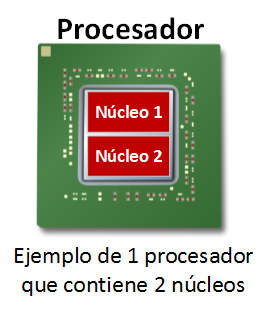
The cores serve to process several threads simultaneously (here is our friend the thread again). That is, each core runs one thread at a time. So if we have a processor with two cores, we can run two threads at once. If we have one with four cores, it can run a maximum of four threads simultaneously. And so on with however many cores we have.
To continue with our example, with the workers being threads, the core would be the brain of each worker/thread. A worker/thread will always have a specific mission to carry out, but without a brain/core he can’t do anything. And here we get right into the processing organ in our head, which we equate to the core of a processor; not to the processor, which can have several cores and therefore several brains.
So, if we review the first example of the factory and the store with a single worker/thread and one brain/core (now we do pay attention to the brains in the images), that is more than enough to run everything correctly. A processor with one core would be plenty, since he wouldn’t make use of more cores.
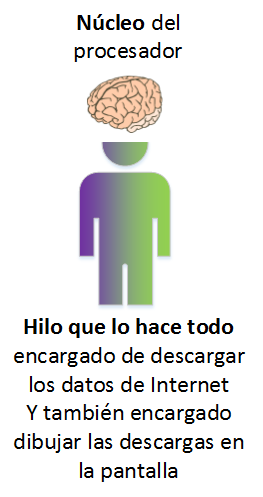
So a brain/core will process the work as fast as it can over time (this speed is measured by the clock speed of a processor core, that is, in Hertz; when we hear that it has, for example, 3.4GHz, this is the speed at which each core of the processor processes the data that reaches it). I’ll draw its time graph again with a brain/core next to it, to represent the time it takes to process everything.

The second example is more complex. We are assuming we have two cores. If we go over it again, paying attention to the brains/cores, we can conclude that there are two cores, one for each thread that runs.
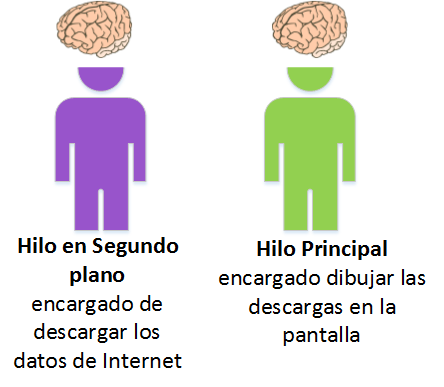
So, with two brains/cores we can work in parallel as we said earlier.

But something else can also happen with the second example. What would happen if we have a processor with a single core? Which thread would run? One first and the other after? Will the application throw an error? What will it do?
Obviously there aren’t enough brains/cores for so many workers/threads. At some point one of them won’t have a brain/core and will have to stay brain-dead (completely stopped) while the other one with the brain/core does his work. The reasonable and fair thing is for them to share the brain/core for a while each so both can work.
And that’s how it’s done. The processor is in charge of deciding how long each thread will use the only core there is. In other words, the processor will cut the threads into very small chunks and interleave them on a timeline. Since the two threads are processed in an interleaved way, and thanks to the great speed at which processors handle data today, it will give the feeling of parallelism, but it is not parallelism. If we look at the following timeline, its length is as long as if we did everything in one thread.

It isn’t parallel, but it is concurrent. The definition of concurrency: two or more components that are independent of each other (for example, threads with separate functionality) help each other to solve a common problem (in these examples, the threads work together to show the user some packages downloaded from the Internet). It is recommended that concurrent things run in parallel to get the most out of concurrency, but as we see it isn’t mandatory. If we look back and review the first example with a single thread (review “Example without concurrency or parallelism, that is, without multitasking”), we will see that neither concurrency nor parallelism exists. And in the second example, with two threads and two cores (review “Example of concurrency and parallelism, multitasking in all its glory”), both concurrency and parallelism occur.
I’m sure you’re wondering: if the processor doesn’t have several cores, then is there no advantage to having developed the application with threads? But there is. If we run everything in the main thread, the user will always be blocked. But if we run it with threads, even if we only have one core, there will be some moment when the user has something to act on, and the processor will take care of giving the user priority so as not to block him.
Let’s look at the following example in comic format of the workers with a single brain/core that they have to share:
Example of concurrency but NOT parallelism: it’s multitasking, though not the ideal kind
1) The processor decides that the background worker/thread starts out owning the brain/core, so it can download a data package. Meanwhile, the main worker/thread can’t do anything because he has no brain.

2) The processor has decided that the background worker/core has had it for long enough and passes the turn to the main worker/thread. While he can use the brain/core, he will place as many data packages as he can in the window. Meanwhile the background worker/thread has gone blank and can’t do anything because he has no brain/core.

3) The processor says: “Turn over”. It’s the secondary worker/thread’s turn again, and he does his work. The main worker/thread does nothing. And at least now the customer/user has some data.
4) This back-and-forth of brain turns repeats.

In this example you can see that it isn’t as fast as having two cores, but it isn’t as slow as working with a single thread that does everything either: in a short time the user already has something to do.
In this example the processor’s turn order has been simplified. In most cases, the processor doesn’t wait for the whole action to finish before offering the core’s turn to another thread. That is, the processor wouldn’t wait for the thread that downloads the data to download 100% of the entire package before handing the core to the other thread. Instead, it can take the core away from the secondary thread that is downloading at, for example, 23.567% of the download. And the same with the main thread: it could take the core away halfway through the action of placing the package in the window. Of course, when it gets the processor’s turn again, it will continue from where it left off. The only actions the processor can’t split are those statements called atomic operations: those that the processor can’t divide and that have to be executed completely.
We have talked about several threads in a single program, but not about running several programs simultaneously. So I’ll ask a simple question that I hope will clarify things. If we have two different programs whose developers didn’t use threads because they didn’t know what they were: a music player and a web browser, what do you think would happen if I want to listen to music while I browse the Internet, with everything running on a two-core processor? Think about it a bit, because the answer is that I would hear the music smoothly with no cuts, and I would also browse the Internet with no cuts. This is because each program (even though no threads were used in its development out of ignorance) has at least one main thread each. Therefore, the two programs, each of which is entirely one thread, can run without interruptions, each on a different core. As we have said, and as a summary: each program has at least one thread, which is the main one. If the applications had several threads and ran at the same time, nothing strange would happen either; the processor and the operating system take care of managing how long each thread uses the cores, and multitasking would occur.
As developers, how do we have to act? We have to act as if there were infinite cores at all times. But hasn’t technology come that far? Well, it will get close in the not too distant future. Just look at how processors have more and more cores, and each new one that hits the market has the number of cores raised to the power of two of the previous newest one (the first processors had 1 core, then came the 2-core ones, then the 4-core, 8, 16, and so on to infinity). We also have to act as if only our application were running; dividing the resources among the different applications is something the operating system takes care of.
In other words, it doesn’t matter how many cores the user’s device has; as developers we must program as if there were as many as we need, and as if only our application existed. After all, the number of cores and of other applications doesn’t affect us when programming with threads. Those who design and build the processor, the operating system, and so on take care of that. But we do have to care about the user, who knows or should know the characteristics of their device, so that they know at all times which applications run well and which ones they will uninstall because they run badly.
Note about the two previous paragraphs: it’s the utopian theory, which is nice and desirable to reach, but it isn’t real; I only include it to learn, and from it you have to realize the limitations, since it depends a lot on each system. The real limitations are varied, such as: it isn’t always faster to divide tasks into several threads (dividing a task into many threads seems like it’s always a good idea, but sharing messages between threads to get the result we want may take longer than the time gained by dividing the task into threads; that is, washing two dishes takes me less time doing it myself than the time it takes to explain to another person how to wash so that we can then each wash one dish at the same time; with the idea of dividing the task and taking less time, having to communicate with the other person has made it take longer to complete the task than doing it on my own), or we won’t be able to use all the resources as if nothing else existed (since the operating system will limit us, or other more important processes will, or we may not want to leave the machine without resources), or we may simply be fine with a couple of threads even if we have many more cores (if we create an application that plays music, one thread for a single song is enough, since it wouldn’t make much sense for several songs to play at once).
You can continue with more details about multitasking, with an explanation similar to this one:
Or practice with:
“Multitasking and Threads: Easy, With Lots of Benefits” by Ramón Invarato at jarroba.com, licensed under Creative Commons Attribution-NonCommercial-ShareAlike 3.0. Registered at Safe Creative.

You may also like


Multitasking and Threads in Java with Examples (Thread & Runnable)
Learn how multitasking works in Java with threads. Step-by-step examples using the Thread class and the Runnable interface, with a supermarket checkout demo.


Multitasking in Android
Learn how multitasking and threads work in Android: the main thread, background threads, event-driven programming and why you should never block the UI.
Leave a comment