CD (Continuous Delivery) — Part 2: Image Scan and Service Tests
📚 Series: CI/CD and AI: From Theory to Practice
This part covers container image vulnerability scanning and service tests that validate the service works correctly before deployments.
Parts of this block:
- Part 1 — Docker Packaging, SBOM, and remediation
- Part 2 — Image Scan and Service Tests ← you are here
- Part 3 — Deploy to Dev and Smoke Tests
- Part 4 — Deploy to Staging and Performance Smoke Tests
- Part 5 — LCA: Load, Stress, and Chaos Engineering
- Part 6 — Final validations, Manual Approval, and Deploy to Production
Image Scan
Used to detect vulnerabilities, misconfigurations, and secrets in the container image before it reaches executable environments. The scan extracts a package inventory (similar to a SBOM) and cross-references it with vulnerability databases (NVD, OSV, distribution repositories) to identify CVEs and configuration issues.
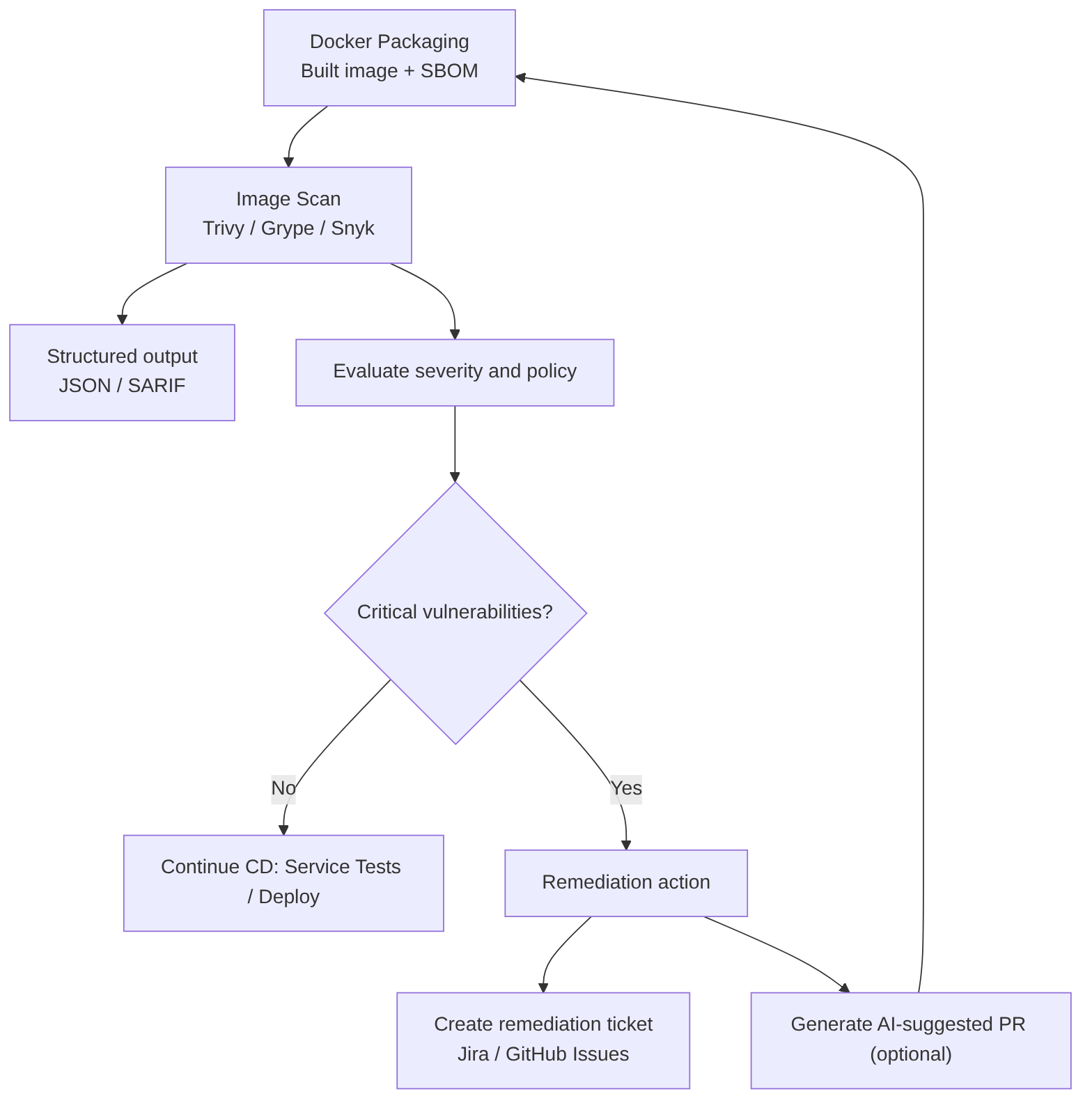
Steps included in this pipeline stage
- Obtain the image: use the freshly built image or download the image published to the registry.
- Run the scanner against the local image or the exported tar (Trivy, Grype, Snyk, Docker Scout).
- Configure thresholds and exit codes so the job fails if vulnerabilities of high/critical severity appear according to policy.
- Generate structured output (JSON, SARIF) for ingestion by other tools and for automatic ticket creation.
- Correlate with SBOM to reduce false positives and prioritize remediation (the SBOM allows knowing whether a package is actually in the image and in which layer).
- Act on results: continue pipeline, create remediation ticket, or block deployment according to severity and policy.
Best practices
- Always scan the final image that will be published; not just the base layers.
- Integrate scanning in CI so that every build/PR goes through the check before the merge.
- Use SBOM for correlation and prioritization; generate SBOM in the same build job to guarantee consistency.
- Define clear policies (which severities fail the pipeline, what gets created as a ticket).
- Periodically scan images in the registry, because CVE databases are updated continuously.
Advantages
- Early prevention: avoids vulnerable images from reaching production environments.
- Automation: CI/CD integration enables automatic blocking and traceability.
- Better prioritization with SBOM: reduces noise and speeds up response.
Disadvantages
- False positives if not correlated with SBOM or execution context.
- Time cost in pipelines if not optimized (caches, incremental scanning).
- Policy maintenance: defining appropriate thresholds requires governance and continuous adjustment.
Tools and command examples
Trivy:
trivy image --format json --output trivy.json --severity HIGH,CRITICAL myapp:latest
Grype:
grype myapp:latest -o json > grype.json
Scan from tar file (useful on runners without a daemon):
podman save -o /tmp/myapp.tar myapp:scan
trivy image --input /tmp/myapp.tar --severity HIGH,CRITICAL --exit-code 1
Generate SBOM with Syft (SARIF/JSON output for ingestion into dashboards or automatic issue creation):
syft myapp:latest -o cyclonedx-json > sbom.json
AI
Does not replace the technical scan: AI cannot execute the analysis or generate real SBOMs. It acts as a decision and automation assistant, not as a replacement for the scanner.
Does improve the process in several areas:
- Prioritize findings combining business context and real-world exploitability.
- Suggest remediations (safe versions, patches, Dockerfile changes) and generate automatic PRs.
- Reduce noise by identifying false positives and grouping related findings.
- Analyze trends and predict which images/packages are most likely to generate issues.
Service Tests (component tests)
The goal is to verify that the service works correctly under real or realistic conditions: validate endpoints, contracts, serialization, authentication, behavior against external dependencies, and error responses.
Service tests sit between integration tests and E2E (end-to-end) tests: they exercise the deployed service (or in an environment very close to real) against simulated or real dependencies to ensure that the service logic and its critical integrations behave as expected.
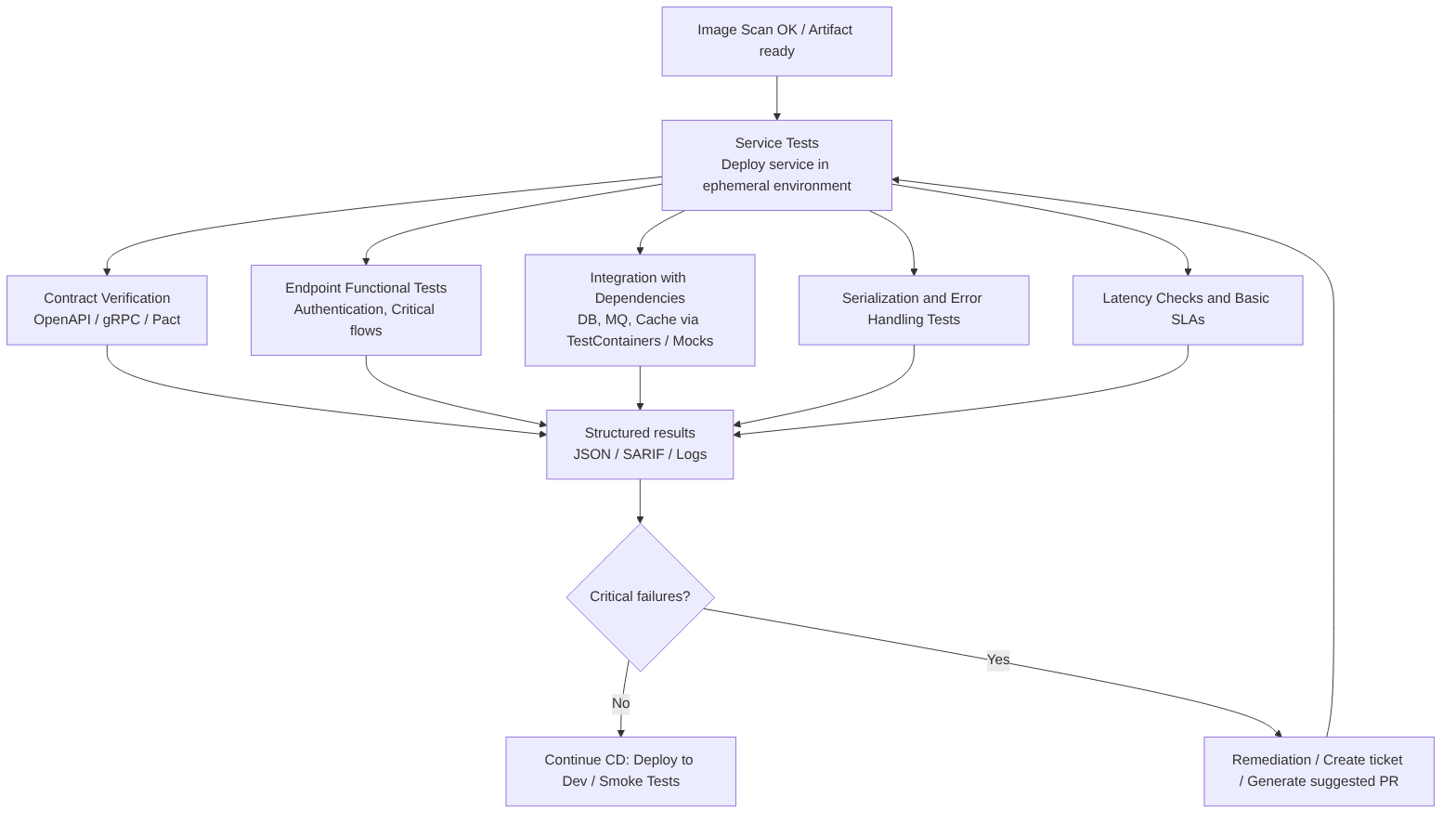
Steps in this stage
- Deploy the service in an ephemeral environment or use a Dev environment with the same runtime configuration as production.
- Contract validation: verify that the service fulfills its API contract (OpenAPI / gRPC) and that responses respect schemas and types.
- Endpoint functional tests: calls to critical routes (authentication, authorization, business flows) with real or synthetic data.
- Integration tests with dependencies: databases, queues, caches, external services; use test doubles (mocks/stubs) when necessary.
- Serialization and compatibility validation: verify JSON formats, headers, HTTP codes, and error handling.
- Latency and basic SLA measurement: check that critical endpoints meet acceptable latencies.
- Structured report generation (logs, JSON, SARIF) for traceability and to feed subsequent gates.
Best practices
- Validate contracts before full integration to detect breaking changes early.
- Use ephemeral environments that reproduce the production configuration (variables, secrets in safe mode).
- Separate fast and exhaustive tests: in PRs run a critical subset; in the target branch pipeline run the full suite.
- Isolate flakiness (tests that sometimes pass and sometimes fail): controlled retries, reasonable timeouts, and resource cleanup.
- Measure and record SLAs (latency, errors) and reproducible failures with traces and dumps.
- Integrate results with Quality Gates so critical failures block deployment.
- Automate contract verification between producers and consumers to avoid regressions in microservices.
Flakiness: unstable tests
A flaky test is one that exhibits inconsistent behavior: it sometimes passes and sometimes fails, without any changes having been made to the code or the environment.
It is one of the most frustrating problems in modern development because it erodes trust in the automation pipeline.
It is better to have a small suite that is 100% reliable than a huge suite where 5% of the tests fail randomly.
Why does it happen?
- Race Conditions: the result depends on the order in which threads or asynchronous processes execute.
- Network Issues: microservices or external APIs that take too long to respond or fail momentarily.
- Order Dependency: a test that only passes if it is executed after another one (because the previous one left data in the database).
- Lack of Isolation: tests that share resources such as files or memory and interfere with each other.
- Tight Timeouts: tests that fail on the CI server because it is slower than the developer’s local machine.
The impact on the pipeline
- Loss of Trust: developers start ignoring failures, assuming “it’s just that test again”, which allows real bugs to reach production.
- Wasted Time: valuable time is spent manually re-running builds to see if “it passes this time”.
- Bottlenecks: a pipeline blocked by a flaky test halts the deployment of critical features.
How to manage it?
- Test Quarantine: if a test is detected as flaky, it is moved to a separate group that does not block deployment until it is fixed.
- Automatic Retries: configure CI to immediately re-run a failed test. If it passes on the second or third attempt, it is marked as flaky.
- Detailed Logs: capture screenshots (in UI tests) or network logs at the exact moment of failure to identify the root cause.
- Data Isolation: ensure that each test creates and destroys its own data, avoiding shared state.
Advantages
- Early detection of integration failures before higher environments.
- Greater confidence in deployments because the service is tested under conditions close to production.
- Reduction of regressions between services when combined with contract testing.
Disadvantages
- Time and resource cost: spinning up environments and dependencies increases pipeline duration.
- Operational complexity: maintaining ephemeral environments, test data, and cleanup flows.
- Flakiness if external dependencies are not well simulated or if tests depend on volatile data.
Tools and practical examples
- Contract testing: Pact, Postman Contract Tests, or tools that validate OpenAPI/gRPC; used to ensure producer/consumer compatibility.
- HTTP test frameworks: JUnit + RestAssured (Java), pytest + requests (Python), SuperTest (Node.js).
- Ephemeral environments: TestContainers, Docker Compose to spin up real dependencies in CI.
- Dependency simulation: WireMock, MockServer, mountebank.
- Orchestration and execution: jobs in GitHub Actions / GitLab CI that deploy the image in an ephemeral namespace and run service test suites.
Example with TestContainers (Java):
// Pseudocode: spin up DB and run tests against the service
PostgresContainer postgres = new PostgresContainer("postgres:15");
postgres.start();
// start service with configuration pointing to postgres.getJdbcUrl()
// run integration/service tests
AI
Does not replace the real execution of tests or the deterministic verification of contracts. It acts as a productivity and prioritization assistant, not as a replacement for real testing.
Does improve the process in several areas:
- Test case generation: create tests that cover untested paths and edge cases.
- Automatic diagnosis: analyze test failures, group related errors, and propose the root cause.
- Mock and fixture suggestions: propose realistic test data and configurations for ephemeral environments.
- Remediation PR automation: generate changes in code or contracts when incompatibilities are detected.
- Intelligent prioritization: combine business impact with failure frequency to order remediations.
You can continue with: Part 3 — Deploy to Dev and Smoke Tests
