
CD (Continuous Delivery) — Part 3: Deploy to Dev and Smoke Tests
Deployment of the verified artifact to the development environment and quick validation with smoke tests to detect obvious failures.
Series: CI/CD and AI: From Theory to Practice part 8 of 11
- Introduction
- 1CI/CD: Introduction — What It Is, Why It Matters, and Who Does It
- 2CI/CD: Core Concepts — pipeline, job, stage, step, and gates
- 3CI/CD: Branching, Git Flow, and Pull Requests
- 4Pre-CI: General CI/CD Pipeline Architecture and Pre-checks
- 5CI (Continuous Integration): analysis, tests, quality, and security
- 6CD (Continuous Delivery) — Part 1: packaging, SBOM, and remediation
- 7CD (Continuous Delivery) — Part 2: Image Scan and Service Tests
- 8CD (Continuous Delivery) — Part 3: Deploy to Dev and Smoke Tests
- 9CD (Continuous Delivery) — Part 4: Deploy to Staging and Performance Smoke Tests
- 10CD (Continuous Delivery) — Part 5: LCA — Load, Stress, and Chaos Engineering
- 11CD (Continuous Delivery) — Part 6: Final validations, Manual Approval, and Deploy to Production
This part covers the first real deployment of the cycle: the deploy to the development environment and immediate validation via smoke tests to confirm the service is alive and working.
Deploy to Dev
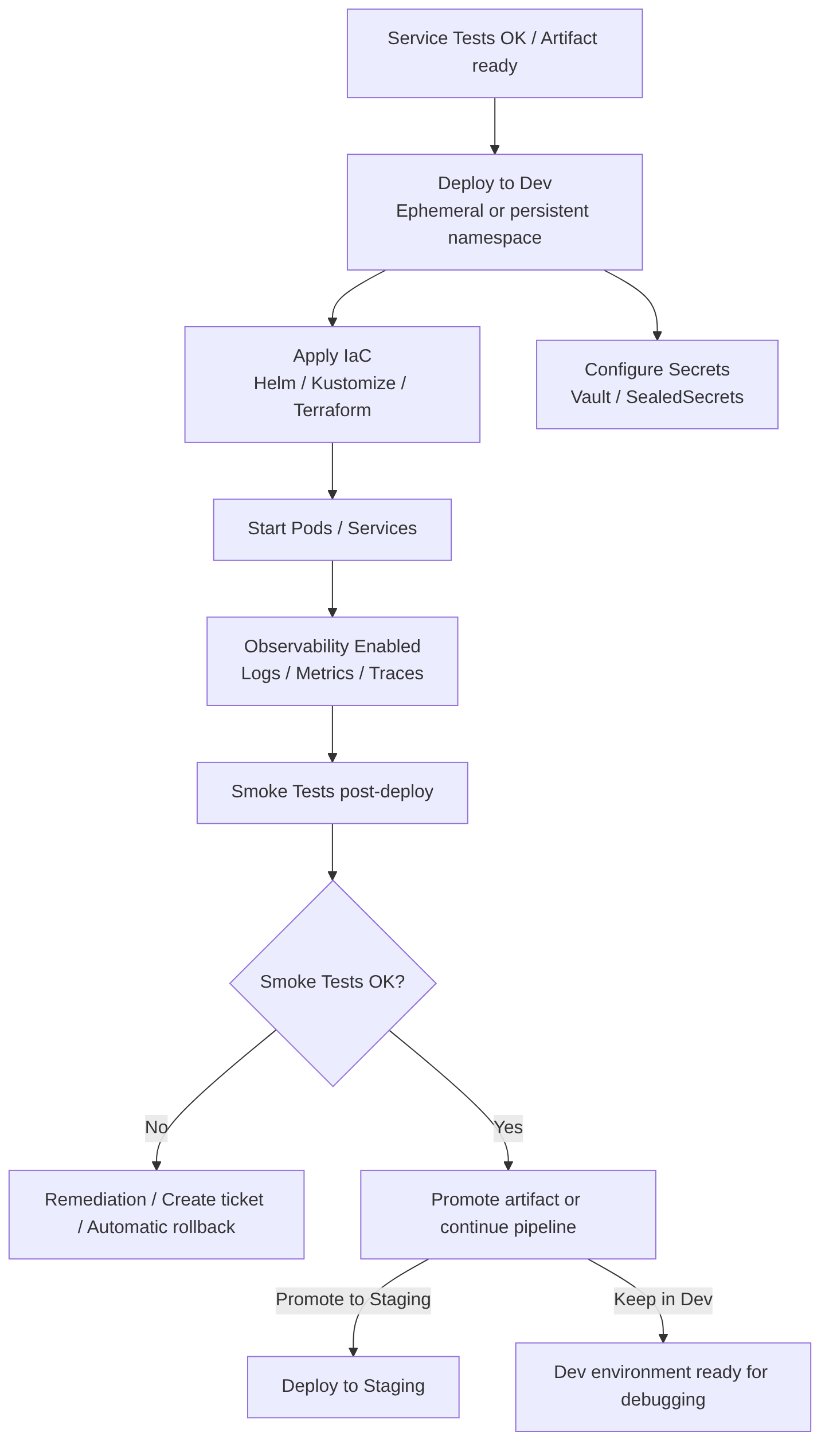
This is a controlled deployment of the artifact or image to a development environment that replicates the essential production configuration. It includes provisioning with IaC (Infrastructure as Code), secret management, observability activation, and smoke test execution, to provide rapid feedback to developers before promoting to higher environments.
This step runs after the merge to the target branch (for example develop or release/x.y), or as an independent pipeline if artifact promotion is used.
It is recommended to promote the same signed image across environments and use ephemeral environments for PRs.
Two pipeline models
It is recommended to use pipeline per branch for integration and pre-production environments (for flexibility), and artifact promotion for production (for traceability and reproducibility):
Pipeline per target branch (recommended in corporate environments):
- PR → CI on feature branch → merge to
develop→ CD fromdevelopdeploys to Dev. - Merge to
release/x.y→ CD from release deploys to Preprod. - Merge to
main→ CD from main deploys to Production. - Advantage: clear separation of responsibilities and policies per branch.
Single pipeline with artifact promotion (alternative):
- A single pipeline builds the artifact and publishes it; then the same image is promoted across environments (Dev → Staging → Prod).
- Advantage: guarantees that exactly the same image passes through all environments.
When to use each one?
- Strict traceability and reproducibility in production: build once and promote artifacts.
- Speed and flexibility in integration: pipelines per branch for Dev/Staging.
- Recommended hybrid: pipeline per branch for Dev/Staging + signed artifact promotion for Production.
Steps in this stage
- Select artifact: use the built and signed image; preferable to promote the image published in the registry rather than rebuilding it.
- Provision environment: ephemeral or persistent namespace/cluster for Dev; apply runtime configuration (config maps, secrets managed by vault).
- Deploy with IaC: Helm, Kustomize, or Terraform for infra and manifests; use Dev-specific values.
- Configure minimum observability: active logs, metrics, and traces (Prometheus, Grafana, OpenTelemetry) to detect failures.
- Run Smoke Tests: health checks, critical endpoints, basic authentication.
- Report results: publish structured results (JSON/SARIF) and metrics; if it fails, stop and create a remediation ticket/PR.
- Traceability: record image version, SBOM, signature, and associated commit in the deployment.
Best practices
- Do not rebuild the image in each environment; promote the published image.
- Ephemeral environments for PRs or features (preview environments) and a persistent Dev environment for continuous integration.
- Configuration parity with staging/production (variables, limits, sidecars) except for sensitive data.
- Externally managed secrets (Vault, SealedSecrets, Azure Key Vault).
- Automatic rollback: maintain a rollback strategy if the smoke test fails.
- Feature flags to enable/disable features in Dev without deploying new code.
- Access policies and auditing for who can promote to higher environments.
Advantages
- Fast feedback for developers.
- Detects integration issues in an environment close to production.
- Facilitates debugging with real traces and logs.
Disadvantages
- Cost in resources and time if not optimized (poorly managed ephemeral environments).
- Possible configuration drift if parity is not maintained.
- Risk of exposing sensitive data if secrets are not properly managed.
Full example with GitLab CI
This example includes: signed image promotion, signature verification, SBOM generation and storage, deploy with Helm to dev, smoke tests, and automatic issue creation on failure.
stages:
  - promote
  - deploy
  - smoke
  - notify

variables:
  REGISTRY: registry.example.com
  IMAGE_NAME: myapp
  NAMESPACE: dev
  HELM_CHART_PATH: ./chart
  SBOM_FILE: sbom-cyclonedx.json

# Job: verify and prepare image (promotion)
promote_and_verify:
  stage: promote
  image: docker:24.0.0
  services:
    - docker:dind
  variables:
    DOCKER_DRIVER: overlay2
  script:
    - echo "Promote job: tag=${IMAGE_TAG:-latest}"
    - docker login $REGISTRY -u "$REGISTRY_USER" -p "$REGISTRY_PASSWORD"
    - docker pull $REGISTRY/$IMAGE_NAME:${IMAGE_TAG}
    # Verify signature with cosign (public key in secret variable)
    - |
      if ! cosign verify --key "$COSIGN_PUBKEY" $REGISTRY/$IMAGE_NAME:${IMAGE_TAG}; then
        echo "Image signature verification failed" >&2
        exit 2
      fi
    # Generate SBOM (Syft) and save as artifact
    - syft $REGISTRY/$IMAGE_NAME:${IMAGE_TAG} -o cyclonedx-json > $SBOM_FILE
  artifacts:
    paths:
      - $SBOM_FILE
    expire_in: 1h
  rules:
    - if: $CI_PIPELINE_SOURCE == "web" || $CI_PIPELINE_SOURCE == "pipeline" || $CI_COMMIT_BRANCH == "develop"

# Job: optional image scan (Trivy)
image_scan:
  stage: promote
  image: aquasec/trivy:latest
  dependencies:
    - promote_and_verify
  script:
    - trivy image --format json --output trivy.json --severity HIGH,CRITICAL $REGISTRY/$IMAGE_NAME:${IMAGE_TAG} || true
    - cat trivy.json
    - |
      CRITICAL_COUNT=$(jq '.Results[].Vulnerabilities[]? | select(.Severity=="CRITICAL")' trivy.json | wc -l || true)
      HIGH_COUNT=$(jq '.Results[].Vulnerabilities[]? | select(.Severity=="HIGH")' trivy.json | wc -l || true)
      echo "HIGH: $HIGH_COUNT CRITICAL: $CRITICAL_COUNT"
      if [ "$CRITICAL_COUNT" -gt 0 ]; then
        echo "Critical vulnerabilities found, failing pipeline" >&2
        exit 3
      fi
  artifacts:
    paths:
      - trivy.json
    expire_in: 1h
  rules:
    - if: $CI_COMMIT_BRANCH == "develop"

# Job: deploy to Dev with Helm
deploy_to_dev:
  stage: deploy
  image: alpine/helm:3.12.0
  dependencies:
    - promote_and_verify
  before_script:
    - apk add --no-cache curl jq bash
    - echo "$KUBE_CONFIG_BASE64" | base64 -d > /tmp/kubeconfig
    - export KUBECONFIG=/tmp/kubeconfig
  script:
    - echo "Deploying $REGISTRY/$IMAGE_NAME:${IMAGE_TAG} to namespace $NAMESPACE"
    - helm upgrade --install myapp $HELM_CHART_PATH \
        --namespace $NAMESPACE \
        --create-namespace \
        --set image.repository=$REGISTRY/$IMAGE_NAME \
        --set image.tag=${IMAGE_TAG} \
        --wait --timeout 5m
    - kubectl -n $NAMESPACE annotate deployment myapp "ci.commit=${CI_COMMIT_SHA}" --overwrite || true
    - kubectl -n $NAMESPACE annotate deployment myapp "ci.image=${REGISTRY}/${IMAGE_NAME}:${IMAGE_TAG}" --overwrite || true
  rules:
    - if: $CI_COMMIT_BRANCH == "develop"

# Job: smoke tests post-deploy
smoke_tests:
  stage: smoke
  image: curlimages/curl:8.3.0
  dependencies:
    - deploy_to_dev
  before_script:
    - apk add --no-cache jq
    - echo "$KUBE_CONFIG_BASE64" | base64 -d > /tmp/kubeconfig
    - export KUBECONFIG=/tmp/kubeconfig
  script:
    - echo "Discover service endpoint"
    - SERVICE_HOST=$(kubectl -n $NAMESPACE get svc myapp -o jsonpath='{.status.loadBalancer.ingress[0].hostname}' || echo "")
    - if [ -z "$SERVICE_HOST" ]; then SERVICE_HOST=$(kubectl -n $NAMESPACE get svc myapp -o jsonpath='{.spec.clusterIP}'); fi
    - echo "Service host: $SERVICE_HOST"
    - |
      # Health check
      if ! curl -fS --retry 3 --max-time 10 "http://$SERVICE_HOST/health"; then
        echo "Smoke test failed" >&2
        exit 4
      fi
  rules:
    - if: $CI_COMMIT_BRANCH == "develop"

# Job: notify and create issue on failure
notify_on_failure:
  stage: notify
  image: curlimages/curl:8.3.0
  when: on_failure
  script:
    - echo "Creating issue for failed pipeline"
    - |
      curl --request POST --header "PRIVATE-TOKEN: $GITLAB_API_TOKEN" \
        --header "Content-Type: application/json" \
        --data '{
          "title":"[CD] Deploy/Smoke tests failure - '"${CI_PROJECT_PATH}"' '"${CI_COMMIT_SHORT_SHA}"'",
          "description":"Pipeline: '"${CI_PIPELINE_URL}"' \nBranch: '"${CI_COMMIT_BRANCH}"' \nImage: '"${REGISTRY}/${IMAGE_NAME}:${IMAGE_TAG}"' \nJob: '"${CI_JOB_NAME}"' \nLogs: see job logs",
          "labels":"security,remediation"
        }' "https://gitlab.example.com/api/v4/projects/${CI_PROJECT_ID}/issues"
  rules:
    - if: $CI_COMMIT_BRANCH == "develop"
Details to keep in mind:
- Promotion without rebuilding:
promote_and_verifypulls the already-published image and verifies its signature withcosign. Guarantees that the image being deployed is the same one that passed prior controls. - SBOM:
syftgenerates the SBOM and saves it as an artifact for traceability. - Image scan:
image_scanusestrivyand fails if there are critical vulnerabilities (adjust the policy according to your governance). - Deploy:
deploy_to_devuseshelm upgrade --installand annotates the deployment with metadata (commit, image). - Smoke tests:
smoke_testsvalidates the health endpoint; if it fails,notify_on_failureautomatically creates an issue in GitLab. - Secrets:
REGISTRY_USER,REGISTRY_PASSWORD,COSIGN_PUBKEY,KUBE_CONFIG_BASE64,GITLAB_API_TOKENmust be set as protected GitLab variables.
AI
Does not replace the real deployment.
Does improve the process in these areas:
- Manifest generation: optimized (Helm/Kustomize) manifests and suggestions to reduce images and layers.
- Post-deploy diagnosis: analyze logs and traces to identify the root cause of failures.
- Rollback automation: predict if a deployment is risky and suggest a rollback.
- Remediation PR generation with changes to configuration or Dockerfile.
- Ephemeral environment optimization: decide when to create or destroy previews based on cost/benefit.
Smoke Tests
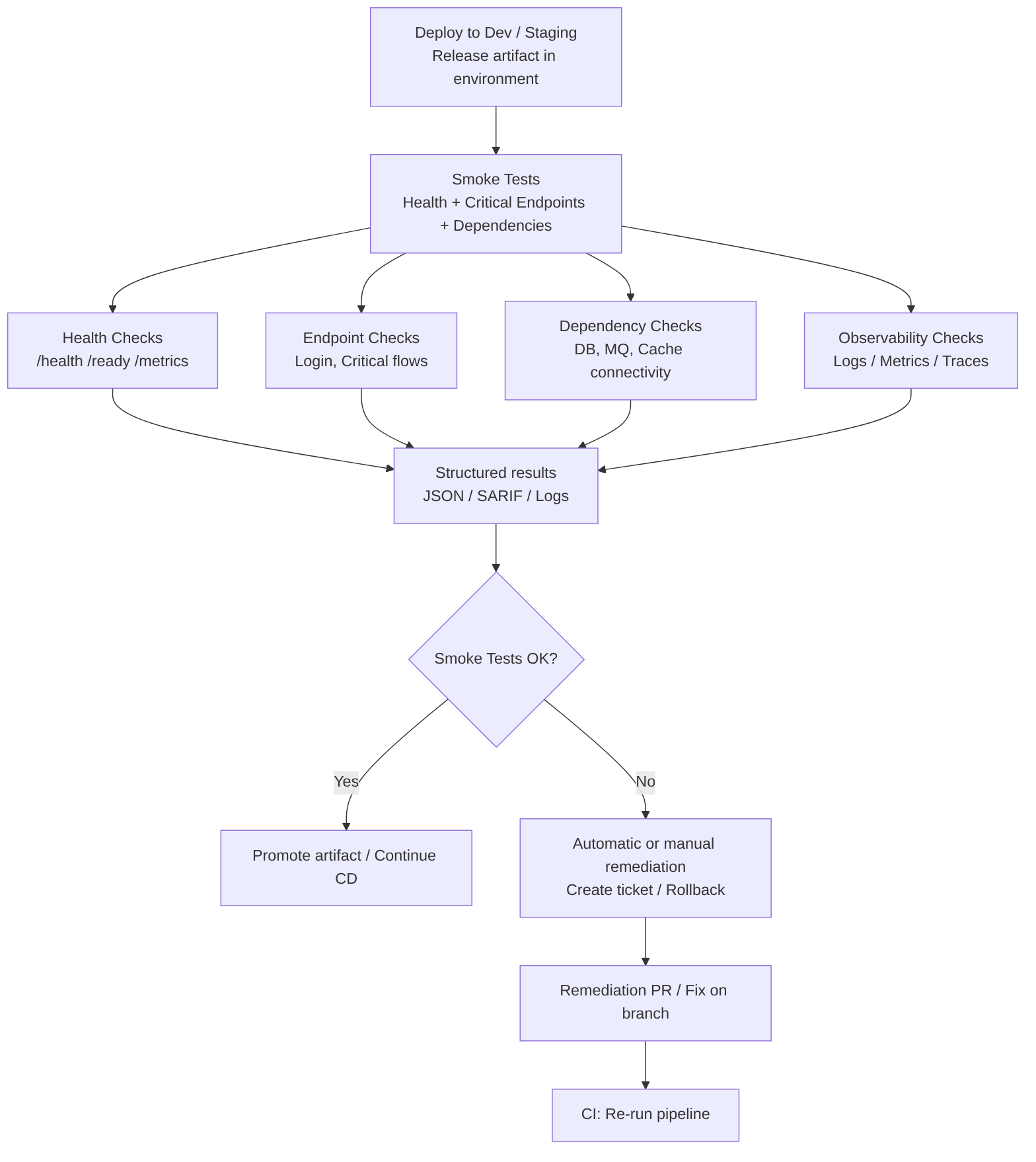
These are quick and deterministic checks that validate the health and critical functions of the service after a deployment to an environment (Dev, Staging). They must be fast, idempotent, and with structured output to integrate with gates and remediation processes.
What this stage includes
- Health checks:
/health,/ready,/metricsendpoints and orchestrator liveness/readiness checks. - Critical endpoint tests: calls to essential routes (login, payment flow, key read/write endpoints) with simple assertions on HTTP code and basic response schema.
- Dependency verification: check connectivity to databases, queues, and essential external services.
- Configuration validation: verify that environment variables, secrets, and applied configurations are present and have expected values (without exposing secrets in logs).
- Observability checks: ensure that logs, metrics, and traces are emitted and accessible.
- Time and tolerance: fast tests with short timeouts and limited retries to avoid blocking the pipeline.
- Structured output: results in JSON/SARIF for ingestion by dashboards, gates, or automatic issue creation.
Best practices
- Keep them fast: target < 2–5 minutes; controlled timeouts and retries.
- Isolate the critical: select a small set of endpoints that represent minimum functional health.
- Do not expose secrets: never print secrets in logs; validate their presence without showing values.
- Idempotence: design tests that do not alter data irreversibly; use synthetic data or ephemeral environments.
- Integration with gates: critical failures must stop promotion; minor failures can create automatic tickets.
- Observability: attach minimal traces/logs to the report to speed up diagnosis.
- Smart retries: allow 1–2 retries with short backoff to mitigate transient flakiness.
- Ephemeral environments for PRs: run smoke tests in previews and destroy the environment when the PR is closed.
Advantages
- Immediate feedback on whether the deployment is viable.
- Prevention of regressions in production by blocking promotions with obvious failures.
- Low cost compared to full E2E suites.
Disadvantages
- Limited coverage: do not detect complex business issues.
- Possible flakiness if external dependencies are not well simulated.
- False sense of security if the check selection is poor.
Examples
Simple health check (curl):
curl -fS --retry 3 --max-time 10 "http://$SERVICE_HOST/health"
Smoke test with assertions in bash:
HTTP_CODE=$(curl -s -o /dev/null -w "%{http_code}" "http://$SERVICE_HOST/api/v1/status")
if [ "$HTTP_CODE" -ne 200 ]; then
  echo "Smoke test failed: status $HTTP_CODE" >&2
  exit 1
fi
- Using frameworks: Newman/Postman for smoke collections; k6 for lightweight latency checks; scripts in pytest, JUnit, or SuperTest for programmatic assertions.
- Integration with Helm: use
helm testto run smoke hooks after deploy if the chart defines them.
AI
Does not replace the real execution of tests or deterministic verification. It acts as a productivity and diagnosis assistant.
Does improve the process:
- Smoke suite generation: propose or generate collections of critical endpoints based on the code, OpenAPI, or incident history.
- Automatic diagnosis: when a smoke test fails, analyze logs and traces, group related errors, and propose the root cause.
- Retry and timeout suggestions: optimize parameters to reduce flakiness without losing early detection.
- Automatic ticket creation: fill issue templates with evidence, traces, and recommendations.
- Prioritization: combine business impact with historical frequency to decide which checks to include in smoke.
“CD (Continuous Delivery) — Part 3: Deploy to Dev and Smoke Tests” by Ramón Invarato at jarroba.com, licensed under Creative Commons Attribution-NonCommercial-ShareAlike 3.0. Registered at Safe Creative.

You may also like

How to Adopt AI in Your Organization Without Making the Most Common Mistakes
Failure and success patterns in AI adoption, a practical decision framework, safe use cases, and minimum viable governance for development teams.

The Real Cost of AI: From the Democratic Promise to the Enterprise Model
Copilot moves to token billing, JetBrains cuts quotas, Claude raises costs with new tokenizer. Analysis of the economic divide AI is opening in 2026.
Leave a comment