
CD (Continuous Delivery) — Part 4: Deploy to Staging and Performance Smoke Tests
Pre-production deployment with production parity, E2E and lightweight performance validation, and manual approval before production.
Series: CI/CD and AI: From Theory to Practice part 9 of 11
- Introduction
- 1CI/CD: Introduction — What It Is, Why It Matters, and Who Does It
- 2CI/CD: Core Concepts — pipeline, job, stage, step, and gates
- 3CI/CD: Branching, Git Flow, and Pull Requests
- 4Pre-CI: General CI/CD Pipeline Architecture and Pre-checks
- 5CI (Continuous Integration): analysis, tests, quality, and security
- 6CD (Continuous Delivery) — Part 1: packaging, SBOM, and remediation
- 7CD (Continuous Delivery) — Part 2: Image Scan and Service Tests
- 8CD (Continuous Delivery) — Part 3: Deploy to Dev and Smoke Tests
- 9CD (Continuous Delivery) — Part 4: Deploy to Staging and Performance Smoke Tests
- 10CD (Continuous Delivery) — Part 5: LCA — Load, Stress, and Chaos Engineering
- 11CD (Continuous Delivery) — Part 6: Final validations, Manual Approval, and Deploy to Production
This part covers the deployment to the pre-production environment (staging), E2E and lightweight performance validation, and manual approval before promoting to production.
Deploy to Staging
Promotes the already-verified artifact (same signed image and SBOM) to a pre-production environment that replicates the production configuration with greater fidelity. Staging is the last environment for validating integrations, performance at reduced scale, regression tests, and compliance validations before deploying to production.
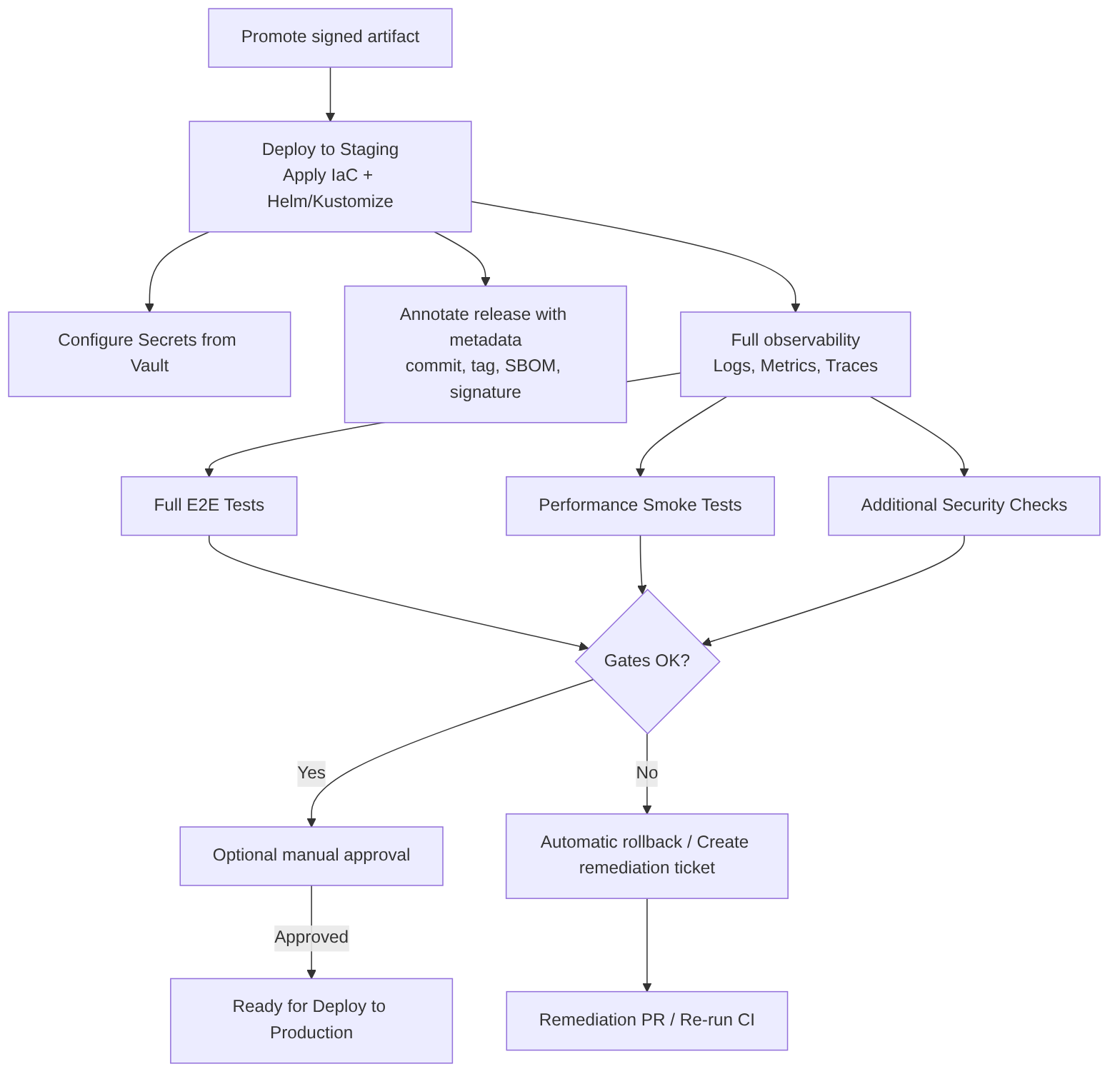
What this stage includes
- Artifact selection: promote the same signed image that passed Dev and the scans.
- Environment provisioning: apply IaC to create/update resources (namespaces, ingress, secrets, configmaps) with staging values.
- Data configuration: use synthetic data or anonymized copies; prepare necessary fixtures and migrations.
- Deployment with realistic strategy: Helm/Kustomize with staging values; apply network resources, limits, and tolerances equivalent to production.
- Full observability activation: metrics, distributed traces, and centralized logging with appropriate retention.
- Full suite execution: E2E, performance smoke, additional security tests, and compliance validations.
- Gates and approvals: automatic gates and, where applicable, manual approval before promoting to production.
- Recording and traceability: annotate release with commit SHA, image tag, SBOM, and signature; store artifacts and reports.
Steps
- Obtain signed image from the registry.
- Verify signature (cosign) and associated SBOM.
- Apply IaC (Terraform for infra, Helm/Kustomize for manifests).
- Configure secrets from Vault/Secret Manager; do not expose values.
- Deploy with wait and probes (
helm upgrade --install --wait --timeout). - Run automatic validations: E2E, contract tests, performance smoke.
- Evaluate results and run gates: if OK → mark ready for production; if KO → rollback and create ticket.
- Optional human approval for production (manual approval step).
Best practices
- Promote the same signed artifact across environments to guarantee reproducibility.
- Configuration parity with production in limits, resources, and sidecars; differences only in data and external endpoints.
- Immutable environment: avoid ad-hoc changes in staging; everything through IaC.
- Anonymized data or synthetic data for realistic tests without exposing PII.
- Clear gates: define which failures block and which generate tickets.
- Production approvals: integrate a human approval step with context (logs, metrics, reports).
- Automatic rollback and mitigation plan if validations fail.
- Observability and traceability: annotate release with metadata and keep reports (E2E, perf, security).
Advantages
- High confidence before production due to similarity with the real environment.
- Allows integration and compliance tests under realistic conditions.
- Reduces risk of regressions and configuration errors.
Disadvantages / risks
- Cost in resources and time; longer pipelines.
- If parity is not maintained, staging can give false positives/negatives.
- Sensitive data management requires strict controls.
Example: simple GitLab CI job for Deploy to Staging
deploy_to_staging:
  stage: deploy
  image: alpine/helm:3.12.0
  variables:
    NAMESPACE: staging
  before_script:
    - echo "$KUBE_CONFIG_BASE64" | base64 -d > /tmp/kubeconfig
    - export KUBECONFIG=/tmp/kubeconfig
  script:
    - echo "Verifying image signature"
    - cosign verify --key "$COSIGN_PUBKEY" $REGISTRY/$IMAGE_NAME:${IMAGE_TAG}
    - echo "Deploying to staging"
    - helm upgrade --install myapp ./chart \
        --namespace $NAMESPACE \
        --create-namespace \
        --set image.repository=$REGISTRY/$IMAGE_NAME \
        --set image.tag=${IMAGE_TAG} \
        --wait --timeout 10m
    - echo "Annotate release metadata"
    - kubectl -n $NAMESPACE annotate deployment myapp "ci.commit=${CI_COMMIT_SHA}" --overwrite || true
  rules:
    - if: $CI_COMMIT_BRANCH =~ /^release\/.*$/ || $CI_COMMIT_BRANCH == "develop"
Full example: Deploy to Staging with E2E, Performance, and Manual Approval
This example runs the full acceptance test suite (E2E) and reduced-scale performance tests on staging, automates result evaluation, and exposes a manual approval step before promoting to production.
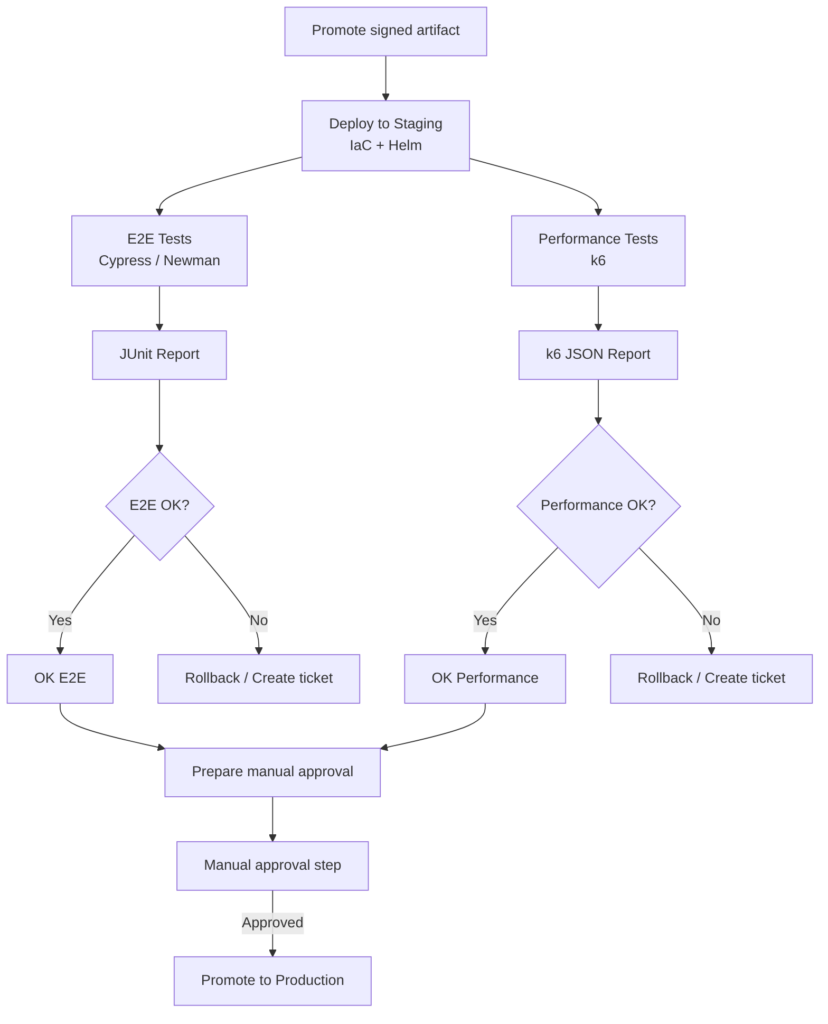
The following pipeline does the following:
- Gets the signed image from the registry and verifies signature and SBOM.
- Deploys to staging with IaC and Helm/Kustomize using staging values.
- Runs E2E (Cypress or Newman) against the staging environment and publishes JUnit/HTML reports.
- Runs performance tests with k6 to measure latency and throughput in critical scenarios.
- Evaluates automatic gates: E2E failures or performance thresholds (e.g. p95 > X ms, error rate > Y%) block promotion.
- Publishes artifacts and reports for auditing and traceability.
- If all OK creates a manual approval step to promote to production.
- If KO performs rollback and creates a remediation ticket with evidence.
stages:
  - staging-deploy
  - staging-validate
  - approval

variables:
  REGISTRY: registry.example.com
  IMAGE_NAME: myapp
  IMAGE_TAG: ${IMAGE_TAG}
  NAMESPACE: staging
  HELM_CHART_PATH: ./chart
  K6_SCRIPT: tests/k6/staging-scenario.js
  CYPRESS_CONFIG: cypress.json

deploy_to_staging:
  stage: staging-deploy
  image: alpine/helm:3.12.0
  before_script:
    - echo "$KUBE_CONFIG_BASE64" | base64 -d > /tmp/kubeconfig
    - export KUBECONFIG=/tmp/kubeconfig
  script:
    - echo "Verify image signature"
    - cosign verify --key "$COSIGN_PUBKEY" $REGISTRY/$IMAGE_NAME:$IMAGE_TAG
    - echo "Deploying to staging"
    - helm upgrade --install myapp $HELM_CHART_PATH \
        --namespace $NAMESPACE \
        --create-namespace \
        --set image.repository=$REGISTRY/$IMAGE_NAME \
        --set image.tag=$IMAGE_TAG \
        --wait --timeout 10m
    - kubectl -n $NAMESPACE annotate deployment myapp "ci.commit=${CI_COMMIT_SHA}" --overwrite || true
  rules:
    - if: $CI_COMMIT_BRANCH =~ /^release\/.*$/ || $CI_COMMIT_BRANCH == "develop"

e2e_and_performance:
  stage: staging-validate
  image: node:20-alpine
  needs:
    - job: deploy_to_staging
      artifacts: false
  before_script:
    - apk add --no-cache curl bash jq
    - npm ci
    - echo "$KUBE_CONFIG_BASE64" | base64 -d > /tmp/kubeconfig
    - export KUBECONFIG=/tmp/kubeconfig
  script:
    - echo "Discover service endpoint"
    - SERVICE_HOST=$(kubectl -n $NAMESPACE get svc myapp -o jsonpath='{.status.loadBalancer.ingress[0].hostname}' || kubectl -n $NAMESPACE get svc myapp -o jsonpath='{.spec.clusterIP}')
    - echo "Service host: $SERVICE_HOST"
    # Run E2E with Cypress headless and export JUnit
    - npx cypress run --config-file $CYPRESS_CONFIG --env baseUrl="http://$SERVICE_HOST" --reporter junit --reporter-options "mochaFile=reports/cypress-junit-[hash].xml"
    - |
      if [ $? -ne 0 ]; then
        echo "E2E tests failed" >&2
        exit 10
      fi
    # Run k6 performance scenario
    - apk add --no-cache curl
    - wget -q -O /usr/local/bin/k6 https://github.com/grafana/k6/releases/download/v0.45.0/k6-v0.45.0-linux64 && chmod +x /usr/local/bin/k6
    - k6 run --out json=reports/k6-results.json $K6_SCRIPT || true
    - |
      ERR_RATE=$(jq '[.metrics.iterations.rate] | add' reports/k6-results.json || echo 0)
      P95=$(jq '.metrics["http_req_duration"].p[95]' reports/k6-results.json || echo 0)
      echo "k6 p95: $P95 ms, err_rate: $ERR_RATE"
      if (( $(echo "$P95 > 500" | bc -l) )); then
        echo "Performance threshold exceeded: p95 > 500ms" >&2
        exit 11
      fi
  artifacts:
    when: always
    paths:
      - reports/
    reports:
      junit: reports/cypress-junit-*.xml
  rules:
    - if: $CI_COMMIT_BRANCH =~ /^release\/.*$/ || $CI_COMMIT_BRANCH == "develop"

staging_to_prod_approval:
  stage: approval
  image: alpine:3.18
  when: manual
  allow_failure: false
  script:
    - echo "Manual approval to promote to production. Review reports and metrics before approving."
  rules:
    - if: $CI_COMMIT_BRANCH =~ /^release\/.*$/ || $CI_COMMIT_BRANCH == "develop"
Notes:
- E2E uses Cypress in headless mode and exports JUnit for integration with GitLab Test Reports.
- Performance uses k6 and saves JSON results; the job evaluates basic thresholds and fails if they are exceeded. Adjust metrics and thresholds to your SLA.
- Artifacts: all reports are saved for auditing.
- Approval: the
staging_to_prod_approvaljob is manual; approving it can trigger the production promotion job that uses the same signed artifact. - Differentiated exit codes to distinguish E2E and performance failures.
AI
- Improves: optimizes resource values, suggests tolerance configurations, generates E2E tests and load scripts, prioritizes security and performance findings.
- Automation: can fill issue templates with evidence, propose patches, and generate remediation PRs.
- Limitation: AI does not replace real execution or human approval in risk decisions; it cannot sign artifacts or execute deployments on its own without integration.
Performance Smoke Tests
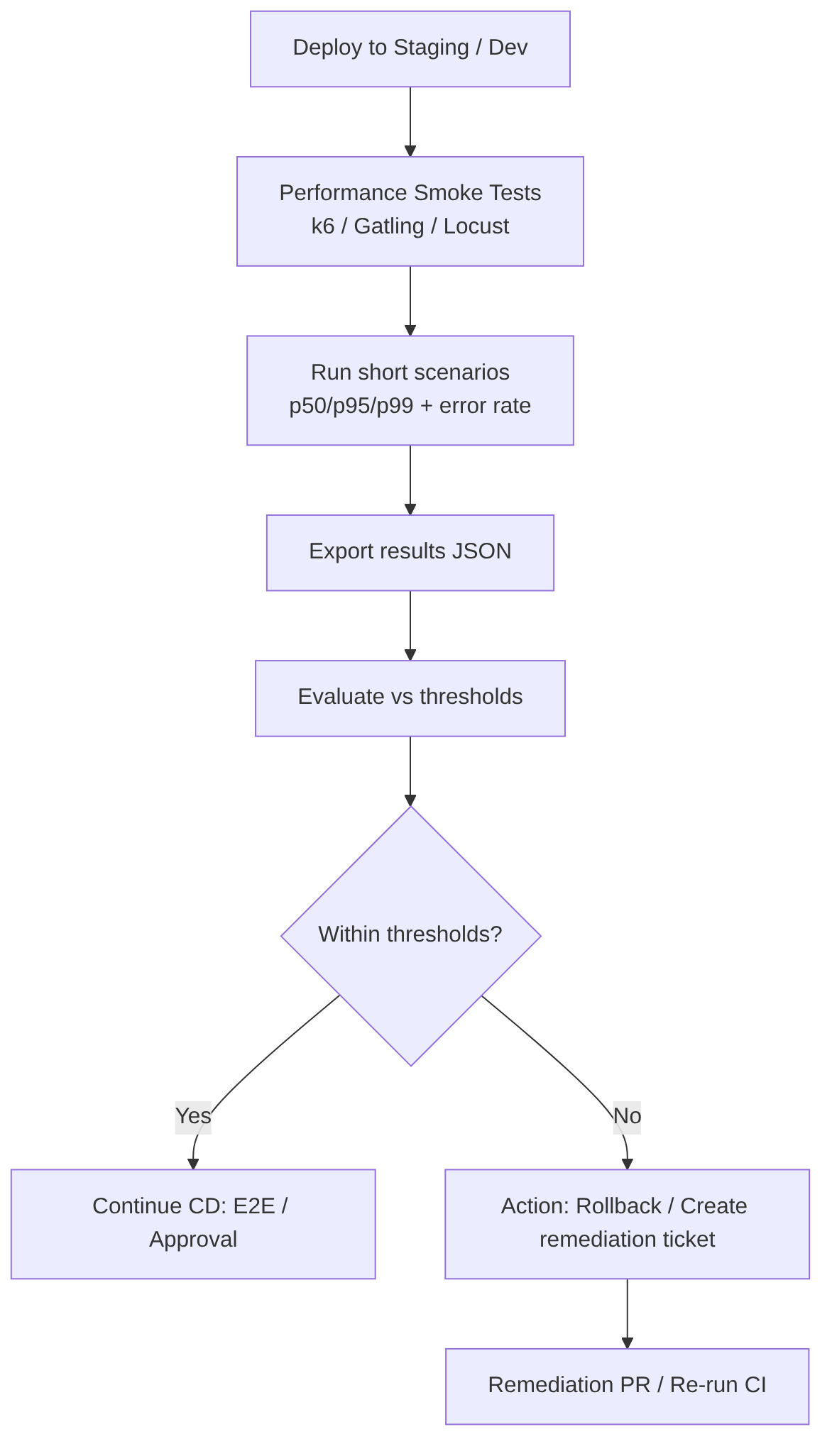
Runs lightweight and deterministic performance tests after a deployment to validate that critical endpoints meet basic latency and stability requirements before advancing to full load tests or production. They aim to detect obvious degradations (p95/p99, error rate) that would indicate the deployment is not fit for promotion.
Steps
- Critical scenario selection: choose 2–6 representative routes or flows (login, search, checkout, read-intensive endpoints).
- Metrics and threshold definition: p50/p95/p99, maximum acceptable latency, maximum error rate, minimum throughput.
- Fast and controlled execution: use tools like k6 for short scenarios (30s–2min) with reduced load.
- Automated measurement and evaluation: calculate percentiles and error rate; compare with thresholds and decide pass/fail.
- Structured output: export results in JSON/CSV for pipeline ingestion and for attaching to reports.
- Actions based on result: if critical thresholds are exceeded → block promotion, create ticket and/or rollback; if within limits → continue.
Best practices
- Keep tests short and deterministic: target < 2–5 minutes to avoid lengthening pipelines.
- Choose high-impact scenarios rather than covering the entire API.
- Run in staging with resource parity to get representative measurements.
- Correlate with traces and metrics to identify the root cause (CPU, GC, DB latency).
- Isolate noise: run in controlled windows and clean data between runs.
- Define thresholds based on SLAs and review them periodically.
- Automate decisions: pass/fail pipeline according to clear rules; generate reports and tickets with evidence.
Advantages
- Early detection of degradations before full load tests.
- Low time cost compared to stress tests.
- Easy automation in CI/CD for quick gates.
Disadvantages
- Limited coverage: does not replace load or stress tests.
- Environment-sensitive results: if staging does not replicate production, metrics can be misleading.
- Possible flakiness if external variables are not controlled.
Tools
- k6: ideal for lightweight JS scripts and JSON export.
- Gatling / Locust: alternatives for more complex scenarios.
- Grafana Tempo / Prometheus: for correlating metrics and traces.
Examples
Minimal k6 example (tests/k6/perf-smoke.js):
import http from 'k6/http';
import { check } from 'k6';
export let options = { vus: 10, duration: '1m' };
export default function () {
  let res = http.get(`${__ENV.BASE_URL}/api/v1/critical`);
  check(res, { 'status 200': (r) => r.status === 200 });
}
Simple evaluation (bash):
k6 run --out json=perf.json tests/k6/perf-smoke.js
P95=$(jq '.metrics.http_req_duration.p[95]' perf.json)
if (( $(echo "$P95 > 500" | bc -l) )); then exit 1; fi
GitLab CI job:
performance_smoke:
  stage: validate
  image: loadimpact/k6:latest
  variables:
    BASE_URL: "http://myapp-staging.example.com"
    K6_SCRIPT: tests/k6/perf-smoke.js
  script:
    - k6 run --out json=perf.json $K6_SCRIPT
    - P95=$(jq '.metrics.http_req_duration.p[95]' perf.json)
    - ERR_RATE=$(jq '.metrics.http_req_failed.rate' perf.json)
    - echo "p95=$P95 ms err_rate=$ERR_RATE"
    - |
      if (( $(echo "$P95 > 500" | bc -l) )) || (( $(echo "$ERR_RATE > 0.01" | bc -l) )); then
        echo "Performance smoke failed: p95 or error rate exceeded" >&2
        exit 1
      fi
  artifacts:
    when: always
    paths:
      - perf.json
  rules:
    - if: $CI_COMMIT_BRANCH =~ /^release\/.*$/ || $CI_COMMIT_BRANCH == "develop"
AI
- Improves: AI can suggest critical scenarios from historical logs and telemetry, propose realistic thresholds, and automatically generate k6 scripts.
- Diagnosis: when a test fails, correlate metrics, group anomalies, and propose the root cause (DB latency, CPU saturation).
- Automation: generate tickets with executive summary, evidence, and recommendations; propose PRs with configuration adjustments (timeouts, pool sizes).
- Limitation: AI does not replace real execution or human validation of architectural changes.
“CD (Continuous Delivery) — Part 4: Deploy to Staging and Performance Smoke Tests” by Ramón Invarato at jarroba.com, licensed under Creative Commons Attribution-NonCommercial-ShareAlike 3.0. Registered at Safe Creative.

You may also like

How to Adopt AI in Your Organization Without Making the Most Common Mistakes
Failure and success patterns in AI adoption, a practical decision framework, safe use cases, and minimum viable governance for development teams.

The Real Cost of AI: From the Democratic Promise to the Enterprise Model
Copilot moves to token billing, JetBrains cuts quotas, Claude raises costs with new tokenizer. Analysis of the economic divide AI is opening in 2026.
Leave a comment