
CD (Continuous Delivery) — Part 1: packaging, SBOM, and remediation
Start of the continuous delivery cycle: Docker packaging, SBOM generation, image signing, and the concept of remediation.
Series: CI/CD and AI: From Theory to Practice part 6 of 11
- Introduction
- 1CI/CD: Introduction — What It Is, Why It Matters, and Who Does It
- 2CI/CD: Core Concepts — pipeline, job, stage, step, and gates
- 3CI/CD: Branching, Git Flow, and Pull Requests
- 4Pre-CI: General CI/CD Pipeline Architecture and Pre-checks
- 5CI (Continuous Integration): analysis, tests, quality, and security
- 6CD (Continuous Delivery) — Part 1: packaging, SBOM, and remediation
- 7CD (Continuous Delivery) — Part 2: Image Scan and Service Tests
- 8CD (Continuous Delivery) — Part 3: Deploy to Dev and Smoke Tests
- 9CD (Continuous Delivery) — Part 4: Deploy to Staging and Performance Smoke Tests
- 10CD (Continuous Delivery) — Part 5: LCA — Load, Stress, and Chaos Engineering
- 11CD (Continuous Delivery) — Part 6: Final validations, Manual Approval, and Deploy to Production
This is the first part of the CD block. It covers the transition from CI, the general CD architecture, container image build and signing, SBOM generation, and the concept of remediation that runs through the entire cycle.
From CI to CD: the merge as the starting point
Once CI approves all gates, the merge is allowed. From that point on, depending on the target branch, CD is triggered:
- Merge to
develop→ CI on the target branch and then CD towards Dev - Merge to
release/x.y→ CI on the target branch and then CD towards Preprod - Merge to
main→ CI on the target branch and then CD towards Production
Most teams skip running the full CI on the branch prior to the merge and only run CI/CD on the main branches (
develop,release,main), to avoid duplicating identical executions.
General CD architecture
CD (Continuous Delivery) takes the artifact verified by CI and progressively and in a controlled manner delivers it all the way to production.
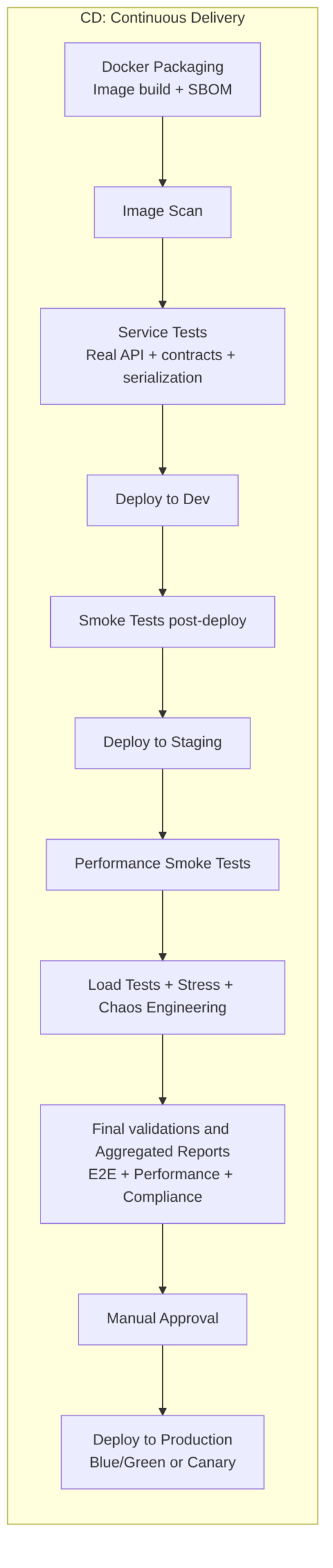
Each stage is a quality gate: if something fails, the pipeline stops, a remediation ticket is created, and the change does not advance to the next environment.
Docker Packaging and SBOM
Builds the container image in a reproducible, minimal, and verifiable way, and generates an SBOM (Software Bill of Materials) that documents all components included in the image. The SBOM is part of supply chain control and facilitates vulnerability management, auditing, and compliance.
The result is an image ready to run in a container (for example, in Kubernetes, Docker Swarm, Azure Container Instances, AWS Fargate, etc.).
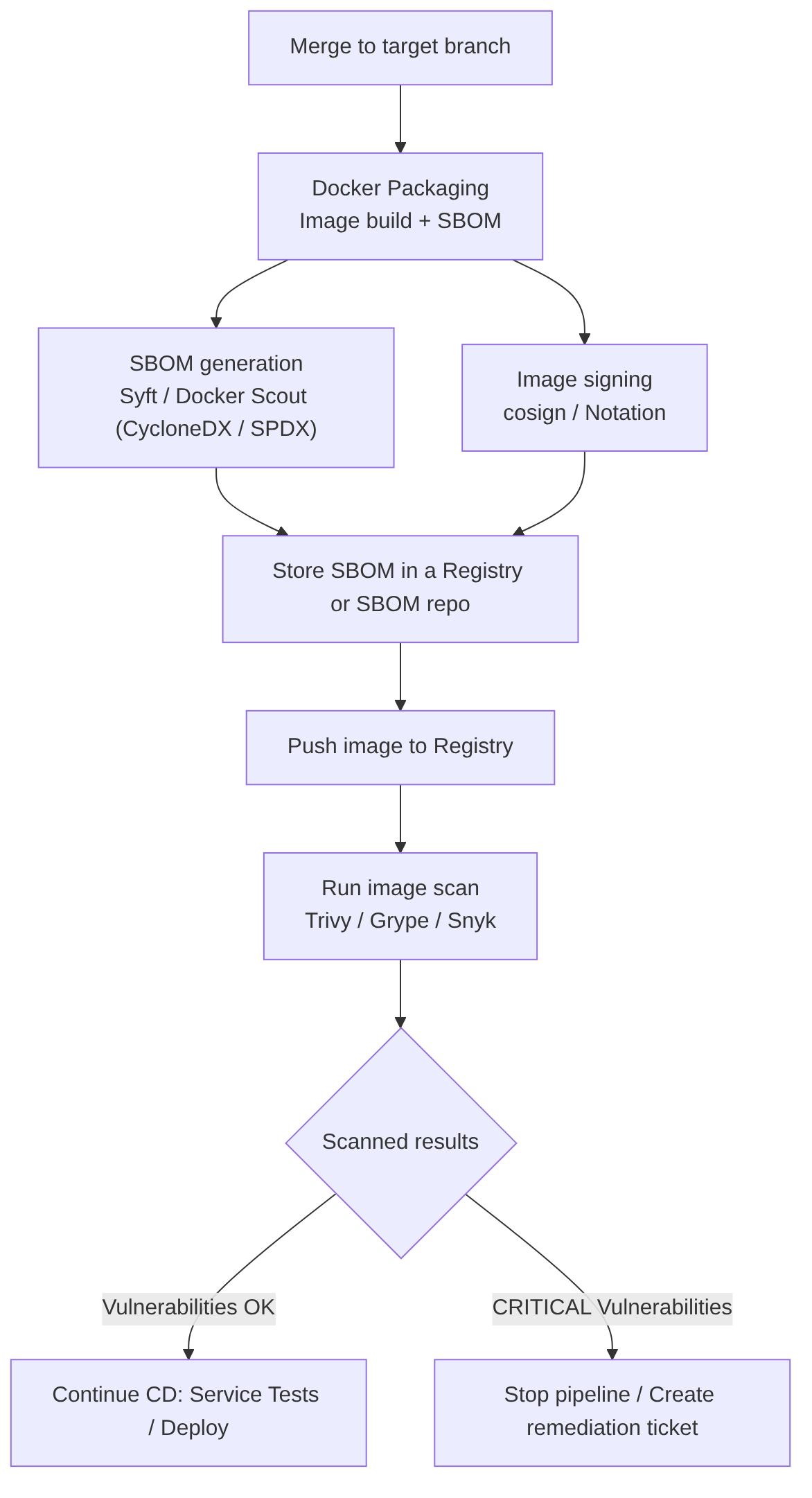
Steps included in this pipeline stage
- Image build using Docker/BuildKit with multi-stage builds to separate the compilation and runtime phases (this reduces size and attack surface).
- SBOM generation immediately after the build (tools: Syft, Docker Scout → CycloneDX/SPDX). The SBOM must reflect layers, system packages, language dependencies, and included artifacts.
- Signing and storage of the artifact and SBOM (cosign / Notation) to guarantee provenance and non-repudiation.
- Publishing to registry (image + SBOM as an associated artifact) and registering the SBOM in the organization’s SBOM management system.
- Image scan trigger (Trivy / Grype / Snyk) using the published image and SBOM to correlate vulnerabilities and prioritize remediation.
Note:
remediationis the set of actions to fix a vulnerability, quality failure, or non-compliance detected. It is detailed in the following section.
Best practices
- Multi-stage builds to remove compilation tools from runtime.
- Minimal images (distroless, scratch) to reduce the attack surface.
- SBOM in standard formats (CycloneDX, SPDX) and versioned alongside the image.
- SBOM signed and stored in the registry or in a SBOM repository with traceability.
- Determinism: use controlled caches, fixed versions, and reproducible builds so that the image and its SBOM are verifiable.
Recommendations
- Generate SBOM in the same job that builds the image to guarantee consistency.
- Sign image and SBOM before publishing.
- Store SBOM alongside the image in the registry or in a centralized repository for auditing.
- Correlate SBOM with scanners to reduce false positives and prioritize remediation.
Advantages
- Supply chain transparency: allows rapid identification of vulnerable components.
- Compliance and auditing: facilitates regulatory requirements and audits.
- Faster incident response: with SBOM you can quickly locate what has been affected.
Disadvantages / challenges
- Noise and maintenance: large SBOMs require processes to keep them useful (filtering, correlation).
- Operational cost: generation, signing, storage, and correlation with scanners adds steps and time.
- False positives in scanners if not correctly correlated with SBOM and execution context.
Example: Docker multi-stage
A typical flow for a Spring Boot application:
- Build/Compilation —
mvn -DskipTests package→ generatestarget/app.jar - Docker multi-stage — copies the already-generated JAR:
FROM eclipse-temurin:17-jre
COPY app.jar /app/app.jar
CMD ["java", "-jar", "/app/app.jar"]
Can’t it be condensed into a single stage with Docker multi-stage?
Yes, but it is not the most professional option. Example:
# "Compilation / Build" stage
FROM maven:3.9 AS build
WORKDIR /app
COPY . .
RUN mvn package -DskipTests

# "Packaging into an image" stage
FROM eclipse-temurin:17-jre
COPY --from=build /app/target/app.jar /app/app.jar
CMD ["java", "-jar", "/app/app.jar"]
Its disadvantages:
- Slower: every change in
pom.xmlinvalidates the cache. - You cannot scan the JAR before packaging it.
- You cannot publish the artifact without building the image.
- SonarQube cannot analyze the code inside the container.
- Less flexible for complex pipelines.
Command examples
Generate SBOM with Syft (CycloneDX or SPDX):
syft <image>:<tag> -o cyclonedx-json > sbom-cyclonedx.json
syft <image>:<tag> -o spdx-json > sbom-spdx.json
Docker Scout (verification):
docker scout sbom <image>:<tag>
Sign image and SBOM with cosign:
cosign sign --key cosign.key <registry>/<image>:<tag>
AI
Does not replace the stage: AI cannot execute builds, produce real SBOMs, or sign artifacts on its own.
Does improve it in several practical areas:
- Dockerfile optimization: suggestions to reduce layers, remove unnecessary packages, suggest better base images (distroless, alpine, slim), detect bad practices (
COPY . .,RUN apt-get updatewithout pinning), and propose multi-stage patterns. - Enriched SBOM generation: automatic correlation between dependencies and historical vulnerabilities; remediation prioritization.
- Remediation automation: proposals for safe versions or patches, generation of PRs with changes to dependencies or Dockerfile.
- Provenance analysis: helps identify packages with low traceability or problematic licenses.
Annex: Remediation
It is the set of actions necessary to fix a vulnerability, quality failure, or non-compliance detected by the pipeline. In other words: remediating means fixing whatever breaks a Quality Gate.
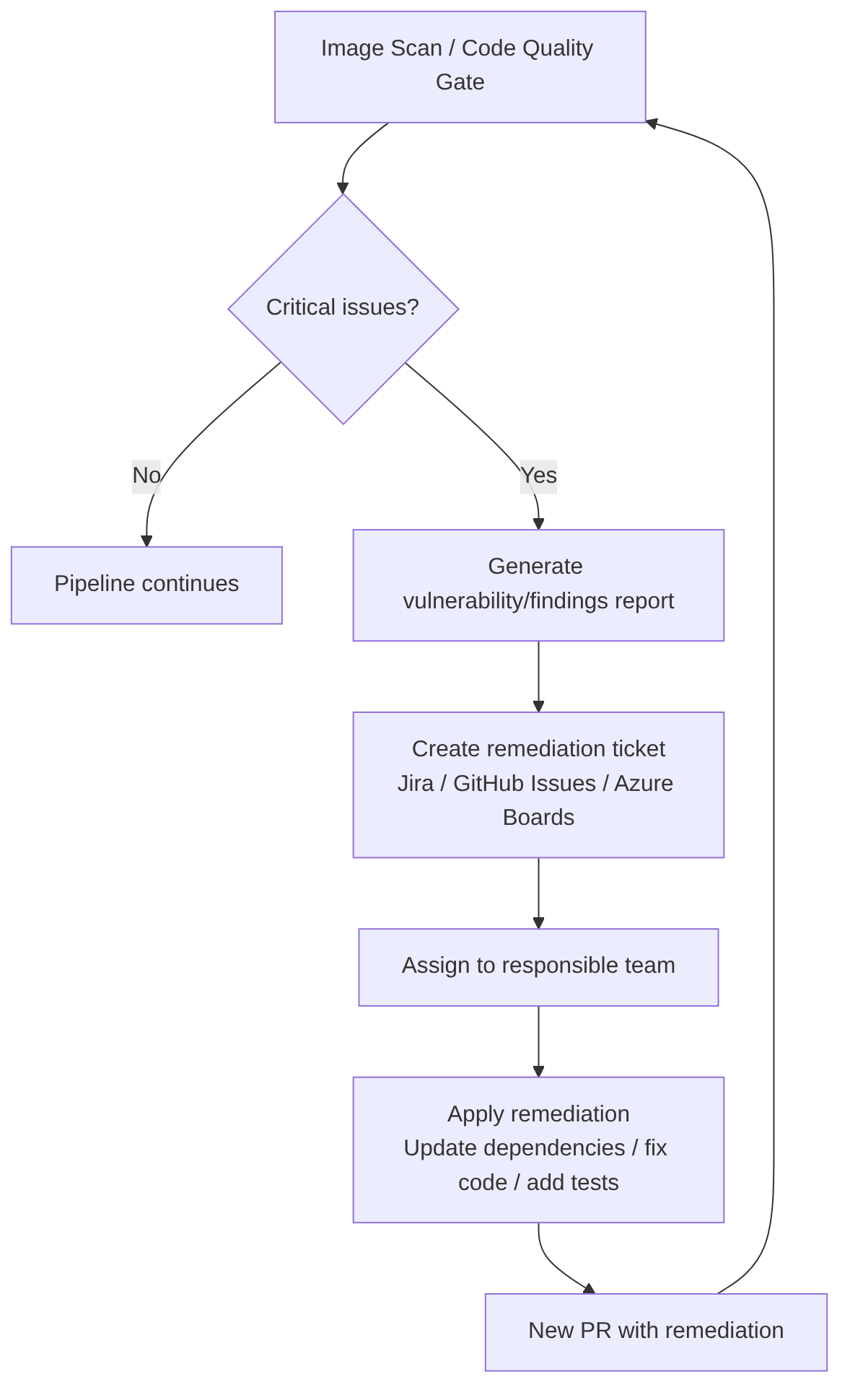
For example:
- If Trivy detects a critical CVE → it must be remediated.
- If SonarQube detects a blocking vulnerability or bug → it must be remediated.
- If the Coverage Gate fails → it must be remediated by adding tests.
- If SCA detects a vulnerable dependency → it must be remediated by updating the version.
Remediation includes
- Updating dependencies: upgrading the version of a vulnerable library, switching to a secure alternative, applying a recommended patch.
- Modifying code: fixing a bug, correcting a vulnerability (SQLi, XSS, SSRF…), reducing complexity, eliminating duplication, adding validations.
- Adding or improving tests: increasing coverage, adding edge case tests, adding integration tests.
- Changing configuration: adjusting permissions, hardening containers, changing compilation flags, adjusting security policies.
When an automatic ticket is created
When the pipeline detects a problem that cannot be fixed automatically or that should not block the flow, it is recommended to automatically create a ticket in Jira, GitHub Issues, ServiceNow, etc. That ticket typically includes:
- Problem description and severity
- Evidence (logs, reports, CVE, findings)
- Remediation recommendation and priority
- SLA (maximum time to fix it)
- Link to the commit or PR that introduced it
- Link to the scanner report (Trivy, Sonar, Snyk…)
When is it created?
- When the vulnerability is high or critical, but the pipeline should not be blocked (for example, in non-production environments).
- When the problem requires human analysis.
- When remediation is not trivial.
- When there are external dependencies (vendor, platform team…).
AI
AI cannot replace remediation nor should it:
- Validate that the patch is safe in production.
- Replace human analysis for complex vulnerabilities.
- Make corporate risk decisions.
AI can accelerate remediation by:
- Generating the patch automatically.
- Explaining the vulnerability.
- Proposing the safe version of a dependency.
- Creating the ticket with all information already filled in.
- Prioritizing findings by actual impact.
- Detecting false positives.
- Suggesting refactors to reduce complexity.
- Generating tests to increase coverage.
- Analyzing the SBOM and proposing mitigations.
“CD (Continuous Delivery) — Part 1: packaging, SBOM, and remediation” by Ramón Invarato at jarroba.com, licensed under Creative Commons Attribution-NonCommercial-ShareAlike 3.0. Registered at Safe Creative.

You may also like

How to Adopt AI in Your Organization Without Making the Most Common Mistakes
Failure and success patterns in AI adoption, a practical decision framework, safe use cases, and minimum viable governance for development teams.

The Real Cost of AI: From the Democratic Promise to the Enterprise Model
Copilot moves to token billing, JetBrains cuts quotas, Claude raises costs with new tokenizer. Analysis of the economic divide AI is opening in 2026.
Leave a comment