CD (Continuous Delivery) — Part 5: LCA — Load, Stress, and Chaos Engineering
📚 Series: CI/CD and AI: From Theory to Practice
This part covers real resilience validation: load tests, stress tests, and chaos engineering to ensure the system remains stable, predictable, and recoverable under extreme conditions.
Parts of this block:
- Part 1 — Docker Packaging, SBOM, and remediation
- Part 2 — Image Scan and Service Tests
- Part 3 — Deploy to Dev and Smoke Tests
- Part 4 — Deploy to Staging and Performance Smoke Tests
- Part 5 — LCA: Load, Stress, and Chaos Engineering ← you are here
- Part 6 — Final validations, Manual Approval, and Deploy to Production
LCA: Load + Stress + Chaos Engineering
This stage validates how the service behaves under extreme or unexpected conditions, beyond basic functionality. It is the validation of real resilience, not just performance.
It includes realistic load tests, stress tests to identify breaking points, and chaos engineering tests to validate automatic recovery. They are essential for guaranteeing stability, scalability, and fault tolerance before production.
The goal is not to verify that “it works”, but that the system remains stable, predictable, and recoverable when:
- load increases.
- resources are saturated.
- dependencies fail.
- artificial latencies are introduced.
- pods are restarted.
- nodes go down.
- external responses are corrupted.
- or traffic spikes occur.
AI can suggest scenarios, analyze anomalies, and automate remediation, but the final validation must be based on real metrics and corporate policies.
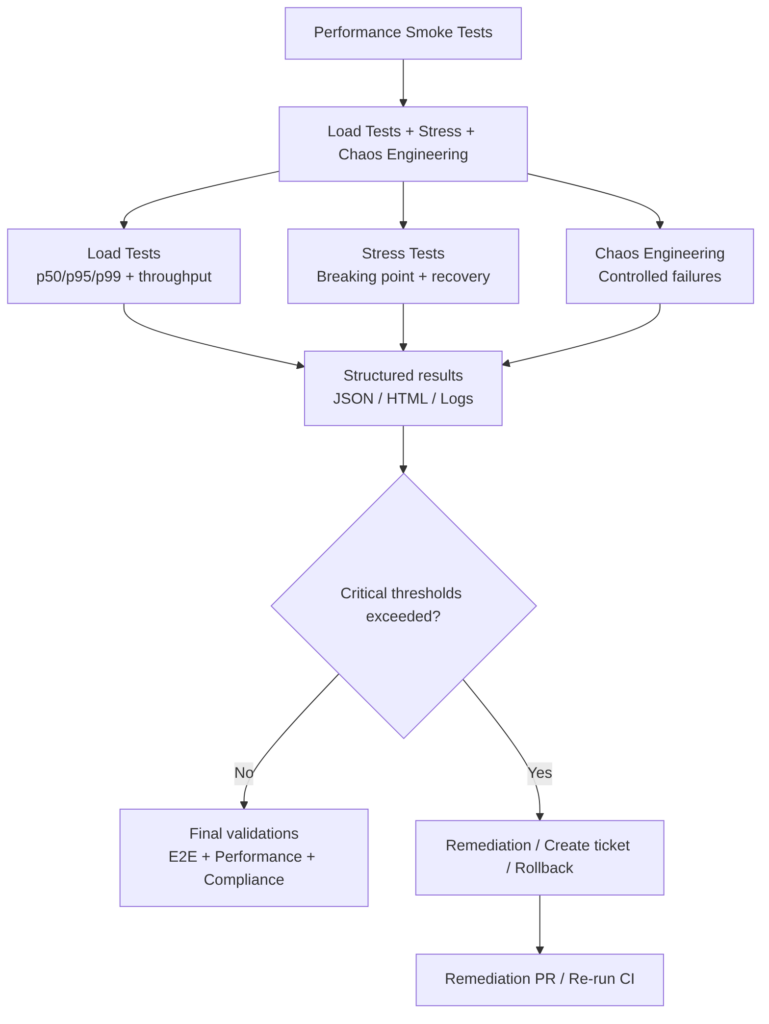
Typical tests
The first three are the most common and recommended. The rest can be useful depending on the case.
Load Tests (Controlled load)
Simulate realistic traffic with increasing volume to validate:
- p50/p95/p99.
- throughput.
- error rate.
- autoscaling stability.
- connection pool behavior.
- dependency latency.
Types:
- Load smoke (typical duration 2–10 minutes): quick, low-intensity test. The minimum amount of traffic is sent for a short time to verify that the environment is properly configured and the basic code does not break. If it fails here, there is no point continuing with heavier tests.
- Sustained load (10–30 minutes): represents normal or expected traffic over a prolonged period. A constant number of concurrent users (for example, 500 users at a time) is maintained for 10, 30, or 60 minutes to observe whether the system is stable. Sometimes a system works well for the first 2 minutes, but after 15 minutes it runs out of memory or database connections become saturated.
k6 sustained load example (tests/k6/load-test.js) — duration 2-5 minutes, 50 VUs, stable load, measure p95/p99 and error rate:
import http from 'k6/http';
import { check, sleep } from 'k6';

export let options = {
  vus: 50,
  duration: '3m',
  thresholds: {
    http_req_duration: ['p(95)<500'],   // p95 < 500ms
    http_req_failed: ['rate<0.01'],     // <1% errors
  },
};

export default function () {
  const res = http.get(`${__ENV.BASE_URL}/api/v1/critical`);
  check(res, {
    'status 200': (r) => r.status === 200,
  });
  sleep(1);
}
Notes:
- Use
thresholdsfor automatic gates. - Ideal for running on Staging after Performance Smoke Tests.
- Export JSON (with
--out json=load.json) for subsequent analysis.
Stress Tests (Pushing to the limit)
The goal is to identify the breaking point and validate that the system recovers when the load returns to normal levels.
The breaking point is the exact moment when the system stops responding correctly. The load is gradually increased (1k, 5k, 10k users…) until something fails. This tells you how much it can withstand before disaster, enabling infrastructure planning or emergency alert configuration.
The breaking point is found by identifying:
- CPU saturation.
- memory exhaustion.
- timeouts.
- full queues.
- progressive degradation.
k6 stress example (tests/k6/stress-test.js) — duration 5-10 minutes, progressive ramp-up → peak → ramp-down:
import http from 'k6/http';
import { check } from 'k6';

export let options = {
  stages: [
    { duration: '1m', target: 20 },   // warm-up
    { duration: '2m', target: 200 },  // stress peak
    { duration: '1m', target: 300 },  // breaking point
    { duration: '1m', target: 0 },    // recovery
  ],
  thresholds: {
    http_req_duration: ['p(95)<800'],   // higher tolerance
    http_req_failed: ['rate<0.05'],     // <5% errors
  },
};

export default function () {
  const res = http.get(`${__ENV.BASE_URL}/api/v1/critical`);
  check(res, {
    'status 200/201/204': (r) => [200,201,204].includes(r.status),
  });
}
Notes:
- This test should not be blocking for minor releases.
- Useful for detecting CPU saturation, connection pool issues, autoscaling limits.
- Export JSON for correlation with Prometheus/Grafana.
Chaos Engineering (Controlled failures)
Verifies that the system:
- recovers automatically.
- maintains SLA.
- does not lose data.
- does not enter a failure cascade.
Injects real failures to validate resilience:
- kill pods.
- cut network.
- add latency.
- degrade DNS.
- restart nodes.
- fail external dependencies.
- simulate 500 error spikes.
Typical tools:
Example: database latency injection (Chaos Mesh on Kubernetes) — simulates realistic degradation without completely breaking the service:
chaos/latency-experiment.yaml
apiVersion: chaos-mesh.org/v1alpha1
kind: NetworkChaos
metadata:
  name: db-latency
  namespace: staging
spec:
  action: delay
  mode: one
  selector:
    labelSelectors:
      "app": "myapp-db"
  delay:
    latency: "200ms"
    jitter: "50ms"
  duration: "120s"
Example: kill service pods (pod-kill):
apiVersion: chaos-mesh.org/v1alpha1
kind: PodChaos
metadata:
  name: kill-myapp-pods
  namespace: staging
spec:
  action: pod-kill
  mode: fixed-percent
  value: "50"
  selector:
    labelSelectors:
      "app": "myapp"
  duration: "60s"
Example: cut network to an external service:
apiVersion: chaos-mesh.org/v1alpha1
kind: NetworkChaos
metadata:
  name: external-service-block
  namespace: staging
spec:
  action: loss
  mode: all
  selector:
    labelSelectors:
      "app": "myapp"
  loss:
    loss: "100"
  direction: to
  target:
    selector:
      labelSelectors:
        "app": "external-api"
  duration: "45s"
Notes:
- Always use abort conditions (Chaos Mesh supports them).
- Run in controlled windows or scheduled pipelines.
- Correlate with logs/traces to validate automatic recovery.
Additional tests
Endurance / Soak Testing
If sustained load lasts 30 minutes, a Soak Test lasts hours or days. It detects memory leaks, disk log saturation, or data corruption that only appears after very prolonged use.
Spike Testing
Simulates a sudden and massive traffic surge (for example, the launch of a flash sale or a viral tweet) and then observes how it comes down. Evaluates whether the infrastructure autoscaling reacts quickly enough.
Scalability Testing
Unlike Load Testing (which measures the current system), this seeks to see how performance improves when resources are added (more CPU, more instances). It determines whether the system scales linearly: if you double the servers but only serve 10% more users, there is a bottleneck in the design.
Volume Testing
The focus is not on users, but on data. The database is flooded with millions of records. It identifies whether queries become slow when tables are gigantic, something you would not notice with an empty test database.
Best practices
-
Run in a dedicated or staging environment: never in Dev. In production only with canary, feature flags, and automatic rollback.
-
Maintain clear thresholds. Example:
- p95 < 500 ms
- error rate < 1%
- recovery < 30 s
- autoscaling < 2 min
-
Correlate with observability:
- metrics (Prometheus).
- traces (OpenTelemetry).
- structured logs.
- saturation dashboards.
-
Run chaos with abort conditions:
- If error rate > X% → stop experiment.
- If latency > Y ms → rollback.
-
Integrate with gates:
- Load/Stress can be non-blocking for minor releases.
- Chaos is usually non-blocking, but mandatory for major releases.
-
Run in scheduled windows: ideally nightly or weekly.
Advantages
- Detects degradations that do not appear in E2E.
- Validates autoscaling and resource limits.
- Ensures resilience against real failures.
- Reduces production incidents.
Disadvantages
- Cost in time and resources.
- Requires prepared environments.
- Can generate noise if variability is not well controlled.
- Poorly configured chaos can cause false positives.
AI
AI can improve:
- Generate k6 scripts based on real logs.
- Suggest stress scenarios based on historical patterns.
- Detect anomalies by correlating metrics and traces.
- Propose mitigations (timeouts, pool sizes, retries).
- Create tickets with evidence and root cause analysis.
- Recommend relevant chaos experiments.
AI CANNOT:
- Execute chaos without human control.
- Replace real resilience validation.
- Make risk decisions in production.
You can continue with: Part 6 — Final validations, Manual Approval, and Deploy to Production
